
Pioneer DEH-140UB: Storing and recalling stations Tuner for each band Menu operations identical for set up menu/function settings/audio adjustments/ initial settings/lists
Storing and recalling stations Tuner for each band Menu operations identical for set up menu/function settings/audio adjustments/ initial settings/lists: Pioneer DEH-140UB
Table of contents
- About this unit About this manual In case of trouble
- Head unit Display indication Basic operations Set up menu
- Storing and recalling stations Tuner for each band Menu operations identical for set up menu/function settings/audio adjustments/ initial settings/lists
- Function settings Advanced operations using special buttons Displaying text information CD/CD-R/CD-RW and USB storage devices Basic operations Selecting and playing files/ tracks from the name list
- Function settings Initial settings Audio adjustments
- Connections Turning the clock display on or off Sound muting This unit
- Power cord Installation Power amp (sold separately) DIN front/rear mount
- Troubleshooting Error messages
- Additional information USB storage device
Section
02
Operating this unit
Operating this unit
Storing and recalling stations
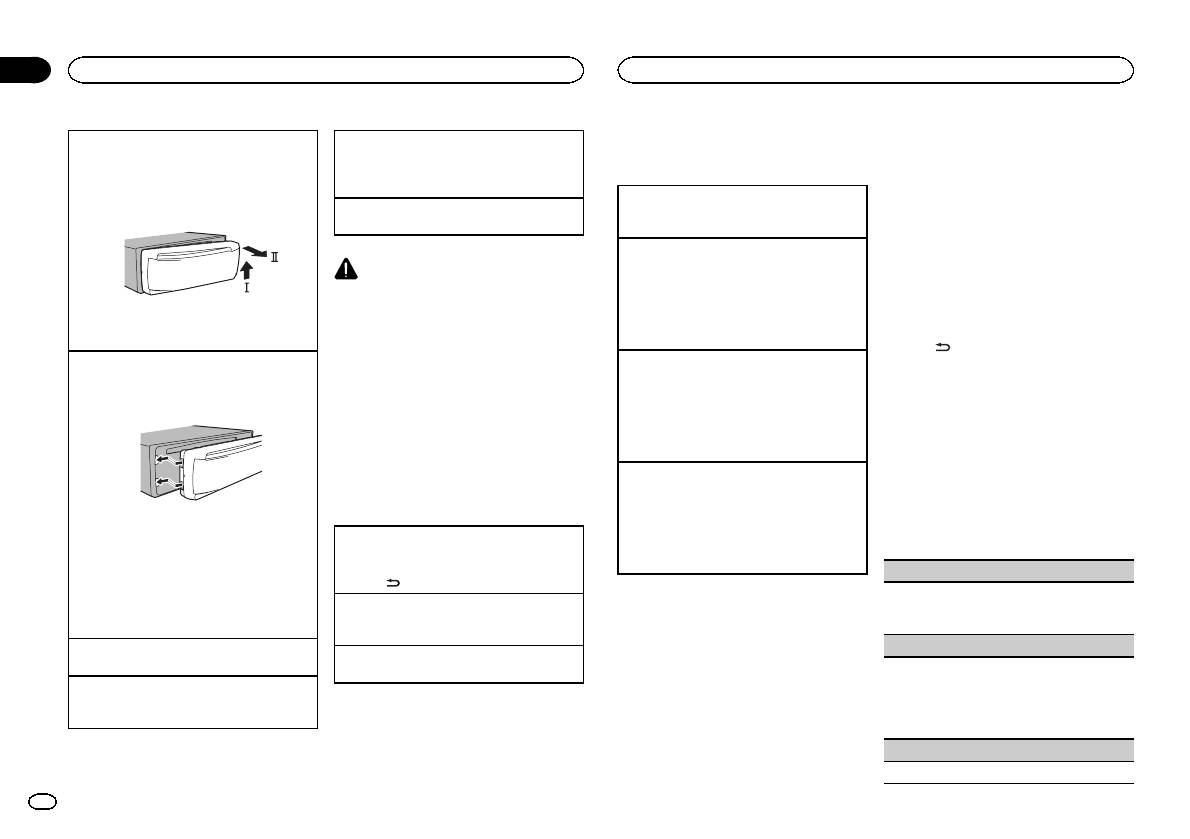
Removing the front panel to protect your unit from
Selecting a source
Tuner
theft
1 Press SRC/OFF to cycle between:
for each band
Basic operations
1 Press the detach button to release the front
TUNER (tuner)—CD (built-in CD player)—USB
Using preset tuning buttons
panel.
(USB)—AUX (AUX)
Selecting a band
2 Push the front panel upward (M) and then pull
1 When you find a station that you want
Adjusting the volume
1 Press BAND until the desired band (F1, F2 for
it toward (N) you.
to store in memory, press one of the preset
1 Turn M.C. to adjust the volume.
FM or MW/LW) is displayed.
tuning buttons (1 to 6) and hold until the
Recalling preset stations
preset number stops flashing.
1 Press c or d.
CAUTION
! If MAN (manual tuning) is selected in SEEK,
2 Press one of the preset tuning buttons (1
For safety reasons, park your vehicle when re-
you cannot recall preset stations. You need to
to 6) to select the desired station.
moving the front panel.
select PCH (preset channel) in SEEK. For de-
3 Always keep the detached front panel in a pro-
Switching the RDS display
Note
tails about the settings, refer to SEEK (left/right
tection device such as a protection case.
key setting) on the next page.
When this unit’s blue/white lead is connected to
% Press .
Re-attaching the front panel
the vehicle’s auto-antenna relay control termi-
Manual tuning (step by step)
Program ser vice name—PTY information—Fre-
1 Slide the front panel to the left.
nal, the vehicle’s antenna extends when this
1 Press c or d.
quency
Make sure to insert the tabs on the left side of
unit’s source is turned on. To retract the anten-
! If PCH (preset channel) is selected in SEEK,
# PTY information and the frequency appear on the
the head unit into the slots on the front panel.
na, turn the source off.
you cannot tune up or down manually. You
display for eight seconds.
need to select MAN (manual tuning) in SEEK.
# Depending on the band, text information can be
For details about the settings, refer to SEEK
changed.
Menu operations identical
(left/right key setting) on the next page.
for set up menu/function
Seeking
Using PTY functions
settings/audio adjustments/
1 Press and hold c or d, and then release.
You can tune in to a station using PTY (program
initial settings/lists
You can cancel seek tuning by briefly pressing
type) information.
c or d.
2 Press the right side of the front panel until it is
While pressing and holding c or d, you can
firmly seated.
Returning to the previous display
PTY list
skip stations. Seek tuning starts as soon as
If you cannot attach the front panel to the
Returning to the previous list (the folder one level
you release c or d.
head unit successfully, make sure that you are
higher)
NEWS/INFO
placing the front panel onto the head unit cor-
1 Press
.
Note
NEWS (News), AFFAIRS (Current affairs), INFO
rectly. Forcing the front panel into place may
Returning to the ordinary display
This unit’s AF (alternative frequencies search)
(Information), SPORT (Sports), WEATHER (Weath-
result in damage to the front panel or head
Canceling the initial setting menu/set up menu
function can be turned on and off. AF should be
er), FINANCE (Finance)
unit.
1 Press BAND.
off for normal tuning operation (refer to AF (al-
POPULAR
Turning the unit on
ternative frequencies search) on the next page).
Returning to the ordinary display from the list
1 Press SRC/OFF to turn the unit on.
POP MUS (Popular music), ROCK MUS (Rock
1 Press BAND.
music), EASY MUS (Easy listening), OTH MUS
Turning the unit off
(Other music), JAZZ (Jazz), COUNTRY (Country
1 Press and hold SRC/OFF until the unit turns
music), NAT MUS (National music), OLDIES
off.
(Oldies music), FOLK MUS (Folk music)
CLASSICS
L. CLASS (Light classical), CLASSIC (Classical)
4
En
