
Pioneer X-SMC22-S: Installing the unit Connecting a playback component
Installing the unit Connecting a playback component: Pioneer X-SMC22-S
Table of contents
- What’s in the box
- POWER-CORD CAUTION Information for users on collection and disposal of old equipment and used batteries Radio wave caution • Make sure to grasp the body of the AC adapter Condensation Store the AC adapter out of the reach of children and infants.
- Installing the unit Connecting a playback component
- Basic control
- Troubleshooting Specifi cations
English
Installing the unit
When installing this unit, make sure to put it on a level and stable surface.
When moving this unit
Don’t install it on the following places:
When moving the unit, be sure to fi rst check
–
on a color TV (the screen may distort)
that there is no disc loaded and disconnect the
–
near a cassette deck (or close to a device that gives off a magnetic fi eld). This may interfere
iPod/iPhone/iPad. Then press
STANDBY/
Français
with the sound.
ON, wait for “STAND BY” disappears on main
–
in direct sunlight
display to turn off, then unplug the power cord.
–
in damp or wet areas
Damage may occur if the unit is transported or
–
in extremely hot or cold areas
moved with a disc inserted, or when another
–
in places where there is vibration or other movement
device is connected to the iPod/iPhone dock,
–
in places that are very dusty in places that have hot fumes or oils (such as a kitchen)
USB terminal, or AUDIO IN mini-plug jack.
Please always refer to the attached Operating Instructions (CD-ROM) included with the unit
Español
when hanging the unit on the wall.
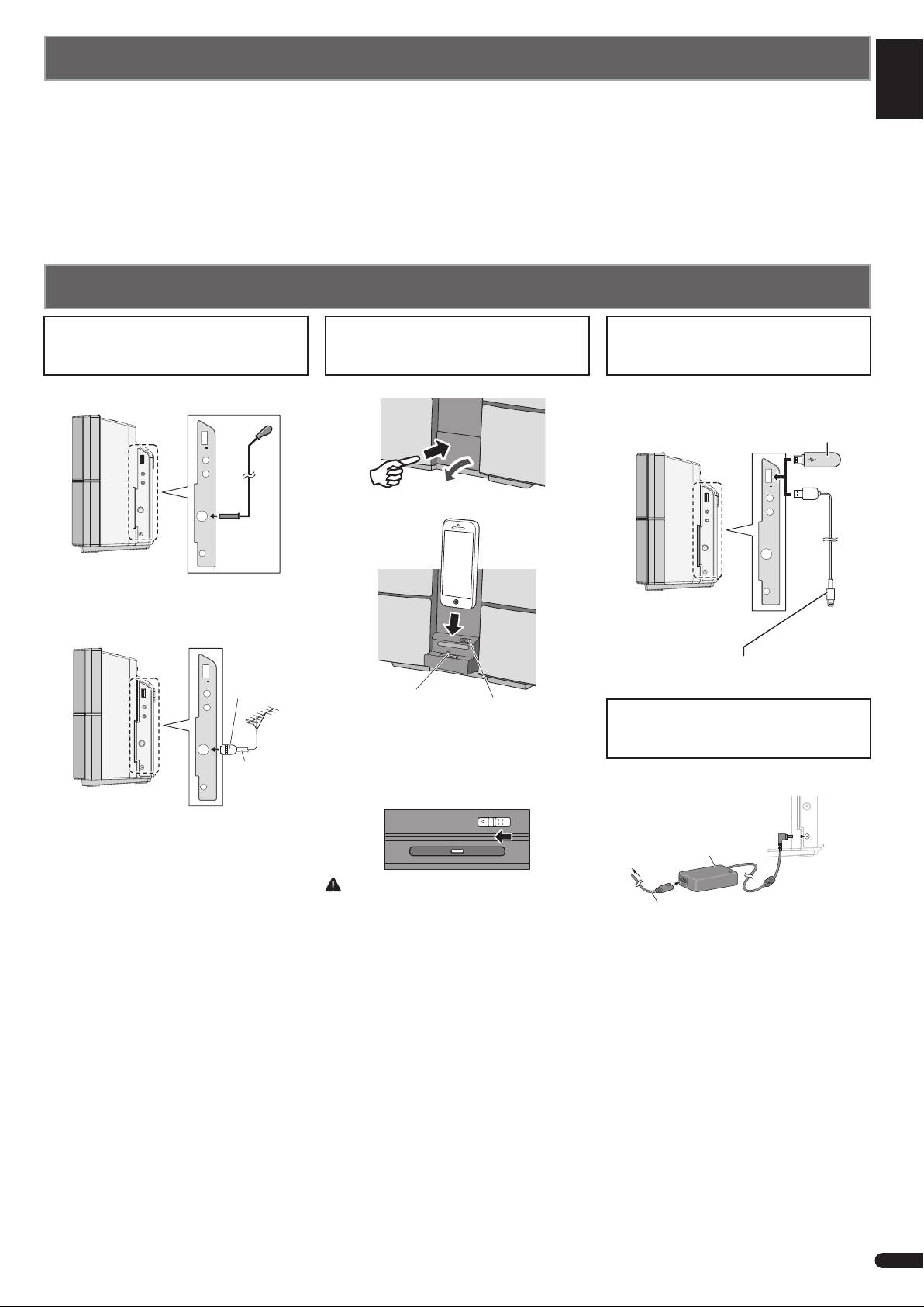
Connecting a playback component
Connecting your iPod/iPhone/iPad
Deutsch
Connecting your iPod/iPhone to
Connecting antennas
(via a USB terminal)
the iPod/iPhone dock
or USB device
Connect the FM wire antenna into the FM
1 Press the PUSH OPEN panel.
Connect your iPod/iPhone/iPad or USB
antenna socket.
device to the USB terminal on the side panel.
USB storage device
(commercially
Italiano
PUSH OPEN
available)
5 V
2.1 A
PHONES
AUDIO IN
5 V
Push
2.1 A
PHONES
2 Connect your iPod/iPhone.
Nederlands
AUDIO IN
ANTENNA
DC IN
18 V
ANTENNA
Using external antenna
DC IN
18 V
To improve FM receptionUse a PAL
connector (not supplied) to connect an
external FM as shown below.
USB cable provided with iPod/iPhone/iPad units, or
a commercially available USB cable to support iPod/
5 V
2.1 A
One-touch
iPhone/iPad (for iPod connection)
PAL connector
PHONES
Dock connector
Lock release switch
AUDIO IN
When closing the iPod/iPhone
Plugging in
dock
ANTENNA
When closing the dock, slide the lock
75
coaxial
release switch once to the left. This will
After you’ve fi nished making all connections,
cable
release the lock on the dock, so return the
plug the unit into an AC outlet.
DC IN
18 V
dock to the original position.
RELEASE
AC adapter
(Supplied)
To AC outlet
CAUTION
Do not connect the iPad/iPad mini to
Power cord (Supplied)
the dock. The unit is not compatible.
1 Plug the supplied AC adapter into the DC
Do not connect any device that is not
IN socket on the side of the unit.
compatible. The iPad/iPad mini may fall
2 Plug the supplied power cord into the AC
and cause injury, or tilt over and cause
adapter then plug the other end into an AC
damage to the device (especially around
outlet.
the connector section).
3
En
