
Pioneer VSX-924-S: Connecting up Connecting the speakers
Connecting up Connecting the speakers: Pioneer VSX-924-S
Table of contents
- AV Receiver What’s in the box
- Connection and initial setup
- Using Built-in AVNavigator Connecting to the network through LAN interface Connecting to a wireless LAN Plugging in the receiver Turning the power on
- Launching the built-in AVNavigator
- About using Wiring Navi
- Connecting up Connecting the speakers
- Connecting a TV and playback Connecting antennas Plugging in the receiver
- Initial Setup Before you start Automatically setting up for surround sound (MCACC)
- Basic playback Multichannel playback Listening to the radio
- Playing an iPod Listening to Internet radio stations
6
Connecting up
Connecting the speakers
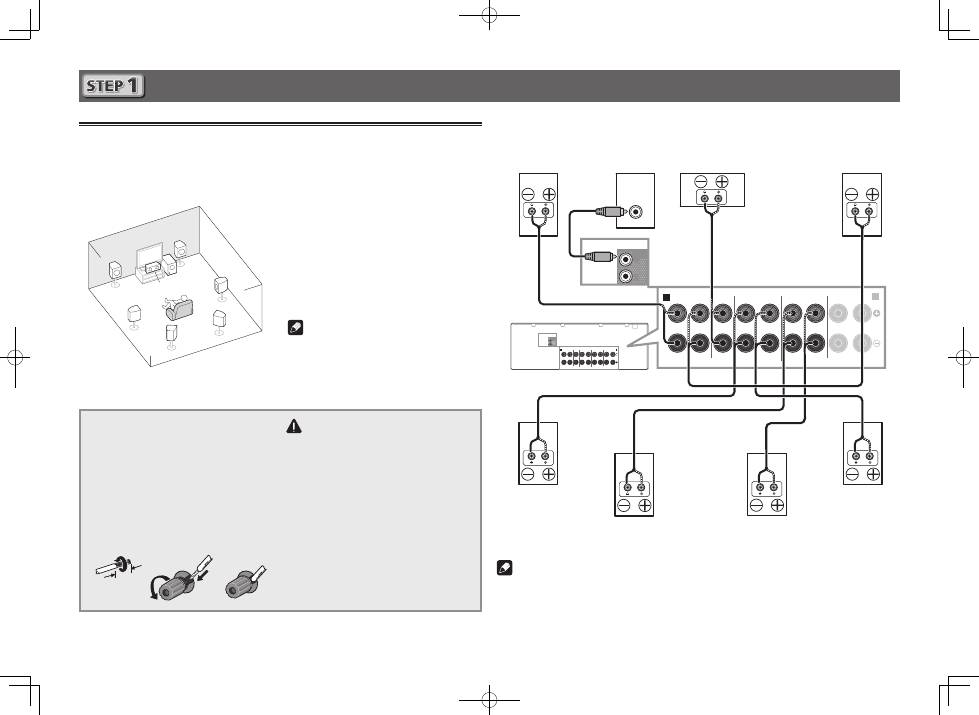
The receiver will work with just two stereo speakers (the front speakers in the diagram) but using
at least five speakers is recommended, and a complete setup is best for surround sound.
To achieve the comfortable surround sound, install your speakers as shown below.
7.1 channel surorund system:
L
– Front Left
C
– Center
R
– Front Right
SL
– Surround Left
SR
– Surround Right
SBL
– Surround back Left
SBR
– Surround back Right
SW
– Subwoofer
Note
• There are also other speaker connection
patterns (front height, front wide, etc.). For
details, see “
Connecting your equipment
”
of the operating instructions.
Connecting the speaker cables
Make sure you connect the speaker on
the right to the right (
R
) terminal and the
speaker on the left to the left (
L
) terminal.
Also make sure the positive and negative
(
+/–
) terminals on the receiver match those
on the speakers.
1
Twist exposed wire strands together.
2
Loosen terminal and insert exposed wire.
3
Tighten terminal.
1
2
3
10 mm
(
3
/
8
in.)
CAUTION
• Before making or changing
connections, switch off the power and
disconnect the power cord from the AC
outlet.
• These speaker terminals carry
HAZARDOUS LIVE
voltage. To
prevent the risk of electric shock when
connecting or disconnecting the
speaker cables, disconnect the power
cord before touching any uninsulated
parts.
SL
L
R
SR
SBL
SBR
SW
C
After installing the speakers, connect them as shown below.
A
FRONT HEIGHT / WIDE /
SURROUND BACK / HDZONE
SURROUND
CENTER
FRONT
R
L
R
L
R
L
R
L
(Single)
B
SUB
WOOFER
1
2
PRE OUT
SPEAKERS
A
FRONT HEIGHT / WIDE /
SURROUND BACK / HDZONE
SURROUND
CENTER
FRONT
R
L
R
L
R
L
R
L
(Single)
B
PRE OUT
SPEAKERS
SUB
WOOFER
1
2
LINE LEVEL
INPUT
Subwoofer
(
SW
)
Front Right
(
R
)
Surround Right
(
SR
)
Surround Left
(
SL
)
Front Left
(
L
)
Center
(
C
)
Surround back Right
(
SBR
)
Surround back Left
(
SBL
)
Note
• When only connecting one surround back speaker, connect it to the
SURROUND BACK L
(Single)
terminals.
• This unit supports speakers with a nominal impedance of 6
W
to 16
W
.
