
Pioneer DEH-3400UB EU: Troubleshooting Error messages
Troubleshooting Error messages: Pioneer DEH-3400UB EU
Table of contents
- About this unit About this manual Demo mode In case of trouble
- Head unit Display indication Set up menu
- Tuner Menu operations identical for set up menu/function settings/audio adjustments/ initial settings/lists
- Storing and recalling stations for each band Function settings
- CD/CD-R/CD-RW and USB storage devices iPod
- Advanced operations using
- Connections
- Installation
- Troubleshooting Error messages
- Handling guidelines
- Compressed audio compatibility (disc, USB)
- Russian character chart Sequence of audio files Copyright and trademark
- Specifications
Appendix
Additional information
Additional information
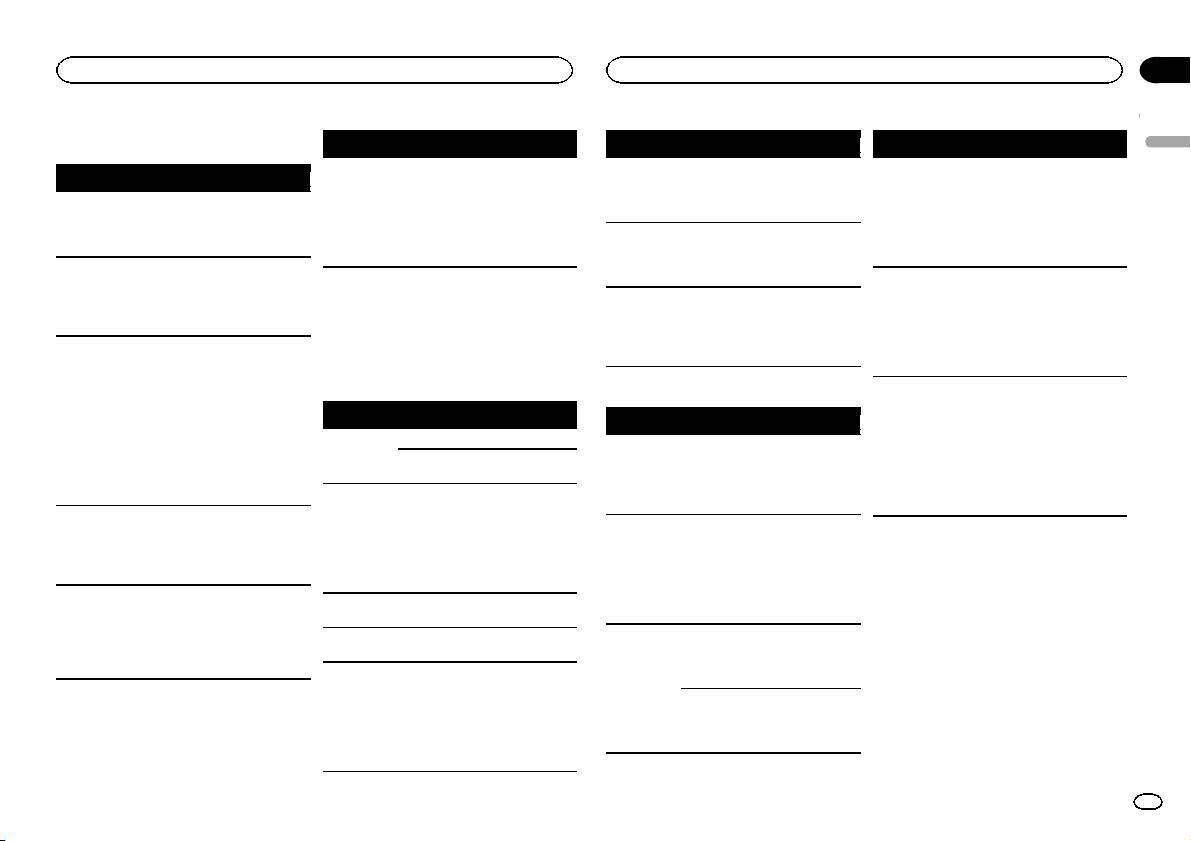
Troubleshooting
Symptom Cause Action
Message Cause Action
Message Cause Action
English
The unit is
You are using a
Move electrical
NO AUDIO The inserted
Replace the disc.
SKIPPED The connected
Play an audio file
Symptom Cause Action
malfunction-
device, such as
devices that may
disc does not
USB storage de-
not embedded
ing.
a cellular
be causing the in-
contain any
vice contains
with Windows
The display il-
Demo mode is
Turn off the demo
There is inter-
phone, that
terference away
playable files.
files embedded
Media DRM 9/10.
lumination
on.
display setting.
ference.
transmits elec-
from the unit.
with Windows
turns on and
SKIPPED The inserted
Replace the disc.
tric waves near
Mediaä DRM 9/
off at random.
disc contains
the unit.
10.
DRM protected
The display
You did not per-
Perform operation
files.
PROTECT All the files in
Transfer audio
automatically
form any opera-
again.
the USB storage
files not em-
returns to the
tion within
PROTECT All the files on
Replace the disc.
Error messages
device are em-
bedded with
ordinary dis-
about 30 sec-
the inserted
When you contact your dealer or your nearest
bedded with
Windows Media
play.
onds.
disc are em-
Pioneer Service Center, be sure to note the error
Windows Media
DRM 9/10 to the
bedded with
The repeat
Depending on
Select the repeat
message.
DRM 9/10.
USB storage de-
DRM.
play range
the repeat play
play range again.
vice and connect.
changes un-
range, the se-
N/A USB The USB device
! Connect a USB
expectedly.
lected range
Built-in CD Player
USB storage device/iPod
connected to is
Mass Storage
may change
Message Cause Action
not supported
Class compliant
when another
Message Cause Action
by this unit.
device.
folder or track is
ERROR-07,
The disc is dirty. Clean the disc.
NO DEVICE When plug and
! Turn the plug
! Disconnect
being selected
11, 12, 17, 30
The disc is
Replace the disc.
play is off, no
and play on.
your device and
or during fast
scratched.
USB storage de-
! Connect a com-
replace it with a
forwarding/re-
ERROR-07,
Turn the ignition
vice or iPod is
patible USB stor-
compatible USB
versing.
There is an elec-
10, 11, 12,
trical or me-
switch OFF and
connected.
age device/iPod.
storage device.
A subfolder is
Subfolders can-
Select another re-
15, 17, 30,
chanical error.
back ON, or
FRMT READ Sometimes
Wait until the
not played
not be played
peat play range.
A0
switch to a differ-
there is a delay
message disap-
back.
when FLD (fold-
ent source, then
between the
pears and you
er repeat) is se-
back to the CD
start of playback
hear sound.
lected.
player.
and when you
NO XXXX ap-
There is no em-
Switch the display
ERROR-15 The inserted
Replace the disc.
start to hear any
pears when a
bedded text in-
or play another
disc is blank.
sound.
display is
formation.
track/file.
changed (NO
ERROR-23 Unsupported
Replace the disc.
NO AUDIO There are no
Transfer the audio
TITLE, for ex-
CD format.
songs.
files to the USB
storage device
ample).
FRMT READ Sometimes
Wait until the
and connect.
there is a delay
message disap-
between the
pears and you
The connected
Follow the USB
start of playback
hear sound.
USB storage de-
storage device in-
and when you
vice has secur-
structions to dis-
start to hear any
ity enabled.
able the security.
sound.
En
13
