
Pioneer DEH-3400UB EU: Russian character chart Sequence of audio files Copyright and trademark
Russian character chart Sequence of audio files Copyright and trademark: Pioneer DEH-3400UB EU
Table of contents
- About this unit About this manual Demo mode In case of trouble
- Head unit Display indication Set up menu
- Tuner Menu operations identical for set up menu/function settings/audio adjustments/ initial settings/lists
- Storing and recalling stations for each band Function settings
- CD/CD-R/CD-RW and USB storage devices iPod
- Advanced operations using
- Connections
- Installation
- Troubleshooting Error messages
- Handling guidelines
- Compressed audio compatibility (disc, USB)
- Russian character chart Sequence of audio files Copyright and trademark
- Specifications
Appendix
Additional information
Additional information
3 Save the folder containing files on the USB
streaming via internet, intranets and/or other
iPod compatibility
About the file/format compatibility, refer to the
storage device.
networks or in other electronic content distribu-
iPod manuals.
However, depending on the system environment,
tion systems, such as pay-audio or audio-on-de-
This unit supports only the following iPod models.
Audiobook, Podcast: Compatible
you may not be able to specify the playback se-
mand applications. An independent license for
Supported iPod software versions are shown
quence.
such use is required. For details, please visit
below. Older versions may not be supported.
For USB portable audio players, the sequence is
http://www.mp3licensing.com.
Made for
CAUTION
different and depends on the player.
! iPhone 4 (software version 4.1)
Pioneer accepts no responsibility for data lost
! iPhone 3GS (software version 3.0.1)
WMA
on the iPod, even if that data is lost while this
! iPhone 3G (software version 2.0)
Windows Media is either a registered trademark
unit is used.
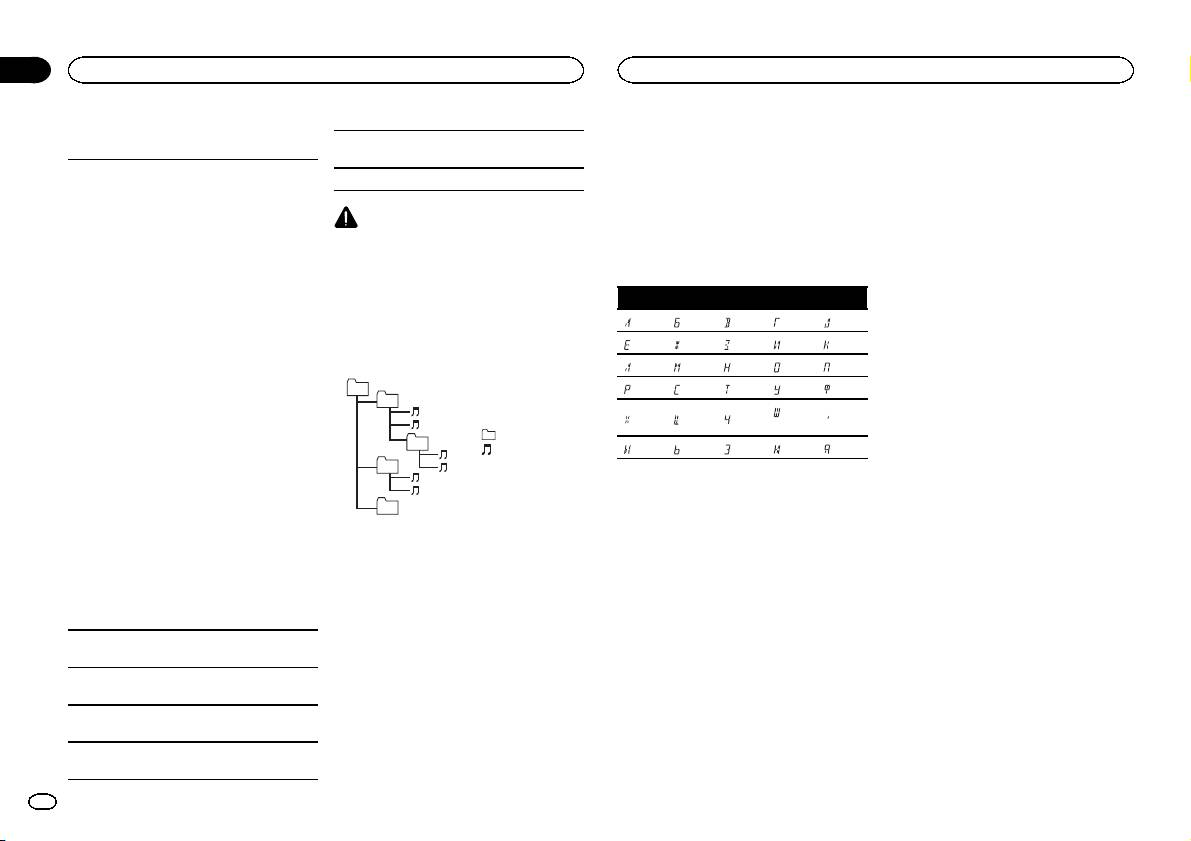
Russian character chart
! iPhone (software version 1.1.1)
or trademark of Microsoft Corporation in the
! iPod nano 6th generation (software version
United States and/or other countries.
D: C D: C D: C D: C D: C
1.0)
This product includes technology owned by
Sequence of audio files
! iPod nano 5th generation (software version
Microsoft Corporation and cannot be used or
: А : Б : В : Г : Д
1.0.1)
The user cannot assign folder numbers and
distributed without a license from Microsoft
! iPod nano 4th generation (software version
specify playback sequences with this unit.
: Е, Ё : Ж : З : И, Й : К
Licensing, Inc.
1.0)
Example of a hierarchy
: Л : М : Н : О : П
! iPod nano 3rd generation (software version
iPod & iPhone
01
: Р : С : Т : У : Ф
1.0)
iPhone, iPod, iPod classic, iPod nano, and iPod
02
! iPod nano 2nd generation (software version
: Ш,
touch are trademarks of Apple Inc., registered in
: Х : Ц : Ч
: Ъ
1.1.2)
Щ
the U.S. and other countries.
: Folder
! iPod nano 1st generation (software version
“Made for iPod” and “Made for iPhone” mean
03
: Compressed
: Ы : Ь : Э : Ю : Я
1.2.0)
that an electronic accessory has been designed
audio file
! iPod touch 4th generation (software version
04
to connect specifically to iPod or iPhone, respec-
D: Display C: Character
01 to 05: Folder
4.1)
tively, and has been certified by the developer to
number
! iPod touch 3rd generation (software version
meet Apple performance standards. Apple is
05
1 to 6: Playback
3.1.1)
not responsible for the operation of this device
Level 1 Level 2 Level 3 Level 4
sequence
Copyright and trademark
! iPod touch 2nd generation (software version
or its compliance with safety and regulator y
2.1.1)
standards. Please note that the use of this ac-
iTunes
! iPod touch 1st generation (software version
Disc
cessory with iPod or iPhone may affect wireless
Apple and iTunes are trademarks of Apple Inc.,
1.1)
Folder selection sequence or other operation
performance.
registered in the U.S. and other countries.
! iPod classic 160GB (software version 2.0.2)
may differ depending on the encoding or writing
! iPod classic 120GB (software version 2.0)
software.
MP3
! iPod classic (software version 1.0)
Supply of this product only conveys a license for
USB storage device
Depending on the generation or version of the
private, non-commercial use and does not con-
Playback sequence is the same as recorded se-
iPod, some functions may not be available.
vey a license nor imply any right to use this prod-
quence in the USB storage device.
uct in any commercial (i.e. revenue-generating)
Operations may vary depending on the software
To specify the playback sequence, the following
real time broadcasting (terrestrial, satellite,
version of iPod.
method is recommended.
cable and/or any other media), broadcasting/
1 Create a file name that includes numbers
When using an iPod, an iPod Dock Connector to
that specify the playback sequence (e.g.,
USB Cable is required.
001xxx.mp3 and 099yyy.mp3).
A Pioneer CD-IU51 interface cable is also avail-
2 Put those files into a folder.
able. For details, consult your dealer.
16
En
