
Dell Precision M60 – страница 2
Инструкция к Ноутбуку Dell Precision M60
Оглавление
S y s t e m I n f o r m a t i o n G u i d e
19
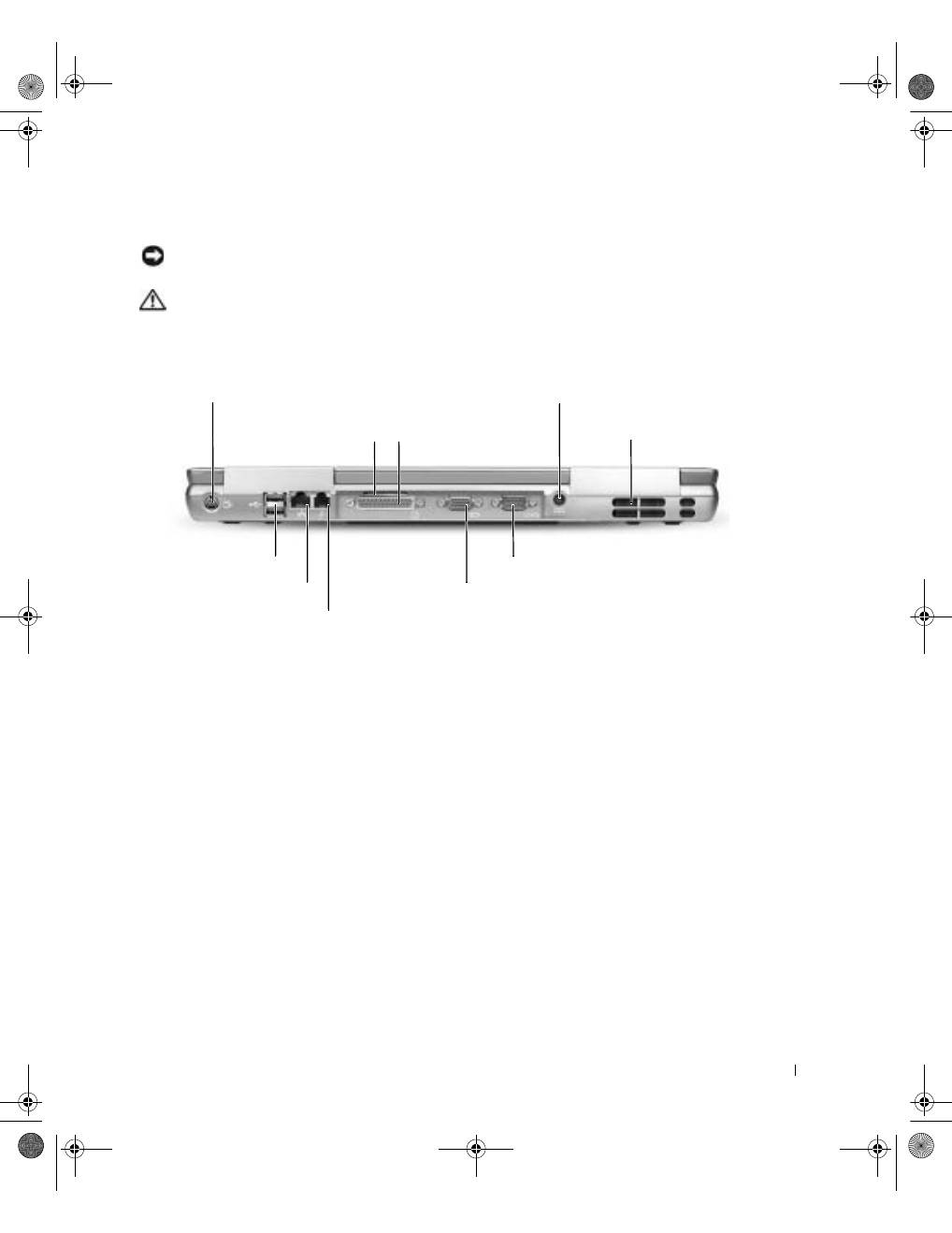
Back View
NOTICE:
To avoid damaging the computer, wait 5 seconds after you turn off the computer
before you disconnect an external device.
CAUTION: Do not block, push objects into, or allow dust to accumulate in the air
vents. Do not store your computer in a low-airflow environment, such as a closed
briefcase, while it is running. Restricting the airflow can damage the computer
or cause a fire.
S-video TV-out connector
network connector (RJ-45)
modem connector (RJ-11)
parallel connector
serial connector
video connector
AC adapter connector
air vents
air vent
USB connectors (2)
3y279bk0.book Page 19 Tuesday, February 11, 2003 4:17 PM
20
S y s t e m I n f o r m a t i o n G u i d e
www
.dell.com | support.dell.com
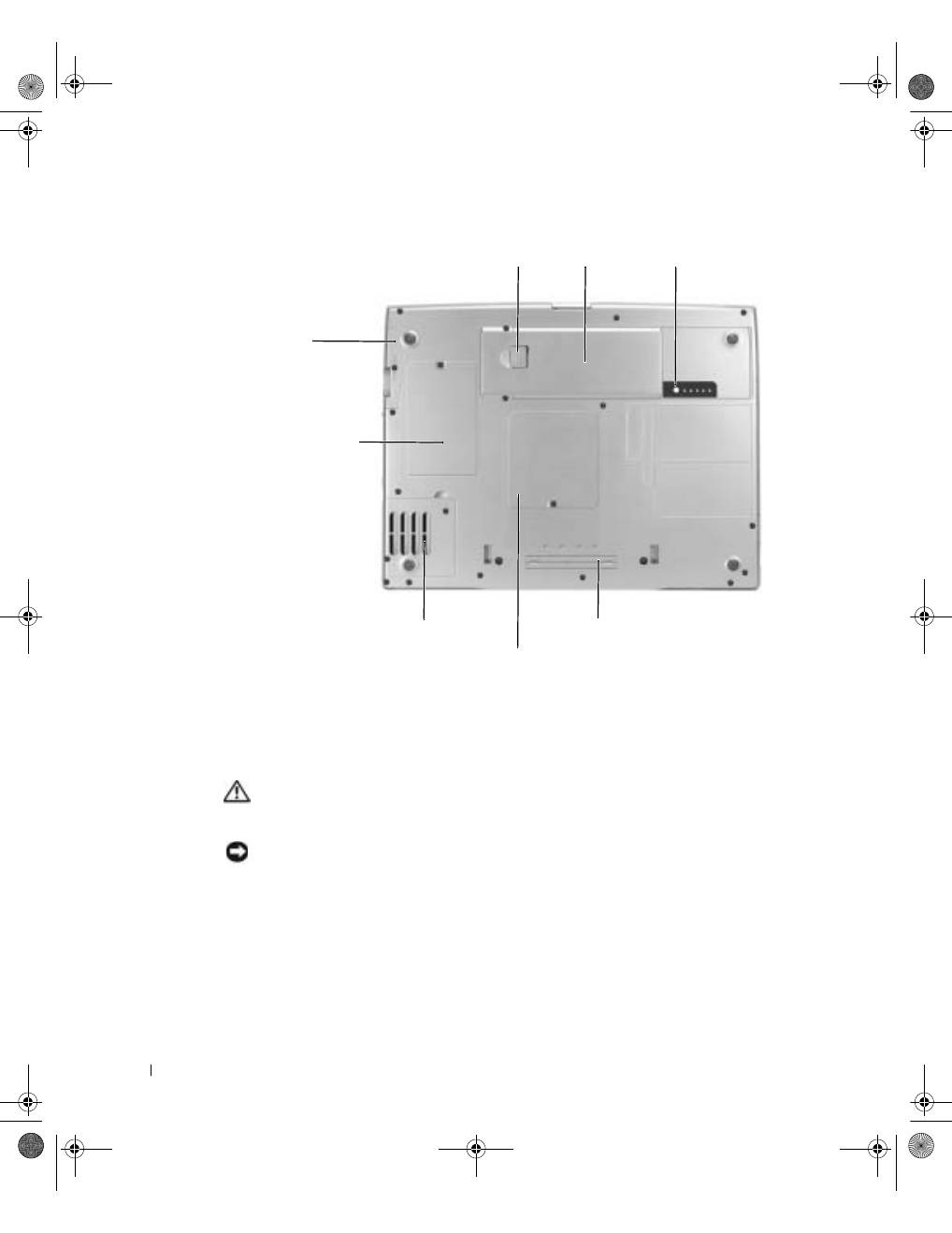
Bottom View
Removing a Battery
For more information about removing the second battery, see "Using the Module Bay" in
your online
User’s Guide
.
CAUTION: Before performing these procedures, read and follow the safety
instructions that begin on page 5, turn off the computer, disconnect it from the
electrical outlet, and disconnect the modem from the telephone wall jack.
NOTICE:
If you choose to replace the battery with the computer in standby mode, you have up
to 90 seconds to complete the battery replacement before the computer shuts down and loses any
unsaved data.
1
Ensure that the computer is turned off, suspended in a power management mode, or
connected to an electrical outlet.
2
If the computer is connected to a docking device (docked), undock it.
See the documentation that came with your docking device for instructions.
hard drive
docking device slot
Mini PCI
card/modem cover
battery
battery-bay latch release
battery charge gauge
memory module cover
fan
3y279bk0.book Page 20 Tuesday, February 11, 2003 4:17 PM
S y s t e m I n f o r m a t i o n G u i d e
21
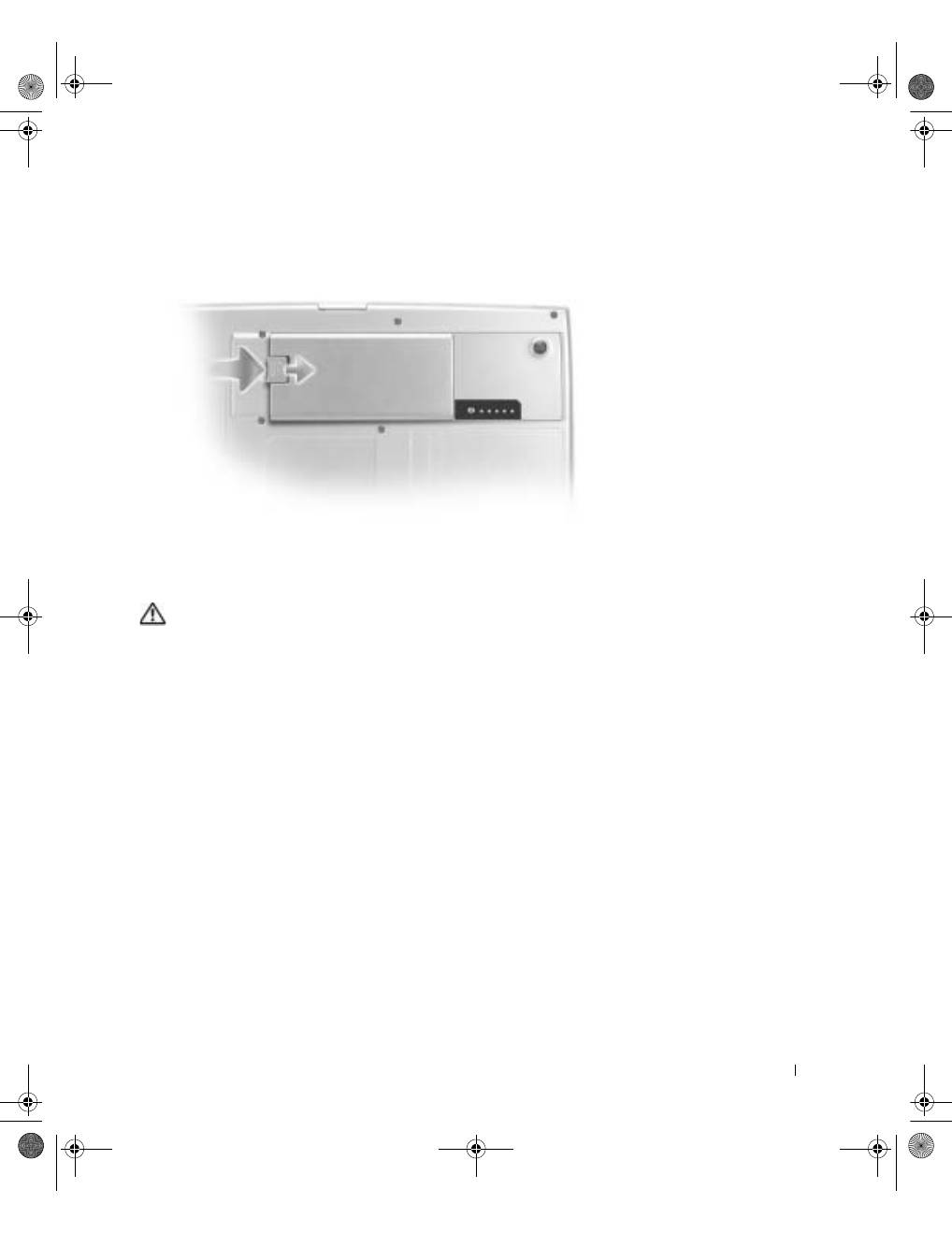
3
Slide and hold the battery-bay latch release on the bottom of the computer, and then
remove the battery from the bay.
Installing a Battery
CAUTION: Before performing this procedure, read and follow the safety
instructions that begin on page 5.
Slide the battery into the bay and lower the battery until the latch release clicks.
For more information about installing the second battery, see "Using the Module Bay" in
your online
User’s Guide
.
3y279bk0.book Page 21 Tuesday, February 11, 2003 4:17 PM
22
S y s t e m I n f o r m a t i o n G u i d e
www
.dell.com | support.dell.com
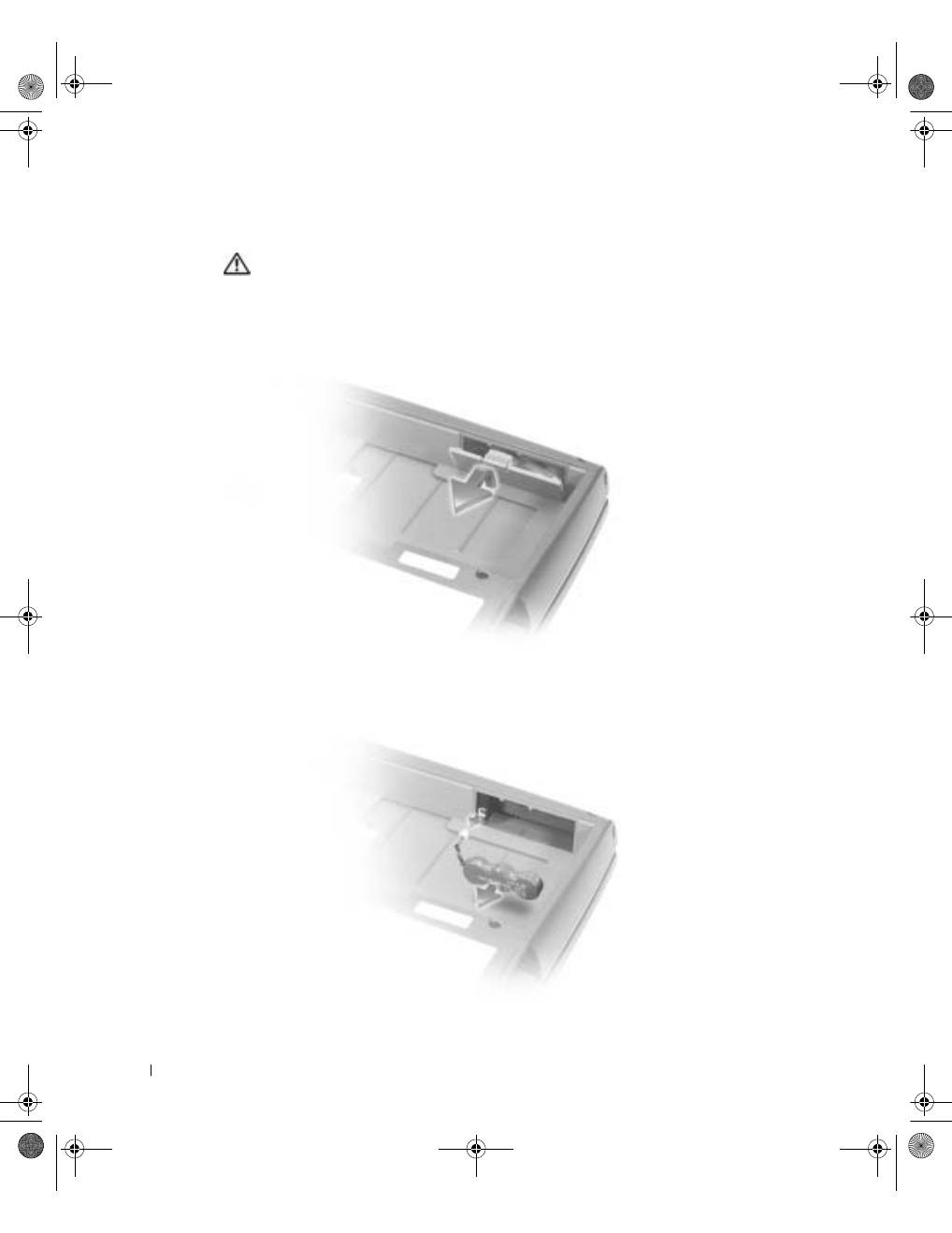
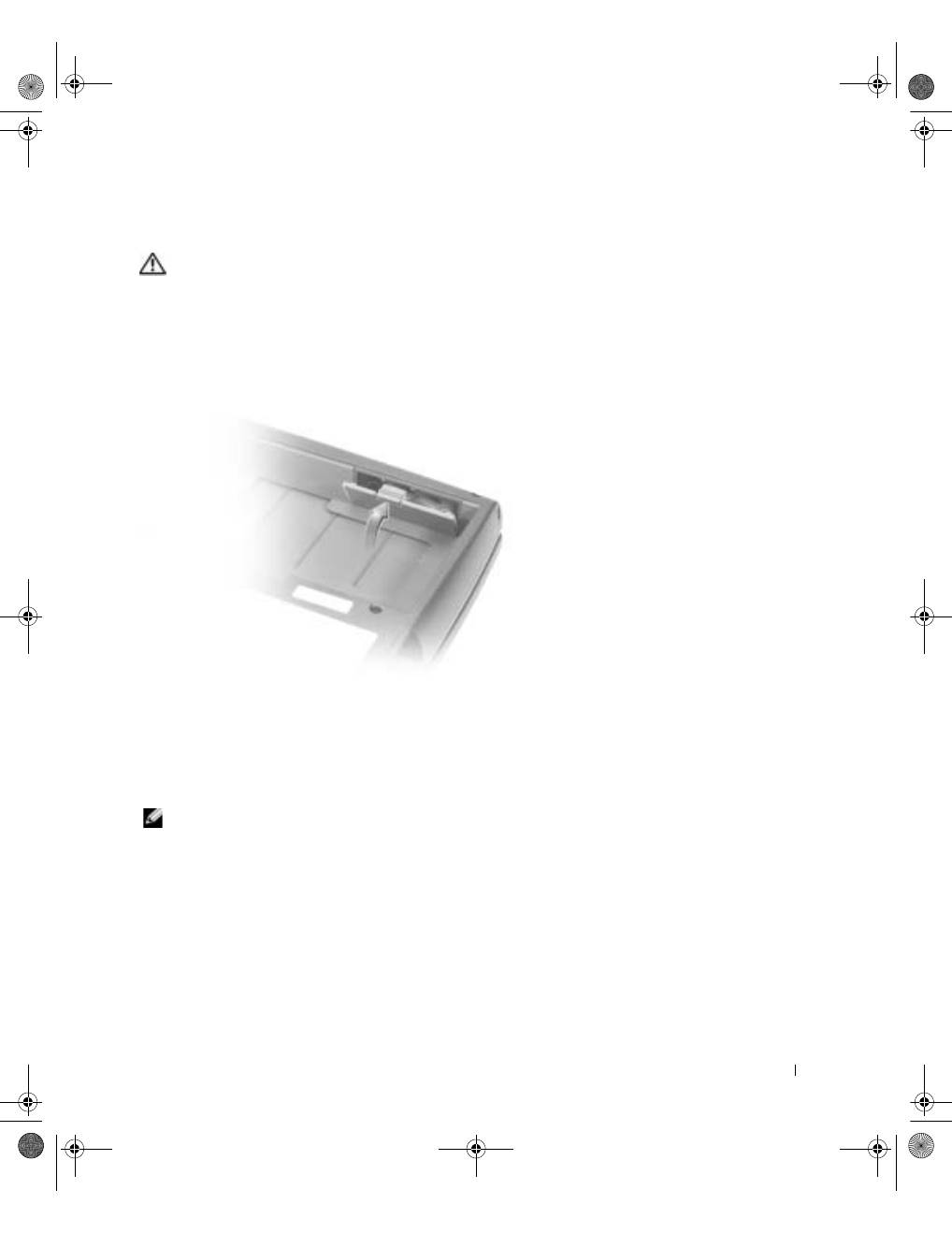
Removing a Reserve Battery
CAUTION: Before performing these procedures, read and follow the safety
instructions that begin on page 5.
1
Remove the battery.
2
Remove the reserve battery cover.
3
Pull the reserve battery out of its compartment, and disconnect the cable from the
connector.
3y279bk0.book Page 22 Tuesday, February 11, 2003 4:17 PM
S y s t e m I n f o r m a t i o n G u i d e
23
Installing a Reserve Battery
CAUTION: Before performing these procedures, read and follow the safety
instructions that begin on page 5.
1
Connect the reserve battery cable to the connector in the reserve battery
compartment.
2
Place the reserve battery in the compartment, and replace the reserve battery cover.
Running the Dell Diagnostics
The Dell Diagnostics is located on a hidden Diagnostic utility partition on your hard drive.
NOTE:
If your computer cannot display a screen image, contact Dell (see "Getting Help" in your
User’s Guide
for the appropriate contact information).
1
Shut down the computer.
2
If the computer is connected to a docking device (docked), undock it.
See the documentation that came with your docking device for instructions.
3y279bk0.book Page 23 Tuesday, February 11, 2003 4:17 PM
24
S y s t e m I n f o r m a t i o n G u i d e
www
.dell.com | support.dell.com
3
Connect the computer to an electrical outlet.
NOTE:
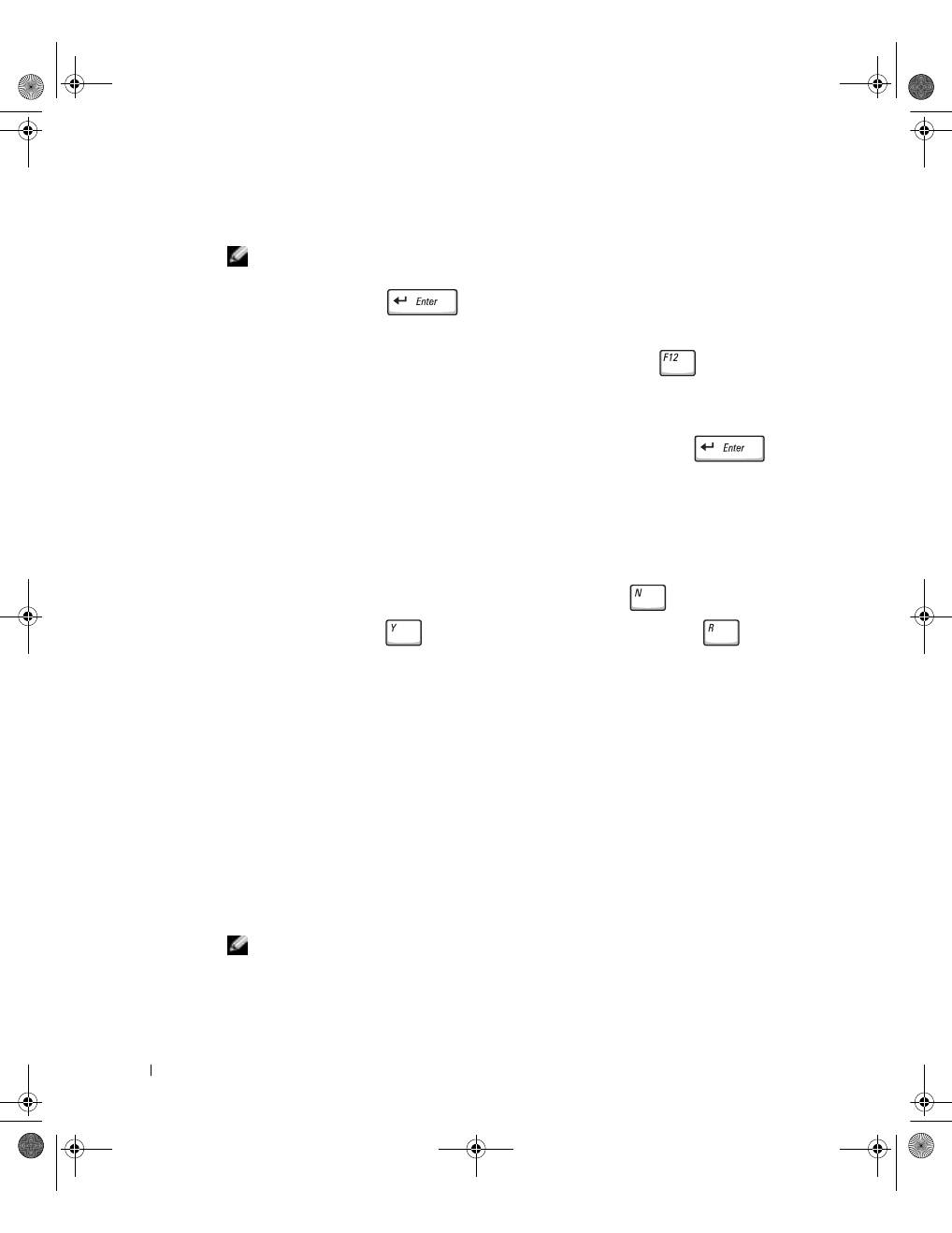
If you cannot see anything on your display, you can hold down the mute button and press
the power button (instead of F12) to begin the Dell Diagnostics. You do not need to highlight
Diagnostics
and press
. The computer automatically runs the Pre-boot System
Assessment.
4
Turn on the computer. When the DELL™ logo appears, press
immediately. If
you wait too long and the Microsoft
®
Windows
®
logo appears, continue to wait until
you see the Windows desktop. Then shut down your computer and try again.
5
When the boot device list appears, highlight
Diagnostics
and press
.
The computer begins to run the Pre-boot System Assessment, a series of embedded
diagnostics that perform initial testing on your system board, keyboard, hard drive, and
display.
•
During the assessment, answer any questions that appear.
•
If a component failure is detected, the computer stops and beeps. To stop the
assessment and reboot to the operating system, press
; to continue to the
next test, press
; to retest the component that failed, press
.
•
If failures are detected during the Pre-boot System Assessment, write down the
error code(s) and contact Dell (see "Getting Help" in your
User’s Guide
for the
appropriate contact information) before continuing on to the Dell Diagnostics.
•
If you receive a message stating that no Diagnostics utility partition has been
found, follow the instructions on the screen to run the Dell Diagnostics from your
Drivers and Utilities
CD.
If the Pre-boot System Assessment completes successfully, you receive the message
Booting Dell Diagnostic Utility Partition. Press any key to
continue
.
6
Press any key to start the Dell Diagnostics from the Diagnostics utility partition on
your hard drive.
7
After the Dell Diagnostics loads and the
Main
Menu
screen appears, click the button
for the option you want.
NOTE:
The service tag for your computer is located in the title bar of each screen.
3y279bk0.book Page 24 Tuesday, February 11, 2003 4:17 PM

S y s t e m I n f o r m a t i o n G u i d e
25
8
If a problem is encountered during a test, a message appears, displaying the error code
and a description of the problem. Write down the error code and problem description
and follow the instructions on the screen. If you cannot resolve the error condition,
contact Dell (see "Getting Help" in your
User’s Guide
for the appropriate contact
information).
9
If you run a test from the
Custom Test
or
Symptom Tree
option, click the applicable
tab described in the following table for more information.
10
When you have finished running a test, close the screen to return to the
Main
Menu
screen. To exit the Dell Diagnostics and reboot the computer, close the
Main
Menu
screen.
Option
Function
Express Test
Performs a quick test of devices. The test typically takes 10 to 20 minutes
and requires no interaction on your part. Run Express Test first to increase
the possibility of tracing the problem quickly.
Extended Test
Performs a thorough check of devices. The test typically takes 1 hour or
more and requires you to answer questions periodically.
Custom Test
Tests a specific device. You can customize the tests to be run.
Symptom Tree
Allows you to select tests based on a symptom of the problem you are
experiencing. The option lists the most common symptoms.
Tab
Function
Results
Displays the results of the test and any error conditions encountered.
Errors
Displays error conditions encountered, error codes, and problem
description.
Help
Describes the test and may indicate requirements for running the test.
Configuration
Displays your hardware configuration for the selected device.
The Dell Diagnostics obtains your configuration information for all devices
from the system
setup program, memory, and various internal tests and
displays the information in the device list in the left pane of the screen.
The device list may not display the names of all the components installed
on your computer or all devices attached to your computer.
Parameters
Allows you to customize the test by changing the test settings.
3y279bk0.book Page 25 Tuesday, February 11, 2003 4:17 PM

26
S y s t e m I n f o r m a t i o n G u i d e
www
.dell.com | support.dell.com
Regulatory Notices
Electromagnetic Interference (EMI) is any signal or emission, radiated in free space or
conducted along power or signal leads, that endangers the functioning of a radio navigation
or other safety service or seriously degrades, obstructs, or repeatedly interrupts a licensed
radio communications service. Radio communications services include but are not limited
to AM/FM commercial broadcast, television, cellular services, radar, air-traffic control,
pager, and Personal Communication Services (PCS). These licensed services, along with
unintentional radiators such as digital devices, including computers, contribute to the
electromagnetic environment.
Electromagnetic Compatibility (EMC) is the ability of items of electronic equipment to
function properly together in the electronic environment. While this computer has been
designed and determined to be compliant with regulatory agency limits for EMI, there is no
guarantee that interference will not occur in a particular installation. If this equipment does
cause interference with radio communications services, which can be determined by
turning the equipment off and on, you are encouraged to try to correct the interference by
one or more of the following measures:
•
Reorient the receiving antenna.
•
Relocate the computer with respect to the receiver.
•
Move the computer away from the receiver.
•
Plug the computer into a different outlet so that the computer and the receiver are on
different branch circuits.
If necessary, consult a Dell Technical Support representative or an experienced
radio/television technician for additional suggestions.
For additional regulatory information, see "Regulatory Notices" in the Appendix of your
online
User’s Guide
. The sections specific to each regulatory agency provide country-
specific EMC/EMI or product safety information.
3y279bk0.book Page 26 Tuesday, February 11, 2003 4:17 PM

S y s t e m I n f o r m a t i o n G u i d e
27
Limited Warranties and Return Policy
Dell-branded hardware products purchased in the U.S. or Canada come with either a 90-day (U.S. only), one-year,
two-year, three-year, or four-year limited warranty. To determine which warranty you purchased, see the invoice
that accompanied your hardware product(s). The following sections describe the limited warranties and return
policy for the U.S., the limited warranties and return policy for Canada, and the manufacturer guarantee for Latin
America and the Caribbean.
Limited Warranty for the U.S.
What is covered by this limited warranty?
This limited warranty covers defects in materials and workmanship in your—our end-user customer's—Dell-
branded hardware products, including Dell-branded peripheral products.
What is not covered by this limited warranty?
This limited warranty does not cover:
•
Software, including the operating system and software added to the Dell-branded hardware products
through our factory-integration system, third-party software, or the reloading of software
•
Non-Dell-branded products and accessories
•
Problems that result from:
–
External causes such as accident, abuse, misuse, or problems with electrical power
–
Servicing not authorized by us
–
Usage that is not in accordance with product instructions
–
Failure to follow the product instructions or failure to perform preventive maintenance
–
Problems caused by using accessories, parts, or components not supplied by us
•
Products with missing or altered service tags or serial numbers
•
Products for which we have not received payment
THIS WARRANTY GIVES YOU SPECIFIC LEGAL RIGHTS, AND YOU MAY ALSO HAVE OTHER
RIGHTS WHICH VARY FROM STATE TO STATE (OR JURISDICTION TO JURISDICTION). DELL'S
RESPONSIBILITY FOR MALFUNCITONS AND DEFECTS IN HARDWARE IS LIMITED TO REPAIR
AND REPLACEMENT AS SET FORTH IN THIS WARRANTY STATEMENT. ALL EXPRESS AND
IMPLIED WARRANTIES FOR THE PRODUCT, INCLUDING BUT NOT LIMITED TO ANY IMPLIED
WARRANTIES AND CONDITIONS OF MERCHANTABILITY AND FITNESS FOR A PARTICULAR
PURPOSE, ARE LIMITED IN TIME TO THE TERM OF THE LIMITED WARRANTY PERIOD
REFLECTED ON YOUR INVOICE. NO WARRANTIES, WHETHER EXPRESS OR IMPLIED, WILL
APPLY AFTER THE LIMITED WARRANTY PERIOD HAS EXPIRED. SOME STATES DO NOT ALLOW
LIMITATIONS ON HOW LONG AN IMPLIED WARRANTY LASTS, SO THIS LIMITATION MAY NOT
APPLY TO YOU.
WE DO NOT ACCEPT LIABILITY BEYOND THE REMEDIES PROVIDED FOR IN THIS LIMITED
WARRANTY OR FOR CONSEQUENTIAL OR INCIDENTAL DAMAGES, INCLUDING, WITHOUT
LIMITATION, ANY LIABILTY FOR THIRD PARTY CLAIMS AGAINST YOU FOR DAMAGES, FOR
PRODUCTS NOT BEING AVAILABLE FOR USE, OR FOR LOST DATA OR LOST SOFTWARE. OUR
LIABILITY WILL BE NO MORE THAN THE AMOUNT YOU PAID FOR THE PRODUCT THAT IS THE
SUBJECT OF A CLAIM. THIS IS THE MAXIMUM AMOUNT FOR WHICH WE ARE RESPONSIBLE.
3y279bk0.book Page 27 Tuesday, February 11, 2003 4:17 PM

28
S y s t e m I n f o r m a t i o n G u i d e
www
.dell.com | support.dell.com
SOME STATES DO NOT ALLOW THE EXCLUSION OR LIMITATION OF INCIDENTAL OR
CONSEQUENTIAL DAMAGES, SO THE ABOVE LIMITATION OR EXCLUSION MAY NOT APPLY TO
YOU.
How long does this limited warranty last?
This limited warranty lasts for the time period indicated on your invoice, except that the limited warranty on Dell-
branded batteries lasts only one year and the limited warranty on the lamps for Dell-branded projectors lasts only
ninety days. The limited warranty begins on the date of the invoice. The warranty period is not extended if we
repair or replace a warranted product or any parts. Dell may change the availability of limited warranties, at its
discretion, but any changes will not be retroactive.
What do I do if I need warranty service?
Before the warranty expires, please call us at the relevant number listed in the following table. Please also have your
Dell service tag number or order number available.
What will Dell do?
During the first 90 days of the 90-day limited warranty and the first year of all other limited warranties:
For the
first 90 days of the 90-day limited warranty and the first year of all other limited warranties, we will repair any Dell-
branded hardware products returned to us that prove to be defective in materials or workmanship. If we are not
able to repair the product, we will replace it with a comparable product that is new or refurbished.
When you contact us, we will issue a Return Material Authorization Number for you to include with your return.
You must return the products to us in their original or equivalent packaging, prepay shipping charges, and insure
the shipment or accept the risk if the product is lost or damaged in shipment. We will return the repaired or
replacement products to you. We will pay to ship the repaired or replaced products to you if you use an address in
the United States (excluding Puerto Rico and U.S. possessions and territories). Otherwise, we will ship the product
to you freight collect.
Individual Home Consumers:
U.S. Only
Technical Support
1-800-624-9896
Customer Service
1-800-624-9897
Individual Home Consumers who purchased through
an Employee Purchase Program:
Technical Support and Customer Service
1-800-822-8965
Home and Small Business Commercial Customers:
Technical Support and Customer Service
1-800-456-3355
Medium, Large, or Global Commercial Customers,
Healthcare Customers, and Value Added Resellers
(VARs):
Technical Support and Customer Service
1-800-822-8965
Government and Education Customers:
Technical Support and Customer Service
1-800-234-1490
Dell-Branded Memory
1-888-363-5150
3y279bk0.book Page 28 Tuesday, February 11, 2003 4:17 PM

S y s t e m I n f o r m a t i o n G u i d e
29
If we determine that the product is not covered under this warranty, we will notify you and inform you of service
alternatives that are available to you on a fee basis.
NOTE:
Before you ship the product(s) to us, make sure to back up the data on the hard drive(s) and any other
storage device(s) in the product(s). Remove any confidential, proprietary, or personal information and removable
media such as floppy disks, CDs, or PC Cards. We are not responsible for any of your confidential, proprietary, or
personal information; lost or corrupted data; or damaged or lost removable media.
During the remaining years:
For the remaining period of the limited warranty, we will replace any defective part
with new or refurbished parts, if we agree that it needs to be replaced. When you contact us, we will require a valid
credit card number at the time you request a replacement part, but we will not charge you for the replacement part
as long as you return the original part to us within thirty days after we ship the replacement part to you. If we do
not receive the original part within thirty days, we will charge to your credit card the then-current standard price for
that part.
We will pay to ship the part to you if you use an address in the United States (excluding Puerto Rico and U.S.
possessions and territories). Otherwise, we will ship the part freight collect. We will also include a prepaid shipping
container with each replacement part for your use in returning the replaced part to us.
NOTE:
Before you replace parts, make sure to back up the data on the hard drive(s) and any other storage
device(s) in the product(s). We are not responsible for lost or corrupted data.
What if I purchased a service contract?
If your service contract is with Dell, service will be provided to you under the terms of the service agreement.
Please refer to that contract for details on how to obtain service.
If you purchased through us a service contract with one of our third-party service providers, please refer to that
contract for details on how to obtain service.
How will you fix my product?
We use new and refurbished parts made by various manufacturers in performing warranty repairs and in building
replacement parts and systems. Refurbished parts and systems are parts or systems that have been returned to Dell,
some of which were never used by a customer. All parts and systems are inspected and tested for quality.
Replacement parts and systems are covered for the remaining period of the limited warranty for the product you
bought.
3y279bk0.book Page 29 Tuesday, February 11, 2003 4:17 PM

30
S y s t e m I n f o r m a t i o n G u i d e
www
.dell.com | support.dell.com
What do I do if I am not satisfied?
We pride ourselves on our great customer service. If you are not satisfied with the service you receive under this
limited warranty, please let us know. We have found that the best way to resolve issues regarding our limited
warranty is to work together. If, after those discussions, you are still not satisfied, we believe arbitration is the most
expeditious way to resolve your concerns. Therefore,
ANY CLAIM, DISPUTE, OR CONTROVERSY
(WHETHER IN CONTRACT, TORT, OR OTHERWISE, WHETHER PREEXISTING, PRESENT, OR
FUTURE, AND INCLUDING STATUTORY, COMMON LAW, INTENTIONAL TORT, AND EQUITABLE
CLAIMS) AGAINST DELL
arising from or relating to this limited warranty, its interpretation, or the breach,
termination, or validity thereof, the relationships which result from this limited warranty (including, to the full
extent permitted by applicable law, relationships with third parties), Dell's advertising, or any related purchase
SHALL BE RESOLVED EXCLUSIVELY AND FINALLY BY BINDING ARBITRATION ADMINISTERED
BY THE NATIONAL ARBITRATION FORUM (NAF)
under its Code of Procedure then in effect (available via
the Internet at
www.arb-forum.com/
or via telephone at 1-800-474-2371). The arbitration will be limited solely to
the dispute or controversy between you and Dell. Any award of the arbitrator(s) shall be final and binding on each
of the parties, and may be entered as a judgment in any court of competent jurisdiction. Information may be
obtained and claims may be filed with the NAF at P.O. Box 50191, Minneapolis, MN 55405. This provision applies
only to individual home consumers and consumers who purchased through an employee purchase program. It does
not apply to small, medium, large, and global commercial customers or government, education, and healthcare
customers.
May I transfer the limited warranty?
Limited warranties on systems may be transferred if the current owner transfers ownership of the system and
records the transfer with us. The limited warranty on Dell-branded memory may not be transferred. You may
record your transfer by going to Dell's website:
•
If you are an Individual Home Consumer, go to
www.dell.com/us/en/dhs/topics/sbtopic_015_ccare.htm
•
If you are a Small, Medium, Large, or Global Commercial Customer, go to
www.dell.com/us/en/biz/topics/sbtopic_ccare_nav_015_ccare.htm
•
If you are a Government, Education, or Healthcare Customer, or an Individual Consumer who purchased
through an employee purchase program, go to
www.dell.com/us/en/pub/topics/sbtopic_015_ccare.htm
If you do not have Internet access, call your customer care representative or call 1-800-624-9897.
"Total Satisfaction" Return Policy (U.S. Only)
We value our relationship with you and want to make sure that you're satisfied with your purchases. That's why we
offer a "Total Satisfaction" return policy for most products that you—the end-user customer—purchase directly
from Dell. Under this policy, you may return to Dell products that you purchased directly from Dell for a credit or
a refund of the purchase price paid, less shipping and handling and applicable restocking fees as follows:
•
New Hardware Products and Accessories
— All new hardware, accessories, parts, and unopened software
still in its sealed package, excluding the products listed below, may be returned within thirty days from the
invoice date. To return applications software or an operating system that has been installed by Dell, you
must return the entire computer. A different return policy applies to nondefective products purchased
through Dell's Software and Peripherals division by customers of our Small and Medium Business divisions.
Those products may be returned within thirty days from the invoice date, but a fifteen percent (15%)
restocking fee will be deducted from any refund or credit. The "Total Satisfaction" Return Policy and
Software and Peripherals division return policy are not available for Dell | EMC storage products, EMC-
branded products, or enterprise software.
3y279bk0.book Page 30 Tuesday, February 11, 2003 4:17 PM

S y s t e m I n f o r m a t i o n G u i d e
31
•
Reconditioned or Refurbished Dell-Branded Hardware Products and Parts
— All reconditioned or
refurbished Dell-branded server and storage products may be returned within thirty days from the invoice
date. All other reconditioned or refurbished Dell-branded hardware products and parts may be returned
within fourteen days of the invoice date.
To return products, e-mail or call Dell customer service to receive a Credit Return Authorization Number within
the return policy period applicable to the product you want to return. You must obtain a Credit Return
Authorization Number in order to return the product. See "Getting Help" in your online
User’s Guide
(or
www.dell.com/us/en/gen/contact.htm
) to find the appropriate contact information for obtaining customer
assistance.
You must ship the products to Dell within five days of the date that Dell issues the Credit Return Authorization
Number. You must also return the products to Dell in their original packaging, in as-new condition along with any
media, documentation, and all other items that were included in the original shipment, prepay shipping charges,
and insure the shipment or accept the risk of loss or damage during shipment.
Limited Warranty Terms for Canada
What is covered by this limited warranty?
This limited warranty covers defects in materials and workmanship in your—our end-user customer's—Dell-
branded hardware products, including Dell-branded peripheral products.
What is not covered by this limited warranty?
This limited warranty does not cover:
•
Software, including the operating system and software added to the Dell-branded hardware products
through our factory-integration system, or the reloading of the software
•
Non-Dell branded products and accessories
•
Problems that result from:
–
External causes such as accident, abuse, misuse, or problems with electrical power
–
Servicing not authorized by us
–
Usage that is not in accordance with product instructions
–
Failure to follow the product instructions or failure to perform preventive maintenance
–
Problems caused by using accessories, parts, or components not supplied by us
•
Products with missing or altered service tags or serial numbers
•
Products for which we have not received payment
THIS WARRANTY GIVES YOU SPECIFIC LEGAL RIGHTS, AND YOU MAY ALSO HAVE OTHER RIGHTS
WHICH VARY FROM PROVINCE TO PROVINCE. DELL'S RESPONSIBILITY FOR MALFUNCTIONS AND
DEFECTS IN PRODUCT IS LIMITED TO REPAIR AND REPLACEMENT AS SET FORTH IN THIS
WARRANTY STATEMENT, FOR THE TERM OF THE WARRANTY PERIOD REFLECTED ON YOUR
INVOICE. EXCEPT FOR THE EXPRESS WARRANTIES CONTAINED IN THIS WARRANTY STATEMENT,
DELL DISCLAIMS ALL OTHER WARRANTIES AND CONDITIONS, EXPRESS OR IMPLIED, INCLUDING
WITHOUT LIMITATION IMPLIED WARRANTIES AND CONDITIONS OF MERCHANTABILITY AND
FITNESS FOR A PARTICULAR PURPOSE, STATUTORY OR OTHERWISE. SOME PROVINCES DO NOT
ALLOW THE EXCLUSION OF CERTAIN IMPLIED WARRANTIES OR CONDITIONS, OR LIMITATIONS
ON HOW LONG AN IMPLIED WARRANTY OR CONDITION LASTS. THEREFORE, THE FOREGOING
EXCLUSIONS AND LIMITATIONS MAY NOT APPLY TO YOU.
3y279bk0.book Page 31 Tuesday, February 11, 2003 4:17 PM

32
S y s t e m I n f o r m a t i o n G u i d e
www
.dell.com | support.dell.com
WE DO NOT ACCEPT LIABILITY BEYOND THE REMEDIES PROVIDED FOR IN THIS WARRANTY
STATEMENT OR FOR SPECIAL, INDIRECT, CONSEQUENTIAL, OR INCIDENTAL DAMAGES,
INCLUDING, WITHOUT LIMITATION, ANY LIABILTY FOR THIRD PARTY CLAIMS AGAINST YOU FOR
DAMAGES, FOR PRODUCTS NOT BEING AVAILABLE FOR USE, OR FOR LOST DATA OR LOST
SOFTWARE. OUR LIABILITY WILL BE NO MORE THAN THE AMOUNT YOU PAID FOR THE PRODUCT
THAT IS THE SUBJECT OF A CLAIM. THIS IS THE MAXIMUM AMOUNT FOR WHICH WE ARE
RESPONSIBLE.
SOME PROVINCES DO NOT ALLOW THE EXCLUSION OR LIMITATION OF SPECIAL, INDIRECT,
INCIDENTAL, OR CONSEQUENTIAL DAMAGES, SO THE ABOVE LIMITATION OR EXCLUSION MAY
NOT APPLY TO YOU.
How long does this limited warranty last?
This limited warranty lasts for the time period indicated on your invoice, except that the limited warranty on Dell-
branded batteries lasts only one year and the limited warranty on the lamps for Dell-branded projectors lasts only
ninety days. The limited warranty begins on the date of the invoice. The warranty period is not extended if we
repair or replace a warranted product or any parts. Dell may change the terms and availability of limited warranties,
at its discretion, but any changes will not be retroactive (that is, the warranty terms in place at the time of purchase
will apply to your purchase).
What do I do if I need warranty service?
Before the warranty expires, please call us at the relevant number listed in the following table. Please also have your
Dell service tag number or order number available.
Individual Home Consumers; Home Office and Small
Business Customers:
Canada Only
Technical Support and Customer Service
1-800-847-4096
Medium, Large, and Global Commercial Customers;
Government, Education, and Healthcare Customers;
and Value Added Resellers (VARs):
Technical Support
1-800-387-5757
Customer Service
1-800-326-9463
Government or Education Customers, or Individual
Home Consumers who purchased through an
Employee Purchase Program:
Technical Support
1-800-387-5757
Customer Service
1-800-326-9463 (Extension 8221 for Individual
Consumers)
Dell-Branded Memory
1-888-363-5150
3y279bk0.book Page 32 Tuesday, February 11, 2003 4:17 PM

S y s t e m I n f o r m a t i o n G u i d e
33
What will Dell do?
During the first year of all limited warranties:
During the first year of all limited warranties, we will repair any
Dell-branded hardware products returned to us that prove to be defective in materials or workmanship. If we are
not able to repair the product, we will replace it with a comparable product that is new or refurbished.
When you contact us, we will issue a Return Material Authorization Number for you to include with your return.
You must return the products to us in their original or equivalent packaging, prepay shipping charges, and insure
the shipment or accept the risk if the product is lost or damaged in shipment. We will return the repaired or
replacement products to you. We will pay to ship the repaired or replaced products to you if you use an address in
Canada. Otherwise, we will ship the product to you freight collect.
If we determine that the problem is not covered under this warranty, we will notify you and inform you of service
alternatives that are available to you on a fee basis.
NOTE:
Before you ship the product(s) to us, make sure to back up the data on the hard drive(s) and any other
storage device(s) in the product(s). Remove any confidential, proprietary or personal information, removable
media, such as floppy disks, CDs, or PC Cards. We are not responsible for any of your confidential, proprietary or
personal information; lost or corrupted data; or damaged or lost removable media.
During the remaining years following the first year of all limited warranties:
We will replace any defective part
with new or refurbished parts, if we agree that it needs to be replaced. When you contact us, we will require a valid
credit card number at the time you request a replacement part, but we will not charge you for the replacement part
as long as you return the original part to us within thirty days after we ship the replacement part to you. If we do
not receive the original part within thirty days, we will charge to your credit card the then-current standard price for
that part.
We will pay to ship the part to you if you use an address in Canada. Otherwise, we will ship the part freight collect.
We will also include a prepaid shipping container with each replacement part for your use in returning the replaced
part to us.
NOTE:
Before you replace parts, make sure to back up the data on the hard drive(s) and any other storage
device(s) in the product(s). We are not responsible for lost or corrupted data.
What if I purchased a service contract?
If your service contract is with Dell, service will be provided to you under the terms of the service contract. Please
refer to that contract for details on how to obtain service. Dell's service contracts can be found online at
www.dell.ca
or by calling Customer Care at 1-800-847-4096. If you purchased through us a service contract with
one of our third-party service providers, please refer to that contract (mailed to you with your invoice) for details
on how to obtain service.
How will you fix my product?
We use new and refurbished parts made by various manufacturers in performing warranty repairs and in building
replacement parts and systems. Refurbished parts and systems are parts or systems that have been returned to Dell,
some of which were never used by a customer. All parts and systems are inspected and tested for quality.
Replacement parts and systems are covered for the remaining period of the limited warranty for the product you
bought. Dell owns all parts removed from repaired products.
3y279bk0.book Page 33 Tuesday, February 11, 2003 4:17 PM

34
S y s t e m I n f o r m a t i o n G u i d e
www
.dell.com | support.dell.com
What do I do if I am not satisfied?
We pride ourselves on our great customer service. If you are not satisfied with the service you receive under this
limited warranty, please let us know. We have found that the best way to resolve issues regarding our limited
warranty is to work together. If, after those discussions, you are still not satisfied, we believe arbitration is the most
expeditious way to resolve your concerns. Therefore,
ANY CLAIM, DISPUTE, OR CONTROVERSY
(WHETHER IN CONTRACT, TORT, OR OTHERWISE, WHETHER PREEXISTING, PRESENT OR
FUTURE, AND INCLUDING STATUTORY, COMMON LAW, INTENTIONAL TORT, AND EQUITABLE
CLAIMS) AGAINST DELL
arising from or relating to this limited warranty, its interpretation, or the breach,
termination or validity thereof, the relationships which result from this limited warranty (including, to the full
extent permitted by applicable law, relationships with third parties), Dell's advertising, or any related purchase
SHALL BE RESOLVED EXCLUSIVELY AND FINALLY BY BINDING ARBITRATION ADMINISTERED
BY THE NATIONAL ARBITRATION FORUM (NAF)
under its Code of Procedure then in effect (available via
the Internet at
www.arb-forum.com/
, or via telephone at 1-800-474-2371). The arbitration will be limited solely to
the dispute or controversy between you and Dell. Any award of the arbitrator(s) shall be final and binding on each
of the parties, and may be entered as a judgment in any court of competent jurisdiction. Information may be
obtained and claims may be filed with the NAF at P.O. Box 50191, Minneapolis, MN 55405.
May I transfer the limited warranty?
Limited warranties on systems may be transferred if the current owner transfers ownership of the system and
records the transfer with us. The limited warranty on Dell-branded memory may not be transferred. You may
record your transfer by going to our website:
•
If you are an Individual Home Consumer, go to
www.dell.com/us/en/dhs/topics/sbtopic_016_ccare.htm
•
If you are a Home Office, Small, Medium, Large, or Global Commercial Customer, go to
www.dell.com/us/en/biz/topics/sbtopic_ccare_nav_016_ccare.htm
•
If you are a Government, Education, or Healthcare Customer, or an Individual Home Consumer who
purchased through an Employee Purchase Program, go to
www.dell.com/us/en/pub/topics/sbtopic_016_ccare.htm
If you do not have Internet access, please call Dell at 1-800-326-9463.
"Total Satisfaction" Return Policy (Canada Only)
If you are an end-user customer who bought new products directly from Dell, you may return them to Dell up to
30 days after you receive them for a refund or credit of the product purchase price. If you are an end-user customer
who bought reconditioned or refurbished products from Dell, you may return them to Dell within 14 days after the
date of invoice for a refund or credit of the product purchase price. In either case, the refund or credit will not
include any shipping and handling charges shown on your invoice and will be subject to a fifteen percent (15%)
restocking fee, unless otherwise prohibited by law. If you are an organization that bought the products under a
written agreement with Dell, the agreement may contain different terms for the return of products than specified
by this policy.
3y279bk0.book Page 34 Tuesday, February 11, 2003 4:17 PM

S y s t e m I n f o r m a t i o n G u i d e
35
To return products, you must call Dell Customer Service at 1-800-387-5759 to receive a Credit Return
Authorization Number. To expedite the process of your refund or credit, Dell expects you to return the products to
Dell in their original packaging within five days of the date that Dell issues the Credit Return Authorization
Number. You must also prepay shipping charges and insure the shipment or accept the risk of loss or damage
during shipment. You may return software for a refund or credit only if the sealed package containing the floppy
disk(s) or CD(s) is unopened. Returned products must be in as-new condition, and all of the manuals, floppy
disk(s), CD(s), power cables, and other items included with a product must be returned with it. For customers who
want to return, for refund or credit only, either application or operating system software that has been installed by
Dell, the whole system must be returned, along with any media and documentation that may have been included
in the original shipment.
The "Total Satisfaction" Return Policy does not apply to Dell | EMC storage products. It also does not apply to
products purchased through Dell's Software and Peripherals division. For those products, please instead refer to
Dell's Software and Peripheral's then-current return policy (see the following section, "Dell Software and
Peripherals (Canada Only)").
Dell Software and Peripherals (Canada Only)
Third-Party Software and Peripherals Products
Similar to other resellers of software and peripherals, Dell does not warrant third-party products. Third-party
software and peripheral products are covered by the warranties provided by the original manufacturer or publisher
only. Third party manufacturer warranties vary from product to product. Consult your product documentation for
specific warranty information. More information may also be available from the manufacturer or publisher.
While Dell offers a wide selection of software and peripheral products, we do not specifically test or guarantee that
all of the products we offer work with any or all of the various models of Dell computers, nor do we test or
guarantee all of the products we sell on the hundreds of different brands of computers available today. If you have
questions about compatibility, we recommend and encourage you to contact the third-party software and
peripheral product manufacturer or publisher directly.
Dell-Branded Peripheral Products
Dell does provide a limited warranty for new Dell-branded peripheral products (products for which Dell is listed as
the manufacturer) such as monitors, batteries, memory, docking stations, and projectors). To determine which
limited warranty applies to the product you purchased, see the Dell invoice and/or the product documentation
that accompanied your product. Descriptions of Dell's limited warranties are described in preceding sections.
Return Policy
If you are an end-user customer who bought Dell Software and Peripherals products directly from a Dell company,
you may return Dell Software and Peripherals products that are in as-new condition to Dell up to 30 days from the
date of invoice for a refund of the product purchase price if already paid. This refund will not include any shipping
and handling charges shown on your invoice; you are responsible for those.
To return products, you must call Dell Customer Service at 1-800-387-5759 to receive a Credit Return
Authorization Number. You must ship the Dell Software and Peripherals products back to Dell in their original
manufacturer's packaging (which must be in as-new condition), prepay shipping charges, and insure the shipment
or accept the risk of loss or damage during shipment.
To qualify for refund or replacement, returned products must be in as-new condition, software products must be
unopened, and all of the manuals, floppy disk(s), CD(s), power cables, and other items included with a product
must be returned with it.
3y279bk0.book Page 35 Tuesday, February 11, 2003 4:17 PM

36
S y s t e m I n f o r m a t i o n G u i d e
www
.dell.com | support.dell.com
One-Year End-User Manufacturer Guarantee (Latin America and the
Caribbean Only)
Guarantee
Dell Computer Corporation ("Dell") warrants to the end user in accordance with the following provisions that its
branded hardware products, purchased by the end user from a Dell company or an authorized Dell distributor in
Latin America or the Caribbean, will be free from defects in materials, workmanship, and design affecting normal
use, for a period of one year from the original purchase date. Products for which proper claims are made will, at
Dell’s option, be repaired or replaced at Dell’s expense. Dell owns all parts removed from repaired products. Dell
uses new and reconditioned parts made by various manufacturers in performing repairs and building replacement
products.
Exclusions
This Guarantee does not apply to defects resulting from: improper or inadequate installation, use, or maintenance;
actions or modifications by unauthorized third parties or the end user; accidental or willful damage; or normal wear
and tear.
Making a Claim
Claims must be made in Latin America or the Caribbean by contacting the Dell point of sale within the guarantee
period. The end user must always supply proof of purchase, indicating name and address of the seller, date of
purchase, model and serial number, name and address of the customer, and details of symptoms and configuration
at the time of malfunction, including peripherals and software used. Otherwise, Dell may refuse the guarantee
claim. Upon diagnosis of a warranted defect, Dell will make arrangements and pay for ground freight and insurance
to and from Dell’s repair/replacement center. The end user must ensure that the defective product is available for
collection properly packed in original or equally protective packaging together with the details listed above and the
return number provided to the end user by Dell.
Limitation and Statutory Rights
Dell makes no other warranty, guarantee or like statement other than as explicitly stated above, and this Guarantee
is given in place of all other guarantees whatsoever, to the fullest extent permitted by law. In the absence of
applicable legislation, this Guarantee will be the end user’s sole and exclusive remedy against Dell or any of its
affiliates, and neither Dell nor any of its affiliates shall be liable for loss of profit or contracts, or any other indirect
or consequential loss arising from negligence, breach of contract, or howsoever.
This Guarantee does not impair or affect mandatory statutory rights of the end user against and/or any rights
resulting from other contracts concluded by the end user with Dell and/or any other seller.
Dell World Trade LP
One Dell Way, Round Rock, TX 78682, USA
Dell Computadores do Brasil Ltda (CNPJ No. 72.381.189/0001-10)/
Dell Commercial do Brasil Ltda (CNPJ No. 03 405 822/0001-40)
Avenida Industrial Belgraf, 400
92990-000 - Eldorado do Sul - RS - Brasil
Dell Computer de Chile Ltda
Coyancura 2283, Piso 3 - Of.302,
Providencia, Santiago - Chile
3y279bk0.book Page 36 Tuesday, February 11, 2003 4:17 PM
S y s t e m I n f o r m a t i o n G u i d e
37
Dell Computer de Colombia Corporation
Carrera 7 #115-33 Oficina 603
Bogota, Colombia
Dell Computer de Mexico SA de CV
Paseo de la Reforma 2620 - 11° Piso
Col. Lomas Altas
11950 México, D.F.
Intel
®
Warranty Statement for Pentium
®
and Celeron
®
Processors Only
(U.S. and Canada Only)
Intel’s Three Year Limited Warranty
Limited Warranty
Intel warrants that its family of Pentium
®
and Celeron
®
processors, if properly used and installed, will be free from defects in materials and workmanship and will substantially
conform to Intel’s publicly available specifications for a period of three (3) years after the date the Pentium or Celeron processor was purchased (whether purchased separately
or as part of a computer system).
If the Pentium or Celeron processor, which is the subject of this Limited Warranty, fails during the warranty period for reasons covered by this Limited Warranty, Intel, at its option, will:
• REPAIR the Pentium or Celeron processor by means of hardware and/or software; OR
• REPLACE the Pentium or Celeron processor with another Pentium or Celeron processor; OR
if Intel is unable to repair or replace the particular Pentium or Celeron processor,
• REFUND the then-current value of the Pentium or Celeron processor.
THIS LIMITED WARRANTY, AND ANY IMPLIED WARRANTIES THAT MAY EXIST UNDER STATE LAW, APPLY ONLY TO THE ORIGINAL PURCHASER OF THE
PENTIUM OR CELERON PROCESSOR, OR PENTIUM OR CELERON PROCESSOR-BASED COMPUTER AND LAST ONLY FOR AS LONG AS SUCH PURCHASER
CONTINUES TO OWN THE PROCESSOR.
Extent of Limited Warranty
Intel does not warrant that your Pentium or Celeron processor will be free from design defects or errors known as "errata." Current characterized errata are available upon request.
This limited warranty is for purchasers in the United States and Canada only. The limited warranty does not cover any costs relating to removal or replacement of any Pentium or
Celeron processors that are soldered or otherwise permanently affixed to your system’s motherboard.
This limited warranty does not cover damages due to external causes, including accident, problems with electrical power, usage not in accordance with product instructions,
misuse, neglect, alteration, repair, improper installation, or improper testing.
How to Obtain Warranty Service
To obtain warranty service for your Pentium or Celeron processor, you may contact your computer system manufacturer in accordance with its instructions, or you may contact Intel.
To request warranty service from Intel, you should call Intel at 1-800-628-8686 during the warranty period during normal business hours (Pacific Time), excluding holidays. Please
be prepared to provide:
(1) your name, address, and telephone numbers;
(2) proof of purchase;
(3) this Intel warranty card;
(4) a description of the computer system including the brand and model; and
(5) an explanation of the problem.
[Note: The Customer Service Representative may need additional information from you depending on the nature of the problem.]
The replacement processor is warranted under this written warranty and is subject to the same limitations and exclusions for the remainder of the original warranty period or one
(1) year, whichever is longer.
WARRANTY LIMITATIONS AND EXCLUSIONS
THESE WARRANTIES REPLACE ALL OTHER WARRANTIES, EXPRESS OR IMPLIED INCLUDING, BUT NOT LIMITED TO, THE IMPLIED WARRANTIES OF
MERCHANTABILITY AND FITNESS FOR A PARTICULAR PURPOSE. INTEL MAKES NO EXPRESS WARRANTIES BEYOND THOSE STATED HERE. INTEL
DISCLAIMS ALL OTHER WARRANTIES, EXPRESS OR IMPLIED, INCLUDING, WITHOUT LIMITATION, IMPLIED WARRANTIES OF MERCHANTABILITY
AND FITNESS FOR A PARTICULAR PURPOSE.
SOME LAWS DO NOT ALLOW THE EXCLUSION OF IMPLIED WARRANTIES SO THIS LIMITATION MAY NOT APPLY TO YOU. IF THESE LAWS APPLY, THEN ALL
EXPRESS AND IMPLIED WARRANTIES ARE LIMITED IN DURATION TO THE LIMITED WARRANTY PERIOD. NO WARRANTIES APPLY AFTER THAT PERIOD.
SOME LAWS DO NOT ALLOW LIMITATIONS ON HOW LONG AN IMPLIED WARRANTY LASTS, SO THIS LIMITATION MAY NOT APPLY TO YOU.
LIMITATIONS OF LIABILITY
INTEL’S RESPONSIBILITY UNDER THIS, OR ANY OTHER WARRANTY, IMPLIED OR EXPRESS, IS LIMITED TO REPAIR, REPLACEMENT OR REFUND, AS SET
FORTH ABOVE. THESE REMEDIES ARE THE SOLE AND EXCLUSIVE REMEDIES FOR ANY BREACH OF WARRANTY. INTEL IS NOT RESPONSIBLE FOR INDIRECT,
SPECIAL, INCIDENTAL, OR CONSEQUENTIAL DAMAGES RESULTING FROM ANY BREACH OF WARRANTY OR UNDER ANY OTHER LEGAL THEORY
INCLUDING, BUT NOT LIMITED TO, LOST PROFITS, DOWNTIME, GOODWILL, DAMAGE TO OR REPLACEMENT OF EQUIPMENT AND PROPERTY, AND ANY
COSTS OF RECOVERING, REPROGRAMMING, OR REPRODUCING ANY PROGRAM OR DATA STORED IN OR USED WITH A SYSTEM CONTAINING YOUR
PENTIUM PROCESSOR. SOME JURISDICTIONS DO NOT ALLOW THE EXCLUSION OR LIMITATION OF INCIDENTAL OR CONSEQUENTIAL DAMAGES, SO THE
ABOVE LIMITATIONS OR EXCLUSIONS MAY NOT APPLY TO YOU.
THE LIMITED WARRANTY GIVES YOU SPECIFIC LEGAL RIGHTS, AND YOU MAY ALSO HAVE OTHER RIGHTS THAT VARY FROM JURISDICTION TO JURISDICTION.
3y279bk0.book Page 37 Tuesday, February 11, 2003 4:17 PM
38
S y s t e m I n f o r m a t i o n G u i d e
www
.dell.com | support.dell.com
Intel Pentium
®
and Celeron
®
Processors are backed by a three-year limited warranty.
Please refer to the reverse side of this card for complete warranty details.
Intel’s Commitment to Quality
Intel is committed to producing the highest quality processors available. That’s why we have hundreds of people dedicated to continuously improve our design, manufacturing,
and testing technology.
We put every one of our Pentium® and Celeron® processors through a rigorous battery of tests during the design and manufacturing processes.
To verify that the new chip will correctly run the software written for Intel Architecture processors, a team of Intel engineers is dedicated to compatibility testing. In a state-of-art lab,
this group runs an extensive set of operating systems, applications, network tests and stress tests repeatedly to ensure that the processor is compatible with representative software.
Just as importantly, we work with hardware and software companies in the computer industry to ensure that our processors are compatible with their products.
Additionally, a sampling of Intel processors are subjected to a rigorous "burn-in" test whereby the chip is operated at higher-than-normal temperatures and voltages. During this
burn-in period, the processor experiences the equivalent of weeks of normal usage. These units are monitored for failures as part of our ongoing quality assurance process.
As a result, today’s microprocessors from Intel are among the most reliable components in computers.
What are ’Errata’?
Exhaustive product testing can highlight differences between the actual behavior of the microprocessor and its specifications. Sometimes the discrepancies are caused by a design
defect or error, which we call errata. Rigorous validation identifies most errata during the development of the processor, but we do detect additional errata during the life cycle of
a microprocessor.
When an erratum is identified, our engineers work to characterize it and find a solution. We work with system designers and software developers to ensure that the discrepancy does
not affect their products. If necessary, special software or hardware solutions (sometimes known as "work arounds") are implemented in the system design to prevent computer
users from encountering the problem. Errata may then be corrected in future revisions of the microprocessor.
No microprocessor is perfect, and Intel recognizes that some consumers want to know about any errata, whether or not the errata affect them. Intel makes documentation of all
characterized Pentium and Celeron processor errata publicly available through our Technical Documentation Service.
At Intel, our goal is to make every computer user satisfied with his or her Pentium or Celeron processor. Should you have any questions, comments or concerns about your Intel
microprocessor, please call us at 1-800-628-8686.
©1997, 1998 Intel Corporation. All rights reserved.
3y279bk0.book Page 38 Tuesday, February 11, 2003 4:17 PM
