
Pioneer s-esr2tb: WALL-MOUNTING THE SURROUND TROUBLESHOOTING SPEAKERS CABINET MAINTENANCE ATTACHING / DETATCHING THE GRILLE
WALL-MOUNTING THE SURROUND TROUBLESHOOTING SPEAKERS CABINET MAINTENANCE ATTACHING / DETATCHING THE GRILLE: Pioneer s-esr2tb
Table of contents
- BEFORE USE INSTALLATION PRECAUTIONS PLACEMENT AND FINE TUNING
- CONNECTING YOUR SYSTEM STANDARD SURROUND SETUP NON-SKID PADS MAKING AMPLIFIER SETTINGS
- WALL-MOUNTING THE SURROUND TROUBLESHOOTING SPEAKERS CABINET MAINTENANCE ATTACHING / DETATCHING THE GRILLE
- SPECIFICATIONS
WALL-MOUNTING THE SURROUND
TROUBLESHOOTING
SPEAKERS
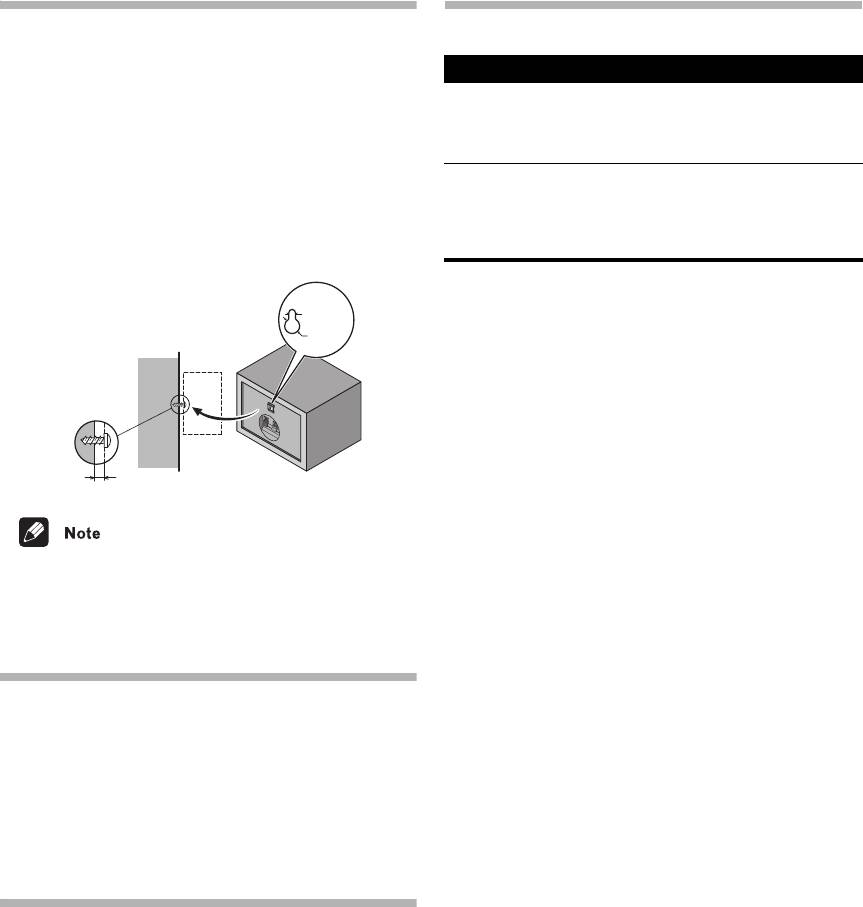
Before mounting
• Remember that the speaker system is heavy and that
its weight could cause the screws to work loose, or
the wall material to fail to support it, resulting in the
speaker falling. Make sure that the wall you intend to
mount the speakers on is strong enough to support
them. Do not mount on plywood or soft surface walls.
• Mounting screws are not supplied. Use screws
suitable for the wall material and support the weight
of the speaker.
• If you are unsure of the quality and strength of the
walls, consult a professional for advice.
• Pioneer is not responsible for any accidents or
damage that result from improper installation.
CABINET MAINTENANCE
Use a polishing cloth or dry cloth to wipe off dust and dirt.
When the cabinet is very dirty, clean with a soft cloth
dipped in some neutral cleanser diluted five or six times
with water, and then wipe again with a dry cloth. Do not
use furniture wax or cleaners.
Never use thinners, benzine, insecticide sprays and other
chemicals on or near the cabinets, since these will
corrode the surfaces.
ATTACHING / DETATCHING THE GRILLE
The front grille of this speaker system is removable.
Proceed as follows:
1. To detatch the grille, grab it by its bottom with both
hands and toward you to separate the bottom part of
the grille from the speaker.
2. Next, grab the top part of the grille and gently pull it
toward you to remove the top portion.
3. To replace the grille, align the holes in the front of the
speaker’s corners with the projections on the grille,
and push each of the corners into place.
3
En
3.7 mm
9.3 mm
Mounting screw
(not supplied)
5 mm to 7 mm
S-ESR2CR_En.fm 3 ページ 2011年2月16日 水曜日 午後2時29分
Symptom Possible cause Remedy
No sound • Bad speaker cord or
• Connect correctly or
connection.
replace cord.
• Amplifier is off.
• Turn on amplifier.
• Volume control is at zero.
• Slowly turn up volume.
Sound is
• Extreme signal condition. • Turn down the
distorted.
amplifier’s output level
(volume, bass control,
bass boost) to lower the
level.


