
Pioneer X-SMC01-K: Installing the unit Connecting a playback component
Installing the unit Connecting a playback component: Pioneer X-SMC01-K
Table of contents
- What’s in the box
- Information for users on collection and disposal of old equipment and used batteries Radio wave caution POWER-CORD CAUTION
- Installing the unit Connecting a playback component
- Basic control Troubleshooting Specications
English
Installing the unit
When installing this unit, make sure to put it on a level and stable surface.
When moving this unit
Don’t install it on the following places:
Do not hold the unit by the electric slide CD
–
on a color TV (the screen may distort)
door when carrying the unit. It could damage
–
near a cassette deck (or close to a device that gives off a magnetic eld). This may interfere
the unit.
Français
with the sound.
When moving the unit, be sure to rst check that
–
in direct sunlight
there is no disc loaded and disconnect the iPod/
–
in damp or wet areas
iPhone/iPad. Then press
STANDBY/ON, wait
–
in extremely hot or cold areas
for “STAND BY” disappears on main display to
–
in places where there is vibration or other movement
turn off, then unplug the power cord. Damage
–
in places that are very dusty in places that have hot fumes or oils (such as a kitchen)
may occur if the unit is transported or moved
Please always refer to the attached Operating Instructions (CD-ROM) included with the unit
Español
with a disc inserted, or when another device is
when hanging the unit on the wall.
connected to the USB terminal, or AUDIO IN
mini-plug jack.
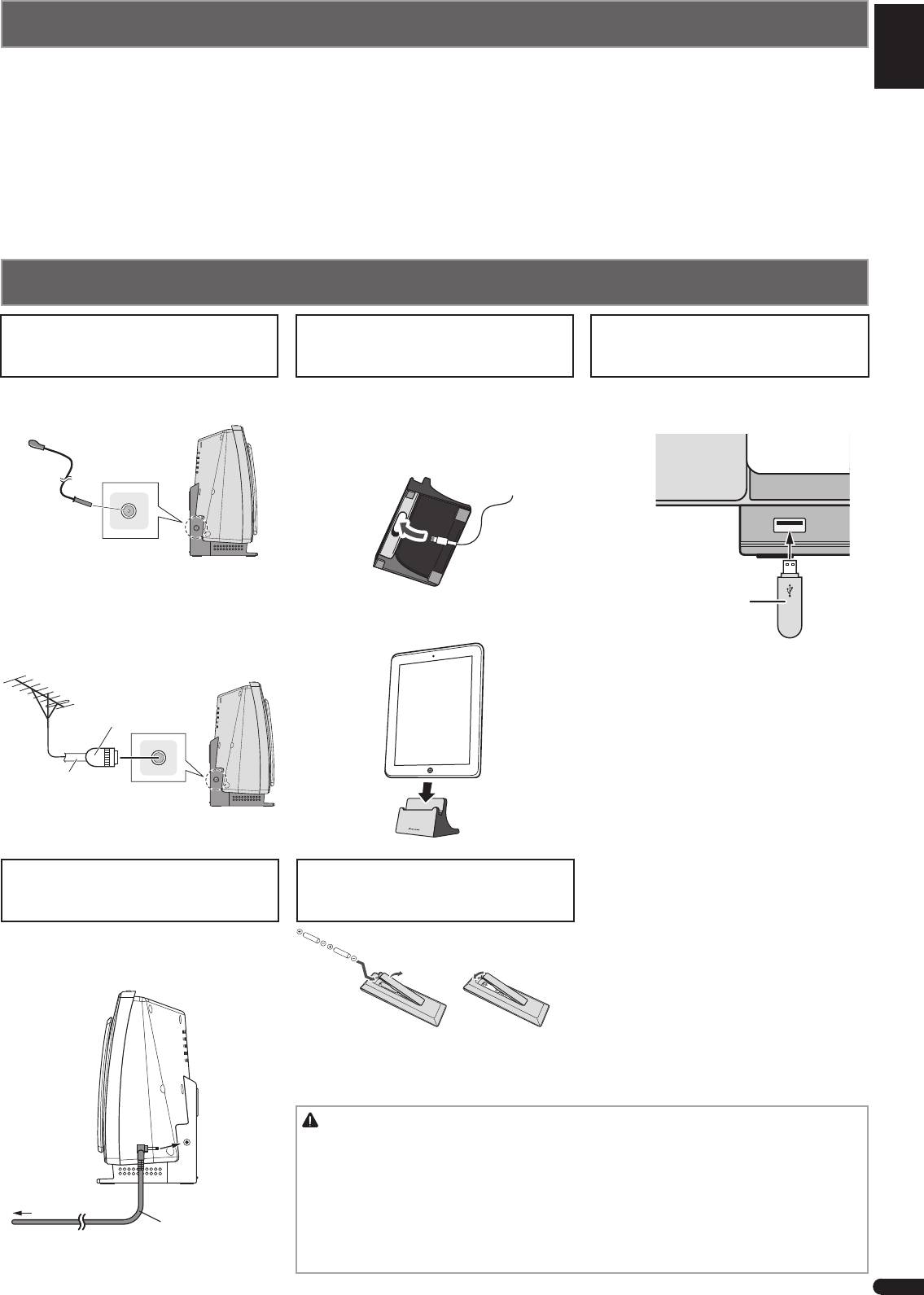
Connecting a playback component
Deutsch
Connecting your iPod/iPhone/iPad
Connecting your iPod/iPhone/iPad
Connecting antennas
(via a USB terminal)
using supplied iPad stand
or USB device
Connect the FM wire antenna into the FM
1 Connect the iPod/iPhone/iPad cable to
Connect your iPod/iPhone/iPad or USB
antenna socket.
the USB terminal on the front of the unit.
storagedevice to the USB terminal.
Italiano
2 Pass the iPod/iPhone/iPad cable through
the bottom of the stand and connect it to the
iPod/iPhone/iPad.
Nederlands
USB storage device
Using external antenna
(commercially available)
3 Set the iPod/iPhone/iPad on the stand.
To improve FM receptionUse a PAL
connector (not supplied) to connect an
external FM as shown below.
One-touch
PAL connector
75
Ω
coaxial
cable
Plugging in
Loading the batteries
Connect the AC adaptor into a wall socket.
Only connect the AC adapter when all other
connections to the unit have been completed.
The batteries included with the unit are to check
initial operations; they may not last over a long
period. We recommend using alkaline batteries
that have a longer life.
CAUTION
•
Incorrect use of batteries may result in such hazards as leakage and bursting. Observe the
following precautions:
–
When disposing of used batteries, please comply with governmental regulations or
environmental public institution’s rules that apply in your country/area.
To AC outlet
–
Do not use or store batteries in direct sunlight or other excessively hot place, such as inside
a car or near a heater. This can cause batteries to leak, overheat, explode or catch re. It
Power cord (Supplied)
can also reduce the life or performance of batteries.
–
When inserting the batteries, make sure not to damage the springs on the battery’s
terminals. This can cause batteries to leak or over heat.
3
En
