
Pioneer X-SMC01-K: Basic control Troubleshooting Specications
Basic control Troubleshooting Specications: Pioneer X-SMC01-K
Table of contents
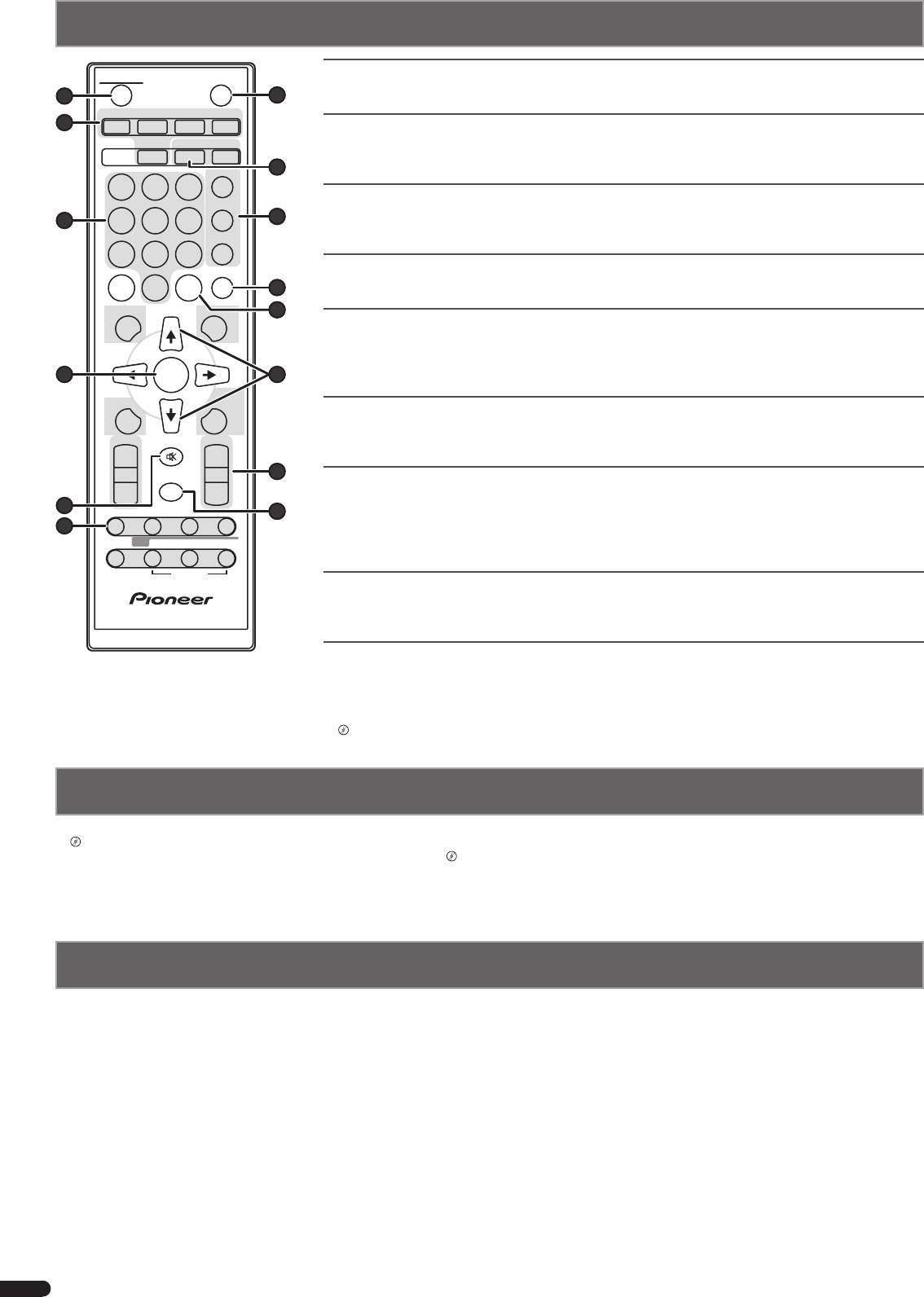
STANDBY/ON
Switches the unit between standby and on
Press
STANDBY/ON (
1
).
CD USB TUNER AUDIO IN
Setting the clock
1. Press CLOCK/TIMER (
8
) and ENTER (
4
).
2. Use
k/l
and ENTER (
4
) to set the day, hour and minute.
Setting the timer
1. Press CLOCK/TIMER (
8
).
2. Use
k/l
and ENTER (
4
) to adjust the day of the week and time.
Control the display brightness
Press DIMMER (
e
) to switch the display brightness in four steps.
DISPLA
Control sound and adjust volume
Press EQUALIZER, P.BASS, BASS or TREBLE (
9
) to adjust sound quality.
Press VOLUME +/
–
(
d
) to adjust the listening volume.
Press MUTE (
5
) to mute the sound.
Playing iPod/iPhone/iPad or USB device using the USB terminal
1. Press USB (
2
) and connect your iPod/iPhone/iPad to the USB terminal.
2. Press
d/
(
6
) to start playback.
Listening to the audio CD
1. Press CD (
2
).
2. Press OPEN/CLOSE (
7
) to open disc door and set a disc.
3. Press
d/
(
6
) to start playback. Use numeric buttons (
3
) or
o/p
(
6
) to select the track.
4. Press REPEAT (
b
) or RANDOM (
a
) to adjust the play mode.
Listening to the radio
1. Press TUNER (
2
).
2. Press TUNE +/– (
c
) to tune in to the desired station.
Bluetooth® audio playback (X-SMC01BT only)
1. Press BT AUDIO (
2
).
2. Turn on the power to the Bluetooth capable device that you wish to pair with, and perform pairing
procedure on it.
4
En
YF
Basic control
OPEN/CLOSE
1
7
2
BT AUDIO
CLOCK/TIMER
SLEEP
EQUALIZER
8
123
P.BASS
3
456
9
BASS/TREBLE
789
CLEAR REPEAT
RANDOM
0
10
TUNE+
OLDER
11
4
ENTER
12
MEMORY
MENU
/PROGRAM
PRESETVOLUME
TUNE–
+
+
MUTE
13
–
–
5
DIMMER
14
6
ST/MONO ASPM PTYDISPLAY
RDS
OPTION
l
“Pairing with the unit (Initial registration)”
Troubleshooting
Incorrect operations are often mistaken for trouble and malfunctions. If you think that there is something wrong with this component,
l
“Troubleshooting”. Sometimes the trouble may lie in another component. Investigate the other components and electrical appliances being used.
If the trouble cannot be rectied even after exercising the checks
l
“Troubleshooting”, ask your nearest Pioneer authorized service center or your
dealer to carry out repair work.
• If the unit does not operate normally due to external effects such as static electricity disconnect the power plug from the outlet and insert again to
return to normal operating conditions.
Specications
• Amplier section
Estimated line-of-sight transmission distance*
• Miscellaneous
RMS Power Output: ............. 10 W + 10 W
. . . . . . . . . . . . . . . . . . . . . . . . . . . . . . . . About 10 m
USB terminal ......................5 V, 2.1 A
(1 kHz, 10 %, T.H.D., 8
Ω
)
Frequency range ....................2.4 GHz
Power source ....AC 100 V to 240 V, 50 Hz/60 Hz
• Tuner section
Modulation .......................... FH-SS
Power consumption
Frequency Range (FM) ....87.5 MHz to 108 MHz
(Frequency Hopping Spread Spectrum)
Power on ............................. 25 W
Antenna Input (FM) ..........75
Ω
unbalanced
Supported Bluetooth profiles .....A2DP, AVRCP
Power stand-by .................0.5 W or less
•
Bluetooth
(X-SMC01BT only)
Supported Codec ........SBC (Subband Codec)
Power stand-by (BT STANDBY ON)*
Version
Supported contents protection ........SCMS-T
. . . . . . . . . . . . . . . . . . . . . . . . . . . . . . .0.5 W or less
. . . . . . . . . Bluetooth Specification Ver. 2.1 + EDR
*X-SMC01BT only
* The line-of-sight transmission distance is
Output .........Bluetooth Specification Class 2
Dimensions
an estimate. Actual transmission distances
. . . . . . . 430 mm (W) x 218 mm (H) x 114 mm (D)
supported may differ depending on
surrounding conditions.
Weight (without package) ...............2.8 kg
© 2013 PIONEER CORPORATION.
All rights reserved.
