
Pioneer X-CM31-J: Chapter 5: iPod/iPhone/iPad playback Confirming what iPod/iPhone/iPad models are supported Connecting your iPod/iPhone/iPad
Chapter 5: iPod/iPhone/iPad playback Confirming what iPod/iPhone/iPad models are supported Connecting your iPod/iPhone/iPad: Pioneer X-CM31-J
Table of contents
- IMPORTANT VENTILATION CAUTION Operating Environment
- Information for users on collection and disposal of old equipment and used batteries POWER-CORD CAUTION
- Contents
- Chapter 1: Before you start What’s in the box Loading the batteries in the remote control
- Chapter 2: Part names and functions Remote control
- Part names and functions 02 Speaker system
- Front panel
- Top panel
- Chapter 3: Connections Connecting a TV Speaker connection
- Connecting antennas Plugging in
- Chapter 4: Getting started To turn the power on General control Setting the clock
- Sound controls Setting the wake-up timer
- Using Headphones Using the sleep timer
- Chapter 5: iPod/iPhone/iPad playback Confirming what iPod/iPhone/iPad models are supported Connecting your iPod/iPhone/iPad
- Connecting iPod/iPhone to the top Connecting iPod/iPhone/iPad using supplied stand
- Watching iPod/iPhone videos on your TV Playing iPad Playing iPod/iPhone
- Chapter 6: Disc playback Playing discs or files
- Advanced CD or MP3/WMA disc playback
- Programmed play (CD or MP3/WMA) About downloading MP3/WMA About folder playback order
- Specify the folder to play Switch the display contents
- Chapter 7: USB playback Playing USB storage devices
- Playing in the desired order (Programmed Play)
- Chapter 8: Using the tuner Listening to the radio broadcasts
- To recall a memorised station Using the Radio Data System (RDS)
- Information provided by RDS Using the Auto Station program Memory (ASPM)
- Chapter 9: Other connections Connecting auxiliary components
- Chapter 10: Additional information Troubleshooting General problem Problem Check Remedy
- When a USB storage device is connected Problem Check Remedy When an iPod/iPhone/iPad is connected Problem Remedy
- Playable discs and formats Cautions on use
- Additional information 10 Handling discs
- About iPod/iPhone/iPad
- Specifications
iPod/iPhone/iPad playback 05
15
En
English Français Español
BL3RGB;&0IP࣮࣌ࢪ㸰㸮㸯㸱ᖺ㸲᭶㸯㸷᪥ࠉ㔠᭙᪥ࠉ༗๓㸯㸯㸳㸷ศ
Chapter 5:
iPod/iPhone/iPad playback
Merely by connecting your iPod/iPhone/iPad to this unit, you
• Pioneer cannot under any circumstances accept
can enjoy high-quality sound from your iPod/iPhone/iPad.
responsibility for any direct or indirect loss arising from
This unit can also be connected to a television set, letting you
any inconvenience or loss of recorded material resulting
view videos from your iPod/iPhone. Playback setting for iPod/
from iPod/iPhone/iPad failure.
iPhone/iPad music can be performed from this unit or the
• For detailed instructions on using the iPod/iPhone/iPad,
iPod/iPhone/iPad itself.
please refer to the manual supplied with the iPod/
• To connect a TV, see page 10.
iPhone/iPad.
• This system has been developed and tested for the
software version of iPod/iPhone/iPad indicated on the
website of Pioneer (http://pioneer.jp/homeav/support/
Confirming what iPod/iPhone/iPad
ios/eu/).
• Installing software versions other than indicated on the
models are supported
website of Pioneer to your iPod/iPhone/iPad may result
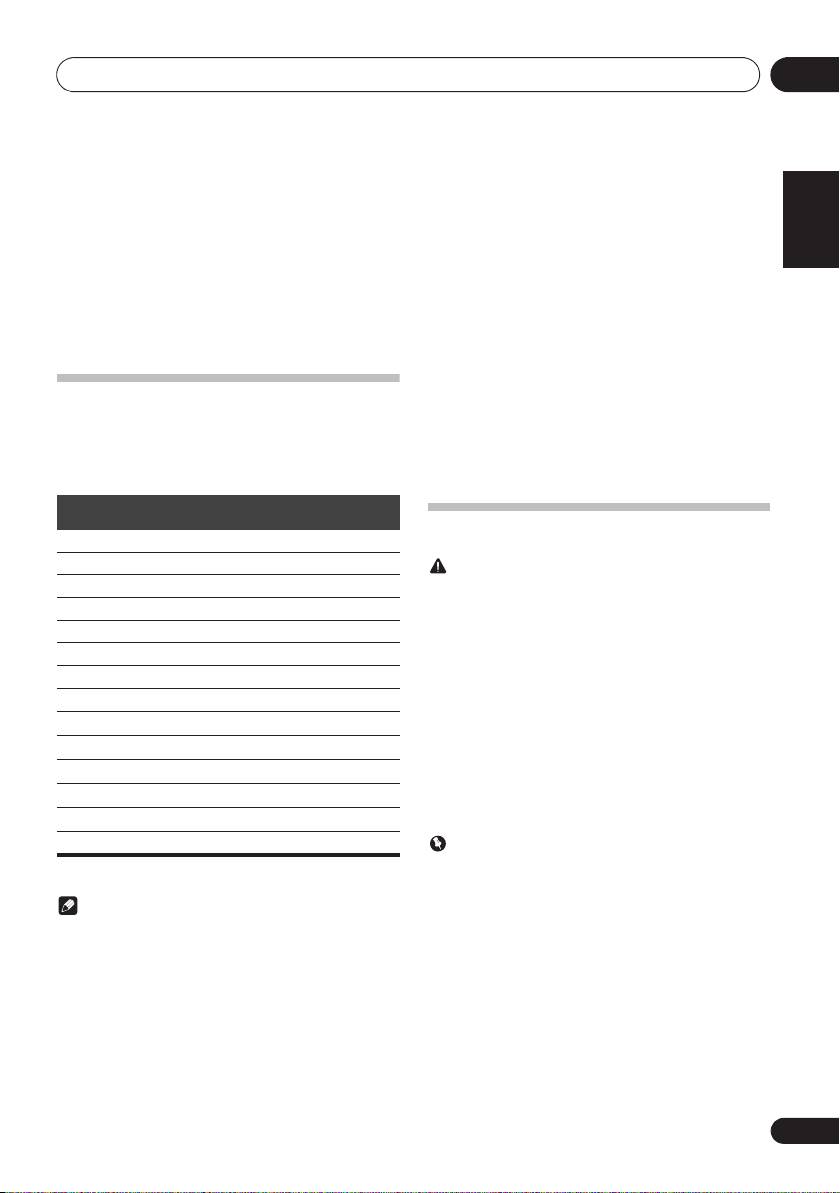
The iPod/iPhone/iPad playable on this unit are shown below.
in incompatibility with this system.
• Video output for iPod/iPhone is only compatible when
• This unit cannot be used to record CD, tuner or other
connected to the Dock connector.
content on an iPod/iPhone/iPad.
Dock connector
USB Terminal
iPod/iPhone/iPad
(Audio/Video)
(Audio only)
Connecting your iPod/iPhone/iPad
*
iPod nano 3G/4G/5G/6G
iPod nano 7G —
CAUTION
iPod touch 1G/2G/3G/4G
• Do not use an adaptor that converts into a Lightning
connector on the unit's iPod/iPhone connector to
iPod touch 5G —
connect an iPod/iPhone/iPad. This may lead to
iPhone
malfunction/damage to the connector.
Please connect these Lightning connector devices to the
iPhone 3G
USB port on the front of the unit.
iPhone 3GS
iPhone 5, iPad (4th generation), iPad mini, iPod touch
(5th generation), iPod nano (7th generation)
iPhone 4
• When connecting iPod/iPhone devices, always use the
iPhone 4S
dock adapter provided with iPod/iPhone devices, or a
commercially available adapter designed to support
iPhone 5 —
iPod/iPhone. The iPod/iPhone cannot be connected
iPad mini —
without a dock adapter; attempting to connect an iPod/
iPhone without it will cause damage or malfunction.
iPad —
• An iPod/iPhone universal dock adapter is not supplied
with this unit.
iPad 2 —
iPad 3G/4G —
Important
• If you are mounting the protective cover of a
* iPod nano 6G is supports audio only.
commercially available iPod/iPhone/iPad, you may not
be able to connect iPod/iPhone/iPad to this unit.
Note
• Pioneer does not guarantee that this unit plays iPod/
iPhone/iPad models other than the ones specified.
• Some functions may be restricted depending on the
model or software version.
• iPod/iPhone/iPad is licensed for reproduction of non-
copyrighted materials or materials the user is legally
permitted to reproduce.
• Features such as the equalizer cannot be controlled
using this system, and we recommend switching the
equalizer off before connecting.
