
Pioneer VSX-S510-S: Connecting a TV and playback Connecting antennas components
Connecting a TV and playback Connecting antennas components: Pioneer VSX-S510-S
Table of contents
- AV Receiver What’s in the box
- Safety Brochure
- Connecting up Connecting the speakers VSX-S510 connection diagram
- VSX-S310 connection diagram
- Connecting a TV and playback Connecting antennas components
- Connecting to the network through LAN interface
- Initial Setup Before you start Automatically setting up for surround sound (MCACC)
- Basic playback Multichannel playback Listening to the radio
- Playing an iPod Listening to Internet radio stations
English
Connecting up (continued)
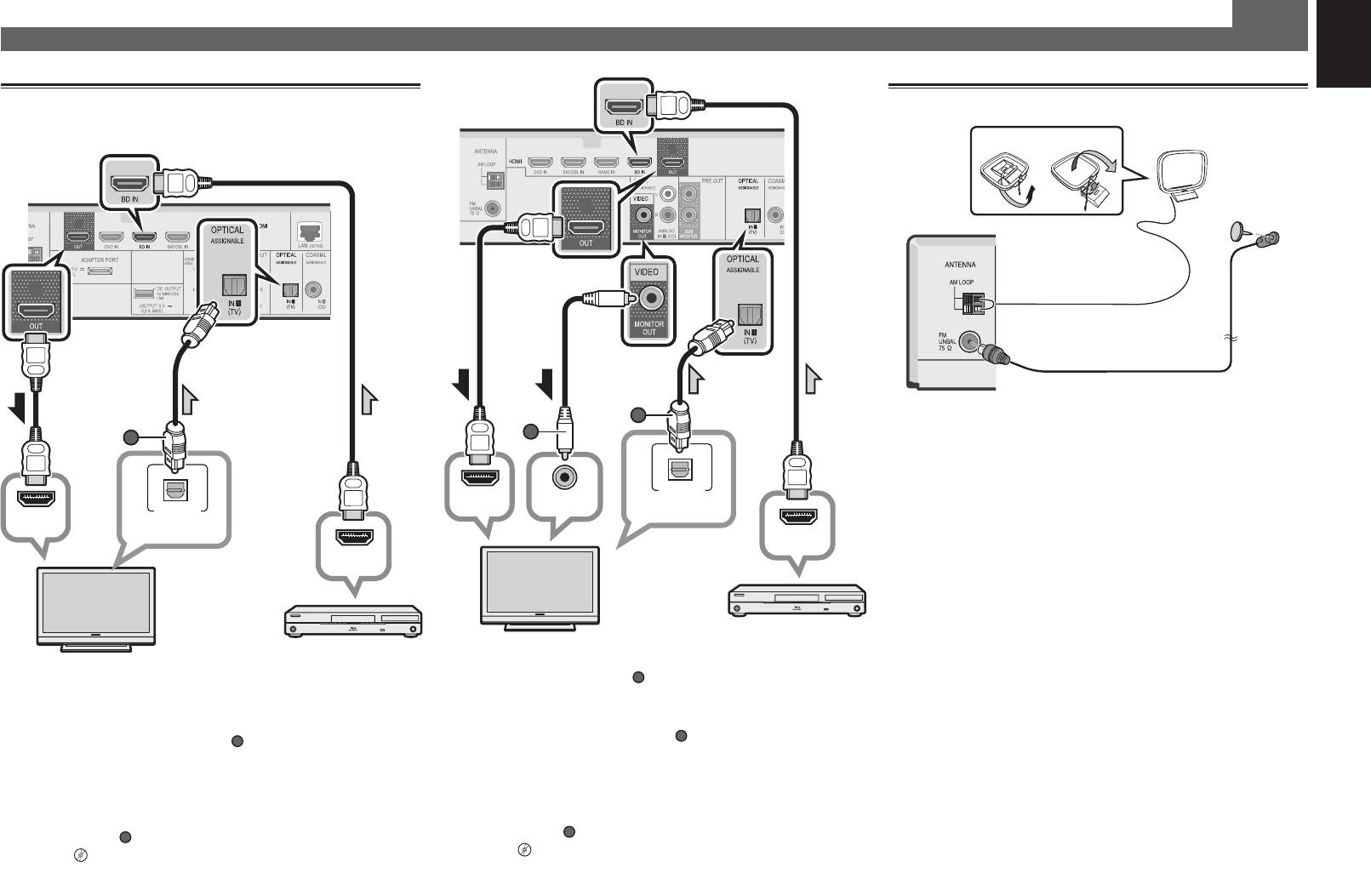
Connecting a TV and playback
Connecting antennas
Français
components
21
AM loop antenna
VSX-S510
Deutsch
Italiano
FM wire antenna
Nederlands
Español
HDMI/DVI-compatible
HDMI/DVI-compatible TV
Blu-ray Disc player, etc.
• The OSD will only be output from the HDMI OUT terminal.
• If the TV does not support the HDMI Audio Return Channel
function, optical digital cable (
5
A
) connection is required to
listen to the TV sound over the receiver.
• If the TV supports the HDMI Audio Return Channel
function, the sound of the TV is input to the receiver via the
HDMI terminal, so there is no need to connect an optical
digital cable (
A
• Composite video cable (
). In this case, set
ARC
at
HDMI Setup
to
ON
l
“HDMI Setup” on page 56.
• Please refer to the TV’s operation manual for directions on
connections and setup for the TV.
A
) connection is necessary in
order to see the OSD of the unit on the TV.
• If the TV does not support the HDMI Audio Return Channel
function, optical digital cable (
B
) connection is required to
listen to the TV sound over the receiver.
• If the TV supports the HDMI Audio Return Channel
function, the sound of the TV is input to the receiver via the
HDMI terminal, so there is no need to connect an optical
digital cable (
B
VSX-S310
B
A
A
OPTICAL
HDMI IN
VIDEO IN
OPTICAL
DIGITAL AUDIO OUT
HDMI IN
DIGITAL AUDIO OUT
HDMI OUT
HDMI OUT
HDMI/DVI-compatible
HDMI/DVI-compatible TV
Blu-ray Disc player, etc.
). In this case, set
ARC
at
HDMI Setup
to
ON
l
“HDMI Setup” on page 56.
• Please refer to the TV’s operation manual for directions on
connections and setup for the TV.
