
Pioneer KRP-S02: Connect the speaker cables Connect the speaker cables
Connect the speaker cables Connect the speaker cables: Pioneer KRP-S02
Table of contents
- CAUTION CHECKING THE ACCESSORIES Installation
- INSTALLATION ON THE FLAT PANEL DISPLAY When using the table top stand:
- English
- Connect the speaker cables Connect the speaker cables
- When using the hung on wall unit: CABINET MAINTENANCE
- SPECIFICATIONS
11
English
English
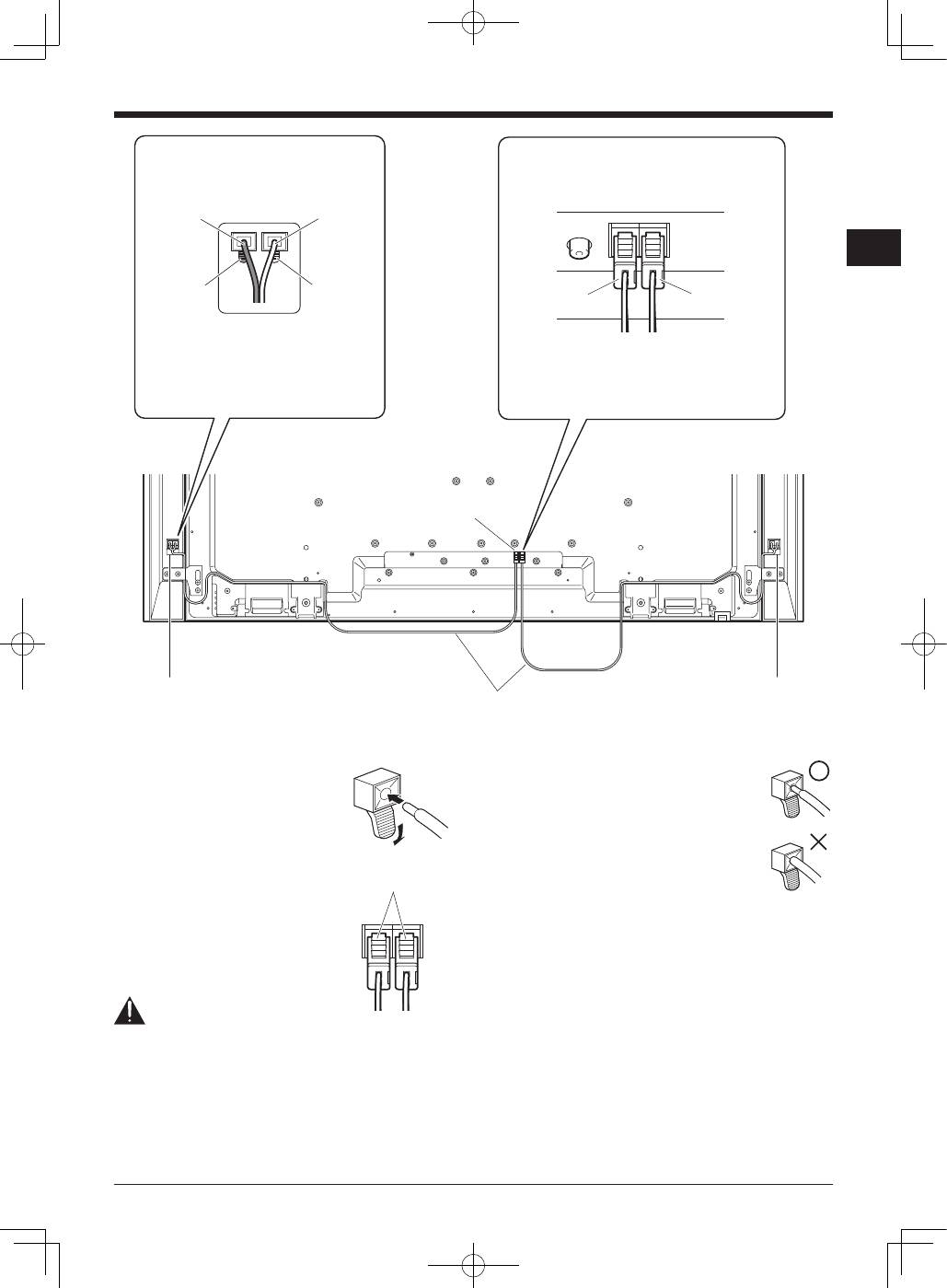
How to connect the speaker cables
(speaker)
Press the lever and insert the end of
the cable. When you release the lever,
it clamps onto the speaker cable. Press
and hold the lever when removing the
cable.
How to connect the speaker cables
(flat panel display)
Insert the speaker cable connector
securely into the panel’s speaker
terminal. To remove the speaker cable,
hold and push the lever then remove it.
Caution
• Before connecting the speakers to the flat panel display,
unplug the panel from the power outlet. Connecting the
speaker cable with the power cord plugged in can cause
malfunction or damage to the panel if the cable’s bare
wire touches other equipment. Plug in the power cord
after connecting the speakers.
Connect the speaker cables
(flat panel display)
Connect the cable with a red connector to R
(right) terminal and the cable with a white
connector to L (left) terminal of the flat panel
display.
Connect the gray-lined cable to the
terminals and the black cable to the
terminals.
Connect the speaker cables
(speaker)
Black
Gray lined
Black
Red
Speaker terminal
Speaker terminal
Speaker cable
Speaker terminal
White: L
Red: R
Lever
• If you insert the speaker cable too far so
that the insulation is touching the speaker
terminal, you may not get any sound. Please
insert it so that the copper wire is still
showing.
• Check if the ends of the speaker cables
are securely connected to the terminals by
slightly tugging on the cables after making
connections. Loose connections may result
in sound dropouts or noise.
• If there is a short in the
and
cables caused by an
exposed lead wire, excessive load may be applied to the
flat panel display, resulting in interrupted operation or
malfunction.
• Incorrect connections of the speaker cable to the left or
right flat panel display terminals with respect to polarity
may result in insufficient stereo sound effects, delivering
poor bass sounds or unstable sound image.
• Do not connect any devices to the speaker terminals
other than the speakers specified.
• Excessive force exerted on the speaker cable may cause
connection failures, sound dropouts and/or connector
damage.
