
Pioneer DEH-X6600DAB: Digital Radio (Digital Audio Broadcasting)
Digital Radio (Digital Audio Broadcasting): Pioneer DEH-X6600DAB
Table of contents
- About this unit If you experience problems
- Head unit Display indication Basic operations Set up menu
- Digital Radio (Digital Audio Broadcasting)
- Radio
- CD/CD-R/CD-RW and USB storage devices
- iPod
- Function settings Using this unit’s iPod function from your iPod Playing songs related to the currently playing song Using connected device applications
Black plate (4,1)
Section
02
Using this unit
Using this unit
DAB stands for Digital Audio Broadcasting and
% Press DAB to pause or resume.
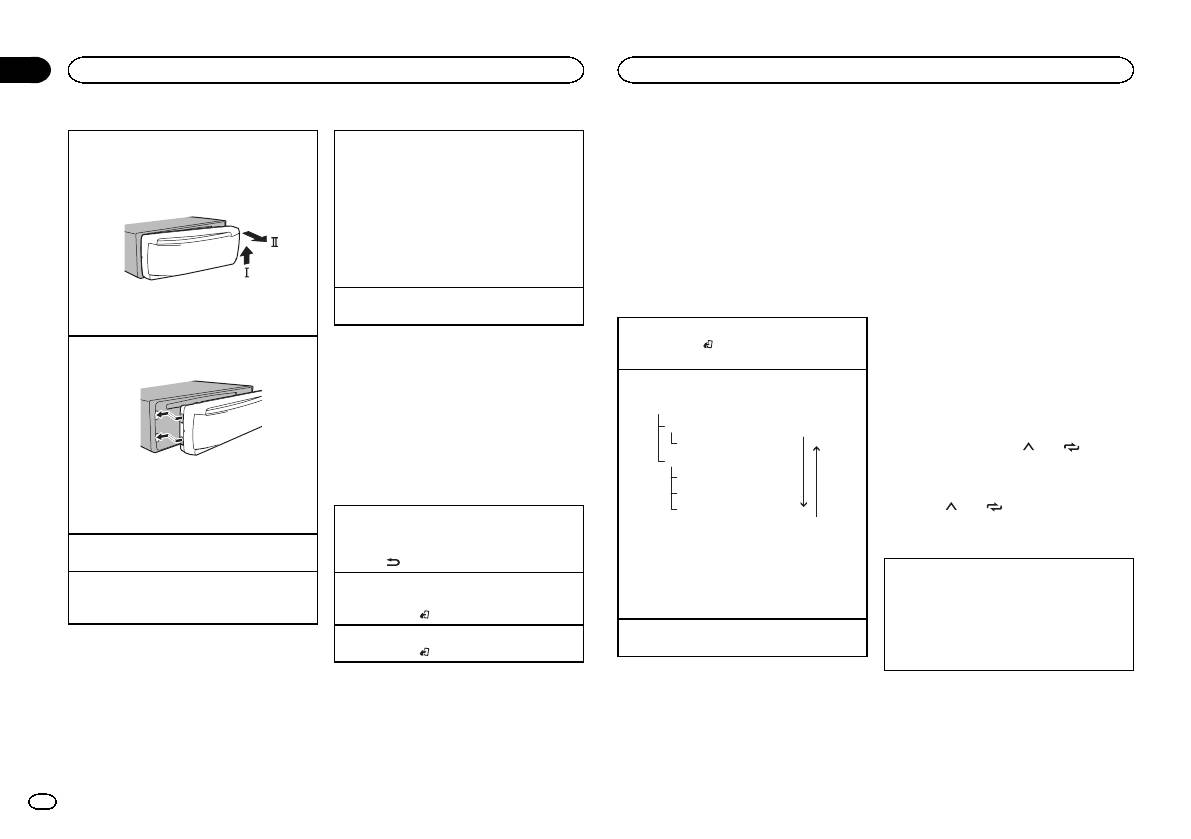
Removing the front panel
Selecting a source
has the following features:
! This unit stores recent broadcasts to memory
1 Press the detach button to release the front
1 Press SRC/OFF to cycle between:
! High sound quality (nearly as high as for
automatically. The memory capacity of this
panel.
DIGITAL RADIO (digital audio broadcasting)
CDs, although it may be reduced in some
unit will vary depending on the bit rate of the
2 Push the front panel upward (M) and then pull
—RADIO—CD—USB/iPod—APP (application)
cases in order to allow more services to be
Service Component used. The approximate
it toward (N) you.
—AUX
broadcast)
memory capacity is five minutes for 192 kbps.
! If a source other than DIGITAL RADIO is se-
! Interference-free reception
! If the duration that a selection is paused ex-
lected, you can switch to DIGITAL RADIO by
ceeds the length of the memory capacity,
pressing DAB.
Note
playback will resume from the beginning of
! USB MTP displays while the MTP connection
Some stations perform broadcast testing.
the selection in memory.
is in use.
Adjusting the volume
Basic operations
This function is disabled while time shift is on.
3 Always store the detached front panel in a pro-
1 Turn M.C. to adjust the volume.
For more details about time shift, refer to Listen-
tective case or bag.
Selecting a band
ing to a recent broadcast (time shift) on page 5.
1 Press BAND/
until the desired band (D1, D2,
Re-attaching the front panel
Note
or D3) is displayed.
1 Slide the front panel to the left.
When this unit’s blue/white lead is connected to
Storing and recalling stations
the vehicle’s auto-antenna relay control termi-
Manual tuning (step by step)
for each band
nal, the vehicle’s antenna extends when this
1 Press c or d.
unit’s source is turned on. To retract the anten-
Ensemble
Using preset tuning buttons
na, turn the source off.
Service
Press
.
1 To store: Press and hold down one of the
Primary Service Component
preset tuning buttons (1/
to 6/ ) until
Service
Frequently used menu
the number stops flashing.
2 Press the right side of the front panel until it is
Primary Service Component
operations
firmly seated.
Secondary Service Component
2 To recall: Press one of the preset tuning
Forcing the front panel into place may result in
Secondary Service Component
buttons (1/
to 6/ ).
Returning to the previous display
damage to the front panel or head unit.
Press
.
Returning to the previous list (the folder one level
Some individual services in an ensemble may be
Switching the display
Turning the unit on
higher)
further subdivided into Service Components. The
1 Press SRC/OFF to turn the unit on.
1 Press
/DIMMER.
main Service Component is called the Primary
Selecting the desired text information
Service Component, and any auxiliary Service
Turning the unit off
Returning to the ordinary display
1 Press DISP to cycle between the following:
Components are called Secondary Service Com-
1 Press and hold SRC/OFF until the unit turns
Canceling the main menu
! SERVICE LABEL (service label or channel)
ponents.
off.
1 Press BAND/
.
! BRDCST INFO (service label/PTY label/en-
Seeking
semble label/channel and frequency)
Returning to the ordinary display from the list
1 Press and hold c or d, and then release.
! DYNAMIC LABEL (dynamic label)
1 Press BAND/
.
! CLOCK (source name and clock)
Pausing
Notes
Digital Radio (Digital Audio
You can use the pause function to temporarily
! If the service label cannot be acquired in
stop listening to a DAB.
SERVICE LABEL, the channel is displayed in-
Broadcasting)
stead. If the service label is detected, the
To receive DAB signals, connect a DAB antenna
service label will be displayed.
(AN-DAB1) sold separately to the unit.
! For more details about PTY list, refer to PTY
list on page 6.
4
En
<QRD3198-B>4
