
Pioneer DEH-6400BT: Power cord This unit
Power cord This unit: Pioneer DEH-6400BT
Table of contents
Important
— Never wire the negative speaker cable directly
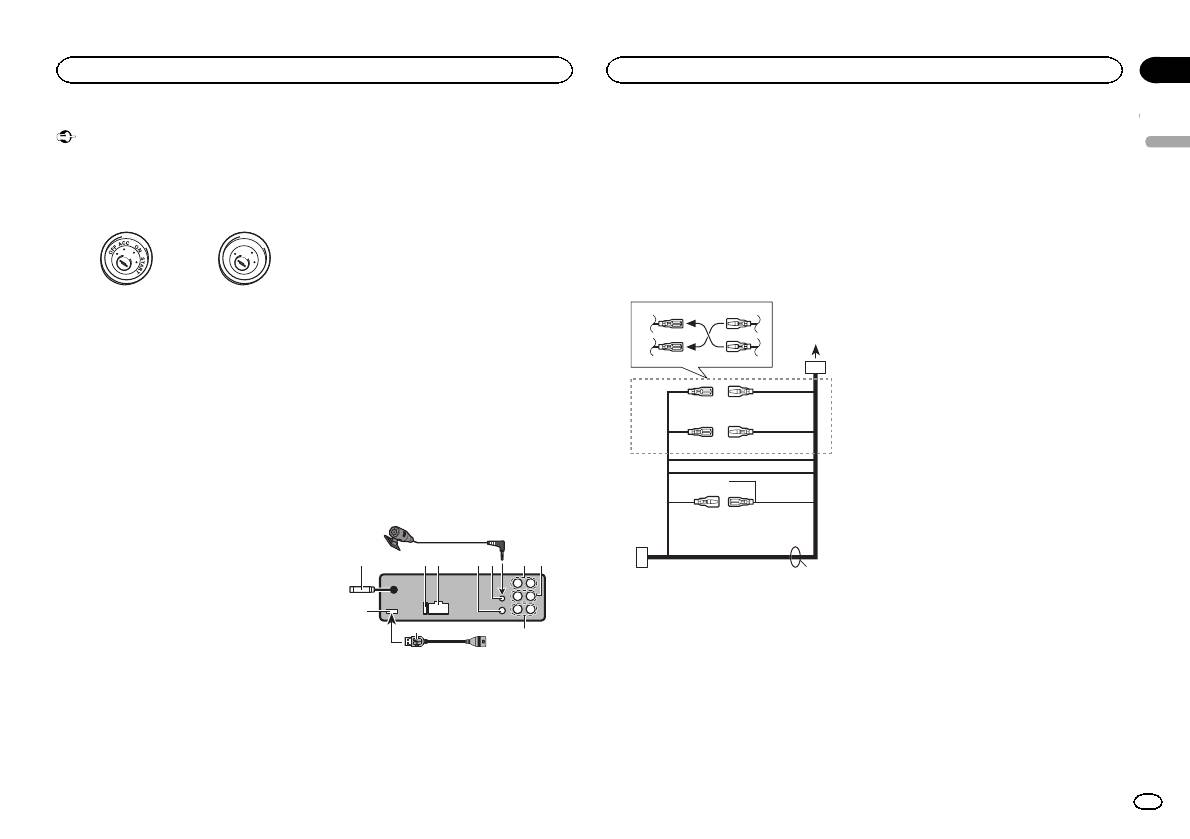
6 Microphone input
! When installing this unit in a vehicle without
to ground.
7 Microphone
an ACC (accessor y) position on the ignition
— Never band together negative cables of multi-
4m
switch, failure to connect the red cable to the
ple speakers.
8 Rear output
terminal that detects operation of the ignition
! When this unit is on, control signals are sent
9 Front output
key may result in battery drain.
through the blue/white cable. Connect this
a Subwoofer output
cable to the system remote control of an ex-
b USB cable
ternal power amp or the vehicle’s auto-anten-
F
O
1.5 m
N
O
F
T
S
na relay control terminal (max. 300 mA
A
T
R
12 V DC). If the vehicle is equipped with a
glass antenna, connect it to the antenna
Power cord
ACC position No ACC position
booster power supply terminal.
! Never connect the blue/white cable to the
3
4
! Use of this unit in conditions other than the
following could result in fire or malfunction.
power terminal of an external power amp.
— Vehicles with a 12-volt battery and negative
Also, never connect it to the power terminal
1
grounding.
of the auto antenna. Doing so may result in
2
5
6
— Speakers with 50 W (output value) and 4 W to
battery drain or a malfunction.
8 W (impedance value).
! The black cable is ground. Ground cables for
! To prevent a short-circuit, overheating or mal-
this unit and other equipment (especially,
3
4
function, be sure to follow the directions
high-current products such as power amps)
below.
must be wired separately. If they are not, an
5
6
— Disconnect the negative terminal of the bat-
accidental detachment may result in a fire or
7
tery before installation.
malfunction.
8
9
— Secure the wiring with cable clamps or adhe-
c
sive tape. Wrap adhesive tape around wiring
This unit
that comes into contact with metal parts to
a
b
protect the wiring.
7
— Place all cables away from moving parts,
e
such as the shift lever and seat rails.
2 3 485 9
6
— Place all cables away from hot places, such
as near the heater outlet.
— Do not connect the yellow cable to the battery
by passing it through the hole to the engine
1
compartment.
b
a
— Cover any disconnected cable connectors
with insulating tape.
1 USB input
— Do not shorten any cables.
2 Antenna input
— Never cut the insulation of the power cable of
15 cm
this unit in order to share the power with
3 Fuse (10 A)
other devices. The current capacity of the
4 Power cord input
cable is limited.
5 Wired remote input
— Use a fuse of the rating prescribed.
Hard-wired remote control adaptor can be
connected (sold separately).
d
Section
Connections
Connections
02
6 Red
Connect to terminal controlled by ignition
English
switch (12 V DC).
7 Connect leads of the same color to each
other.
8 Orange/white
Connect to lighting switch terminal.
9 Black (chassis ground)
a Blue/white
The pin position of the ISO connector will dif-
fer depending on the type of vehicle. Connect
a and b when Pin 5 is an antenna control
type. In another type of vehicle, never con-
nect a and b.
b Blue/white
Connect to system control terminal of the
power amp (max. 300 mA 12 V DC).
c Blue/white
Connect to auto-antenna relay control termi-
nal (max. 300 mA 12 V DC).
d Speaker leads
White: Front left +
White/black: Front left *
Gray: Front right +
Gray/black: Front right *
Green: Rear left + or subwoofer +
Green/black: Rear left * or subwoofer *
Violet: Rear right + or subwoofer +
Violet/black: Rear right * or subwoofer *
e ISO connector
In some vehicles, the ISO connector may be
1 To power cord input
divided into two. In this case, be sure to con-
2 Depending on the kind of vehicle, the func-
nect to both connectors.
tion of 3 and 5 may be different. In this
case, be sure to connect 4 to 5 and 6 to
Notes
3.
! Change the initial setting of this unit (refer to
3 Yellow
the Operation Manual). The subwoofer out-
Back-up (or accessory)
put of this unit is monaural.
4 Yellow
! When using a subwoofer of 70 W (2 W), be
Connect to the constant 12 V supply termi-
sure to connect the subwoofer to the violet
nal.
and violet/black leads of this unit. Do not
5 Red
connect anything to the green and green/
Accessory (or back-up)
black leads.
En
3
