
Pioneer DEH-141UB: Compressed audio compatibility (disc, USB) WMA Sequence of audio files
Compressed audio compatibility (disc, USB) WMA Sequence of audio files: Pioneer DEH-141UB
Table of contents
- About this unit About this manual Demo mode In case of trouble
- Head unit Display indication Basic operations Set up menu
- Tuner Menu operations identical for set up menu/function settings/audio adjustments/ initial settings/lists
- CD/CD-R/CD-RW and USB storage devices
- Initial settings Audio adjustments
- Connections Turning the clock display on or off Sound muting Using an AUX source
- Installation DIN front/rear mount
- Troubleshooting Error messages
- Handling guidelines
- Compressed audio compatibility (disc, USB) WMA Sequence of audio files
- Specifications WMA Russian character chart Copyright and trademark
Appendix
Additional information
Additional information
USB storage device
Compressed audio
Supplemental information
Playback of copyright-protected files: Not compati-
English
compatibility (disc, USB)
ble
Connections via USB hub are not supported.
Only the first 32 characters can be displayed as a
file name (including the file extension) or a folder
Partitioned USB storage device: Only the first par-
WMA
Do not connect anything other than a USB stor-
name.
tition can be played.
age device.
File extension: .wma
Russian text to be displayed on this unit should be
There may be a slight delay when starting play-
Firmly secure the USB storage device when driv-
encoded in one of the following character sets:
back of audio files on a USB storage device with
Bit rate: 48 kbps to 320 kbps (CBR), 48 kbps to
ing. Do not let the USB storage device fall onto the
numerous folder hierarchies.
384 kbps (VBR)
! Unicode (UTF-8, UTF-16)
floor, where it may become jammed under the
! A character set other than Unicode that is
brake or accelerator pedal.
Sampling frequency: 32 kHz, 44.1 kHz, 48 kHz
used in a Windows environment and is set to
Depending on the USB storage device, the follow-
Windows Media Audio Professional, Lossless,
Russian in the multi-language setting
CAUTION
ing problems may occur.
Voice/DRM Stream/Stream with video: Not com-
Do not leave discs or a USB storage device in
This unit may not operate correctly depending on
! Operations may vary.
patible
any place that is subject to high temperatures.
the application used to encode WMA files.
! The storage device may not be recognized.
! Files may not be played back properly.
There may be a slight delay at the start of playback
! The device may generate noise in the radio.
MP3
of audio files embedded with image data or audio
Sequence of audio files
files stored on a USB storage device that has nu-
The user cannot assign folder numbers and
File extension: .mp3
merous folder hierarchies.
specify playback sequences with this unit.
DualDiscs
Bit rate: 8 kbps to 320 kbps (CBR), VBR
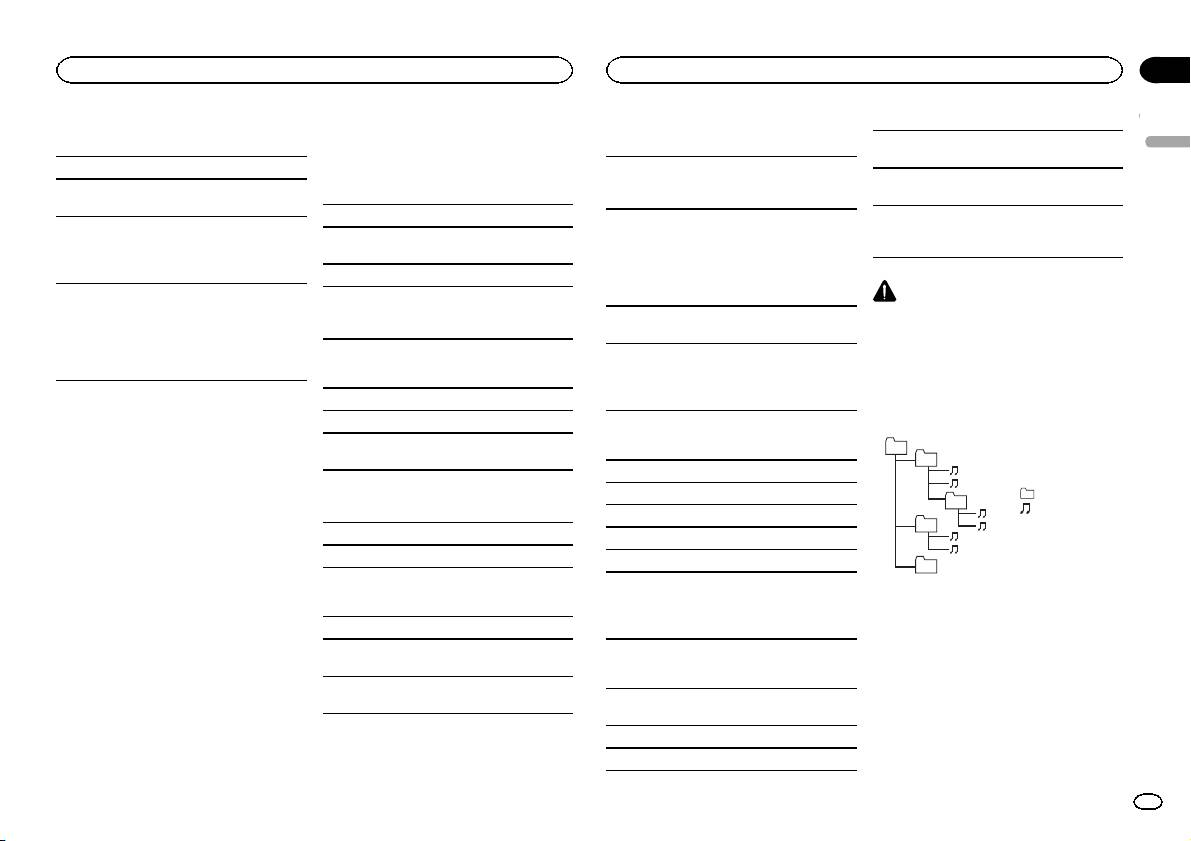
Example of a hierarchy
DualDiscs are two-sided discs that have a record-
Sampling frequency: 16 kHz to 48 kHz (32 kHz,
Disc
01
able CD for audio on one side and a recordable
44.1 kHz, 48 kHz for emphasis)
02
DVD for video on the other.
Playable folders: up to 99
Since the CD side of DualDiscs is not physically
Compatible ID3 tag version: 1.0, 1.1, 2.2, 2.3, 2.4
compatible with the general CD standard, it may
(ID3 tag Version 2.x is given priority over Version 1.
Playable files: up to 999
: Folder
03
not be possible to play the CD side with this unit.
x.)
: Compressed
File system: ISO 9660 Level 1 and 2, Romeo, Joliet
audio file
Frequent loading and ejecting of a DualDisc may
04
M3u playlist: Not compatible
Multi-session playback: Compatible
01 to 05: Folder
result in scratches on the disc. Serious scratches
MP3i (MP3 interactive), mp3 PRO: Not compatible
number
can lead to playback problems on this unit. In
Packet write data transfer: Not compatible
05
1 to 6: Playback
some cases, a DualDisc may become stuck in the
Regardless of the length of blank sections be-
Level 1 Level 2 Level 3 Level 4
sequence
disc loading slot and will not eject. To prevent this,
WAV
tween the songs from the original recording, com-
we recommend you refrain from using DualDisc
pressed audio discs play with a short pause
with this unit.
Disc
File extension: .wav
between songs.
Please refer to the information from the disc man-
Folder selection sequence or other operation
ufacturer for more detailed information about
Quantization bits: 8 and 16 (LPCM), 4 (MS
may differ depending on the encoding or writing
DualDiscs.
ADPCM)
software.
USB storage device
Sampling frequency: 16 kHz to 48 kHz (LPCM),
USB storage device
22.05 kHz and 44.1 kHz (MS ADPCM)
Playable folder hierarchy: up to eight tiers (A prac-
Playback sequence is the same as recorded se-
tical hierarchy is less than two tiers).
quence in the USB storage device.
Playable folders: up to 500
To specify the playback sequence, the following
method is recommended.
Playable files: up to 15 000
En
11
