
Melissa Steel Series 253-006: 4 3 5 1 2 dabce f g
4 3 5 1 2 dabce f g: Melissa Steel Series 253-006
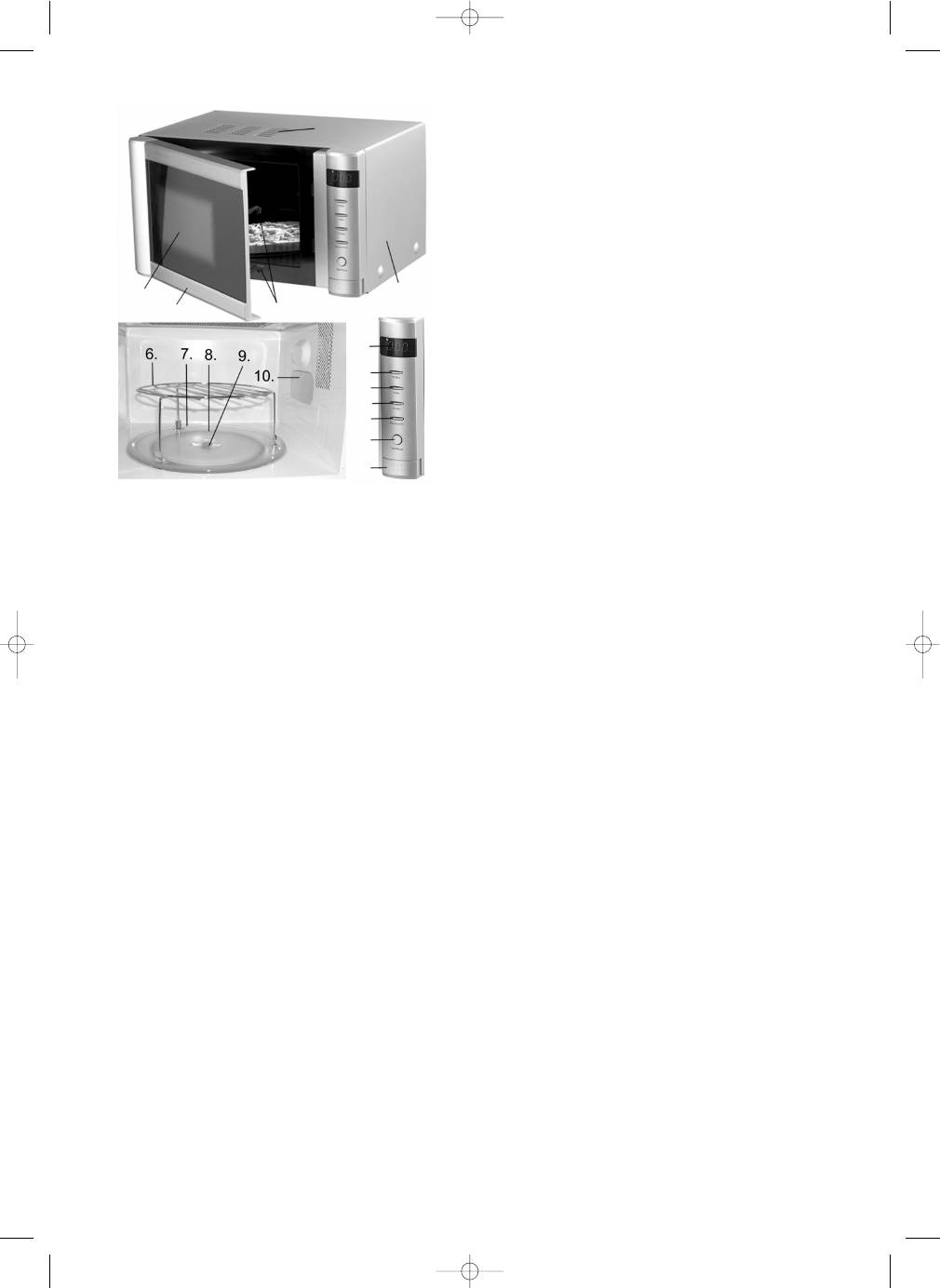
KEY TO MICROWAVE OVEN PARTS
1. Cabinet
2. Air
vents
3. Oven
door
4. Window
5. Lock
dowels
6. Grill
7. Glass
turntable
8. Roller
ring
9. Spindle
10. Magnetron cover
a. 10 min button
b. 1 min button
c. 10 sec button
d. Display
e. Micro/Defrost/Grill
button
f. Start/Reset
button
g. Door
release
button
PREPARING THE MICROWAVE OVEN
Each individual microwave oven is checked at the factory, but for safety’s
sake, after unpacking the appliance, you should check carefully that it has
not been damaged during transport. Check whether there is any visible
damage (e.g. in the form of dents or similar), if the oven door (3) closes
properly, and if the hinges are in order. If it appears that the microwave
oven has been damaged, you must contact the store where you bought it,
and do not use it until it has been checked by an authorised specialist.
Before using the microwave oven, you should check that you have
removed all packaging both inside and outside.
Positioning the microwave oven
The microwave oven should be placed on a flat surface that can support
its weight (16 kg). There must be clearance of at least 10 cm at the rear, 8
cm at the sides and 30 cm above to ensure sufficient ventilation.
Connecting the microwave oven
The microwave oven must be connected to a 230-volt AC current, 50 Hz.
The guarantee is not valid if the microwave oven is connected to the wrong
voltage. When the power to the appliance is switched on, a beep is heard
and the display (d) shows "00.0".
Inserting the glass turntable
Before using the microwave oven, ensure the glass turntable (7) is correctly
seated on its roller ring (8) and spindle (9). The glass turntable should be on
the roller ring in the recess in the bottom of the microwave oven, so the pin
on the spindle fits between two of the three pins on the underneath of the
glass turntable.
Before using the microwave oven for the first time
The first time the microwave oven is used, it may give off a little smoke and
a slight odour. This is due to oil residue from production and is neither
abnormal nor dangerous. To eliminate the odour, start grill programme no.
1 and leave to run for several minutes. The odour and smoke should then
disappear. If not, repeat this procedure.
OPERATING THE MICROWAVE OVEN
•
Place the food to be cooked in the oven and close the door. Select
cooking function as described below, and start the microwave oven. Once
the cooking time set has elapsed, the oven will switch off automatically.
The display will show "00.0", and 5 beeps will sound.
Express cooking
Express cooking is performed at full microwave power for the number of
minutes entered.
1. Press the Start/Reset button (f) to commence cooking. Each time you
press the button the cooking time is extended by 1 minute. The
microwave oven will start automatically and the display will show the
remaining cooking time. The maximum cooking time that can be set
in this way is 30 minutes.
•
You can also set the cooking time using the 10 min (a), 1 min (b) and
10 sec (c) buttons and then pressing the Start/Reset button.
2. Use the Start/Reset button to extend cooking time while the oven is
working. Each time you press the button the cooking time is
extended by 1 minute.
3. Use the Start/Reset button to interrupt cooking at any point. If you
press and hold the button for 2 seconds, cooking will stop and the
timer will be reset.
•
Cooking can also be temporarily interrupted by opening the door
(practical if the food needs turning).
4. A temporary interruption to cooking can be cancelled by pressing the
Start/Reset button.
Manual cooking – selecting power level
1. Press the Micro/Defrost/Grill button (e) to select power required. See
the various power levels in the table below.
2. When the display shows the required power (see "Indication in the
display" in the table below) enter the required cooking time using the
10 min, 1 min and 10 sec buttons.
3. Press the Start/Reset button to commence cooking. Press the
Start/Reset button to interrupt cooking at any point.
Number of presseson key
Indication in the display Microwave power
1
P10
100 %
2
P7
70 %
3
P5
50 %
4
P3
30 %
5
P1
10 %
Example:
You want to set the microwave oven to cook at 70 % microwave power
for 10 minutes.
•
Press the Micro/Defrost/Grill button twice. The display now shows
"P7".
•
Press the 10 min button once. The display shows "10.0". Tip: If you
hold the button down, the display will change faster.
•
Press the Start/Reset button to commence cooking.
NB: If you want to view the power level, press the Micro/Defrost/Grill
button once. The display will show the selected power level for
several seconds and then switch back to displaying cooking time
remaining.
18
4 3 5 1 2 d a b c e f g
253006_IM6 19/05/05 12:10 Side 18
Оглавление
- INTRODUKTION
- BETJENING AF MIKROBØLGEOVNEN
- GODE RÅD OM TILBEREDNING AF MAD
- BRUG AF TILBEHØR VED TILBEREDNING AF MAD
- INTRODUKTION
- 4 3 5 1 2 dabce f g
- TIPS FÖR TILLAGNING AV MAT
- ANVÄNDA KÄRL VID TILLAGNING AV MAT
- ,GARANTIVILLKOR
- JOHDANTO
- 4 3 5 1 2 dabce f g
- RUUANVALMISTUSVINKKEJÄ
- RUUANVALMISTUKSESSA KÄYTETTÄVÄT VÄLINEET
- PUHDISTUS
- INTRODUCTION
- 4 3 5 1 2 dabce f g
- TIPS FOR FOOD PREPARATION
- EINLEITUNG
- 4 3 5 1 2 dabce f g
- TIPPS FÜR DIE ESSENSZUBEREITUNG
- Spis tresci
- 4 3 5 1 2 dabce f g
- INDHOLDSFORTEGNELSE
- 4 3 5 1 2 dabce f g
- 4 3 5 1 2 dabce f g
