
Dell POWEREDGE M1000E – страница 5
Инструкция к Компьютерным аксессуарам Dell POWEREDGE M1000E
Оглавление

book.book Page 81 Wednesday, March 9, 2011 3:11 PM
10 Gb Ethernet Pass-Through I/O Module
The 10 Gb Ethernet pass-through module supports 10 Gb connections
and provides a direct connection between the optional internal Ethernet
mezzanine card in the blade and an external Ethernet device. The Ethernet
pass-through modules are hot-swappable and may be installed in Fabric B or
Fabric C.
The 10 Gb Ethernet pass-through I/O module enables you to use optical SFP,
SFP+, and direct-attached copper (DCA) SFP+ modules. To operate the I/O
module and the SFP+ modules at 10 Gbps,
you must use either optical SFP+
short reach (SR), long reach multimode (LRM), or DCA SFP+ modules.
This
module does not support 1G mezzanine or network daughter cards in blades.
Configuring the I/O Modules 81
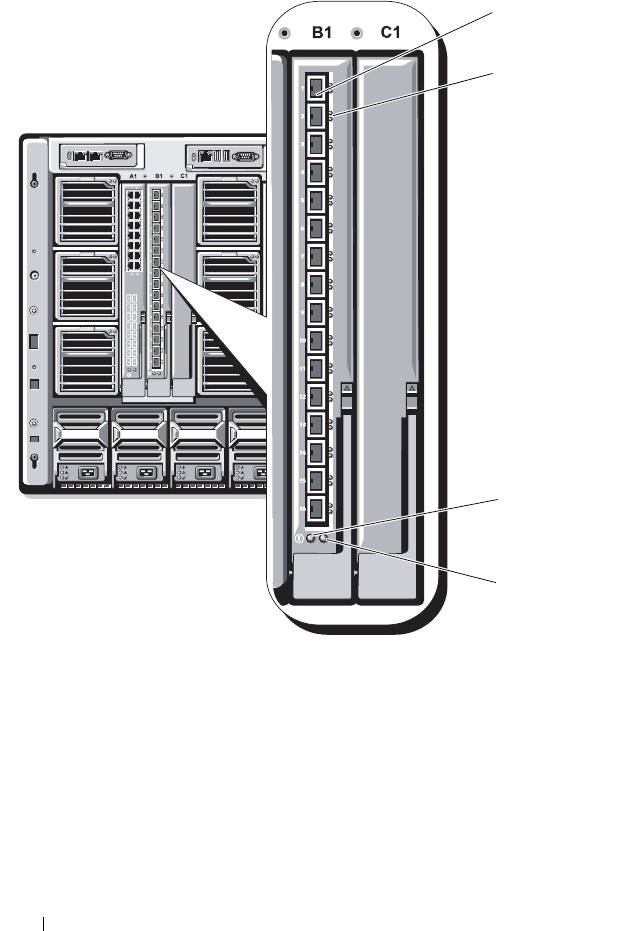
Figure 3-19. 10 Gb Ethernet Pass-Through I/O Module
1 SFP+ cages (16) 2 green/amber indicators (two per
port)
3 power indicator 4 status/identification indicator
82 Configuring the I/O Modules
1
2
3
4
book.book Page 82 Wednesday, March 9, 2011 3:11 PM

book.book Page 83 Wednesday, March 9, 2011 3:11 PM
10/100/1000 Mb Ethernet Pass-Through I/O Module
The Ethernet pass-through module supports 10/100/1000 Mb connections
and provides a direct connection between the optional internal Ethernet
mezzanine card in the blade and an external Ethernet device. The Ethernet
pass-through modules are hot-swappable and may be installed in any of the
three Fabrics.
Configuring the I/O Modules 83
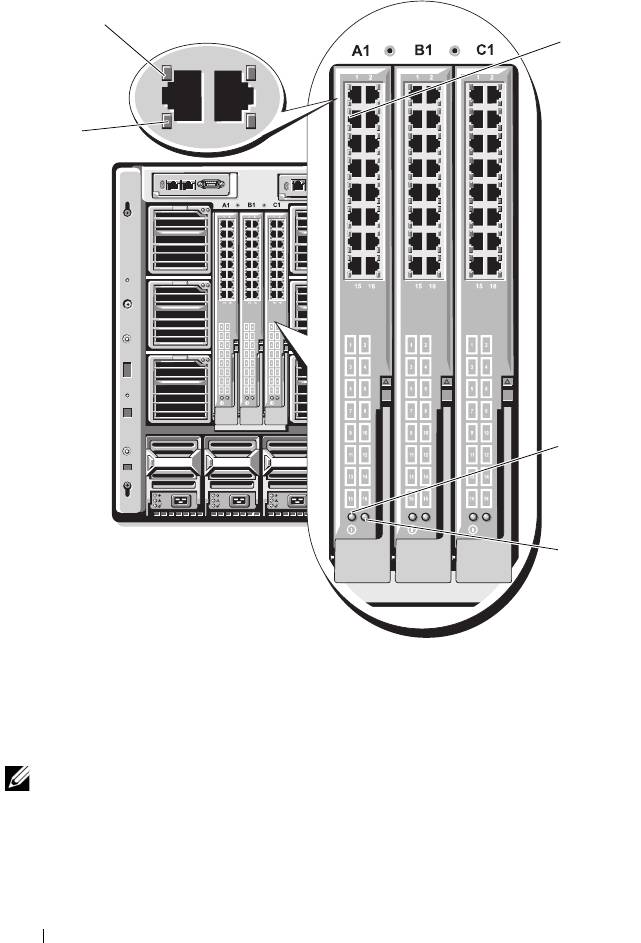
Figure 3-20. Ethernet Pass-Through Module
1 link indicator (16) 2 RJ45 Ethernet connector (16)
3 power indicator 4 status/identification indicator
5 activity indicator (16)
NOTE: Connectors on the Ethernet pass-through module correspond directly to the
blade number. For example, blade 5 is connected to port 5 on the Ethernet pass-
through module. Integrated network adapter 1 maps to I/O slot A1. Integrated
network adapter 2 maps to I/O slot A2.
84 Configuring the I/O Modules
1
2
5
3
4
book.book Page 84 Wednesday, March 9, 2011 3:11 PM

book.book Page 85 Wednesday, March 9, 2011 3:11 PM
4G Fibre Channel Pass-Through I/O Module
The 4G Fibre Channel pass-through module provides a bypass connection
between a Fibre Channel mezzanine card in the blade and optical transceivers.
The bypass connection enables a direct connection to a Fibre Channel switch
or a storage array. The 16 pass-through ports on this module can negotiate
speeds of 1, 2, or 4 Gbps. The 4G Fibre Channel pass-through module is
hot-swappable, and may be installed in Fabric B or Fabric C.
NOTE: To ensure proper functionality, use only the Short Wave Small Form Factor
Pluggable (SFP) transceivers provided with this module.
Configuring the I/O Modules 85
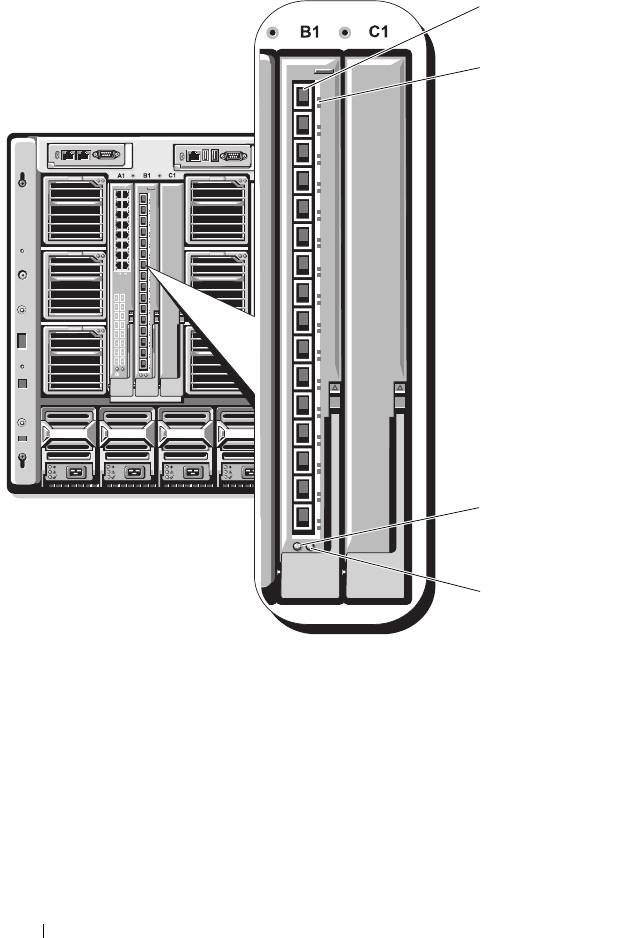
Figure 3-21. 4G Fibre Channel Pass-Through Module
1 SFP Fibre Channel connector (16) 2 Fibre Channel green/amber
indicators (two per port)
3 power indicator 4 status/identification indicator
86 Configuring the I/O Modules
1
2
3
4
book.book Page 86 Wednesday, March 9, 2011 3:11 PM
