
Dell POWEREDGE M1000E – страница 4
Инструкция к Компьютерным аксессуарам Dell POWEREDGE M1000E
Оглавление

book.book Page 61 Wednesday, March 9, 2011 3:11 PM
Cisco Catalyst Ethernet Switch I/O Modules
Your system supports three Cisco Catalyst Blade Switch (CBS) versions:
• The Cisco 3130G-S switch includes four
10/100/1000 Mb Ethernet uplink
ports and two Stackwise Plus ports.
• The Cisco CBS 3130X-S switch includes four
10/100/1000 Mb Ethernet
uplink ports,
two 10 Gb uplink ports,
and two Stackwise Plus ports.
• The Cisco CBS 3032 switch includes four
10/100/1000 Mb Ethernet
uplink ports.
The two option bays support the following module options:
• Cisco X2 10 Gb transceiver modules (CBS 3130X-S only)
• Cisco TwinGig converter modules
All three switches include an RJ-45 console connector for switch
management. Sixteen internal Gb Ethernet connectors link to the blades in
the enclosure.
For additional information about the Cisco CBS Ethernet switch modules,
see the documentation that shipped with the module.
Configuring the I/O Modules 61
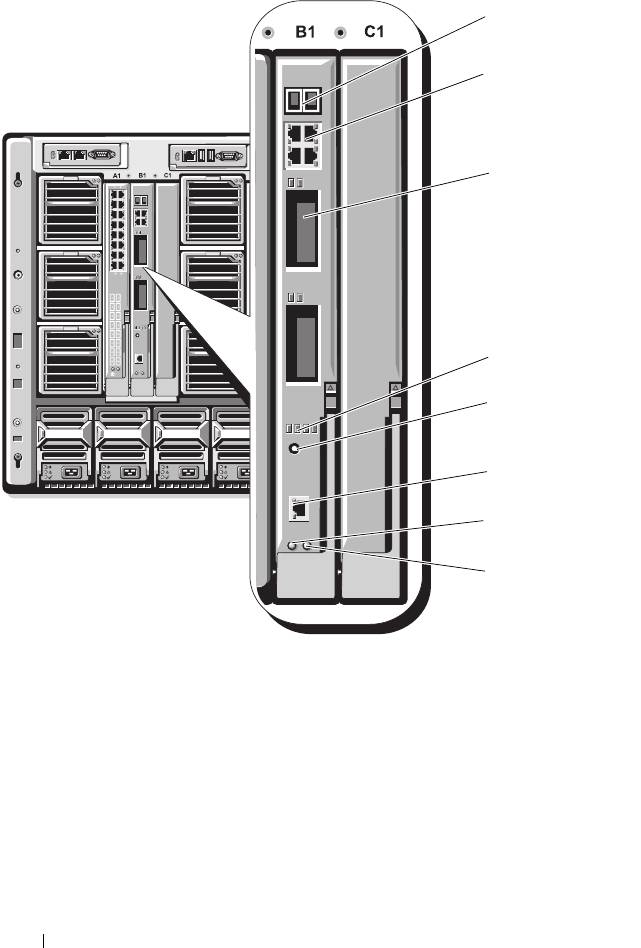
Figure 3-9. Cisco Catalyst Ethernet Switch Module Features
1 Stackwise Plus connectors (not
2 10/100/1000 Mb Ethernet
enabled in CBS 3032)
connectors (4)
3 option bays (2) 4 Cisco status indicators
5 mode button 6 console port for switch
management
7 power indicator 8 status/identification indicator
62 Configuring the I/O Modules
1
2
3
4
5
6
7
8
book.book Page 62 Wednesday, March 9, 2011 3:11 PM

book.book Page 63 Wednesday, March 9, 2011 3:11 PM
PowerConnect M6220 Ethernet Switch I/O Module
The PowerConnect M6220 Ethernet switch module includes four external
10/100/1000 Mbps Ethernet connectors and one USB type A form factor serial
connector. Two option bays support the following modules:
• A resilient stacking module with 2 x 24 Gb stacking ports
• A 10 Gb Ethernet module with two 10 Gb optical XFP uplinks
• A 10 Gb Ethernet module with two copper CX4 uplinks
• A 10 Gb Ethernet module with two copper 10GBASE-T uplinks
• A 10 Gb Ethernet module with two SFP+ (optical or direct-attach copper)
uplinks
Installing two optional modules provides additional stacking and redundancy
support. Sixteen internal Gb Ethernet connectors link to the blades in the
enclosure.
For additional information about the PowerConnect M6220 Ethernet switch
module, see the documentation that shipped with the module.
Configuring the I/O Modules 63
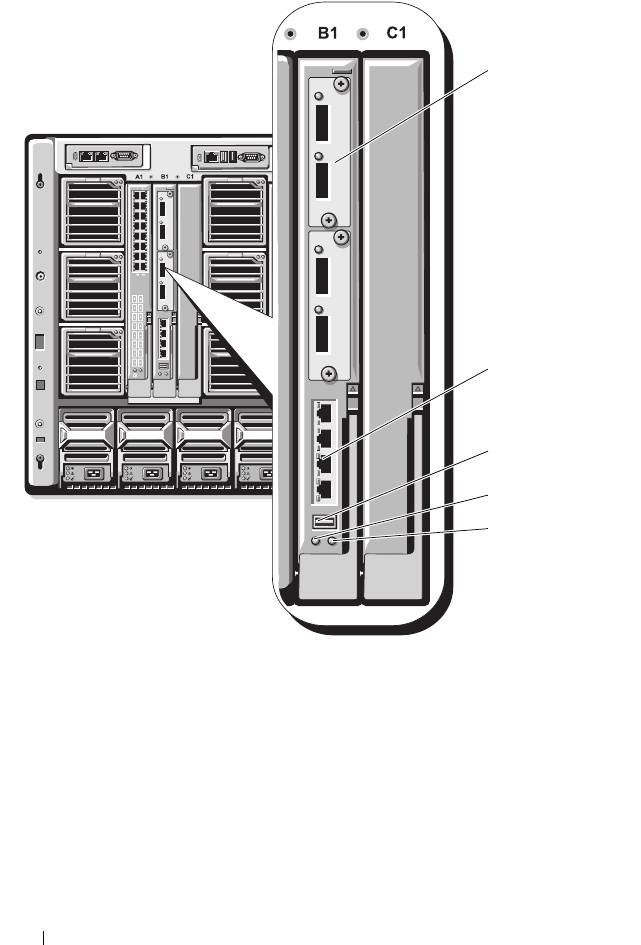
Figure 3-10. PowerConnect M6220 Ethernet Switch Module Features
1 optional module (2) (dual 10 Gb
2 standard 10/100/1000 Mb Ethernet
Ethernet uplink module shown)
connectors (4)
3 serial connector (USB type-A form
4 power indicator
factor)
5 status/identification indicator
64 Configuring the I/O Modules
1
2
3
4
5
book.book Page 64 Wednesday, March 9, 2011 3:11 PM

book.book Page 65 Wednesday, March 9, 2011 3:11 PM
PowerConnect M6348 1 Gb Ethernet Switch I/O Module
The PowerConnect M6348 is a hot-swappable 48-port 1 Gb Ethernet switch.
While 16 ports are external uplink ports, the remaining 32 internal ports
provide connectivity to the blades within the enclosure with a maximum
bandwidth of 1 Gbps each. The PowerConnect M6348 switch also supports:
• Two integrated 10 Gb Ethernet SFP+ connectors
• Two integrated CX4 connectors for stacking or 10 Gb uplinks
• One console management connector
It is recommended that you use the PowerConnect M6348 switch with
quad-port mezzanine cards for maximum functionality. The quad-port
mezzanine cards and the PowerConnect M6348 Ethernet switch enable an
increased bandwidth (two 1 Gbps lanes), higher port density, and server
module consolidation.
Configuring the I/O Modules 65
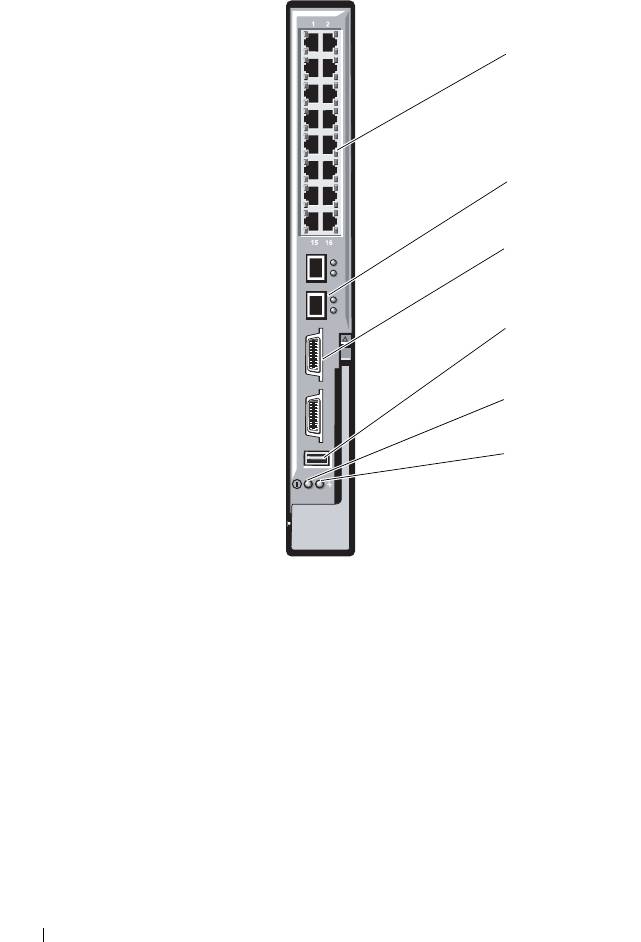
Figure 3-11. PowerConnect M6348 Switch Module
1 standard 10/100/1000 Mb
2 SFP+ connectors (2)
Ethernet connectors (16)
3 CX4 stacking connectors (2) 4 console management connector
5 power indicator 6 status/identification indicator
66 Configuring the I/O Modules
1
2
3
4
5
6
book.book Page 66 Wednesday, March 9, 2011 3:11 PM

book.book Page 67 Wednesday, March 9, 2011 3:11 PM
PowerConnect M8024 10 Gb Ethernet Switch I/O Module
The PowerConnect M8024 switch module incorporates two optional bays
that support the following modules:
• A 10 Gb Ethernet module with four optical SFP+ connectors
• A 10 Gb Ethernet module with three copper CX4 uplinks
• A 10 Gb Ethernet module with two copper 10GBASE-T uplinks
The modules can be used in any combination and are sold separately.
You can initially configure the switch using either of two methods:
• Connect an external management system to the switch using an optional
USB type-A form factor serial cable, and configure the switch using a
terminal application.
• Use the iKVM CMC console (“17th blade”) and the
connect switch-
n
CMC CLI command. For more information, see the CMC
User’s Guide
.
Once an IP address is assigned to the management VLAN or interface and the
switch is connected to a management network, both Telnet and http are
available through the network.
Configuring the I/O Modules 67
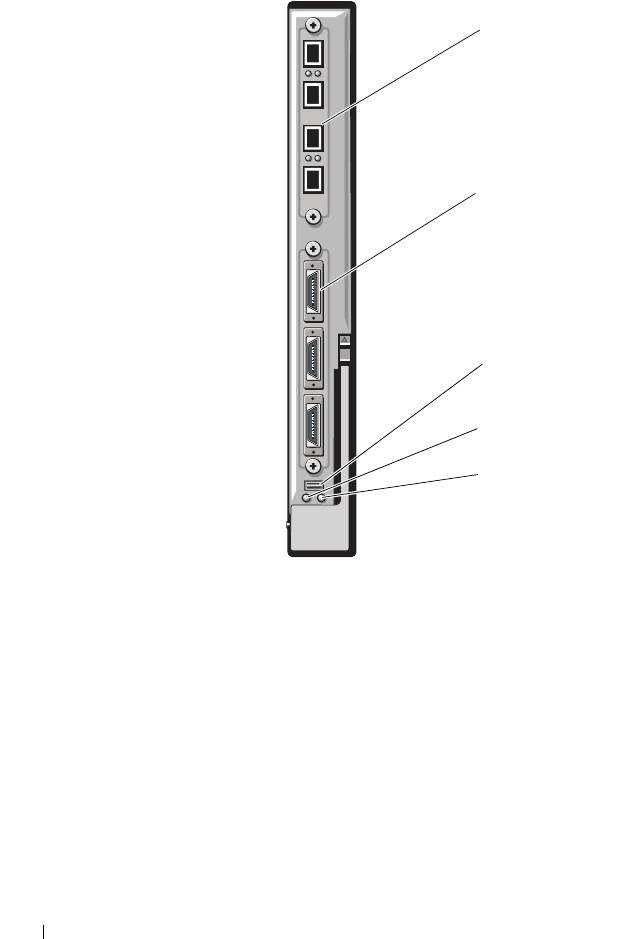
Figure 3-12. PowerConnect M8024 Switch Module
1 optional module with four SFP+
2 optional module with three CX4
ports
ports
3 serial connector for optional USB
4 power indicator
type-A form-factor cable
5 status/identification indicator
68 Configuring the I/O Modules
1
2
3
4
5
book.book Page 68 Wednesday, March 9, 2011 3:11 PM

book.book Page 69 Wednesday, March 9, 2011 3:11 PM
Brocade M4424 SAN I/O Module
The Brocade M4424 SAN I/O module includes eight external autosensing
Fibre Channel ports (four ports are enabled in the standard configuration and
four additional ports may be enabled as an optional upgrade), 16 internal
ports, and one serial port with an RJ-45 connector. The external Fibre
Channel ports operate at 1 Gb/sec, 2 Gb/sec, or 4 Gb/sec. The Fibre Channel
switch module is hot-swappable, and may be installed in Fabric B or Fabric C.
NOTE: The Fibre Channel switch module includes Short Wave Small Form Factor
Pluggable (SFP) optical transceivers. To ensure proper functionality, use only SFPs
provided with this module.
Configuring the I/O Modules 69
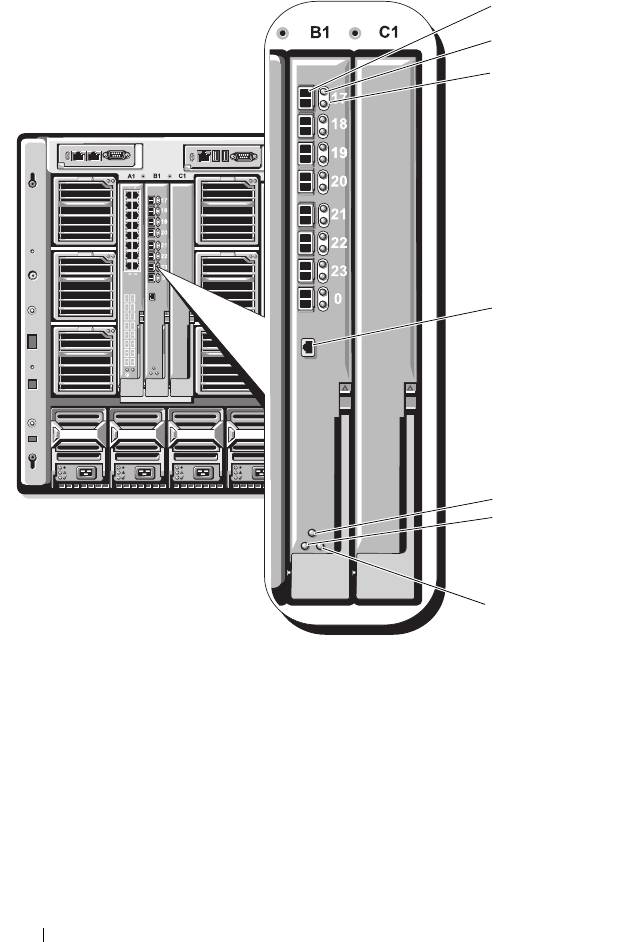
Figure 3-13. Brocade M4424 SAN I/O Module
1 Fibre Channel port (8) 2 Fibre Channel port status
indicator (8)
3 Fibre Channel port speed
4 serial port (RJ-45 connector)
indicator (8)
5 module status indicator 6 power indicator
7 status/identification indicator
70 Configuring the I/O Modules
1
2
3
4
5
6
7
book.book Page 70 Wednesday, March 9, 2011 3:11 PM

book.book Page 71 Wednesday, March 9, 2011 3:11 PM
Brocade M5424 FC8 I/O Module
The Brocade M5424 I/O module includes eight external autosensing Fibre
Channel ports (four ports are enabled in the standard configuration and four
additional ports may be enabled as an optional upgrade), 16 internal ports,
and one serial port with an RJ-45 connector. The external Fibre Channel ports
operate at 8 Gb/sec, 4 Gb/sec, or 2 Gb/sec.
NOTE: CMC firmware version 1.3 is required to support FC8 mezzanine cards and
I/O modules.
NOTE: This Fibre Channel switch module includes Short Wave Small Form Factor
Pluggable (SFP) optical transceivers. To ensure proper functionality, use only SFPs
provided with this module.
Configuring the I/O Modules 71
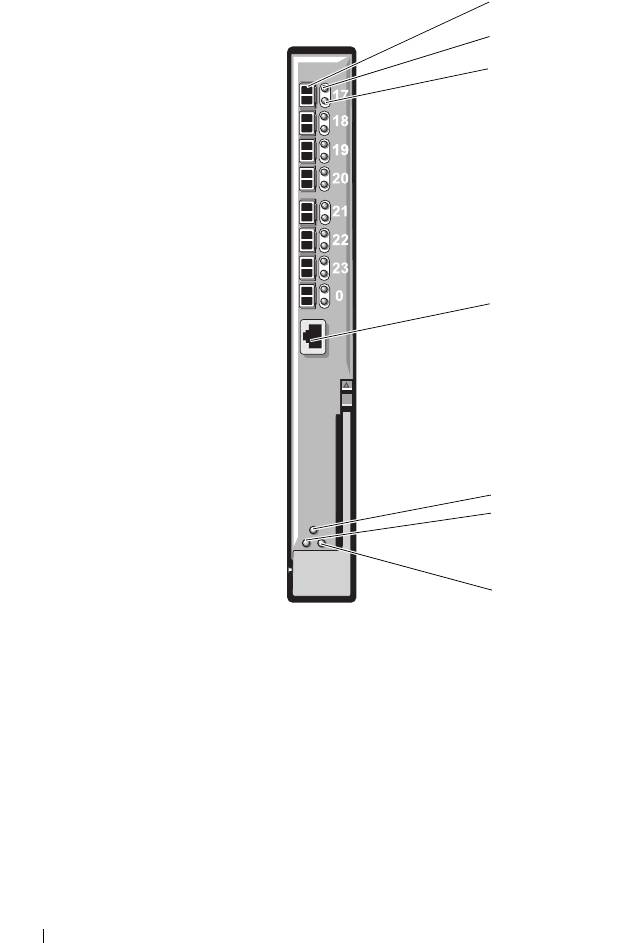
Figure 3-14. Brocade M5424 FC8 I/O Module
1 Fibre Channel port (8) 2 Fibre Channel port status
indicator (8)
3 Fibre Channel port speed
4 serial port (RJ-45 connector)
indicator (8)
5 module status indicator 6 power indicator
7 status/identification indicator
72 Configuring the I/O Modules
1
2
3
4
5
6
7
book.book Page 72 Wednesday, March 9, 2011 3:11 PM

book.book Page 73 Wednesday, March 9, 2011 3:11 PM
Dell 8/4 Gbps FC SAN Module
The Dell 8/4 Gbps FC SAN module (see Figure 3-15) includes 24 total
autosensing Fibre Channel ports (12 ports are enabled in the standard
configuration and 12 additional ports may be enabled as an optional upgrade)
and one serial port with an RJ-45 connector. The internal Fibre Channel ports
operate at 8 Gb/sec or 4 Gb/sec. The external Fibre Channel ports operate at
8 Gb/sec, 4 Gb/sec, or 2 Gb/sec.
NOTE: CMC firmware version 1.3 is required to support FC8 mezzanine cards and
I/O modules.
NOTE: This Fibre Channel switch module includes Short Wave Small Form Factor
Pluggable (SFP) optical transceivers. To ensure proper functionality, use only SFPs
provided with this module.
Configuring the I/O Modules 73
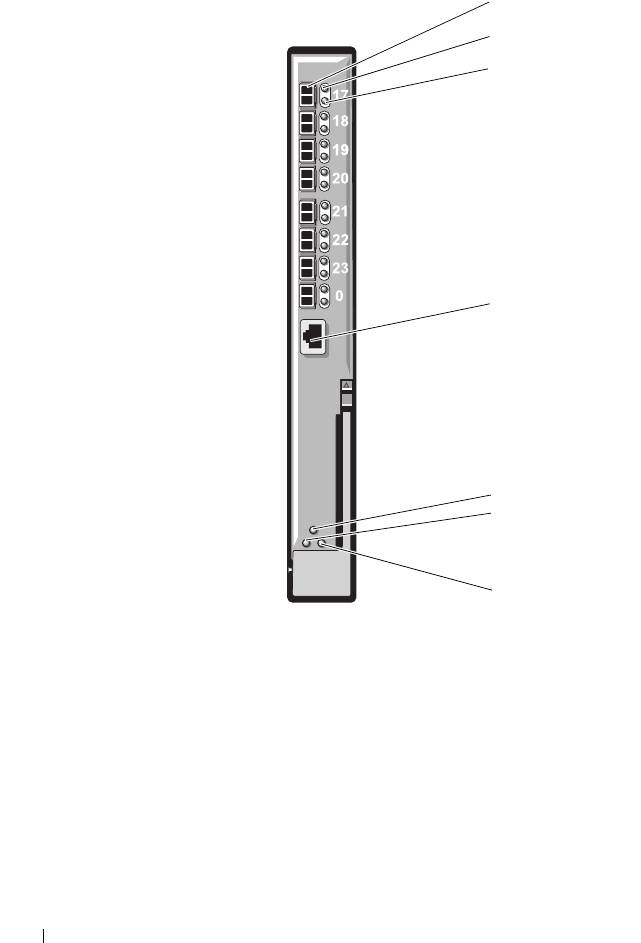
Figure 3-15. Dell 8/4 Gbps FC SAN Module
1 Fibre Channel port (8) 2 Fibre Channel port status
indicator (8)
3 Fibre Channel port speed
4 serial port (RJ-45 connector)
indicator (8)
5 module status indicator 6 power indicator
7 status/identification indicator
74 Configuring the I/O Modules
1
2
3
4
5
6
7
book.book Page 74 Wednesday, March 9, 2011 3:11 PM

book.book Page 75 Wednesday, March 9, 2011 3:11 PM
Pass-Through Modules
Dell 10 GbE KR Pass-Through I/O Module
The 10 GbE KR pass-through module supports 10 Gb connections and
provides a direct connection between the optional internal Ethernet KR
mezzanine card or KR network daughter card in the blade and an external
Ethernet device. This module has 16 external SFP+ ports on the front panel
and sixteen 10 GbE KR internal ports through the backplane. This module
enables you to use optical SFP+ (short reach or long reach) and direct-attached
copper (DCA) SFP+ modules.
The Ethernet pass-through module is hot-swappable and may be installed in
Fabric A, B, or C. The pass-through module does not support 1G mezzanine
or network daughter cards in blades.
Configuring the I/O Modules 75
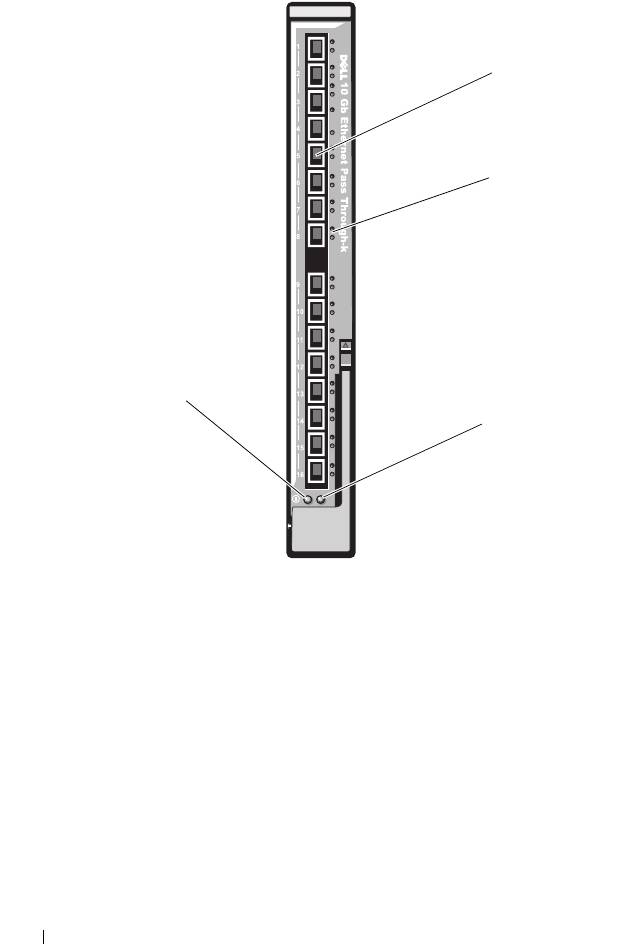
Figure 3-16. Dell 10 GbE KR Pass-Through I/O Module
1 SFP+ ports (16) 2 green/amber indicators (two per
port)
3 status/identification indicator 4 power indicator
76 Configuring the I/O Modules
1
2
4
3
book.book Page 76 Wednesday, March 9, 2011 3:11 PM

book.book Page 77 Wednesday, March 9, 2011 3:11 PM
Dell 8/4 Gbps Fibre Channel Pass-Through I/O Module
The 8G Fibre Channel pass-through module provides a bypass connection
between a Fibre Channel mezzanine card in the blade and optical
transceivers. The bypass connection enables a direct connection to a Fibre
Channel switch or a storage array. The 16 pass-through ports on this module
can negotiate speeds of 2, 4, and 8 Gbps. The 8G Fibre Channel pass-through
module is hot-swappable and may be installed in Fabric B or Fabric C.
NOTE: To ensure proper functionality, use only the Short Wave Small Form Factor
Pluggable (SFP) transceivers provided with this module.
Configuring the I/O Modules 77
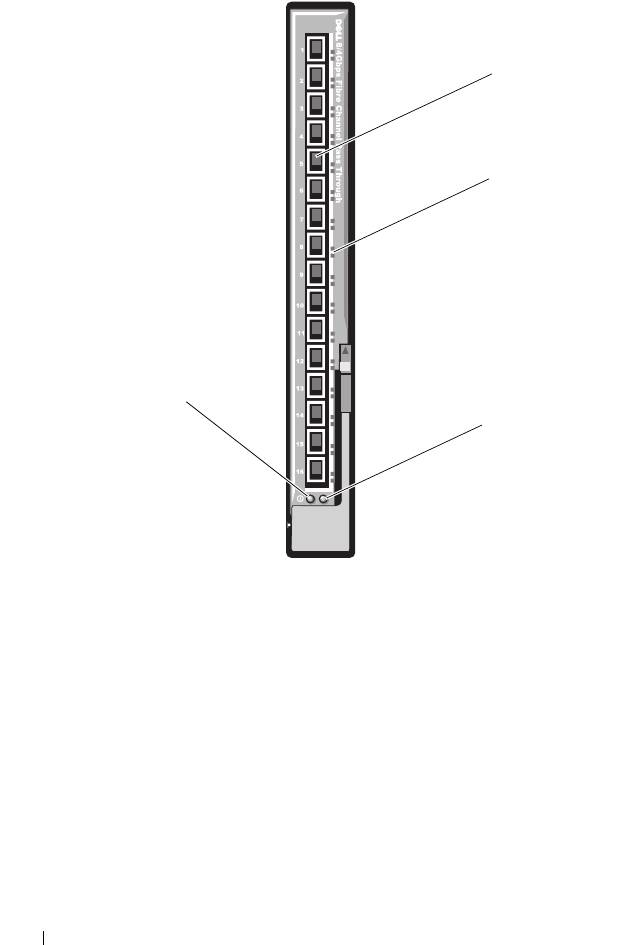
Figure 3-17. Dell 8/4 Gbps Fibre Channel Pass-Through I/O Module
1 Fibre Channel ports (16) 2 port status indicators
3 status/identification indicator 4 power indicator
78 Configuring the I/O Modules
1
2
4
3
book.book Page 78 Wednesday, March 9, 2011 3:11 PM

book.book Page 79 Wednesday, March 9, 2011 3:11 PM
10 Gb Ethernet Pass-Through Module II
The Dell 10 Gb Ethernet pass-through module II supports 10 Gb connections
and provides a direct connection between the optional internal Ethernet
mezzanine card in the blade and an external Ethernet device. The Ethernet
pass-through modules are hot-swappable and may be installed in Fabric B or
Fabric C.
The 10 Gb Ethernet pass-through module II enables you to use optical SFP+
(short reach or long reach) and direct-attached copper (DCA) SFP+
modules. The Ethernet pass-through module does not support 1G mezzanine
or network daughter cards in blades.
Configuring the I/O Modules 79
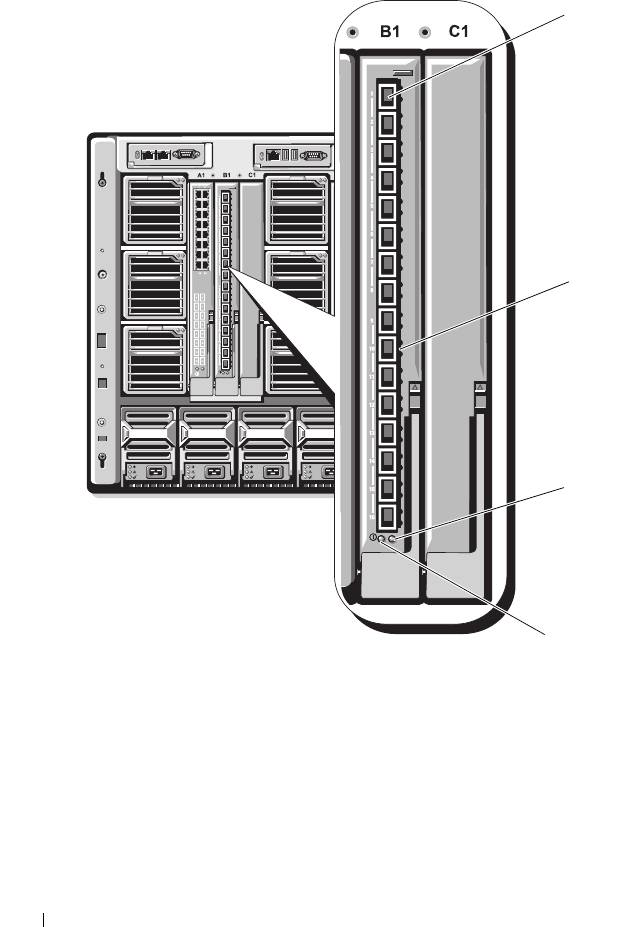
Figure 3-18. 10 Gb Ethernet Pass-Through Module II
1 SFP+ cages (16) 2 green/amber indicators (two per
port)
3 status/identification indicator 4 power indicator
80 Configuring the I/O Modules
1
2
3
4
book.book Page 80 Wednesday, March 9, 2011 3:11 PM
