
Sony α6500 ILCE-6500 – page 3
Manual for Sony α6500 ILCE-6500
Table of contents
- Check out the Help Guide!
- Owner’s Record Battery pack WARNING
- Notice Power Cord
- Notes on using your camera No compensation for damaged content or recording failure Screen language Notes on recording/playback Notes on the monitor, electronic viewfinder, lens, and image sensor Notes on handling the product
- Notes on using lenses and accessories Notes on the Multi Interface Shoe Notes on shooting with the viewfinder
- Notes on recording for long periods of time or recording 4K movies Notes on continuous shooting
- How to turn off wireless network functions (Wi-Fi, NFC and Bluetooth function, etc.) temporarily Notes on wireless LAN Notes on playing back movies on other devices Notes on security when using wireless LAN products Warning on copyright On the data specifications described in this manual
- Checking the camera and the supplied items
- Identifying parts When the lens is removed Multi Interface Shoe*
-
- Eye sensor Viewfinder Eyepiece cup Attaching/removing the eyepiece cup
- Monitor (For touch operation: Touch panel/Touch pad) (N mark)
- Battery/memory card cover Memory card slot Battery lock lever Battery insertion slot Connection plate cover Tripod socket hole Access lamp
- Basic operations Using the control wheel
- Using the Fn (Function) button To adjust settings from the dedicated setting screens
- Using the AF/MF/AEL switch lever
- Startup guide Step 1: Inserting the battery pack/memory card into the camera
- To remove the battery pack To remove the memory card
- Step 2: Charging the battery pack while it is inserted in the camera
- Step 3: Attaching a lens
- To remove the lens
- Step 4: Setting the language and the clock
- Step 5: Shooting images in auto mode
- To shoot movies To play back images To delete displayed image To shoot images in various shooting modes
- Using the Wi-Fi / One-touch (NFC) / Bluetooth functions PlayMemories Mobile Recording location information to captured images
- Introduction to computer software / PlayMemories Camera Apps PlayMemories Home
- Image Data Converter Remote Camera Control PlayMemories Camera Apps
- List of MENU items (Camera Settings1) Quality/Image Size Shoot Mode/Drive
- AF
- Exposure Flash Color/WB/Img. Processing White Balance Priority Set in AWB
- DRO/Auto HDR Creative Style Picture Effect Picture Profile Soft Skin Effect Focus Assist Face Detection/Shoot Assist
- Auto Obj. Framing (Camera Settings2) Movie
- Shutter/SteadyShot Zoom Display/Auto Review DISP Button FINDER/MONITOR Finder Frame Rate Zebra Grid Line Exposure Set. Guide
- Live View Display Auto Review Custom Operation (Wireless) Send to Smartphone Send to Computer View on TV
- One-touch(NFC) Airplane Mode Wi-Fi Settings Bluetooth Settings Loc. Info. Link Set. Edit Device Name Reset Network Set. (Application) (Playback) Delete View Mode Image Index Display Rotation Slide Show
- Rotate Enlarge Image Protect Specify Printing Photo Capture (Setup)
- NTSC/PAL Selector Cleaning Mode Touch Operation Touch Pad (vertical) Touch Pad Area Set. Demo Mode TC/UB Settings Remote Ctrl HDMI Settings 4K Output Sel. USB Connection USB LUN Setting USB Power Supply PC Remote Settings Language
- Date/Time Setup
- Specifications Battery life and number of recordable images
- Memory cards that can be used
- Number of recordable images
- The number of images that can be recorded on a memory card
- Recordable movie times File Format Record Setting 8 GB 16 GB 32 GB 64 GB
- File Format Record Setting 8 GB 16 GB 32 GB 64 GB
- Notes on continuous movie recording
- Specifications Camera
- Rechargeable battery pack NP-FW50
- On focal length Trademarks
- On GNU GPL/LGPL applied software
C:\4690670411ILCE6500CEC\01GB-ILCE6500CEC\100MEN.indd
2016/09/30 16:25
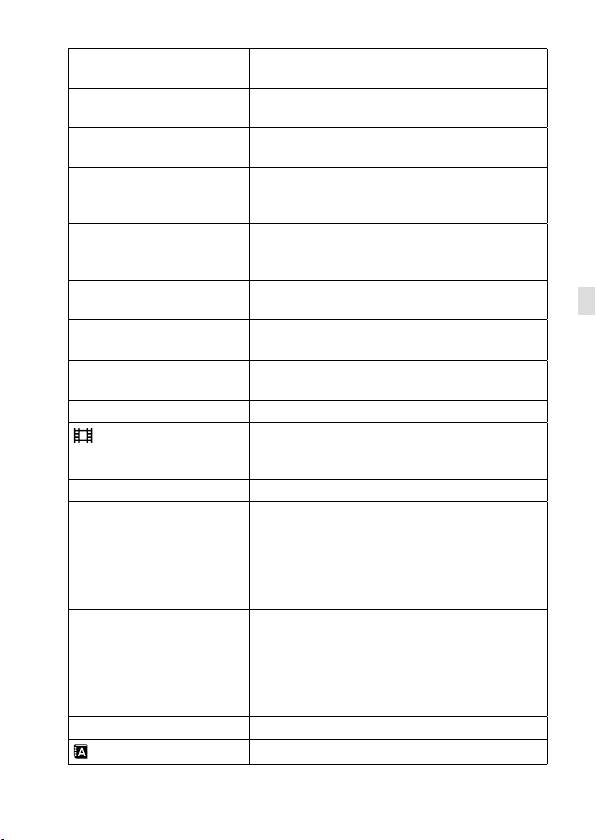
NTSC/PAL Selector
*1
Changes the TV format of the device so that
you can shoot in a different movie format.
Cleaning Mode
Starts the cleaning mode to clean the image
sensor.
Touch Operation
Sets whether or not to activate the touch
operation of the monitor.
Touch Pad (vertical)
Sets whether to operate the camera using the
touch pad when you use the viewfinder in the
vertical position.
Touch Pad Area Set.
Sets the area to be used in the touch
pad operation at the time of shooting by
viewfinder.
Demo Mode
Sets demonstration playback of movies to on
GB
or off.
TC/UB Settings
Sets the time code (TC) and user bit (UB).
* This function is for skilled movie creators.
Remote Ctrl
Sets whether to use the infrared remote
control.
HDMI Settings
Sets the HDMI settings.
4K Output Sel.
Sets how to record and output 4K movies via
HDMI when the camera is connected to an
external recorder/player that supports 4K.
USB Connection
Sets the USB connection method.
USB LUN Setting
Enhances compatibility by limiting the
functions of USB connection. Set to [Multi]
in normal conditions and to [Single] only
when the connection between the camera
and a computer or AV component cannot be
established.
USB Power Supply
Sets whether to supply power via USB
connection when the camera is connected to
a computer or USB device using a micro USB
cable. If you use the supplied AC Adaptor,
power will be supplied regardless of whether
this setting is on or off.
PC Remote Settings
Controls the PC remote shooting settings.
Language
Selects the language.
GB
41
ILCE-6500
4-690-670-41(1)
C:\4690670411ILCE6500CEC\01GB-ILCE6500CEC\100MEN.indd
2016/09/30 16:25
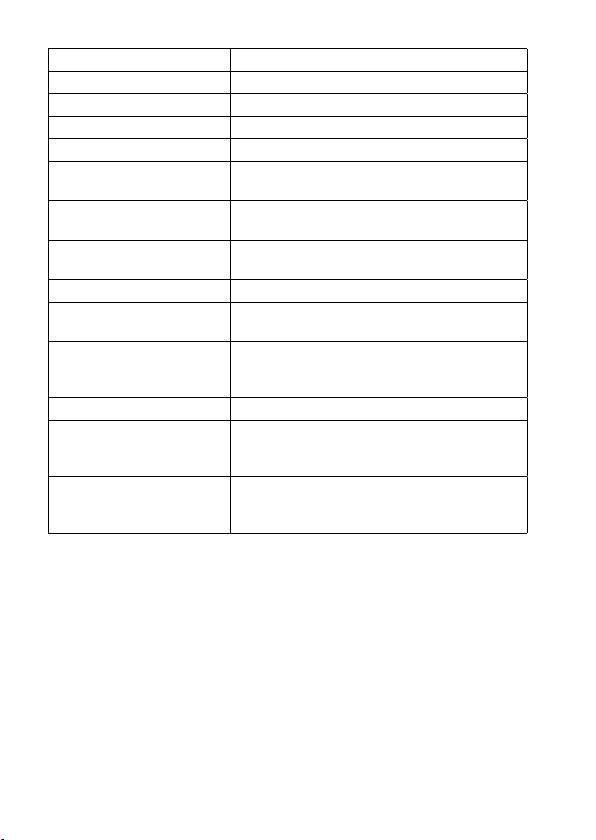
Date/Time Setup
Sets the date, time, and daylight savings.
Area Setting
Sets the location of use.
Copyright Info
Sets copyright information for still images.
Format
Formats the memory card.
File Number
Sets the method used to assign file numbers.
Set File Name
Changes the first 3 characters of the file names
for still images.
Select REC Folder
Changes the folder selected for storing still
images and movies (MP4).
New Folder
Creates a new folder for storing still images
and movies (MP4).
Folder Name
Sets the folder format for still images.
Recover Image DB
Recovers the image database file and enables
recording and playback.
Display Media Info.
Displays the remaining recording time of
movies and the recordable number of still
images on the memory card.
Version
Displays the camera software version.
Certification Logo
*2
Displays certification information for the
camera (only some of the certification logos are
displayed).
Setting Reset
Restores settings to their defaults. Select
[Initialize] to restore all settings to their default
values.
*
1
If you change this item, you will need to format the memory card for
compatibility with the PAL or NTSC system. Also, note that it may not be
possible to play back movies recorded for the NTSC system on PAL system
TVs.
*
2
Overseas models only.
GB
42
ILCE-6500
4-690-670-41(1)
C:\4690670411ILCE6500CEC\01GB-ILCE6500CEC\120OTH.indd
2016/09/30 16:25
Specifications
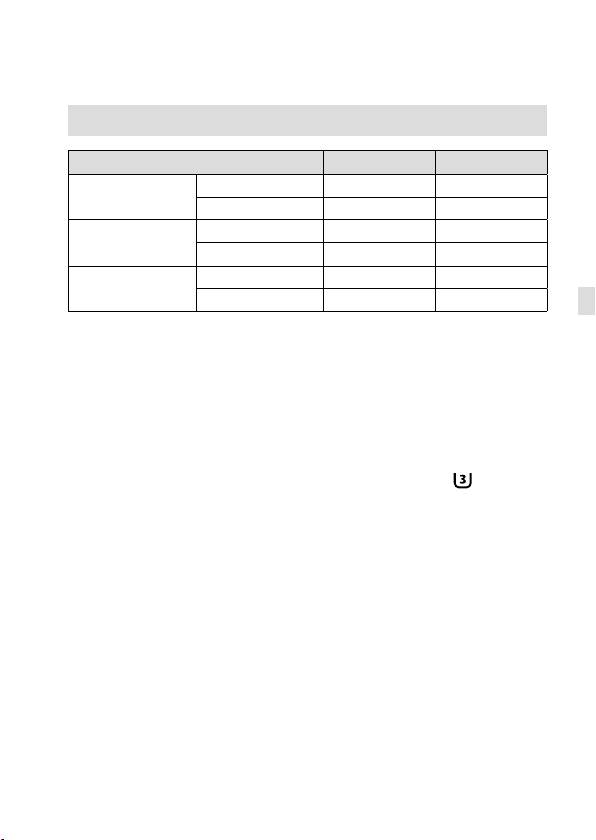
Battery life and number of recordable images
Battery life Number of images
Shooting
Screen mode
― Approx. 350
(still images)
Viewfinder mode
― Approx. 310
Actual shooting
Screen mode
Approx. 70 min. ―
(movies)
Viewfinder mode
Approx. 65 min. ―
Continuous shooting
Screen mode
Approx. 105 min. ―
(movies)
Viewfinder mode
Approx. 105 min. ―
GB
• The above estimates for battery life and number of recordable images
apply when the battery pack has been fully charged. The battery life
and number of images may decrease depending on the conditions of
use.
• The battery life and number of recordable images are estimates based
on shooting under the following conditions:
– Using the battery pack at an ambient temperature of 25°C (77°F).
– Using an E PZ 16 - 50mm F3.5 - 5.6 OSS lens (sold separately)
– Using a Sony SDXC memory card of UHS Speed Class 3 (
)
(sold separately)
– [Viewfinder Bright.]: [Manual] [±0]
– [Monitor Brightness]: [Manual] [±0]
– [Display Quality]: [Standard]
• The numbers for “Shooting (still images)” are based on the CIPA
standard and shooting under the following conditions:
(CIPA: Camera & Imaging Products Association)
– DISP: [Display All Info.]
– [Focus Mode]: [Automatic AF]
– One picture is taken every 30 seconds.
– The flash strobes once for every two pictures.
– The power is turned on and off once every ten times.
GB
43
ILCE-6500
4-690-670-41(1)
C:\4690670411ILCE6500CEC\01GB-ILCE6500CEC\120OTH.indd
2016/09/30 16:25
• The number of minutes for movie shooting is based on the CIPA
standard and shooting under the following conditions:
– The image quality is set to XAVC S HD 60p 50M
/50p 50M .
– Actual shooting (movies): Battery life based on repeatedly shooting,
zooming, shooting stand-by, turning on/off, etc.
– Continuous shooting (movies): Battery life based on non-stop
shooting until the limit (29 minutes) has been reached, and then
continued by pressing the MOVIE (Movie) button again. Other
functions, such as zooming, are not operated.
Memory cards that can be used
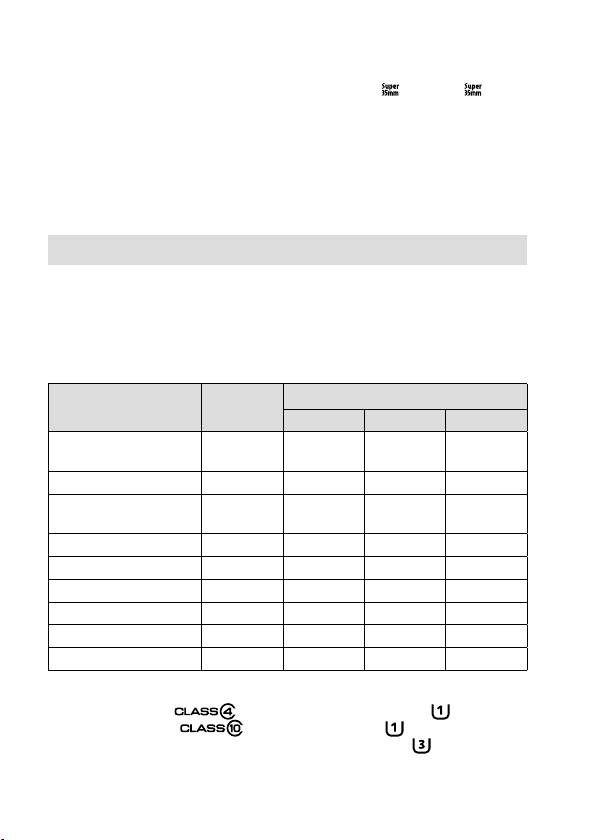
You can use the following types of memory cards with this camera. The
mark indicates that these memory cards can be used for shooting still
images or movies.
When using Memory Stick Micro media or microSD memory cards with
this camera, make sure to use with the appropriate adaptor.
For still
For movies
Memory card
images
MP4 AVCHD XAVC S
Memory Stick PRO Duo
—
(Mark2 only)
(Mark2 only)
Memory Stick PRO-HG Duo
*
1
Memory Stick Micro (M2)
—
(Mark2 only)
(Mark2 only)
SD memory card
*
2
*
2
—
SDHC memory card
*
2
*
2
*
3
SDXC memory card
*
2
*
2
*
3
microSD memory card
*
2
*
2
—
microSDHC memory card
*
2
*
2
*
3
microSDXC memory card
*
2
*
2
*
3
*
1
Movies cannot be recorded in 100 Mbps or more.
*
2
SD Speed Class 4 ( ) or faster, or UHS Speed Class 1 ( ) or faster
*
3
SD Speed Class 10 ( ), or UHS Speed Class 1 ( ) or faster
When recording in 100 Mbps or more, UHS Speed Class 3 (
) is required.
GB
44
ILCE-6500
4-690-670-41(1)

C:\4690670411ILCE6500CEC\01GB-ILCE6500CEC\120OTH.indd
2016/09/30 16:25
Note
• When an SDHC memory card is used to record an XAVC S movie over
extended periods of time, the recorded movies will be divided into files 4GB
in size. The divided files can be handled as a single file by importing them to
a computer using PlayMemories Home.
Number of recordable images
When you insert a memory card into the camera and set the ON/OFF
(Power) switch to “ON,” the number of images that can be recorded
(should you continue to shoot using the current settings) is displayed on
the screen.
Note
GB
• When “0” (the number of recordable images) flashes in orange, the memory
card is full. Replace the memory card with another one, or delete images from
the current memory card.
• When “NO CARD” flashes in orange, it means no memory card has been
inserted. Insert a memory card.
GB
45
ILCE-6500
4-690-670-41(1)
C:\4690670411ILCE6500CEC\01GB-ILCE6500CEC\120OTH.indd
2016/09/30 16:25
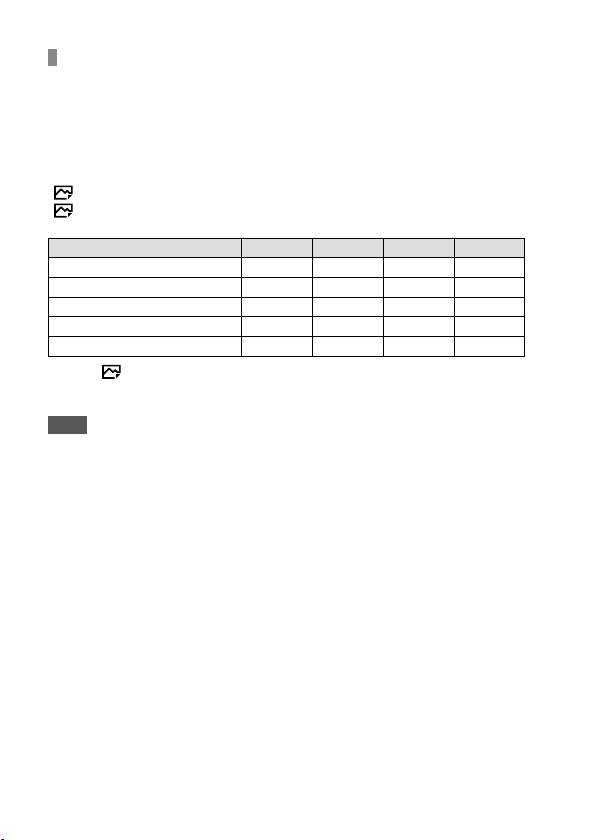
The number of images that can be recorded on a memory
card
The table below shows the approximate number of images that can be
recorded on a memory card formatted with this camera. The values are
defined using Sony standard memory cards for testing. The values may
vary depending on the shooting conditions and the type of memory card
used.
[
Image Size]: [L: 24M]
[
Aspect Ratio]: [3:2]*
(Units: Images)
Quality 8 GB 16 GB 32 GB 64 GB
Standard
1300 2700 5400 10500
Fine
820 1650 3300 6600
Extra fine
405 810 1600 3250
RAW & JPEG
215 435 880 1750
RAW
295 600 1200 2400
* When [
Aspect Ratio] is set to other than [3:2], you can record more images
than the numbers shown in the table above (except when [RAW] is selected).
Note
• Even if the number of recordable images is higher than 9999 images, “9999”
will appear.
• When an image shot with another product is played back on this camera, the
image may not appear in its actual size.
• The numbers shown are when using a Sony memory card.
GB
46
ILCE-6500
4-690-670-41(1)
C:\4690670411ILCE6500CEC\01GB-ILCE6500CEC\120OTH.indd
2016/09/30 16:25
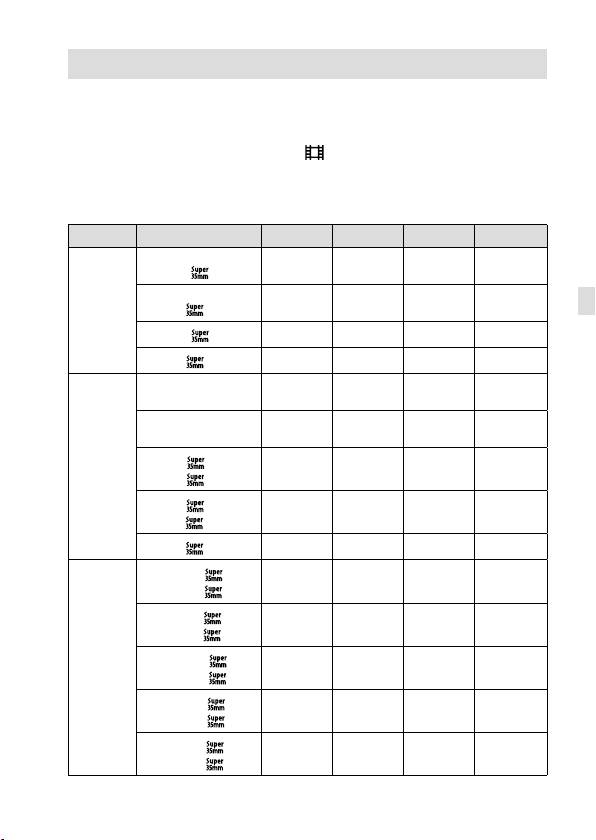
Recordable movie times
The table below shows the approximate total recording times using
a memory card formatted with this camera. The values may vary
depending on the shooting conditions and the type of memory card
used. The recording times for when [
File Format] is set to [XAVC S 4K],
[XAVC S HD], and [AVCHD] are recording times when shooting with
[Dual Video REC] set to [Off].
(h (hour), m (minute))
File Format Record Setting 8 GB 16 GB 32 GB 64 GB
XAVC S 4K
30p 100M/
9m 15m 35m 1h 15m
25p 100M
30p 60M/
15m 30m 1h 2h 5m
GB
25p 60M
24p 100M
*/ –
9m 15m 35m 1h 15m
24p 60M
*/ –
15m 30m 1h 2h 5m
XAVC S HD
120p 100M/
9m 15m 35m 1h 15m
100p 100M
120p 60M/
15m 30m 1h 2h 5m
100p 60M
60p 50M
/
15m 35m 1h 15m 2h 35m
50p 50M
30p 50M
/
15m 35m 1h 15m 2h 35m
25p 50M
24p 50M
*/ –
15m 35m 1h 15m 2h 35m
AVCHD
60i 24M (FX)
/
40m 1h 25m 3h 6h
50i 24M (FX)
60i 17M (FH)
/
55m 2h 4h 5m 8h 15m
50i 17M (FH)
60p 28M (PS)
/
35m 1h 15m 2h 30m 5h 5m
50p 28M (PS)
24p 24M (FX)
/
40m 1h 25m 3h 6h
25p 24M (FX)
24p 17M (FH)
/
55m 2h 4h 5m 8h 15m
25p 17M (FH)
GB
47
ILCE-6500
4-690-670-41(1)
C:\4690670411ILCE6500CEC\01GB-ILCE6500CEC\120OTH.indd
2016/09/30 16:25
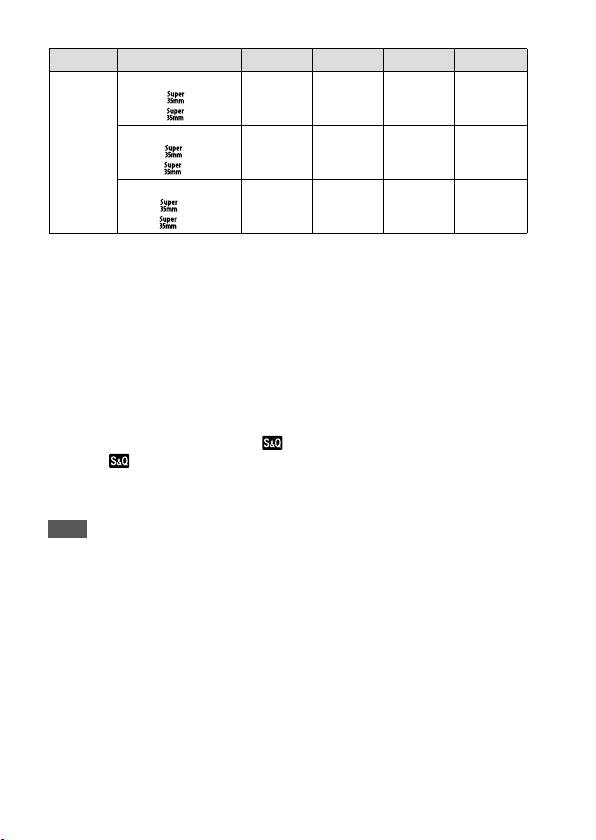
File Format Record Setting 8 GB 16 GB 32 GB 64 GB
MP4
1920×1080
60p 28M
/
35m 1h 15m 2h 35m 5h 20m
50p 28M
1920×1080
30p 16M
/
1h 2h 4h 10m 8h 25m
25p 16M
1280×720
30p 6M
/
2h 35m 5h 20m 10h 55m 22h
25p 6M
* Only when [NTSC/PAL Selector] is set to NTSC
• Continuous shooting is possible for approximately 29 minutes (a
product specification limit). The continuous recordable time may differ
in the following situations:
– When the file format is set to MP4 (28M): Approximately 20 minutes
(limited by file size of 4 GB).
– When shooting slow-motion/quick-motion movies: Recording will
automatically stop when the recorded file reaches approximately
29minutes (the played back movie reaches approximately 29
minutes).
(Recording will automatically stop when the recorded file reaches
approximately 15 minutes if [
Record Setting] is set to [60p/50p]
and [
Frame Rate] is set to [30fps/25fps].)
• The times for slow-motion/quick-motion movies are playback times,
not recording times.
Note
• The recordable time of movies varies because the camera is equipped with
VBR (Variable Bit-Rate), which automatically adjusts image quality depending
on the shooting scene. When you record a fast-moving subject, the image is
clearer but the recordable time is shorter because more memory is required
for recording. The recordable time also varies depending on the shooting
conditions, the subject or the image quality/size settings.
• The times shown are recordable times using a Sony memory card.
GB
48
ILCE-6500
4-690-670-41(1)
C:\4690670411ILCE6500CEC\01GB-ILCE6500CEC\120OTH.indd
2016/09/30 16:25
Notes on continuous movie recording
• It requires a lot of power to perform high quality movie recording
or continuous shooting. Therefore, if you continue to shoot, the
temperature inside the camera will rise, especially that of the image
sensor. In such cases, the camera will turn off automatically because
the surface of the camera is heated to a high temperature that can
affect the quality of the images or the internal mechanism of the
camera.
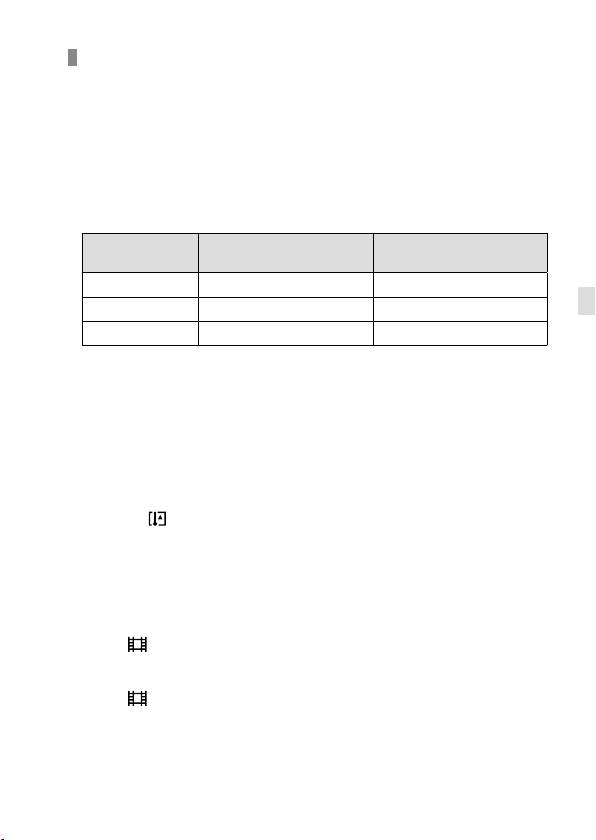
• The following values are the continuous times from when the camera
starts recording until the camera stops recording.
Ambient
Continuous recording time for
Continuous recording time for
temperature
movies (HD)
movies (4K)
20°C (68°F)
Approx. 29min. Approx. 20min.
GB
30°C (86°F)
Approx. 29min. Approx. 20min.
40°C (104°F)
Approx. 29min. Approx. 20min.
[Auto Pwr OFF Temp.]: [Standard]
HD: XAVC S HD (60p 50M/50p 50M, not connected via Wi-Fi)
4K: XAVC S 4K (24p 60M, not connected via Wi-Fi)
• The duration of time available for movie recording varies with the
temperature, file format/record setting for movies, Wi-Fi network
environment, or condition of the camera before you start recording. If
you frequently recompose or shoot images after the power is turned
on, the temperature inside the camera will rise and the recording time
available will be shorter.
• When the
icon appears, the temperature of the camera is too high.
• If the camera stops recording due to the temperature, leave it for some
time with the power turned off. Start recording after the temperature
inside the camera drops fully.
• If you observe the following points, the recording time will be longer.
– Keep the camera out of direct sunlight.
– Turn the camera off when it is not being used.
• When [
File Format] is set to [AVCHD], the file size of movies is
limited to approx. 2GB. If the movie file size reaches approx. 2GB
during recording, a new movie file will be created automatically.
• When [
File Format] is set to [MP4], the file size of movies is limited
to approx. 4GB. If the movie file size reaches approx. 4GB during
recording, recording will stop automatically.
GB
49
ILCE-6500
4-690-670-41(1)

C:\4690670411ILCE6500CEC\01GB-ILCE6500CEC\120OTH.indd
2016/09/30 16:25
Specifications
Metering range
Camera
EV–2 to EV20 (at ISO100 equivalent,
with F2.0 lens)
[System]
ISO sensitivity (Recommended
Camera type
exposure index)
Interchangeable Lens Digital Camera
Still images: AUTO, ISO100 –
Lens
ISO25600 (Extended ISO: Maximum
Sony E-mount lens
ISO51200)
Movies: AUTO, ISO100 – ISO25600
[Image sensor]
equivalent
Image sensor
Exposure compensation
APS-C format (23.5mm × 15.6mm)
±5.0EV (switchable between 1/3 and
CMOS image sensor
1/2EV steps)
Effective pixel number of camera
Approx. 24200000pixels
[Shutter]
Total pixel number of image sensor
Type
Approx. 25000000pixels
Electronically-controlled, vertical-
traverse, focal-plane type
[SteadyShot]
Speed range
System
Still images: 1/4000second to
In-camera sensor shift image
30seconds, BULB
stabilization system
Movies: 1/4000second to
1/4second (1/3 EV step)
[Anti-Dust]
– 1080 60i-compatible device:
System
up to 1/60second in AUTO mode
Charge protection coating on
(up to 1/30second in Auto slow
optical filter and image sensor shift
shutter mode)
mechanism
– 1080 50i-compatible device:
up to 1/50second in AUTO mode
[Auto focus system]
(up to 1/25second in Auto slow
System
shutter mode)
Phase detection system/Contrast
detection system
Flash sync speed
1/160second
Sensitivity range
EV–1 to EV20 (at ISO100 equivalent,
[Recording media]
with F2.0 lens)
Memory Stick PRO Duo media, SD
card
[Exposure control]
Metering method
[Monitor]
1200-segment metering by the
LCD monitor
image sensor
Wide, 7.5cm (3.0type) TFT drive,
touch panel
GB
50
ILCE-6500
4-690-670-41(1)

C:\4690670411ILCE6500CEC\01GB-ILCE6500CEC\120OTH.indd
2016/09/30 16:25
Total number of dots
[Others]
921600dots
Exif Print
Compatible
[Electronic viewfinder]
PRINT Image Matching III
Type
Compatible
Electronic viewfinder
DPOF
Total number of dots
Compatible
2359296dots
Dimensions (CIPA compliant)
Frame coverage
(Approx.)
100%
120.0mm × 66.9mm × 53.3mm
Magnification
(43/4inches × 23/4inches ×
Approx. 1.07×
21/8inches) (W/H/D)
Approx. 0.70× (35mm-format
Mass (CIPA compliant) (Approx.)
equivalent) with 50mm lens at
infinity, –1m
–1
453g (1lb)
(diopter)
(including battery and SD card)
GB
Eye point (CIPA compliant)
410g (14.5oz) (camera only)
Approx. 23mm from the eyepiece,
Operating temperature
approx. 21.4mm from the eyepiece
frame at –1m
–1
0°C to 40°C (32°F to 104°F)
Storage temperature
Diopter Adjustment
–4.0m
–1
to +3.0m
–1
–20°C to +60°C (–4°F to +140°F)
[File format]
[Input/output terminals]
Still image
Multi/Micro USB Terminal*
JPEG compliant (DCF Ver. 2.0, Exif Ver.
Hi-Speed USB (USB 2.0)
2.31, MPF Baseline), RAW (Sony ARW
* Supports Micro USB compatible
2.3 Format)
device.
Movies (XAVC S format)
HDMI
MPEG-4 AVC/H.264 XAVC S ver.1.0
HDMI type D micro jack
format compliant
(Microphone) Terminal
Video: MPEG-4 AVC/H.264
3.5mm Stereo mini jack
Audio: LPCM2ch (48kHz 16bit)
Movie (AVCHD format)
[Power]
AVCHD format Ver. 2.0 compatible
Battery type
Video: MPEG-4 AVC/H.264
Rechargeable battery pack NP-FW50
Audio: Dolby Digital 2ch
Dolby Digital Stereo Creator
Power consumption (while shooting)
When using an
• Manufactured under license from
E PZ 16 – 50 mm F3.5 – 5.6 OSS lens
Dolby Laboratories.
Approx. 2.8W (during shooting with
Movie (MP4 format)
the viewfinder)
Video: MPEG-4 AVC/H.264
Approx. 2.5W (during shooting with
Audio: MPEG-4 AAC-LC 2ch
the monitor)
USB communication
Hi-Speed USB (USB 2.0)
GB
51
ILCE-6500
4-690-670-41(1)

C:\4690670411ILCE6500CEC\01GB-ILCE6500CEC\120OTH.indd
2016/09/30 16:25
[Flash]
Rechargeable battery pack
Flash guide number
NP-FW50
6 (in meters at ISO100)
Nominal voltage
Recycling time
DC 7.2V
Approx. 4seconds
Flash coverage
Design and specifications are subject
Covering 16mm lens (focal length
to change without notice.
that the lens indicates)
Flash compensation
±3.0EV (switchable between 1/3 and
1/2 EV steps)
[Wireless LAN]
Supported format
IEEE802.11b/g/n
Frequency band
2.4GHz
Supported security protocols
WEP/WPA-PSK/WPA2-PSK
Configuration method
Wi-Fi Protected Setup™ (WPS)/
Manual
Access method
Infrastructure mode
[NFC]
Tag type
NFC Forum Type 3 Tag compliant
[Bluetooth communications]
Bluetooth standard Ver. 4.1
Frequency band
2.4GHz
Model No. WW213019
AC Adaptor AC-UUD12/UUE12
Power requirements
AC 100V to 240V, 50Hz/60Hz, 0.2A
Output voltage
DC 5V, 1.5A
GB
52
ILCE-6500
4-690-670-41(1)

C:\4690670411ILCE6500CEC\01GB-ILCE6500CEC\120OTH.indd
2016/09/30 16:25
On focal length
Trademarks
The picture angle of this camera is
• Memory Stick and are
narrower than that of a 35 mm-
trademarks or registered
format camera. You can find the
trademarks of Sony Corporation.
approximate equivalent of the focal
length of a 35 mm-format camera,
• XAVC S and
are registered
and shoot with the same picture
trademarks of Sony Corporation.
angle, by increasing the focal length
• “AVCHD Progressive” and
of your lens by half.
the “AVCHD Progressive”
For example, by using a 50 mm
logotype are trademarks of
lens, you can get the approximate
Panasonic Corporation and
equivalent of a 75 mm lens of a
Sony Corporation.
35mm-format camera.
• Mac is a registered trademark of
Apple Inc. in the United States and
other countries.
• IOS is a registered trademark or
GB
trademark of Cisco Systems, Inc.
• iPhone and iPad are registered
trademarks of Apple Inc. in the
United States and other countries.
• Blu-ray Disc™ and Blu-ray™
are trademarks of the
Blu-ray Disc Association.
• DLNA and DLNA CERTIFIED
are trademarks of
Digital Living Network Alliance.
• Dolby and the double-D symbol are
trademarks of Dolby Laboratories.
• Eye-Fi is a trademark of Eye-Fi, Inc.
• The terms HDMI and HDMI High-
Definition Multimedia Interface,
and the HDMI Logo are trademarks
or registered trademarks of HDMI
Licensing LLC in the United States
and other countries.
• Microsoft and Windows
are registered trademarks
or trademarks of
Microsoft Corporation in the United
States and/or other countries.
• SDXC logo is a trademark of
SD-3C, LLC.
GB
53
ILCE-6500
4-690-670-41(1)
C:\4690670411ILCE6500CEC\01GB-ILCE6500CEC\120OTH.indd
2016/09/30 16:25
• Facebook and the “f” logo
On GNU GPL/LGPL applied
are trademarks or registered
trademarks of Facebook, Inc.
software
The software that is eligible for the
• Android and Google Play
following GNU General Public License
are trademarks or registered
(hereinafter referred to as “GPL”) or
trademarks of Google Inc.
GNU Lesser General Public License
• YouTube and the YouTube logo
(hereinafter referred to as “LGPL”) are
are trademarks or registered
included in the product.
trademarks of Google Inc.
This informs you that you have a
• Wi-Fi, the Wi-Fi logo and
right to have access to, modify,
Wi-Fi Protected Setup are
and redistribute source code for
these software programs under the
registered trademarks or
conditions of the supplied GPL/LGPL.
trademarks of the Wi-Fi Alliance.
Source code is provided on the web.
• The N Mark is a trademark
Use the following URL to download it.
or registered trademark of
http://oss.sony.net/Products/Linux/
NFC Forum, Inc. in the United States
We would prefer you do not contact
and in other countries.
us about the contents of source code.
• The Bluetooth® word mark and
Licenses (in English) are recorded in
logos are registered trademarks
the internal memory of your product.
owned by the Bluetooth SIG, Inc.
Establish a Mass Storage connection
and any use of such marks by
between the product and a computer
Sony Corporation is under license.
to read licenses in the “PMHOME” -
“LICENSE” folder.
• In addition, system and product
names used in this manual are, in
general, trademarks or registered
Additional information on this
trademarks of their respective
product and answers to frequently
developers or manufacturers.
asked questions can be found at our
However, the
or
marks may
Customer Support Website.
not be used in all cases in this
manual.
GB
54
ILCE-6500
4-690-670-41(1)

C:\4690670411ILCE6500CEC\01GB-ILCE6500CEC\120OTH.indd
2016/09/30 16:25
GB
GB
55
ILCE-6500
4-690-670-41(1)
C:\4690670411ILCE6500CEC\02FR-ILCE6500CEC\010BEF.indd
2016/09/30 16:27
Français
Consultez le
Manuel d’aide!
Le «Manuel d’aide» est un mode d’emploi en ligne que vous
pouvez lire sur votre ordinateur ou smartphone. Consultez-
le pour en savoir plus sur les éléments du menu, l’utilisation
avancée et les plus récentes informations sur l’appareil.
Scannez
ici
http://rd1.sony.net/help/ilc/1640/h_zz/
ILCE-6500 Manuel d’aide
Mode d’emploi
Guide intégr. à
(ce livret)
l'app.
Ce mode d’emploi présente
Le [Guide intégr. à l'app.]
certaines fonctions de base.
donne des explications des
Voir «Guide de démarrage»
éléments du menu sur l’écran
(page22) pour le guide de
de l’appareil.
démarrage rapide. Le «Guide
Vous pouvez facilement obtenir
de démarrage» présente les
des informations pendant la prise
procédures initiales depuis le
de vue.
moment où vous déballez le
Pour utiliser la fonction
produit jusqu’au moment où vous
[Guide intégr. à l'app.],
déclenchez l’obturateur pour la
certains réglages doivent être
première prise de vue.
effectués au préalable. Pour
en savoir plus, recherchez
«Guide intégr. à l'app.» dans le
FR
Manuel d’aide.
2
ILCE-6500
4-690-670-41(1)
C:\4690670411ILCE6500CEC\02FR-ILCE6500CEC\010BEF.indd
2016/09/30 16:27
AVERTISSEMENT
ATTENTION
Afin de réduire les risques
Batterie
d’incendie ou de décharge
Toute erreur de manipulation de
électrique, n’exposez pas cet
la batterie peut provoquer son
appareil à la pluie ou à l’humidité.
explosion, entraîner un incendie,
voire même des brûlures de
IMPORTANTES
substances chimiques. Respectez les
précautions suivantes :
INSTRUCTIONS DE
• Ne démontez pas la batterie.
• N’écrasez et n’exposez pas la batterie
SÉCURITÉ
à des chocs ou à une force extérieure.
Vous ne devez pas la frapper avec un
- CONSERVEZ CES
marteau, la laisser tomber ou marcher
dessus.
INSTRUCTIONS
• Ne court-circuitez pas les bornes de
la batterie et maintenez-les à l’écart
DANGER
de tout contact avec des objets
FR
métalliques.
AFIN DE RÉDUIRE LE
• N’exposez pas la batterie à des
RISQUE D’INCENDIE
températures supérieures à 60 °C
(140°F), notamment les rayons directs
OU DE DÉCHARGE
du soleil ou l’habitacle d’un véhicule
garé au soleil.
ÉLECTRIQUE, SUIVEZ
• N’incinérez pas la batterie et ne la
jetez pas au feu.
EXACTEMENT CES
• Ne manipulez jamais des batteries
lithium ion qui sont endommagées
INSTRUCTIONS
ou présentent une fuite.
Si la forme de la fiche ne correspond
• Veillez à recharger la batterie à l’aide
d’un chargeur Sony authentique ou
pas à la prise secteur, utilisez un
d’un appareil capable de la recharger.
adaptateur de fiche accessoire de
• Tenez la batterie hors de la portée
configuration correcte pour la prise
des petits enfants.
secteur.
• Gardez la batterie au sec.
• Remplacez-la uniquement par une
batterie de même type ou d’un type
équivalent recommandé par Sony.
• Mettez les batteries au rebut sans
attendre, de la manière décrite dans
les instructions.
• N’exposez pas l’appareil à des
températures et des pressions très
basses, respectivement inférieures ou
égales à -20 °C (-4 °F) et à 11,6kPa.
FR
3
ILCE-6500
4-690-670-41(1)
C:\4690670411ILCE6500CEC\02FR-ILCE6500CEC\010BEF.indd
2016/09/30 16:27
Lorsque vous utilisez l’adaptateur
Avis
secteur/le chargeur de batterie,
Si l’électricité statique ou les
branchez-le sur une prise murale
champs électrostatiques entraînent
se trouvant à proximité. En cas de
une interruption lors du transfert
dysfonctionnement, débranchez
des données (échec), redémarrez
immédiatement la fiche de la prise
l’application ou débranchez, puis
murale pour couper l’alimentation.
rebranchez le câble de connexion
Si vous utilisez un produit équipé
(USB, etc.).
d'un témoin de charge, notez que
Cet appareil a été testé et jugé
l'alimentation du produit n'est pas
conforme aux limites établies
coupée même lorsque le témoin est
par la réglementation EMC visant
éteint.
l’utilisation de câbles de connexion
Le cordon d’alimentation, s’il est
de moins de 3 mètres (9,8 pi.).
fourni, est conçu spécifiquement
Le champ électromagnétique à des
pour une utilisation exclusive avec ce
fréquences particulières peut avoir
produit et ne doit pas être utilisé avec
une incidence sur l’image et le son de
un autre appareil électrique.
cet appareil.
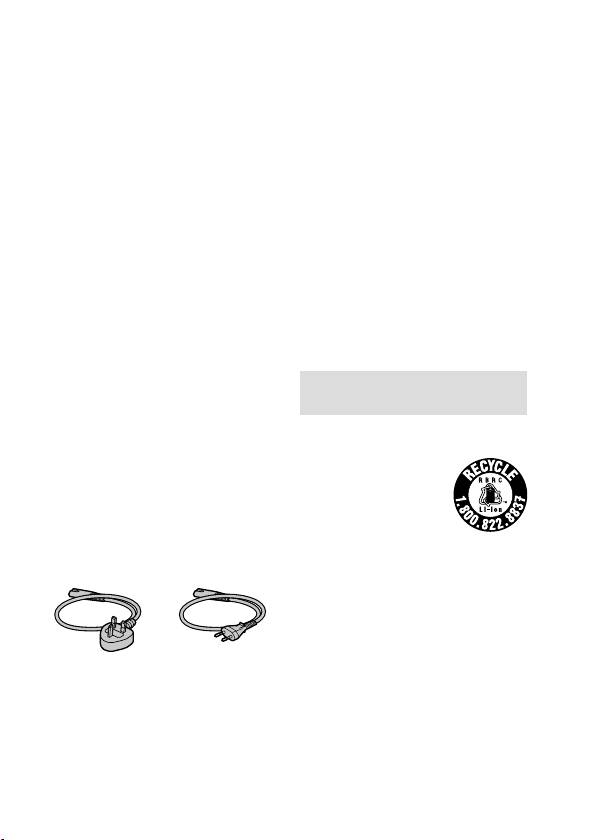
Cordon d’alimentation
Pour les clients au Royaume-Uni,
Pour les clients aux États-Unis et
en Irlande, à Malte, à Chypre et en
au Canada
Arabie saoudite
Utilisez le cordon d’alimentation
RECYCLAGE DES ACCUMULATEURS AUX
(A). Pour des raisons de sécurité, le
IONS DE LITHIUM
cordon d’alimentation (B) ne doit pas
Les accumulateurs aux
être utilisé dans les pays/régions,
ions de lithium sont
pour lesquels il n’est pas conçu.
recyclables.
Pour les clients dans les autres pays/
Vous pouvez
régions de l’UE
contribuer à préserver
Utilisez le cordon d’alimentation (B).
l’environnement en
rapportant les piles usagées dans un
(A) (B)
point de collecte et de recyclage le
plus proche.
Pour plus d’informations sur le
recyclage des accumulateurs,
téléphonez au numéro gratuit
1-800-822-8837 (États-Unis et Canada
uniquement), ou visitez
http : //www.call2recycle.org/
FR
4
ILCE-6500
4-690-670-41(1)

C:\4690670411ILCE6500CEC\02FR-ILCE6500CEC\010BEF.indd
2016/09/30 16:27
Avertissement : Ne pas utiliser des
Cet équipement a été testé et jugé
accumulateurs aux ions de lithium
conforme aux limites d’exposition
qui sont endommagés ou qui fuient.
aux rayonnements IC énoncées pour
un environnement non contrôlé et
Cet équipement est conforme
respecte les règles d’exposition aux
aux limites d’exposition aux
fréquences radioélectriques (RF)
rayonnements énoncées pour
CNR-102 de l’IC.
un environnement non contrôlé
et respecte les règles les
radioélectriques (RF) de la FCC
Pour les utilisateurs au Canada
lignes directrices d’exposition. Cet
Le présent appareil est conforme aux
équipement émet une énergie RF
CNR d’Industrie Canada applicables
très faible qui est considérée comme
aux appareils radio exempts de
conforme sans évaluation du débit
licence. L’exploitation est autorisée
d’absorption spécifique (DAS).
aux deux conditions suivantes :
Les connaissances scientifiques
1) l’appareil ne doit pas produire de
dont nous disposons n’ont mis en
brouillage;
évidence aucun problème de santé
2) l’utilisateur de l’appareil
FR
associé à l’usage des appareils
doit accepter tout brouillage
sans fil à faible puissance. Nous ne
radioélectrique subi, même si le
sommes cependant pas en mesure
brouillage est susceptible d’en
de prouver que ces appareils sans fil
compromettre le fonctionnement.
à faible puissance sont entièrement
sans danger. Les appareils sans fil
CAN ICES-3 B/NMB-3 B
à faible puissance émettent une
énergie fréquence radioélectrique
POUR LES CLIENTS RÉSIDANT EN
(RF) très faible dans le spectre des
EUROPE
micro-ondes lorsqu’ils sont utilisés.
Alors qu’une dose élevée de RF
Fabricant : Sony Corporation, 1-7-1
peut avoir des effets sur la santé (en
Konan Minato-ku Tokyo, 108-0075
chauffant les tissus), l’exposition à
Japon
de faibles RF qui ne produisent pas
Pour toute question relative à la
de chaleur n’a pas de mauvais effets
conformité des produits dans l’UE :
connus sur la santé. De nombreuses
Sony Belgium, bijkantoor van Sony
études ont été menées sur les
Europe Limited, Da Vincilaan 7-D1,
expositions aux RF faibles et n’ont
1935 Zaventem, Belgique
découvert aucun effet biologique.
Certaines études ont suggéré
qu’il pouvait y avoir certains effets
biologiques, mais ces résultats n’ont
pas été confirmés par des recherches
supplémentaires.
FR
5
ILCE-6500
4-690-670-41(1)
C:\4690670411ILCE6500CEC\02FR-ILCE6500CEC\010BEF.indd
2016/09/30 16:27
Par la présente, Sony Corporation
Pour les produits qui pour des raisons
déclare que cet appareil est
de sécurité, de performance ou
conforme aux exigences essentielles
d’intégrité de données nécessitent
et aux autres dispositions pertinentes
une connexion permanente à
de la directive 1999/5/CE. Pour toute
une pile ou à un accumulateur, il
information complémentaire, veuillez
conviendra de vous rapprocher d’un
consulter l’URL suivante :
Service Technique qualifié pour
http : //www.compliance.sony.de/
effectuer son remplacement.
En rapportant votre appareil
Élimination des piles et accumulateurs
électrique, les piles et accumulateurs
et des Équipements Électriques et
en fin de vie à un point de collecte
Électroniques usagés (Applicable dans
approprié vous vous assurez que le
les pays de l’Union Européenne et aux
produit, la pile ou l’accumulateur
autres pays européens disposant de
incorporé sera traité correctement.
systèmes de collecte sélective)
Pour tous les autres cas de figure
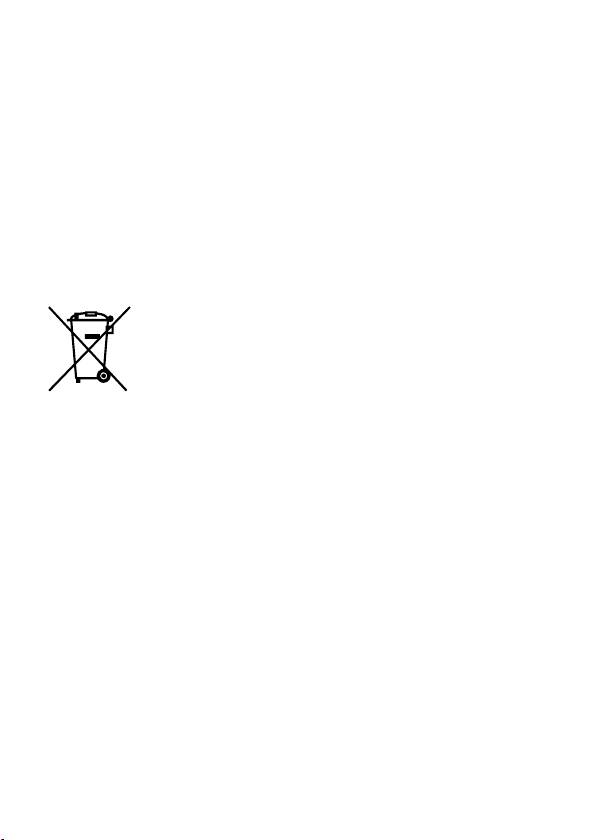
Ce symbole apposé
et afin d’enlever les piles ou
sur le produit, la pile
accumulateurs en toute sécurité
ou l’accumulateur
de votre appareil, reportez-vous au
ou sur l’emballage,
manuel d’utilisation.
indique que le
Rapportez les piles et accumulateurs,
produit et les piles
et les équipements électriques et
et accumulateurs fournis avec
électroniques usagés au point de
ce produit ne doivent pas être
collecte approprié pour le recyclage.
traités comme de simples déchets
Pour toute information
ménagers.
complémentaire au sujet du
Sur certains types de piles, ce
recyclage de ce produit ou des piles
symbole apparaît parfois combiné
et accumulateurs, vous pouvez
avec un symbole chimique. Les
contacter votre municipalité, votre
symboles pour le mercure (Hg) ou le
déchetterie locale ou le point de
plomb (Pb) sont rajoutés lorsque ces
vente où vous avez acheté ce
piles contiennent plus de 0,0005% de
produit.
mercure ou 0,004% de plomb.
En vous assurant que les produits,
piles et accumulateurs sont mis au
rebut de façon appropriée, vous
participez activement à la prévention
des conséquences négatives que
leur mauvais traitement pourrait
provoquer sur l’environnement et
sur la santé humaine. Le recyclage
des matériaux contribue par ailleurs
à la préservation des ressources
naturelles.
FR
6
ILCE-6500
4-690-670-41(1)
