
Sony KDL-40P300H: instruction
Class: Household, kitchen appliances, electronics and equipment
Type:
Manual for Sony KDL-40P300H
Table of contents
010COV.fm Page 1 Monday, April 7, 2008 9:43 AM
3-290-196-11(2)
LCD Digital Colour TV
GB
DE
FR
IT
NL
ES
PT
GR
RU
PL
CZ
KDL-40P30xH
SK
KDL-37P30xH
KDL-32P30xH
HU
KDL-26P30xH
SE
KDL-26T26xH
DK
FI
NO
TR
© 2007 Sony Corporation
010COV.book Page 2 Friday, November 9, 2007 4:48 PM
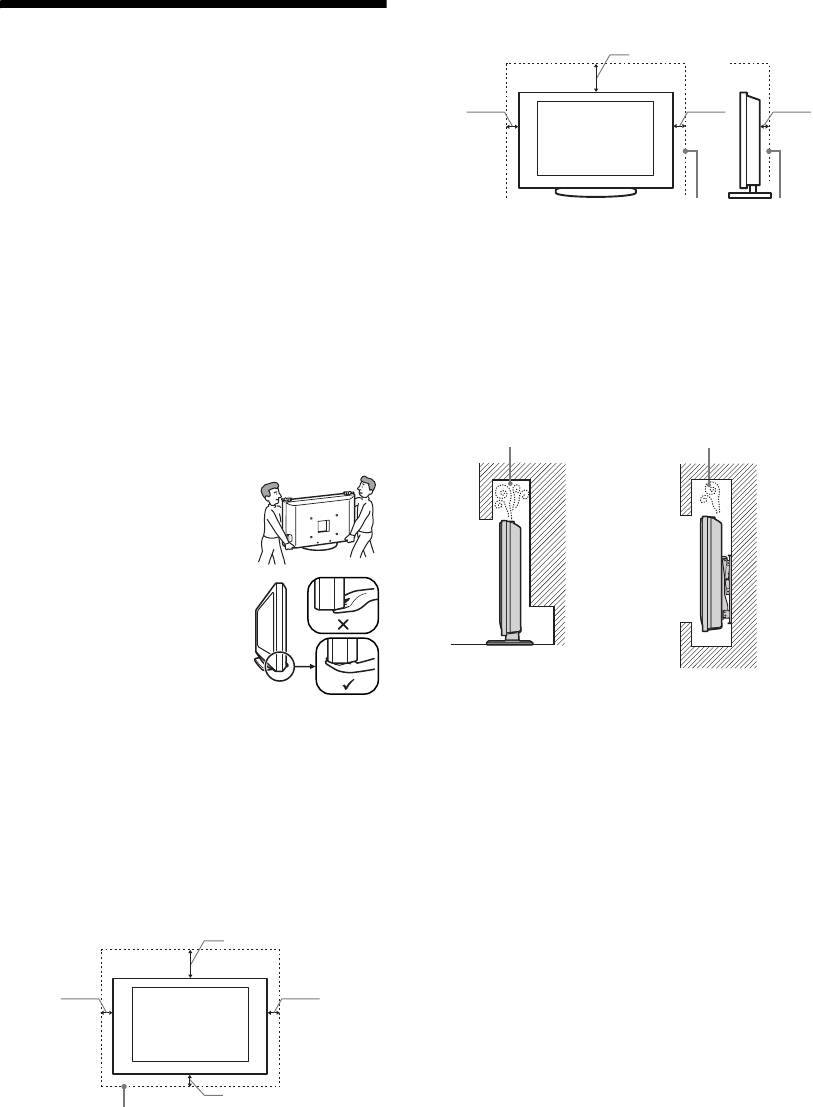
Installed with stand
Safety information
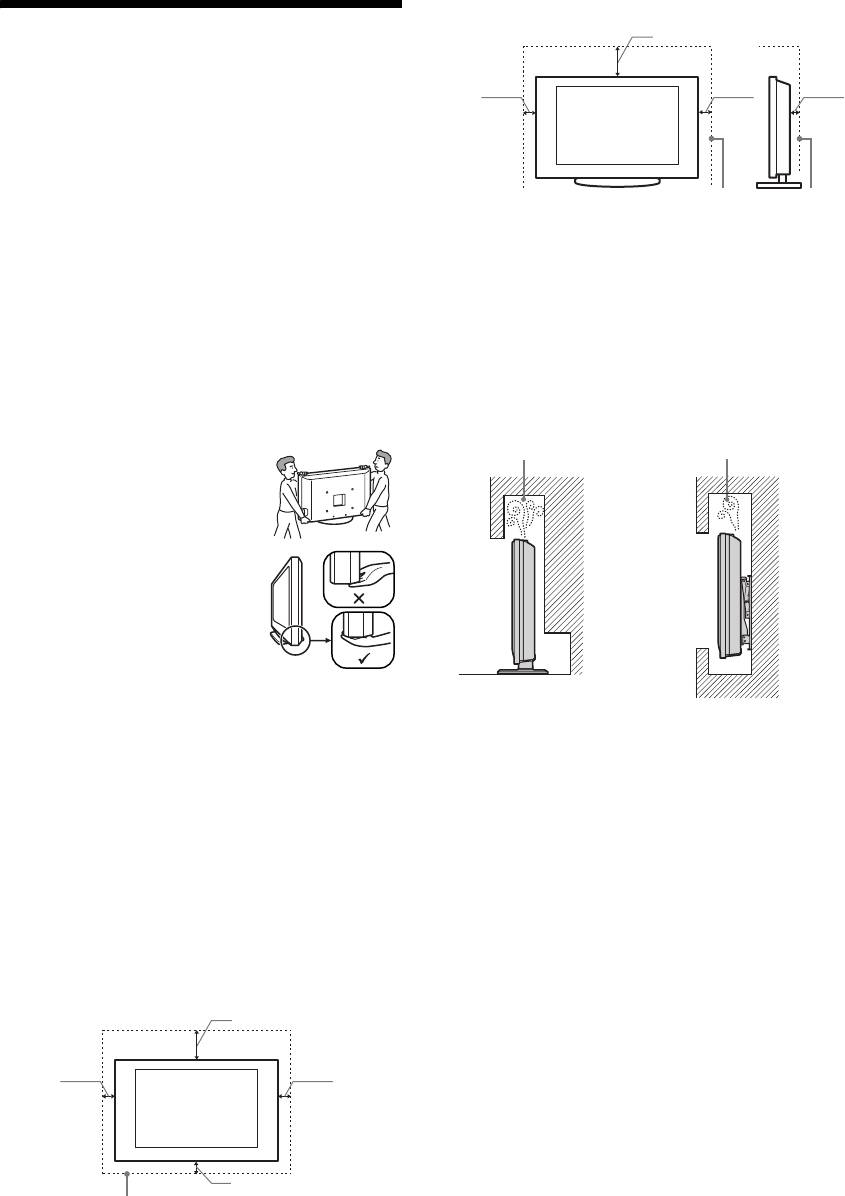
30 cm
10 cm10 cm
6 cm
Installation/Set-up
Install and use the TV set in accordance with the
instructions below in order to avoid any risk of fire,
electrical shock or damage and/or injuries.
Leave at least this space around the set.
Installation
• The TV set should be installed near an easily accessible
• To ensure proper ventilation and prevent the collection of
mains socket.
dirt or dust:
• Place the TV set on a stable, level surface.
– Do not lay the TV set flat, install upside down,
• Only qualified service personnel should carry out wall
backwards, or sideways.
installations.
– Do not place the TV set on a shelf, rug, bed or in a
• For safety reasons, it is strongly recommended that you
closet.
use Sony accessories, including:
– Do not cover the TV set with a cloth, such as curtains,
– KDL-40P30xH/ KDL-37P30xH/ KDL-32P30xH:
or items such as newspapers, etc.
Wall-mount bracket SU-WL500.
– Do not install the TV set as shown below.
– KDL-26P30xH/KDL-26T26xH:
Air circulation
Air circulation
Wall-mount bracket SU-WL100.
is blocked.
is blocked.
Transporting
• Before transporting the TV set,
disconnect all cables.
• Two or three people are needed to
transport a large TV set.
Wall
Wall
• When transporting the TV set by
hand, hold it as shown on the right.
Do not put stress on the LCD panel
and the frame around the screen.
• When lifting or moving the TV set,
hold it firmly from the bottom.
• When transporting the TV set, do
not subject it to jolts or excessive
vibration.
• When transporting the TV set for repairs or when moving,
pack it using the original carton and packing material.
Mains lead
Handle the mains lead and socket as follows in order
Ventilation
to avoid any risk of fire, electrical shock or damage
• Never cover the ventilation holes or insert anything in the
and/or injuries:
cabinet.
– Use only Sony mains leads, not those of other brands.
• Leave space around the TV set as shown below.
– Insert the plug fully into the mains socket.
• It is strongly recommended that you use a Sony wall-
– Operate the TV set on a 220-240 V AC supply only.
mount bracket in order to provide adequate air-circulation.
– When wiring cables, be sure to unplug the mains lead
for your safety and take care not to catch your feet on
Installed on the wall
the cables.
– Disconnect the mains lead from the mains socket before
30 cm
working on or moving the TV set.
– Keep the mains lead away from heat sources.
– Unplug the mains plug and clean it regularly. If the plug
10 cm
10 cm
is covered with dust and it picks up moisture, its
insulation may deteriorate, which could result in a fire.
Notes
• Do not use the supplied mains lead on any other
10 cm
equipment.
• Do not pinch, bend, or twist the mains lead excessively.
Leave at least this space around the set.
The core conductors may be exposed or broken.
• Do not modify the mains lead.
• Do not put anything heavy on the mains lead.
• Do not pull on the mains lead itself when disconnecting
the mains lead.
• Do not connect too many appliances to the same mains
socket.
GB
2

010COV.book Page 3 Friday, November 9, 2007 4:48 PM
• Do not use a poor fitting mains socket.
• The communication cable used between media box and
TV must be shorter than 3m length.
Precautions
Prohibited Usage
Viewing the TV
Do not install/use the TV set in locations,
• View the TV in moderate light, as viewing the TV in poor
environments or situations such as those listed below,
light or during long period of time, strains your eyes.
or the TV set may malfunction and cause a fire,
• When using headphones, adjust the volume so as to avoid
electrical shock, damage and/or injuries.
excessive levels, as hearing damage may result.
Location:
LCD Screen
Outdoors (in direct sunlight), at the seashore, on a ship or
• Although the LCD screen is made with high-precision
other vessel, inside a vehicle, in medical institutions,
technology and 99.99% or more of the pixels are effective,
unstable locations, near water, rain, moisture or smoke.
black dots may appear or bright points of light (red, blue,
or green) may appear constantly on the LCD screen. This
Environment:
is a structural property of the LCD screen and is not a
Places that are hot, humid, or excessively dusty; where
malfunction.
insects may enter; where it might be exposed to mechanical
• Do not push or scratch the front filter, or place objects on
vibration, near flammable objects (candles, etc).
top of this TV set. The image may be uneven or the LCD
The TV set shall not be exposed to dripping or splashing and
screen may be damaged.
no objects filled with liquids, such as vases, shall be placed
• If this TV set is used in a cold place, a smear may occur in
on the TV.
the picture or the picture may become dark. This does not
indicate a failure. These phenomena disappear as the
Situation:
temperature rises.
• Ghosting may occur when still pictures are displayed
Do not use when your hands are wet, with the cabinet
continuously. It may disappear after a few moments.
removed, or with attachments not recommended by the
• The screen and cabinet get warm when this TV set is in
manufacturer. Disconnect the TV set from mains socket and
use. This is not a malfunction.
aerial during lightning storms.
• The LCD screen contains a small amount of liquid crystal
and mercury. The fluorescent tubes used in this TV set
Broken pieces:
also contain mercury. Follow your local ordinances and
• Do not throw anything at the TV set. The screen glass may
regulations for disposal.
GB
break by the impact and cause serious injury.
• If the surface of the TV set cracks, do not touch it until you
Handling and cleaning the screen surface/cabinet of
have unplugged the mains lead. Otherwise electric shock
the TV set
may result.
Be sure to unplug the mains lead connected to the TV set
from mains socket before cleaning.
When not in use
To avoid material degradation or screen coating degradation,
• If you will not be using the TV set for several days, the TV
observe the following precautions.
set should be disconnected from the mains for
• To remove dust from the screen surface/cabinet, wipe
environmental and safety reasons.
gently with a soft cloth. If dust is persistent, wipe with a
• As the TV set is not disconnected from the mains when the
soft cloth slightly moistened with a diluted mild detergent
TV set is just turned off, pull the plug from the mains to
solution.
disconnect the TV set completely.
• Never use any type of abrasive pad, alkaline/acid cleaner,
• However, some TV sets may have features that require the
scouring powder, or volatile solvent, such as alcohol,
TV set to be left in standby to work correctly.
benzene, thinner or insecticide. Using such materials or
maintaining prolonged contact with rubber or vinyl
materials may result in damage to the screen surface and
For children
cabinet material.
• Do not allow children to climb on the TV set.
• When adjusting the angle of the TV set, move it slowly so
• Keep small accessories out of the reach of children, so that
as to prevent the TV set from moving or slipping off from
they are not mistakenly swallowed.
its table stand
If the following problems occur...
Optional Equipment
Turn off the TV set and unplug the mains lead
Keep optional components or any equipment emitting
immediately if any of the following problems occur.
electromagnetic radiation away from the TV set. Otherwise
picture distortion and/or noisy sound may occur.
Ask your dealer or Sony service centre to have it
checked by qualified service personnel.
When:
– Mains lead is damaged.
– Poor fitting of mains socket.
– TV set is damaged by being dropped, hit or having
something thrown at it.
– Any liquid or solid object falls through openings in the
cabinet.
GB
3
090ADD.fm Page 4 Monday, April 7, 2008 9:41 AM
Additional Information
TV System
Specifications
Depending on your country/region selection
Analogue: B/G/H, D/K, L, I
Display Unit
Digital: DVB-T
Power Requirements:
Colour/Video System
220–240 V AC, 50 Hz
Screen Size:
Analogue: PAL, SECAM
KDL-40xxxxx: 40 inches
NTSC 3.58, 4.43 (only Video In)
KDL-37xxxxx: 37 inches
Digital: MPEG-2 MP@ML
KDL-32xxxxx: 32 inches
Aerial
KDL-26xxxxx: 26 inches
75 ohm external terminal for VHF/UHF
Display Resolution:
1,366 dots (horizontal) × 768 lines (vertical)
Channel Coverage
Power Consumption:
Analogue: 48.25 - 855.25 MHz
KDL-40xxxxx: 165 W or less
Digital: VHF Band III (177.5 - 226.5 MHz)
KDL-37xxxxx: 150 W or less
UHF E21 - E69 (474 - 858 MHz)
KDL-32xxxxx: 130 W or less
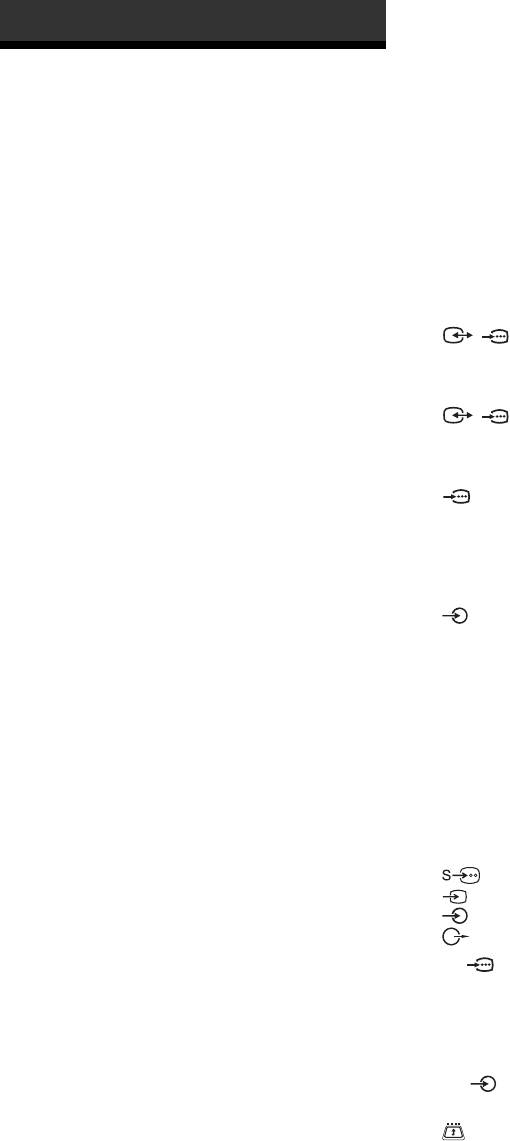
Terminals
KDL-26xxxxx: 90 W or less
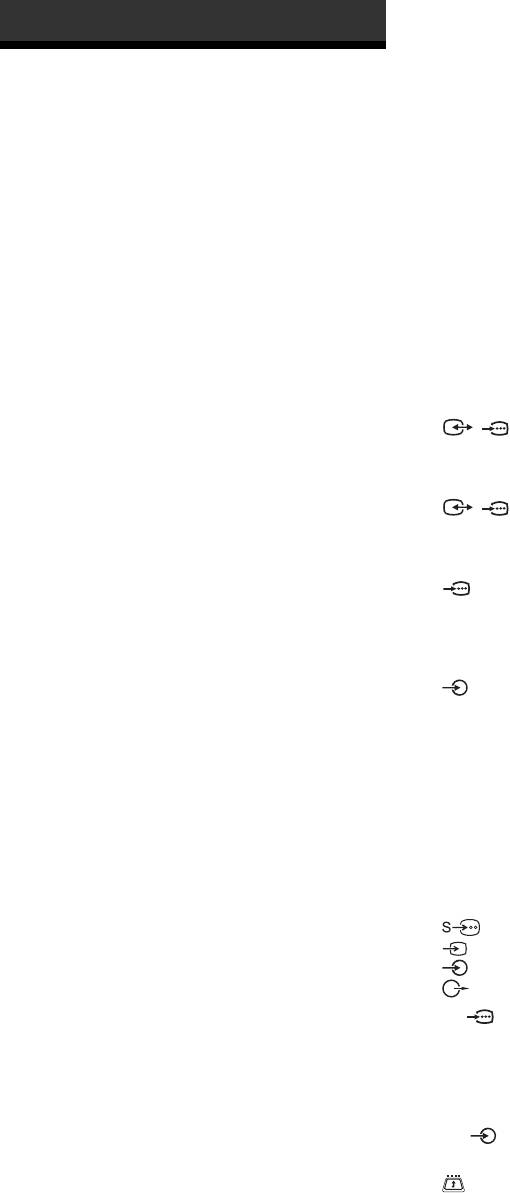
/1
Standby Power Consumption*:
21-pin Scart connector (CENELEC standard) including
1,6 W or less
audio/video input, RGB input, and TV audio/video
* Specified standby power is reached after the TV
output.
finishes necessary internal processes.
/ 2 (SMARTLINK)
Dimensions (w × h × d):
21-pin Scart connector (CENELEC standard) including
KDL-40xxxxx:
audio/video input, RGB input, selectable audio/video
Approx: 982 x 696 x 265 mm (with stand)
output, and SMARTLINK interface.
Approx: 982 x 643 x 124 mm (without stand)
3
KDL-37xxxxx:
Supported formats: 1080i, 720p, 576p, 576i, 480p, 480i
Approx: 906 x 664 x 265 mm (with stand)
Y: 1 Vp-p, 75 ohms, 0.3V negative sync
Approx: 906 x 630 x 126 mm (without stand)
P
B/CB: 0.7 Vp-p, 75 ohms
KDL-32xxxxx:
P
R/CR: 0.7 Vp-p, 75 ohms
Approx: 790 x 583 x 214 mm (with stand)
3
Approx: 790 x 549 x 119 mm (without stand)
Audio input (phono jacks)
KDL-26P30xH:
500 mVrms
Approx: 657 x 506 x 214 mm (with stand)
Impedance: 47 kilo ohms
Approx: 657 x 472 x 121 mm (without stand)
HDMI IN 4, 5
KDL-26T26xH:
Video: 1080i, 720p, 576p, 576i, 480p, 480i
Approx: 657 x 506 x 214 mm (with stand)
Audio: Two channel linear PCM
Approx: 657 x 453 x 121 mm (without stand)
32, 44.1 and 48 kHz, 16, 20 and 24 bits
Mass:
PC (see table)
KDL-40xxxxx:
Analogue audio (phono jacks):
Approx: 23,5 kg (with stand)
500 mVrms, Impedance 47 kilohms
Approx: 20,0 kg (without stand)
(HDMI IN 4 only)
KDL-37xxxxx:
6 S video input (4-pin mini DIN)
Approx: 21,0 kg (with stand)
6 Video input (phono jack)
Approx: 18,0 kg (without stand)
6 Audio input (phono jacks)
KDL-32xxxxx:
Audio output (Left/Right) (phono jacks)
Approx: 15,0 kg (with stand)
Approx: 13,0 kg (without stand)
PC PC Input (15 Dsub) (see page 17)
KDL-26P30xH:
G: 0.7 Vp-p, 75 ohms, non Sync on Green
Approx: 12,0 kg (with stand)
B: 0.7 Vp-p, 75 ohms, non Sync on Green
Approx: 10,0 kg (without stand)
R: 0.7 Vp-p, 75 ohms, non Sync on Green
KDL-26T26xH:
HD: 1-5 Vp-p
Approx: 12,5 kg (with stand)
VD: 1-5 Vp-p
Approx: 10,5 kg (without stand)
PC audio input (minijack)
Panel System
i Headphones jack
LCD (Liquid Crystal Display) Panel
CAM (Conditional Access Module) slot
GB
4
010COV.book Page 5 Friday, November 9, 2007 4:48 PM
Sound Output
Optional Accessories
10 W + 10 W (RMS)
Wall-Mount Bracket SU-WL500 (KDL-40P30xH/
KDL-37P30xH/KDL-32P30xH).
External speaker
Wall-Mount Bracket SU-WL100 (KDL-26P30xH/
Impedance 16 ohm, max. 10W
KDL-26T26xH).
Design and specifications are subject to change without
notice.
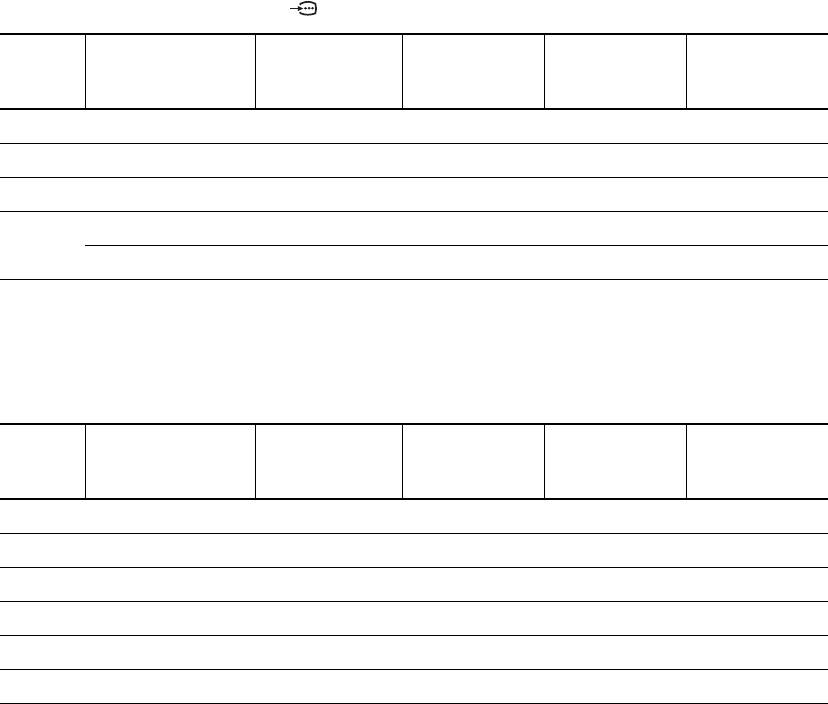
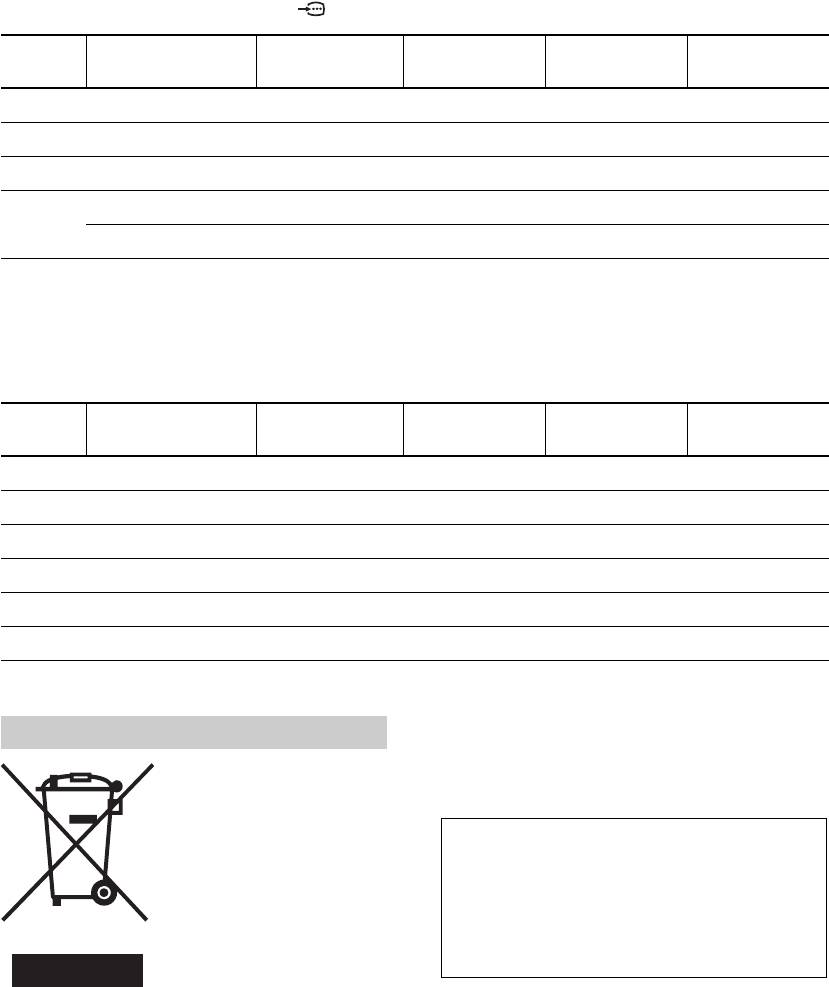
PC Input Signal Reference Chart for PC
Horizontal
Vertical
Signals Horizontal (Pixel) Vertical (Line)
frequency
Standard
frequency (Hz)
(kHz)
VGA 640 480 31.5 60 VGA
SVGA 800 600 37.9 60 VESA Guidelines
XGA 1024 768 48.4 60 VESA Guidelines
WXGA 1280 768 47.4 60 VESA
1280 768 47.8 60 VESA
• This TV’s PC input does not support Sync on Green or Composite Sync.
• This TV’s PC input does not support interlaced signals.
• This TV’s PC input supports signals in the above chart with a 60 Hz vertical frequency. For other signals, you will see the
message “NO SYNC”.
PC Input Signal Reference Chart for HDMI IN 4, 5
Horizontal
Vertical
Signals Horizontal (Pixel) Vertical (Line)
frequency
Standard
frequency (Hz)
(kHz)
VGA 640 480 31.5 60 VGA
SVGA 800 600 37.9 60 VESA Guidelines
XGA 1024 768 48.4 60 VESA Guidelines
WXGA 1280 768 47.4 60 VESA
WXGA 1280 768 47.8 60 VESA
WXGA 1360 768 47.7 60 VESA
GB
5
010COV.book Page 6 Friday, November 9, 2007 4:48 PM
The manufacturer of this product is Sony Corporation,
1-7-1 Konan Minato-ku Tokyo, 108-0075 Japan. The
NOTICE FOR
Authorized Representative for EMC and product safety
is Sony Deutschland GmbH, Hedelfinger Strasse 61,
CUSTOMERS IN THE
70327 Stuttgart, Germany. For any service or
guarantee matters please refer to the addresses given in
UNITED KINGDOM
separate service or guarantee documents
A moulded plug complying with BS1363 is fitted to this
equipment for your safety and convenience.
~
Should the fuse in the plug supplied need to be replaced, a 10
The “x” that appears on the model name, corresponds to
AMP fuse approved by ASTA or BSI to BS 1362 (i.e.,
a numeric digit related to colour variation.
marked with or ) must be used.
When an alternative type of plug is used it should be fitted
with a 10 AMP FUSE otherwise the circuit should be
protected by a 10 AMP FUSE at the distribution board.
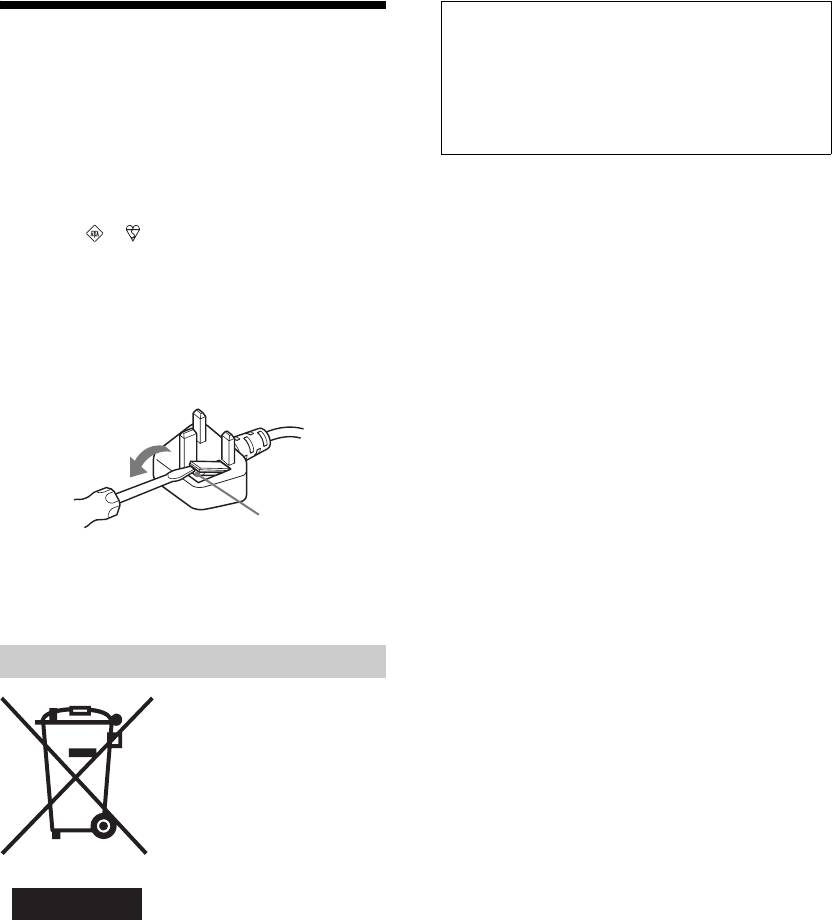
If the plug supplied with this equipment has a detachable fuse
cover, be sure to attach the fuse cover after you change the
fuse. Never use the plug without the fuse cover. If you should
lose the fuse cover, please contact your nearest Sony service
station.
FUSE
How to replace the fuse
Open the fuse compartment with a blade screwdriver, and
replace the fuse.
Disposal of the TV set
Disposal of Old Electrical &
Electronic Equipment
(Applicable in the European
Union and other European
countries with separate
collection systems)
This symbol on the product or on
its packaging indicates that this
product shall not be treated as
household waste. Instead it shall
be handed over to the applicable
collection point for the recycling
of electrical and electronic equipment. By ensuring this
product is disposed of correctly, you will help prevent
potential negative consequences for the environment and
human health, which could otherwise be caused by
inappropriate waste handling of this product. The recycling
of materials will help to conserve natural resources. For more
detailed information about recycling of this product, please
contact your local Civic Office, your household waste
disposal service or the shop where you purchased the
product.
.
GB
6

010COV.book Page 7 Friday, November 9, 2007 4:48 PM
GB
7
010COV.book Page 2 Monday, November 12, 2007 10:41 AM
Aufstellung auf dem Standfuß
30 cm
Sicherheitsinformationen
Installation/Einstellung
10 cm10 cm
6 cm
Installieren und benutzen Sie das Fernsehgerät unter
Berücksichtigung der unten angegebenen Anweisungen,
um alle Risiken wie Feuer, Elektroschock oder
Beschädigungen und /oder Verletzungen zu vermeiden.
Installation
Lassen Sie mindestens so viel Platz um das Gerät.
• Das Fernsehgerät sollte neben einer frei zugänglichen
• Um eine ausreichende Belüftung zu gewährleisten und Staub,-
Netzsteckdose installiert werden.
oder Schmutzablagerungen zu vermeiden:
• Stellen Sie das Fernsehgerät auf eine stabile, ebene Fläche.
– Stellen Sie das Fernsehgerät weder flach, noch auf dem
• Wandeinbauten sollten nur von qualifiziertem Fachpersonal
Kopf stehend, falsch herum oder seitwärts geneigt auf.
ausgeführt werden.
– Stellen Sie das Fernsehgerät weder auf einem Regal, einem
• Aus Sicherheitsgründen wird dringend empfohlen,
Teppich, einem Bett oder in einem Schrank auf.
ausschlie
ß
lich Sony Zubehörteile zu verwenden, inklusive:
– Decken Sie das Fernsehgerät nicht mit Decken oder
– KDL-40P30xH/ KDL-37P30xH/ KDL-32P30xH:
Vorhängen ab und legen Sie keine Gegenstände wie
Wandmontagehalterung SU-WL500.
Zeitungen usw. darauf.
– KDL-26P30xH/ KDL-26T26xH:
– Installieren Sie das Fernsehgerät nicht wie auf der
Wandmontagehalterung SU-WL100.
Abbildung gezeigt.
Die Luftzirkulation
Die Luftzirkulation
Transport
wird unterbunden.
wird unterbunden.
• Vor dem Transport des Fernsehgeräts
ziehen Sie bitte alle Kabel aus dem
Gerät.
• Zum Transport eines großen
Fernsehgeräts sind zwei oder drei
Personen nötig.
Wand Wand
• Wenn Sie das Fernsehgerät von Hand
transportieren , halten Sie es bitte wie
rechts dargestellt. Üben Sie weder auf
den LCD Bildschirm noch auf den
Bildschirmrahmen Druck aus.
• Wenn Sie das Fernsehgerät anheben
oder transportieren, halten Sie dieses
fest an der Unterkante.
• Setzen Sie das Fernsehgerät beim Transport weder Stössen
Netzkabel
noch starken Erschütterungen aus.
Um alle Risiken wie Feuer, Elektroschock oder
• Wenn Sie das Fernsehgerät für Reparaturen oder bei einem
Beschädigungen und /oder Verletzungen auszuschliessen,
Umzug transportieren müssen, verpacken Sie es bitte
sollten Sie das Netzkabel und den Stecker wie hier angegeben
mithilfe der Originalverpackungsmaterialien im
handhaben:
Originalkarton.
– Verwenden Sie ausschließlich Originalnetzkabel von Sony
Luftzirkulation
und keinem anderen Hersteller.
– Stecken Sie den Stecker ganz in die Netzsteckdose.
• Decken Sie nie die Lüftungsöffnungen ab und stecken Sie
– Dieses Fernsehgerät ist au
ß
chließlich für den Betrieb an
nichts in das Gehäuse.
220-240 V Wechselstrom ausgelegt.
• Lassen Sie ausreichend Platz um das Fernsehgerät (siehe
– Trennen Sie das Gerät zu Ihrer eigenen Sicherheit unbedingt
Abbildung).
vom Netzstrom, wenn Sie Kabel an dem Gerät anschließen
• Es wird dringend empfohlen, die offizielle Sony
und stolpern Sie nicht über die Kabel.
Wandmontagehalterung zu verwenden, um eine
– Trennen Sie das Netzkabel von der Netzsteckdose, bevor Sie
ausreichende Luftzirkulation zu gewährleisten.
das Fernsehgerät reparieren oder transportieren.
– Halten Sie das Netzkabel von Wärmequellen fern.
Installation an der Wand
– Ziehen Sie den Netzstecker aus der Steckdose und reinigen
Sie ihn regelmäßig. Wenn der Stecker verstaubt ist und sich
30 cm
Feuchtigkeit ablagert, kann die Isolierung leiden und es
besteht Feuergefahr.
Anmerkungen
10 cm
10 cm
• Verwenden Sie das mitgelieferte Netzkabel nicht mit anderen
Geräten.
• Klemmen, biegen oder verdrehen Sie das Netzkabel nicht
übermäßig. Die blanken Adern im Inneren des Kabels könnten
freiliegen oder brechen.
• Nehmen Sie am Netzkabel keine Veränderungen vor.
10 cm
• Stellen Sie keine schweren Gegenstände auf das Netzkabel.
Lassen Sie mindestens so viel Platz um das Gerät.
• Ziehen Sie nicht am Kabel, selbst wenn Sie das Netzkabel aus
der Steckdose herausziehen.
• Achten Sie darauf, nicht zu viele andere Geräte an dieselbe
Netzsteckdose anzuschließen.
DE
2

010COV.book Page 3 Monday, November 12, 2007 10:41 AM
• Verwenden Sie eine Netzsteckdose, in der der Stecker fest sitzt.
• Das Übertragungskabel zwischen der Media-box und dem
Fernsehgerät darf höchstens 3 Meter lang sein.
Sicherheitsmaßnahmen
Verbotene Nutzung
Installieren Sie das Fernsehgerät weder an Standorten, in
Fernsehen
Umgebungen noch in Situationen wie den hier
• Schauen Sie bei gemäßigter Beleuchtung fern. Durch
aufgeführten, da dies zu Fehlfunktionen des Fernsehgeräts
falsche Beleuchtung oder langes Fernsehen werden die
und Feuer, Elektroschock, Beschädigungen und/oder
Augen belastet.
Verletzungen führen kann.
• Stellen Sie beim Verwenden von Kopfhörern die
Standort:
Lautstärke moderat ein. Andernfalls kann es zu
Im Freien (in direktem Sonnenlicht), am Meer, auf einem Schiff
Gehörschäden kommen.
oder Boot, im Innern eines Fahrzeugs, in medizinischen
LCD-Bildschirm
Einrichtungen, instabilen Standorten, in der Nähe von Wasser,
Regen, Feuchtigkeit oder Rauch.
• Obwohl bei der Herstellung des LCD-Bildschirms mit
hochpräziser Technologie gearbeitet wird und der
Umgebung:
Bildschirm 99,99% und mehr effektive Pixel besitzt, ist es
An heissen, feuchten oder übermässig staubigen Orten, an
möglich, dass dauerhaft einige schwarze oder leuchtende
denen Insekten in das Gerät eindringen können; an denen es
mechanischen Erschütterungen ausgesetzt ist, neben
Punkte (rot, grün oder blau) sichtbar sind. Es handelt sich
brennbaren Objekten (Kerzen usw.). Das Fernsehgerät darf
dabei um eine strukturelle Eigenschaft von LCD-
weder Tropfen oder Spritzern ausgesetzt werden. Es dürfen
Bildschirmen und nicht um eine Fehlfunktion.
keine mit Flüssigkeit gefüllten Gegenstände, zum Beispiel
• Stoßen Sie nicht gegen den Filter an der Vorderseite,
Vasen, auf dem Fernsehgerät abgestellt werden.
zerkratzen Sie ihn nicht und stellen Sie nichts auf dieses
Situation:
Fernsehgerät. Das Bild kann ungleichmäßig werden und
Nicht mit nassen Händen, ohne Gehäuse oder mit anderem als vom
der LCD-Bildschirm kann beschädigt werden.
Hersteller empfohlenen Zubehör benutzen. Trennen Sie das
• Wenn dieses Fernsehgerät an einem kalten Ort verwendet
Fernsehgerät bei Gewitter von der Netzsteckdose und der Antenne.
wird, kommt es möglicherweise zu Schmierstreifen im
Bild oder das Bild wird dunkel. Dabei handelt es sich nicht
Bruchstücke:
um ein Versagen. Diese Effekte verschwinden, wenn die
• Werfen Sie nichts gegen das Fernsehgerät. Das Glas des
Temperatur steigt.
Bildschirms könnte durch den Aufprall zerbrechen und
• Wenn Standbilder längere Zeit angezeigt werden, kann es
schwere Verletzungen verursachen.
zu Doppelbildern kommen. Dieser Effekt verschwindet in
• Falls die Oberfläche des Fernsehgeräts zerspringt, ziehen
der Regel nach einigen Augenblicken.
Sie zuerst das Netzkabel aus der Steckdose, bevor sie das
• Bildschirm und Gehäuse erwärmen sich, wenn das
Gerät berühren. Andernfalls besteht die Gefahr eines
Fernsehgerät in Betrieb ist. Dies ist keine Fehlfunktion.
elektrischen Schlages.
DE
• Der LCD-Bildschirm enthält eine kleine Menge
Wenn das Gerät nicht benutzt wird
Flüssigkristalle und Quecksilber. Die Leuchtstoffröhren,
• Zum Schutz der Umwelt und aus Sicherheitsgründen
die in diesem Fernsehgerät verwendet werden, enthalten
empfiehlt es sich, das Fernsehgerät vom Stromnetz zu
auch Quecksilber. Befolgen Sie bei der Entsorgung die bei
trennen, wenn es mehrere Tage nicht benutzt wird.
Ihnen geltenden Entsorgungsrichtlinien.
• Da das Fernsehgerät auch in ausgeschaltetem Zustand mit
dem Stromnetz verbunden ist, wenn es nur ausgeschaltet
Pflegen und Reinigen der Bildschirmoberfläche bzw.
wurde, muss der Stecker aus der Netzsteckdose gezogen
des Gehäuses des Fernsehgeräts.
werden, um das Fernsehgerät vollkommen auszuschalten.
Trennen Sie das Netzkabel unbedingt von der
• Bei einigen Fernsehgeräten gibt es jedoch möglicherweise
Netzsteckdose, bevor Sie das Gerät reinigen.
Funktionen, für die das Fernsehgerät in den
Um Materialschäden oder Schäden an der
Bereitschaftsmodus geschaltet sein muss.
Bildschirmbeschichtung zu vermeiden, beachten Sie bitte
Kinder
folgende Vorsichtsmaßnahmen.
• Sorgen Sie dafür, dass Kinder nicht auf das Fernsehgerät
• Entfernen Sie Staub vorsichtig mit einem weichen Tuch
klettern.
von der Bildschirmoberfläche bzw. dem Gehäuse. Bei
• Bewahren Sie kleine Zubehörteile außerhalb der Reichweite
stärkerer Verschmutzung feuchten Sie ein weiches Tuch
von Kindern auf, damit diese nicht irrtümlicherweise
leicht mit einer milden Reinigungslösung an und wischen
verschluckt werden.
dann über den Bildschirm.
• Verwenden Sie keine Scheuerschwämme, keine
Falls folgende Problemen auftreten...
alkalischen/säurehaltigen Reinigungsmittel, kein
Schalten Sie das Fernsehgerät sofort aus und ziehen
Scheuerpulver oder flüchtigen Lösungsmittel wie
Sie den Netzstecker aus der Steckdose, sobald eines der
Alkohol, Benzin, Verdünnung oder Insektizide. Wenn Sie
folgenden Probleme auftritt.
solche Mittel verwenden oder das Gerät längere Zeit mit
Wenden Sie sich an Ihren Händler oder das Sony
Gummi- oder Vinylmaterialien in Berührung kommt,
Kundendienstzentrum, um es von qualifiziertem
kann es zu Schäden an der Bildschirm- oder der
Fachpersonal überprüfen zu lassen.
Gehäuseoberfläche kommen.
Wenn:
• Wenn Sie den Winkel des Fernsehgeräts einstellen,
– Das Netzkabel beschädigt ist.
bewegen Sie das Fernsehgerät mit Vorsicht, damit es nicht
– Der Stecker nicht fest in der Netzsteckdose sitzt.
verrutscht oder vom Ständer fällt.
– Das Fernsehgerät durch Fallen, Stoßen oder einen
geworfenen Gegenstand beschädigt ist.
Sonderzubehör
– Flüssigkeit oder Fremdkörper durch die Öffnungen in
Halten Sie Zusatzteile oder Geräte mit elektromagnetischer
das Fernsehgerät gelangen.
Strahlung von dem Fernsehgerät fern. Andernfalls können
Bild- und/oder Tonstörungen auftreten.
DE
3
010COV.book Page 4 Monday, November 12, 2007 10:41 AM
Zusatzinformationen
Farb-/Videosystem
Technische Daten
Analog: PAL, SECAM
NTSC 3.58, 4.43 (nur Videoeingang)
Display
Digital: MPEG-2 MP@ML
Betriebsspannung:
Antenne
220–240 V Wechselstrom, 50 Hz
Bildschirmgröße:
75-Ohm-Außenantenne für VHF/UHF
KDL-40xxxxx: 40 Zoll
Kanalbereich
KDL-37xxxxx: 37 Zoll
Analog: 48.25 - 855.25 MHz
KDL-32xxxxx: 32 Zoll
Digital: VHF Band III (177.5 - 226.5 MHz)
KDL-26xxxxx: 26 Zoll
UHF E21 - E69 (474 - 858 MHz)
Anzeigeauflösung:
1366 Punkte (horizontal) × 768 Zeilen (vertikal)
Anschlüsse
Leistungsaufnahme:
/1
KDL-40xxxxx: 165 W oder weniger
21-poliger Scart-Anschluss (CENELEC-Standard) mit
KDL-37xxxxx: 150 W oder weniger
Audio-/Videoeingang, RGB-Eingang und
KDL-32xxxxx: 130 W oder weniger
Audio-/Videoausgang für Fernsehsignale.
KDL-26xxxxx: 90 W oder weniger
/ 2 (SMARTLINK)
Leistungsaufnahme im Standby-Modus*:
21-poliger Scart-Anschluss (CENELEC-Standard) mit
1,6 W oder weniger
Audio-/Videoeingang, RGB-Eingang, wählbarem
* Die angegebene Bereitschaftsleistung ist erreicht,
Audio-/Videoausgang und SMARTLINK-Schnittstelle
wenn das Fernsehgerät notwendige interne Prozesse
3
abgeschlossen hat.
Unterstützte Formate: 1080i, 720p, 576p, 576i, 480p,
Abmessungen (B x H x T):
480i
KDL-40xxxxx:
Ca. 982 x 696 x 265 mm (mit Geräteständer)
Y: 1 Vp-p, 75 Ohm, 0,3V negative Sync
Ca. 982 x 643 x 124 mm (ohne Geräteständer)
P
B/CB: 0,7 Vp-p, 75 Ohm
KDL-37xxxxx:
P
R/CR: 0,7 Vp-p, 75 Ohm
Ca. 906 x 664 x 265 mm (mit Geräteständer)
3
Ca. 906 x 630 x 126 mm (ohne Geräteständer)
Audioeingang (CINCH)
KDL-32xxxxx:
500 mV effektiver Mittelwert
Ca. 790 x 583 x 214 mm (mit Geräteständer)
Impedanz: 47 kOhm
Ca. 790 x 549 x 119 mm (ohne Geräteständer)
HDMI IN 4, 5
KDL-26P30xH:
Video: 1080i, 720p, 576p, 576i, 480p, 480i
Ca. 657 x 506 x 214 mm (mit Geräteständer)
Audio: Zwei Kanäle, linear, PCM
Ca. 657 x 472 x 121 mm (ohne Geräteständer)
32, 44.1 und 48 kHz, 16, 20 und 24 Bit
KDL-26T26xH:
PC (siehe Tabelle)
Ca. 657 x 506 x 214 mm (mit Geräteständer)
Analoger Audioeingang (Phono-Stecker):
Ca. 657 x 453 x 121 mm (ohne Geräteständer)
500 mV effektiver Mittelwert, Impedanz 47
Gewicht:
kOhm
KDL-40xxxxx:
(nur HDMI IN 4)
Ca.23,5 kg (mit Geräteständer)
6 S Video Eingang (4- polig DIN)
Ca.20,0 kg (ohne Geräteständer)
6 Video-Eingangt (Kopfhörerbuchse)
KDL-37xxxxx:
6 Audio-Eingang (Kopfhörerbuchse)
Ca.21,0 kg (mit Geräteständer)
Ca.18,0 kg (ohne Geräteständer)
Audioausgänge (links/rechts) - CINCH
KDL-32xxxxx:
PC PC-Eingang (15 Dsub) (siehe Seite 17)
Ca.15,0 kg (mit Geräteständer)
G: 0,7 Vp-p, 75 Ohm, kein Sync auf Grün
Ca.13,0 kg (ohne Geräteständer)
B: 0,7 Vp-p, 75 Ohm, kein Sync auf Grün
KDL-26P30xH:
R: 0,7 Vp-p, 75 Ohm, kein Sync auf Grün
Ca.12,0 kg (mit Geräteständer)
HD: 1-5 Vp-p
Ca.10,0 kg (ohne Geräteständer)
VD: 1-5 Vp-p
KDL-26T26xH:
PC-Audioeingang (Minibuchse)
Ca.12,5 kg (mit Geräteständer)
Ca.10,5 kg (ohne Geräteständer)
i Kopfhörerbuchse
CAM- (Zugangskontrollmodul) Slot
Bildschirmsystem
LCD-Bildschirm (Flüssigkristall-Display)
Tonausgabe
10 W + 10 W (effektiv)
Fernsehnorm
Je nach ausgewähltem Land/Gebiet
Externer Lautsprecher
Analog: B/G/H, D/K, L, I
Impedanz 16 Ohm, max. 10W
Digital: DVB-T
DE
4
010COV.book Page 5 Monday, November 12, 2007 10:41 AM
Sonderzubehör
Wandmontagehalterung SU-WL500 (KDL-40P30xH/KDL-
Design und Spezifikationen können ohne vorherige
37P30xH/KDL-32P30xH).
Ankündigung geändert werden.
Wandmontagehalterung SU-WL100 (KDL-26P30xH/KDL-
26T26xH).
Referenztabelle für PC-Eingangssignale
Zeilenfrequenz
Bildfrequenz
Signale Horizontal (Pixel) Vertikal (Zeile)
Standard
(kHz)
(Hz)
VGA 640 480 31.5 60 VGA
SVGA 800 600 37.9 60 VESA Richtlinien
XGA 1024 768 48.4 60 VESA Richtlinien
WXGA 1280 768 47.4 60 VESA
1280 768 47.8 60 VESA
• Der PC-Eingang dieses Fernsehgerät unterstützt kein Sync-Signal auf Grün und kein Composite Sync.
• Der PC-Eingang dieses Fernsehgerät unterstützt keine Interlaced-Signale.
• Der PC-Eingang dieses Fernsehgerät unterstützt die in der o.g. Tabelle aufgeführten Signale mit 60 Hz Bildfrequenz. Bei
anderen Signalen wird die Meldung "Kein Sync" angezeigt.
Referenztabelle für HDMI IN 4, 5 Eingangssignale
Zeilenfrequenz
Bildfrequenz
Signale Horizontal (Pixel) Vertikal (Zeile)
Standard
(kHz)
(Hz)
VGA 640 480 31.5 60 VGA
SVGA 800 600 37.9 60 VESA Richtlinien
XGA 1024 768 48.4 60 VESA Richtlinien
WXGA 1280 768 47.4 60 VESA
WXGA 1280 768 47.8 60 VESA
WXGA 1360 768 47.7 60 VESA
Materialrecycling hilft, den Verbrauch von Rohstoffen zu
Entsorgen des Fernsehgeräts
verringern. Für nähere Informationen bezüglich Recycling
des Gerätes setzen Sie sich bitte mit Ihrer örtlichen Behörde,
Entsorgung von gebrauchten
Ihrer Müllabfuhr oder dem Geschäft, in dem Sie das Gerät
elektrischen und
erworben haben, in Verbindung.
elektronischen Geräten
(anzuwenden in den Ländern
Der Hersteller dieses Produktes ist Sony Corporation,
der Europäischen Union und
1-7-1 Konan Minato-ku Tokio, 108-0075 Japan.
anderen europäischen
Bevollmächtigter für EMV und Produktsicherheit ist
Ländern mit einem separaten
Sony Deutschland GmbH, Hedelfinger Strasse 61,
Sammelsystem für diese
70327 Stuttgart, Deutschland. Für Kundendienst- oder
Geräte)
Garantieangelegenheiten wenden Sie sich bitte an die in
Kundendienst- oder Garantiedokumenten genannten
Das Symbol auf dem Produkt oder
Adressen.
seiner Verpackung weist darauf
hin, dass dieses Produkt nicht als
normaler Haushaltsabfall zu
~
behandeln ist, sondern an einer Annahmestelle für das
Der Buchstabe “x” , der in der Modellbezeichnung steht,
Recycling von elektrischen und elektronischen Geräten
entspricht der Zahl für die Farbvariationen.
abgegeben werden muss. Durch Ihren Beitrag zum korrekten
Entsorgen dieses Produkts schützen Sie die Umwelt und die
Gesundheit Ihrer Mitmenschen. Umwelt und Gesundheit
werden durch falsches Entsorgen gefährdet.
DE
5

010COV.book Page 2 Monday, November 12, 2007 10:45 AM
Installation sur pied
30 cm
Consignes de sécurité
10 cm10 cm
6 cm
Installation/Mise en place
Installez et utilisez le téléviseur conformément aux
instructions ci-dessous afin d'éviter tout risque
d'incendie, d'électrocution ou autre dommage et/ou
blessure.
Laissez au moins cet espace libre autour du téléviseur.
Installation
• Pour une ventilation correcte, sans accumulation de
• Le téléviseur doit être installé à proximité d'une prise de
salissures ni de poussière :
courant aisément accessible.
– Ne placez pas le téléviseur à plat, à l'envers, vers l'arrière
• Placez le téléviseur sur une surface stable et horizontale.
ou sur le côté.
• L'installation murale du téléviseur doit être confiée à un
– Ne placez pas le téléviseur sur une étagère, un tapis, un
technicien spécialisé.
lit ou dans un placard.
• Pour des raisons de sécurité, il est vivement recommandé
– Ne couvrez pas le téléviseur avec des tissus tels que des
d'utiliser les accessoires Sony, notamment :
rideaux, pas plus qu'avec des journaux, etc.
– KDL-40P30xH/ KDL-37P30xH/ KDL-32P30xH:
– N'installez pas le téléviseur comme illustré ci-dessous.
Support mural SU-WL500.
La circulation de l'air
La circulation de l'air est
– KDL-26P30xH/ KDL-26T26xH:
est bloquée.
bloquée.
Support mural SU-WL100.
Transport
• Avant de transporter le téléviseur,
débranchez tous ses câbles.
• La présence de deux ou trois
Mur Mur
personnes est nécessaire pour le
transport des téléviseurs de grande
taille.
• Pour transporter le téléviseur à la
main, saisissez-le de la manière
illustrée ci-contre. N'exercez
aucune pression sur le panneau
LCD ni sur le cadre qui entoure
l'écran.
Cordon d'alimentation secteur
• Pour soulever ou déplacer le
téléviseur, saisissez-le par sa base.
Manipulez le cordon et la prise d'alimentation secteur
• Lorsque vous transportez le téléviseur, ne le soumettez pas
comme indiqué ci-dessous afin d'éviter tout risque
à des secousses ou des vibrations excessives.
d'incendie, d'électrocution ou autre dommage et/ou
• Lorsque vous transportez le téléviseur pour le porter à
blessure :
réparer ou lorsque vous déménagez, glissez-le dans son
– Utilisez uniquement un cordon d’alimentation Sony et
emballage et son carton d'origine.
pas un cordon d'une autre marque.
– Insérez la fiche à fond dans la prise secteur.
Aération
– Utilisez le téléviseur sur une alimentation de 220-240 V CA
uniquement.
• Vous ne devez jamais obstruer les orifices d'aération du
– Pour votre propre sécurité, assurez-vous que le cordon
boîtier ni y introduire un objet quelconque.
d'alimentation secteur est débranché lorsque vous
• Laissez un espace libre autour du téléviseur, comme
réalisez des branchements et veillez à ne pas trébucher
indiqué ci-dessous.
dans les câbles.
• Il est vivement recommandé d'utiliser le support mural
– Avant d'effectuer tout type d'intervention ou de déplacer
Sony pour favoriser la circulation adéquate de l'air.
le téléviseur, débranchez le cordon d'alimentation
secteur de la prise de courant.
Installation murale
– Eloignez le cordon d'alimentation secteur des sources de
chaleur.
30 cm
– Débranchez la fiche du cordon d'alimentation secteur et
nettoyez-la régulièrement. Si la fiche accumule de la
poussière ou est exposée à l'humidité, son isolation peut
10 cm
10 cm
se détériorer et un incendie se déclarer.
Remarques
• N'utilisez pas le cordon d'alimentation fourni avec un autre
appareil.
• Ne pliez pas et ne tordez pas exagérément le cordon
d'alimentation secteur. Cela pourrait mettre à nu ou rompre
10 cm
les fils conducteurs.
Laissez au moins cet espace libre
autour du téléviseur.
FR
2

010COV.book Page 3 Monday, November 12, 2007 10:45 AM
• Ne modifiez pas le cordon d'alimentation secteur.
Contactez votre revendeur ou le centre de service
• Ne posez jamais d'objet lourd sur le cordon d'alimentation
après-vente Sony pour faire contrôler votre téléviseur
secteur.
par un technicien spécialisé.
• Ne tirez jamais sur le cordon d'alimentation secteur
proprement dit pour le débrancher.
Si :
• Veillez à ne pas brancher un trop grand nombre d'appareils
– Le cordon d'alimentation secteur est endommagé.
sur la même prise de courant.
– La prise de courant est de mauvaise qualité.
• Pour la prise de courant, n'utilisez pas une prise de
– Le téléviseur est endommagé après avoir subi une chute,
mauvaise qualité.
un impact ou la projection d'un objet.
• La longueur du câble de communication utilisée pour relier
– Un objet liquide ou solide a pénétré à l'intérieur des
la média box* au téléviseur doit être inférieure à 3 mètres
ouvertures du boîtier.
(la média box ou boîtier média, permet de gérer
l’information envoyée à plusieurs chambres
simultanément).
Précautions
Ce qu'il ne faut pas faire
N'installez/n'utilisez pas le téléviseur dans des lieux,
Regarder la télévision
environnements ou situations comparables à ceux
• Regarder la télévision dans une pièce modérément éclairée
répertoriés ci-dessous car sinon, il risque de ne pas
ou peu éclairée ou pendant une période prolongée soumet
fonctionner correctement ou de provoquer un incendie, une
vos yeux à un effort.
• Si vous utilisez un casque, réglez le volume de façon à
électrocution, d'autres dommages et/ou des blessures.
éviter un niveau sonore excessif qui pourrait altérer votre
Lieu :
capacité auditive.
A l'extérieur (en plein soleil), au bord de la mer, sur un bateau
Ecran LCD
ou voilier, à l'intérieur d'un véhicule, dans des établissements
hospitaliers, des sites instables, exposés à la pluie, l'humidité
• Bien que l'écran LCD soit fabriqué avec une technologie de
ou à la fumée.
haute précision et soit doté d'une définition de pixels
effectifs de 99,99 % ou supérieure, il est possible que
Environnement :
quelques points noirs ou points lumineux (rouges, bleus ou
Endroits excessivement chauds, humides ou poussiéreux,
verts) apparaissent constamment sur l'écran. Ce phénomène
accessibles aux insectes, soumis à des vibrations mécaniques, à
est inhérent à la structure de l'écran LCD et n'indique pas un
proximité d'objets inflammables (bougies, etc.). Le téléviseur ne
dysfonctionnement.
doit être exposé à aucune forme d'écoulement ou d'éclaboussure.
• N'appuyez pas sur le filtre avant, ne l'éraflez pas et ne placez
C'est pourquoi, aucun objet rempli d'un liquide quelconque,
pas d'objets sur ce téléviseur. L'image pourrait être instable
comme un vase, ne doit être placé sur le téléviseur.
ou l'écran LCD être endommagé.
• Si ce téléviseur est utilisé dans un environnement froid,
Situation :
l'image peut apparaître sale ou sombre. Ce n'est pas le signe
N'utilisez pas le téléviseur avec les mains mouillées, sans son
d'un dysfonctionnement. Ce phénomène disparaît au fur et
boîtier ou avec des accessoires non recommandés par le
à mesure que la température augmente.
FR
fabricant. En cas d'orage, débranchez le téléviseur de la prise
• Une image rémanente peut apparaître lorsque des images
secteur et de la prise d'antenne.
fixes sont affichées en continu. Elle peut disparaître au bout
d'un certain temps.
Eclats et projections d'objets :
• L'écran et le boîtier se réchauffent lorsque le téléviseur est
• Ne projetez aucun objet en direction du téléviseur. Le verre
en cours d'utilisation. Ceci n'a rien d'anormal.
de l'écran pourrait être brisé lors de l'impact et provoquer
• L'écran LCD contient une petite quantité de cristaux
des blessures graves.
liquides et de mercure. Les tubes fluorescents utilisés dans
• Si la surface de l'écran se fendille, ne touchez pas le
ce téléviseur contiennent également du mercure. Respectez
téléviseur avant d'avoir débranché le cordon d'alimentation
les réglementations locales en vigueur concernant la mise
secteur. Le non-respect de cette consigne peut entraîner un
au rebut de cet équipement.
risque d'électrocution.
Traitement et nettoyage du boîtier et de la surface de
Au repos
l'écran du téléviseur
• Si vous envisagez de ne pas utiliser le téléviseur pendant
Assurez-vous que le cordon d'alimentation secteur relié au
plusieurs jours, il est conseillé de le débrancher de
téléviseur est débranché de la prise de courant avant
l'alimentation secteur pour des raisons de sécurité et de
d'entreprendre toute opération de nettoyage.
protection de l'environnement.
Pour éviter toute dégradation du matériau ou du revêtement de
• Le téléviseur étant toujours sous tension lorsqu'il est
l'écran, respectez les précautions suivantes.
simplement éteint, débranchez la fiche d'alimentation
• Pour ôter la poussière du boîtier ou de la surface de l'écran,
secteur de la prise de courant pour le mettre complètement
frottez délicatement avec un linge doux. En cas de saleté
hors tension.
tenace, frottez avec un linge doux légèrement imprégné
• Toutefois, certains téléviseurs possèdent des fonctionnalités
d'une solution à base de détergent doux dilué.
dont le bon fonctionnement peut exiger que l'appareil demeure
• N'utilisez jamais aucune éponge abrasive, produit de
sous tension lorsqu'il est en mode de veille.
nettoyage alcalin/acide, poudre à récurer ou solvant volatil,
qu'il s'agisse d'alcool, d'essence, de diluant ou d'insecticide.
Avec les enfants
L'utilisation de ces produits ou tout contact prolongé avec
des matériaux en caoutchouc ou en vinyle peut
• Ne laissez pas les enfants grimper sur le téléviseur.
endommager la surface de l'écran et le matériau du boîtier.
• Conservez les petits accessoires hors de la portée des
• Si l'angle du téléviseur doit être réglé, déplacez lentement ce
enfants pour éviter tout risque d'ingestion accidentelle.
dernier pour éviter qu'il ne se désolidarise et tombe de son pied.
Si vous rencontrez les problèmes suivants...
Appareils optionnels
Eteignez le téléviseur et débranchez immédiatement
Eloigner le téléviseur de tout appareil ou équipement optionnel
le cordon d'alimentation de la prise secteur si l'un des
émettant des rayonnements électromagnétiques. Sinon,
problèmes suivants devait survenir.
l'image pourrait être déformée et/ou un bruit être provoqué.
FR
3
010COV.book Page 4 Monday, November 12, 2007 10:45 AM
Informations complémentaires
Norme Couleur/Vidéo
Spécifications
Analogique :PAL, SECAM
NTSC 3.58, 4.43 (Entrée vidéo uniquement)
Ecran
Numérique : MPEG-2 MP@ML
Puissance requise :
220–240 V ca, 50 Hz
Antenne
Taille d'écran :
Borne 75 ohms externe pour VHF/UHF
KDL-40xxxxx : 40 pouces
Canaux couverts
KDL-37xxxxx : 37 pouces
Analogique :48.25 - 855.25 MHz
KDL-32xxxxx : 32 pouces
KDL-26xxxxx : 26 pouces
Numérique : VHF Bande III (177.5 - 226.5 MHz)
Résolution d'affichage :
UHF E21 - E69 (474 - 858 MHz)
1366 points (horizontal) × 768 lignes (vertical)
Bornes
Consommation électrique :
/1
KDL-40xxxxx : 165 W ou moins
Connecteur Péritel à 21 broches (norme CENELEC)
KDL-37xxxxx : 150 W ou moins
comprenant entrée audio et vidéo, entrée RVB et sortie
KDL-32xxxxx : 130 W ou moins
audio et vidéo TV.
KDL-26xxxxx : 90 W ou moins
Consommation électrique en veille* :
/ 2 (SMARTLINK)
1,6 W ou moins
Connecteur Péritel à 21 broches (norme CENELEC)
* La consommation spécifiée en mode de veille est
comprenant entrée audio et vidéo, entrée RVB, sortie
atteinte une fois que le téléviseur a terminé tous les
audio et vidéo commutable et interface Smartlink.
processus internes nécessaires.
3
Dimensions (largeur x hauteur x profondeur) :
Formats pris en charge : 1080i, 720p, 576p, 576i, 480p,
KDL-40xxxxx :
480i
Environ 982 x 696 x 265 mm (avec pied)
Y : 1 Vp-p, 75 ohms, 0,3 V sync. négative
Environ 982 x 643 x 124 mm (sans pied)
P
B/CB : 0,7 Vp-p, 75 ohms
KDL-37xxxxx :
P
R/CR : 0,7 Vp-p, 75 ohms
Environ 906 x 664 x 265 mm (avec pied)
3
Environ 906 x 630 x 126 mm (sans pied)
Entrée audio (prises phono)
KDL-32xxxxx :
500 mV eff.
Environ 790 x 583 x 214 mm (avec pied)
Impédance : 47 kilo ohms
Environ 790 x 549 x 119 mm (sans pied)
HDMI IN 4, 5
KDL-26P30xH :
Vidéo : 1080i, 720p, 576p, 576i, 480p, 480i
Environ 657 x 506 x 214 mm (avec pied)
Audio : Linéaire deux canaux PCM
Environ 657 x 472 x 121 mm (sans pied)
32, 44,1 et 48 kHz, 16, 20 et 24 bits
KDL-26T26xH :
PC (voir tableau)
Environ 657 x 506 x 214 mm (avec pied)
Environ 657 x 453 x 121 mm (sans pied)
Audio analogique (prises phono) :
Poids :
500 mV eff., Impédance 47 kilohms
KDL-40xxxxx :
(HDMI IN 4 uniquement)
Environ 23,5 kg (avec pied)
6 Entrée S-vidéo (mini DIN 4 broches)
Environ 20,0 kg (sans pied)
6 Entrée vidéo (prise phono)
KDL-37xxxxx :
6 Entrée audio (prises phono)
Environ 21,0 kg (avec pied)
Sortie audio (gauche/droite) (prises phono)
Environ 18,0 kg (sans pied)
PC Entrée de l'ordinateur (15 Dsub) (voir page 17)
KDL-32xxxxx :
G : 0,7 Vp-p, 75 ohms, pas de sync. sur le Vert
Environ 15,0 kg (avec pied)
B : 0,7 Vp-p, 75 ohms, pas de sync. sur le Vert
Environ 13,0 kg (sans pied)
R : 0,7 Vp-p, 75 ohms, pas de sync. sur le Vert
KDL-26P30xH :
Environ 12,0 kg (avec pied)
HD : 1-5 Vp-p
Environ 10,0 kg (sans pied)
VD : 1-5 Vp-p
KDL-26T26xH :
Entrée audio de l'ordinateur (mini-prise)
Environ 12,5 kg (avec pied)
i Prise casque
Environ 10,5 kg (sans pied)
Emplacement CAM (Module pour système à contrôle
Type d'affichage
d'accès)
Ecran à cristaux liquides
Sortie son
Standard de télévision
10 W + 10 W (RMS)
Selon le pays ou la région
Haut-parleur externe
Analogique :B/G/H, D/K, L, I
Impédance de 16 ohm, 10 W maximum
Numérique : DVB-T
FR
4
010COV.book Page 5 Monday, November 12, 2007 10:45 AM
Accessoires en option
Support mural SU-WL500 (KDL-40P30xH/KDL-
La conception et les spécifications sont sujettes à
37P30xH/KDL-32P30xH).
modification sans préavis.
Support mural SU-WL100 (KDL-26P30xH/KDL-
26T26xH).
Tableau de compatibilité du signal d'entrée PC pour ordinateur
Fréquence
Fréquence
Signaux Horizontal (Pixel) Vertical (Ligne)
horizontale
Standard
verticale (Hz)
(kHz)
VGA 640 480 31,5 60 VGA
SVGA 800 600 37,9 60 Instructions VESA
XGA 1024 768 48,4 60 Instructions VESA
WXGA 1280 768 47,4 60 VESA
1280 768 47,8 60 VESA
• L'entrée PC de ce téléviseur ne prend pas en charge le synchronisme sur le Vert ou le signal composite de synchronisation.
• L'entrée PC de ce téléviseur ne prend pas en charge les signaux entrelacés.
• L'entrée PC de ce téléviseur prend en charge les signaux indiqués dans le tableau ci-dessus avec une fréquence verticale de
60 Hz. Pour les autres signaux, le message “PAS DE SYNC” s'affiche.
Tableau de compatibilité du signal d'entrée PC pour HDMI IN 4, 5
Fréquence
Fréquence
Signaux Horizontal (Pixel) Vertical (Ligne)
horizontale
Standard
verticale (Hz)
(kHz)
VGA 640 480 31,5 60 VGA
SVGA 800 600 37,9 60 Instructions VESA
XGA 1024 768 48,4 60 Instructions VESA
WXGA 1280 768 47,4 60 VESA
WXGA 1280 768 47,8 60 VESA
WXGA 1360 768 47,7 60 VESA
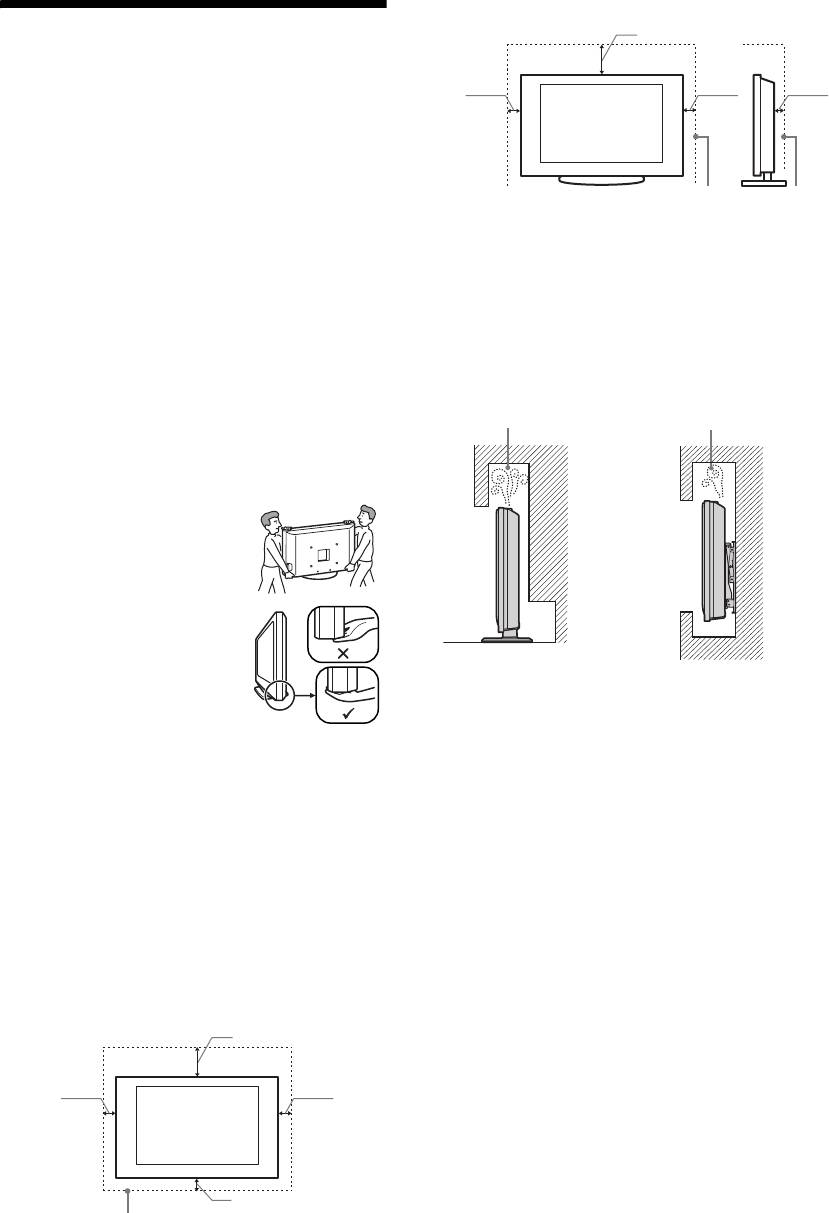
préserver les ressources naturelles. Pour des informations
Mise au rebut du téléviseur
détaillées sur le recyclage de ce produit, veuillez contacter le
service municipal local, le service chargé du traitement des
Traitement des appareils
déchets ménagers ou le magasin où vous avez acheté le
électriques et électroniques
produit.
en fin de vie (Applicable dans
les pays de l'Union
Le fabricant de ce produit est Sony Corporation, 1-7-1
Konan Minato-ku Tokyo, 108-0075 Japon. Le
Européenne et aux autres
représentant autorisé pour les questions de compatibilité
pays européens disposant de
électromagnétique (EMC) et la sécurité des produits est
systèmes de collecte
Sony Deutschland GmbH, Hedelfinger Strasse 61,
sélective)
70327 Stuttgart, Allemagne. Pour toute question relative
Ce symbole, apposé sur le produit
au SAV ou à la garantie, merci de bien vouloir vous
ou sur son emballage, indique que
référer aux coordonnées contenues dans les documents
ce produit ne doit pas être traité
relatifs au SAV ou la garantie.
avec les déchets ménagers. Il doit
être remis à un point de collecte
approprié pour le recyclage des équipements électriques et
~
électroniques. En s'assurant que ce produit est bien mis au
La notation "x" qui apparait sur les noms de modèle
rebut de manière appropriée, vous aiderez à prévenir les
correspond au chiffre relatif à la couleur du produit.
conséquences négatives potentielles pour l'environnement et
la santé humaine. Le recyclage des matériaux aidera à
FR
5
010COV_IT.book Page 2 Monday, November 12, 2007 10:48 AM
Installato sul supporto
30 cm
Informazioni di
10 cm10 cm
6 cm
sicurezza
Installazione/Impostazione
Installare e utilizzare il televisore attenendosi alle
istruzioni fornite di seguito al fine di evitare il rischio
Spazio minimo indispensabile attorno al televisore.
di incendi, scosse elettriche o danni e/o lesioni.
• Per garantire una ventilazione adeguata ed evitare
Installazione
l'accumulo di sporcizia e polvere:
– Non posare il televisore piatto, né installarlo in posizione
• Il televisore deve essere installato in prossimità di una
capovolta, girato all'indietro o lateralmente.
presa di rete facilmente accessibile.
– Non posizionare il televisore su uno scaffale o dentro un
• Collocare il televisore su una superficie piana e stabile.
armadio.
• Per l'installazione a parete rivolgersi esclusivamente a
– Non coprire il televisore con tessuti od oggetti, come per
personale qualificato.
esempio tende, giornali e simili.
• Per motivi di sicurezza, si consiglia caldamente di
– Non installare il televisore nel modo indicato di seguito.
utilizzare esclusivamente accessori Sony, compresi:
Circolazione
Circolazione
– KDL-40P30xH/ KDL-37P30xH/ KDL-32P30xH:
Staffa di montaggio a parete SU-WL500.
dell’aria bloccata
dell’aria bloccata
– KDL-26P30xH/ KDL-26T26xH:
Staffa di montaggio a parete SU-WL100.
Trasporto
• Prima di trasportare il televisore,
Parete Parete
scollegare tutti i cavi.
• Per trasportare un televisore di
grandi dimensioni sono necessarie
due o tre persone.
• Se il televisore viene trasportato a
mano, sollevarlo come illustrato a
destra. Non praticare pressione sul
pannello LCD e sulla cornice
intorno allo schermo.
• Durante il sollevamento o lo
Cavo di alimentazione
spostamento del televisore,
sorreggerlo saldamente dal fondo.
Maneggiare il cavo e la presa di rete nel modo indicato
• Durante il trasporto, non sottoporre il televisore a urti o
di seguito al fine di evitare il rischio di incendi, scosse
vibrazioni eccessive.
elettriche o danni e/o lesioni:
• Nel caso in cui si renda necessario trasportare il televisore
– Utilizzare soltanto cavi di alimentazione Sony, non di
per farlo riparare o per un trasloco, richiuderlo sempre
altre marche.
nell'imballaggio originale.
– Inserire completamente la spina nella presa di rete.
– Utilizzare il televisore esclusivamente con alimentazione
da 220-240 V CA.
Ventilazione
– Prima di effettuare i collegamenti, per motivi di
• Non coprire i fori di ventilazione o inserire oggetti nel
sicurezza assicurarsi di aver scollegato il cavo di
mobile.
alimentazione e prestare attenzione a non rimanere
• Lasciare un po' di spazio intorno al televisore.
impigliati nei cavi con i piedi.
• Si raccomanda caldamente di utilizzare la staffa di
– Disinserire il cavo di alimentazione dalla presa di rete prima
montaggio a parete Sony al fine di consentire un'adeguata
di effettuare operazioni sul televisore o di spostarlo.
circolazione dell'aria.
– Tenere il cavo di alimentazione lontano da fonti di calore.
– Scollegare e pulire regolarmente la spina del cavo di
Installato a parete
alimentazione. Se la spina è ricoperta di polvere ed è
esposta a umidità, l'isolamento potrebbe deteriorarsi e
30 cm
provocare un incendio.
Note
• Non utilizzare il cavo di alimentazione fornito su altri
10 cm
10 cm
apparecchi.
• Non sottoporre a pressione, piegare o attorcigliare
eccessivamente il cavo di alimentazione. I fili interni
potrebbero scoprirsi o danneggiarsi.
• Non modificare il cavo di alimentazione.
• Non collocare oggetti pesanti sul cavo di alimentazione.
10 cm
• Non tirare il cavo di alimentazione per disinserirlo.
Spazio minimo indispensabile attorno al televisore.
• Non collegare un numero eccessivo di apparecchiature alla
medesima presa di rete.
• Non utilizzare una presa di rete inadeguata alla spina in uso.
IT
2

010COV_IT.book Page 3 Monday, November 12, 2007 10:48 AM
• Il cavo di comunicazione utilizzato per collegare il decoder
– All'interno del televisore sono penetrate sostanze liquide
multimediale al televisore deve essere inferiore a 3 m di
o oggetti solidi.
lunghezza.
Uso proibito
Non installare/utilizzare il televisore in luoghi,
Precauzioni
ambienti o situazioni come quelle elencate di seguito: il
televisore potrebbe presentare un malfunzionamento e
Visione del televisore
provocare incendi, scosse elettriche, danni e/o lesioni.
• Si consiglia la visione del televisore in condizioni di luce
adatta, in quanto condizioni di luce scarsa o periodi
Luogo:
prolungati danneggiano la vista.
All'aperto (esposto alla luce solare diretta), in spiaggia, su
• Onde evitare danni all’udito, durante l’uso delle cuffie
imbarcazioni, all'interno di un veicolo, in ambiente medico, in
regolare il volume a livelli moderati.
posizioni instabili, esposto all’acqua, pioggia, umidità o fumo.
Schermo LCD
Ambiente:
• Per quanto lo schermo LCD sia realizzato con tecnologia
Luoghi caldi, umidi o eccessivamente polverosi; esposti
ad alta precisione e disponga del 99,99% od oltre di pixel
all'ingresso di insetti; dove potrebbero essere soggetti a
effettivi, potranno comparire ripetutamente punti neri o
vibrazioni meccaniche; nelle vicinanze di oggetti infiammabili
luminosi (rossi, blu o verdi) sullo schermo. Ciò costituisce
(candele, ecc.). Non esporre il televisore a sgocciolamento o
una caratteristica di fabbricazione dello schermo LCD e
spruzzi e non posizionarvi sopra oggetti contenenti liquidi,
non è un problema di funzionamento.
come per esempio vasi.
• Non spingere o graffiare il filtro anteriore e non
Situazione:
posizionare oggetti sopra al televisore. L'immagine potrà
Non utilizzare con le mani bagnate, senza il mobile o con
risultare non uniforme o lo schermo LCD danneggiato.
accessori diversi da quelli raccomandati dal fabbricante.
• Se il televisore viene utilizzato in un luogo freddo, le immagini
Durante i temporali scollegare il televisore dalla presa di rete
potrebbero risultare distorte o più scure del normale. Non si
e dall'antenna.
tratta di un problema di funzionamento, bensì di un fenomeno
che scompare con l’aumento della temperatura.
Rottura di componenti:
• Se vengono visualizzati in modo continuo fermi
immagine, è possibile che si presenti un’immagine
• Non tirare oggetti contro il televisore. Il vetro dello schermo
residua. Tale immagine scompare dopo alcuni istanti.
potrebbe rompersi a causa dell’impatto e provocare lesioni
• Durante l’uso del televisore, lo schermo e il rivestimento si
gravi.
scaldano. Non si tratta di un problema di funzionamento.
• Se la superficie del televisore si rompe, non toccarla finché
non è stato scollegato il cavo di alimentazione. In caso
• Lo schermo LCD contiene piccole quantità di cristalli
contrario, potrebbero generarsi scosse elettriche.
liquidi e mercurio. Anche i tubi a fluorescenza utilizzati in
questo televisore contengono mercurio. Per lo smaltimento
attenersi ai regolamenti e alle normative locali.
Periodi di inutilizzo
• Qualora si preveda di non utilizzare il televisore per
Cura e pulizia della superficie dello schermo e del
IT
numerosi giorni, esso dovrà essere scollegato dalla presa di
rivestimento
rete per motivi ambientali e di sicurezza.
Verificare di avere disinserito il cavo di alimentazione
• Anche se spento, il televisore non è scollegato dalla rete
collegato al televisore dalla presa di rete prima di procedere
elettrica; per scollegare completamente il televisore,
alla pulizia.
estrarre la spina dalla presa di rete.
Per evitare il degradamento del materiale o del rivestimento
• Alcuni televisori potrebbero comunque disporre di funzioni
dello schermo, prendere le seguenti precauzioni.
che per operare correttamente richiedono di lasciare il
televisore in standby.
• Per rimuovere la polvere dalla superficie dello schermo e
dal rivestimento, utilizzare un panno morbido e procedere
con delicatezza. Se la polvere persiste, utilizzare un panno
Bambini
morbido leggermente inumidito con una soluzione
• Impedire ai bambini di salire sul televisore.
detergente neutra diluita.
• Tenere gli accessori di piccole dimensioni lontano dalla portata
• Non utilizzare spugnette abrasive, detergenti alcalini o
dei bambini, affinchè non vengano accidentalmente ingeriti.
acidi, polveri abrasive o solventi volatili quali alcool,
benzene, diluenti o insetticidi. L'uso di tali materiali o il
Qualora si verifichino i seguenti
contatto prolungato con gomma o materiali vinilici
potrebbero danneggiare la superficie dello schermo e il
problemi...
materiale di rivestimento del televisore.
Spegnere il televisore e disinserire immediatamente
• Per regolare l'angolazione del televisore, spostarlo
il cavo di alimentazione qualora si verifichino i
lentamente in modo da evitare che muovendolo scivoli dalla
seguenti problemi.
base.
Rivolgersi al proprio rivenditore o a Sony per fare
Apparecchiature opzionali
controllare il televisore da personale opportunamente
Mantenere i componenti opzionali o eventuali
qualificato.
apparecchiature che emettono radiazioni elettromagnetiche
Quando:
lontano dal televisore. In caso contrario, si potranno
verificare distorsione dell'immagine e/o disturbi dell'audio.
– Il cavo di alimentazione è danneggiato.
– La presa di rete è inadeguata alla spina in uso.
– Il televisore è danneggiato per una caduta, un urto o un
oggetto lanciato.
IT
3
010COV_IT.book Page 4 Monday, November 12, 2007 10:48 AM
Informazioni utili
Sistema televisivo
Caratteristiche tecniche
In base alla selezione della nazione/regione
Analogico: B/G/H, D/K, L, I
Schermo
Digitale: DVB-T
Requisiti di alimentazione:
Sistema Colore/Video
220–240 V CA, 50 Hz
Dimensioni schermo:
Analogico: PAL, SECAM
KDL-40xxxxx: 40 "
NTSC 3.58, 4.43 (solo ingresso video)
KDL-37xxxxx: 37 "
Digitale: MPEG-2 MP@ML
KDL-32xxxxx: 32 "
Antenna
KDL-26xxxxx: 26 "
Terminale esterno 75 ohm per VHF/UHF
Risoluzione schermo:
1366 punti (orizzontale) × 768 linee (verticale)
Copertura dei canali
Potenza assorbita:
Analogico: 48.25 - 855.25 MHz
KDL-40xxxxx: 165 W o inferiore
Digitale: VHF Banda III (177.5 - 226.5 MHz)
KDL-37xxxxx: 150 W o inferiore
UHF E21 - E69 (474 - 858 MHz)
KDL-32xxxxx: 130 W o inferiore
Terminali
KDL-26xxxxx: 90 W o inferiore
/1
Potenza assorbita in modalità standby*:
connettore scart a 21 pin (standard CENELEC) per
1,6 W o inferiore
ingresso audio/video, ingresso RGB e uscita audio/video
* La potenza in modalità standby viene raggiunta
TV.
quando il televisore ha ultimato i necessari processi
/ 2 (SMARTLINK)
interni.
connettore scart a 21 pin (standard CENELEC) per
Dimensioni (l x h x p):
ingresso di segnali audio/video, ingresso RGB, uscita
KDL-40xxxxx:
audio/video selezionabile e interfaccia SmartLink.
Circa 982 x 696 x 265 mm (con il mobile)
3
Circa 982 x 643 x 124 mm (senza mobile)
Formati supportati: 1080i, 720p, 576p, 576i, 480p, 480i
KDL-37xxxxx:
Y: 1 Vp-p, 75 ohm, 0,3 V sincron negativa
Circa 906 x 664 x 265 mm (con il mobile)
P
B/CB: 0,7 Vp-p, 75 ohm
Circa 906 x 630 x 126 mm (senza mobile)
P
R/CR: 0,7 Vp-p, 75 ohm
KDL-32xxxxx:
3
Circa 790 x 583 x 214 mm (con il mobile)
Ingresso audio (connettori fono)
Circa 790 x 549 x 119 mm (senza mobile)
500 mVrms
KDL-26P30xH:
Impedenza: 47 kilo ohm
Circa 657 x 506 x 214 mm (con il mobile)
HDMI IN 4, 5
Circa 657 x 472 x 121 mm (senza mobile)
Video: 1080i, 720p, 576p, 576i, 480p, 480i
KDL-26T26xH:
Audio: PCM lineare due canali
Circa 657 x 506 x 214 mm (con il mobile)
32, 44,1 e 48 kHz, 16, 20 e 24 bits
Circa 657 x 453 x 121 mm (senza mobile)
PC (vedere tabella)
Peso:
Audio analogico (connettori fono):
KDL-40xxxxx:
500 mVrms, Impedenza 47 kilohms
Circa 23,5 kg (con il mobile)
(solo HDMI IN 4)
Circa 20,0 kg (senza mobile)
6 Ingresso S video (4 pin mini DIN)
KDL-37xxxxx:
6 Ingresso video (connettore fono)
Circa 21,0 kg (con il mobile)
6 Ingresso audio (connettori fono)
Circa 18,0 kg (senza mobile)
Uscita audio (Sinistra/Destra) - (connettori fono)
KDL-32xxxxx:
Circa 15,0 kg (con il mobile)
PC Ingresso PC (15 Dsub) (vedere pagina 17)
Circa 13,0 kg (senza mobile)
G: 0,7 Vp-p, 75 ohm, no Sincron su Verde
KDL-26P30xH:
B: 0,7 Vp-p, 75 ohm, no Sincron su Verde
Circa 12,0 kg (con il mobile)
R: 0,7 Vp-p, 75 ohm, no Sincron su Verde
Circa 10,0 kg (senza mobile)
HD: 1-5 Vp-p
KDL-26T26xH:
VD: 1-5 Vp-p
Circa 12,5 kg (con il mobile)
Ingresso audio del PC (minijack)
Circa 10,5 kg (senza mobile)
i Uscita cuffia
Sistema pannello
Alloggiamento CAM (Conditional Access Module,
Pannello LCD (Display Cristalli Liquidi)
modulo di accesso condizionale)
IT
4
010COV_IT.book Page 5 Monday, November 12, 2007 10:48 AM
Uscita audio
Accessori opzionali
10 W + 10 W (RMS)
Staffa montaggio a parete SU-WL500 (KDL-40P30xH/
KDL-37P30xH/KDL-32P30xH).
Altoparlante esterno
Staffa montaggio a parete SU-WL100 (KDL-26P30xH/
Impedenza 16 ohm, max 10 W
KDL-26T26xH).
Design e specifiche sono soggetti a modifiche senza
preavviso.
Schema di riferimento segnali di ingresso PC per PC
Frequenza
Frequenza
Segnali Orizzontale (Pixel) Verticale (Linea)
orizzontale
Standard
verticale (Hz)
(kHz)
VGA 640 480 31,5 60 VGA
SVGA 800 600 37,9 60 Linee guida VESA
XGA 1024 768 48,4 60 Linee guida VESA
WXGA 1280 768 47,4 60 VESA
1280 768 47,8 60 VESA
• L'ingresso PC di questo televisore non supporta il sincronismo sul verde o il sincronismo composito.
• L'ingresso PC di questo televisore non supporta segnali interallacciati.
• L'ingresso PC di questo televisore supporta i segnali indicati nello schema sopra riportato con una frequenza verticale di 60 Hz.
Per altri segnali, verrà visualizzato il messaggio “NO SINCRON.”.
Schema di riferimento segnali di ingresso PC per HDMI IN 4, 5
Frequenza
Frequenza
Segnali Orizzontale (Pixel) Verticale (Linea)
orizzontale
Standard
verticale (Hz)
(kHz)
VGA 640 480 31,5 60 VGA
SVGA 800 600 37,9 60 Linee guida VESA
XGA 1024 768 4,4 60 Linee guida VESA
WXGA 1280 768 47,4 60 VESA
WXGA 1280 768 47,8 60 VESA
WXGA 1360 768 47,7 60 VESA
IT
5
010COV_IT.book Page 6 Monday, November 12, 2007 10:48 AM
Introduzione
Il fabbricante di questo prodotto è Sony Corporation,
1-7-1 Konan Minato-ku Tokyo, 108-0075, Giappone.
Trattamento del dispositivo
Il rappresentante autorizzato ai fini della
elettrico o elettronico a fine
Compatibilità Elettromagnetica e della sicurezza del
vita (applicabile in tutti i paesi
prodotto è Sony Deutschland GmbH, Hedelfinger
dell’Unione Europea e in altri
Strasse 61, 70327, Stoccarda Germania. Per qualsiasi
problema relativo all'assistenza o alla garanzia, si
paesi europei con sistema di
prega di fare riferimento agli indirizzi indicati nei
raccolta differenziata)
documenti di assistenza e garanzia forniti con il
Questo simbolo sul prodotto o sulla
prodotto.
confezione indica che il prodotto non
deve essere considerato come un
normale rifiuto domestico, ma deve
~
invece essere consegnato a un punto
La cifra “x” che compare nel nome del modello, identifica
di raccolta appropriato per il riciclo
il colore del prodotto.
di apparecchi elettrici ed elettronici. Accertando che questo
prodotto sia smaltito correttamente, si contribuirà a prevenire
potenziali conseguenze negative per l’ambiente e per la salute
che potrebbero altrimenti essere causate dal suo smaltimento
inadeguato. Il riciclo dei materiali aiuta a conservare le risorse
naturali. Per informazioni più dettagliate circa il riciclo di
questo prodotto, contattare l’ufficio comunale, il servizio locale
di smaltimento rifiuti oppure il negozio dove è stato acquistato.
DICHIARAZIONE DI CONFORMITA’ IN BASE ALL’ARTICOLO 2 PARAGRAFO B DEL D.M. 26.03.1992
Si dichiara che questi modelli sono stati assemblati nella Comunità Economica Europea nel rispetto delle disposizioni di cui al
D.M. 26.03.92 ed in particolare sono conformi alle prescrizioni dell’articolo 1 dello stesso D.M.
DICHIARAZIONE DI CONFORMITÀ
Si dichiara che gli apparecchi sono stati fabbricati in conformità all’Art. 2 Comma 1 del D.M. 28.08.1995 n.548.
Le prescrizioni alle frequenze sono quelle indicate nel paragrafo 3 dell’allegato A. al D.M. 25.06.85 e nel paragrafo 3 dell’allegato
1 al D.M. 27.08.87 e precisamente:
BANDE DI FREQUENZA
1. Bande di frequenza:
Low VHF E2 - C Freq. da 48,25 a 82,25 MHz Compreso Canale C
S01 - S2 Freq. da 69,25 a 112,25 MHz
S3 - S10 Freq. da 119,25 a 168,25 MHz
High VHF E5 - E12 Freq. da 175,25 a 224,25 MHz
S11 - S20 Freq. da 231,25 a 294,25 MHz
Hyperband S21 - S36 Freq. da 303,25 a 423,25 MHz
S37 - S41 Freq. da 431,25 a 463,25 MHz
UHF E21- E69 Freq. da 471,25 a 855,25 MHz
2. Frequenza intermedia: Multi - Standard FI-Video: 38,9 MHz
FI-Audio I: 33,4 MHz
FI-Audio II: 33,16 MHz
3. Oscillatore locale: Frequenza oscillatore locale superiore a quella del segnale.
IT
6
