
Sony Walkman MZ-E310: instruction
Class: Household, kitchen appliances, electronics and equipment
Type: Player
Manual for Sony Walkman MZ-E310
Table of contents
3-247-462-13(1)
Portable
MiniDisc Player
Operating Instructions
Käyttöohjeet
Mode d’emploi
Bedienungsanleitung
Manual de instrucciones
Gebruiksaanwijzing
Bruksanvisning
Istruzioni per l’uso
Manual de instruções
MZ-E310
©2002 Sony Corporation
“
Portable MiniDisc Player MZ-E310
WALKMAN” is a registered trademark of Sony Corporation to
represent Stereo products. is a trademark of
Sony Corporation.
filename[C:\WINNT\Profiles\Administrator\Desktop\02GB-MZE310CE7\020REG.fm]
masterpage:Left
The validity of the CE marking
WARNING
is restricted to only those
To prevent fire or shock hazard, do
countries where it is legally
not expose the unit to rain or
enforced, mainly in the
moisture.
countries EEA (European
Economic Area).
Do not install the appliance in a
The C-Tick mark on the
confined space, such as a bookcase or
Walkman is valid only for
built-in cabinet.
the products marketed in
Australia.
To prevent fire, do not cover the
ventilation of the apparatus with
newspapers, table-cloths, curtains, etc.
And don’t place lighted candles on the
apparatus.
To prevent fire or shock hazard, do not
place objects filled with liquids, such as
vases, on the apparatus.
Certain countries may regulate disposal of
the battery used to power this product.
Please consult with your local authority.
Caution
The use of optical instruments with this
product will increase eye hazard.
CAUTION — INVISIBLE LASER
RADIATION WHEN OPEN
DO NOT STARE INTO BEAM OR
VIEW DIRECTRY WITH OPTICAL
INSTRUMENTS
Information
IN NO EVENT SHALL SELLER BE
LIABLE FOR ANY DIRECT,
INCIDENTAL OR
CONSEQUENTIAL DAMAGES OF
ANY NATURE, OR LOSSES OR
EXPENSES RESULTING FROM
ANY DEFECTIVE PRODUCT OR
THE USE OF ANY PRODUCT.
2-GB
model name1[MZ-E310] model name2[MZ------]
[3-247-462-11(1)]
filename[C:\WINNT\Profiles\Administrator\Desktop\02GB-
MZE310CE7\020REGTOC.fm]
masterpage:Right
Table of contents
Looking at the controls .................................... 4
Getting started! ................................................ 6
Playing an MD right away! ................................8
Various ways of playback .............................. 10
Searching for a specific track or a position quickly (Quick Search) .... 10
Selecting the play mode ....................................................................... 10
Listening to tracks in a desired sequence (Program Play) ............. 12
Using the group function ...................................................................... 12
GB
What is a disc with group settings? ............................................... 12
Listening to tracks in a specific group (Group Mode Playback) ... 13
Selecting and playing specific groups (Group Skip Function) ...... 13
Registering groups using your MiniDisc recorder ......................... 14
Adjusting treble or bass (Digital Sound Preset) ................................... 15
Selecting the sound quality ............................................................ 15
Adjusting the sound quality ........................................................... 15
Other Operations ............................................ 17
Viewing the track name and playing time ........................................... 17
Protecting your hearing (AVLS) .......................................................... 18
Locking the controls (HOLD) .............................................................. 18
Additional information .................................... 19
Precautions ........................................................................................... 19
Troubleshooting ................................................................................... 21
Specifications ....................................................................................... 23
3-GB
model name1[MZ-E310] model name2[MZ------]
[3-247-462-11(1)]
filename[C:\WINNT\Profiles\Administrator\Desktop\02GB-MZE310CE7\030GET.fm]
masterpage:Left
Looking at the controls
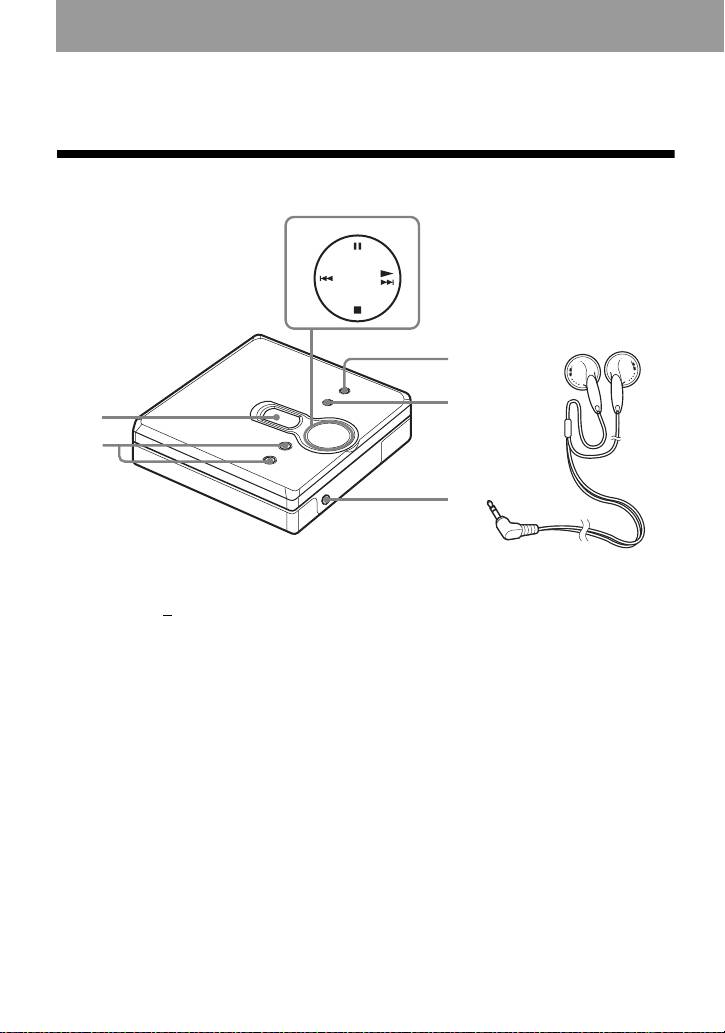
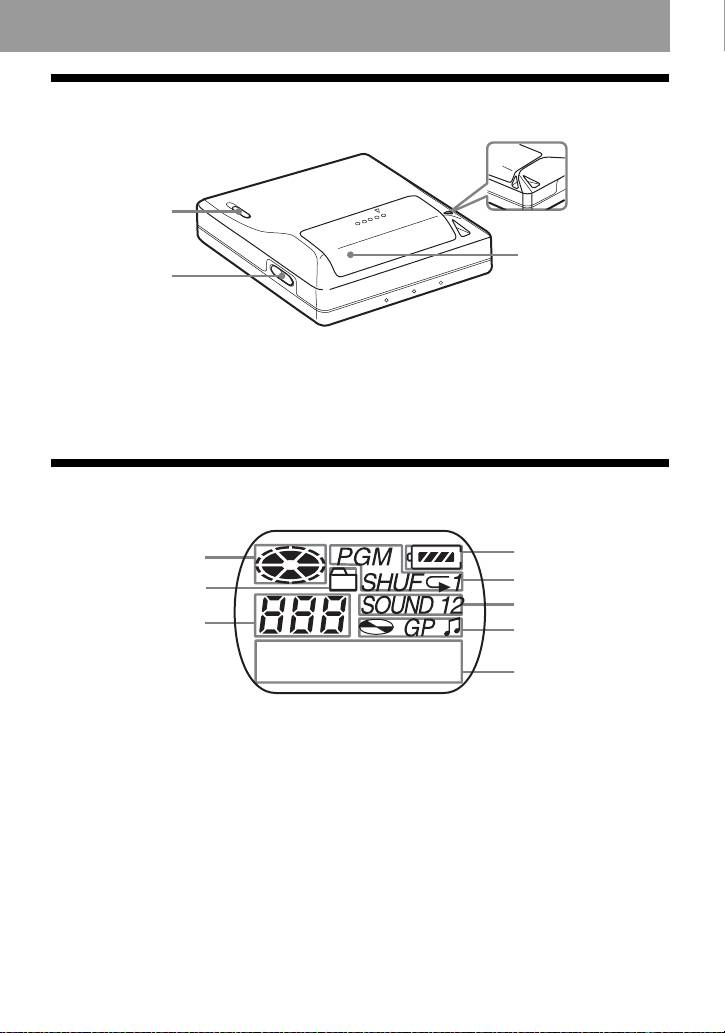
Front of the player
3
7
4
5
1
2
6
A Display window
D
MENU/ENTER button
B VOL + and – button
E GROUP button
The VOL + button has a tactile dot.
F i (headphones/earphones) jack
C 4-position control key
G Headphones/earphones
*
N (play)
. and > (search/AMS)
x (stop)
X (pause)
∗ The N button has a tactile dot.
4-GB
model name1[MZ-E310] model name2[MZ------]
[3-247-462-11(1)]
filename[C:\WINNT\Profiles\Administrator\Desktop\02GB-MZE310CE7\030GET.fm]
masterpage:Right
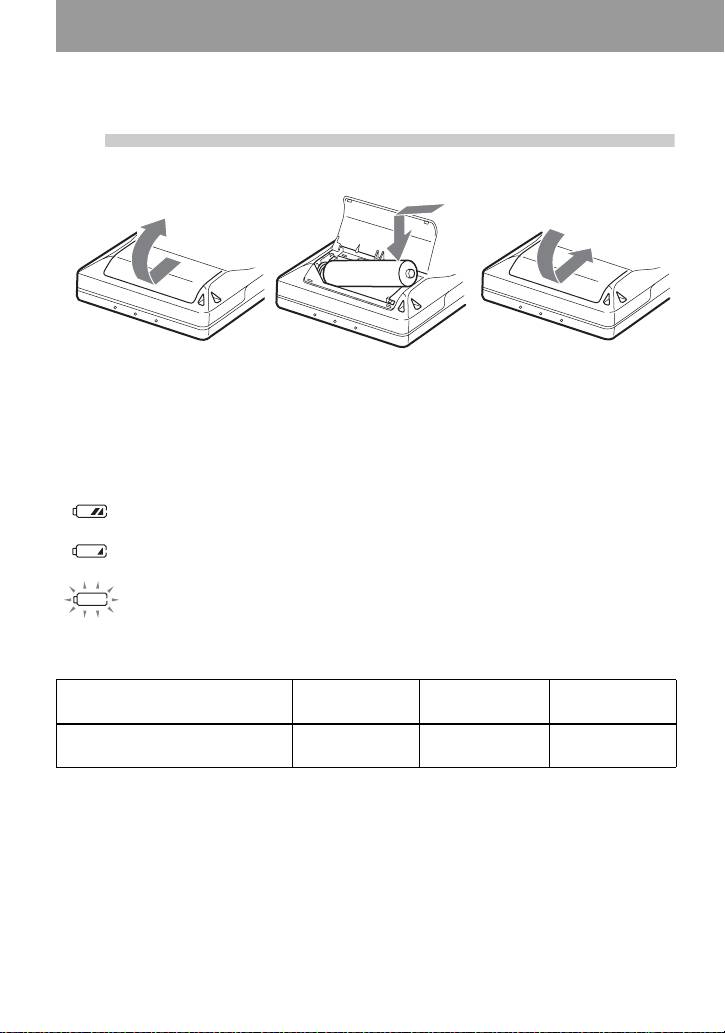
Back of the player
1
4
2
A HOLD switch
C Hand strap hole
Use the hole to attach your own strap.
B OPEN button
D Battery compartment lid
The display window of the player
A Disc indication
H Character information display
Displays the track names, elapsed
B Group mode indication
time, etc.
Lights up when group mode is on.
C Track number display
D Battery level indication
Shows approximate battery condition.
E Play mode indication
Shows play mode of the MD.
F SOUND indication
G Disc, group, track indication
5-GB
model name1[MZ-E310] model name2[MZ------]
[3-247-462-11(1)]
3
4
1
5
2
6
3
7
8
filename[C:\WINNT\Profiles\Administrator\Desktop\02GB-MZE310CE7\030GET.fm]
masterpage:Left
Getting started!
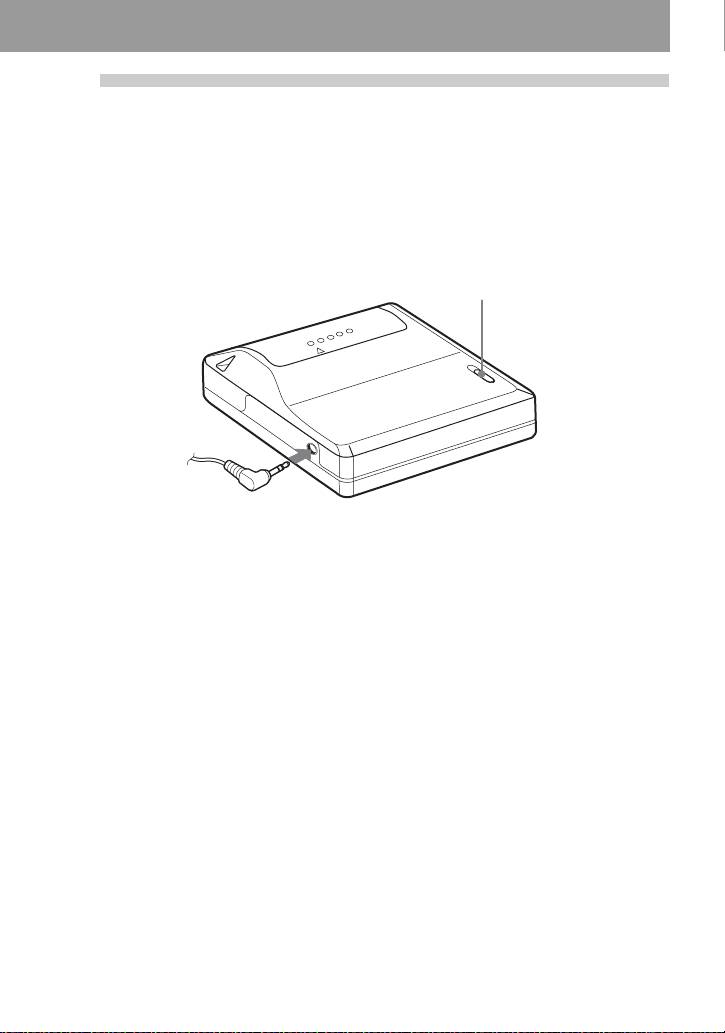
1
Insert an alkaline dry battery.
E
e
Slide to open the battery
Insert one LR6 (size AA)
Close the lid.
compartment lid.
alkaline dry battery
minus end first.
When to replace the battery
You can check the battery condition through the battery indicator while using the player.
Battery power decreasing
r
Weak battery
r
The battery has gone out.
“LoBATT” flashes in the display, and the power goes off.
Battery life
1)
(Unit:approx.hours)(JEITA
)
Battery SP
LP2
LP4
Stereo
Stereo
Stereo
LR6 (SG)
41 50 56
2)
Sony alkaline dry battery
1)
Measured in accordance with the JEITA (Japan Electronics and Information Technology Industries
Association) standard.
2)
When using a Sony LR6 (SG) “STAMINA” alkaline dry battery (produced in Japan).
Note
The battery life may be shorter than that specified, depending on the operating conditions, the
temperature of the location, and varieties of batteries.
6-GB
model name1[MZ-E310] model name2[MZ------]
[3-247-462-11(1)]
filename[C:\WINNT\Profiles\Administrator\Desktop\02GB-MZE310CE7\030GET.fm]
masterpage:Right
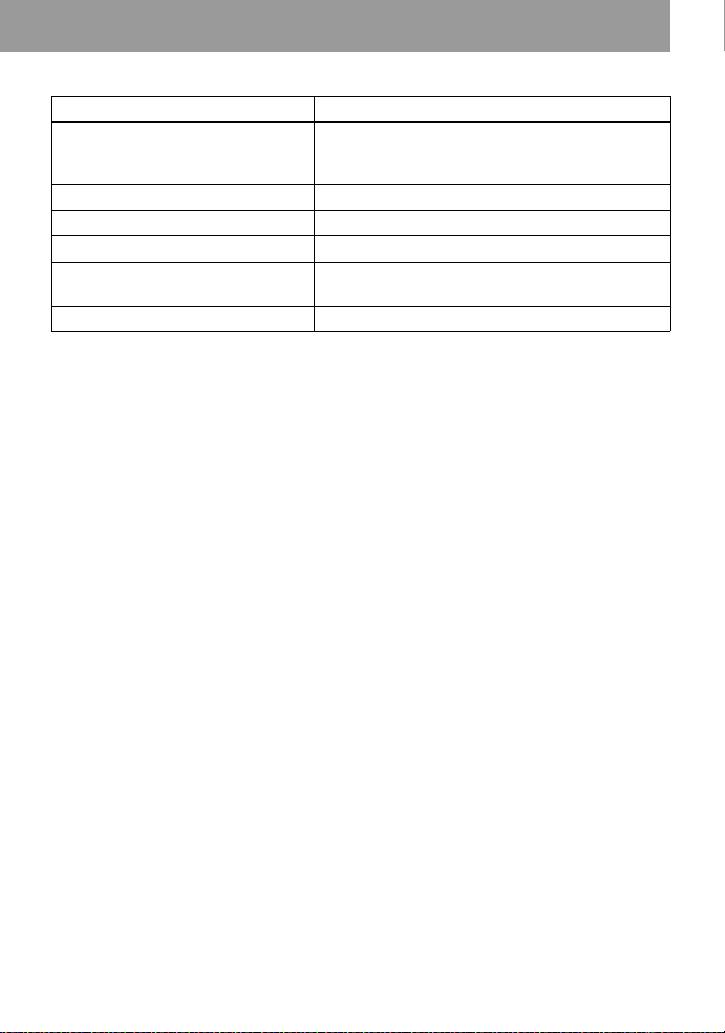
2
Make connections and unlock the
control.
1 Connect the headphones/earphones to
2 Slide HOLD in the opposite direction of
i.
the arrow indicated on the player
(HOLD .) to unlock the controls.
HOLD
to i
Connect firmly.
7-GB
model name1[MZ-E310] model name2[MZ------]
[3-247-462-11(1)]

filename[C:\WINNT\Profiles\Administrator\Desktop\02GB-MZE310CE7\030GET.fm]
masterpage:Left
Playing an MD right away!
1
Insert an MD.
1 Press OPEN to open the lid. 2 Insert an MD with the label side facing
front, and press the lid down to close.
2
Play an MD.
1 Press N> .
., N>, x, X
2 Press VOL + or – to adjust the volume.
The volume indicator appears in the
display allowing you to check the
volume level.
To stop play, press x.
Playback starts from the point you last stopped
playing. To start playback from the beginning
of the first track, hold down
N> for 2
seconds or more.
VOL +, –
8-GB
model name1[MZ-E310] model name2[MZ------]
[3-247-462-11(1)]
filename[C:\WINNT\Profiles\Administrator\Desktop\02GB-MZE310CE7\030GET.fm]
masterpage:Right
To Operation
Find the beginning of the current
Press ..
1)
track or the previous track
Press . repeatedly until the beginning of the
desired track appears.
2)
Find the beginning of the next track
Press N> once.
Go backwards while playing Hold down ..
Go forward while playing Hold down
N>.
Pause Press X.
Press X again to resume play.
3)
Remove the MD Press x, and then press OPEN.
1)
If you press . twice continuously while playing the first track of the disc, the player goes to the
beginning of the last track on the disc.
2)
If you press N> during the last track of the disc, the player goes to the beginning of the first track
on the disc.
3)
If you open the lid, the playback will begin from the beginning of the first track (except when group
mode is on).
Suppressing the skip of the sound (G-PROTECTION)
The G-PROTECTION function was developed to provide a higher level of shock resistance
than that of existing players in order to allow the player to be used while jogging.
Note
The playback sound may skip if:
• the player receives stronger continuous shock.
• a dirty or scratched MiniDisc is played.
z
• The MZ-E310 supports the newly developed DSP TYPE-R for ATRAC. It thus allows you to enjoy
TYPE-R high-quality sound from MDs recorded in SP stereo on TYPE-R-equipped MD decks, etc.
• The player can play the track recorded by 2 × or 4 × long playing mode (LP2 or LP4). Normal stereo
playback, LP2 stereo playback, LP4 stereo playback or monaural playback is automatically selected
to match the audio source.
• The display will turn off shortly after you press
x.
9-GB
model name1[MZ-E310] model name2[MZ------]
[3-247-462-11(1)]
filename[C:\WINNT\Profiles\Administrator\Desktop\02GB-MZE310CE7\040OPE.fm]
masterpage:L0-Left
Various ways of playback
z
Searching for a specific
• If you do this procedure while the player is in
shuffle play mode, shuffle play starts from the
track or a position
track that you selected.
quickly (Quick Search)
• If the player reaches to the first track or the
last track on the disc as you are holding .
You can do two kinds of quick searches.
or N> button in step 5, it will return to
• Index search — Searching quickly
the last track or the first track, respectively. (In
while monitoring the track number or
group mode, if the player reaches to the first
track name (factory setting).
track or the last track in a group as you are
holding . or N> button in step 5, it
• Time search — Searching quickly
will return to the last track or the first track in
while monitoring the elapsed time.
that group, respectively.) (See “Using the
group function” (page 12).)
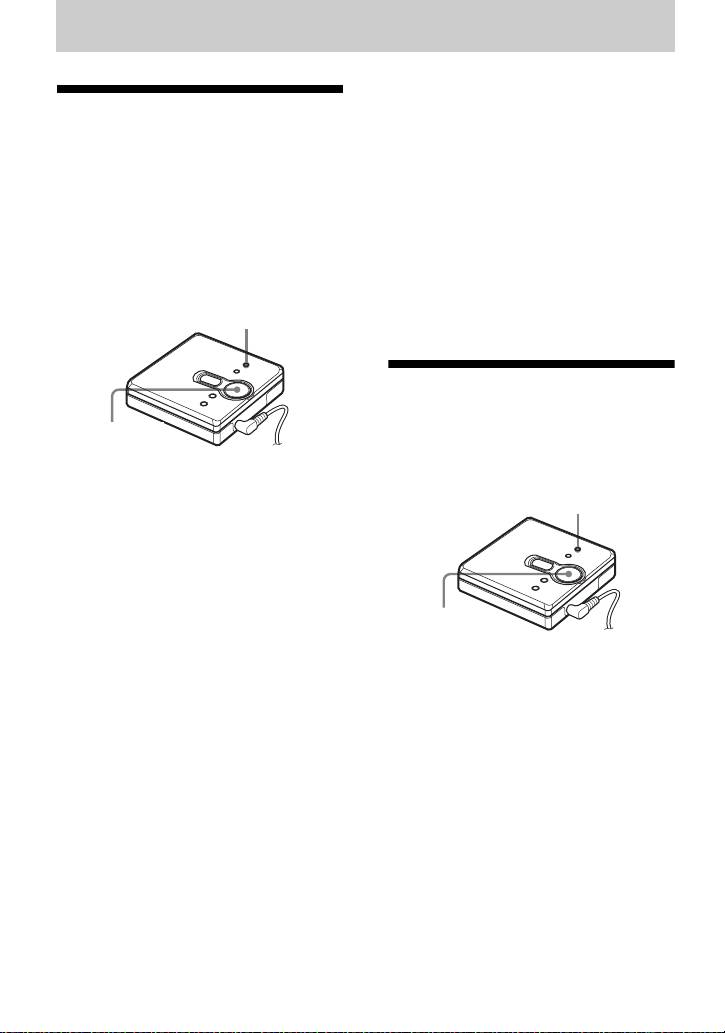
MENU/ENTER
Selecting the play
mode
., N>,
You can select various play modes such as
X, x
normal play, repeat play (1Rep.), shuffle
play (Shuff), or program play (PGM).
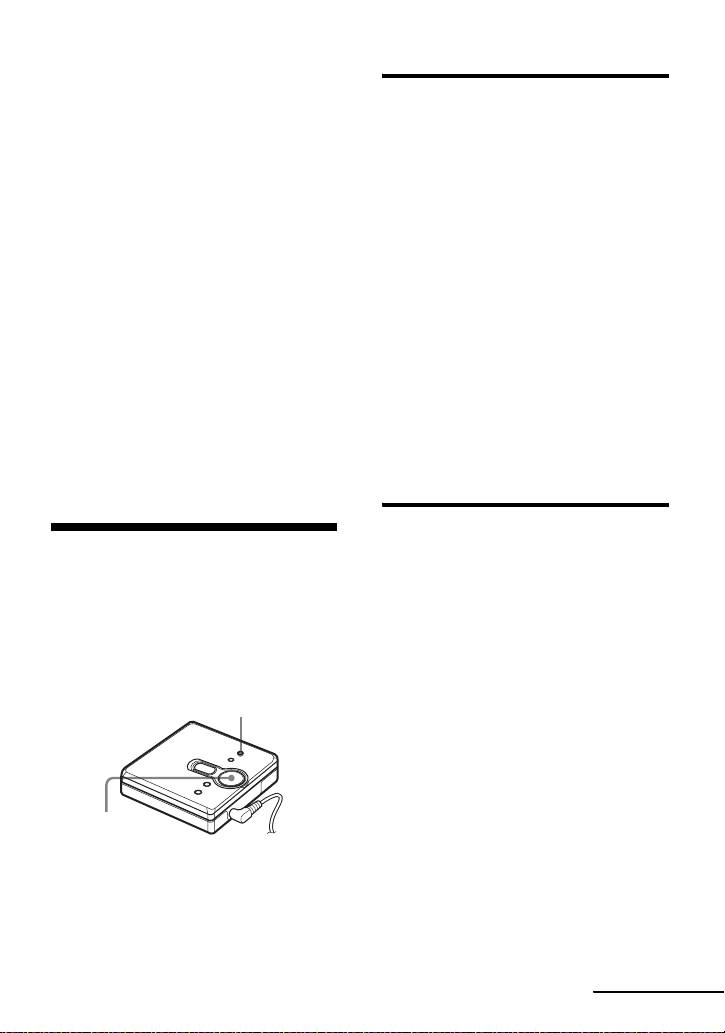
1 During playback, press MENU/
MENU/ENTER
ENTER.
2 Press . or N> repeatedly until
“SEARCH” flashes in the display,
and then press MENU/ENTER.
3 Press . or N> repeatedly until
., N>
“Index”(index search) or “Time”(time
search) flashes in the display, and
then MENU/ENTER.
1 During playback, press MENU/
4 Press X.
ENTER.
5 Hold down . or N> until the
2 Press . or N> repeatedly until
desired track number/track name
“P-MODE” flashes in the display, and
(index search) or the desired elapsed
then press MENU/ENTER.
time (time search) appears in the
display.
6 Press X.
Playback starts from the selected
track.
To cancel the procedure
Press x.
10-GB
model name1[MZ-E310] model name2[MZ------]
[3-247-462-11(1)]

filename[C:\WINNT\Profiles\Administrator\Desktop\02GB-MZE310CE7\040OPE.fm]
masterpage:Right
3 Press . or N> repeatedly to
Indication A/B (play mode)
select the play mode, and then press
Normal/—(normal play)
MENU/ENTER.
All the tracks are played once.
Each time you press
N>, the
r
display item indicated by A changes
AllRep/
as follows:
All the tracks are played repeatedly.
Pressing MENU/ENTER while A is
r
flashing causes the play mode to
1 Track/1
change.
A track is played once.
The new mode then appears in the
r
display indicated by B.
1Rep./ 1
A single track is played repeatedly.
Pressing N> repeatedly changes
r
A.
Shuff/SHUF
After the currently selected track
finishes playing, the remaining
tracks are played in random order.
r
Shuf.R/SHUF
After the currently selected track
B lights up when you press MENU/
finishes playing, the remaining
ENTER
.
tracks are played repeatedly in
random order.
r
PGM/PGM
The tracks are played in the order
that you specified.
r
PGMRep/PGM
The tracks are played repeatedly in
the order that you specified.
To cancel the procedure
Press x.
11-GB
model name1[MZ-E310] model name2[MZ------]
[3-247-462-11(1)]
filename[C:\WINNT\Profiles\Administrator\Desktop\02GB-MZE310CE7\040OPE.fm]
masterpage:Left
• You can specify the play mode for a selected
Listening to tracks in a
group when group mode is on. To activate
group mode, see “Selecting and playing
desired sequence (Program
specific groups (Group Skip Function)”
Play)
(page 13).
• The play mode can also be selected when the
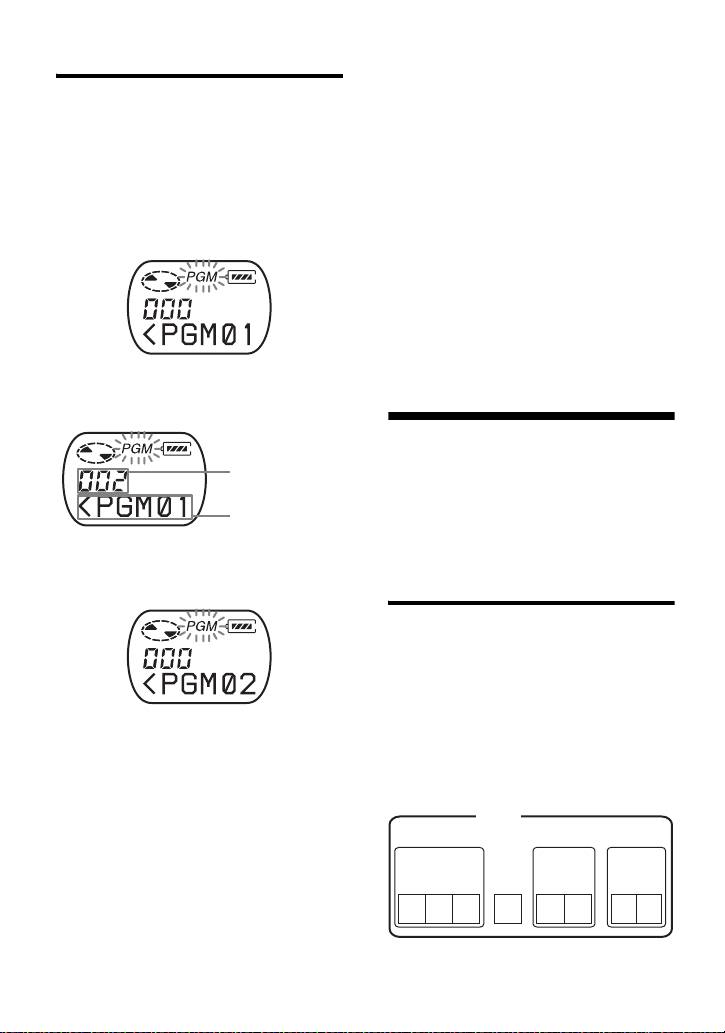
1 Do the steps 1 and 2 in “Selecting the
player is paused or stopped.
play mode” (page 10), select “PGM”
Notes
in step 3 and then press MENU/
• All program settings are lost when the lid is
ENTER.
opened.
• If no settings are made for 5 minutes while the
player is stopped, the settings made up to that
point are entered.
• During program setting, you cannot do group
mode’s on/off setting.
• If you turn on group mode during program
play, the program play is canceled.
2 Press . or N> repeatedly to
select the track number.
Using the group
function
Track number
The player can be used with a disc which
Program number
has group setting.
The group function is useful for playing a
great number of tracks, or tracks that have
3 Press MENU/ENTER.
been recorded in MDLP (LP2/LP4) mode.
The track is entered.
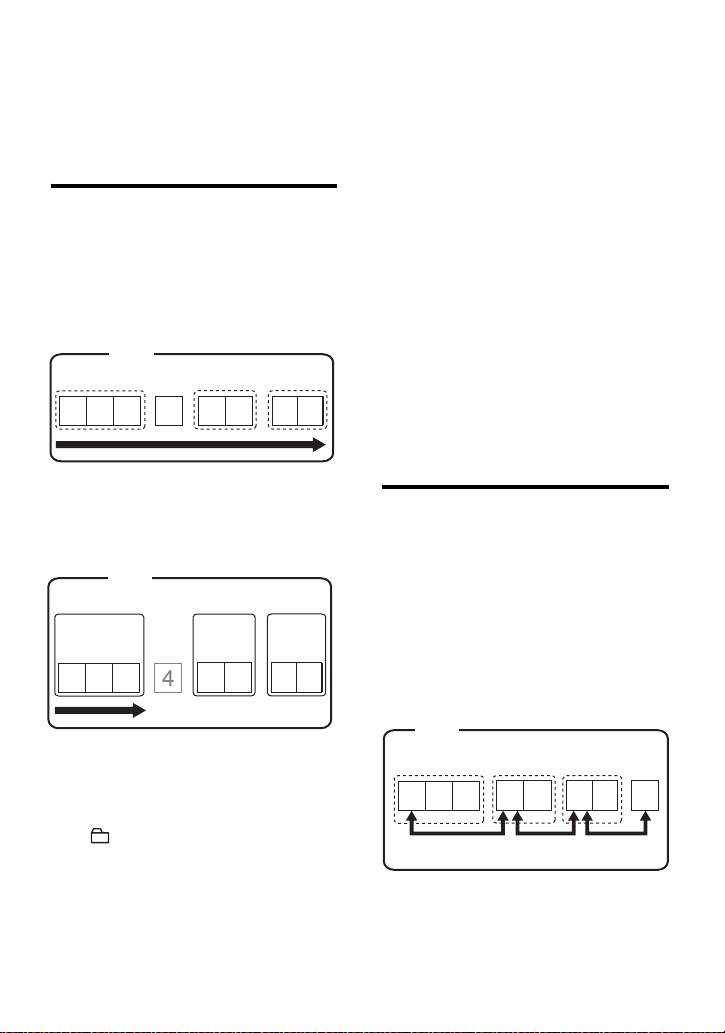
What is a disc with group
settings?
This is a disc with settings that organize
tracks into groups, and which allow those
groups to be selected.
The player does not support the recording
4 Repeat steps 2 and 3 to select other
of group settings. Use your MD recorder
tracks in the desired sequence.
to record information, and then use the
5 Press MENU/ENTER for 2 seconds
player for playback.
or more.
Disc
The settings are entered and playback
Group 1
Group 2
Group 3
starts from the first programmed
Track
Track
Track
track.
number
number
number
z
• The program play settings will remain in
123
4
7
85 6
memory even after playback finishes or is
stopped.
• You can set the program play up to 20 tracks.
12-GB
model name1[MZ-E310] model name2[MZ------]
[3-247-462-11(1)]
filename[C:\WINNT\Profiles\Administrator\Desktop\02GB-MZE310CE7\040OPE.fm]
masterpage:Right
z
To turn off group mode
If your recorder has a function for editing disc
Press GROUP for 2 seconds or more
names, you can use it to register groups. For
again.
details, see “Registering groups using your
MiniDisc recorder” (page 14).
z
• When group mode is on, it is possible to do
repeat play, shuffle play, or program play. For
Listening to tracks in a
details on the respective operations, see
“Selecting the play mode” (page 10).
specific group (Group Mode
• In group mode, pressing N> during the
Playback)
last track of the group moves playback to the
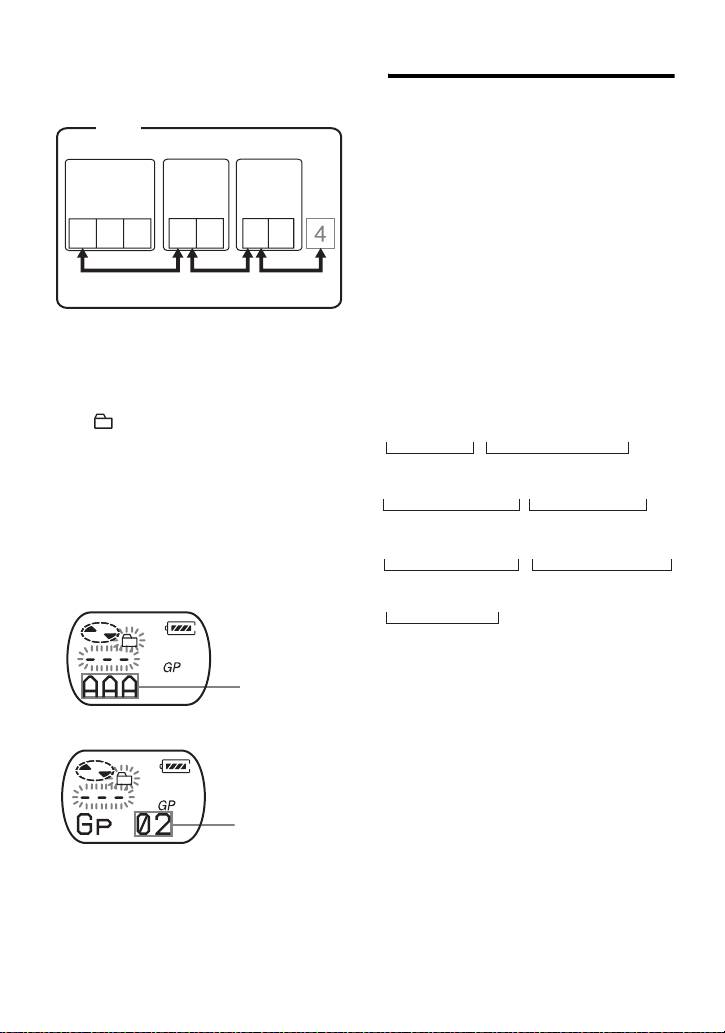
Playback when group mode is off:
first track of the group. Pressing . twice
Playback starts with the first track in the
continuously while playing the first track of a
group moves playback to the last track of the
disc, and stops with the last track in the
group.
disc.
Disc
Note
In group mode, the player treats all tracks
Track number
without group settings as belonging to the last
group on the disc. The last group is indicated in
123
4
7
85 6
the display as “GP --”. Within a group, the
tracks appear in their order on the disc, not their
order within the group.
Playback when group mode is on:
Selecting and playing specific
Playback of the selected group starts with
groups (Group Skip Function)
the first track in the group, and stops with
the last track in the group.
When playing a disc with group settings,
the group skip function allows you to
Disc
Group 1
jump from the currently playing group to
Group 2
Group 3
any other group on the MD. The group
Track
Track
Track
skip function can be used at any time
number
number
number
during playback, regardless of whether
the player is in group mode on or not.
123
1
21 2
When group mode is off:
Disc
Track number
1 Insert a disc which has group settings
into the player, and then play the disc.
123
7
85 6
4
2 Press GROUP for 2 seconds or more.
“ ” and “GP ON” light up in the
Skip
Skip
Skip
display and group mode is turned on.
Playback stops at the end of the last
track in the selected group.
For details on selecting another
group, see “Selecting and playing
specific groups (Group Skip
Function)” (page 13).
13-GB
model name1[MZ-E310] model name2[MZ------]
[3-247-462-11(1)]
filename[C:\WINNT\Profiles\Administrator\Desktop\02GB-MZE310CE7\040OPE.fm]
masterpage:Left
Registering groups using
When group mode is on:
your MiniDisc recorder
Disc
Group 1
Group 2
Group 3
If your MD recorder (MD deck or
recording MD Walkman) has a function
Track
Track
Track
for editing disc names, you can use it to
number
number
number
register groups even if your recorder does
not have the group function.
123
1
21 2
Make sure you enter the text string
exactly as described below. The group
function will not work if you enter the text
Skip
Skip
Skip
string incorrectly.
To specify groups
1 Insert a disc which has group settings
into the player, and then play the disc.
1 Change the disc name to the
following by using your MD
2 Press GROUP.
recorder:
“ ” and “- - -” flash in the display
0;[Disc name] // [First track of group 1 ]-
and groups skip mode is turned on.
A
B
3 Within 5 seconds, press . or
N> repeatedly until the name or
[Last track of group 1] ; [Name of group 1 ] //
number of the desired group appears.
B
C
The player starts playing from the
first track in the group.
[First track of group 2] - [Last track of group 2 ] ;
When there is a group name
BB
(Example: AAA)
[Name of group 2] // ......
C
A Disc name
B Track number
Group name
C Group name
// Separator between groups
When there is no group name
– Hyphen placed between the first
track and the last track
; Separator between track number
and group name
Group number
(Ex.) Set the following groups for the disc
named “Collections”:
Group name for tracks 1-7:
To cancel the procedure
My Favorites“2002winter”
Group name for tracks 8-17:
Press x.
Jun&Tac“sunshine head”
Group name for tracks 18-24:
Note
THE NIGHT BUTTERFLYS
If no operation is performed within 5 seconds in
Group name for tracks 25-32:
step 3, group skip mode is canceled. To do the
Dream World/Kiss Me!
procedure, start from step 2 again.
14-GB
model name1[MZ-E310] model name2[MZ------]
[3-247-462-11(1)]
filename[C:\WINNT\Profiles\Administrator\Desktop\02GB-MZE310CE7\040OPE.fm]
masterpage:Right
Text string entered:
Selecting the sound quality
0;Collections//
1-7;My Favorites“2002winter”//
8-17;Jun&Tac“sunshine head”//
Factory settings
18-24;THE NIGHT BUTTERFLYS//
Factory settings of the digital sound preset
25-32;Dream World/Kiss Me!//
are as follows:
•“SOUND 1”: bass +1, treble ±0
z
•“SOUND 2”: bass +3, treble ±0
• Up to 99* groups can be registered on a single
MD.
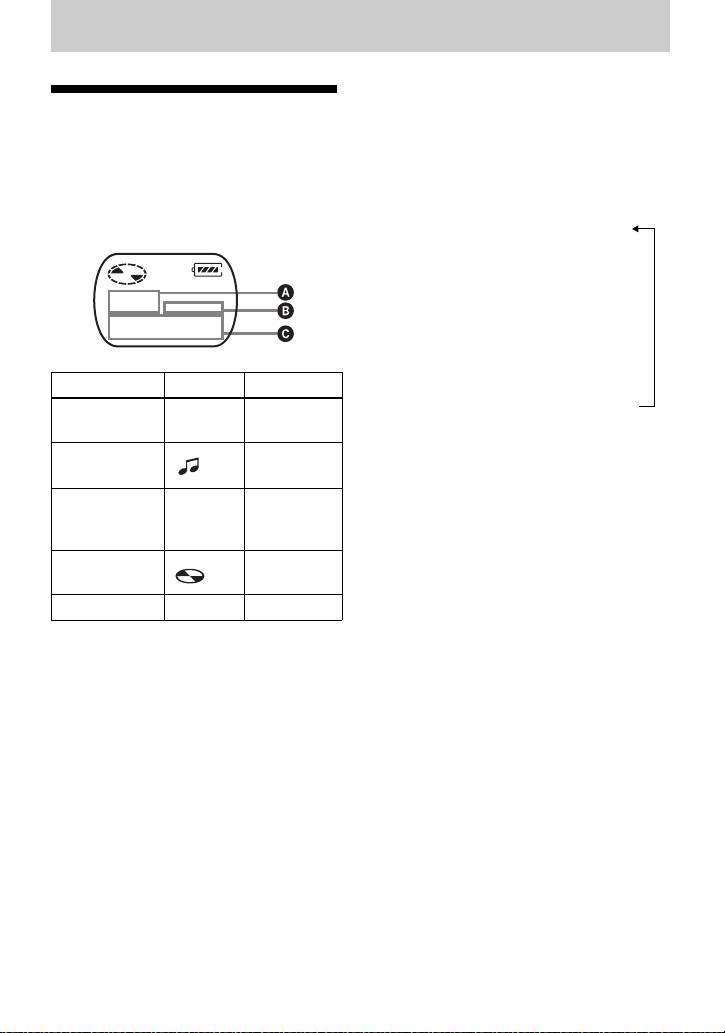
1 During playback, press MENU/
• The characters “;”, “/”, and “–” can be used in
ENTER.
a group name.
• You can register the same group name twice
2 Press . or N> repeatedly until
or more on the same MD.
“S–SEL” flashes in the display, and
• You can specify a group without entering a
press MENU/ENTER.
group name (C) for it.
∗The actual number will be less than 99 if you
3 Press . or N> repeatedly to
have entered more characters than are
select “SOUND 1”, “SOUND 2”, or
allowed per disc.
“OFF” in the display, and then press
MENU/ENTER.
Note
Selecting “OFF” turns off the digital
Depending on the specifications of your MD
sound preset function.
recorder, the group function will not work.
Adjusting the sound quality
Adjusting treble or bass
You can change the preset sound quality.
(Digital Sound Preset)
To change the preset sound quality, select
“SOUND 1” or “SOUND 2”, the one you
You can adjust the treble and bass to suit
want to change, in advance.
your taste. The player can store two sets
of treble-bass adjustments, which can
1 While playing and “SOUND 1” or
then be selected later during playback.
“SOUND 2” has been selected, press
MENU/ENTER.
MENU/ENTER
2 Press . or N> repeatedly until
“S–SET” flashes in the display, and
then press MENU/ENTER.
The display shows the currently
“BASS” sound setting.
., N>,
x
continued
15-GB
model name1[MZ-E310] model name2[MZ------]
[3-247-462-11(1)]

filename[C:\WINNT\Profiles\Administrator\Desktop\02GB-MZE310CE7\040OPE.fm]
masterpage:Left
3 Press . or N> repeatedly to
adjust the sound level.
Shows “SOUND 1” or “SOUND 2” is
selected
The sound can be adjusted in 8 steps.
(–4, –3, ...±0, ...+2, +3)
4 Press MENU/ENTER.
“BASS” is set and the display
changes to “TRE” (treble) setting
mode.
5 Press . or N> repeatedly to
adjust the sound level, and then press
MENU/ENTER.
“TRE” (treble) is set.
The sound settings are saved and the
playback display appears again.
To cancel the procedure
Press x.
z
You can set a preset sound while playback is
paused.
Note
When using a digital sound preset, the sound
may break or become distorted if the volume is
turned up too high, depending on the settings or
the track. In this case, change the settings of the
sound quality.
16-GB
model name1[MZ-E310] model name2[MZ------]
[3-247-462-11(1)]
filename[C:\WINNT\Profiles\Administrator\Desktop\02GB-MZE310CE7\040OPE.fm]
masterpage:L0-Right
Other Operations
3 Press . or N> repeatedly until
Viewing the track name
the information that you want flashes
and playing time
in the display, and then press MENU/
ENTER.
You can check the track name, disc name,
Each time you press
N>, the
etc. during playback. Group-related items
display changes as follows:
appear only when a track with group
settings is played.
LapTim (The elapsed time of the
current track)
r
T.Name (Track name)
r
G.Name (Group name)
r
D.Name (Disc name)
ABC
r
T–MODE (indicates the recording
Track number — The elapsed
mode selected on the MD recorder
time
used; i.e., “SP”, “LP2”, “LP4”, or
Track number Track name
“MONO”. )
Notes
The number of
GP Group name
• Items may appear differently or may not be
total tracks in
selectable, depending on the group mode’s on/
the groups
off status, the player’s operating status, or the
The number of
Disc name
player and disc settings.
total tracks
• The mode indication appears only during
playback. It appears for 2 seconds, and is then
Track number — Track mode
replaced by the elapsed time of the current
track.
1 Press MENU/ENTER.
2 Press . or N> repeatedly until
“DISP” flashes in the display, and
then press MENU/ENTER.
17-GB
model name1[MZ-E310] model name2[MZ------]
[3-247-462-11(1)]
filename[C:\WINNT\Profiles\Administrator\Desktop\02GB-MZE310CE7\040OPE.fm]
masterpage:Left
Protecting your hearing
Locking the controls
(AVLS)
(HOLD)
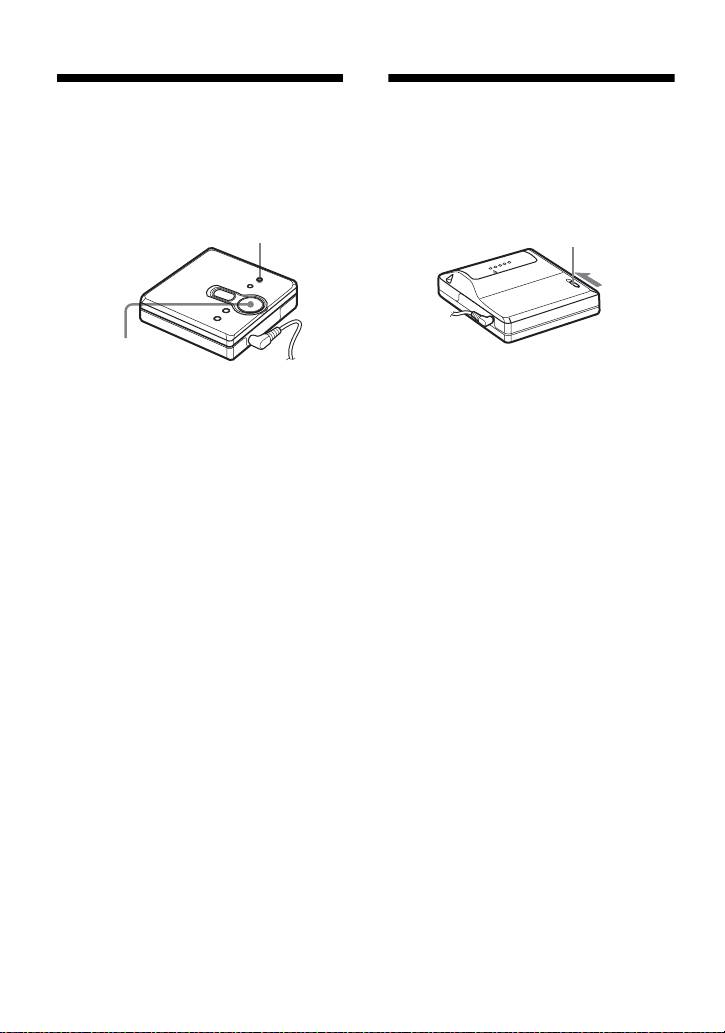
The AVLS (Automatic Volume Limiter
To prevent the buttons from being
System) function keeps down the
accidentally operated when you carry the
maximum volume to protect your ears.
player, use this function.
MENU/ENTER
HOLD
., N>, x
1 Slide HOLD in the direction of the
. to lock.
1 Press MENU/ENTER.
2 Press . or N> repeatedly until
To unlock the controls
“OPTION” flashes in the display, and
Slide HOLD to the opposite direction of
then press MENU/ENTER.
the arrow.
“AVLS” flashes in the display.
3 Press MENU/ENTER.
4 Press . or N> repeatedly until
“ON” flashes in the display, and then
press MENU/ENTER.
“ON” appears in the display, and after
2 seconds, the playback display
appears again.
To cancel the AVLS function
Select “OFF” in step 4, and press MENU/
ENTER.
To cancel the procedure
Press x.
18-GB
model name1[MZ-E310] model name2[MZ------]
[3-247-462-11(1)]

filename[C:\WINNT\Profiles\Administrator\Desktop\02GB-MZE310CE7\040OPE.fm]
masterpage:L0-Right
Additional information
On installation
Precautions
Never use the player where it will be subjected
to extremes of light, temperature, moisture or
On safety
vibration.
• Do not carry or store the dry battery in the
same place with metallic objects such as
On the MiniDisc cartridge
coins, key rings, or necklaces. This may cause
• Do not touch the internal disc directly. Forcing
a short-circuit and the generation of heat.
the shutter open may damage the internal disc.
• Incorrect battery usage may cause the battery
• When transporting a MiniDisc, keep it in its
fluid to leak or battery to burst. To prevent
case.
such accidents, make sure the battery is
• Do not place the cartridge where it will be
installed with the + and – poles oriented
subjected to light, temperature, moisture or
correctly.
dust.
• If a battery leak should develop, carefully and
• Do not affix the label outside of the specified
thoroughly wipe away the battery fluid in the
area on the MD. Make sure the label is placed
battery compartment before inserting a new
within the recessed space on the disc.
battery.
• If you will not use the player for a long time,
On the headphones/earphones
be sure to remove the dry battery.
Road safety
On Handling
• Do not use headphones/earphones while
driving, cycling, or operating any motorized
• Do not drop or bump the player. This may
vehicle. This may lead to a traffic accident and
cause the player to malfunction.
is illegal in many areas. It can also be
• Do not pull headphones/earphones cords.
potentially dangerous to play your player at
• Do not place the player in the following
high volumes while walking, especially at
places:
—An extremely hot place (over 60°C
pedestrian crossings. You should exercise
extreme caution or discontinue using the
(140°F))
player in potentially hazardous situations.
—A place exposed to direct sunlight or near a
• If you experience an allergic reaction to the
heater
supplied headphones/earphones, stop using
—In a car with the windows rolled up
them at once and consult a doctor or a Sony
(especially in the summer)
—In a damp place such as a bathroom
service center.
—Near a source of electromagnetic fields
Preventing hearing damage
such as a magnet, speaker, or TV
Avoid using headphones/earphones at high
—In a dusty place
volumes. Hearing experts advise against
continuous, loud and extended play. If you
On heat build-up
experience a ringing in your ears, reduce the
Heat may build up in the player if it is used for
volume or discontinue use.
an extended period of time. This, however, is
not a malfunction.
Caring for others
Keep the volume at a moderate level. This will
allow you to hear outside sounds and to be
On mechanical noise
considerate of the people around you.
The player emits mechanical noise while
operating, which is caused by the power-saving
system of the player. This is not a malfunction.
19-GB
model name1[MZ-E310] model name2[MZ------]
[3-247-462-11(1)]
filename[C:\WINNT\Profiles\Administrator\Desktop\02GB-MZE310CE7\040OPE.fm]
masterpage:Left
On cleaning
• After wiping the player casing with a soft
cloth slightly moistened with water, wipe it
again with a dry cloth. Do not use any type of
abrasive pad, scouring powder or solvent such
as alcohol or benzene as this may mar the
finish on the casing.
• Wipe the disc cartridge with a dry cloth to
remove dirt.
• Dust on the lens may prevent the unit from
operating properly. Be sure to close the disc
compartment lid after inserting or ejecting an
MD.
• To maintain good sound quality, use a soft
cloth to clean the plugs of the headphones/
earphones. A dirty plug may cause noise or
intermittent breaks in the sound during
playback.
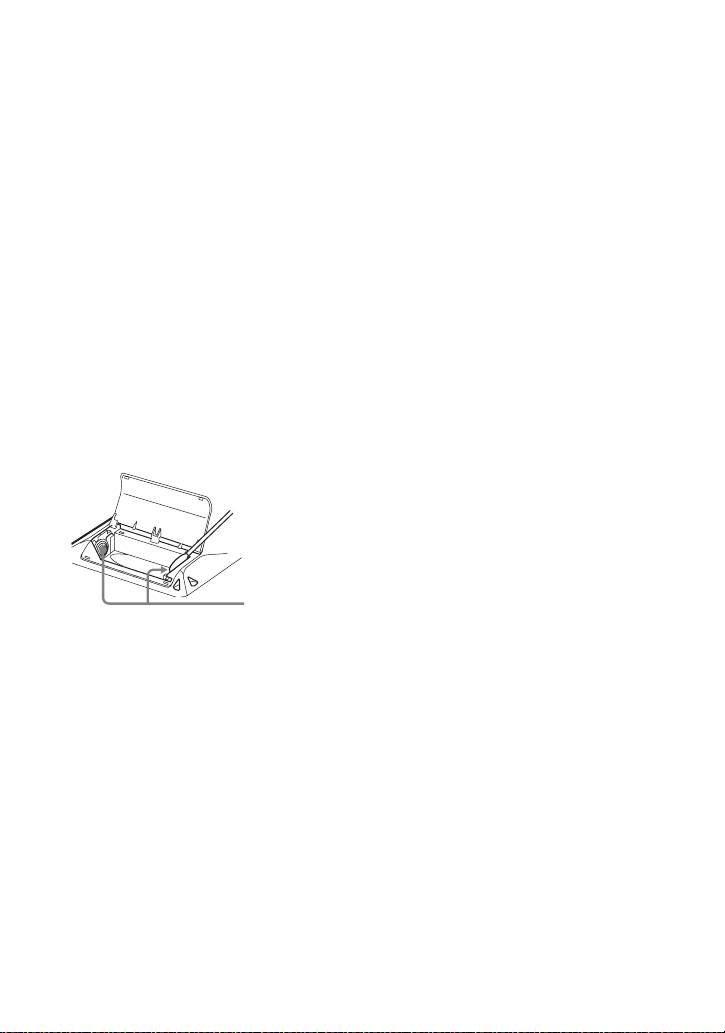
• Clean the terminals periodically with a cotton
swab or a soft cloth as illustrated.
Dry battery compartment
Terminals
If you have any questions or problems
concerning your player, please consult your
nearest Sony dealer. (If a trouble occurred when
the disc was in the player, we recommend that
the disc be left in the player when you consult
your Sony dealer so that the cause of trouble
may be better understood.)
When consulting your Sony dealer, be sure to
bring the player, and the headphones/
earphones.
20-GB
model name1[MZ-E310] model name2[MZ------]
[3-247-462-11(1)]
