
Sony KDL-48W585B: instruction
Class: Household, kitchen appliances, electronics and equipment
Type:
Manual for Sony KDL-48W585B
Table of contents
Wall-Mount
Bracket
Installation Information
Instalační informace
GB
CZ
Informations d’installation
Informácie týkajúce sa montáže
FR
SK
Información de instalación
Informaţii de instalare
ES
RO
Installationsinformationen
Информация за монтаж
DE
BG
Installatie-informatie
Информация по установке
NL
RU
Informazioni sull’installazione
Інформація про встановлення
IT
UA
Installationsinformation
Paigaldusteave
SE
EE
Informacje dotyczące instalacji
Uzstādīšanas informācija
PL
LV
Informações de instalação
Montavimo informacija
PT
LT
Oplysninger om montering
Navodila za uporabo
DK
SI
Asennustiedot
Informacije za instalaciju
FI
HR
Installasjonsveiledning
Орнату ақпараты
NO
KZ
Πληροφορίες εγκατάστασης
Informacije za montažu
GR
SR
Montaj Bilgileri
TR
הנקתה תוארוה
HE
Szerelési információk
HU
A-EUS-100-11(1)
SU-WL450

Installation Information for
Using Sony Wall-Mount Bracket (SU-WL450)
Supported models:
KDL-48W60*B/48W58*B/48R48*B
KDL-40W60*B/40R48*B/40R45*B
KDL-32R43*B/32R41*B
* In the actual model names, the “” indicates numbers and/or characters specific to each model.
To Customers
For product protection and safety reasons, Sony strongly recommends that installation of your TV
be performed by Sony dealers or licensed contractors. Do not attempt to install it yourself.
To Sony Dealers and Contractors
Provide full attention to safety during the installation, periodic maintenance and examination of this
product.
Sufficient expertise is required for installing this product, especially to determine the
strength of the wall for withstanding the TV’s weight. Be sure to entrust the attachment
of this product to the wall to Sony dealers or licensed contractors and pay adequate
attention to safety during the installation. Sony is not liable for any damage or injury
caused by mishandling or improper installation.
For Safety and proper installation, follow the Wall-mount Bracket Operation Instructions, TV Set up
guide and the directions in this manual.
− 2 (GB) −

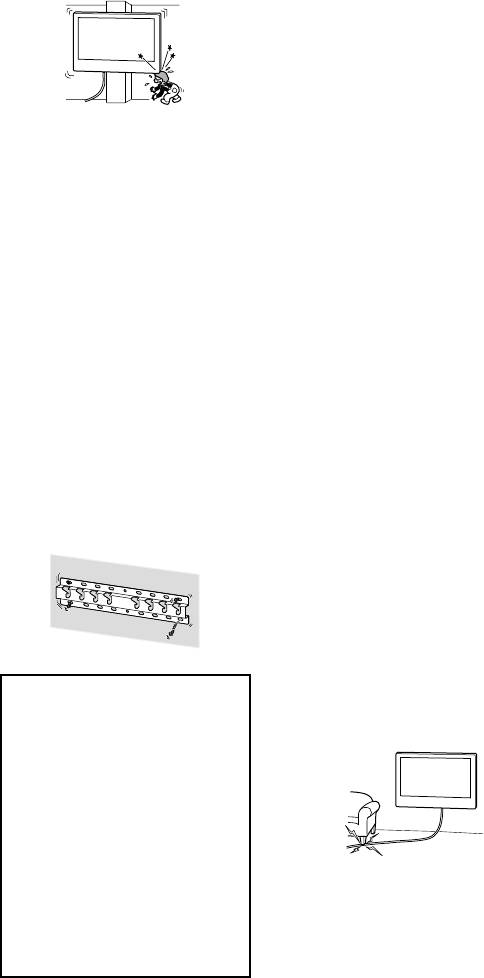
Do not apply any load
On Safety
To Customers
other than the TV on the
Thank you for purchasing this product.
Wall-Mount Bracket.
WARNING
If the following precautions are not
Do not shake the TV left/
To Customers
observed, serious injury or death
right, up/down.
Sufficient expertise is required for
through fire, electric shock, or the
installing this product. Be sure to
product dropping can result.
If you do so, the TV may fall and cause injury
subcontract the installation to Sony
or property damage.
dealers or licensed contractors and pay
special attention to safety during the
Be sure to subcontract
Do not lean on or hang
installation. Sony is not liable for any
damages or injury caused by
the installation to
from the TV.
mishandling or improper installation, or
licensed contractors and
Do not lean on or hang from the TV as it may
installing any other than the specified
fall on you and cause serious injury.
product. Your Statutory Rights (if any) are
keep small children away
not affected.
during the installation.
If the Wall-Mount Bracket or the TV is not
CAUTION
installed correctly, the following accidents
To Sony dealers
may occur. Be sure licensed contractors carry
If the following precautions are not
Sufficient expertise is required for
out installation.
observed, injury or property damage
installing this product. Be sure to read
The TV may fall and cause a serious injury
may occur.
this instruction manual thoroughly to do
such as a bruise or a fracture.
the installation work safely. Sony is not
If the wall on which the Wall-Mount
liable for any damages or injury caused
Bracket is installed is unstable, uneven, or
Do not handle the
by mishandling or improper installation.
not perpendicular to the floor, the unit
Please give this manual to the customer
may fall and cause injury or property
product with excessive
after installation.
damage. The wall should be capable of
force during cleaning or
supporting a weight of at least four times
This instruction manual shows the correct
the TV weight.
maintenance.
handling of the product and important
(Refer to your TV’s Reference Guide for its
Do not apply excessive force on the topside
precautions necessary to prevent accidents.
weight.)
of the TV. If you do so, the TV may fall and
Be sure to read this manual thoroughly and
If the installation of the Wall-Mount
cause injury or property damage.
use the product correctly. Keep this manual
Bracket on the wall is not sufficiently
GB
available for future reference.
sturdy, the unit may fall and cause injury or
property damage.
Products by Sony are designed with safety in
Precautions
mind. If the products are used incorrectly,
Be sure to subcontract
however, it may result in a serious injury
through fire, electric shock, the product
moving or dismounting
If you use the TV installed on the
Wall-Mount Bracket for a long time, the
toppling over, or the product dropping. Be
of the TV to licensed
wall behind or above the TV may become
sure to observe the precautions for safety to
discolored or the wallpaper may come
prevent such accidents.
contractors.
unstuck, depending on the material of the
If persons other than licensed contractors
wall.
transport or dismount the TV, it may fall and
If the Wall-Mount Bracket is removed after
cause injury or property damage. Be sure
installing it on the wall, the screw holes are
CAUTION
that two or more persons carry or dismount
left.
the TV.
Do not use the Wall-Mount Bracket in a
place where it is subjected to mechanical
Specified products
Do not remove screws,
vibrations.
This Wall-Mount Bracket is designed for use
etc., after mounting the
with the products specified TVs. For TVs,
refer to their Reference Guide to verify that
TV.
Installing the Wall-
the Wall-Mount Bracket can be used.
If you do so, the TV may fall and cause injury
or property damage.
Mount Bracket
Do not make alterations
To Sony Dealers
to the parts of the Wall-
Mount Bracket.
WARNING
If you do so, the Wall-Mount Bracket may fall
and cause injury or property damage.
The following instructions are for Sony
dealers only. Be sure to read safety
precautions described above and pay
Do not mount any
special attention to safety during the
equipment other than
installation, maintenance and checking
of this product.
the specified product.
This Wall-Mount Bracket is designed for use
with the specified product only. If you mount
Do not install the Wall-
equipment other than specified, it may fall or
break, and cause injury or property damage.
Mount Bracket on wall
surfaces where the
corners or the sides of
the TV protrude away
from the wall surface.
− 3 (GB) −

Do not install the Wall-Mount Bracket on wall
Be sure to assemble the
surfaces such as a pillar, where the corners
or the sides of the TV protrude away from
bracket properly
the wall surface. If a person or object
following the instructed
happens to hit the protruded corner or side
of the TV, it may cause injury or property
procedure explained in
damage.
this instruction manual.
If any of the screws are loose or fall out, the
TV may fall and cause bodily injury to
someone or damage to the TV.
Be sure to tighten the
screws securely in the
designated position.
Do not install the TV over
If you fail to do so, the TV may fall and cause
bodily injury to someone or damage to the
or under an air-
TV.
conditioner.
If the TV is exposed to water leaks or air
Be careful not to subject
current from an air conditioner for a long
the TV to shock during
time, it may cause a fire, an electric shock or
a malfunction of the TV.
installation.
If the TV is exposed to shock, it may fall or
Be sure to install the
break apart. This may cause injury.
Wall-Mount Bracket
Be sure to install the TV
securely to the wall
on a wall that is both
following the instructions
perpendicular and flat.
in this instruction
If you fail to do so, the TV may fall and cause
manual.
injury.
If any of the screws are loose or fall out, the
Wall-Mount Bracket may fall and cause injury
After proper installation
or property damage. Be sure to use the
of the TV, secure the
appropriate screws for the material of the
wall and install the unit securely using four
cables properly.
or more screws of 8 mm diameter (or
If people or objects get tangled with cables,
equivalent).
this may result in injury or damage to the TV.
Do not allow the AC
power cord or the
connecting cable to be
pinched.
If the AC power cord or the connecting cable
is pinched between the unit and the wall or
Be sure to use the
is bent or twisted by force, the internal
conductors may become exposed and cause
supplied screws and
a short circuit or an electrical break. This may
attachment parts
cause a fire or an electric shock.
properly following the
instructions given in
this instruction
manual. If you use
substitute items, the
TV may fall and cause
bodily injury to
The screws needed to
someone or damage to
secure the Wall-Mount
the TV.
Bracket to the wall are
not supplied.
Use the appropriate screws for the wall
material and structure when mounting the
Wall-Mount Bracket.
− 4 (GB) −
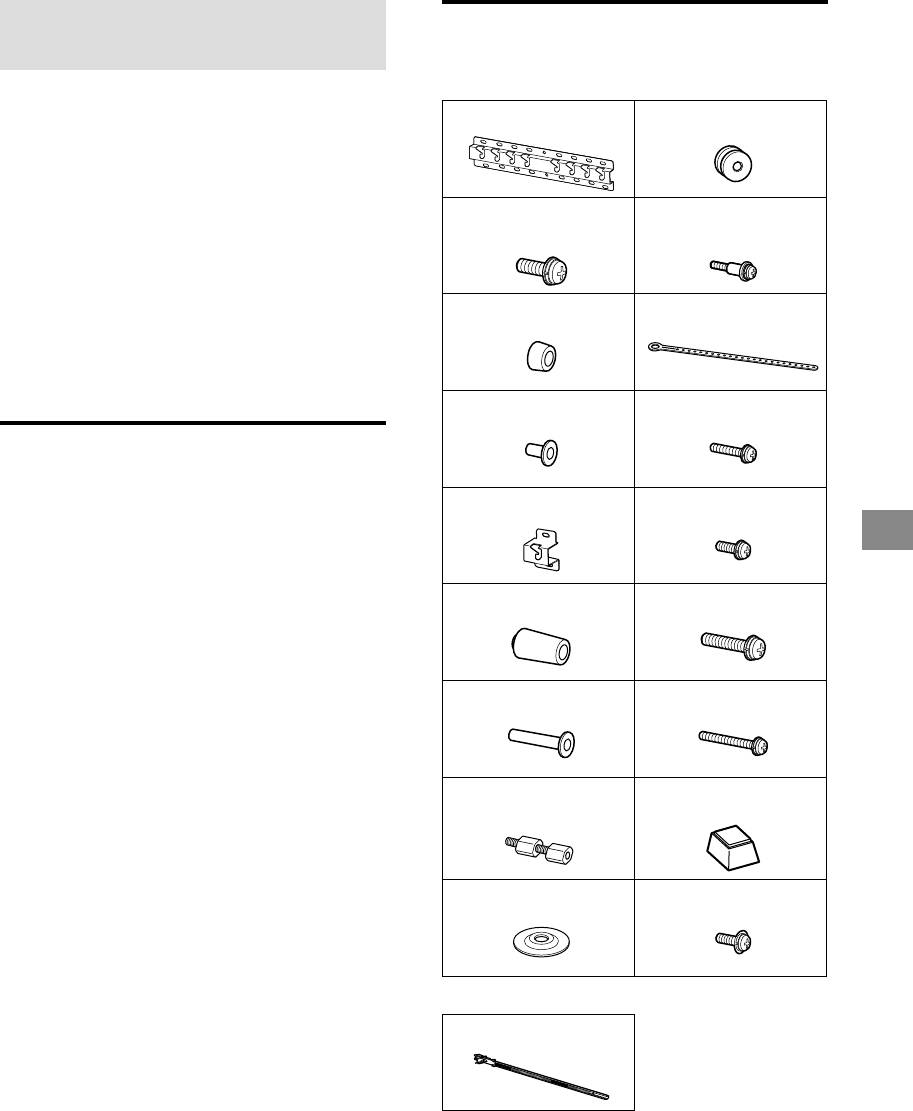
Installing the TV onto the
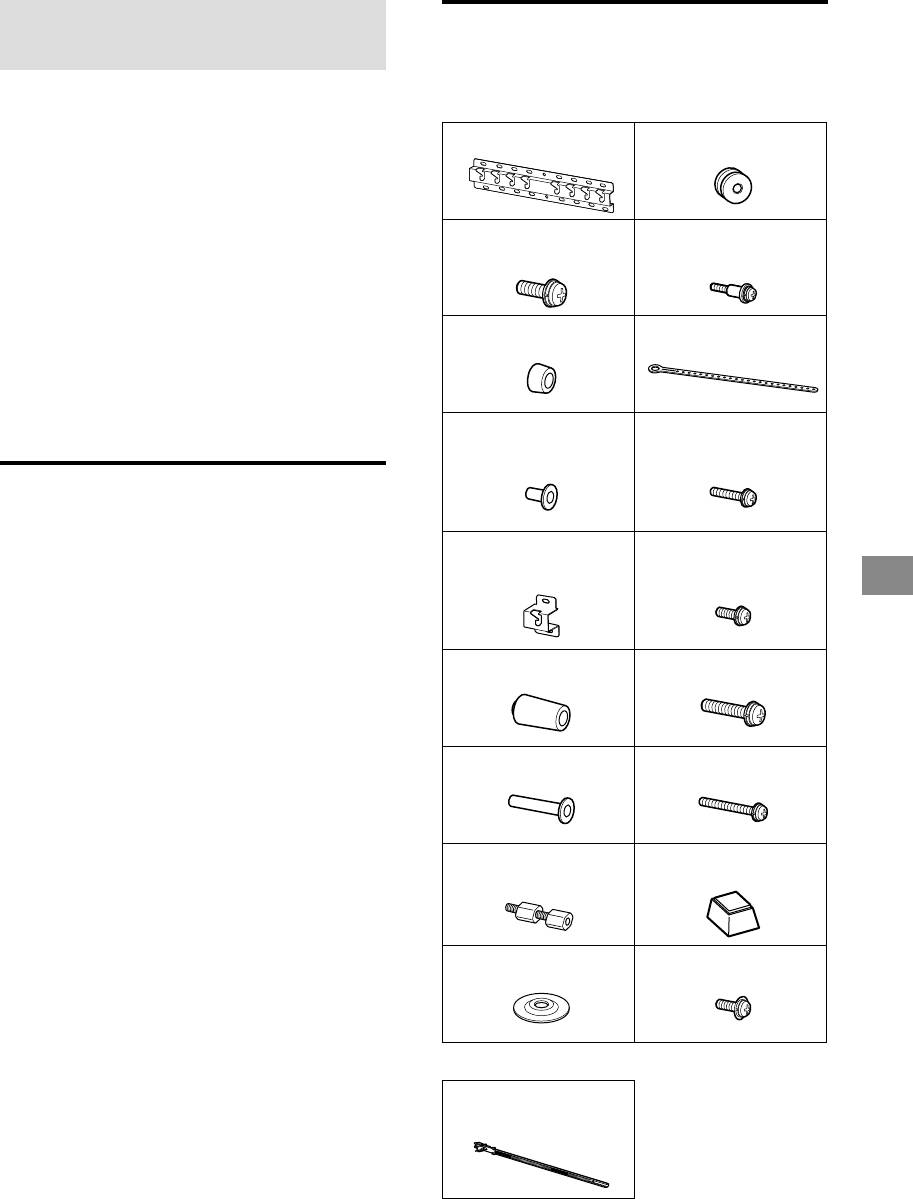
Checking the parts
wall
Supplied with SU-WL450
Installation procedure differs, depending on
Verify that all the parts are included.
your TV.
Base (20) (1) Pulley (2)
Use the Wall-Mount Bracket SU-WL450 to
install the TV to the wall.
Note
If the Table-Top Stand is attached to the TV, detach the
PSW 6x20 (4) PSW 4x20 with
Table-Top Stand beforehand. See the Quick Start Guide
Bush (2)
and follow in reverse order the steps to attach the
Table-Top Stand.
Place the TV with its screen facing down on a level and
stable surface covered with a thick and soft cloth, when
Spacer (20) (2) Belt (1)
securing the Attachment parts for Wall-Mount Bracket or
when removing the Table-Top Stand from the TV to
prevent damaging the surface of the LCD display.
Be sure to store the removed screws in a safe place,
keeping them away from children.
Bush (20) (M4) (2) PSW 4x20 (2)
Preparing for installation
Have the TV’s Reference Guide at hand
before installation.
Base Adaptor (2) PSW 4x10 (8)
Be sure to have a Phillips screwdriver that
GB
fits the screws prior to the assembly.
Confirm the installing position of your TV.
Prepare four or more screws of 8 mm
diameter and one screw of 5 mm or
Spacer (60) (2) PSW 6x50 (2)
equivalent (not supplied). Select screws
suitable for the material of the wall.
Bush (M4) (2) PSW 4x50 (2)
Wall-Mount
Spacer (2)
Attachment (S) (2)
Washer (1) PSW 5x12 (1)
Supplied with the TV
Cable holder (2)
− 5 (GB) −
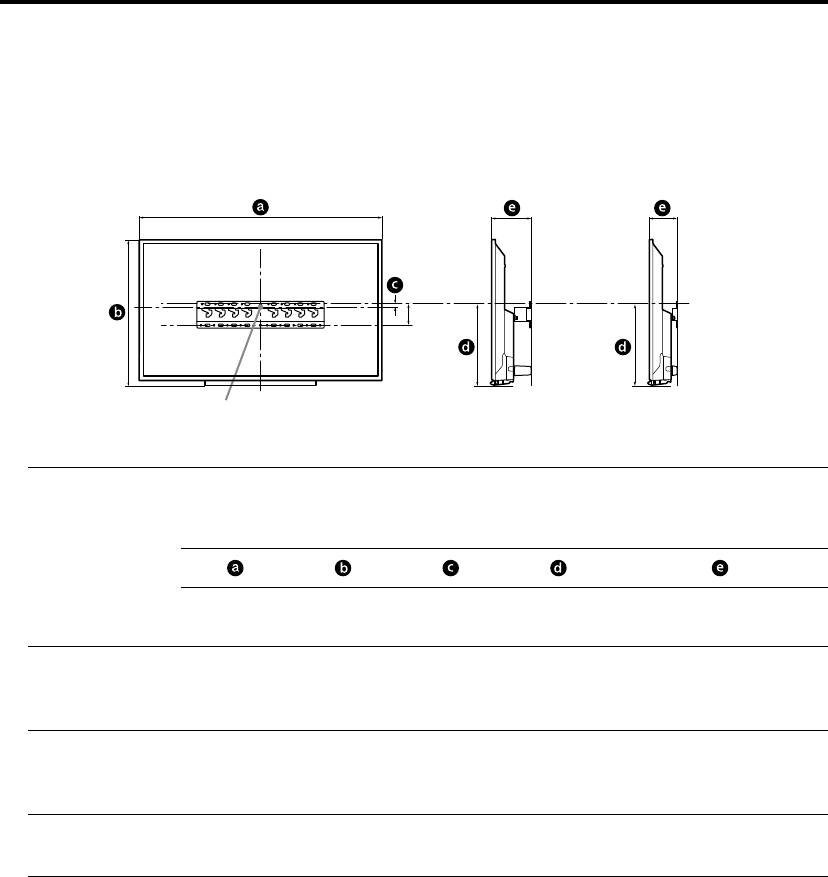
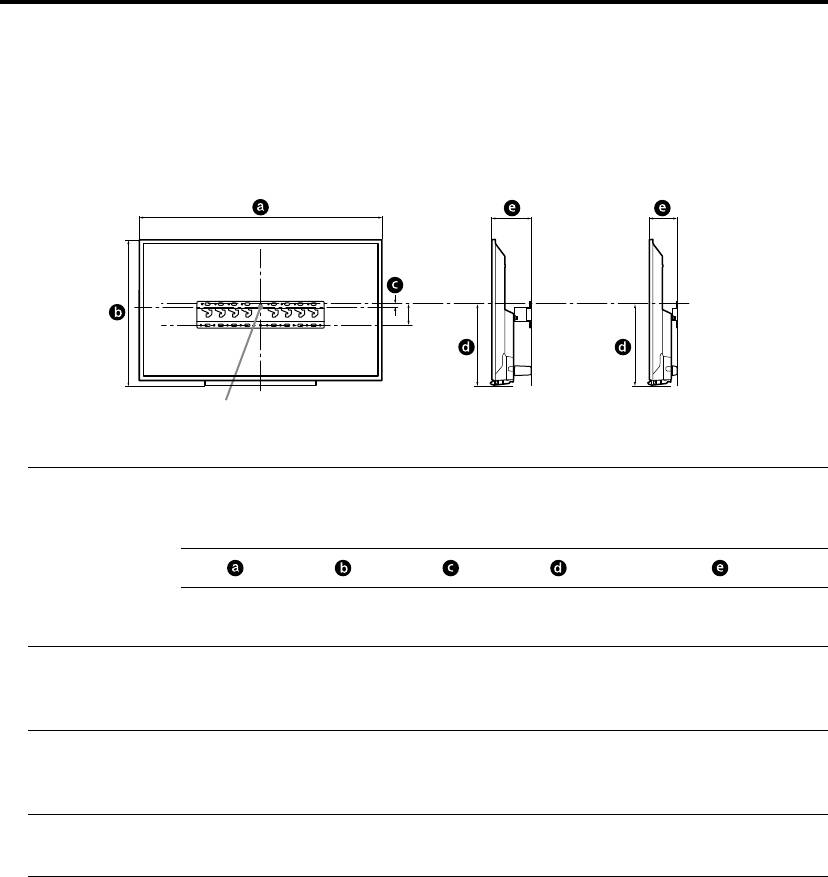
Deciding on the installation location
1 Decide on the installation location.
Make sure that the wall has enough space for the TV and is capable of supporting a weight of at
least four times that of the TV.
Refer to the following table on installing the TV to the wall. Refer to your TV’s Reference Guide
for the TV's weight.
Standard mounting Slim mounting
80
Screen centre point
Unit: mm
Screen
Display dimensions
centre
Length for mounting
dimension
Model Name
KDL-
Standard
Slim
mounting
mounting
48W60B
48W58B
1,086 646 -29 305 152 111
48R48B
40W60B
40R48B
926 556 16 306 151 110
40R45B
32R43B
736 451 68 306 142 101
32R41B
Note
Figures in the table may differ slightly depending on the installation.
When your TV is installed on the wall, the upper side of the TV slightly leans forward.
− 6 (GB) −

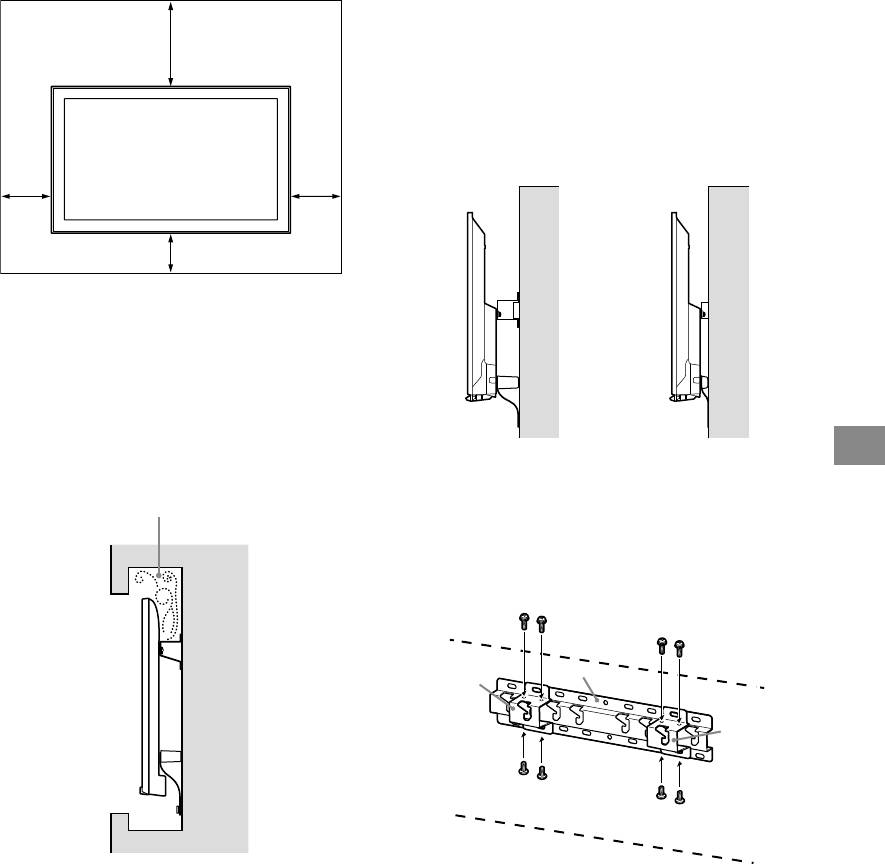
Allow for suitable clearance between the
2 Select Wall mounting style. It is
TV and the ceiling and protruding parts of
selectable as shown below.
the wall as shown below.
2-a Standard mount
Unit: mm
2-b Slim mount
Refer to the table of step 1.
WARNING
300100
When 2-b is selected, Rear terminal access is limited.
2-a 2-b
100 100
To ensure proper ventilation and prevent the
collection of dirt or dust:
ˋ Do not lay the TV set flat, install upside down,
backwards, or sideways.
ˋ Do not place the TV set on a shelf, rug, bed or in a
closet.
ˋ Do not cover the TV set with a cloth, such as
3 Fit Base Adaptor by using
curtains, or items such as newspapers, etc.
GB
Screw (PSW 4x10) to Base
ˋ Do not install the TV set as shown below.
(20) when selecting 2-a.
Air circulation is blocked.
Wall
Note
If you intend to route the cables in the wall, make a
hole in the wall to insert the cables before beginning
the installation.
To prevent pinching the cables, prepare a hole in the
wall somewhere outside the perimeter of the Base
(20) , Base Adaptor and Spacer (20) , Spacer
(60) .
− 7 (GB) −

Refer to the below table about
Installing the Base on the
the Base Adaptor fitting
wall
location. In case of selecting
Use four or more screws of 8 mm diameter
2-b, then skip this step.
or equivalent (not supplied).
Fit four screws to the holes of Base
Model Name KDL- Hook location
Adaptor with Base (20) (2-a only).
48W60B
Install the Base (20) on the wall
b
horizontally.
48W58B
40W60B
2-a
48R48B
40R48B
40R45B
c
32R43B
32R41B
a
b
c
d
2-b
4 Decide the positions of the
screws for installing the Base
(20) .
Refer to the specifications on page 12.
When selecting 2-a, please use the hole
positions of Base Adaptor .
WARNING
The wall that the TV will be mounted on should be
able to support a weight of at least four times that of
the TV (Refer to your TV’s Reference Guide for its
weight.).
Determine the strength of the wall the TV will be
mounted on. Reinforce the wall sufficiently, if
necessary.
− 8 (GB) −
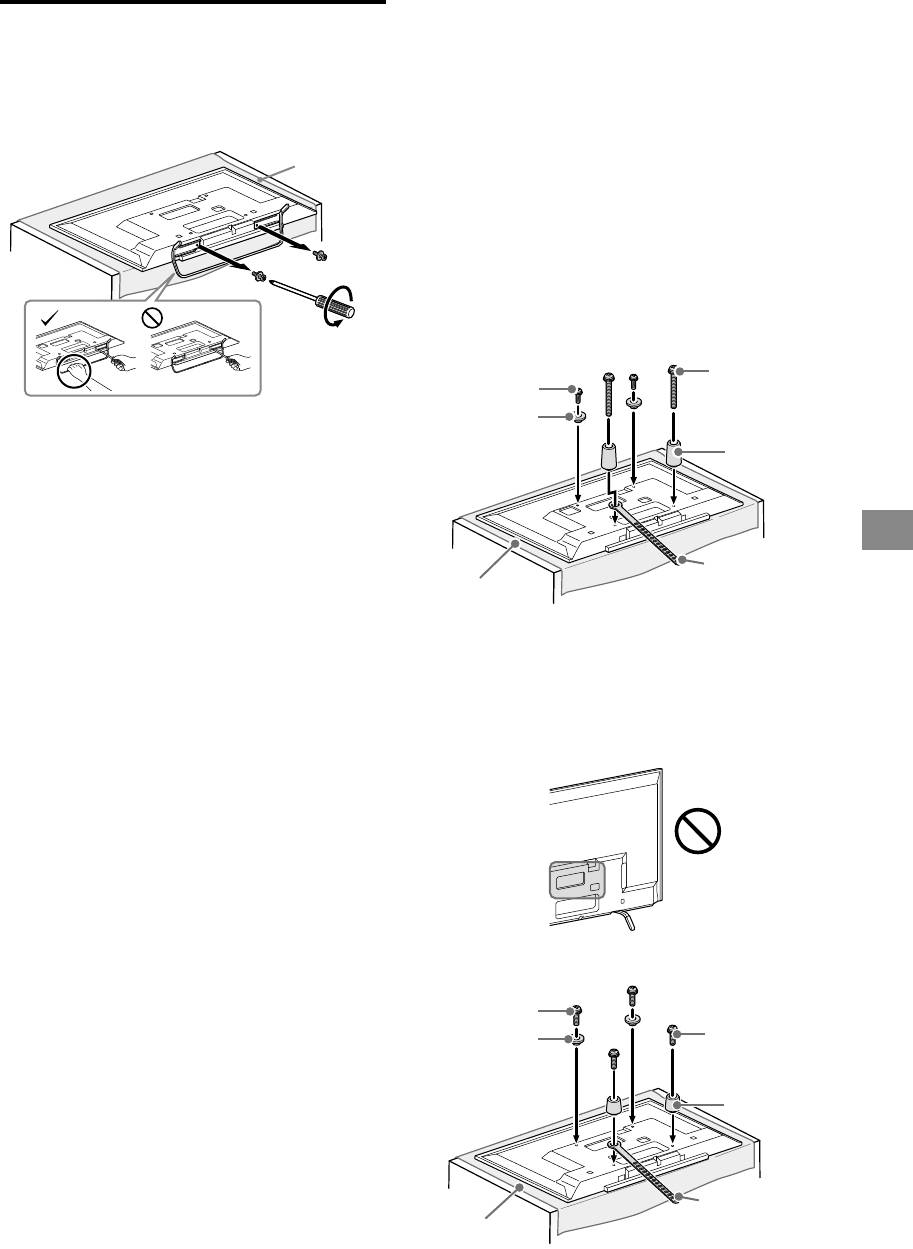
2 Attach the Attachment parts for
Preparing for the installation
Wall-Mount Bracket. Check the
of the TV
Attachment parts by referring to
1 Detach the Table-Top Stand
“Supplied with SU-WL450” in
from the TV.
“Checking the parts” on page
5.
Soft cloth
Note
Firmly secure the Attachment parts using screws.
When using an electric screwdriver, set the torque
setting to approximately 1.5 N·m {15 kgf·cm}.
Be sure to store the unused parts in a safe place for
future use. Retain this manual for future reference.
Standard mounting (2-a)
Screw
Screw
(+PSW 6 x 20)
(+PSW 6 x 50)
Pulley
Note
Spacer
Make sure to place TV on the place where you put a
(60 mm)
soft cloth on to prevent damaging display’s surface.
When installing the Wall-Mount Bracket, do not use
the screws removed from the Table-Top Stand.
Be sure to store the removed Table-top Stand and its
GB
screws in a safe place, keeping them away from
children. You will need them if you want to use the TV
Belt
on a table in the future. The Table-Top Stand cannot
Soft cloth
be purchased separately.
WARNING
Be sure the TV is on the vertical position before
switching on. TV set must not powered on with LCD
Slim mounting (2-b)
panel face down to avoid uneven picture uniformity.
If pressure or shock is applied to the surface of the
Note
TV, the TV may break or become damaged.
You cannot use some of the terminals on the rear of
Lay the TV face down on a stable and level surface
the TV when using this mounting style.
with the Table-Top Stand hanging over the edge of
the surface. Having the TV face and the base of the
Table-Top Stand on the same level surface will create
an unstable working condition and can damage the
TV.
When detaching the Table-Top Stand from the TV,
hold the Table-Top Stand securely with both hands.
Screw
(+PSW 6 x 20)
Screw
(+PSW 6 x 20)
Pulley
Spacer
(20 mm)
Belt
Soft cloth
− 9 (GB) −
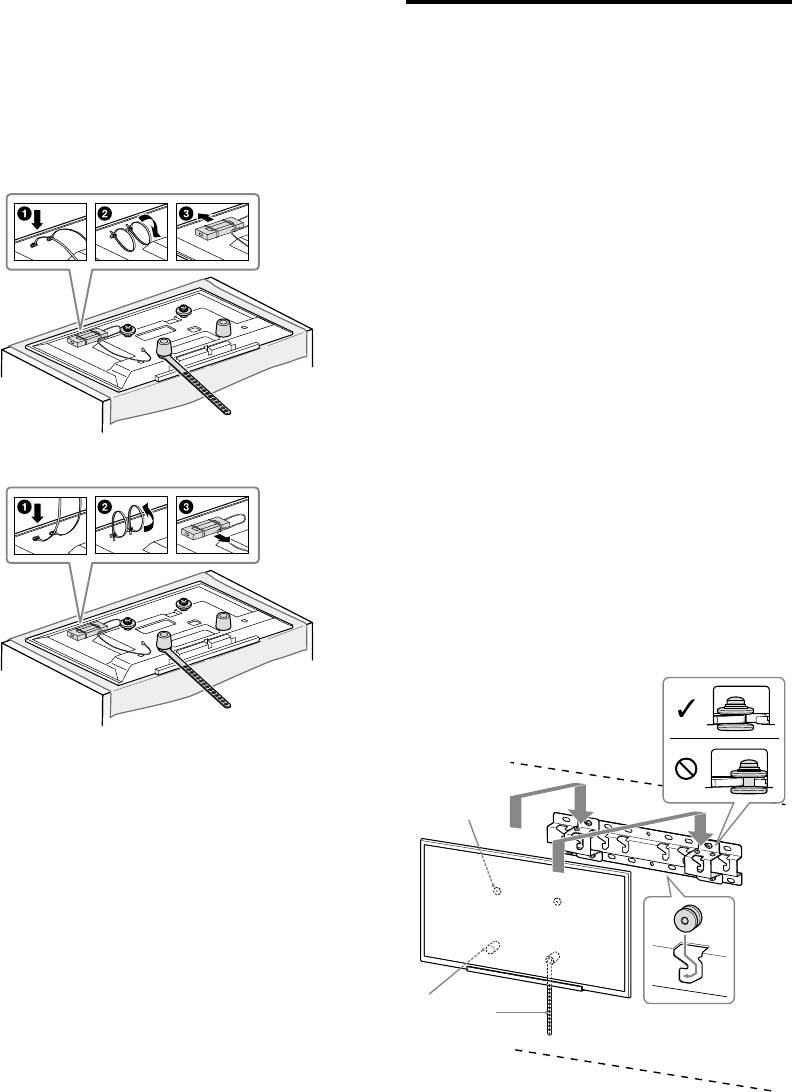
3 Bundle the AC Adapter using
Installing the TV on the wall
the cable holders (supplied
with the TV). Make sure that the
1 Connect the necessary cable(s)
label is facing outwards when
to the TV.
Make sure to connect the cables before
bundling AC adapter.
installing the TV on the wall. You will be
For KDL-48W60B/48W58B/48R48B/
unable to connect the cables when the TV
40W60B/40R48B/40R45B
is installed.
Refer to the Reference Guide supplied with
your TV.
Note
Subcontract the cable routing in the wall to a licensed
contractor.
Bundle the connecting cables to prevent stepping on
them before wall mounting.
2 Install the TV onto the Base.
For the location of the Pulleys to the
hang on the Base, refer to the table of
step 3 in “Deciding on the installation
For KDL-32R43B/32R41B
location” on page 8.
Hold the TV securely with both hands
and gently hang the Pulleys attached
to the rear of the TV to the Base, making
sure to confirm the shape of the holes.
After installing the TV on the wall,
confirm the Pulleys are firmly latched
into the Base.
2-a
− 10 (GB) −
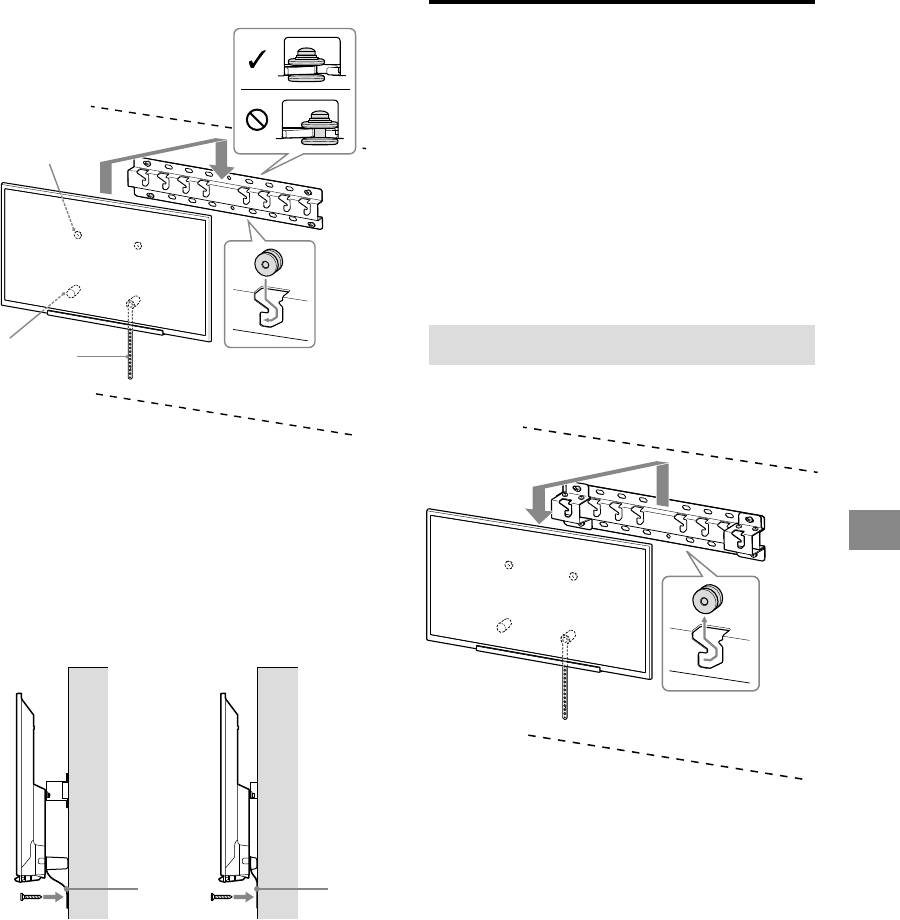
2-b
Confirming the completion of
the installation
Check the following points.
The Pulleys are firmly hung onto the
Base.
The cord and the cable are not twisted or
pinched.
The Belt is tight with no slack.
WARNING
Improper placement of the AC power cord, etc., may
cause fire or electric shock through a short circuit. Be sure
to confirm the completion of the installation for safety.
Other information
When removing the TV, reverse the previous
installation procedure.
WARNING
Be sure that two or more persons hold the TV when
carrying it.
GB
3 Preventing the bottom of the TV
from shifting.
Take up the slack of Belt and attach it
to the wall tightly.
2-a 2-b
WARNING
Be sure that two or more persons hold the TV when
removing it.
Use a 5 mm diameter screw or
equivalent (not supplied).
Note
Try to pull the bottom of the TV forwards yourself
slightly, to make sure that it does not move forward.
If there is any movement, it is not fixed correctly, and
the Belt should be secured firmly again.
− 11 (GB) −
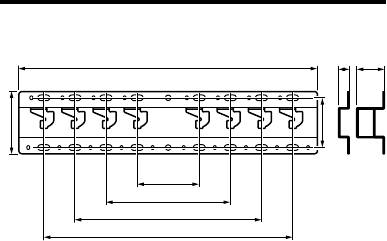
Specifications
f
h2h1
g
d
a
b
c
e
Dimensions: (Approx.) [mm]
a : 100
b : 200
c : 300
d : 80
e : 400
f : 480
g : 100
h1 : 20 (case 2-b)
h2 : 60 (case 2-a)
Weight (base only): (Approx.) [kg]
0.8
Design and specifications are subject to change without
notice.
− 12 (GB) −

Informations d’installation pour
l’utilisation du support de fixation murale
Sony (SU-WL450)
Modèles pris en charge :
KDL-48W60*B/48W58*B/48R48*B
KDL-40W60*B/40R48*B/40R45*B
KDL-32R43*B/32R41*B
* Dans les noms de modèle réels, « » indique des chiffres et/ou des caractères propres à chaque
modèle.
À l’attention des clients
Pour des raisons de sécurité et de protection du produit, Sony recommande vivement de confier
l’installation de votre téléviseur à des revendeurs ou installateurs agréés Sony. N’essayez pas de
l’installer vous-même.
A l’attention des installateurs et revendeurs Sony
Soyez particulièrement attentif à la sécurité pendant l’installation, l’entretien périodique et l’examen
du produit.
L’installation de ce produit exige un certain savoir-faire, notamment pour vérifier la
résistance du mur qui devra soutenir le poids du téléviseur. Veillez à confier la fixation
de ce produit au mur à des revendeurs ou installateurs agréés Sony et portez une
attention suffisante aux consignes de sécurité pendant l’installation. Sony ne saurait
être tenue responsable de tout dommage ou de toute blessure découlant d’une
mauvaise utilisation ou d’une installation incorrecte.
Pour une installation sûre et correcte, suivez le Mode d’emploi du support de fixation murale du
téléviseur, le Guide de démarrage rapide et les instructions de ce manuel.
− 2 (FR) −
N’installez aucune charge
Sécurité
À l’attention des clients
autre que le téléviseur
Nous vous remercions d’avoir fait
sur le support de fixation
l’acquisition de ce produit.
AVERTISSEMENT
Le non-respect des consignes suivantes
murale.
peut être fatal ou entraîner des blessures
À l’attention des clients
Ne secouez pas le
graves en provoquant un incendie,
L’installation de ce produit exige un
l’électrocution ou la chute de l’appareil.
téléviseur vers la gauche/
certain savoir-faire. Veillez à confier
droite, le haut/bas.
l’installation à des revendeurs Sony ou à
des installateurs agréés et portez une
Veillez à confier
Dans ce cas, le téléviseur pourrait tomber et
attention particulière aux consignes de
provoquer des blessures ou des dommages
sécurité pendant l’installation. Sony ne
l’installation à du
matériels.
saurait être tenue responsable de tout
personnel agréé en
dommage ou de toute blessure
Ne vous appuyez pas sur
découlant d’une mauvaise utilisation ou
tenant les petits enfants à
d’une installation incorrecte, ou encore
le téléviseur et ne vous y
l’écart pendant
de l’installation d’un produit autre que
suspendez pas.
celui spécifié. Vos droits légaux
l’installation.
(éventuels) ne sont pas affectés.
Ne vous appuyez pas sur le téléviseur et ne
Si le support de fixation murale ou le
vous y suspendez pas, car il risque de
téléviseur n’est pas installé correctement, les
tomber et de causer des blessures graves.
accidents suivants peuvent se produire.
À l’attention des
Veillez à confier l’installation à des
installateurs agréés.
détaillants Sony
Le téléviseur peut tomber et causer des
ATTENTION
L’installation de ce produit exige un
blessures graves comme des hématomes
Le non-respect des consignes suivantes
certain savoir-faire. Lisez ce mode
ou des fractures.
peut entraîner des blessures ou des
d’emploi attentivement afin de procéder
Si le mur sur lequel le support de fixation
dommages matériels.
à l’installation en toute sécurité. Sony ne
murale est fixé est instable, inégal ou non
saurait être tenue responsable de tout
perpendiculaire au sol, l’appareil risque de
dommage ou de toute blessure
tomber et de provoquer des blessures ou
N’appliquez aucune force
découlant d’une mauvaise utilisation ou
des dommages matériels. Le mur doit
d’une installation incorrecte. Une fois
pouvoir supporter un poids équivalent à
excessive sur le produit
l’installation terminée, veuillez remettre
au moins quatre fois celui du téléviseur.
au cours de l’entretien ou
ce manuel d’installation au client.
(Pour connaître le poids du téléviseur,
reportez-vous à son Guide de référence.)
du nettoyage de
Ce mode d’emploi indique comment
Si l’installation du support de fixation
FR
l’appareil.
manipuler le produit correctement et
murale n’est pas assez solide, l’appareil
contient des précautions essentielles à
risque de tomber et de provoquer des
N’exercez aucune pression excessive sur le
prendre pour éviter tout accident. Lisez
blessures ou des dommages matériels.
dessus du téléviseur. Dans ce cas, le
attentivement ce mode d’emploi et veillez à
téléviseur pourrait tomber et provoquer des
utiliser le produit correctement. Conservez ce
blessures ou des dommages matériels.
Veillez à confier le
mode d’emploi pour toute référence
ultérieure.
déplacement ou le
démontage du téléviseur
Les produits Sony sont conçus pour vous
Précautions
offrir le maximum de sécurité. Toutefois, si
à des installateurs agréés.
les produits sont utilisés de façon incorrecte,
Si des personnes autres que des installateurs
Si vous utilisez le téléviseur fixé au support
ils peuvent entraîner des blessures graves en
agréés transportent ou démontent le
de fixation murale pendant une longue
provoquant un incendie ou l’électrocution,
téléviseur, celui-ci peut tomber et provoquer
période, le mur situé derrière le téléviseur
ou encore la chute de l’appareil hors de son
des blessures ou des dommages matériels.
ou au-dessus de celui-ci peut se décolorer,
support. Veillez à observer les consignes de
Deux personnes au moins doivent porter ou
ou encore le papier peint peut se décoller,
sécurité préconisées pour éviter de tels
démonter le téléviseur.
selon le matériau du mur.
accidents.
Les trous des vis restent apparents si vous
démontez le support de fixation murale
Ne retirez pas les vis, etc.
après son installation.
après l’installation du
N'utilisez pas le support de fixation murale
ATTENTION
dans un endroit soumis à des vibrations
téléviseur.
mécaniques.
Dans ce cas, le téléviseur pourrait tomber et
provoquer des blessures ou des dommages
Produits spécifiés
matériels.
Installation du
Ce support de fixation murale est conçu pour
être utilisé avec les téléviseurs spécifiés.
support de fixation
Ne modifiez pas les
Pour plus d’informations sur les téléviseurs,
reportez-vous à leur Guide de référence pour
pièces du support de
murale
vous assurer que vous pouvez bien utiliser le
support de fixation murale.
fixation murale.
À l’attention des
Dans ce cas, le support de fixation murale
détaillants Sony
pourrait tomber et provoquer des blessures
ou des dommages matériels.
N’installez aucun appareil
AVERTISSEMENT
autre que ceux spécifiés.
Les instructions suivantes concernent les
Ce support de fixation murale est conçu pour
détaillants Sony uniquement. Lisez
être utilisé avec les produits spécifiés
attentivement les consignes de sécurité
uniquement. Si vous installez un appareil
ci-dessus et accordez une attention
autre que ceux qui sont spécifiés, il pourrait
particulière à la sécurité lors de
tomber ou se briser et provoquer des
l’installation, de l’entretien et de la
blessures ou des dommages matériels.
vérification de ce produit.
− 3 (FR) −
N’installez pas le support
Veillez à monter le
Les vis nécessaires à
de fixation murale sur
support correctement en
l’installation du support
une surface où les coins
suivant la procédure
de fixation murale au
ou les côtés du téléviseur
décrite dans ce mode
mur ne sont pas fournies.
dépasseraient.
d’emploi.
Utilisez les vis appropriées selon le matériau
et la structure du mur lors du montage du
N’installez pas le support de fixation murale
S’il manque des vis ou si elles sont
support de fixation murale.
sur une surface verticale telle qu’une
desserrées, le téléviseur pourrait tomber et
colonne, où les coins ou les côtés du
causer des blessures corporelles ou être
téléviseur dépasseraient de la surface
endommagé.
murale. Si une personne ou un objet venait à
heurter le coin ou les côtés du téléviseur, ceci
Veillez à serrer les vis
risquerait de provoquer des blessures ou des
dommages matériels.
solidement dans la
position indiquée.
Si vous oubliez, le téléviseur pourrait tomber
et causer des blessures corporelles ou être
endommagé.
Veillez à ne pas
soumettre le téléviseur à
des chocs pendant
N’installez pas le
l’installation.
téléviseur sur ou sous un
Si le téléviseur subit des chocs, il pourrait
climatiseur.
tomber ou se briser. Ceci pourrait causer des
L’exposition prolongée du téléviseur à des
blessures.
fuites d’eau ou à des courants d’air
provenant du climatiseur pourrait provoquer
Veillez à installer le
un incendie, l’électrocution ou des
téléviseur sur un mur
problèmes de fonctionnement du téléviseur.
parfaitement vertical et
Veillez à installer le
plat.
support de fixation
Dans le cas contraire, le téléviseur pourrait
tomber et provoquer des blessures.
murale solidement en
suivant les instructions
Une fois le téléviseur
de ce mode d’emploi.
installé correctement,
S’il manque des vis ou si elles sont
fixez solidement les
desserrées, le support de fixation murale
pourrait tomber et provoquer des blessures
câbles.
ou des dommages matériels. Veillez à utiliser
Si des personnes ou des objets s’accrochent
les vis appropriées selon le matériau du mur
aux câbles, ceci risque de provoquer des
et installez le téléviseur solidement en
blessures ou d’endommager le téléviseur.
utilisant au moins quatre vis de 8 mm de
diamètre (ou équivalentes).
Veillez à ce que le cordon
d’alimentation CA ou le
câble de raccordement ne
soit pas coincé ni écrasé.
Si le cordon d’alimentation CA ou le câble de
raccordement est coincé entre l’appareil et le
mur, ou s’il est plié ou tordu, les conducteurs
internes peuvent être exposés et provoquer
Veillez à utiliser
un court-circuit ou une coupure électrique.
correctement les vis et
Un incendie ou l’électrocution pourrait en
résulter.
les pièces de fixation
fournies conformément
aux instructions du
mode d’emploi. Si vous
utilisez d’autres
éléments de fixation, le
téléviseur pourrait
tomber et causer des
blessures corporelles
ou être endommagé.
− 4 (FR) −
Installation du téléviseur
Vérification des pièces
au mur
Fournies avec le SU-WL450
La procédure d’installation varie selon votre
Vérifiez que vous disposez de toutes les
téléviseur.
pièces.
Utilisez le support de fixation murale
Base (20) (1) Poulie (2)
SU-WL450 pour installer le téléviseur sur
le mur.
Remarque
Si le support de table est fixé au téléviseur, retirez-le au
PSW 6x20 (4) PSW 4x20 avec
préalable. Reportez-vous au Guide de démarrage rapide
douille (2)
et suivez, dans l’ordre inverse, la procédure de fixation du
support de table.
Posez le téléviseur, écran vers le bas, sur une surface
horizontale stable recouverte d’un linge épais et doux
Entretoise (20) (2) Courroie (1)
lorsque vous installez les pièces de fixation du support de
fixation murale ou lorsque vous détachez le support de
table du téléviseur afin d’éviter d’endommager la surface
de l’écran LCD.
Les vis que vous retirez doivent être rangées en lieu sûr,
hors de portée des enfants.
Manchon (20)
PSW 4x20 (2)
(M4) (2)
Préparation de l’installation
Gardez le Guide de référence du téléviseur à
portée de main avant l’installation.
Adaptateur de
PSW 4x10 (8)
Avant de procéder au montage, vérifiez que
base (2)
vous disposez d’un tournevis cruciforme
FR
adapté aux vis.
Vérifiez la position d’installation de votre
téléviseur.
Préparez au moins quatre vis de 8 mm de
Entretoise (60) (2) PSW 6x50 (2)
diamètre et une vis de 5 mm ou équivalente
(non fournies). Choisissez des vis adaptées
au matériau du mur.
Manchon (M4) (2) PSW 4x50 (2)
Fixation murale
Entretoise (2)
(S) (2)
Rondelle (1) PSW 5x12 (1)
Fournies avec le téléviseur
Support de câble
(2)
− 5 (FR) −
Choix de l’emplacement d’installation
1 Choisissez l’emplacement d’installation.
Assurez-vous que le mur dispose d’un espace suffisant pour le téléviseur et qu’il peut supporter
un poids équivalent à au moins quatre fois celui du téléviseur.
Reportez-vous au tableau suivant lorsque vous installez le téléviseur au mur. Pour connaître le
poids du téléviseur, reportez-vous à son Guide de référence.
Montage standard Montage fin
80
Point central de l’écran
Unité : mm
Dimension
Dimensions d’affichage
du centre
Longueur de montage
écran
Nom du modèle
KDL-
Montage
Montage
standard
fin
48W60B
48W58B
1 086 646 -29 305 152 111
48R48B
40W60B
40R48B
926 556 16 306 151 110
40R45B
32R43B
736 451 68 306 142 101
32R41B
Remarque
Les chiffres repris dans le tableau peuvent varier légèrement selon l’installation.
Quand votre téléviseur est installé au mur, sa partie supérieure est légèrement inclinée vers l’avant.
− 6 (FR) −
Prévoyez un espace suffisant entre le
2 Sélectionnez le style de fixation
téléviseur et le plafond ainsi que les
murale. Il est possible de
parties saillantes du mur, tel qu’indiqué
sélectionner la distance entre
ci-dessous.
l’arrière du téléviseur et le mur
Unité : mm
comme indiqué ci-dessous.
2-a Montage standard
300100
2-b Montage fin
Reportez-vous au tableau de l’étape 1.
AVERTISSEMENT
Lorsque 2-b est sélectionné, l’accès à la borne arrière
est limité.
2-a 2-b
100 100
Pour assurer une bonne ventilation et éviter
l’accumulation de poussière et de saleté :
ˋ Ne posez pas le téléviseur à plat et ne l’installez
pas tête en bas, à l’envers ou de biais.
ˋ Ne placez pas le téléviseur sur une étagère, un
tapis, un lit ou dans une armoire.
ˋ Ne recouvrez pas le téléviseur avec du tissu,
notamment des tentures, ou des objets tels qu’un
journal, etc.
FR
ˋ N’installez pas le téléviseur de la manière illustrée
ci-dessous.
3 Montez l’adaptateur de base
La circulation d’air est bloquée.
avec les vis (PSW 4x10) sur la
base (20) lors de la sélection
de 2-a.
Mur
Remarque
Si vous envisagez d’acheminer les câbles à travers la
paroi murale, percez un trou dans le mur et insérez-y
les câbles avant de procéder à l’installation.
Pour ne pas pincer les câbles, préparez un trou dans
le mur, en dehors du périmètre de la base (20) ,
Adaptateur de base et de l’entretoise (20) , de
l’entretoise (60) .
− 7 (FR) −
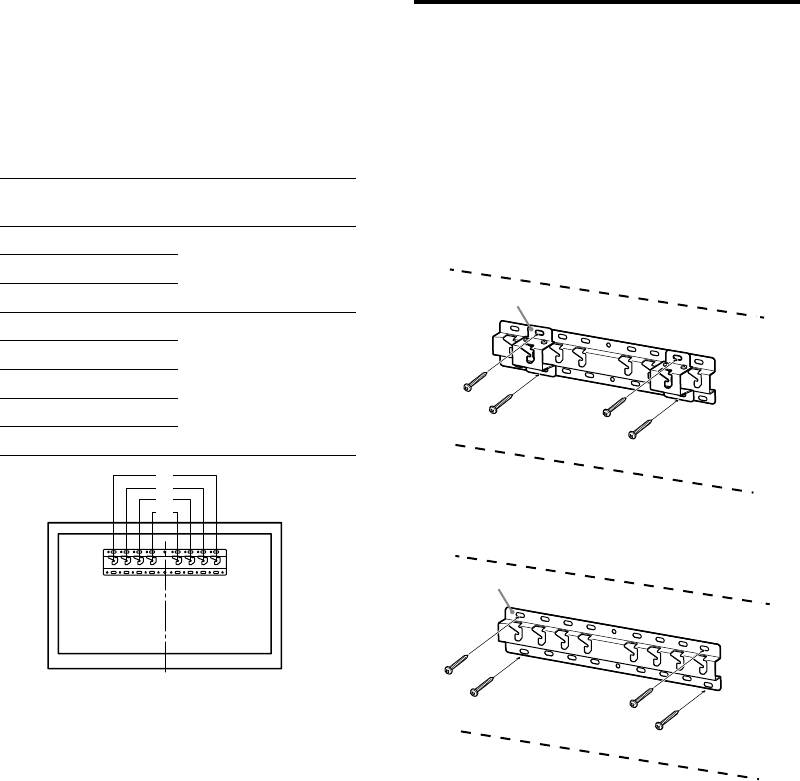
Reportez-vous au tableau
Installation de la base au
ci-dessous pour connaître
mur
l’emplacement de montage de
Utilisez au moins quatre vis de 8 mm de
l’adaptateur de base. Lors de la
diamètre ou équivalentes (non fournies).
sélection de 2-b, omettez cette
Insérez quatre vis dans les orifices de
étape.
l’adaptateur de base avec la base (20)
(2-a seule).
Nom du modèle
Emplacements des
Installez la base (20) au mur à
KDL-
crochets
l'horizontale.
48W60B
2-a
48W58B
b
40W60B
48R48B
40R48B
40R45B
c
32R43B
32R41B
a
b
c
d
2-b
4 Déterminez les positions des vis
pour l’installation de la base
(20) .
Reportez-vous aux spécifications de la
page 12.
Lors de la sélection de 2-a, utilisez les
positions des orifices de l’adaptateur de
base .
AVERTISSEMENT
Le mur sur lequel vous installez le téléviseur doit
pouvoir supporter un poids équivalent à au moins
quatre fois celui du téléviseur (Pour connaître le
poids du téléviseur, reportez-vous à son Guide de
référence.).
Déterminez la solidité du mur sur lequel vous allez
installer le téléviseur. Au besoin, renforcez
suffisamment le mur.
− 8 (FR) −
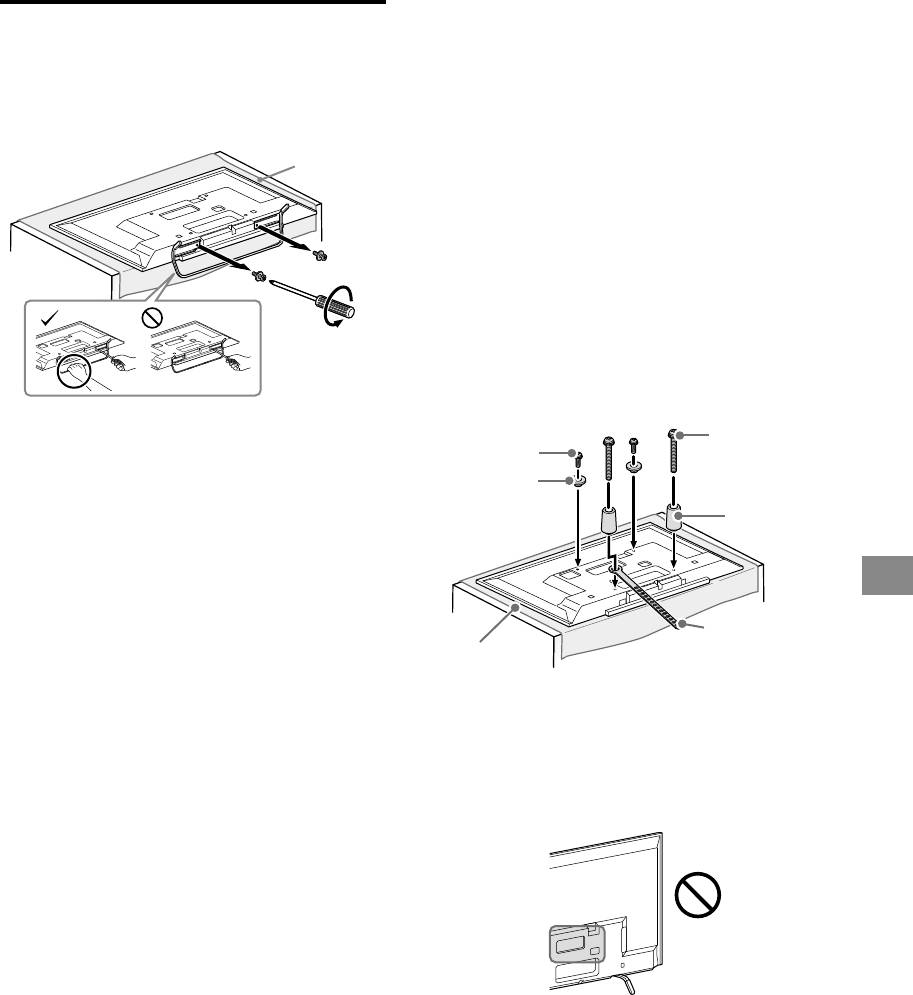
2 Installez les pièces de fixation
Préparation à l’installation du
du support de fixation murale.
téléviseur
Vérifiez les pièces de fixation en
1 Détachez le support de table du
vous reportant à la section
téléviseur.
« Fournies avec le SU-WL450 »
sous « Vérification des pièces » à
Linge
doux
la page 5.
Remarque
Fixez convenablement les pièces de fixation à l’aide
des vis.
Si vous utilisez un tournevis électrique, réglez son
couple sur 1,5 N·m {15 kgf·cm} environ.
Veillez à ranger en lieu sûr les pièces superflues en
vue de leur utilisation ultérieure. Conservez ce
manuel pour toute référence ultérieure.
Montage standard (2-a)
Vis
Vis
Remarque
(+PSW 6 x 20)
(+PSW 6 x 50)
Veillez à placer le téléviseur à un endroit recouvert
d’un linge doux afin de ne pas risquer de griffer sa
Poulie
surface.
Lorsque vous installez le support de fixation murale,
Entretoise
n’utilisez pas les vis retirées du support de table.
(60 mm)
Une fois retirés, le support de table et ses vis doivent
être rangés en lieu sûr, hors de la portée des enfants.
Vous en aurez besoin si vous décidez un jour
FR
d’utiliser à nouveau le téléviseur posé sur une table.
Le support de table ne peut pas être acheté
Courroie
séparément.
Linge doux
AVERTISSEMENT
Assurez-vous que le téléviseur est en position
verticale avant de le mettre sous tension. Le
téléviseur ne doit pas être mis sous tension lorsque
Montage fin (2-b)
sa dalle LCD se trouve face vers le bas, sinon l’image
n’est pas uniforme.
Remarque
Si la surface du téléviseur subit une pression ou un
Ce type de montage ne permet pas d’utiliser
choc, son écran risque de se briser ou d’être
certaines bornes situées à l’arrière du téléviseur.
endommagé.
Posez l’écran, face vers le bas, sur une surface stable
et horizontale en laissant dépasser le support de
table au-delà du bord de la surface. En effet, si vous
posez la surface du téléviseur et la base du support
de table sur une même surface horizontale, vous
créez des conditions de travail instables et vous
risquez d’endommager le téléviseur.
Lorsque vous détachez le support de table du
téléviseur, saisissez fermement le support de table
des deux mains.
− 9 (FR) −
