
Sony SU-52HX1: instruction
Class: Audio and DJ Equipment
Type:
Manual for Sony SU-52HX1
Table of contents
TV Stand
Instructions
Mode d’emploi
Instrucciones
Gebrauchsanweisung
Instructies
Istruzioni
Bruksanvisning
Instrukcje
Instruções
Vejledning
Käyttöohje
Instruksjoner
Οδηγίες
Utasítások
Instrukce
Inštrukcie
Инструкции
Інструкції
Höôùng daãn
TR
GR
RU
UA
TH
4-188-907-
01
(1)
© 2010 Sony Corporation
T
V
St
an
d
S
U
-52HX
1
/S
U-46HX
1
ES
GB
FR
DE
DK
IT
SE
PL
PT
DK
NL
Printed in Japan
http://www.sony.net/
SU-52HX1
SU-46HX1
SU-52HX1
SU-46HX1
TV Stand
AR
PR
FI
HU
CZ
SK
NO
CT
CS
KR
VN
JP
Actual total number:
Sony SU-52HX1/SU-46HX1
4-188-907-
01
(1)
OTF
2
(JP)
ソニー製品は安全に充分配慮して設計されています。しか
し、まちがった使いかたをすると、火災・感電・転倒・落下な
どにより人身事故になることがあり危険です。事故を防ぐた
めに安全のための注意事項を必ずお守りください。
警告表示の意味
取扱説明書では、次のような表示をしています。表示の内容をよ
く理解してから本文をお読みください。
この表示の注意事項を守らないと、火災・感電・転倒・
落下などにより死亡や大けがなどの人身事故につな
がることがあります。
この表示の注意事項を守らないと、けがをしたり周
辺の家財に損害を与えたりすることがあります。
注意を促す記号
行為を禁止する記号
行為を指示する記号
対応モデル
このテレビスタンドはソニー製の下記指定機器専用です。
指定機器以外にはご使用にならないでください。
こちらは日本のお客様の情報です。
地上・
BS
・
110
度
CS
デジタルハイビジョン
液晶テレビ
SU-52HX1
SU-46HX1
KDL-52HX90
*
KDL-46HX90
*
(
2010
年
3
月現在)
*
「
」は各モデル特定の数字あるいは文字を表しています。
本機のシリアルナンバーは、テレビスタンド後面の位置に記載され
ています。
安全のために
JP
日
本
語
(JP)
Actual total number:
Sony SU-52HX1/SU-46HX1
4-188-907-
01
(1)
OTF
お客様へ
下記の注意事項を守らないと
火災・感電・転倒・
落下
などにより
死亡
や
大けが
の原因となります。
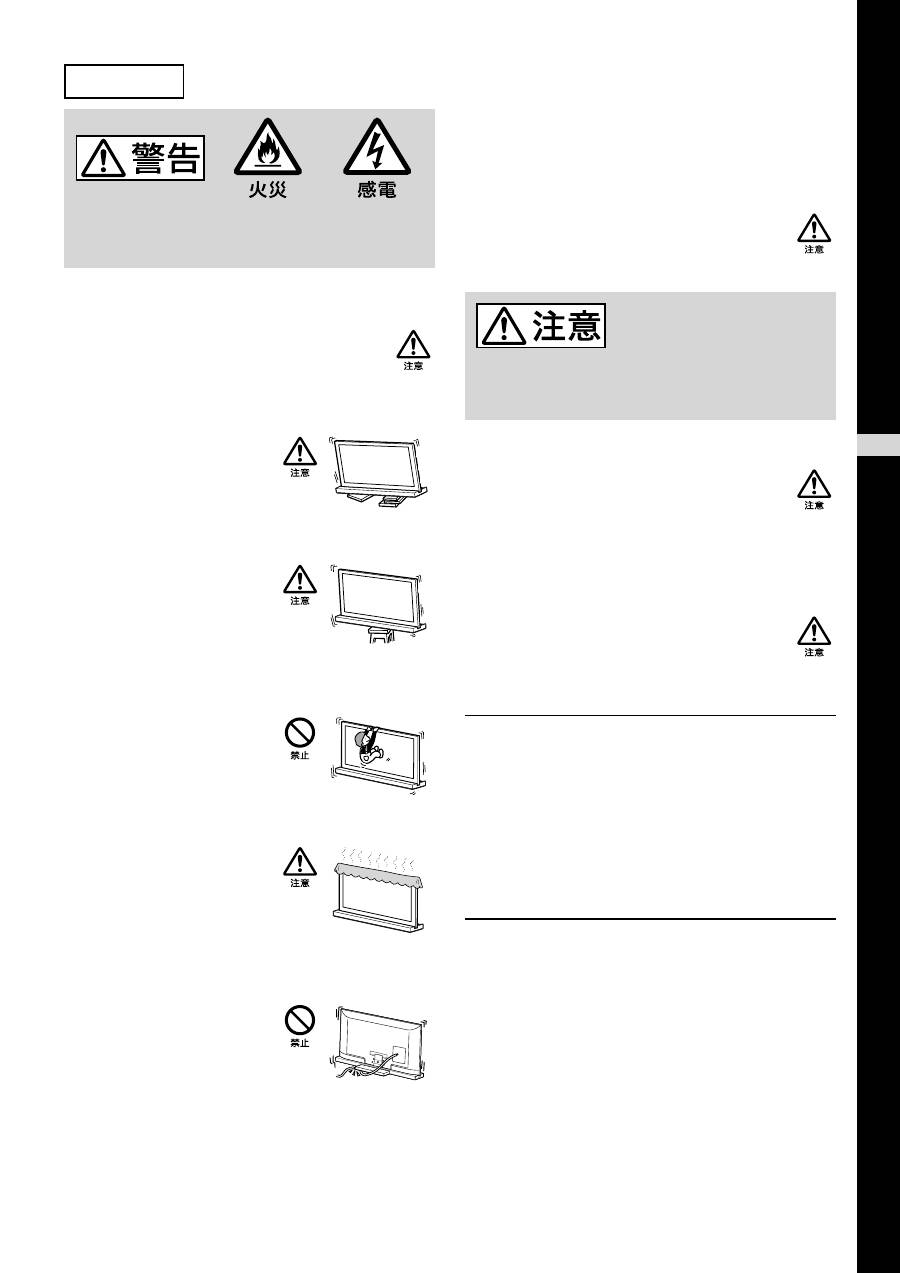
転倒防止の処置をする
転倒防止の処置をしないと、テレビが転倒し、けが
の原因となることがあります。スタンドとテレビ台
などをつないで転倒防止の処置を行ってください。
堅くて平坦な床面に設置する
傾斜のあるところに設置すると、
テレビスタンドが転倒したり、テ
レビが落下して、けがや破損の原
因となることがあります。
安定している台の上に載せる
不安定な台の上に載せるとバラン
スを崩して転倒し、落下によるけ
がや破損の原因となることがあり
ます。
スタンドにテレビを取り付けた状態で、ぶら下が
らない
テレビスタンドが転倒したり、テ
レビが落下して、けがの原因とな
ることがあります。
テレビの通風孔をふさがない
テレビの上に布をかけて通風孔を
ふさぐと、内部に熱がこもり、火
災の原因となることがあります。
テレビの電源コードおよび接続ケーブルを
はさまないようにする
•
テレビをテレビスタンドに取り
付けるときは、電源コードおよ
び接続ケーブルをはさみこまな
いようにしてください。
電源コードおよび接続ケーブル
に傷がついて火災や感電の原因
となります。
•
テレビスタンドを動かすときは、電源コードおよび接続
ケーブルを踏まないようにしてください。
電源コードおよび接続ケーブルに傷がついて火災や感電
の原因となります。
テレビの電源コードおよび接続ケーブルを足で
ひっかけない
テレビスタンドが転倒し、けがの原因となることが
あります。
下記の注意事項を守らないと
けが
をしたり周辺の
家財
に
損害
を与えたりすることがあります。
指定機器以外の物を取り付けない
このスタンドは指定機器専用です。指定機器以外の
物を取り付けると、落下によるけがや破損の原因と
なることがあります。特に記載のない場合は、この
取扱説明書内では
KDL-46HX90
のイラストを使用
しています。
テレビを固定する
付属のネジでテレビをテレビスタンドに固定してく
ださい。
固定しないと、テレビスタンドが転倒したり、テレ
ビが落下して、けがの原因となることがあります。
設置上のご注意
設置場所は、堅くて平坦な床面にしてください。設置場所
によってはスタンドの変形や傾きが生じることがあります
ので下記のことをお守りください。
−
畳、じゅうたん、カーペットなどの上に置く場合は板など
堅い物を敷く
−
直射日光が当たる場所や、暖房器具のそばに置かない
−
高温多湿の場所や屋外に置かない
使用上のご注意
お手入れについて
やわらかい布で、から拭きしてください。汚れがひどいと
きは中性洗剤を水で薄め、やわらかい布に含ませて軽く拭
き取ってください。アルコールやシンナー、ベンジンなど
の化学薬品はスタンドの仕上げを痛めることがありますの
で、使わないでください。
Actual total number:
Sony SU-52HX1/SU-46HX1
4-188-907-
01
(1)
OTF
4
(JP)
先に示した安全上のご注意をよくお読みのうえ、取り
付けや設置・保守・点検・修理などを安全に行ってくだ
さい。
設置は
2
人以上で行う
テレビをテレビスタンドに設置するときは、
2
人以上
で行ってください。
1
人で行うと腰を痛めたり、けが
の原因となることがあります。
スタンドの分解・改造は行わない
落下によるけがや破損の原因となります。
取り付け手順に従って、テレビをしっかりと
取り付ける
ネジを確実に締めてください。
テレビがしっかり取り付けられていないと、テレビ
が落下し、けがの原因となることがあります。
テレビを取り付けるときには、手や指を傷つけな
いように注意する
•
スタンドを持ち運ぶときは、ネック部分を触らな
いでください。
•
テレビを取り付けるときは、手や指を傷つけない
ようにご注意ください。
テレビスタンドを箱から取り出すときのご注意
テレビスタンドをしっかり持って気をつけて取り扱ってください。
手順
1
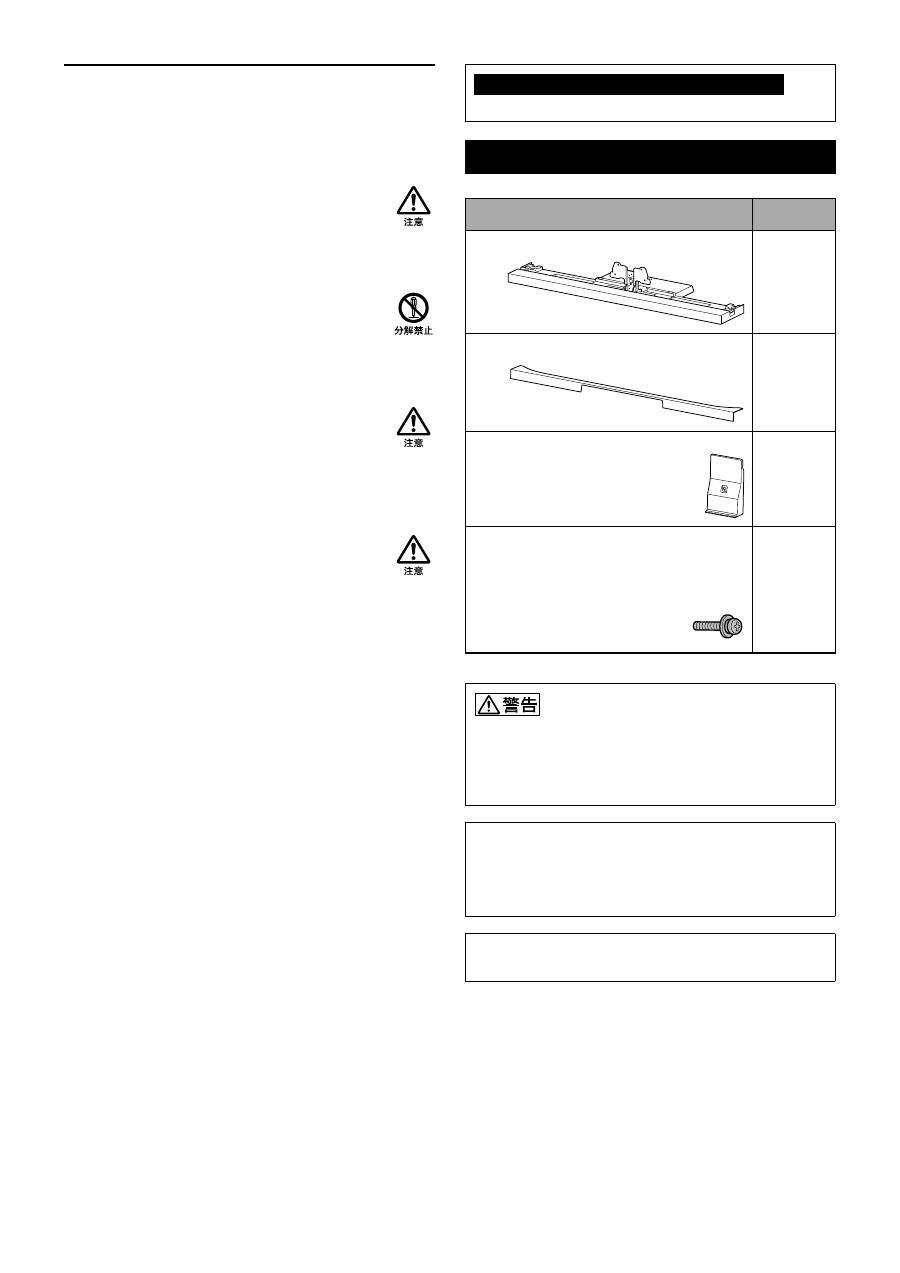
:部品を確認する
名称
数量
スタンド
1
リアカバー
1
ネックカバー
1
テレビ固定ネジ(
PSW5
×
16
)
ブラック(×
4
)
ネックカバー固定ネジ(
PSW5
×
16
)
ブラック(×
1
)
5
機器などに電源コードをはさみこむと、ショートして感電する恐
れがあります。また、電源コードや接続ケーブルを引っかけると、
転んだりスタンドが倒れたりしてけがの原因となることがありま
す。
テレビの設置場所を決め、あらかじめテレビスタン
ドを置く。
テレビは重いので、取り付ける前に場所を決め、テレビスタンド
を組み立ててください。
テレビ本体付属の取扱説明書を参照して、テレビからテーブル
トップスタンドをはずしてください。
Actual total number:
Sony SU-52HX1/SU-46HX1
4-188-907-
01
(1)
OTF
5
(JP)
2
テレビをテレビスタンドに取り付ける。
テレビをテレビスタンドの溝に設置してください。
ご注意
•
テレビを取り付けるときに指をケガしないように気をつけ
てください。
3
テレビとテレビスタンドを付属のテレビ固定ネジ
(
PSW5
×
16
、ブラック
)
4
本で固定する。
テレビ固定ネジ
(
PSW5
×
16
、ブラック
)
マークの矢印は、テレビスタンドの正面方向を示します。
手順
2
:テレビを取り付ける
組み立てる前に
•
組み立てる前にネジに合った
ドライバーをご用意ください。
•
電動ドライバーを使用する場合、締め付けトルクはおよそ
1.5 N
・
m
{
15 kgf
・
cm
}に設定してください。
1
テレビを持つときは規定の位置を持つ。
表を参照して
と
の長さをイラストのようにテレ
ビ上部の角から測る。測った
(
)の位置を持つ。
B A
B
A
寸法:
mm
テレビのサイズ
の長さ
の長さ
52V
型
170
170
46V
型
170
170
ご注意
•
規定の位置を持ち、指を傷つけないようにしてください。
テレビの持ち方を確認する。
ご注意
•
テレビを運ぶときは、上記の様に持ってください。液晶画
面と画面周りのフレームに強い力を加えないでください。
次のページにつづく
Actual total number:
Sony SU-52HX1/SU-46HX1
4-188-907-
01
(1)
OTF
6
(JP)
4
ネックカバーをネックに取り付ける。
ネックカバーをイラストのようにネックに合わせ
て下に降ろす。ネックカバーとネックを付属の
ネックカバー固定ネジ(
PSW5
×
16
、ブラック)で
固定する。
テレビの角度調整をする場合は、ネックカバーを
取り付ける前に行ってください。「テレビの角度
を調整する」の手順
2
(
7
ページ)から参照してくだ
さい。
ネックカバー
固定ネジ
(
PSW5
×
16
、
ブラック
)
ネックカバー
ネック
5
リアカバーをテレビスタンドに取り付ける。
リアカバー
手順
3
:転倒防止の処置をする
転倒防止の処置をしないと、テレビスタンドが転倒
して、大けがの原因となることがあります。転倒防
止の処置を行ってください。
テレビスタンドには転倒防止用の穴があります
(下図参照)。
手順についてくわしくは、テレビ本体付属の取扱
説明書をご覧ください。
Actual total number:
Sony SU-52HX1/SU-46HX1
4-188-907-
01
(1)
OTF
7
(JP)
主な仕様
SU-52HX1
SU-46HX1
寸法(
mm
)
410
410
125
140
225
190
1,263
1,124
0
゚
812.8
732.8
6
゚
808.8
729.2
45
45
350
330
スタンド質量
(
kg
)
9.6 kg
8.8 kg
本機の仕様および外観は、改良のため予告なく変更す
ることがありますが、ご了承ください。
テレビの角度を調整する
このスタンドは角度調整ができます。
(出荷時は
6
度に設定されています。)
0
゚
6
゚
1
リアカバーとネックカバーをはずす。
2
1
ネックカバー
固定ネジ
(
PSW5
×
16
、
ブラック
)
ネックカバー
リアカバー
2
ネジをはずす。
ネックからネジ
3
本をはずす。
1
2
次のページにつづく
Actual total number:
Sony SU-52HX1/SU-46HX1
4-188-907-
01
(1)
OTF
8
(JP)
3
角度を調整する。
テレビを前に傾けたまま、アジャスターを固定した
い角度の位置に動かす。
アジャスター
• 6
度から
0
度に調整するときは、アジャスターを前
に動かす。
• 0
度から
6
度に調整するときは、アジャスターを後
ろに動かす。
もう一度テレビを後ろ側に戻す。
ご注意
•
テレビを後ろ側に戻すときはアジャスターを手で支えてく
ださい(
0
度設定時のみ)。
4
ネジで固定する。
はじめにネジ(
)で固定し、次に
2
本のネジ(
)
で固定する。(手順
2
ではずした
3
本のネジを使用
する。)
2
1
6
゚
0
゚

Actual total number:
Sony SU-52HX1/SU-46HX1
4-188-907-
01
(1)
OTF
2
(GB)
Thank you for purchasing this product.
Products by Sony are designed with safety in mind.
Incorrect use may result in a serious injury through
fire, electric shock, the product toppling over, or the
product being dropped. Be sure to observe the
precautions for safety to prevent such accidents.
This instructions manual shows the correct handling of the
product and important precautions necessary to prevent
accidents. Be sure to read this manual thoroughly and use the
product correctly. Keep this manual available for future
reference.
Specified products
This stand is designed for use with the Sony products
specified below. Do not install other than the specified
products.
The following products are subject to change without notice,
may be out of stock, or discontinued.
Also, certain models are sold in some regions.
(As of March 2010)
* In the actual model names, the “
s
” indicates numbers and/or
characters specific to each model.
Location of the identification label
Label for Model No. is located on the rear of the TV Stand.
Be sure to take measures to prevent
the TV Stand from toppling over.
If you fail to do so, the TV may topple over and cause injury.
Anchor the TV Stand and the rack, etc., to prevent toppling
over.
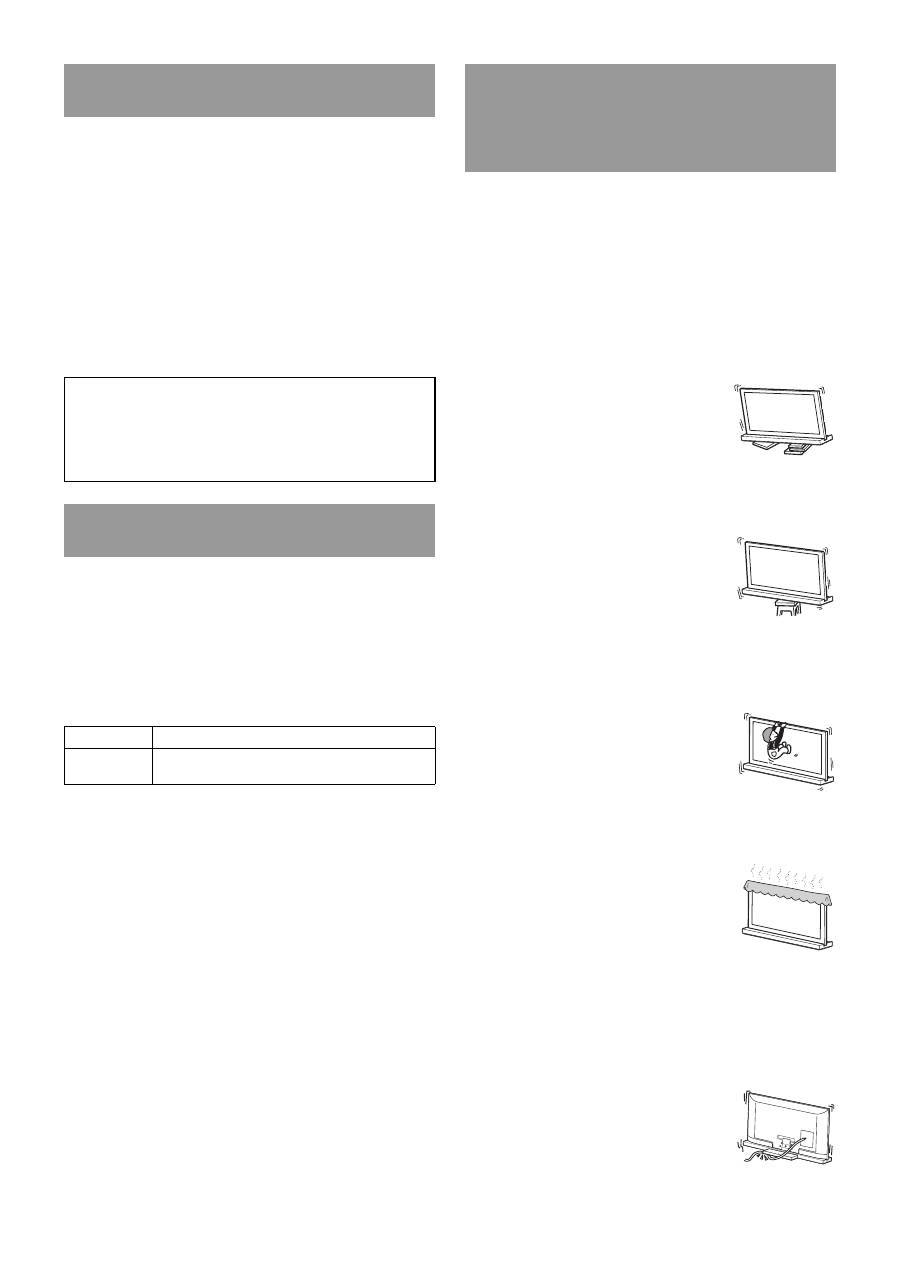
Be sure to install the TV Stand on a
solid and flat floor.
Do not install the TV Stand so that it leans
in one direction. If you do so, the TV
Stand may topple over or the TV may fall.
This may cause injury or damage.
Be sure to install the TV Stand on a
stable surface.
If you install the TV Stand on an unstable
surface, it may lose its balance and topple
over or fall off. This may cause injury or
property damage.
Do not lean on or hang from the TV
with the TV installed on the TV
Stand.
The TV Stand may topple over, or the TV
may fall and cause serious injury or death.
Do not cover the ventilation holes of
the TV.
If you cover the ventilation holes (with a
cloth, etc.), heat may build up inside and
cause fire.
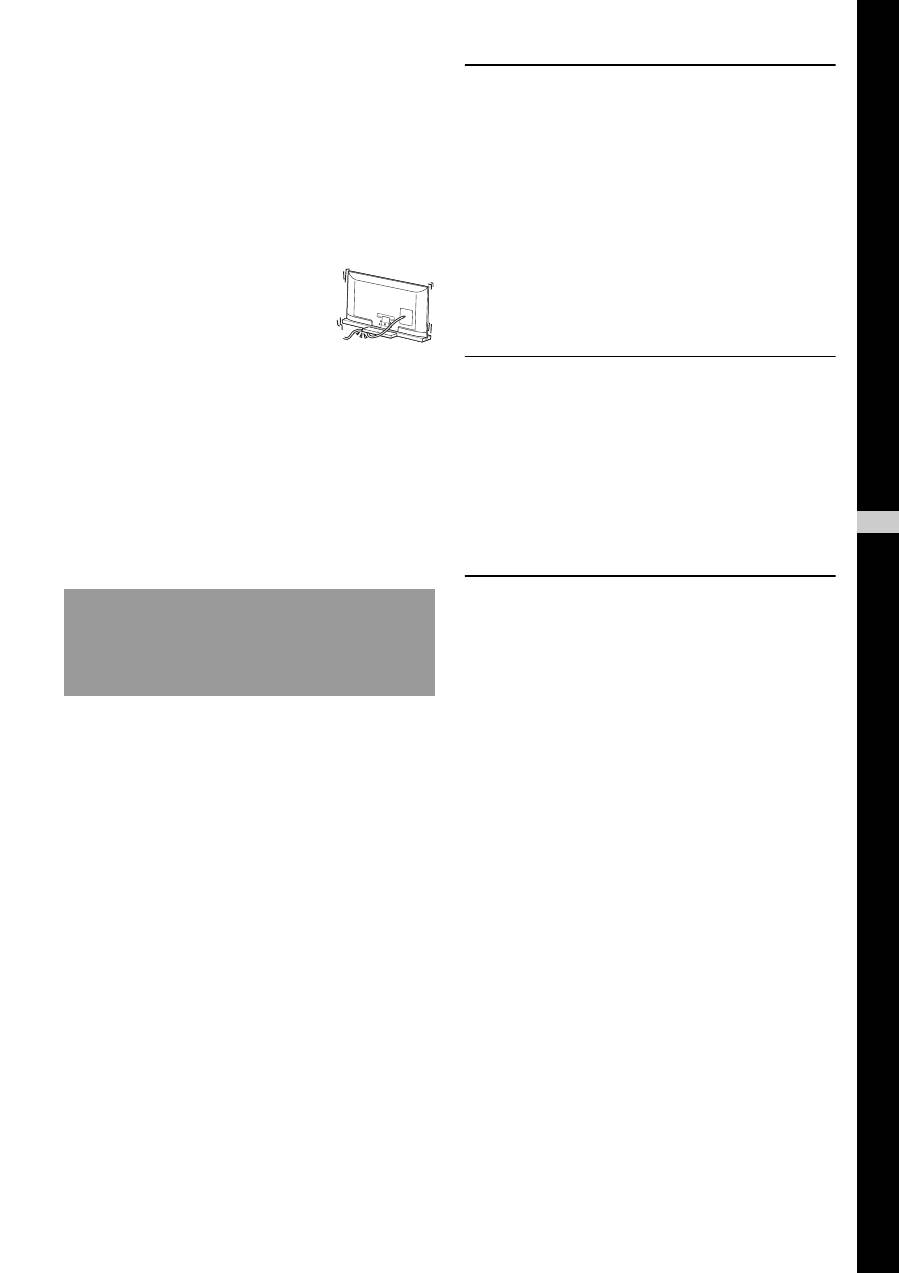
Do not allow the AC power cord or
the connecting cable to be pinched.
• Do not allow the AC power cord or the connecting cable to
be pinched when you install the TV on the TV Stand. If
the AC power cord or the connecting cable is damaged,
this may result in fire or electric shock.
• Do not step on the AC power cord or the
connecting cable when you carry the TV
Stand. The AC power cord or the
connecting cable may be damaged, and
this may result in fire or electric shock.
On Safety
The manufacturer of this product is Sony Corporation, 1-7-
1 Konan Minato-ku Tokyo, 108-0075 Japan. The
Authorized Representative for EMC and product safety is
Sony Deutschland GmbH, Hedelfinger Strasse 61, 70327
Stuttgart, Germany.
CAUTION
LCD color TV
SU-52HX1
SU-46HX1
XBR-52HX90
s
*
/KDL-52HX90
s
*
XBR-46HX90
s
*
/KDL-46HX90
s
*
WARNING
If the following precautions are not observed,
serious injury or death can result through fire,
electric shock, or the product toppling over.
3
(GB)
Do not stumble over the AC power
cord or the connecting cable.
If you stumble over the AC power cord or the connecting
cable, the TV Stand may topple over and cause injury.
Do not install any equipment other
than the specified product.
This TV Stand is designed for use with the specified product
only. If you install equipment other than specified, it may fall
or break, and cause injury. Illustrations used in this manual
show of the KDL-46HX90
s
, unless otherwise stated.
Be sure to secure the TV.
Secure the TV to the TV Stand using the supplied screws. If
the TV is not installed securely, it may fall, or the TV Stand
may topple over, and cause injury.
Notes on installation
Install the TV Stand on a solid and flat floor. Do not allow the
TV Stand to be installed at an angle or incline. To avoid this,
observe the following precautions.
If you install the TV Stand on a soft surface such as a mat or
a carpet, lay a board over the designated location beforehand.
– Do not install the TV Stand in a place subject to direct
sunlight or near a heater.
– Do not install the TV Stand in a hot or humid place, or
outdoors.
Note on use
Cleaning
To keep the TV Stand clean, occasionally wipe it with a dry
soft cloth. Stubborn stains may be removed by wiping with a
cloth slightly dampened with mild soap. Be sure to dry the
area afterwards with a dry soft cloth. Do not use chemicals,
such as thinner or benzine, as they damage the finish of the
TV Stand.
Be sure that two or more persons do
the installation work.
Be sure that two or more persons install the TV on the TV
Stand. If one person does the installation work alone, this
may result in an accident or injury.
Do not modify the TV Stand.
It may fall and cause injury.
Be sure to install the TV securely
following the instructions.
Tighten the screws securely. If the TV is not installed
securely, it may fall and cause injury.
Be careful not to injure your hands
or fingers while assembling.
• Do not move the TV Stand with holding the Neck section.
• Be careful not to hurt your fingers or hands when
installing the TV.
CAUTION
If the following precautions are not observed,
injury or property damage may occur.
GB
Englis
h
4
(GB)
Before assembling
• Be sure to have a Phillips screwdriver that fits the screws prior to
the assembly.
• When using an electric screwdriver, set the torque setting to
approximately 1.5 N·m {15 kgf·cm}.
Be sure to hold the TV Stand and handle it carefully.
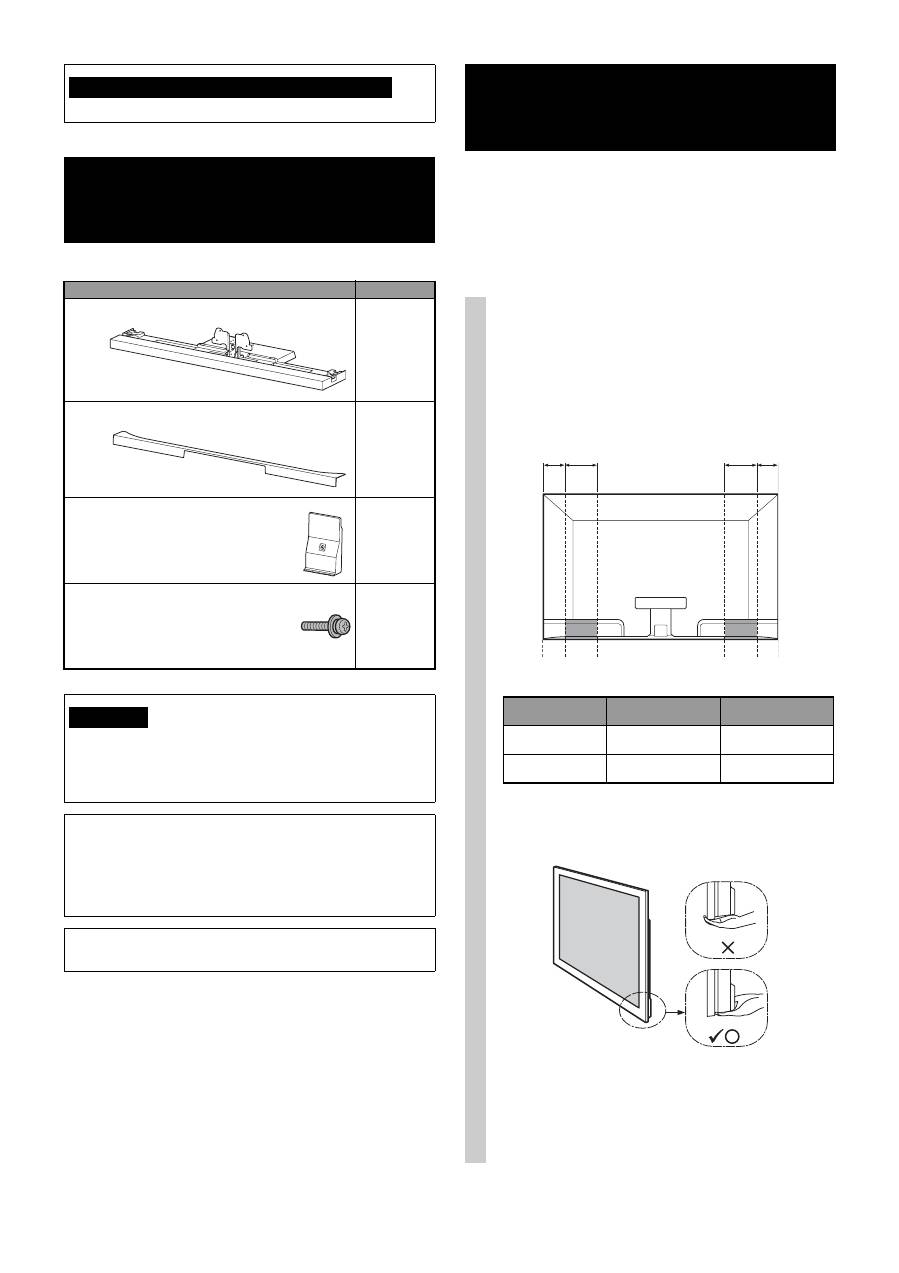
Step 1:
Checking the parts
Name
Quantity
Stand
1
Rear Cover
1
Neck Cover
1
TV Neck Attachment Screw
(PSW5 × 16) black (× 4)
Neck Cover Screw
(PSW5 × 16) black (× 1)
5
If you allow the AC power cord to be pinched under or between
pieces of equipment, this may result in a short circuit or an electric
shock. If you stumble over the AC power cord or the connecting
cable, the TV Stand may topple over and cause injury.
Decide on the installation location and lay the TV
Stand down before installing the TV.
Since the TV is heavy, it is recommended that you decide on the
installation location beforehand, and assemble the TV Stand on
site.
Refer to the operating instructions supplied with your TV for
information on how to remove the Table-Top Stand from the TV.
Note on taking the TV Stand out from the carton
WARNING
Step 2:
Installing the TV
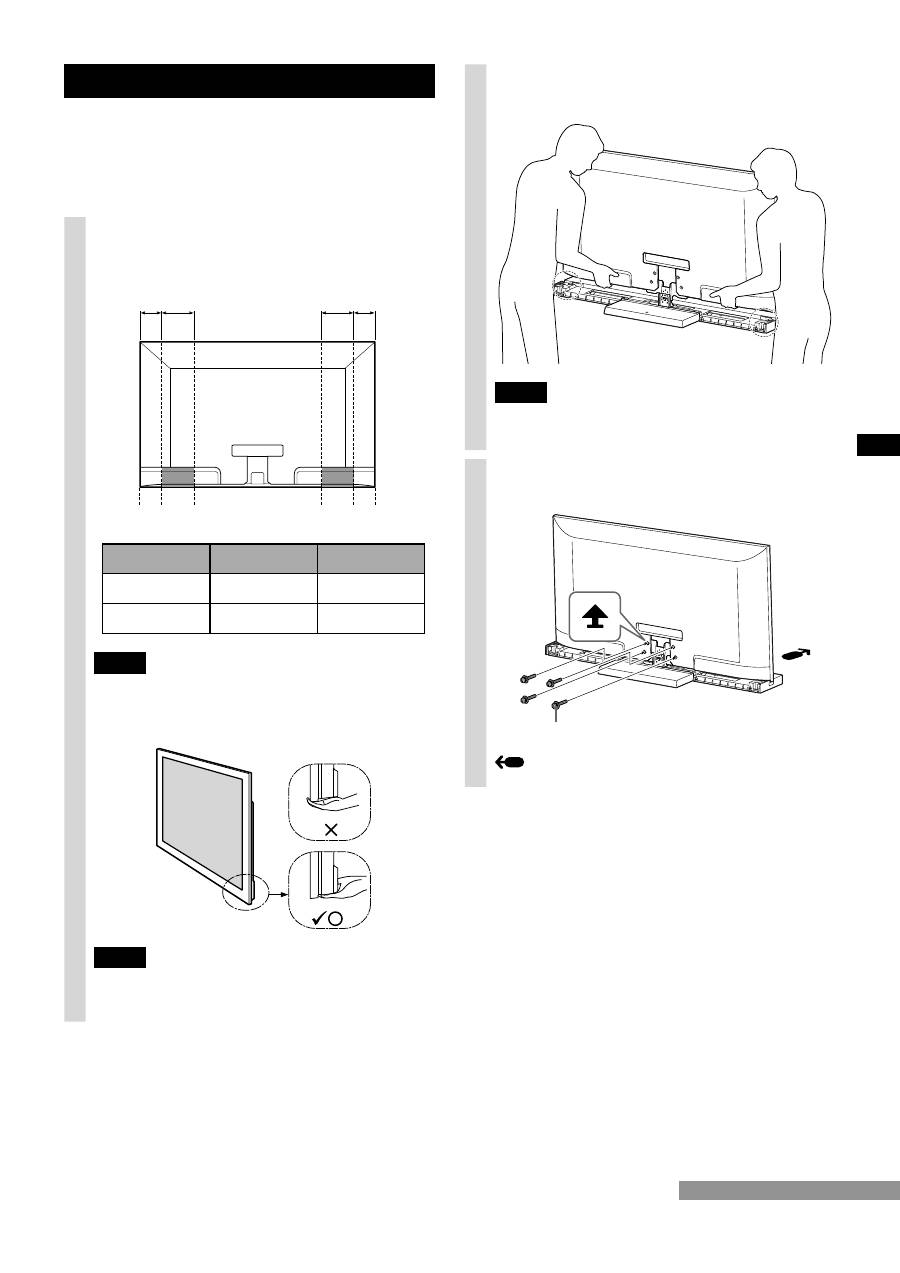
1
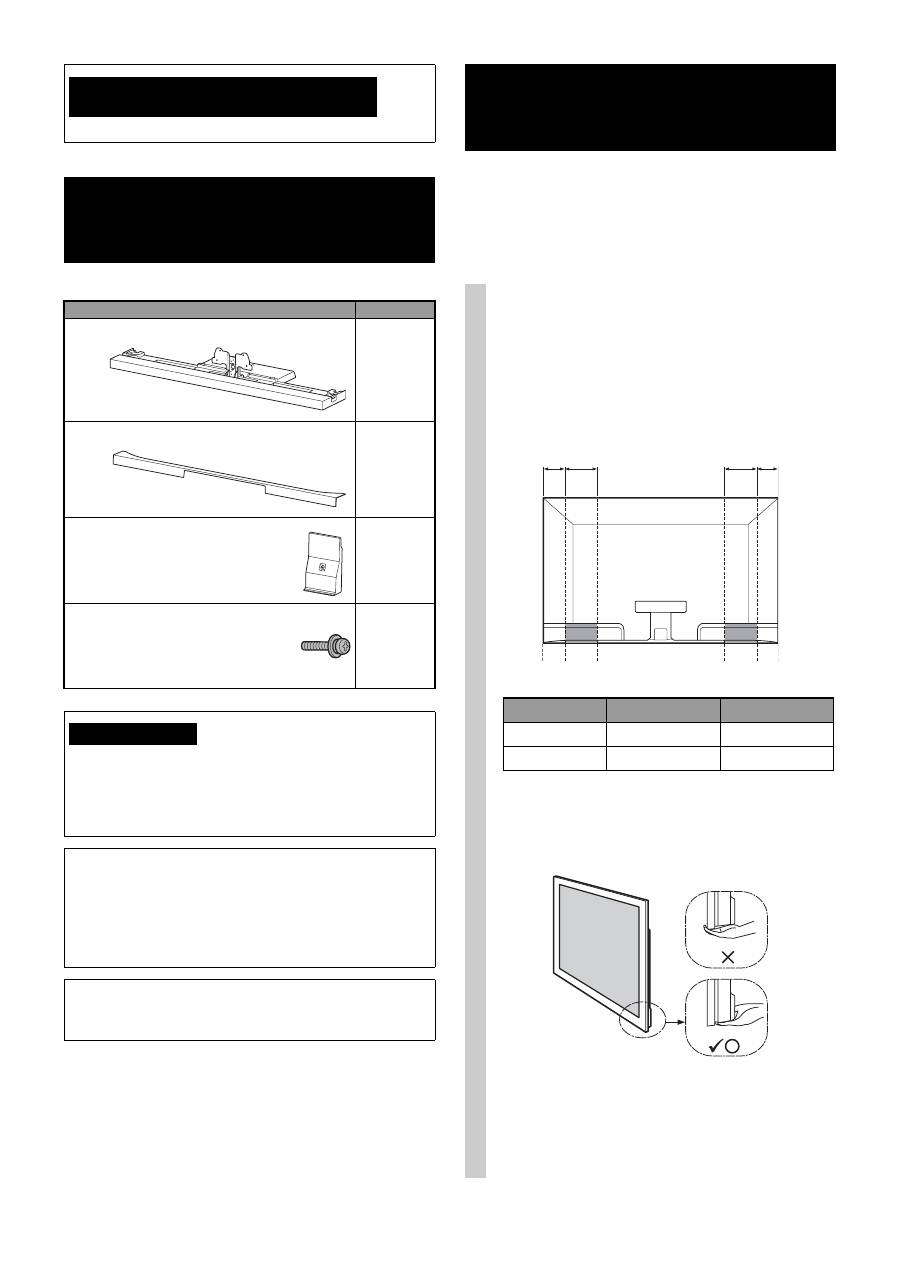
Hold the TV at the specified point
when moving the TV.
1
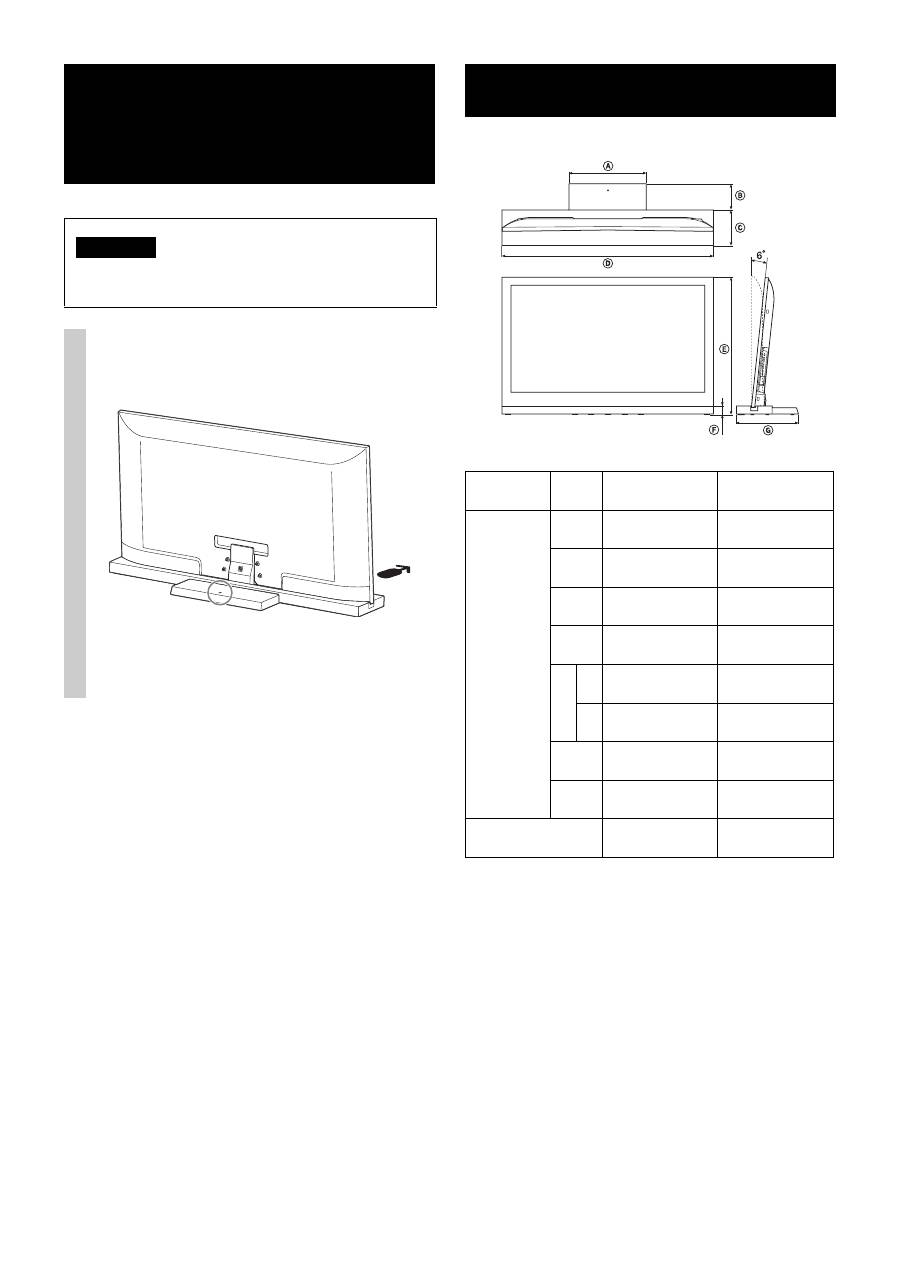
Refer to the chart and measure lengths
A
and
B
from the top edge of the TV, as shown in the
illustration below. Hold the TV at the specified
point of the measured length
B
(
x
).
~
• Hold at the specified point to avoid injuring your fingers.
2
Make sure to hold the TV as shown:
~
• When transporting the TV set by hand, hold it as shown
above. Do not put stress on the LCD panel and the frame
around the screen.
B A
B
A
TV size
Length
A
Length
B
52"
170 (6 3/4)
170 (6 3/4)
46"
170 (6 3/4)
170 (6 3/4)
Unit: mm (inches)
5
(GB)
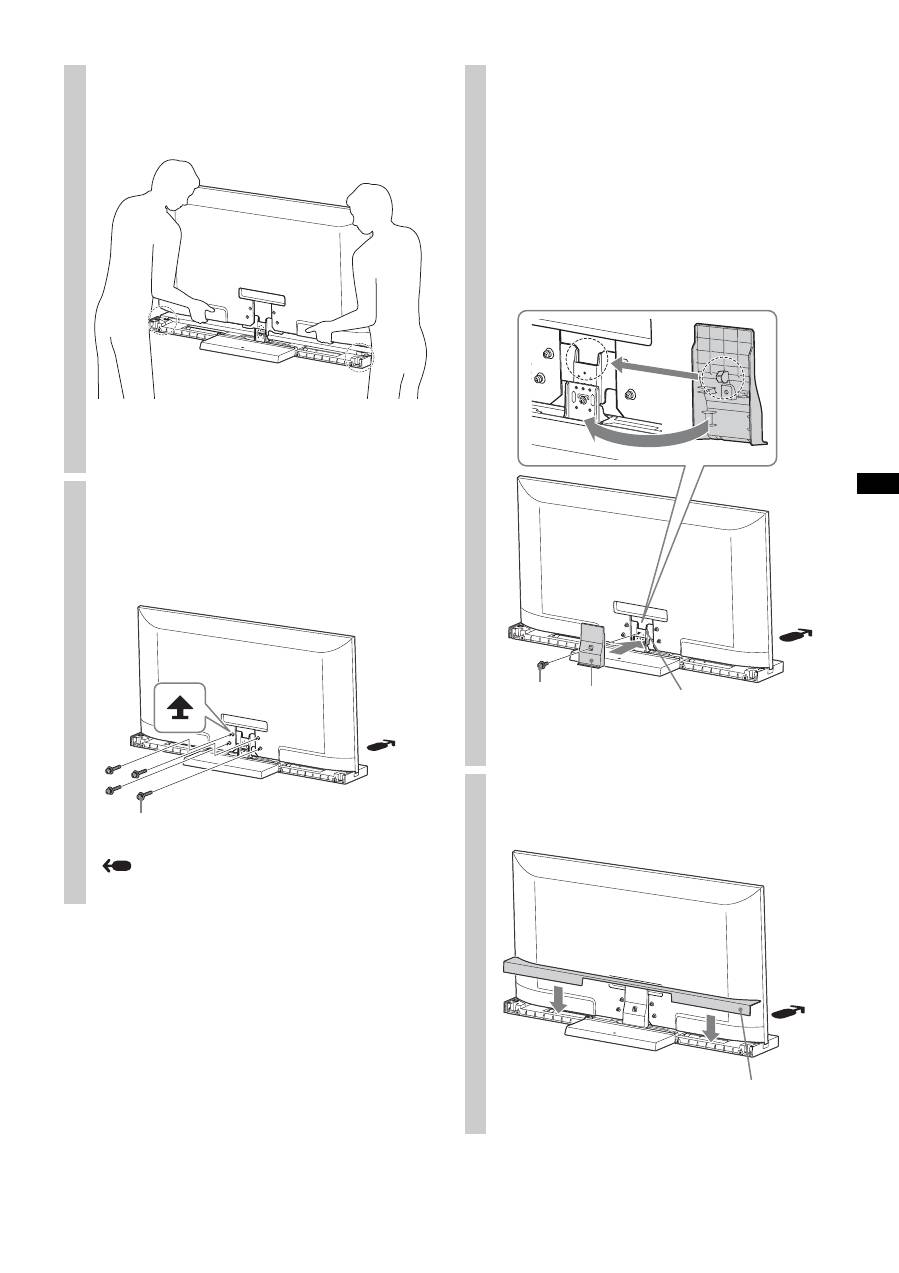
2
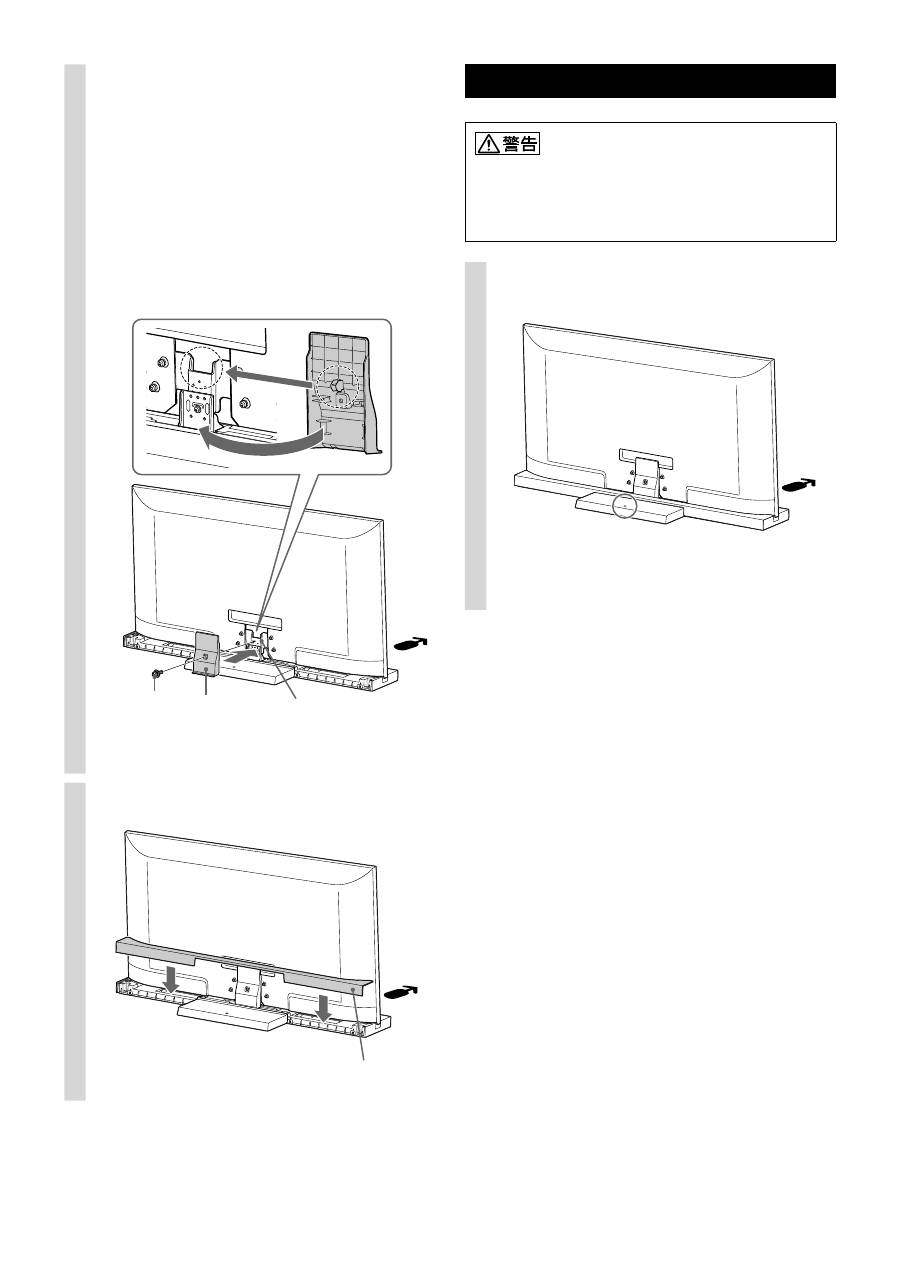
Install the TV onto the TV Stand.
The TV is installed by placing it in the groove of the
TV Stand.
~
• Be careful not to pinch your fingers when installing the TV.
3
Secure the TV and the TV Stand
with the four TV Neck
Attachment Screws (PSW5 × 16)
black (supplied).
Arrow direction shows front of the TV Stand.
TV Neck Attachment Screw
(PSW5 × 16) black
4
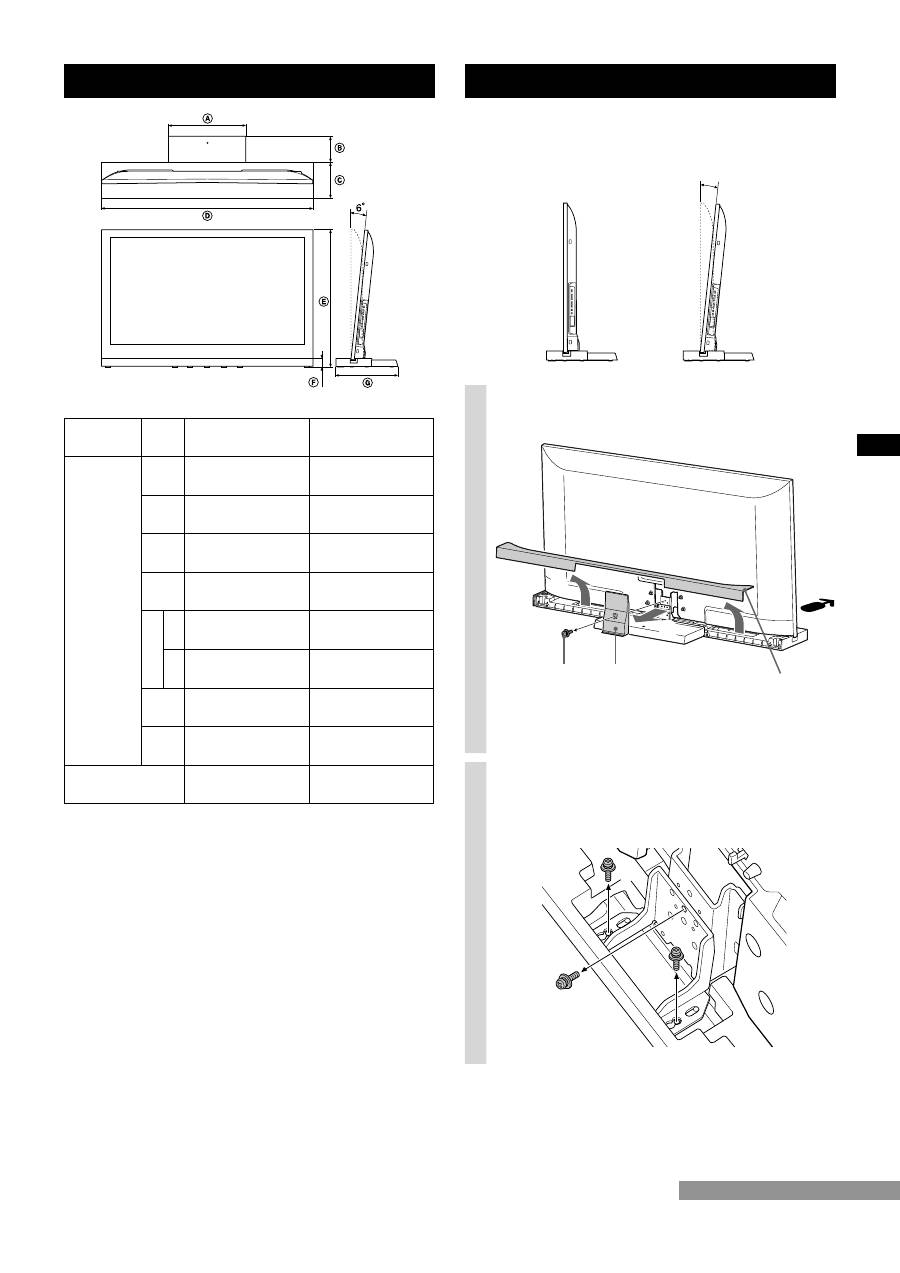
Attach the Neck Cover to the
Neck.
Align the Neck Cover with the Neck and slide it down
as shown in the illustration below. Secure the Neck
Cover and Neck with the Neck Cover Screw (PSW5 ×
16) black (supplied).
If you want to adjust the viewing angle of the TV,
adjust the angle before attaching the Neck Cover. Refer
to Step 2 of “Adjusting the viewing angle of the TV” on
page 7.
5
Attach the Rear Cover to the TV
Stand.
Neck Cover
Screw
(PSW5 × 16)
black
Neck Cover
Neck
Rear Cover
6
(GB)
Design and specifications are subject to change without
notice.
Step 3:
Safety measures to
prevent toppling over
WARNING
Be sure to take measures to prevent the TV Stand from
toppling over, and causing possible injury and damage.
There is a hole to allow you to take measures to prevent
the TV Stand from toppling over, as shown in the
illustration below.
For details on the procedure, refer to the instruction
manual supplied with the TV.
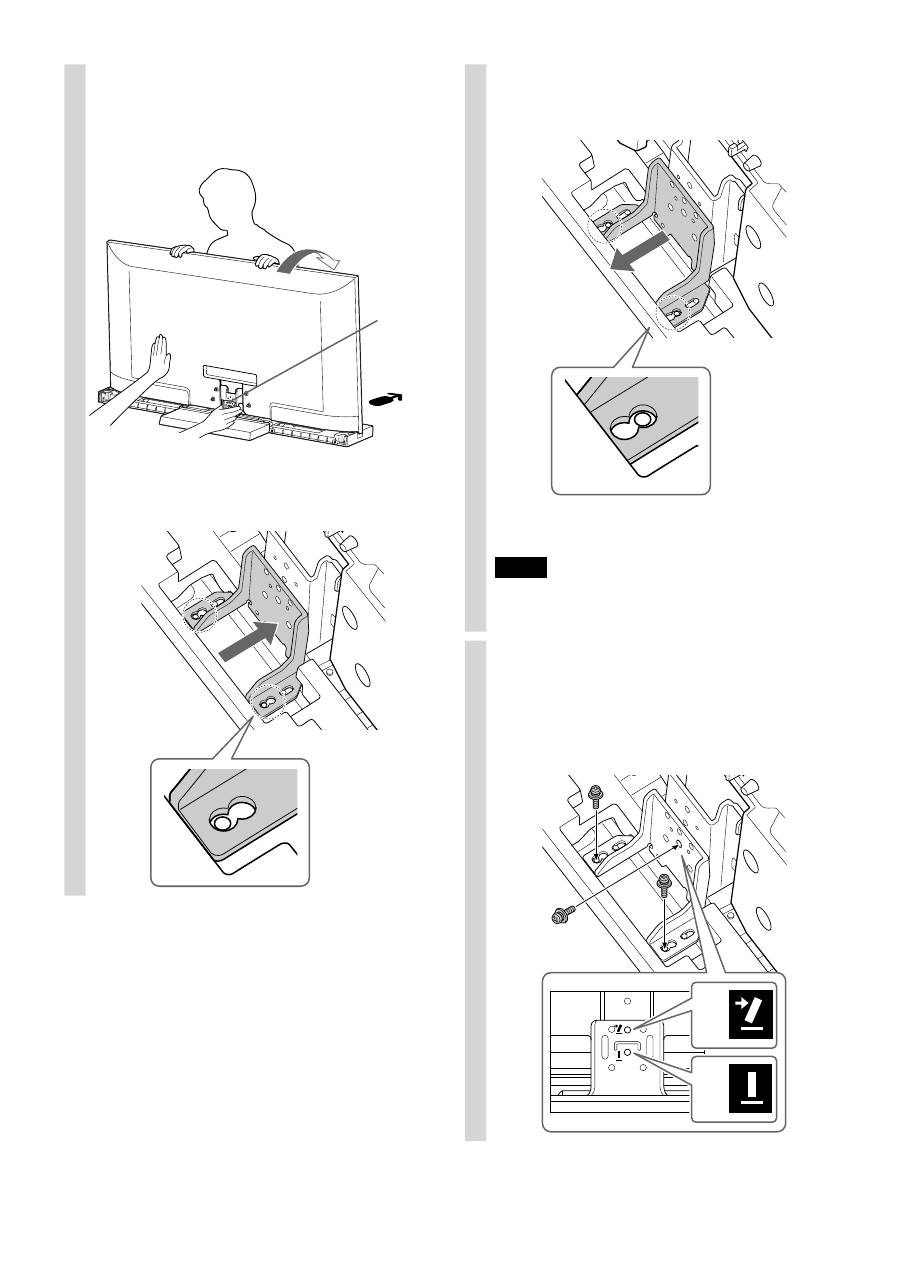
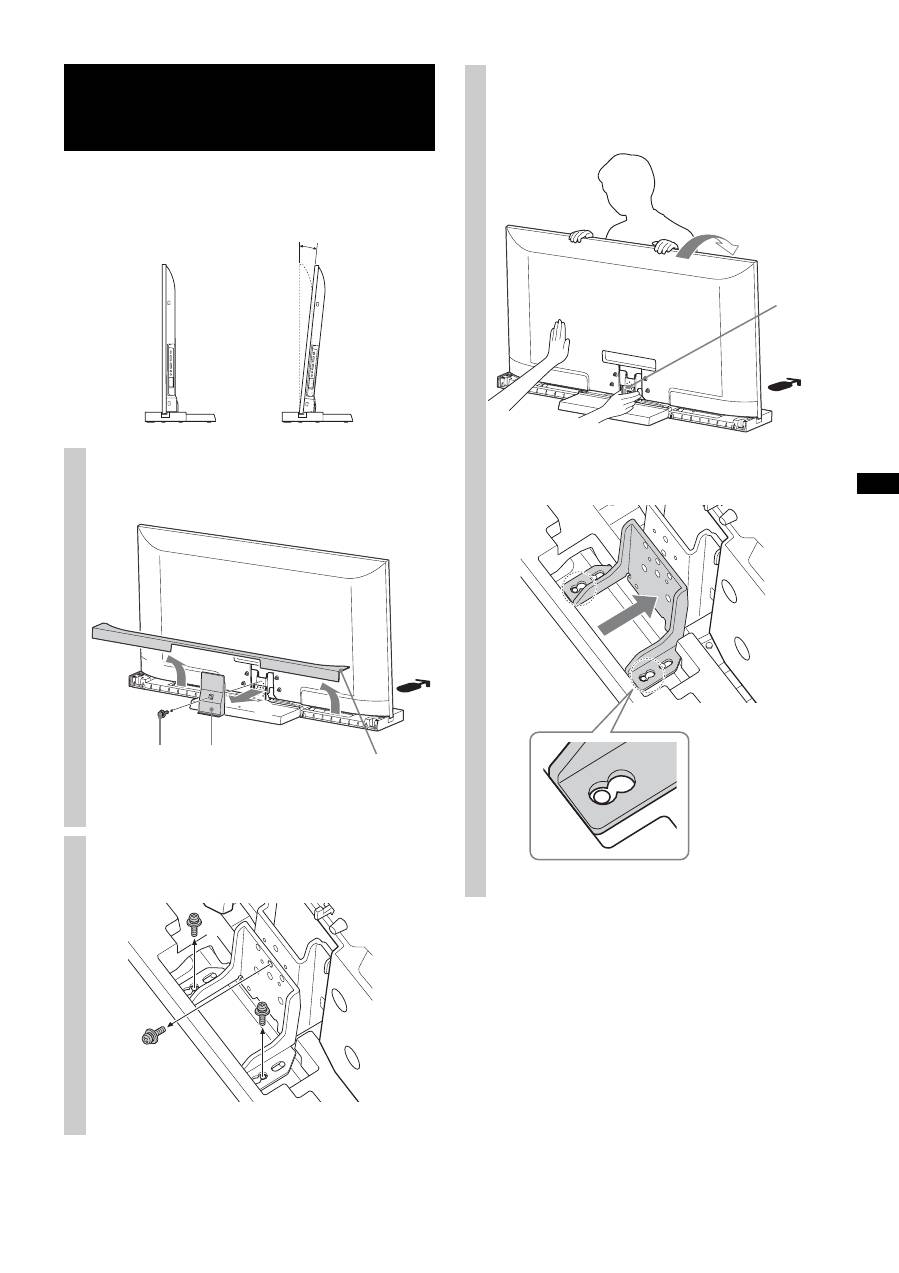
Specifications
SU-52HX1
SU-46HX1
Dimensions:
mm (inches)
A
410
(16 1/4)
410
(16 1/4)
B
125
(5)
140
(5 5/8)
C
225
(8 7/8)
190
(7 1/2)
D
1,263
(49 3/4)
1,124
(44 3/8)
E
0°
812.8
(32)
732.8
(28 7/8)
6°
808.8
(31 7/8)
729.2
(28 3/4)
F
45
(1 13/16)
45
(1 13/16)
G
350
(13 7/8)
330
(13)
Stand Weight:
9.6 kg
(21.2 lb)
8.8 kg
(19.4 lb)
7
(GB)
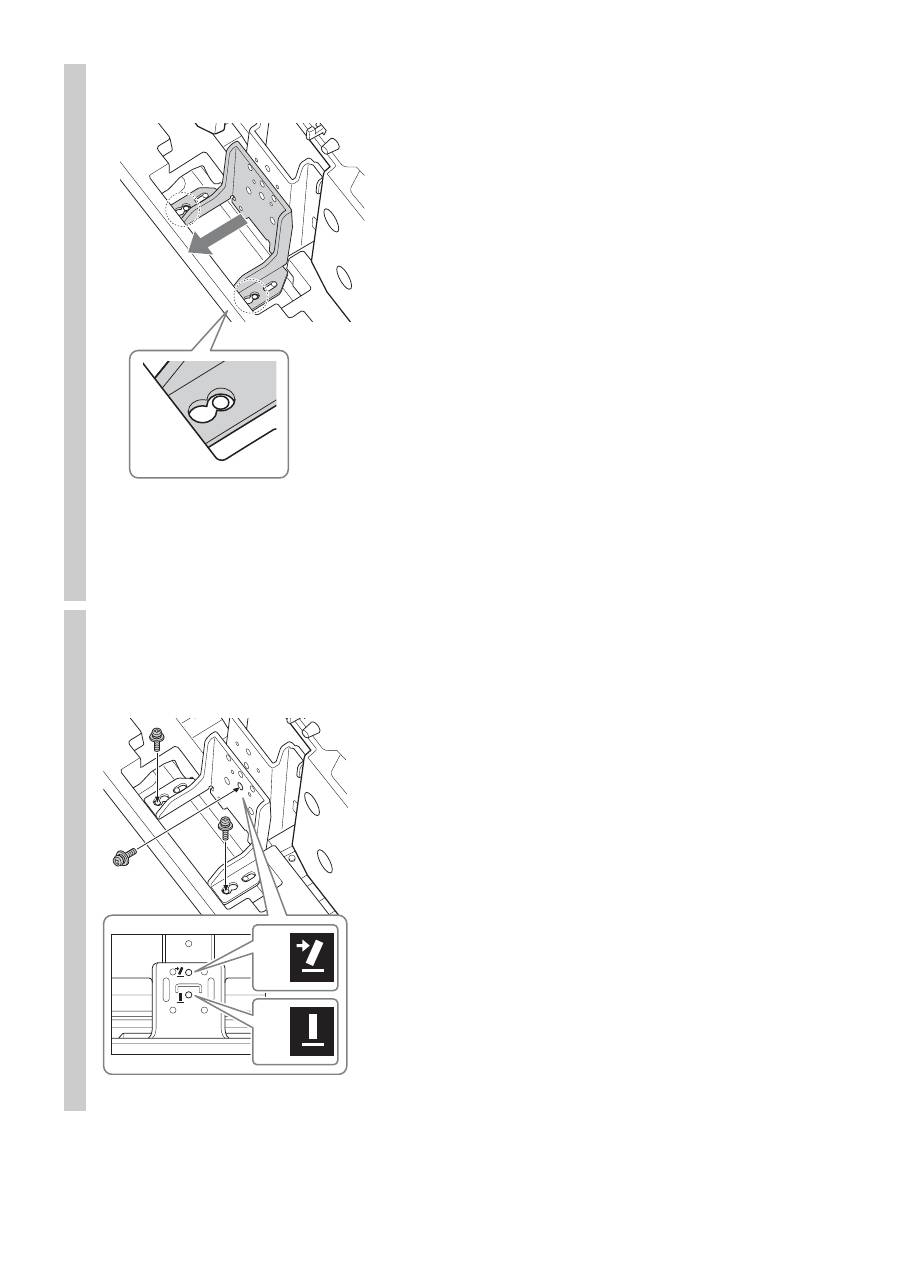
This TV can be adjusted within the angles shown below.
(Factory setting is 6 degrees.)
Adjusting the viewing
angle of the TV
1
Detach the Rear Cover and Neck
Cover.
2
Remove the screws.
Remove the three screws from the Neck.
0°
6°
2
1
Neck Cover
Screw
(PSW5 × 16)
black
Neck Cover
Rear Cover
1
2
3
Adjust the angle.
1
Tilting the TV forwards, set the Adjuster at the
required angle.
• Move the Adjuster backward when adjusting from
6 degrees to 0 degrees.
Adjuster
(Continued)
8
(GB)
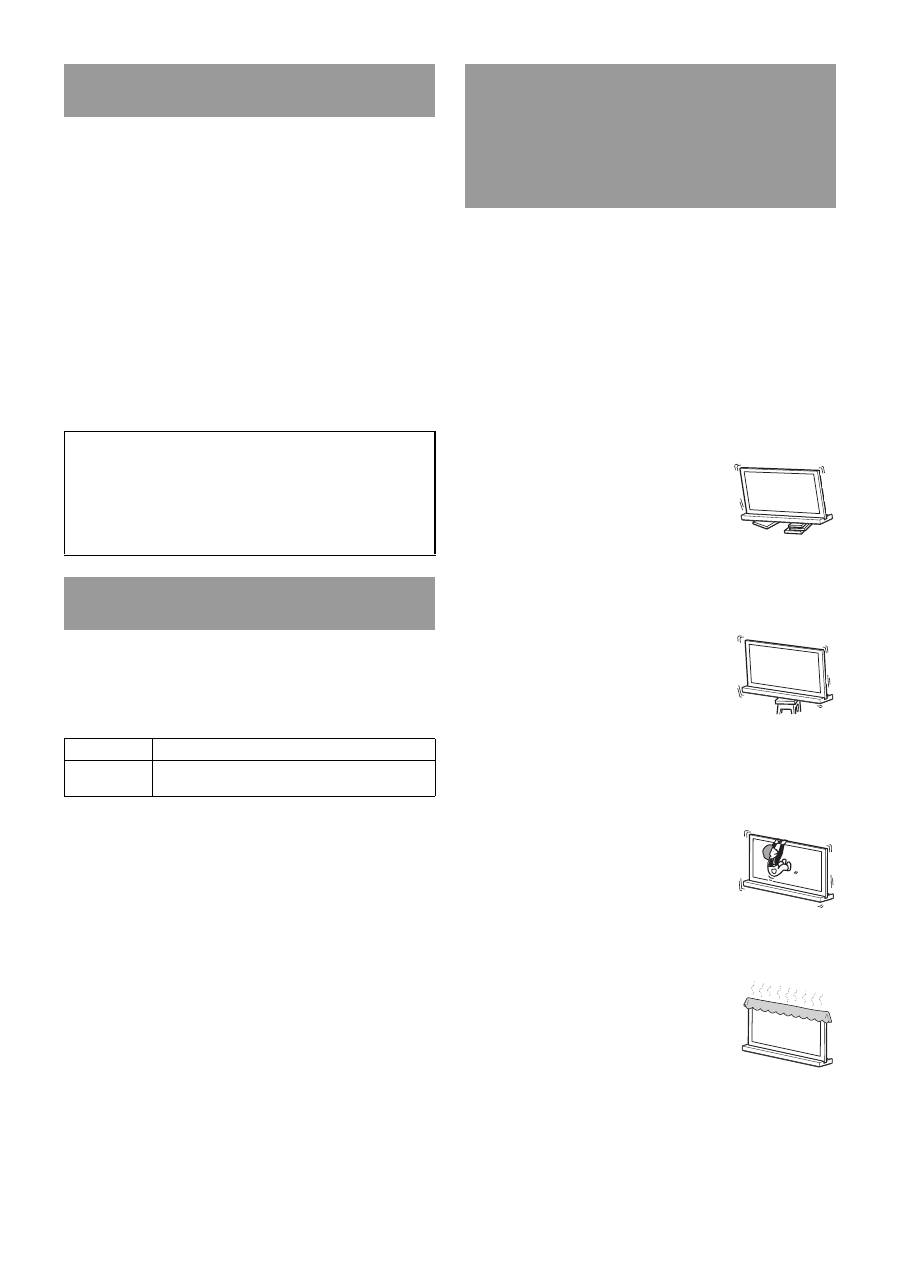
• Move the Adjuster forward when adjusting from
0 degrees to 6 degrees.
2
Position the TV back again.
~
• When positioning the TV back, support the Adjuster with a
hand. (In the case of setting to 0 degrees only.)
4
Secure the screws.
Firstly, secure the Adjuster and the Neck with the
Screw (
1
), then two screws (
2
) (using the three
screws removed in step 2).
2
1
6°
0°

2
(FR)
Merci d’avoir fait l’acquisition de ce produit.
Les produits Sony sont conçus pour vous offrir le
maximum de sécurité. Si vous n’utilisez pas ce
produit correctement, un incendie ou une secousse
électrique risque de se produire ; il est en outre
possible que l’appareil bascule hors de son support
et tombe, ce qui risque d’entraîner des blessures
graves. Veillez à observer les consignes de sécurité
préconisées pour éviter de tels accidents.
Ce mode d’emploi indique comment manipuler le produit
correctement et contient des précautions essentielles à
prendre pour éviter tout accident. Lisez attentivement ce
mode d’emploi et veillez à utiliser le produit correctement.
Conservez ce mode d’emploi pour toute référence ultérieure.
Produits spécifiés
Ce support est conçu pour être utilisé avec les produits Sony
spécifiés ci-dessous. N’installez aucun produit autre que ceux
spécifiés.
(En date de mars 2010)
* Dans les noms de modèle réels, «
s
» indique des chiffres et/ou
des caractères propres à chaque modèle.
Emplacement de l’étiquette d’identification
L’étiquette du numéro de modèle se trouve à l’arrière du
support TV.
Veillez à prendre toutes les mesures
nécessaires afin d’éviter que le
support TV ne bascule.
Dans le cas contraire, le téléviseur risque de basculer, ce qui
pourrait provoquer des blessures.
Fixez solidement le support TV et le support mural, entre
autres, afin d’éviter qu’il ne bascule.
Veillez à installer le support TV sur
une surface plane et solide.
N’installez pas le support TV s’il penche
d’un côté. Dans le cas contraire, le support
TV risque de basculer et le téléviseur
risque de tomber. Vous pourriez
endommager le téléviseur ou vous blesser.
Veillez à installer le support TV sur
une surface stable.
Si vous installez le support TV sur une
surface instable, il risque de perdre son
équilibre, de basculer et de tomber. Vous
risquez par conséquent d’endommager le
téléviseur ou de vous blesser.
Ne vous appuyez pas sur le
téléviseur et ne vous suspendez pas
au support TV.
Le support TV risque de basculer ou le
téléviseur risque de tomber, ce qui peut
provoquer des blessures graves, voire la
mort.
Ne couvrez pas les orifices de
ventilation du téléviseur.
Si vous couvrez les orifices de ventilation
(avec du tissu ou tout autre matériau),
l’appareil pourrait surchauffer et provoquer
un incendie.
À propos de la sécurité
Le fabricant de ce produit est Sony Corporation, 1-7-1
Konan Minato-ku Tokyo, 108-0075 Japon. Le représentant
autorisé pour les questions de compatibilité
électromagnétique (EMC) et la sécurité des produits est
Sony Deutschland GmbH, Hedelfinger Strasse 61, 70327
Stuttgart, Allemagne.
ATTENTION
Téléviseur couleur LCD
SU-52HX1
SU-46HX1
XBR-52HX90
s
*
/KDL-52HX90
s
*
XBR-46HX90
s
*
/KDL-46HX90
s
*
AVERTISSEMENT
Le non-respect des consignes suivantes peut
être fatal ou entraîner des blessures graves en
provoquant un incendie ou l’électrocution, ou
encore la chute de l’appareil hors de son
support.
3
(FR)
Veillez à ce que le cordon
d’alimentation CA ou le câble de
raccordement ne soit pas coincé ni
écrasé.
• Veillez à ne pas coincer le cordon d’alimentation CA ou le
câble de raccordement lors de l’installation du téléviseur
sur le support TV. Si vous endommagez le cordon
d’alimentation CA ou le câble de raccordement, un
incendie ou une secousse électrique risque de se produire.
• Veillez à ne pas marcher sur le cordon
d’alimentation CA ou sur le câble de
raccordement lorsque vous déplacez le
support TV. Vous risquez
d’endommager le cordon d’alimentation
CA ou le câble de raccordement, ce qui
risque de provoquer un incendie ou une
secousse électrique.
Veillez à ne pas trébucher sur le
cordon d’alimentation CA ou le câble
de raccordement.
Si vous trébuchez sur le cordon d’alimentation CA ou le
câble de raccordement, vous risquez de faire basculer le
support TV et de vous blesser.
N’installez aucun appareil autre que
ceux spécifiés.
Ce support TV est conçu pour être utilisé avec le produit
spécifié uniquement. Si vous installez un appareil autre que
ceux spécifiés, celui-ci pourrait tomber ou se briser, et vous
risquez de vous blesser. Les illustrations de ce document sont
destinées aux modèles KDL-46HX90
s
, sauf indication
contraire.
Veillez à bien fixer le téléviseur.
Fixez le téléviseur au support TV à l’aide des vis fournies. Si
le téléviseur n’est pas correctement fixé, il risque de tomber
ou le support TV peut basculer, et vous risquez de vous
blesser.
Remarques à propos de l’installation
Installez le support TV sur une surface solide et plane. Le
support ne doit jamais être installé selon un angle ou incliné.
Pour éviter cela, respectez les consignes de sécurité
suivantes.
Si vous installez le support TV sur une surface molle,
notamment sur de la moquette ou sur un tapis, posez au
préalable une planche à l’emplacement correspondant.
– N’installez pas le support TV dans un endroit exposé à
la lumière directe ou à proximité d’une source de
chaleur.
– N’installez pas le support TV dans un endroit exposé à
la chaleur ou à l’humidité, ni à l’extérieur.
Remarque concernant l’utilisation
Nettoyage
Pour maintenir le support TV propre, nettoyez-le de temps en
temps avec un chiffon doux et sec. Pour éliminer les taches
tenaces, utilisez un chiffon légèrement imprégné de savon au
pH neutre. Essuyez ensuite la surface nettoyée avec un
chiffon doux et sec. N’utilisez pas de produits chimiques,
notamment du diluant ou de l’essence, car ils risquent
d’endommager la surface du support TV.
Veillez à ce que le travail
d’installation soit effectué par au
moins deux personnes.
L’installation du téléviseur sur le support TV doit être
effectuée par au moins deux personnes. Si une seule personne
se charge de l’installation, un accident ou des blessures
peuvent être occasionnés.
Ne modifiez pas le support TV.
Il risque de tomber et de vous blesser.
Veillez à monter le support TV
correctement en suivant les
instructions.
Serrez correctement les vis. Si le téléviseur n’est pas
correctement fixé, il risque de tomber et vous risquez de vous
blesser.
Prenez garde de ne pas vous blesser
les mains ou les doigts pendant le
montage.
• Ne déplacez pas le support TV en le saisissant par le pied.
• Veillez à ne pas vous blesser les mains ou les doigts lors de
l’installation du téléviseur.
ATTENTION
Le non-respect des consignes suivantes peut
entraîner des blessures ou des dommages
matériels.
FR
Fra
n
çai
s
4
(FR)
Avant le montage
• Assurez-vous de disposer d’un tournevis Phillips correspondant
aux vis fournies avant de procéder au montage.
• Si vous utilisez un tournevis électrique, réglez son couple sur
1,5 N·m {15 kgf·cm} environ.
Tenez fermement le support TV et manipulez-le avec soin.
Étape 1 :
Vérification des pièces
Nom
Quantité
Support
1
Panneau arrière
1
Cache du montant
1
Vis de fixation du montant TV
(PSW5 × 16) de couleur noire (× 4)
Vis du cache du montant
(PSW5 × 16) de couleur noire (× 1)
5
Si vous coincez le cordon d’alimentation sous ou entre des pièces
de l’équipement, un court-circuit ou une secousse électrique risque
de se produire. Si vous trébuchez sur le cordon d’alimentation CA
ou le câble de raccordement, vous risquez de faire basculer le
support TV et de vous blesser.
Choisissez l’emplacement d’installation et posez
le support TV sur le sol avant d’installer le
téléviseur.
Étant donné que le téléviseur est lourd, il est recommandé de
choisir tout d’abord l’emplacement d’installation, puis de monter
le support TV à l’emplacement choisi.
Reportez-vous au mode d’emploi fourni avec votre téléviseur pour
toute information sur la manière de détacher le support de table du
téléviseur.
Remarque concernant le retrait du support TV
de son emballage
AVERTISSEMENT
Étape 2 :
Installation du téléviseur
1
Tenez le téléviseur au point
spécifié lorsque vous le déplacez.
1
Reportez-vous au tableau et aux longueurs
A
et
B
mesurées depuis le bord supérieur du téléviseur,
comme indiqué dans l’illustration ci-dessous. Tenez
le téléviseur au point spécifié de la longueur
mesurée
B
(
x
).
~
• Tenez le téléviseur au point spécifié pour ne pas vous
blesser les doigts.
2
Assurez-vous de tenir le téléviseur comme indiqué :
~
• Lorsque vous déplacez le téléviseur en le tenant par les
mains, procédez comme illustré ci-dessus. N’exercez
aucune pression sur le panneau LCD ni sur le cadre du
téléviseur.
B A
B
A
Format TV
Longueur
A
Longueur
B
52"
170 (6 3/4)
170 (6 3/4)
46"
170 (6 3/4)
170 (6 3/4)
Unité : mm (pouces)
