
Sony SU-52HX1: Step 1: Checking the parts Step 2: Installing the TV 1
Step 1: Checking the parts Step 2: Installing the TV 1: Sony SU-52HX1
Table of contents
- On Safety CAUTION WARNING
- CAUTION
- Step 1: Checking the parts Step 2: Installing the TV 1
- 2 3 4 5
- Step 3: Safety measures to prevent toppling over Specifications
- Adjusting the viewing angle of the TV 1 2 3
- 4
4
(GB)
Before assembling
• Be sure to have a Phillips screwdriver that fits the screws prior to
the assembly.
• When using an electric screwdriver, set the torque setting to
approximately 1.5 N·m {15 kgf·cm}.
Be sure to hold the TV Stand and handle it carefully.
Step 1:
Checking the parts
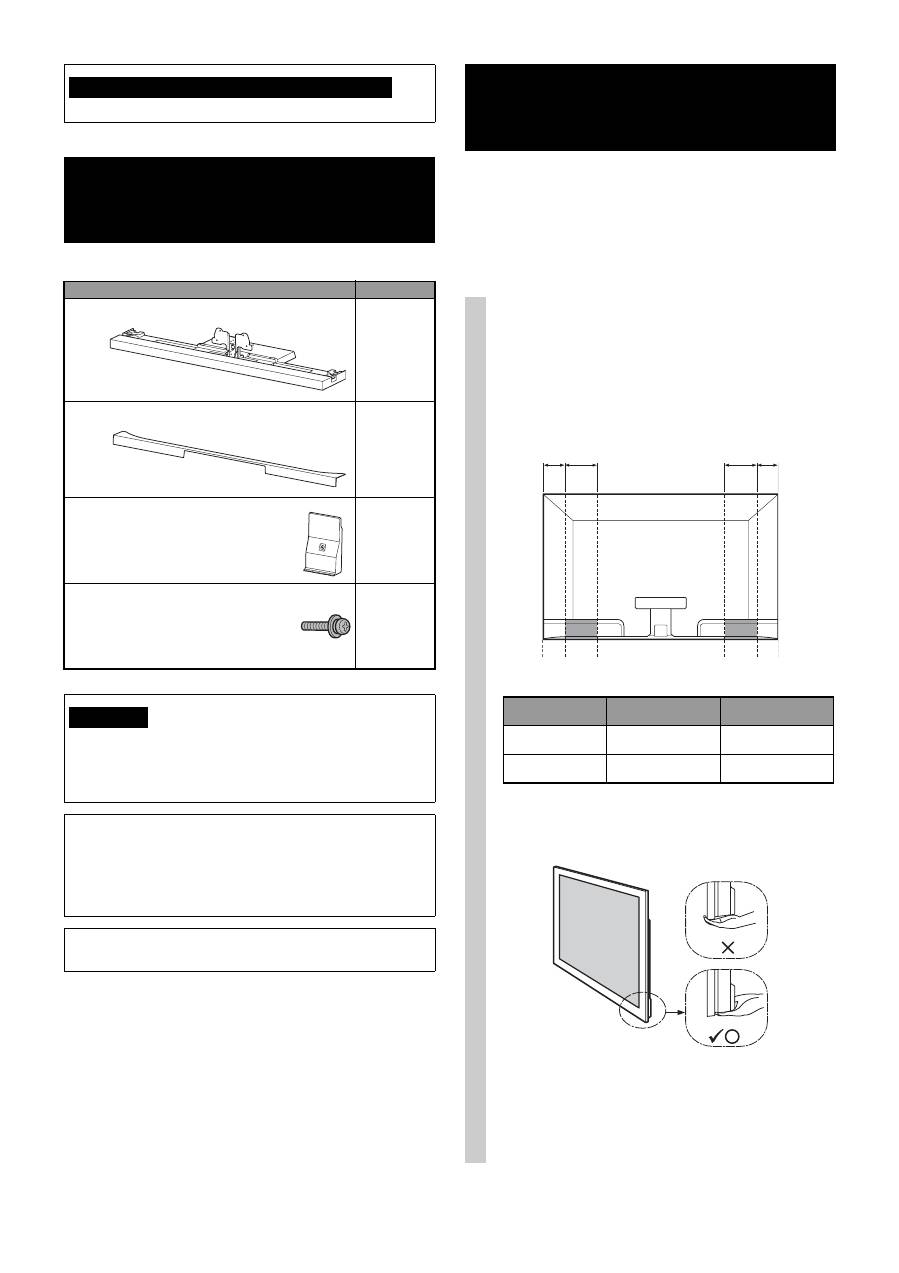
Name
Quantity
Stand
1
Rear Cover
1
Neck Cover
1
TV Neck Attachment Screw
(PSW5 × 16) black (× 4)
Neck Cover Screw
(PSW5 × 16) black (× 1)
5
If you allow the AC power cord to be pinched under or between
pieces of equipment, this may result in a short circuit or an electric
shock. If you stumble over the AC power cord or the connecting
cable, the TV Stand may topple over and cause injury.
Decide on the installation location and lay the TV
Stand down before installing the TV.
Since the TV is heavy, it is recommended that you decide on the
installation location beforehand, and assemble the TV Stand on
site.
Refer to the operating instructions supplied with your TV for
information on how to remove the Table-Top Stand from the TV.
Note on taking the TV Stand out from the carton
WARNING
Step 2:
Installing the TV
1
Hold the TV at the specified point
when moving the TV.
1
Refer to the chart and measure lengths
A
and
B
from the top edge of the TV, as shown in the
illustration below. Hold the TV at the specified
point of the measured length
B
(
x
).
~
• Hold at the specified point to avoid injuring your fingers.
2
Make sure to hold the TV as shown:
~
• When transporting the TV set by hand, hold it as shown
above. Do not put stress on the LCD panel and the frame
around the screen.
B A
B
A
TV size
Length
A
Length
B
52"
170 (6 3/4)
170 (6 3/4)
46"
170 (6 3/4)
170 (6 3/4)
Unit: mm (inches)
