
Sony SU-52HX1: 2 3 4 5
2 3 4 5: Sony SU-52HX1
Table of contents
5
(GB)
2
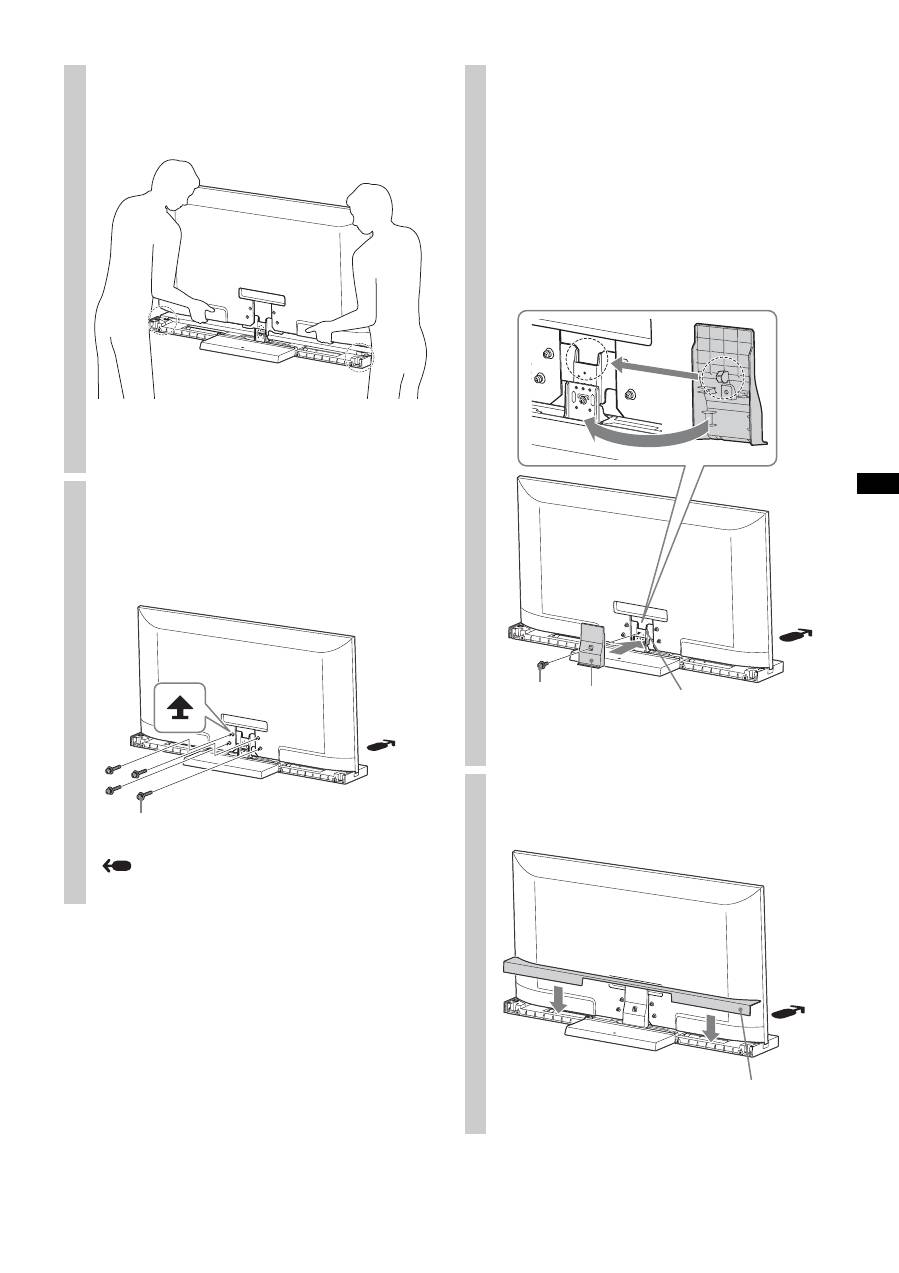
Install the TV onto the TV Stand.
The TV is installed by placing it in the groove of the
TV Stand.
~
• Be careful not to pinch your fingers when installing the TV.
3
Secure the TV and the TV Stand
with the four TV Neck
Attachment Screws (PSW5 × 16)
black (supplied).
Arrow direction shows front of the TV Stand.
TV Neck Attachment Screw
(PSW5 × 16) black
4
Attach the Neck Cover to the
Neck.
Align the Neck Cover with the Neck and slide it down
as shown in the illustration below. Secure the Neck
Cover and Neck with the Neck Cover Screw (PSW5 ×
16) black (supplied).
If you want to adjust the viewing angle of the TV,
adjust the angle before attaching the Neck Cover. Refer
to Step 2 of “Adjusting the viewing angle of the TV” on
page 7.
5
Attach the Rear Cover to the TV
Stand.
Neck Cover
Screw
(PSW5 × 16)
black
Neck Cover
Neck
Rear Cover
