
Sony HDPS-M1: instruction
Class: Household, kitchen appliances, electronics and equipment
Type: Digital Photo Frame
Manual for Sony HDPS-M1
Table of contents
F:\work\4041445_HDPS-M1_Read\2109917311\2109917311Readme\01GB\01GB00COV.fm
2-109-917-31(1)
2-109-917-31(1)
HDPS-M1

F:\work\4041445_HDPS-
masterpage:Left
M1_Read\2109917311\2109917311Readme\01GB\01GB03COVTOC.fm
Safety regulations
WARNING
Keep away from children. If any part of the unit is swallowed, promptly see a
doctor.
To prevent fire or shock hazard, do not expose the unit to rain or moisture.
To avoid electrical shock, do not open the cabinet. Refer servicing to qualified
personnel only.
For use only with power supply SONY, Model HDAC-M1/MCS-AC1.
Disclaimer
Sony Corporation assumes no responsibility for the loss of information stored on the hard
disk of this unit, or information transferred to a “Memory Stick” and/or CompactFlash
card with your computer.
Voor de Klanten in Nederland
(For customers in the Netherlands)
Gooi de batterij niet weg maar lever deze in als klein chemisch afval
(KCA).
GB
2
2-109-917-31(1)
HDPS-M1
F:\work\4041445_HDPS-
masterpage:Right
M1_Read\2109917311\2109917311Readme\01GB\01GB03COVTOC.fm
Table of contents
Safety regulations .................................................................................................2
Introduction ..........................................................................................................4
Unpacking .............................................................................................................4
Preparing the HDD Photo Storage and computer ................................................. 5
Troubleshooting .................................................................................................... 7
GB
Technical Support .................................................................................................7
• The following are trademarks of Sony Corporation:
“Memory Stick”, , “MagicGate Memory Stick”, “Memory Stick Duo”,
“ ”, “MagicGate Memory Stick Duo”, “Memory Stick PRO”,
“ ”, “Memory Stick PRO Duo”, “ ”, “MagicGate”, and
“”.
• Microsoft and Windows are registered trademarks of Microsoft Corporation in the United States
and/or other countries.
• Mac and Macintosh are trademarks of Apple Computer Inc., registered in the U.S. and/or other
countries.
• Microdrive is a registered trademark of Hitachi Global Storage Technologies.
• Other system and product names used herein are registered trademarks or trademarks of their
respective manufacturers, although the ™ and ® marks are not used in the text.
®
®
®
®
In this document, Microsoft
Windows
XP Professional and Microsoft
Windows
XP Home
Edition are referred to as Windows XP.
®
®
In this document, Microsoft
Windows
2000 Professional is referred to as Windows 2000.
®
®
In this document, Microsoft
Windows
Millennium Edition is referred to as Windows Me.
GB
3
2-109-917-31(1)
HDPS-M1
F:\work\4041445_HDPS-
masterpage:Left
M1_Read\2109917311\2109917311Readme\01GB\01GB05C02-J.fm
Introduction
Thank you for purchasing the HDD Photo Storage HDPS-M1. This document
explains how to prepare your unit for use. For details about how to use the unit,
refer to the operating instructions in PDF format on the hard disk of the unit.
To locate the operating instructions, refer to “ReadMe.html” on the internal
hard disk of the unit.
Unpacking
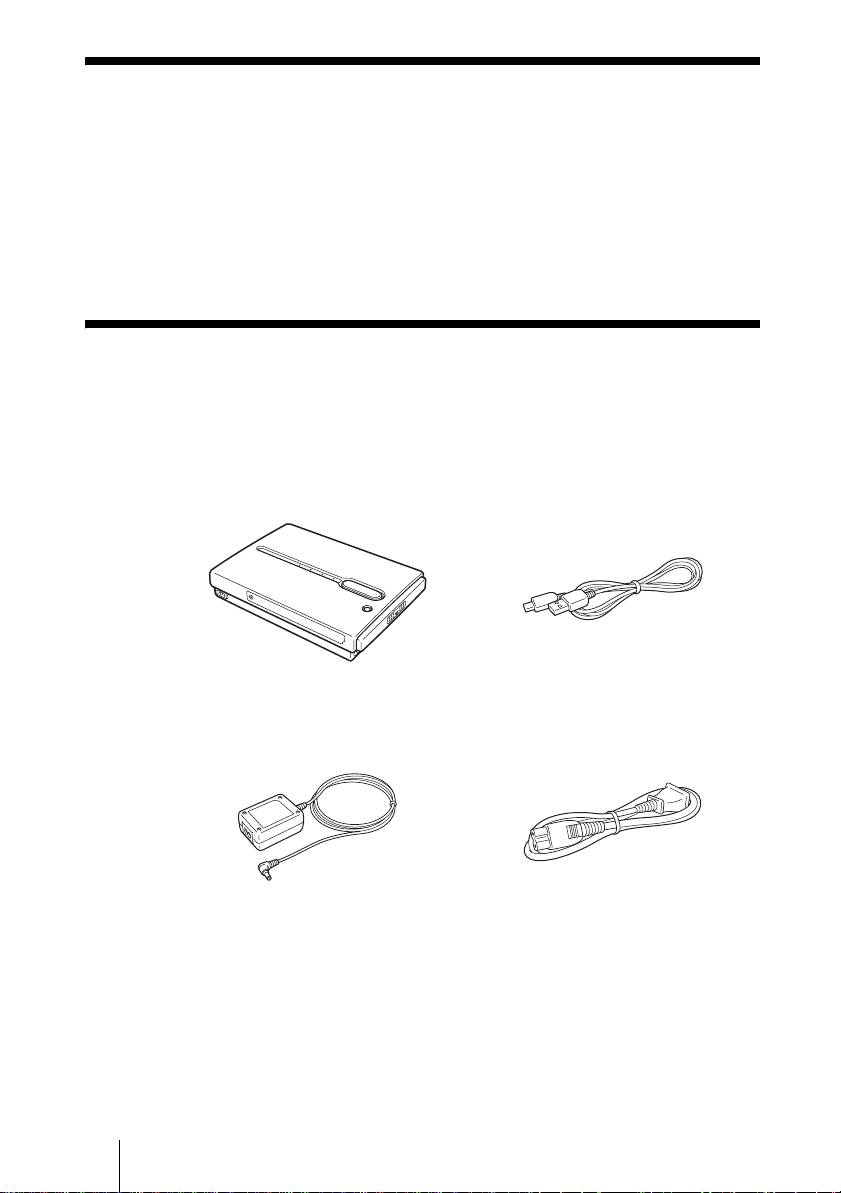
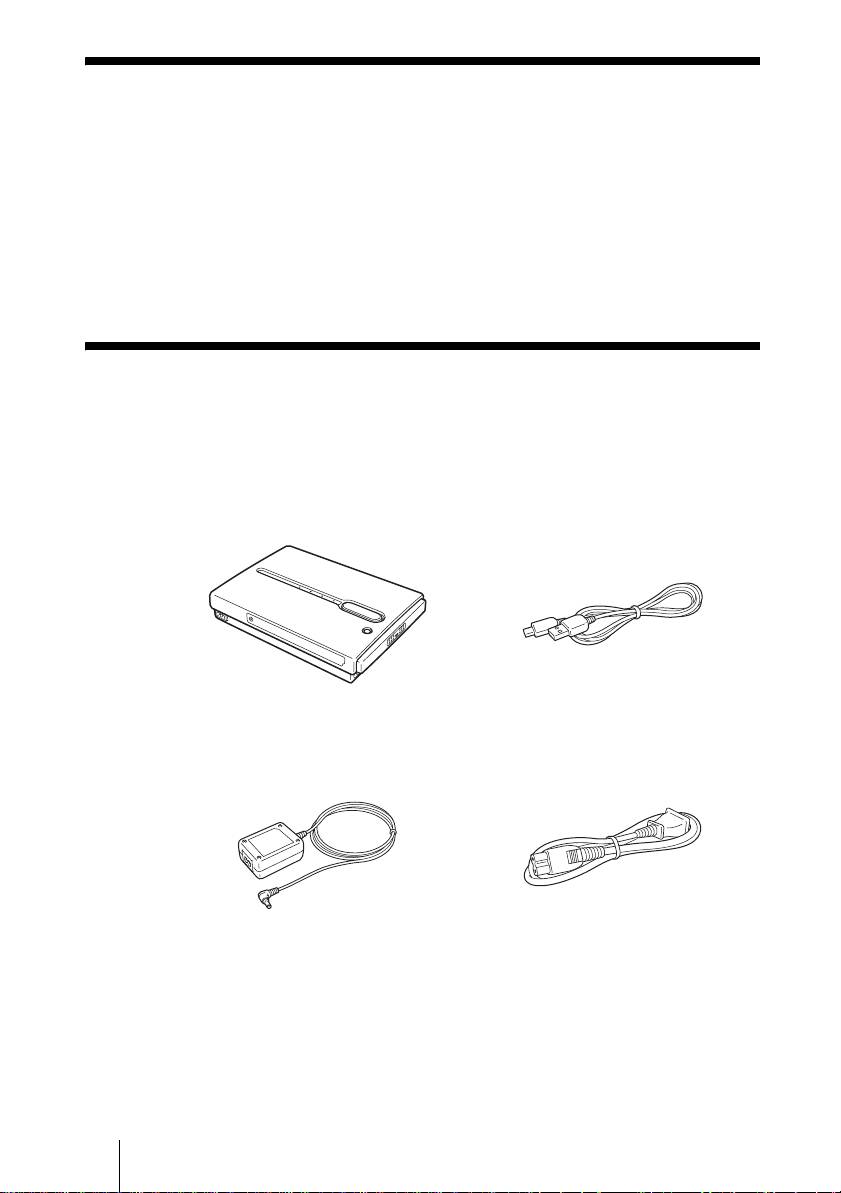
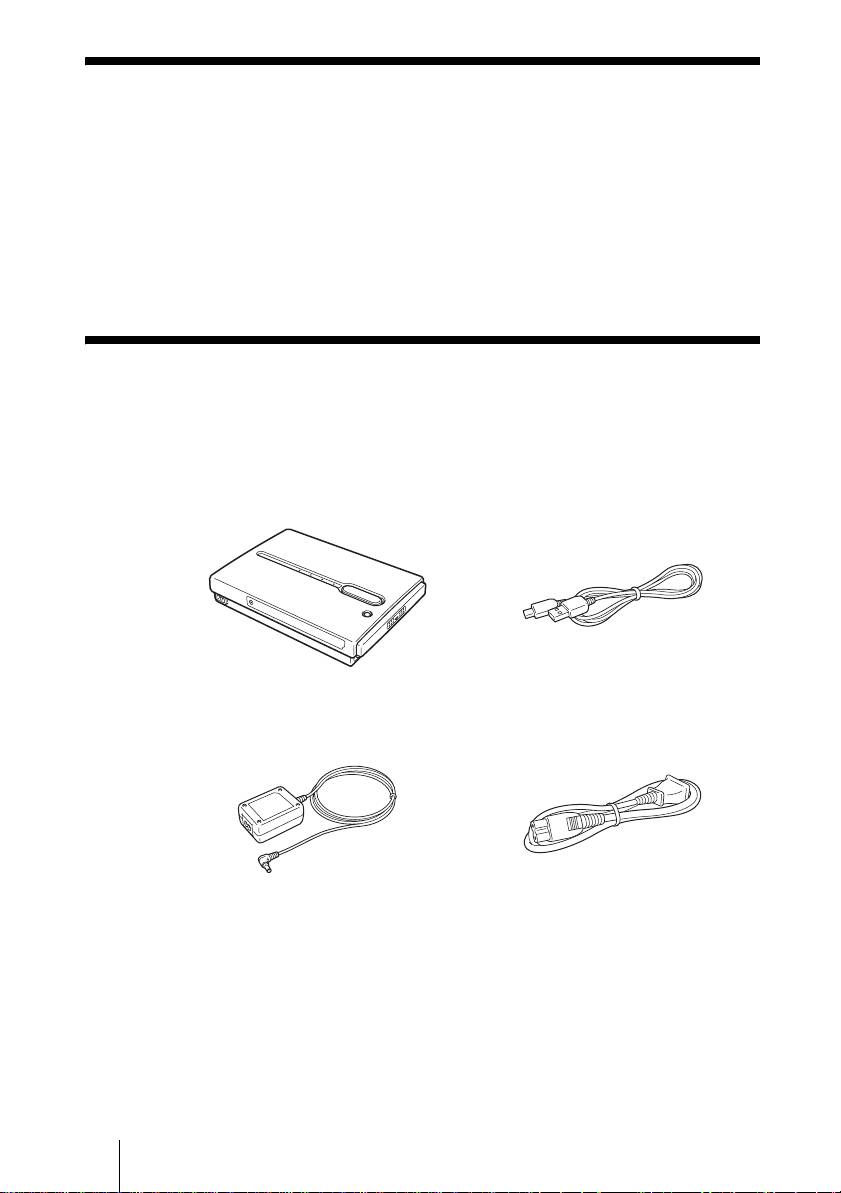
When you unpack the unit, make sure that all the items listed below are
present. If anything is missing, contact your dealer or an authorized service
center in your area.
• HDD Photo Storage unit (1) • USB cable (1)
OPEN
• AC power adapter (1)
• Power cord (1)
(SONY, Model HDAC-M1/
MCS-AC1)
• Carrying case (1)
• Hand strap (1)
• Indicator label (1)
• Operating Instructions (on the hard disk)
• PhotoDiary software (on the hard disk)
• Read Me First (this document) (1)
• Warranty card (1)
GB
4
2-109-917-31(1)
HDPS-M1
F:\work\4041445_HDPS-
masterpage:Right
M1_Read\2109917311\2109917311Readme\01GB\01GB05C02-J.fm
Preparing the HDD Photo Storage and
computer
This section describes how to connect the unit to a computer using the USB
cable.
Hint
When the unit is connected to a computer for the first time, the necessary programs are
installed automatically.
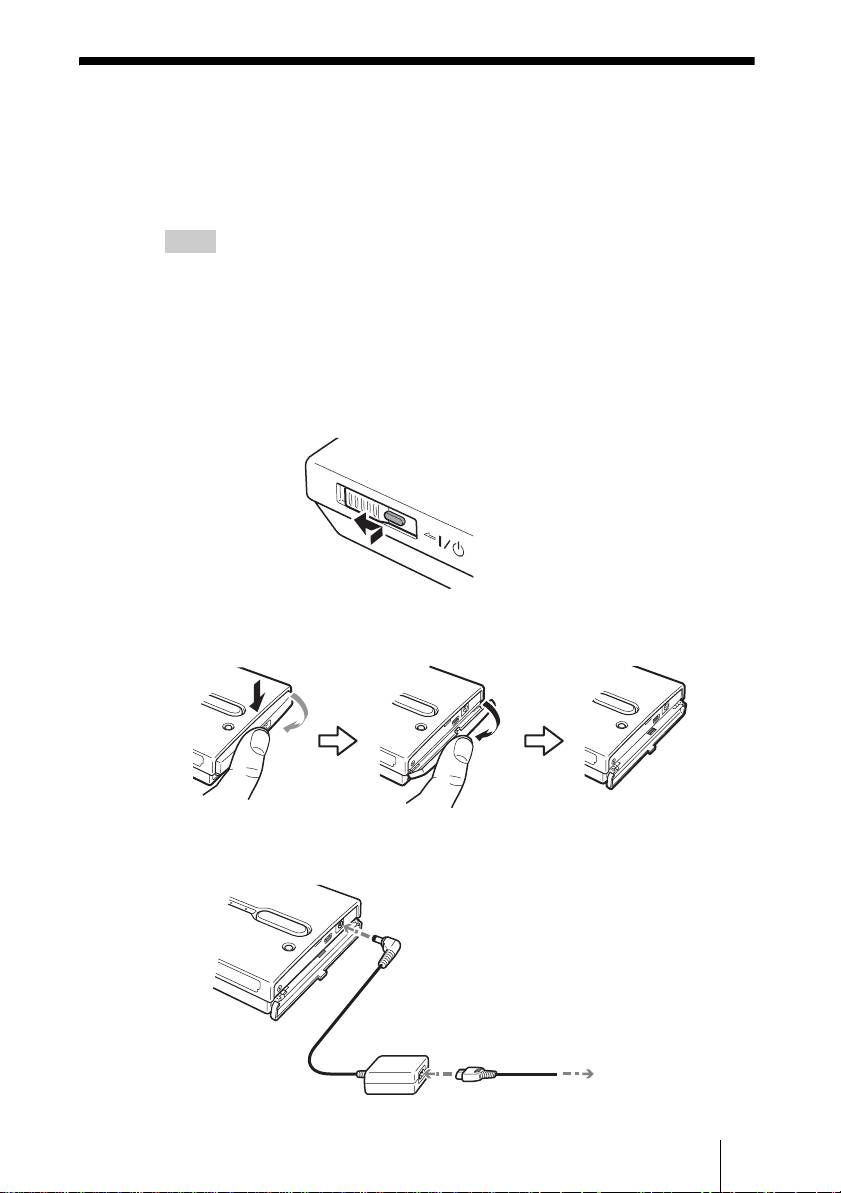
1 Turn on the computer.
2 Turn on the unit.
Push and slide the ?/1 (power) switch in the direction of the arrow. Hold
the ?/1 (power) switch until the 1 e (power) indicator lights up.
Hold down and slide in the
direction of the arrow
3 Open the port cover on the right side of the unit.
4 Connect the AC power adapter.
GB
5
2-109-917-31(1)
HDPS-M1
H
D
D
H
D
D
H
D
D
OWER
To the
! (DC In) connector
To the AC outlet
F:\work\4041445_HDPS-
masterpage:Left
M1_Read\2109917311\2109917311Readme\01GB\01GB05C02-J.fm
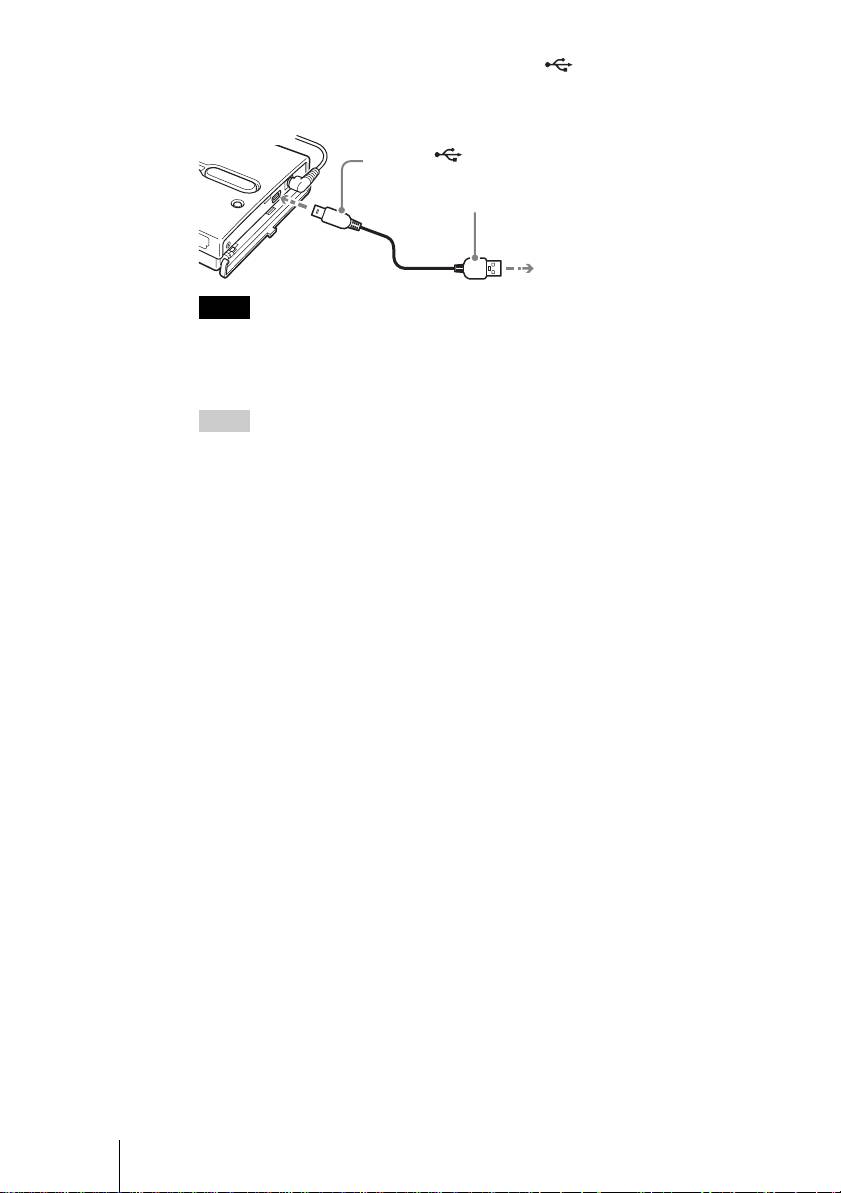
5 Connect the supplied USB cable to the (USB) port. Connect
the other end of the cable to the USB port of your computer.
To the (USB) port
1
To the USB port of your computer
2
Notes
• With Windows XP, when you connect the unit to your computer with the USB cable,
the AutoPlay dialog box will open. Click [Cancel] to close it.
• Correct operation is not guaranteed when the unit is connected to a USB hub. Establish
a direct USB connection.
Hint
When you connect the unit to your computer, the internal battery automatically charges
whether the unit is on or off and the 1 e (power) indicator flashes.
6 Access the internal hard disk of the unit.
• With Windows 2000 or Windows Me
Double-click [My Computer] on your desktop, and then double click the
local disk that corresponds to the internal hard disk of the unit in the “My
Computer” window.
• With Windows XP
On the [Start] menu, click [My Computer], and then click the local disk
that corresponds to the internal hard disk of the unit in the “My
Computer” window.
• With a Macintosh computer
Double-click the icon of the internal hard disk on your desktop.
The “STORE.IPS”, and “HDPS” folders, and the “ReadMe.html” file
appear.
7 Double-click the “ReadMe.html” file and follow the instructions
on the screen to proceed.
GB
6
2-109-917-31(1)
HDPS-M1
F:\work\4041445_HDPS-
masterpage:Right
M1_Read\2109917311\2109917311Readme\01GB\01GB05C02-J.fm
Troubleshooting
In addition to this section, refer to the operating instructions of the unit and the
documentation of your computer.
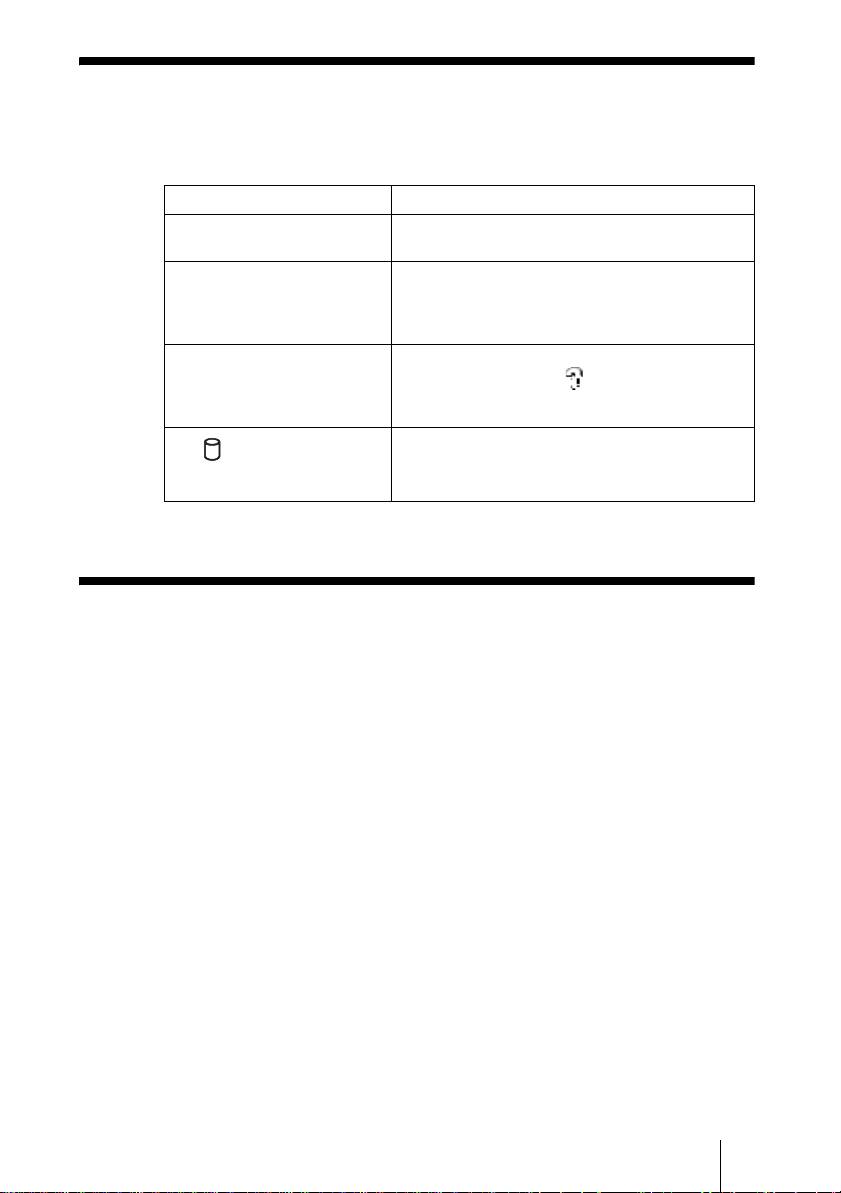
Symptom Cause/remedy
The unit does not start. c The internal battery may be depleted. Connect
the AC power adapter and charge the battery.
The unit turns off
c When the unit is used stand-alone, it turns off
unexpectedly.
automatically after remaining idle for five
minutes, whether operating on internal power or
through the AC power adapter. Restart the unit.
With Windows 2000 or
c Make sure that the “USB Mass Storage Device”
Windows Me, the drive icon of
is not displayed as a in the “Device
the unit does not appear in the
Manager”. If it is, delete it, disconnect the USB
“My Computer” window.
cable from your computer, and then reconnect it.
c Contact your dealer or an authorized service
The (hard disk) indicator is
center.
lit green and the COPY button
is lit yellow or red.
Technical Support
For customers in Europe
Refer to “Customer Support and Service” of the European guarantee
certificate.
GB
7
2-109-917-31(1)
HDPS-M1

masterpage:Left
F:\work\4041445_HDPS-M1_Read\2109917311\2109917311Readme\02FR\02FR01COVTOC.fm
Consignes de sécurité
ATTENTION
Ne laissez pas ce produit à portée de jeunes enfants. En cas d’ingestion de
n’importe quelle pièce de l’appareil, consultez un médecin sans délai.
Pour éviter tout risque d’incendie ou de décharge électrique, n’exposez pas
l’appareil à la pluie ou à l’humidité.
Pour éviter tout risque de décharge électrique, n’ouvrez pas le boîtier du
produit. En cas de besoin, adressez-vous exclusivement à un technicien
qualifié.
Cet appareil doit être utilisé uniquement avec une alimentation SONY, modèle
HDAC-M1/MCS-AC1.
Avertissement
Sony Corporation n’endosse aucune responsabilité en cas de perte de données stockées sur le disque
dur de cet appareil, ou de données copiées sur « Memory Stick » ou carte CompactFlash à l’aide de
votre ordinateur.
FR
2
2-109-917-31(1)
HDPS-M1
masterpage:Right
F:\work\4041445_HDPS-M1_Read\2109917311\2109917311Readme\02FR\02FR01COVTOC.fm
Table des matières
Consignes de sécurité ...........................................................................................2
Introduction ..........................................................................................................4
Déballage ..............................................................................................................4
Préparation de l’Unité de stockage de photos et de l’ordinateur. .........................5
Dépannage ............................................................................................................7
Support technique ................................................................................................. 7
FR
• Les marques commerciales suivantes appartiennent à Sony Corporation :
«Memory Stick», , «MagicGate Memory Stick », « Memory Stick Duo »,
« », « MagicGate Memory Stick Duo», «Memory Stick PRO»,
« », « Memory Stick PRO Duo », « », « MagicGate » et
«».
• Microsoft et Windows sont des marques déposées par Microsoft Corporation aux Etats-Unis et
dans d’autres pays.
• Mac et Macintosh sont des marques commerciales d’Apple Computer Inc., déposées aux Etats-
Unis et dans d’autres pays.
• Microdrive est une marque déposée par Hitachi Global Storage Technologies.
• Les autres noms de systèmes et de produits mentionnés dans ce manuel sont des marques
déposées ou des marques commerciales appartenant à leurs fabricants, bien que les symboles ™
et ® ne figurent pas dans le texte.
®
®
®
®
Dans ce document, Microsoft
Windows
XP Professionnel et Microsoft
Windows
XP Édition
Familiale sont désignés du terme collectif abrégé de Windows XP.
®
®
Dans ce document, Microsoft
Windows
2000 Professionnel est désigné du terme de Windows
2000.
®
®
Dans ce document, Microsoft
Windows
Millenium Edition est désigné du terme de Windows
Me.
FR
3
2-109-917-31(1)
HDPS-M1
F:\work\4041445_HDPS-
masterpage:Left
M1_Read\2109917311\2109917311Readme\02FR\02FR05C02-J.fm
Introduction
Merci d’avoir fait l’acquisition de l’Unité de stockage de photos HDPS-M1.
Ce document vous explique comment préparer l’appareil avant utilisation.
Pour plus de précisions sur l’utilisation de l’appareil, reportez-vous au mode
d’emploi au format PDF qui est fourni sur le disque dur de l’unité. Pour
localiser ce mode d’emploi, consultez le fichier « ReadMe.html » qui se trouve
sur le disque dur de l’unité.
Déballage
En déballant l’appareil, assurez-vous que la boîte contient bien tous les
éléments énumérés ci-dessous. S’il manque quelque chose, contactez votre
revendeur ou le centre de SAV agréé de votre région.
• Unité de stockage de photos (1) • Câble USB (1)
OPEN
• Adaptateur secteur (1)
• Cordon d’alimentation (1)
(SONY, Modèle HDAC-M1/
MCS-AC1)
• Étui de transport (1)
• Dragonne (1)
• Étiquette d’information (1)
• Mode d’emploi (sur le disque dur)
• Logiciel PhotoDiary (sur le disque dur)
• Lisez-moi en premier (ce document) (1)
• Carte de garantie (1)
FR
4
2-109-917-31(1)
HDPS-M1
F:\work\4041445_HDPS-
masterpage:Right
M1_Read\2109917311\2109917311Readme\02FR\02FR05C02-J.fm
Préparation de l’Unité de stockage de
photos et de l’ordinateur.
Cette section explique comment raccorder l’unité à un ordinateur grâce au
câble de liaison USB.
Conseil
Lorsqu’on raccorde l’appareil à l’ordinateur pour la première fois, les programmes
nécessaires s’installent automatiquement.
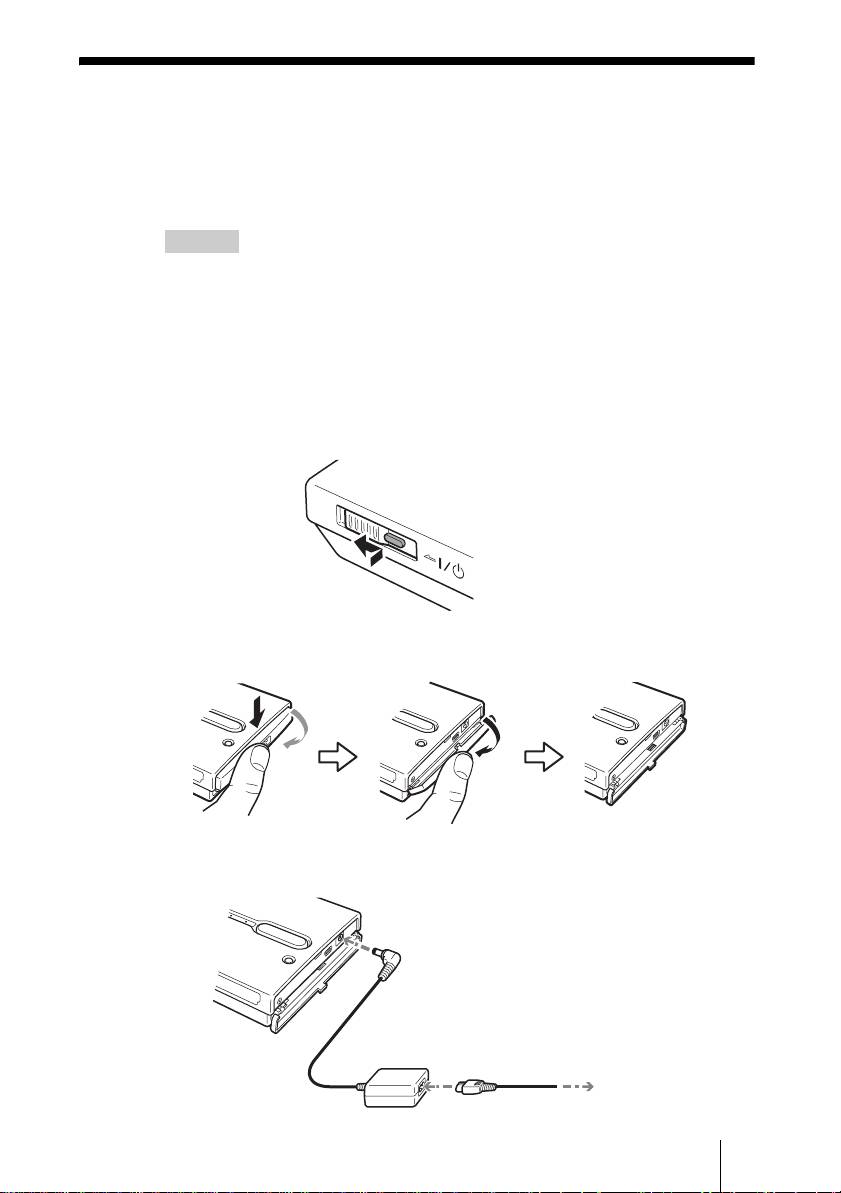
1 Mettez l’ordinateur sous tension.
2 Mettez l’appareil sous tension.
Appuyez sur le commutateur ?/1 (alimentation) et faites-le glisser dans le
sens de la flèche. Maintenez appuyé le commutateur ?/1 (alimentation)
jusqu’à ce que le témoin 1 e (alimentation) s’allume.
Appuyez et faites glisser
dans la direction de la flèche
3 Ouvrez le capot des connecteurs, sur le côté droit de l’unité.
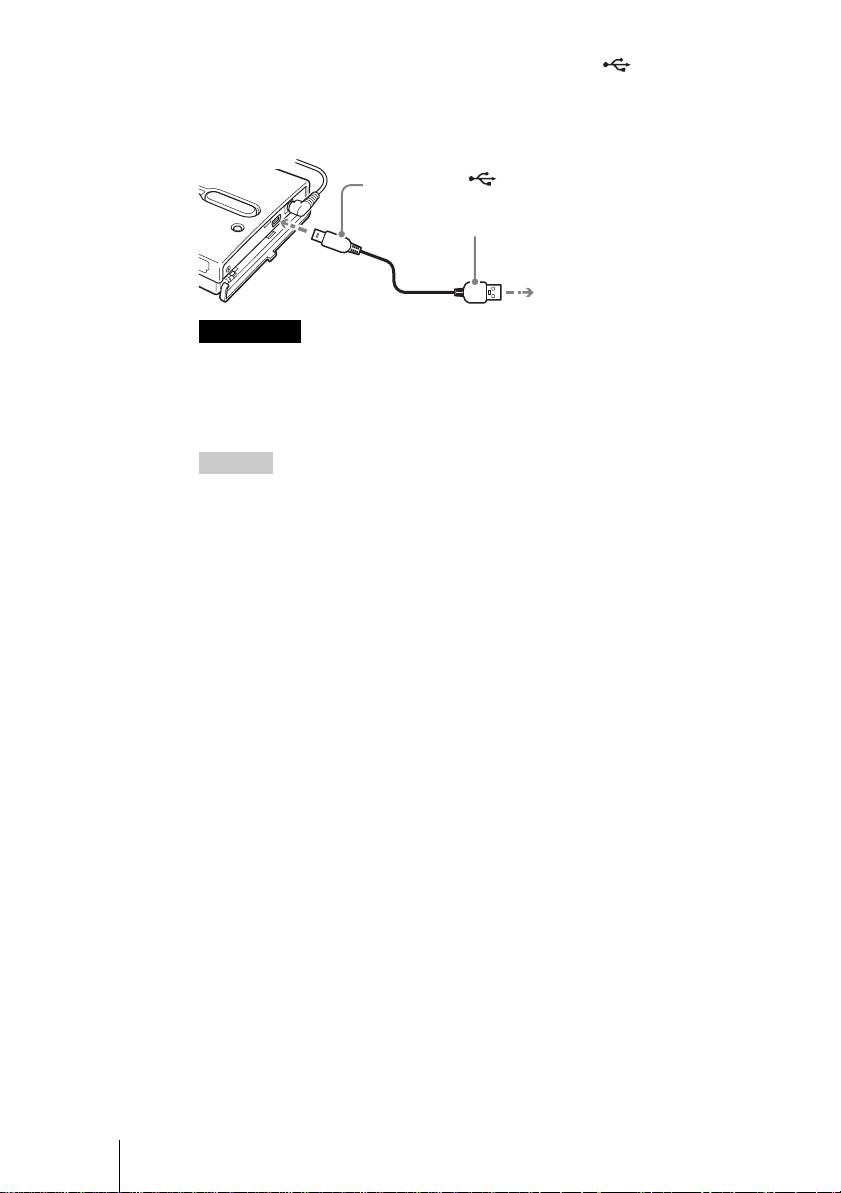
4 Branchez l’adaptateur secteur.
FR
5
2-109-917-31(1)
HDPS-M1
H
D
D
H
D
D
H
D
D
OWER
Vers la prise
! (DC In/Alimentation)
Vers la prise secteur
F:\work\4041445_HDPS-
masterpage:Left
M1_Read\2109917311\2109917311Readme\02FR\02FR05C02-J.fm
5 Branchez le câble USB fourni au connecteur (USB).
Branchez l’autre extrémité du câble à un port USB de
l’ordinateur.
Vers le port (USB)
1
Vers le port USB de l’ordinateur
2
Remarques
• Avec Windows XP, lorsque vous raccordez l’unité à votre ordinateur à l’aide du câble
USB, la boîte de dialogue de prise en charge automatique s’ouvre. Cliquez sur
[Annuler] pour la refermer.
• Le bon fonctionnement n’est pas garanti lorsqu’on branche l’appareil sur un
concentrateur (hub) USB. Réalisez un branchement USB direct.
Conseil
Lorsque vous raccordez l’appareil à votre ordinateur, la charge de la batterie intégrée
débute automatiquement, que l’appareil soit allumé ou éteint, et le témoin 1 e
(alimentation) clignote.
6 Accédez au disque dur de l’unité.
• Avec Windows 2000 ou Windows Me
Double-cliquez sur l’icône [Poste de travail] de votre Bureau, puis
double-cliquez sur le disque local qui correspond au disque dur interne
de l’unité dans la fenêtre « Poste de travail ».
• Avec Windows XP
Déroulez le menu [Démarrer], cliquez sur [Poste de travail], puis cliquez
sur le disque local qui correspond au disque dur interne de l’unité dans la
fenêtre « Poste de travail ».
• Avec un ordinateur Macintosh
Double-cliquez sur l’icône du disque dur de l’unité qui s’affiche sur le
Bureau.
Les dossiers « STORE.IPS » et « HDPS » apparaissent, ainsi que le fichier
« ReadMe.html ».
7 Double-cliquez sur le fichier « ReadMe.html », puis suivez les
instructions affichées à l’écran.
FR
6
2-109-917-31(1)
HDPS-M1
F:\work\4041445_HDPS-
masterpage:Right
M1_Read\2109917311\2109917311Readme\02FR\02FR05C02-J.fm
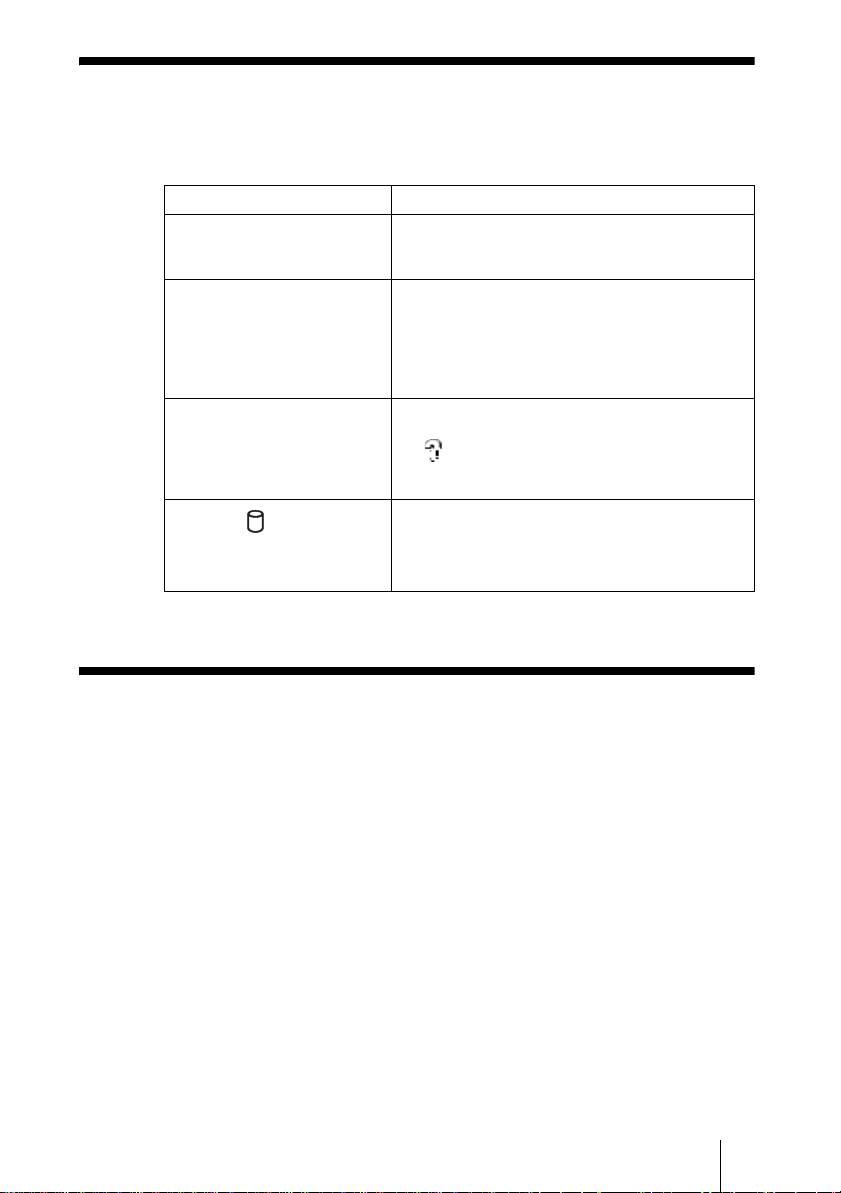
Dépannage
Pour compléter les informations ci-dessous, reportez-vous au mode d’emploi
de l’unité de stockage et à la documentation de votre ordinateur.
Symptôme Cause probable/remède
L’appareil ne s’allume pas. c La batterie intégrée est peut-être déchargée.
Raccordez l’adaptateur secteur pour recharger la
batterie .
L’appareil s’éteint de façon
c Lorsque l’appareil est utilisé en mode
inattendue.
autonome, il se met automatiquement hors
tension au bout de cinq minutes en cas de non-
utilisation, qu’il fonctionne sur la batterie
interne ou grâce à l’adaptateur secteur.
Rallumez l’appareil .
Avec Windows 2000 ou
c Vérifiez que l’entrée « Périphérique de stockage
Windows Me, l’icône du disque
de masse USB » n’est pas assortie de l’icône
dur de l’unité ne s’affiche pas
dans la fenêtre du « Gestionnaire de
dans la fenêtre « Poste de
périphériques ». Si c’est le cas, débranchez le
travail »
câble USB, puis rebranchez-le.
c Contactez votre revendeur ou un centre de
Le témoin (disque dur) est
service agréé.
allumé en vert et la touche
COPY est allumée en jaune ou
en rouge.
Support technique
Pour les consommateurs en Europe
Reportez-vous à la section relative au support technique et au service après vente
du certificat de garantie pour l’Europe.
FR
7
2-109-917-31(1)
HDPS-M1

F:\work\4041445_HDPS-
Hauptseite:Links
M1_Read\2109917311\2109917311Readme\03DE\03DE03COVTOC.fm
Sicherheitsbestimmungen
WARNUNG
Von Kindern fernhalten. Falls ein Teil des Geräts verschluckt wird, unverzüglich
einen Arzt aufsuchen.
Zur Verhinderung von Brand und Stromschlägen das Gerät vor Regen und
Feuchtigkeit schützen.
Zur Vermeidung von Stromstößen Gehäuse nicht öffnen. Wartungsarbeiten
sollten nur von qualifiziertem Personal durchgeführt werden.
Nur mit SONY Netzteil Modell HDAC-M1/MCS-AC1 verwenden.
Für Kunden in Deutschland
Entsorgungshinweis: Bitte werfen Sie nur entladene Batterien in die Sammelboxen beim Handel
oder den Kommunen. Entladen sind Batterien in der Regel dann, wenn das Gerät abschaltet und
signalisiert „Batterie leer“ oder nach längerer Gebrauchsdauer der Batterien „nicht mehr
einwandfrei funktioniert“. Um sicherzugehen, kleben Sie die Batteriepole z.B. mit einem
Klebestreifen ab oder geben Sie die Batterien einzeln in einen Plastikbeutel.
Haftungsausschluss
Die Sony Corporation übernimmt keine Verantwortung für den Verlust von Daten, die auf der
Festplatte dieses Geräts gespeichert oder mit Ihrem Computer auf einen „Memory Stick“ und/oder
auf eine CompactFlash Karte übertragen wurden.
Diese Ausrüstung erfüllt die Europäischen EMC-Bestimmungen für die Verwendung in folgender/
folgenden Umgebung(en):
• Wohngegenden
• Gewerbegebiete
• Leichtindustriegebiete
(Diese Ausrüstung erfüllt die Bestimmungen der Norm EN55022, Klasse B.)
DE
2
2-109-917-31(1)
HDPS-M1
F:\work\4041445_HDPS-
Hauptseite:Rechts
M1_Read\2109917311\2109917311Readme\03DE\03DE03COVTOC.fm
Inhalt
Sicherheitsbestimmungen ..................................................................................... 2
Einführung ............................................................................................................4
Auspacken ............................................................................................................4
Vorbereiten des Fotospeicherlaufwerks und des Computers ...............................5
Fehlerbehebung .....................................................................................................7
Technischer Kundendienst .................................................................................... 7
DE
• Folgende Produkte sind Warenzeichen der Sony Corporation.
„Memory Stick”, , „MagicGate Memory Stick“,„Memory Stick Duo“,
„ “, „MagicGate Memory Stick Duo“, „Memory Stick PRO“,
„ “, „Memory Stick PRO Duo“, „ “, „MagicGate“ und
„“.
• Microsoft und Windows sind eingetragene Warenzeichen der Microsoft Corporation in den
Vereinigten Staaten und/oder in anderen Ländern.
• Mac und Macintosh sind in den USA und/oder in anderen Ländern eingetragene Warenzeichen
von Apple Computer Inc.
• Microdrive ist ein eingetragenes Warenzeichen von Hitachi Global Storage Technologies.
• Andere hierin verwendete System- und Produktnamen sind eingetragene Warenzeichen oder
Warenzeichen ihrer jeweiligen Hersteller, wenngleich die Symbole ™ und ® im Text nicht
verwendet werden.
®
®
®
®
In diesem Dokument werden Microsoft
Windows
XP Professional und Microsoft
Windows
XP Home Edition als Windows XP bezeichnet.
®
®
In diesem Dokument wird Microsoft
Windows
2000 Professional als Windows 2000 bezeichnet.
®
®
In diesem Dokument wird Microsoft
Windows
Millennium Edition als Windows Me bezeichnet.
DE
3
2-109-917-31(1)
HDPS-M1
F:\work\4041445_HDPS-
Hauptseite:Links
M1_Read\2109917311\2109917311Readme\03DE\03DE05C02-J.fm
Einführung
Vielen Dank, dass Sie das HDPS-M1 Fotospeicherlaufwerk gekauft haben. In
diesem Dokument wird die Vorbereitung des Geräts für den Betrieb erklärt.
Details über die Verwendung des Geräts entnehmen Sie bitte der
Bedienungsanleitung im .PDF Format, die auf der Festplatte des Geräts
gespeichert ist. Sie finden die Betriebsanleitung unter „ReadMe.html“ auf der
internen Festplatte des Geräts.
Auspacken
Wenn Sie das Gerät auspacken, achten Sie darauf, dass alle unten aufgelisteten
Teile vorhanden sind. Wenn etwas fehlt, wenden Sie sich bitte an Ihren
Händler oder an ein autorisiertes Servicezentrum in Ihrer Nähe.
• Fotospeicherlaufwerk Gerät (1) • USB-Kabel (1)
OPEN
• Wechselstromadapter (1)
• Stromkabel (1)
(SONY, Modell HDAC-M1/
MCS-AC1)
• Transporttasche (1)
• Handriemen (1)
• Anzeige-Label (1)
• Betriebsanleitung (auf der Festplatte)
• PhotoDiary Software (auf der Festplatte)
• Lies mich zuerst (dieses Dokument) (1)
• Garantiekarte (1)
DE
4
2-109-917-31(1)
HDPS-M1
F:\work\4041445_HDPS-
Hauptseite:Rechts
M1_Read\2109917311\2109917311Readme\03DE\03DE05C02-J.fm
Vorbereiten des Fotospeicherlaufwerks
und des Computers
In diesem Abschnitt wird beschrieben, wie das Gerät mit dem USB-Kabel an
einen Computer angeschlossen wird.
Hinweis
Beim ersten Anschließen des Geräts an einen Computer werden die notwendigen Progamme
automatisch installiert.
1 Schalten Sie den Computer ein.
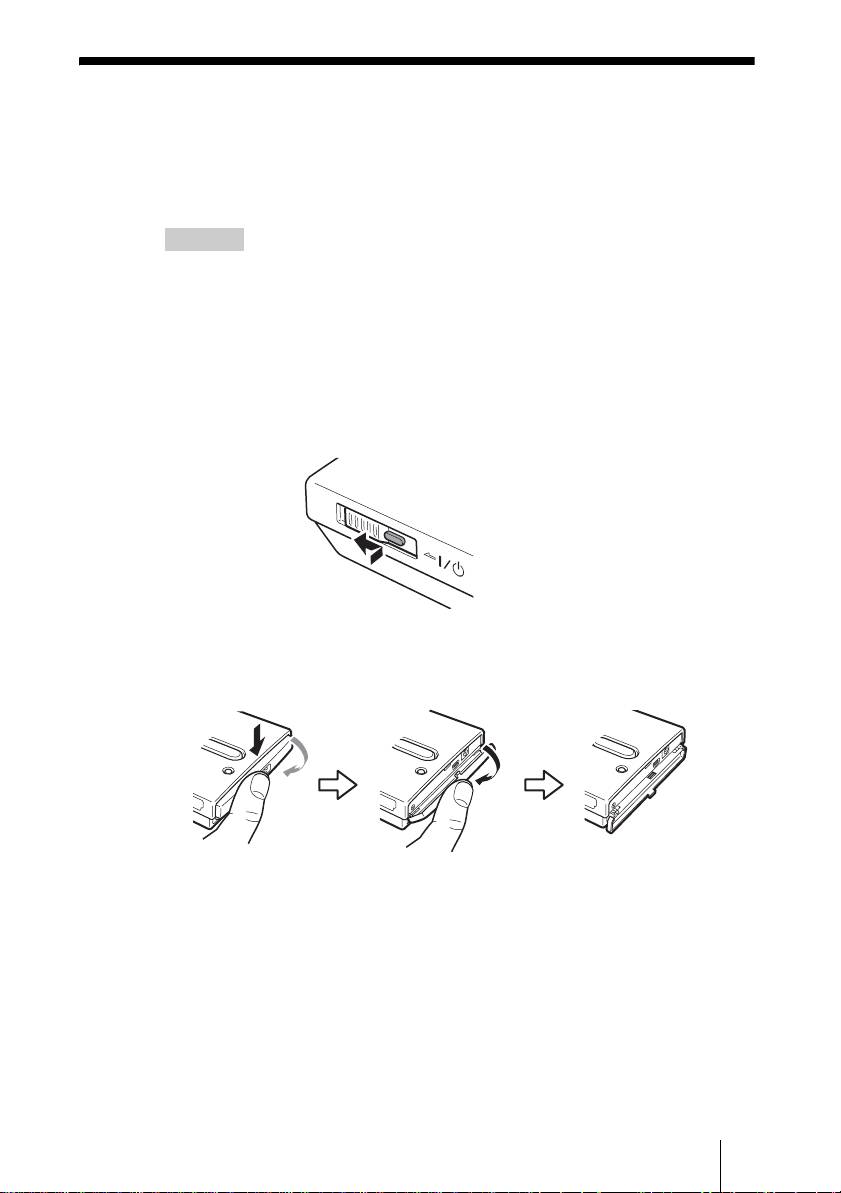
2 Schalten Sie das Gerät ein.
Drücken und schieben Sie den ?/1 (Betrieb) Schalter in Pfeilrichtung.
Halten Sie den ?/1 (Betrieb) Schalter gedrückt, bis die 1 e (Betrieb)
Anzeige aufleuchtet.
Halten und schieben Sie
den Schalter in Pfeilrichtung
3 Öffnen Sie die Anschlussabdeckung auf der rechten Seite des
Geräts.
DE
5
2-109-917-31(1)
HDPS-M1
H
D
D
H
D
D
H
D
D
F:\work\4041445_HDPS-
Hauptseite:Links
M1_Read\2109917311\2109917311Readme\03DE\03DE05C02-J.fm
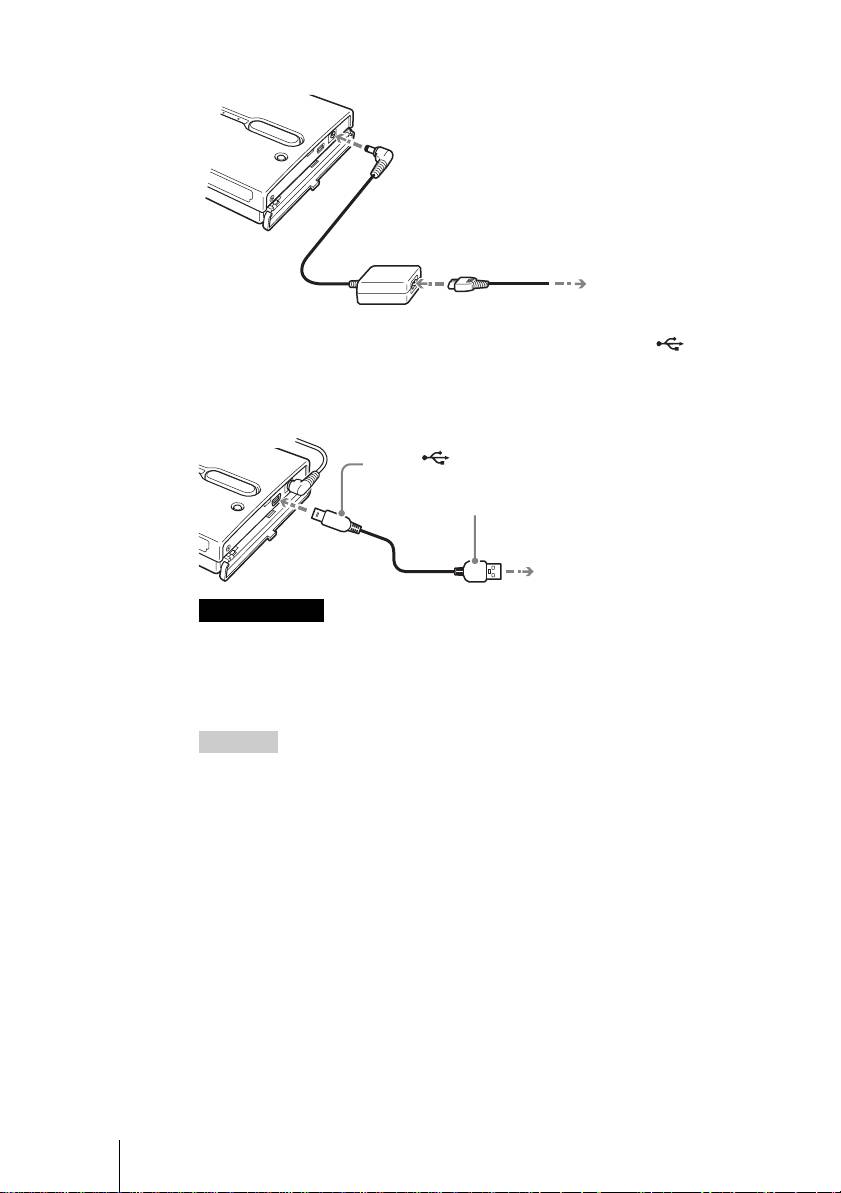
4 Stecken Sie den Wechselstromadapter ein.
5 Schließen Sie das mitgelieferte USB-Kabel an den (USB)
Port an. Schließen Sie das andere Ende des Kabels an den
USB-Port Ihres Computers an.
Anmerkungen
• Wenn Sie das Gerät bei Windows XP mit dem USB-Kabel an Ihren Computer
anschließen, öffnet sich das Dialogfeld AutoPlay. Klicken Sie auf [Cancel]
(Abbrechen), um es zu schließen.
• Der ordnungsgemäße Betrieb kann nicht garantiert werden, wenn das Gerät an einen
USB-Hub angeschlossen ist. Stellen Sie eine direkte USB-Verbindung her.
Hinweis
Wenn Sie das Gerät an Ihren Computer anschließen, wird die interne Batterie
automatisch aufgeladen, gleich ob das Gerät ein- oder ausgeschaltet ist, und die 1 e
(Betrieb) Anzeige blinkt.
6 Zugreifen auf die Interne Festplatte des Geräts.
• Bei Windows 2000 oder Windows Me
Doppelklicken Sie auf [My Computer] (Arbeitsplatz) auf Ihrem Desktop
und doppelklicken Sie dann auf die lokale Festplatte, die der internen
Festplatte des Geräts im Fenster „My Computer“ (Arbeitsplatz)
entspricht.
• Bei Windows XP
Doppelklicken Sie im Menü [Start] (Start) auf [My Computer]
(Arbeitsplatz) und klicken Sie dann auf die lokale Festplatte, die der
internen Festplatte des Geräts im Fenster „My Computer“ (Arbeitsplatz)
entspricht.
DE
6
2-109-917-31(1)
HDPS-M1
OWER
Zur ! (Gleichstrom) Steckdose
Zur
Wechselstromsteckdose
Zum (USB) Port
1
Zum USB-Port Ihres Computers
2
F:\work\4041445_HDPS-
Hauptseite:Rechts
M1_Read\2109917311\2109917311Readme\03DE\03DE05C02-J.fm
• Bei einem Macintosh Computer
Doppelklicken Sie auf das Symbol der internen Festplatte auf Ihrem
Desktop.
Es erscheinen die Ordner „STORE.IPS“ und „HDPS“ und die Datei
„ReadMe.html“.
7 Doppelklicken Sie auf die „ReadMe.html“ Datei und folgen Sie
den Anweisungen auf dem Bildschirm.
Fehlerbehebung
Schlagen Sie zusätzlich zu diesem Abschnitt in der Betriebsanleitung des
Geräts und in der Dokumentation Ihres Computers nach.
Symptom Ursache/Abhilfe
Das Gerät startet nicht. c Die interne Batterie ist möglicherweise leer.
Schließen Sie den Wechselstromadapter an, um
die Batterie aufzuladen .
Das Gerät schaltet sich
c Wenn das Gerät allein verwendet wird, schaltet
unerwartet aus.
es sich nach fünfminütigem Leerlauf
automatisch ab, unabhängig davon, ob es mit
Batterie oder mit dem Wechselstromadapter
betrieben wird. Starten Sie das Gerät neu .
Unter Windows 2000 oder
c Achten Sie darauf, dass „USB Massenspeicher“
Windows Me erscheint das
nicht als im „Geräte-Manager“ angezeigt
Laufwerksymbol des Geräts im
wird. Wenn dies der Fall ist, löschen Sie es,
Fenster „Arbeitsplatz“ nicht.
stecken Sie das USB-Kabel aus Ihrem
Computer aus und schließen Sie es dann wieder
an.
c Kontaktieren Sie Ihren Händler oder ein
Die (Festplatte) Anzeige
autorisiertes Service Center.
leuchtet grün und die Taste
COPY leuchtet gelb oder rot.
Technischer Kundendienst
Für Kunden in Europa
Lesen Sie unter „Kundenunterstützung und Kundendienst” des
Garantiezertifikats für Europa nach.
DE
7
2-109-917-31(1)
HDPS-M1

F:\work\4041445_HDPS-
masterpage:Left
M1_Read\2109917311\2109917311Readme\04IT\04IT03COVTOC.fm
Avvisi per la sicurezza
AVVERTIMENTO
Tenere fuori dalla portata dei bambini Nel caso dovessero essere inghiottite
parti dell’apparecchio, rivolgersi immediatamente a un medico.
Per evitare il pericolo di incendi o folgorazione, non esporre l’unità alla pioggia
o all’umidità.
Per evitare il rischio di folgorazione, non aprire mai il contenitore dell’unità. In
caso di guasti, rivolgersi unicamente a tecnici di assistenza qualificati.
Utilizzare unicamente alimentatore SONY modello HDAC-M1/MCS-AC1.
Dichiarazione di non responsabilità;
Sony Corporation non si assume alcuna responsabilità per la perdita di informazioni memorizzate
sul disco rigido di questo apparecchio o di informazioni trasferite a un “Memory Stick” e/o scheda
CompactFlash con un computer.
IT
2
2-109-917-31(1)
HDPS-M1
