
Sony SU-FL300L: instruction
Class: Furniture
Type:
Manual for Sony SU-FL300L
Table of contents
- WARNING On Safety CAUTION
- WARNING
- CAUTION
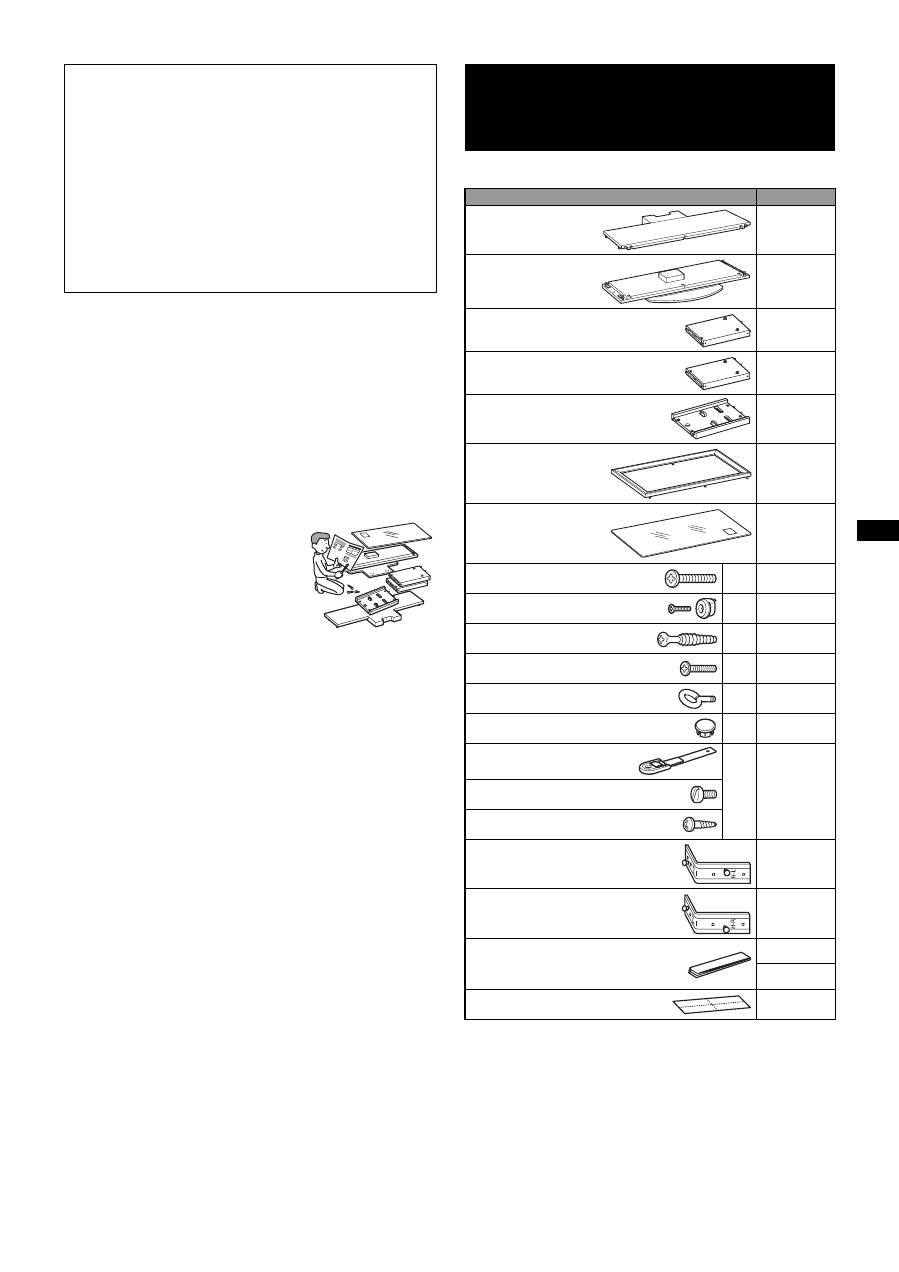
- Step 1: Checking the parts
- Step 2: Assembling the TV Stand 1 2
- 3 4
- 5 Step 3: Preparing for the installation of the TV 1 2
- Step 4: Installing the TV 1 2 3
- Step 5: Safety measures to prevent toppling over 1 2 3
- Specifications Installing the Center Speaker (For Home Theatre Systems only)
- 1 2
TV Stand
Instructions
Mode d’emploi
Instrucciones
Instruções
Vejledning
Instruksjoner
Bruksanvisning
Käyttöohje
Instructies
Gebrauchsanweisung
Istruzioni
Οδηγίες
Инструкции
Instrukcje
Instrukce
Inštrukcie
Utasítások
CZ
GR
RU
PL
CT
TH
KR
3-273-330-
12
(1)
SU-FL300L
© 2007 Sony Corporation
T
V
St
an
d
S
U
-F
L
3
0
0
M/
SU-F
L
300L
ES
GB
FR
PT
DK
NO
SE
FI
NL
DE
DK
Printed in Thailand
http://www.sony.net/
SU-FL300M
SU-FL300L
SU-FL300M
TV Stand
AR
PR
IT
SK
HU
TR
2
(GB)
Thank you for purchasing this product.
If the safety precautions are not observed or the product is
used incorrectly, it may result in serious injury or fire.
This instruction manual shows the correct handling of the
product and important precautions necessary to prevent
accidents. Be sure to read this manual thoroughly and use the
product correctly. Keep this manual available for future
reference.
For Sony dealers
Installation of a TV requires two or more people, special care
and technique. When installing a TV, refer to this manual
carefully. Sony is not liable for any accidents or damages
caused by incorrect installation or handling. Please give this
manual to the customer after installation.
Products by Sony are designed with safety in mind. Incorrect
use may result in a serious injury through fire, electric shock,
the product toppling over, or the product dropping. Be sure to
observe the precautions for safety to prevent such accidents.
Specified products
The following products are subject to change without notice.
Certain models may be out of stock or discontinued, or may
not be available in certain regions.
This TV Stand is designed for use with the products specified
above. For other TVs, refer to their operating instructions to
verify that the TV Stand can be used.
Some TVs are supplied with a leaflet explaining how to
install the TV Stand.
For customers
This product should only be installed by qualified Sony
service representatives, as it requires two or more people,
special care, safety, and technique.
WARNING On Safety CAUTION
LCD Color TV
SU-FL300M
KDL-46W3500
KDL-46W3100
KDL-46W3000
KDL-46V3100
KDL-46V3000
KDL-46VL130
KDL-46S3000
KDL-46D3550
KDL-46D3500
KDL-46D3100
KDL-46D3010
KDL-46D3000
KLV-46W300A
KLV-46V300A
KLV-46D300A
KDL-40W3500
KDL-40W3100
KDL-40W3000
KDL-40V3100
KDL-40V3000
KDL-40VL130
KDL-40T3000
KDL-40T2800
KDL-40T2600
KDL-40S3000
KDL-40SL130
KDL-40D3550
KDL-40D3500
KDL-40D3100
KDL-40D3010
KDL-40D3000
KDL-40D2810
KDL-40D2710
KDL-40D2600
KLV-40W300A
KLV-40V300A
KLV-40D300A
KDL-37S3100
KLV-37S310A
KDL-32XBR4
KDL-32V3100
KDL-32T3000
KDL-32T2800
KDL-32T2600
KDL-32S3100
KDL-32S3000
KDL-32SL130
KDL-32D3100
KDL-32D3010
KDL-32D3000
KDL-32D2810
KDL-32D2710
KDL-32D2600
KLV-32V300A
KLV-32S310A
KLV-32D300A
SU-FL300L
KDL-52W3000
KDL-52WL130
KDL-46W3000
KDL-46V3000
KDL-46VL130
KDL-46S3000
3
(GB)
Products should only be installed by
qualified Sony service
representatives.
The TV and the TV Stand are very heavy; installation by non-
qualified persons could result in serious injury.
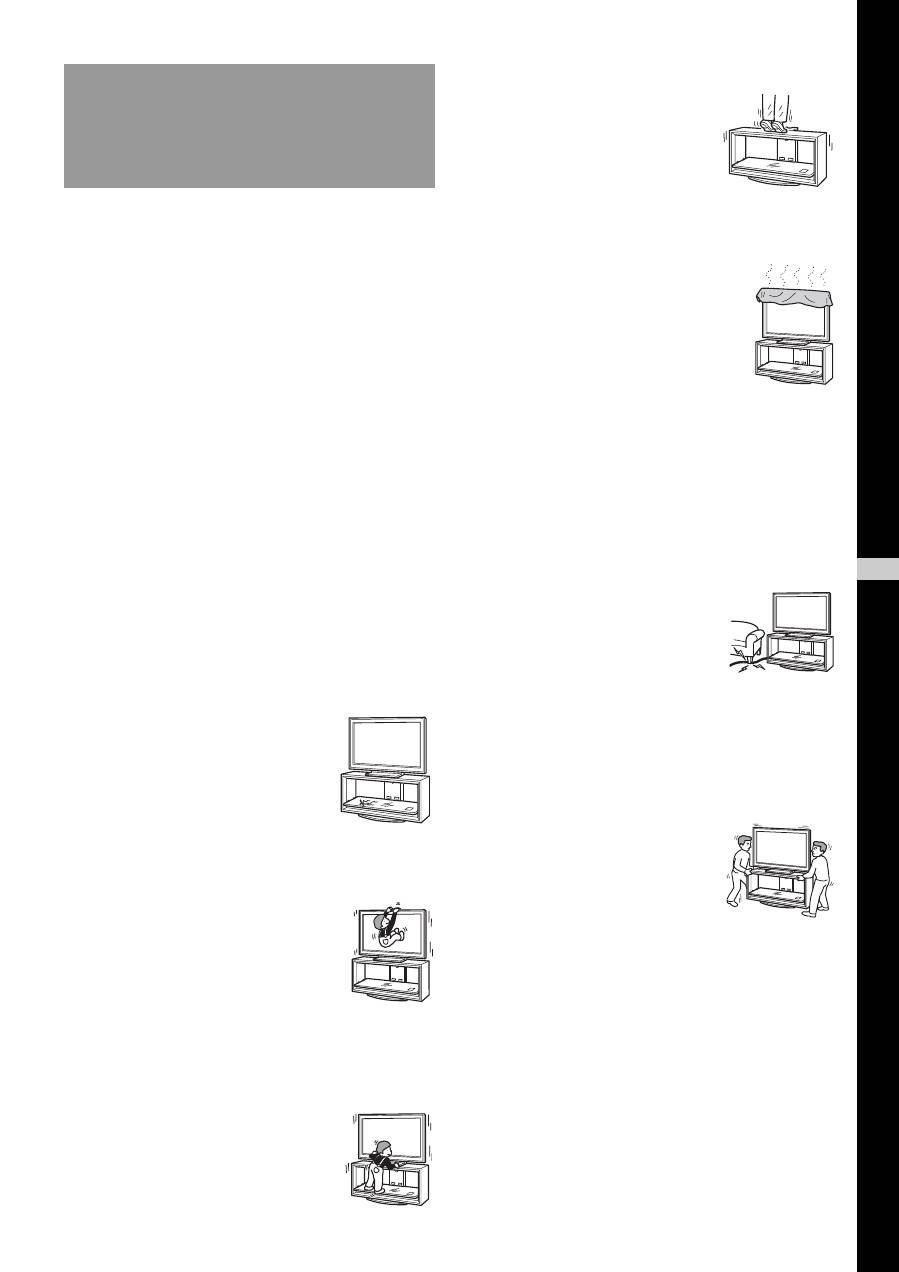
Be sure to take measures to prevent
the TV Stand from toppling over.
If you fail to do so, the TV may topple over and cause injury.
Anchor the TV to a wall, etc., to prevent toppling over.
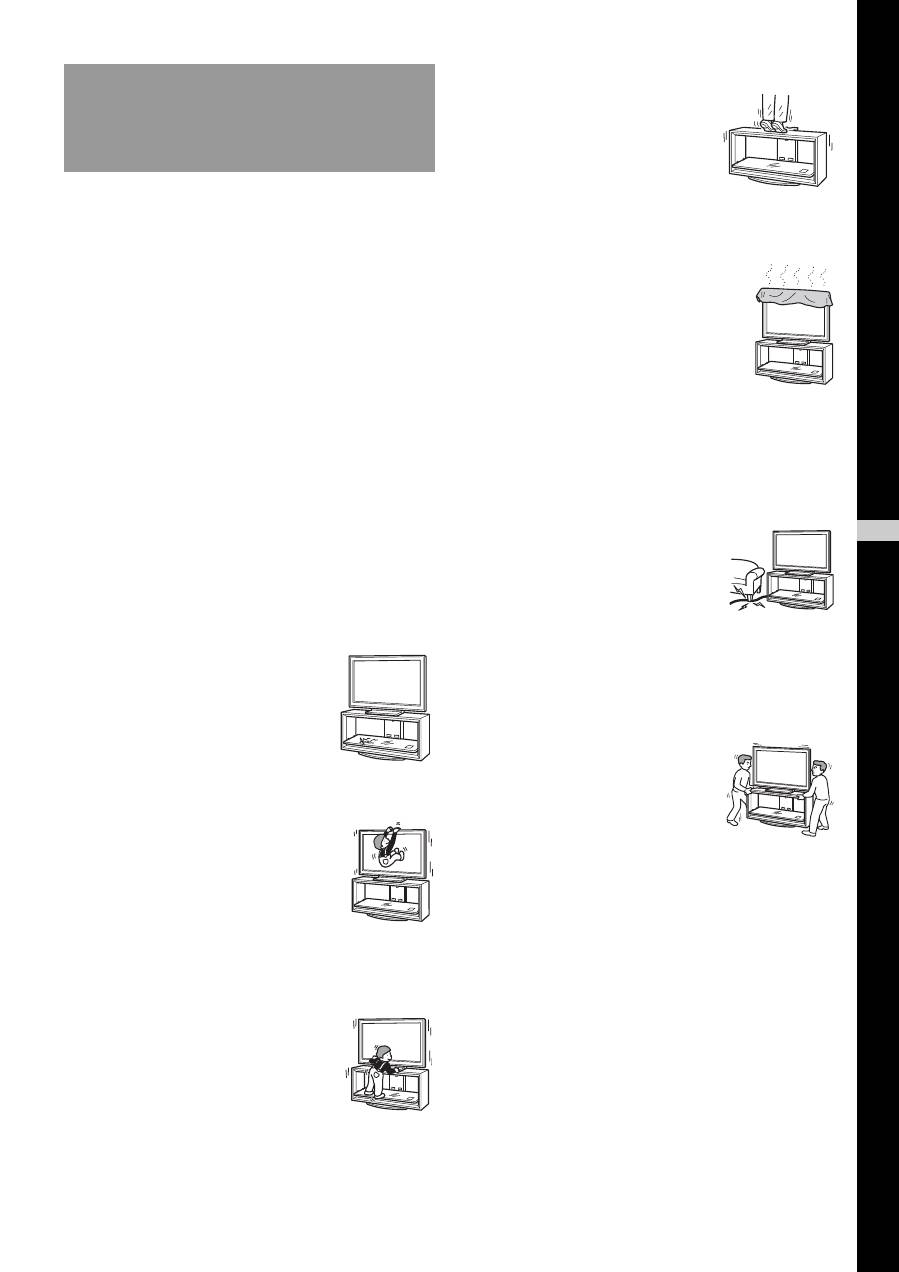
Be sure to install the TV Stand on a
solid and flat floor.
Do not install the TV Stand so that it leans in one direction. If
you do so, the TV Stand may topple over or the TV may fall.
This may cause injury or damage.
If you install the TV Stand on a soft surface such as a mat or
a carpet, lay a board over the designated location beforehand.
Do not use a cracked TV Stand.
Do not lean on or hang from the TV.
The TV Stand may topple over, or the TV
may fall and cause serious injury or death.
Do not allow children to climb on the
TV Stand or crawl between the
shelves.
If children climb on the TV Stand or get
between the shelves, serious injury or death
can result if the glass breaks or the TV Stand
and the TV topples over.
Do not step on the TV Stand.
You may fall, or break the glass and
cause injury.
Do not cover the ventilation holes of
the TV.
If you cover the ventilation holes (with a
cloth, etc.), heat may build up inside and cause
fire.
Do not allow the AC power cord or
the connecting cable to be pinched.
• Do not allow the AC power cord or the connecting cable to
be pinched when you install the TV on the TV Stand. If
the AC power cord or the connecting cable is damaged,
this may result in fire or electric shock.
• Do not step on the AC power cord or
the connecting cable when you carry
the TV Stand. The AC power cord or
the connecting cable may be damaged,
and this may result in fire or electric
shock.
Do not move the TV Stand with the
TV attached or with connected
equipment inside.
If you move the TV Stand with the TV
attached, it may hurt your back, or the
TV Stand may topple over and cause
serious injury. Also, any connected
equipment within may fall and cause the
glass shelf to break or other property
damage.
WARNING
If the following precautions are not observed,
serious injury or death can result through fire,
electric shock, or the product toppling over.
Do not use the TV Stand if it has
sustained any cracks. The glass may
break and cause the TV to topple over,
which could cause serious injury or
damage.
Cracked TV Stand
GB
Engli
s
h
4
(GB)
Do not install any equipment other
than the specified product.
• This TV Stand is designed for use with the specified
product only. If you install equipment other than specified,
it may fall or break, and cause injury.
• Do not place objects such as vases, pottery, etc., on the TV
Stand.
• Do not modify the TV Stand.
• Do not place anything hot directly on the TV Stand. The
heat may cause discoloration or deformation of the TV
Stand.
• Do not place anything directly on the TV Stand that may
damage the glass.
Be sure to secure the TV.
Secure the TV to the TV Stand using the supplied anchor
attachments. If the TV is not installed securely, it may fall, or
the TV Stand may topple over, and cause injury.
Do not apply weight to the glass or
subject it to any kind of impact.
Do not apply weight to the TV Stand with your hand when
installing the TV. Do not hit the TV Stand with hard objects,
such as a screwdriver, etc. The glass may break and cause
injury.
When carrying the TV Stand
Trying to move the TV Stand alone, or without following the
proper procedures, may cause injury. To avoid this, be sure to
follow the advice given below.
• Be sure that two or more persons carry the TV Stand, and
only after removing the TV, connected equipment and
glass shelves.
• Do not drag the TV Stand. The base parts of the TV Stand
may come off and damage the floor.
• Be careful not to allow your hands or feet to be pinched
under the Base Board.
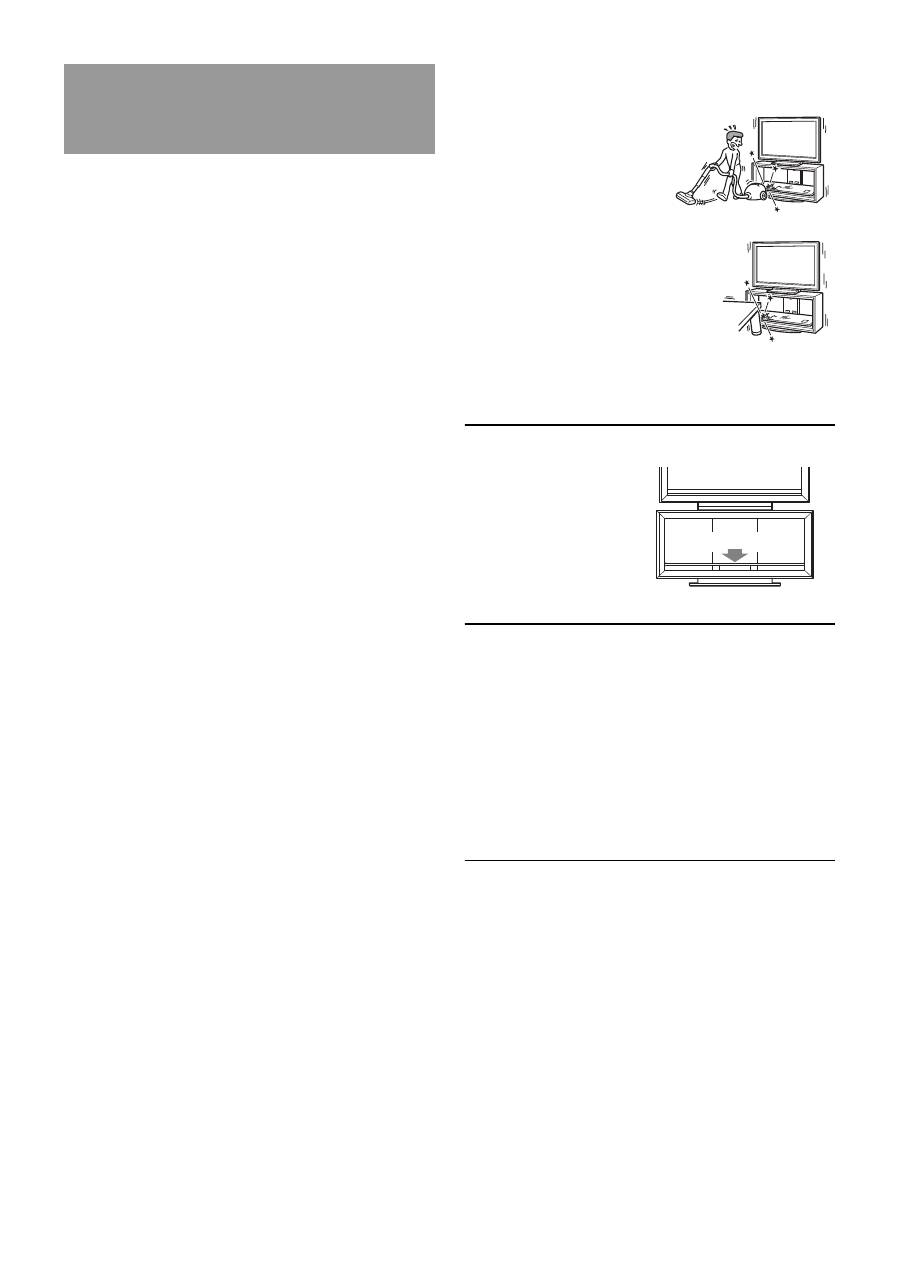
• Do not grab the glass shelf when carrying the TV Stand.
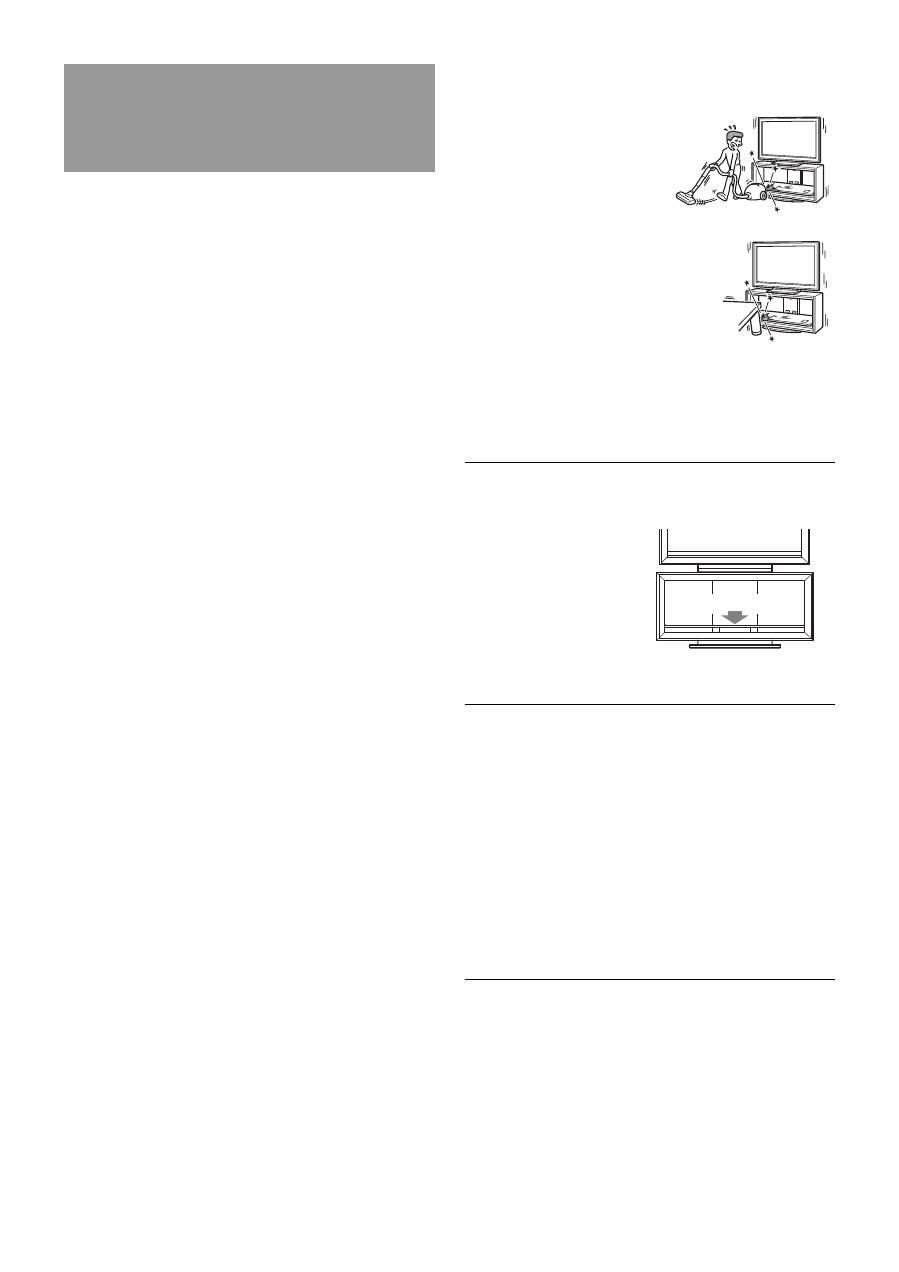
Do not subject the glass to
excessive shock.
This TV Stand is made of
tempered glass, but care should
be taken.
If the glass breaks, glass
fragments could cause injury, so
observe the precautions below.
• Do not hit the glass or drop
sharp-pointed objects on the
glass. Avoid excessive shock.
• Do not scratch or poke the
glass with sharp-pointed
objects.
• Do not let hard objects such
as a vacuum cleaner hit the
edges of the glass.
Note on carrying capacity
Do not place any equipment
which exceeds the
maximum weight for each
shelf as indicated in the
illustration.
Otherwise, the shelves may
break.
Notes on installation
• When assembling, lay the packing materials on the floor to
avoid damage to the floor.
• Install the TV Stand on a solid and flat floor. Do not allow
the TV Stand to be installed at an angle or incline. To
avoid this, observe the following precautions.
– Do not install the TV Stand in a place subject to direct
sunlight or near a heater.
– Do not install the TV Stand in a hot or humid place, or
outdoors.
Note on use
To keep the TV Stand clean, occasionally wipe it with a dry
soft cloth. Stubborn stains may be removed by wiping with a
cloth slightly dampened with mild soap. Be sure to dry the
area afterwards with a dry soft cloth. Do not use chemicals,
such as thinner or benzine, as they damage the finish of the
TV Stand.
CAUTION
If the following precautions are not observed,
injury or property damage may occur.
30 kg (66 lb 2 oz)
5
(GB)
Be sure that two or more persons do
the installation work.
Be sure that two or more persons install the TV on the TV
Stand. If one person does the installation work alone, this
may result in an accident or injury. Be sure to keep children
away during the installation.
Be sure to assemble the TV Stand
securely following the instructions.
If a screw is not tightened securely, or
it has fallen out, it may cause the TV
Stand to topple over. This may cause
damage or injury.
Be careful not to injure your hands
or fingers while assembling.
Be careful not to pinch your fingers or hands when
assembling the TV Stand and installing the TV.
Be sure to install the TV securely
following the instructions.
Tighten the screws securely. If the TV is not installed
securely, it may fall and cause injury.
*
1
The illustrations above are for SU-FL300M. This differs
from SU-FL300L. For SU-FL300L, there are two cutout
parts on the side of the Side Pillar.
*
2
For SU-FL300M, four paper templates are provided.
*
3
For SU-FL300L, three paper templates are provided.
*
4
The parts bags are labeled alphabetically.
Be sure to have a Phillips screwdriver that fits the screws
indicated above prior to the assembly.
To Sony dealers
Be sure to thoroughly read the
safety precautions described
previously and pay special
attention to safety during the
installation, maintenance,
checking, and repair of this
product.
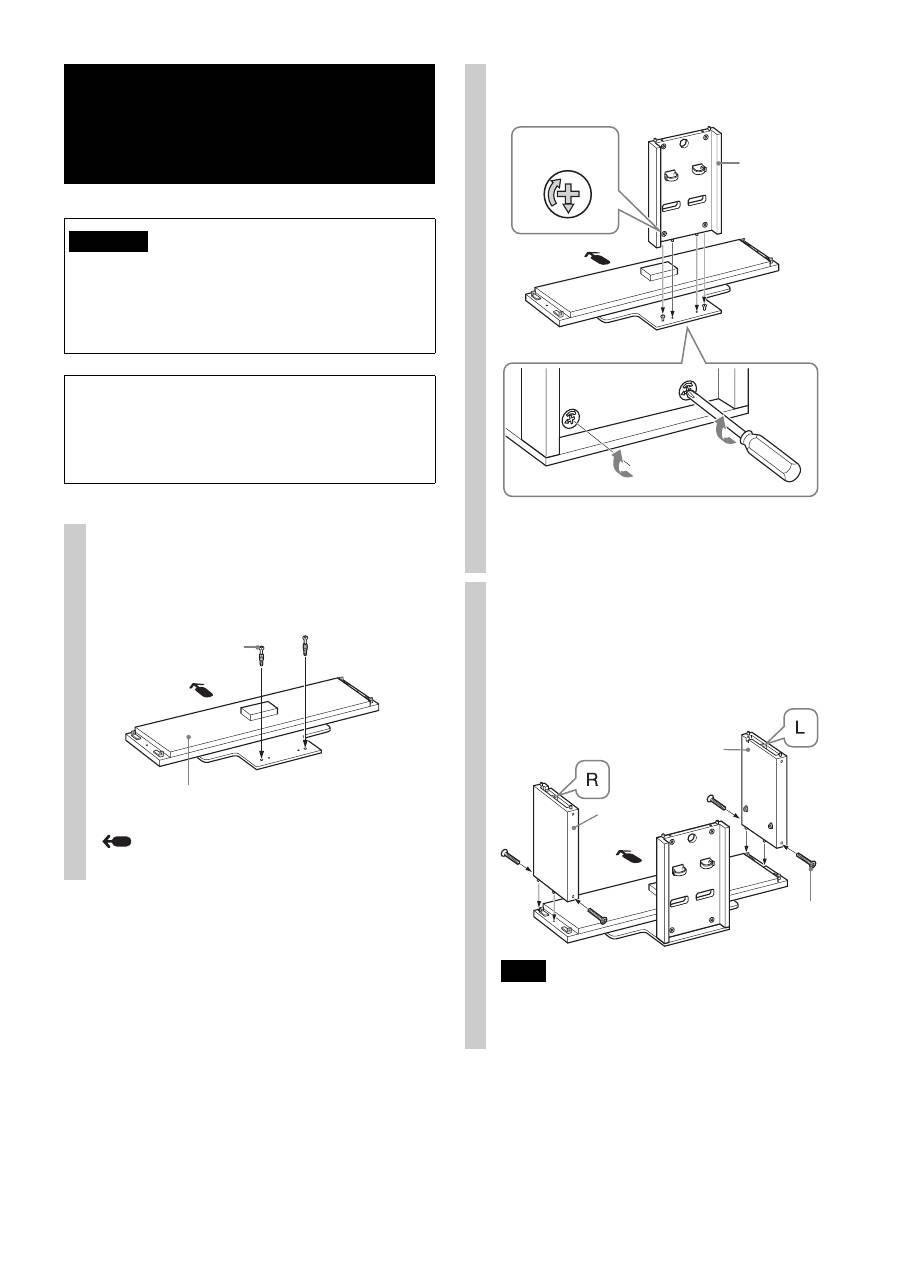
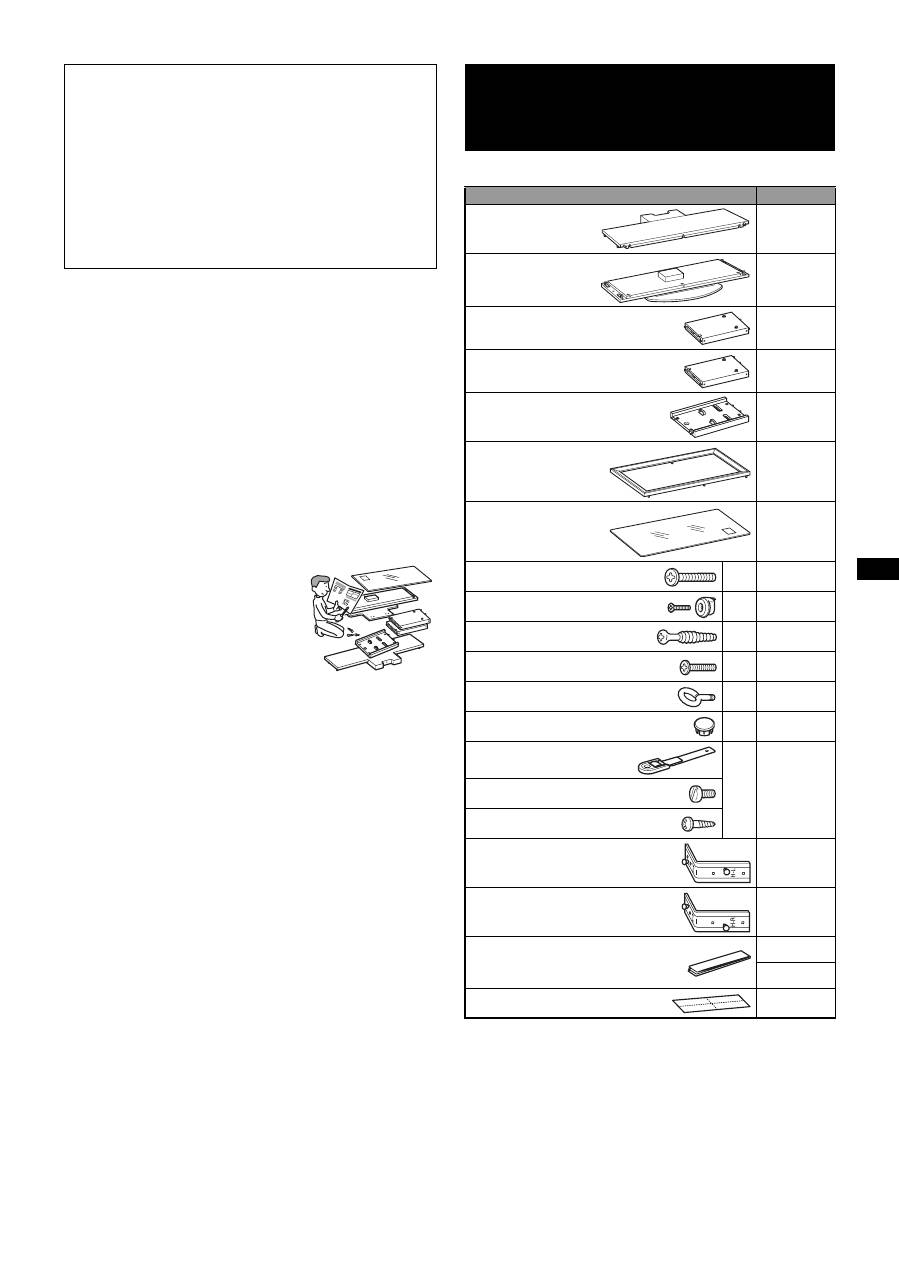
Step 1: Checking the parts
Name
Quantity
Top Board
1
Base Board
1
Side Pillar (L)*
1
1
Side Pillar (R)*
1
1
Rear Pillar
1
Front Panel
1
Glass Shelf
1
Screw (+PWH5 × 25)
a
*
4
8
Screw (+K4 × 20) + Sleeve
b
*
4
2
Cam-lock screw
c
*
4
4
Screw (+P4 × 15)
d
*
4
4
Anchor bolt
e
*
4
2
Screw cap
f
*
4
3
Support belt
g
*
4
1
Screw (M6 × 18)
Wood screw (M3.8 × 20)
Speaker Hook (L)
1
Speaker Hook (R)
1
Paper template
4*
2
3*
3
Tape
1
6
(GB)
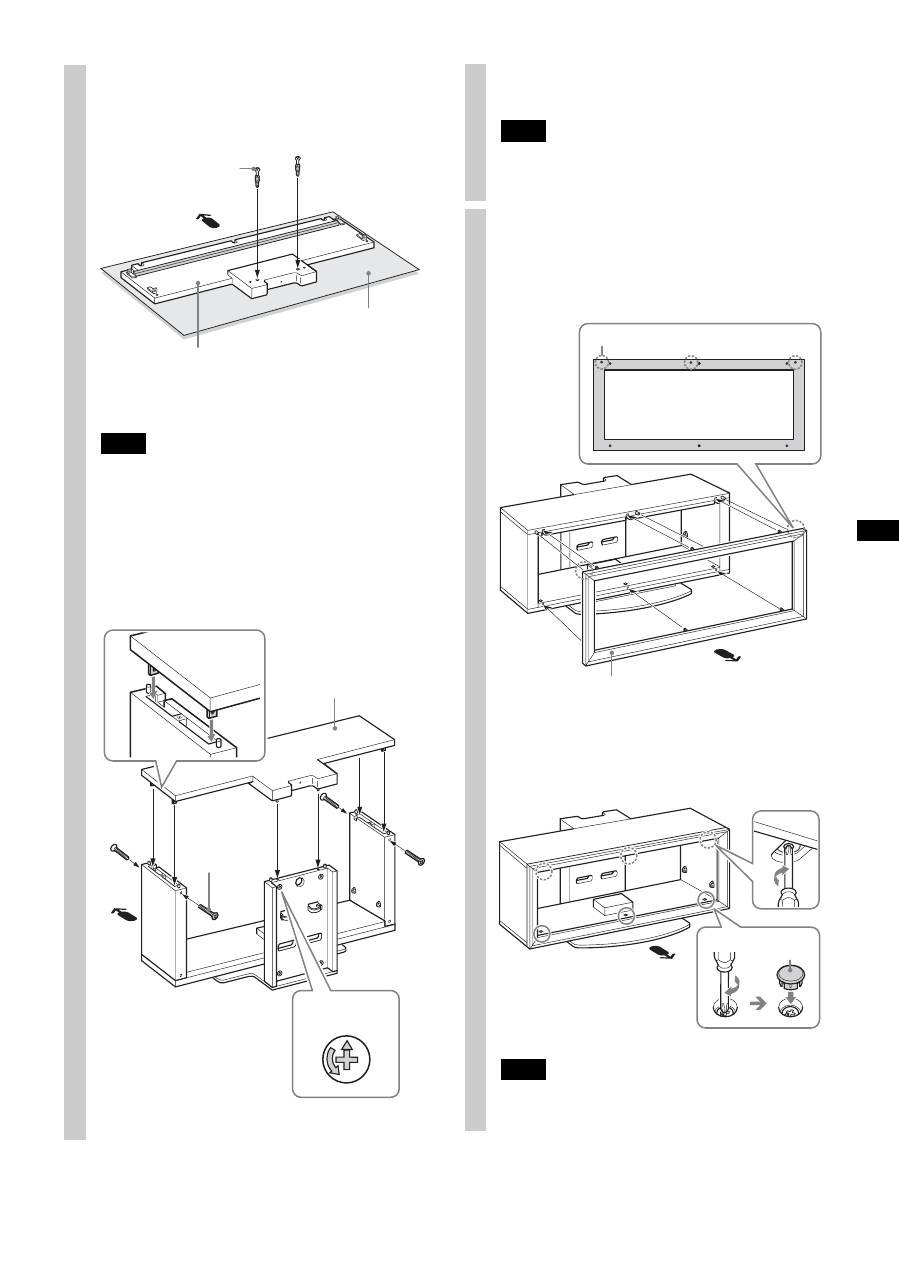
Step 2: Assembling the TV Stand
If you allow the AC power cord to be pinched under or
between pieces of equipment, this may result in a short
circuit or an electric shock. If you stumble over the AC
power cord or the connecting cable, the TV Stand may
topple over and cause injury.
Decide on the installation location and lay the TV
Stand down before installing the TV.
Since the TV is heavy, it is recommended that you decide
on the installation location beforehand, and assemble the
TV Stand on site.
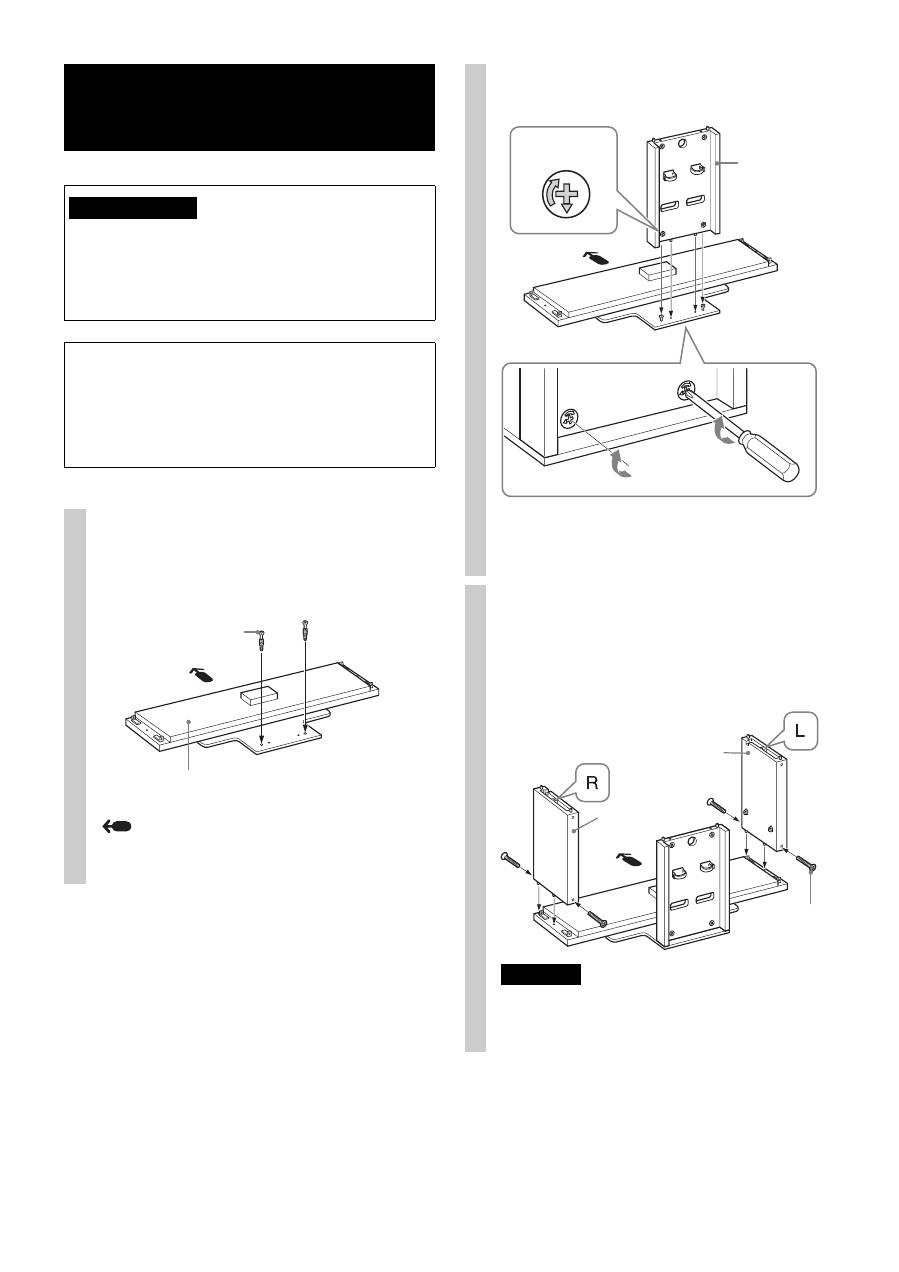
1
Attach the Rear Pillar to the Base
Board.
1
Tighten the two supplied Cam-lock screws to the
Base Board.
Arrow direction shows front of the TV Stand.
WARNING
Cam-lock screw
Base Board
2
Attach the Rear Pillar to the Base Board and secure
the two Cam-locks with a screwdriver.
* Before attaching the Rear Pillar, make sure that the
F
mark points downward.
2
Attach the Side Pillars to the
Base Board.
Secure the Side Pillars and the Base Board with the
four supplied screws (+PWH5 × 25).
Note
There are differences between the left and right pillars.
Be sure to install each pillar on the correct side.
Rear Pillar
Cam-lock
*
Side Pillar (R)
Side Pillar (L)
Screw
(+PWH5 × 25)
7
(GB)
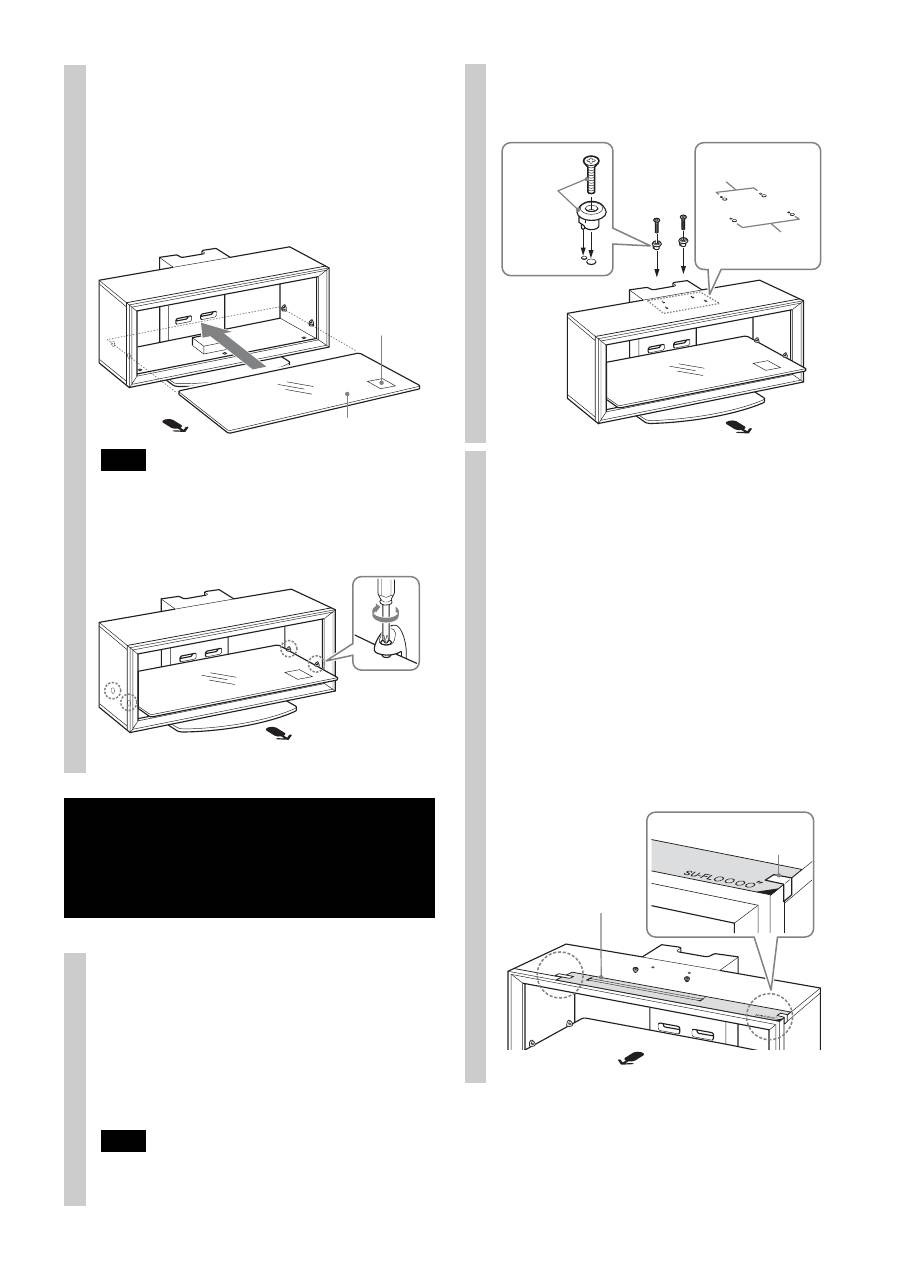
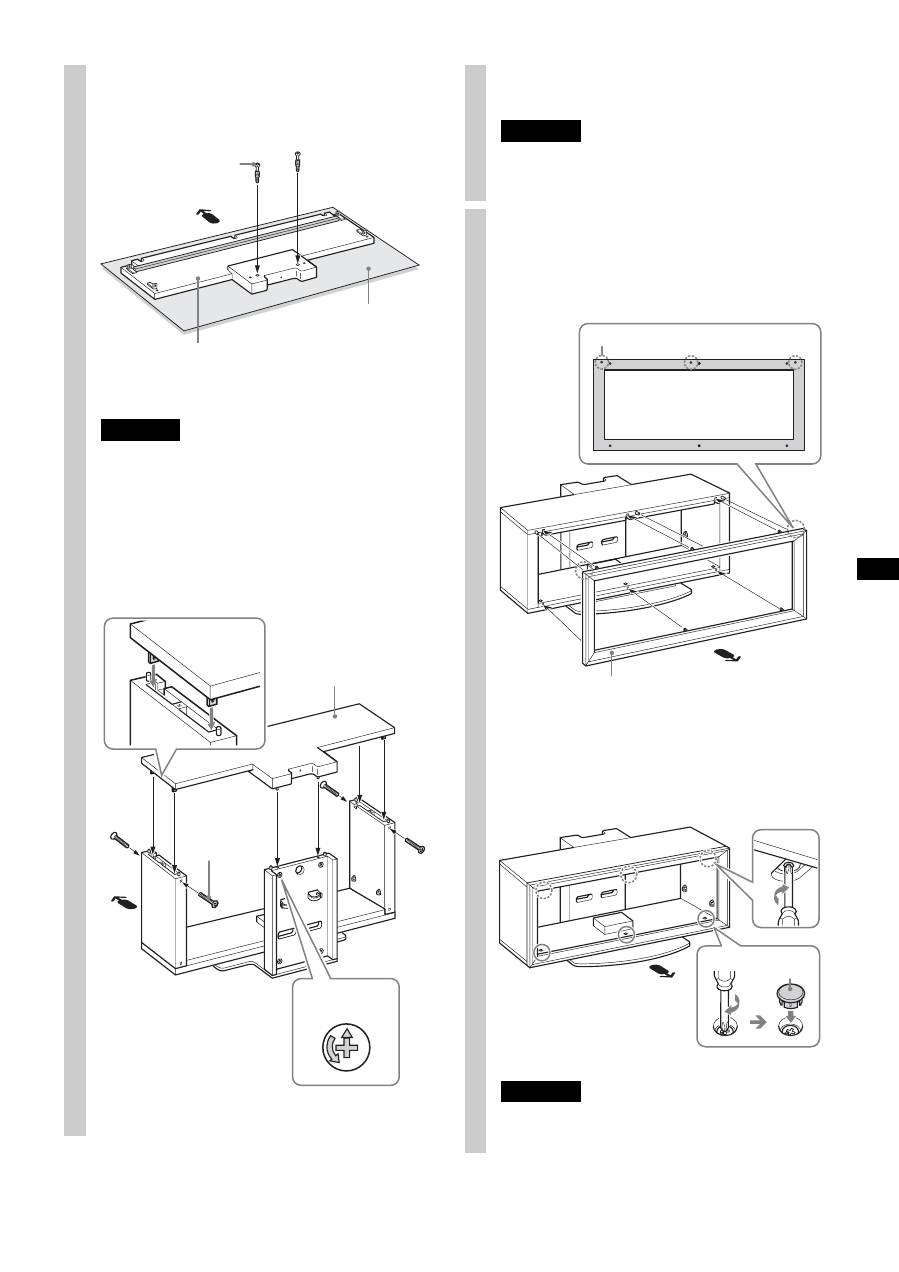
3
Attach the Top Board.
1
Tighten the two supplied Cam-lock screws to the
Top Board.
The illustration shown above is SU-FL300M as an
example. For SU-FL300L, there are two reinforcing
bars on the Top Board.
Note
To prevent damaging the glossy surface of the Top Board,
make sure to clean and place a soft cloth on the work surface.
2
Align and insert fixing brackets on both sides of the
Top Board into the Side Pillars.
3
Secure the Side Pillars with the four supplied screws
(+PWH5 × 25). And secure the two remaining Cam-
locks on the back side of the Rear Pillar.
Soft cloth
Cam-lock screw
Top Board
Top Board
Screw
(+PWH5 × 25)
Cam-lock
*
* Before attaching the Top Board, make sure that the
f
mark points upward.
Note
Be careful not to pinch your fingers when attaching the Top
Board.
4
Attach the Front Panel to the TV
Stand.
1
Align the three dowels of the TV Stand with the
three holes of the Front Panel.
2
Turn the six Cam-lock screws on the Top and the
Base Boards clockwise to secure the Front Panel.
Then, attach the three supplied screw caps to the
three bottom screws.
Note
Be sure to attach the Front Panel in the correct direction.
Front Panel
Dowel hole
Screw cap
(Continued)
8
(GB)
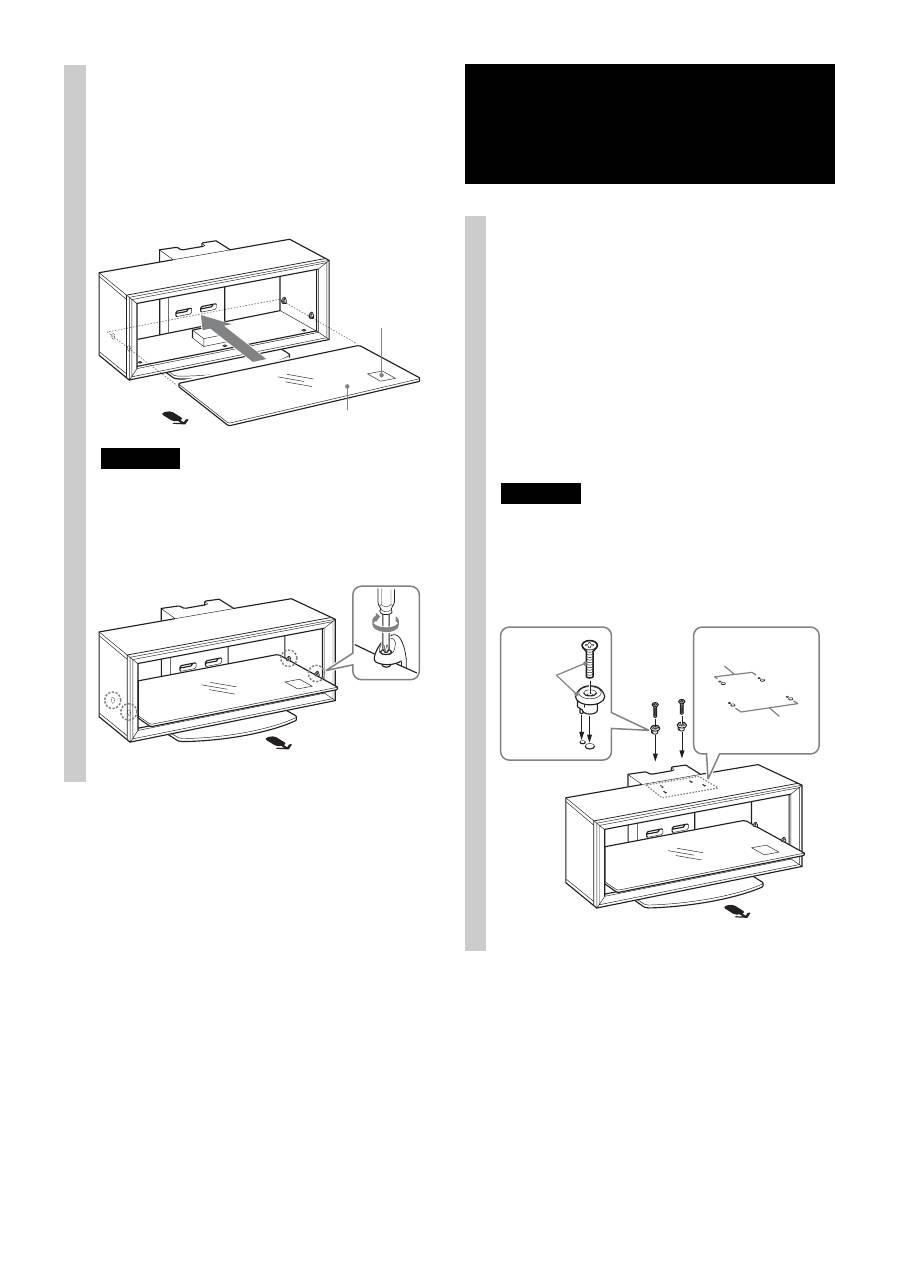
5
Attach the Glass Shelf.
If you attach the Home Theatre System to the Stand,
attach the Speaker Hooks first. (Refer to “Installing the
Center Speaker (For Home Theatre Systems only)” on
page 11.)
1
Fully insert the Glass Shelf until it touches the Rear
Pillar.
Note
Attach the Glass Shelf to the TV Stand with the Caution label
facing up on the front right, as shown in the illustration.
2
Tighten the four screws on the Side Pillars to secure
the Glass Shelf to the TV Stand.
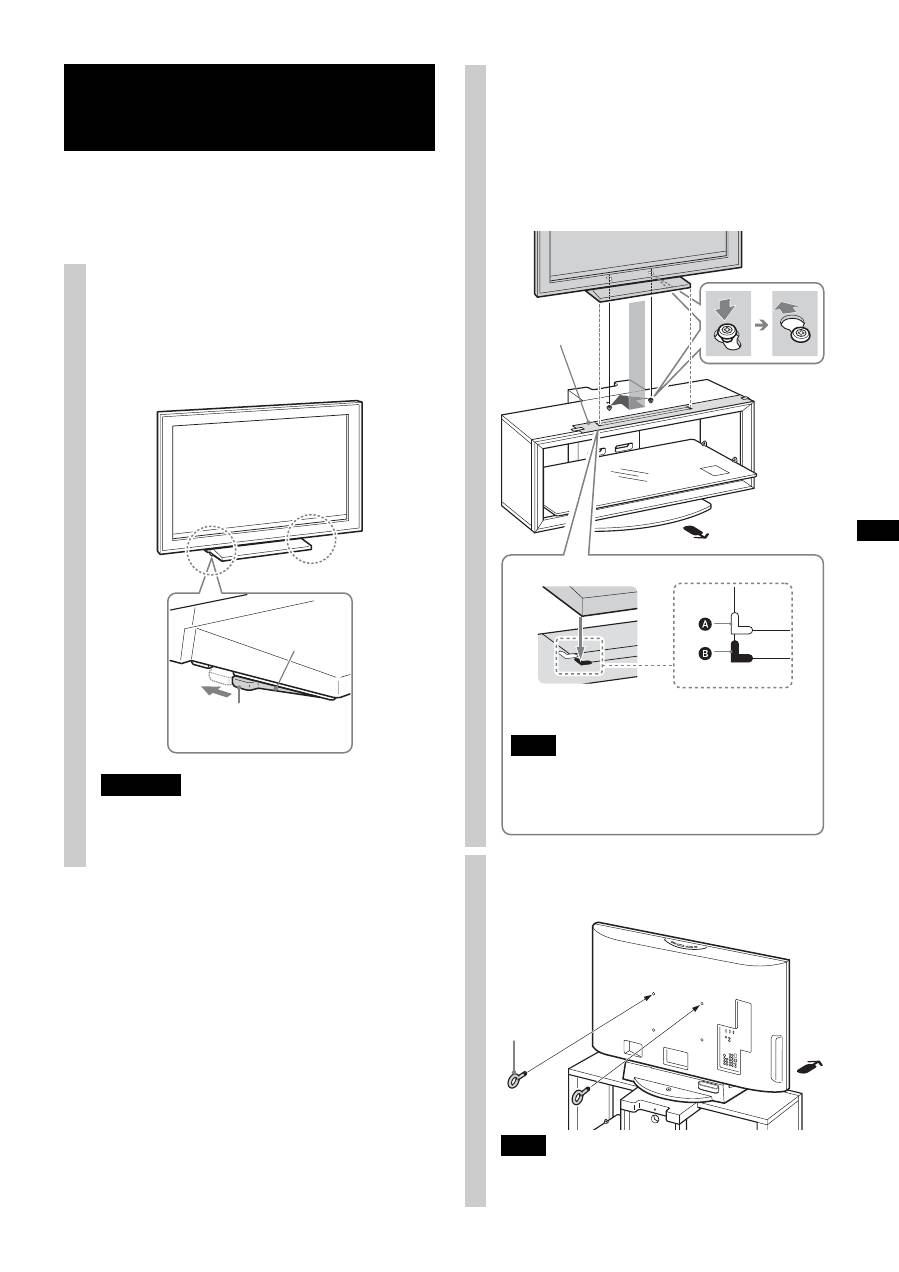
Step 3: Preparing for the installation of the TV 1
Attach the sleeves to the Top Board.
Attach the sleeves with the supplied screws (+K4 × 20).
For models that are not specified on page 2:
Use the front holes.
For models that are specified on page 2:
For swivel models*, use the rear holes; for non-swivel
models, use the front holes.
Note
Check your TV’s operating instructions as to whether or not
your TV can swivel.
Caution label
Glass Shelf
* The swivel function allows you to adjust the viewing angle
of the TV (left and right).
2
Paste the supplied paper
template on the Top Board.
1
Choose the supplied paper template and align the
right corner edges of the paper template with the
right corner of the Top Board.
For models that are not specified on page 2:
Be sure to refer to the leaflet supplied with your TV,
choose the paper template corresponding to your
TV.
For models that are specified on page 2:
Choose the paper template in black print
corresponding to your TV screen size.
2
Tape the paper template to the Top Board with the
supplied tape.
Rear holes
Front holes
Screw
(+K4 × 20)
+
Sleeve
Tape
Paper template
9
(GB)
Attach your TV to the Table-Top Stand if it is not already
attached.
Only for the specified swivel models on page 2, follow the
procedure part 1 of Step 4.
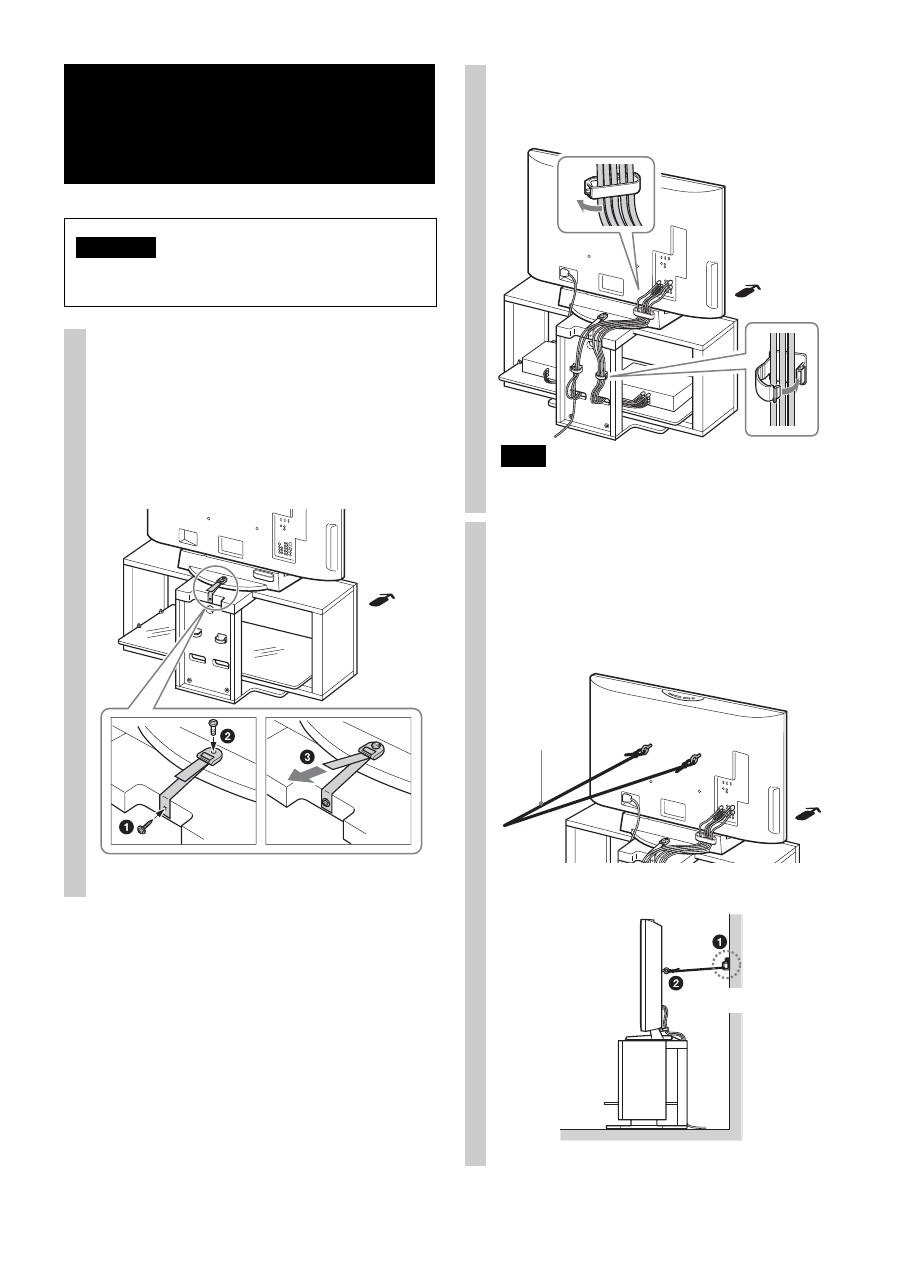
Step 4: Installing the TV 1
Adjust the position of the swivel
plate to the center (For swivel
models only).
Before installing the TV, align the tab of the swivel
plate with the notch in the Table-Top Stand.
WARNING
If the swivel plate is not adjusted correctly, the TV will
not be installed securely and it may fall.
Tab
Swivel plate
For swivel models only
2
Install the TV onto the TV Stand.
1
Match the outline of the Table-Top Stand to the outline
of the TV screen size and corner marks on the paper
template, so that the holes at the bottom of the Table-Top
Stand align to the sleeves which were attached in part 1
of Step 3.
2
Slide the TV back to lock into place.
3
Remove the paper template from the Top Board.
3
Attach the anchor bolts.
Secure the two supplied anchor bolts to the rear of the TV.
Note
If the two anchor bolts are not used to secure the TV, it may
fall and cause injury.
Paper template
A
The white corner mark is for swivel models.
B
The black corner mark is for non-swivel models.
Note
For 37/40 inch users, whether the TV is swivel model or
not, align the Table-Top Stand with the black corner
mark. (There is no white corner mark on the paper
template for 37/40 inch.)
Only for the specified swivel models on page 2
Anchor bolt
10
(GB)
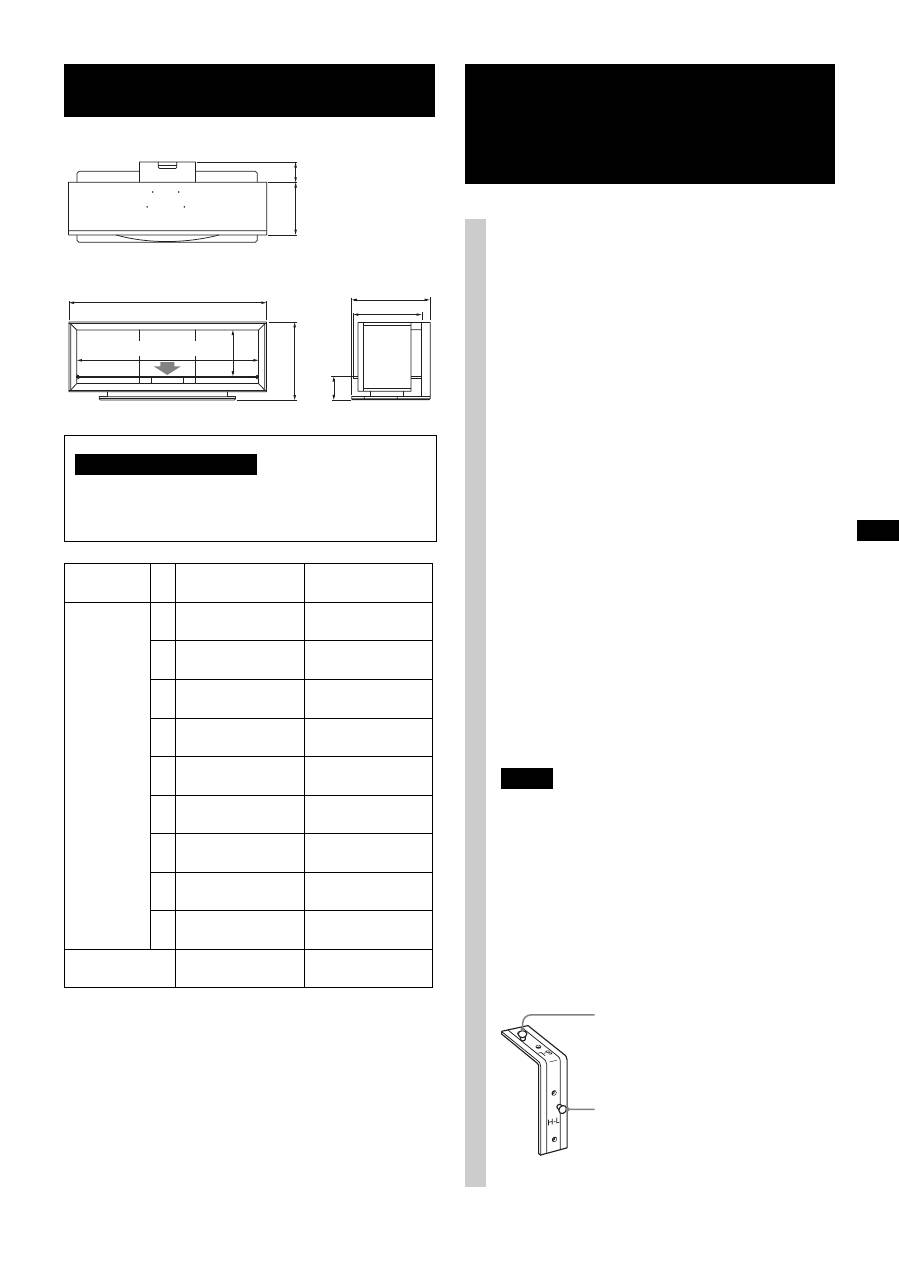
Step 5: Safety measures to prevent toppling over
WARNING
Be sure to take measures to prevent the TV Stand from
toppling over, and causing possible injury and damage.
1
Attach the support belt.
1
Screw the support belt to the TV Stand with the
supplied wood screw using the screwdriver.
2
Attach the support belt to the Table-Top Stand, and
screw the belt with the supplied securing screw
using a coin, etc.
3
Adjust the length by tightening the support belt
while holding the Table-Top Stand.
2
Connect the cables.
Run the cables through the cable holders and the Rear
Pillar holes.
Note
If the cables are not installed properly, they might be pinched
and damaged, and could result in electric shock, etc.
3
Anchor the TV to the wall.
Prepare a strong, commercially-available rope or chain
and wall anchor bracket for this purpose.
1
Secure the wall anchor bracket to a solid wall.
2
Pass the rope or chain through both holes of the
anchor bolts and then tighten the other end of the
rope or chain to the wall anchor bracket.
Strong rope or
chain
Wall anchor bracket
11
(GB)
Design and specifications are subject to change without
notice.
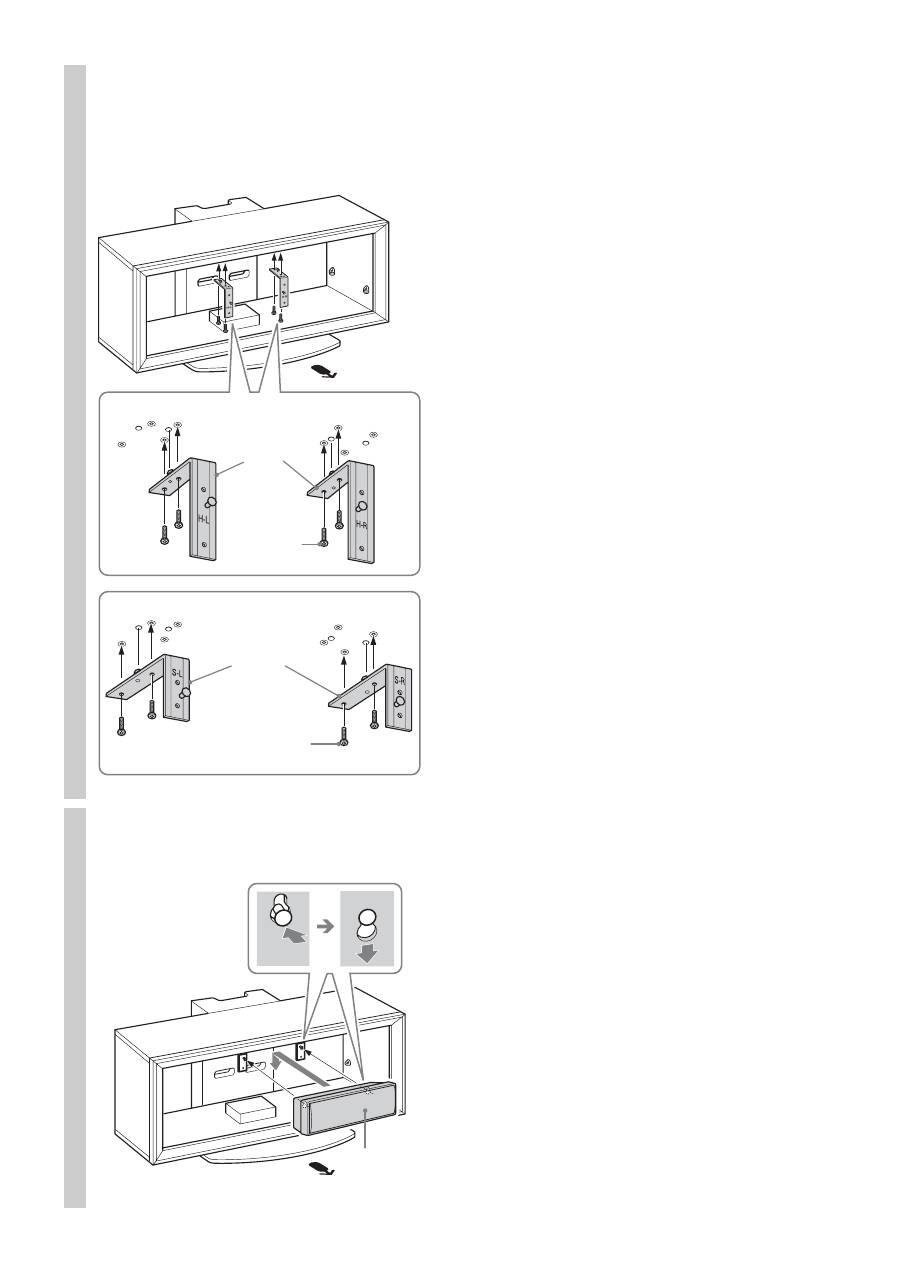
Specifications
Do not place any equipment on the Glass Shelf which
exceeds its maximum weight, as it may break and cause
injury.
SU-FL300M
SU-FL300L
Dimensions:
mm (inches)
A
1,035
(40 3/4)
1,280
(50 1/2)
B
503
(19 7/8)
503
(19 7/8)
C
485
(19 1/8)
518
(20 1/2)
D
895
(35 1/4)
1,140
(45)
E
303
(12)
303
(12)
F
418
(16 1/2)
468
(18 1/2)
G
146
(5 3/4)
146
(5 3/4)
H
120
(4 3/4)
130
(5 1/8)
I
272
(10 3/4)
340
(13 1/2)
Weight:
35 kg
(77 lb 3 oz)
52 kg
(114 lb 11 oz)
H
I
A
D
E
B
G
F
C
30 kg (66 lb 2 oz)
Note on carrying capacity
Installing the Center Speaker (For Home Theatre Systems only)
The Center Speaker model SS-CT71/CNP2200 is for
the following Home Theatre System models:
The Center Speaker model SS-CT72/CT74 is for the
following Home Theatre System models:
Notes
• The products above are subject to change without notice,
may be out of stock, or discontinued.
• Certain models may not be available in certain regions.
Before attaching the Speaker Hook:
For SS-CT71/CNP2200, the H-L/H-R markings should
face forward. (H-L is for the left side, H-R is for the
right side.)
For SS-CT72/CT74, the S-L/S-R markings should face
forward. (S-L is for the left side, S-R is for the right
side.)
DAV-HDX665
DAV-HDX466
DAV-HDX465
DAV-HDX267W
DAV-HDX266
DAV-HDX265
DAV-HDZ235
HT-SF2000
HT-SF1200
HT-SF1100
DAV-DZ750K
DAV-DZ630
DAV-DZ556KB
DAV-DZ555K
DAV-DZ555M
DAV-DZ530
DAV-DZ250KW
DAV-DZ250K
DAV-DZ250M
DAV-DZ231
DAV-DZ230
DAV-DZ151KB
DAV-DZ150K
DAV-HDX900W
DAV-HDX501W
DAV-HDX500
DAV-DZ1000
DAV-DZ850KW
DAV-DZ850M
DAV-DZ830W
DAV-DZ531W
Speaker hook screw for
SS-CT72/CT74
Speaker hook screw for
SS-CT71/CNP2200
(Continued)
12
(GB)
1
Attach the Speaker Hook.
Secure each Speaker Hook with the supplied screws
(+P4 × 15) (two screws each for left/right) to the under
side of the Top Board.
2
Hang the Center Speaker onto
the hook screws as shown.
Speaker
Hook
Screw
(+P4 × 15)
Speaker
Hook
Center Speaker: SS-CT71/CNP2200
Center Speaker: SS-CT72/CT74
Screw
(+P4 × 15)
Center Speaker

2
(FR)
Merci d’avoir fait l’acquisition de ce
produit.
Le non-respect des consignes de sécurité ou l’usage incorrect
de ce produit peut provoquer des blessures graves ou un
incendie.
Ce mode d’emploi contient la procédure d’utilisation du
produit et les précautions essentielles pour éviter tout
accident. Lisez attentivement ce manuel et utilisez
correctement le produit. Conservez ce manuel pour pouvoir
le consulter ultérieurement.
À l’attention des détaillants Sony
Un téléviseur doit être installé par deux personnes au moins,
en prenant les précautions d’usage et en utilisant les
techniques appropriées. Lors de l’installation d’un téléviseur,
reportez-vous au présent mode d’emploi. Sony décline toute
responsabilité en cas d’accident ou de dommages provoqués
par une installation ou une utilisation incorrecte. Le présent
mode d’emploi doit être remis au client après installation.
Les produits Sony sont conçus pour vous offrir le maximum
de sécurité. L’utilisation incorrecte peut provoquer des
blessures graves en cas d’incendie, d’électrocution, ou si
l’appareil tombe ou bascule. Veillez à observer les consignes
de sécurité pour éviter de tels accidents.
Produits spécifiés
Les produits suivants sont sujets à modification sans préavis.
Il est possible que certains modèles ne soient plus en stock ou
que leur production ait été arrêtée, ou encore qu’ils ne soient
plus disponibles dans certaines régions.
Ce support TV est conçu pour être utilisé avec les produits
spécifiés ci-dessus. Pour les autres téléviseurs, reportez-vous
à leur mode d’emploi pour vérifier si vous pouvez utiliser ce
support TV.
Certains téléviseurs sont fournis avec un livret qui explique
comment installer le support TV.
À l’attention des clients
Ce produit doit être installé uniquement par des
représentants agrées du service technique Sony, car il
exige la présence d’au moins deux personnes, des
mesures de sécurité, des connaissances techniques et une
attention particulière.
AVERTISSEMENT À propos de la sécurité ATTENTION
Téléviseur couleur LCD
SU-FL300M
KDL-46W3500
KDL-46W3100
KDL-46W3000
KDL-46V3100
KDL-46V3000
KDL-46VL130
KDL-46S3000
KDL-46D3550
KDL-46D3500
KDL-46D3100
KDL-46D3010
KDL-46D3000
KLV-46W300A
KLV-46V300A
KLV-46D300A
KDL-40W3500
KDL-40W3100
KDL-40W3000
KDL-40V3100
KDL-40V3000
KDL-40VL130
KDL-40T3000
KDL-40T2800
KDL-40T2600
KDL-40S3000
KDL-40SL130
KDL-40D3550
KDL-40D3500
KDL-40D3100
KDL-40D3010
KDL-40D3000
KDL-40D2810
KDL-40D2710
KDL-40D2600
KLV-40W300A
KLV-40V300A
KLV-40D300A
KDL-37S3100
KLV-37S310A
KDL-32XBR4
KDL-32V3100
KDL-32T3000
KDL-32T2800
KDL-32T2600
KDL-32S3100
KDL-32S3000
KDL-32SL130
KDL-32D3100
KDL-32D3010
KDL-32D3000
KDL-32D2810
KDL-32D2710
KDL-32D2600
KLV-32V300A
KLV-32S310A
KLV-32D300A
SU-FL300L
KDL-52W3000
KDL-52WL130
KDL-46W3000
KDL-46V3000
KDL-46VL130
KDL-46S3000
3
(FR)
Les produits ne doivent être installés
que par des représentants agréés du
service technique Sony.
Le téléviseur et son support sont très lourds ; toute installation
par un tiers non agréé risque de provoquer des blessures graves.
Veillez prendre toutes les mesures
nécessaires afin d’éviter que le
support TV ne bascule.
Dans le cas contraire, le téléviseur risque de basculer et de
provoquer des blessures.
Ancrez le téléviseur sur un mur, etc., afin d’éviter qu’il ne
bascule.
Veillez à installer le support TV sur
une surface plane et solide.
N’installez pas le support TV s’il penche d’un côté. Sinon, le
support TV risque de basculer ou le téléviseur risque de tomber.
Vous pourriez endommager le téléviseur ou vous blesser.
Si vous installez le support TV sur une surface moelleuse,
comme un tapis ou une moquette, posez au préalable une
plaque à l’emplacement concerné.
N’utilisez pas de support TV fissuré.
Ne vous appuyez pas sur le téléviseur
et ne vous y suspendez pas.
Le support TV risque de basculer et le
téléviseur risque de tomber, ce qui peut
provoquer des blessures graves, voire la mort.
Veillez à ce que les enfants ne
grimpent pas sur le support TV et
empêchez-les de se faufiler entre les
étagères.
Les enfants risquent de se blesser gravement
ou d’être tués s’ils grimpent sur le meuble ou
sur les étagères et brisent le verre ou font
basculer le meuble et le téléviseur.
Ne montez pas sur le support TV.
Vous risquez de tomber ou de briser le
verre et de vous blesser.
Ne bouchez pas les orifices de
ventilation du téléviseur.
Si vous couvrez les orifices de ventilation du
téléviseur (avec un drap ou autre), le
téléviseur risque de surchauffer et de
provoquer un incendie.
Veillez à ne pas coincer le cordon
d’alimentation ou le câble de
raccordement.
• Veillez à ne pas coincer le cordon d’alimentation ou le
câble de raccordement lorsque vous installez le téléviseur
sur le support TV. L’endommagement du cordon
d’alimentation ou du câble de raccordement peut entraîner
un incendie ou l’électrocution.
• Ne marchez pas sur le cordon
d’alimentation ou sur le câble de
raccordement lorsque vous transportez
le support TV. Le cordon
d’alimentation ou le câble de
raccordement peuvent être endommagés, entraînant un
incendie ou l’électrocution.
Ne déplacez pas le support TV si le
téléviseur est fixé dessus ou si des
appareils y sont raccordés.
Si vous déplacez le support TV lorsque le
téléviseur est fixé dessus, vous pourriez
vous faire mal au dos, le support TV
pourrait tomber et vous risqueriez de vous
blesser. De plus, les appareils raccordés
pourraient tomber et briser le verre.
AVERTISSEMENT
Le non-respect des consignes suivantes peut
être fatal ou entraîner des blessures graves en
cas d’incendie, d’électrocution, ou si l’appareil
bascule.
N’utilisez pas le support TV s’il est
fissuré. Le verre risque de casser et de
faire basculer le téléviseur, provoquant
ainsi des blessures graves ou des dégâts.
Support TV fissuré
FR
Français
4
(FR)
N’installez pas d’autre équipement
que le produit spécifié.
• Ce support TV est conçu pour être utilisé uniquement avec
le produit spécifié. Si vous installez un autre équipement
que celui spécifié, il risque de tomber ou de se briser et de
provoquer des blessures.
• Ne placez aucun objet sur le support TV, tels que vases,
poteries, etc.
• Ne démontez pas sur le support TV.
• Ne placez aucun objet chaud directement sur le support
TV. La chaleur risque de décolorer ou de déformer le
support TV.
• Ne placez aucun objet sur le support TV pouvant briser le
verre.
Veillez à bien fixer le téléviseur.
Fixez le téléviseur au support TV à l’aide des fixations
fournies. Si le téléviseur n’est pas installé correctement, il
risque de tomber ou le support TV risque de basculer,
entraînant des blessures.
Ne vous appuyez pas sur le verre et
ne le soumettez pas à des chocs.
Ne vous appuyez pas sur le support TV avec les mains lors de
l’installation du téléviseur. Ne cognez pas le support TV avec
des objets durs, tels qu’un tournevis, etc. Le verre risque de
se briser et de provoquer des blessures.
Transport du support TV
Vous risquez de vous blesser si vous essayez de déplacer
vous-même le support TV ou si vous ne tenez pas compte des
procédures appropriées énoncées ci-après. Afin d’éviter cela,
suivez les conseils ci-dessous.
• Assurez-vous qu’au moins deux personnes transportent le
support TV et que vous avez préalablement retiré le
téléviseur, les appareils qui lui sont raccordés et les
étagères en verre.
• Ne tirez pas sur le support TV. Les pièces de la base du
support TV risquent de s’enlever et vous risquez
d’endommager votre sol.
• Veillez à ne pas coincer vos mains ou vos pieds sous le
panneau inférieur.
• Lorsque vous transportez le support TV, ne le tenez pas
par l’étagère en verre.
Ne soumettez pas le verre à un choc
trop violent.
Même si ce support TV est en
verre trempé, il est nécessaire de
le manier avec précaution.
Si le verre rompt, les bris de
verre peuvent provoquer des
blessures. Il est par conséquent
important de respecter les
consignes de sécurité ci-
dessous.
• Ne heurtez pas le verre et ne
laissez aucun objet pointu
tomber dessus. Évitez les
chocs violents.
• Ne rayez pas le verre et
évitez de le heurter avec des objets pointus.
• Ne frappez pas les bords du verre avec un objet lourd, tel
qu’un aspirateur.
Remarque à propos de la capacité de
charge
Ne placez aucun
équipement qui dépasse la
capacité de charge
maximale de chaque
étagère, comme indiqué sur
l’illustration.
Sinon, les étagères risquent
de se rompre.
Remarques à propos de l’installation
• Lorsque vous montez le support TV, protégez le sol avec
les emballages.
• Installez le support TV sur une surface plane et solide. Le
support ne doit jamais être installé selon un angle ou
incliné. Pour éviter cela, respectez les consignes de
sécurité suivantes.
– N’installez pas le support TV dans un endroit exposé à
la lumière directe ou à proximité d’une source de
chaleur.
– N’installez pas le support TV dans un endroit exposé à
la chaleur ou à l’humidité, ni à l’extérieur.
Remarque à propos de l’utilisation
Pour maintenir le support TV propre, nettoyez-le de temps en
temps avec un chiffon doux et sec. Les taches tenaces
peuvent être nettoyées avec un chiffon légèrement imprégné
de savon au pH neutre. Veillez à essuyer ensuite la surface
avec un chiffon doux et sec. N’utilisez pas de produits
chimiques, tels qu’un diluant ou de l’essence, car ils
endommageront la surface du support TV.
ATTENTION
Le non-respect des précautions suivantes peut
entraîner des dommages corporels ou
matériels.
30 kg (66 lb 2 oz)
5
(FR)
Veillez à ce que le travail
d’installation soit effectué par au
moins deux personnes.
L’installation du téléviseur sur le support TV doit être
effectuée par au moins deux personnes. Si une seule personne
se charge de l’installation, un accident ou des blessures
peuvent être occasionnés. Veillez à éloigner les enfants lors
de l’installation.
Veillez à monter le support TV
correctement en suivant les
instructions.
Si une vis n’est pas correctement
serrée ou si elle est tombée, le support
TV risque de basculer. Vous pourriez
vous blesser ou endommager le
téléviseur.
Prenez garde de ne pas vous blesser
les mains ou les doigts pendant le
montage.
Évitez de vous pincer les doigts ou les mains lorsque vous
assemblez le support TV ou installez le téléviseur.
Veillez à installer le téléviseur
correctement en suivant les
instructions.
Serrez les vis correctement. Si le téléviseur n’est pas installé
correctement, il risque de tomber et de provoquer des
blessures.
*
1
Les illustrations ci-dessus sont destinées au SU-FL300M.
Elles sont différentes du SU-FL300L. Le SU-FL300L
possède deux découpes sur le pilier latéral.
*
2
Quatre gabarits papier sont fournis pour le SU-FL300M.
*
3
Trois gabarits papier sont fournis pour le SU-FL300L.
*
4
Les sachets contenant les pièces sont étiquetés dans
l’ordre alphabétique.
Vous devez disposer d’un tournevis cruciforme correspondant
aux vis indiquées avant de procéder à l’assemblage.
Aux revendeurs Sony
Lisez attentivement les consignes
de sécurité énoncées ci-dessus et
soyez particulièrement attentif lors
de l’installation, de la
maintenance, du contrôle et de la
réparation de ce produit.
Étape 1 : Vérification des pièces
Nom
Quantité
Panneau
supérieur
1
Panneau
inférieur
1
Pilier latéral (L)*
1
1
Pilier latéral (R)*
1
1
Pilier arrière
1
Panneau avant
1
Étagère en verre
1
Vis (+PWH5 × 25)
a
*
4
8
Vis (+K4 × 20) + Manchon
b
*
4
2
Vis à cames
c
*
4
4
Vis (+P4 × 15)
d
*
4
4
Boulon d’ancrage
e
*
4
2
Capuchon de vis
f
*
4
3
Courroie de soutien
g
*
4
1
Vis (M6 × 18)
Vis à bois (M3,8 × 20)
Crochet d’enceinte (L)
1
Crochet d’enceinte (R)
1
Gabarit en papier
4*
2
3*
3
Bande
1
6
(FR)
Étape 2 : Montage du support TV
Si vous coincez le cordon d’alimentation sous ou entre des
pièces de l’équipement, ceci peut provoquer un court-circuit
ou une électrocution. Si vous trébuchez sur le cordon
d’alimentation ou le câble de raccordement, le support TV
risque de basculer et de provoquer des blessures.
Choisissez l’emplacement d’installation et posez
le support TV sur le sol avant d’installer le
téléviseur.
Comme le téléviseur est lourd, il est recommandé de choisir
au préalable l’emplacement d’installation, et de monter le
support TV sur place.
1
Fixez le pilier arrière au panneau
inférieur.
1
Serrez les deux vis à cames fournies au panneau
inférieur.
Le sens de la flèche indique l’avant du support
TV.
AVERTISSEMENT
Vis à cames
Panneau inférieur
2
Fixez le pilier arrière à le panneau inférieur et fixez
les verrous à came à l’aide d’un tournevis.
* Avant de fixer le pilier arrière, assurez-vous que les
repères
F
sont dirigés vers le bas.
2
Fixez les piliers latéraux au
panneau inférieur.
Fixez les piliers latéraux au panneau inférieur à l’aide
des quatre vis fournies (+PWH5 × 25).
Remarque
Il existe des différences entre les piliers gauche et droit.
Veillez à installer chaque pilier du côté adéquat.
Pilier arrière
Verrou à came
*
Pilier latéral (R)
Pilier latéral (L)
Vis
(+PWH5 × 25)
7
(FR)
3
Fixez le panneau supérieur.
1
Serrez les deux vis à cames fournies au panneau
supérieur.
L’illustration ci-dessus représente le SU-FL300M à
titre d’exemple. Le SU-FL300L possède deux barres de
renforcement sur le panneau supérieur.
Remarque
Pour éviter d’endommager la surface brillante du panneau
supérieur, assurez-vous de la nettoyer et de placer un chiffon
doux sur la surface de travail.
2
Alignez et insérez les supports de fixation des deux
côtés du panneau supérieur dans les piliers latéraux.
3
Fixez les piliers latéraux à l’aide des quatre vis
fournies (+PWH5 × 25). Et fixez les deux derniers
verrous à came à l’arrière du pilier arrière.
Tissus doux
Vis à cames
Panneau supérieur
Panneau supérieur
Vis
(+PWH5 × 25)
Verrou à came
*
* Avant de fixer le panneau supérieur, assurez-vous
que les repères
f
sont dirigés vers le haut.
Remarque
Veillez à ne pas vous coincer les doigts lors de la fixation du
panneau supérieur.
4
Fixez le panneau avant au
support TV.
1
Alignez les trois goujons du support TV sur les trois
orifices du panneau avant.
2
Tournez les six vis à cames dans le sens des
aiguilles d’une montre sur les panneaux supérieur et
inférieur pour fixer le panneau avant. Ensuite, fixez
les trois capuchons de vis fournis aux trois vis
inférieures.
Remarque
N’oubliez pas de fixer le panneau avant dans le sens adéquat.
Panneau avant
Orifice de goujon
Capuchon
de vis
(Suite)
8
(FR)
5
Fixez l’étagère en verre.
Si vous raccordez le système Home Theatre au support,
fixez d’abord les crochets d’enceinte. (Consultez la
section « Installation de l’enceinte centrale (pour les
systèmes Home Theatre uniquement) » à la page 12.)
1
Insérez complètement l’étagère en verre jusqu’à ce
qu’elle touche le pilier arrière.
Remarque
Installez l’étagère en verre sur le support TV en dirigeant
l’étiquette « Attention » vers le haut, sur la partie avant
droite, comme indiqué sur l’illustration.
2
Serrez les quatre vis sur les piliers latéraux pour
fixer l
’
étagère en verre et le support TV.
Étiquette
« Attention »
Étagère en verre
Étape 3 : Préparation à l’installation du téléviseur 1
Fixez les manchons sur le
panneau supérieur.
Fixez les manchons à l’aide des vis fournies
(+K4 × 20).
Pour les modèles qui ne sont pas spécifiés à la
page 2 :
Utilisez les orifices avant.
Pour les modèles qui sont spécifiés à la
page 2 :
Pour les modèles pivotants*, utilisez les orifices
arrière, tandis que pour les modèles non pivotants,
utilisez les orifices avant.
Remarque
Consultez le mode d’emploi de votre téléviseur pour vérifier
s’il peut pivoter.
* Le pivotement vous permet de régler l’angle de vision du
téléviseur (à gauche et à droite).
Vis
(+K4 × 20)
+
Manchon
Orifices arrière
Orifices avant
