
Sony SU-FL300L: Step 4: Installing the TV 1 2 3
Step 4: Installing the TV 1 2 3: Sony SU-FL300L
Table of contents
- WARNING On Safety CAUTION
- WARNING
- CAUTION
- Step 1: Checking the parts
- Step 2: Assembling the TV Stand 1 2
- 3 4
- 5 Step 3: Preparing for the installation of the TV 1 2
- Step 4: Installing the TV 1 2 3
- Step 5: Safety measures to prevent toppling over 1 2 3
- Specifications Installing the Center Speaker (For Home Theatre Systems only)
- 1 2
9
(GB)
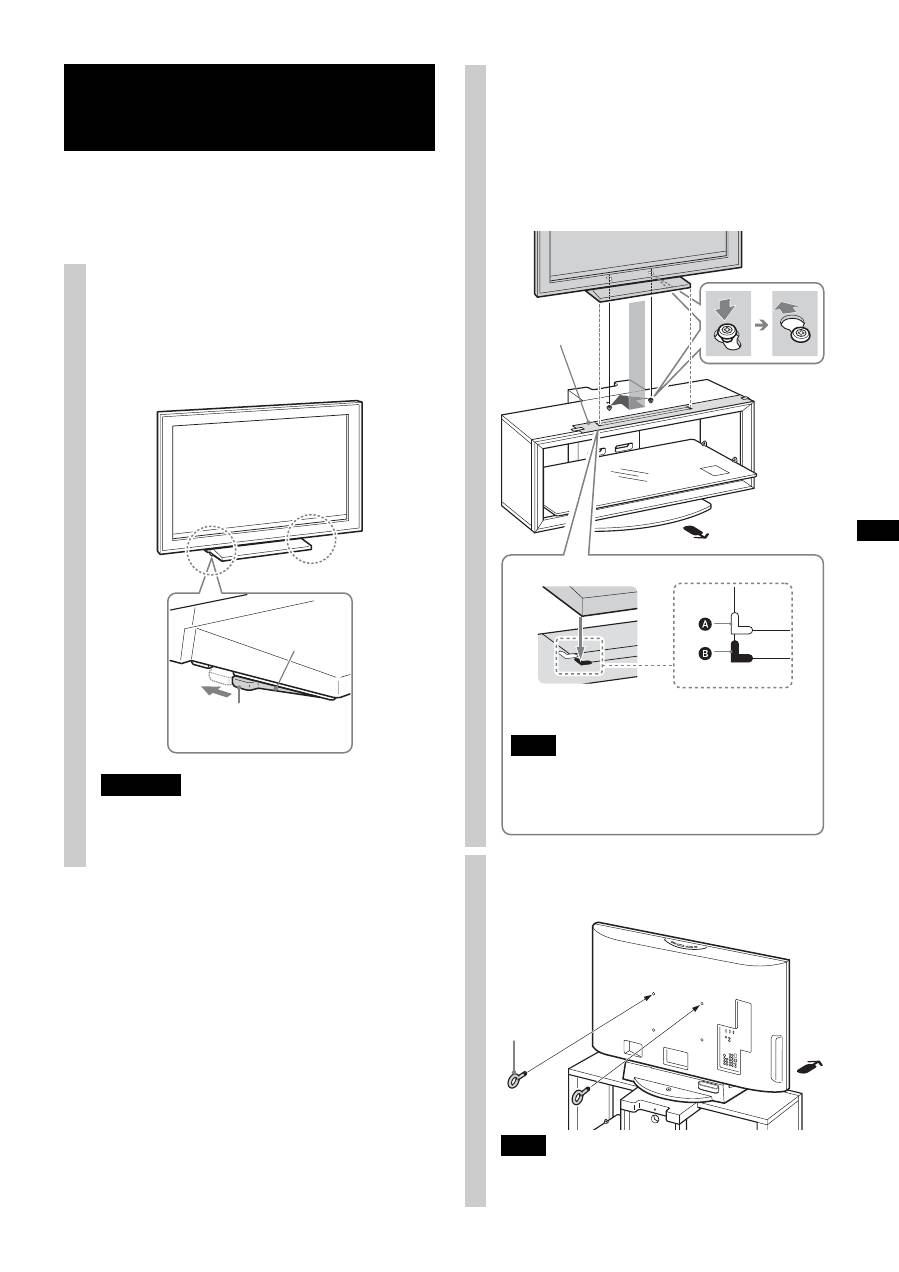
Attach your TV to the Table-Top Stand if it is not already
attached.
Only for the specified swivel models on page 2, follow the
procedure part 1 of Step 4.
Step 4: Installing the TV 1
Adjust the position of the swivel
plate to the center (For swivel
models only).
Before installing the TV, align the tab of the swivel
plate with the notch in the Table-Top Stand.
WARNING
If the swivel plate is not adjusted correctly, the TV will
not be installed securely and it may fall.
Tab
Swivel plate
For swivel models only
2
Install the TV onto the TV Stand.
1
Match the outline of the Table-Top Stand to the outline
of the TV screen size and corner marks on the paper
template, so that the holes at the bottom of the Table-Top
Stand align to the sleeves which were attached in part 1
of Step 3.
2
Slide the TV back to lock into place.
3
Remove the paper template from the Top Board.
3
Attach the anchor bolts.
Secure the two supplied anchor bolts to the rear of the TV.
Note
If the two anchor bolts are not used to secure the TV, it may
fall and cause injury.
Paper template
A
The white corner mark is for swivel models.
B
The black corner mark is for non-swivel models.
Note
For 37/40 inch users, whether the TV is swivel model or
not, align the Table-Top Stand with the black corner
mark. (There is no white corner mark on the paper
template for 37/40 inch.)
Only for the specified swivel models on page 2
Anchor bolt
