
Sony HDPS-M1: Table of contents
Table of contents: Sony HDPS-M1
Table of contents
- Table of contents
F:\work\4041445_HDPS-
masterpage:Right
M1_Read\2109917311\2109917311Readme\01GB\01GB03COVTOC.fm
Table of contents
Safety regulations .................................................................................................2
Introduction ..........................................................................................................4
Unpacking .............................................................................................................4
Preparing the HDD Photo Storage and computer ................................................. 5
Troubleshooting .................................................................................................... 7
GB
Technical Support .................................................................................................7
• The following are trademarks of Sony Corporation:
“Memory Stick”, , “MagicGate Memory Stick”, “Memory Stick Duo”,
“ ”, “MagicGate Memory Stick Duo”, “Memory Stick PRO”,
“ ”, “Memory Stick PRO Duo”, “ ”, “MagicGate”, and
“”.
• Microsoft and Windows are registered trademarks of Microsoft Corporation in the United States
and/or other countries.
• Mac and Macintosh are trademarks of Apple Computer Inc., registered in the U.S. and/or other
countries.
• Microdrive is a registered trademark of Hitachi Global Storage Technologies.
• Other system and product names used herein are registered trademarks or trademarks of their
respective manufacturers, although the ™ and ® marks are not used in the text.
®
®
®
®
In this document, Microsoft
Windows
XP Professional and Microsoft
Windows
XP Home
Edition are referred to as Windows XP.
®
®
In this document, Microsoft
Windows
2000 Professional is referred to as Windows 2000.
®
®
In this document, Microsoft
Windows
Millennium Edition is referred to as Windows Me.
GB
3
2-109-917-31(1)
HDPS-M1
F:\work\4041445_HDPS-
masterpage:Left
M1_Read\2109917311\2109917311Readme\01GB\01GB05C02-J.fm
Introduction
Thank you for purchasing the HDD Photo Storage HDPS-M1. This document
explains how to prepare your unit for use. For details about how to use the unit,
refer to the operating instructions in PDF format on the hard disk of the unit.
To locate the operating instructions, refer to “ReadMe.html” on the internal
hard disk of the unit.
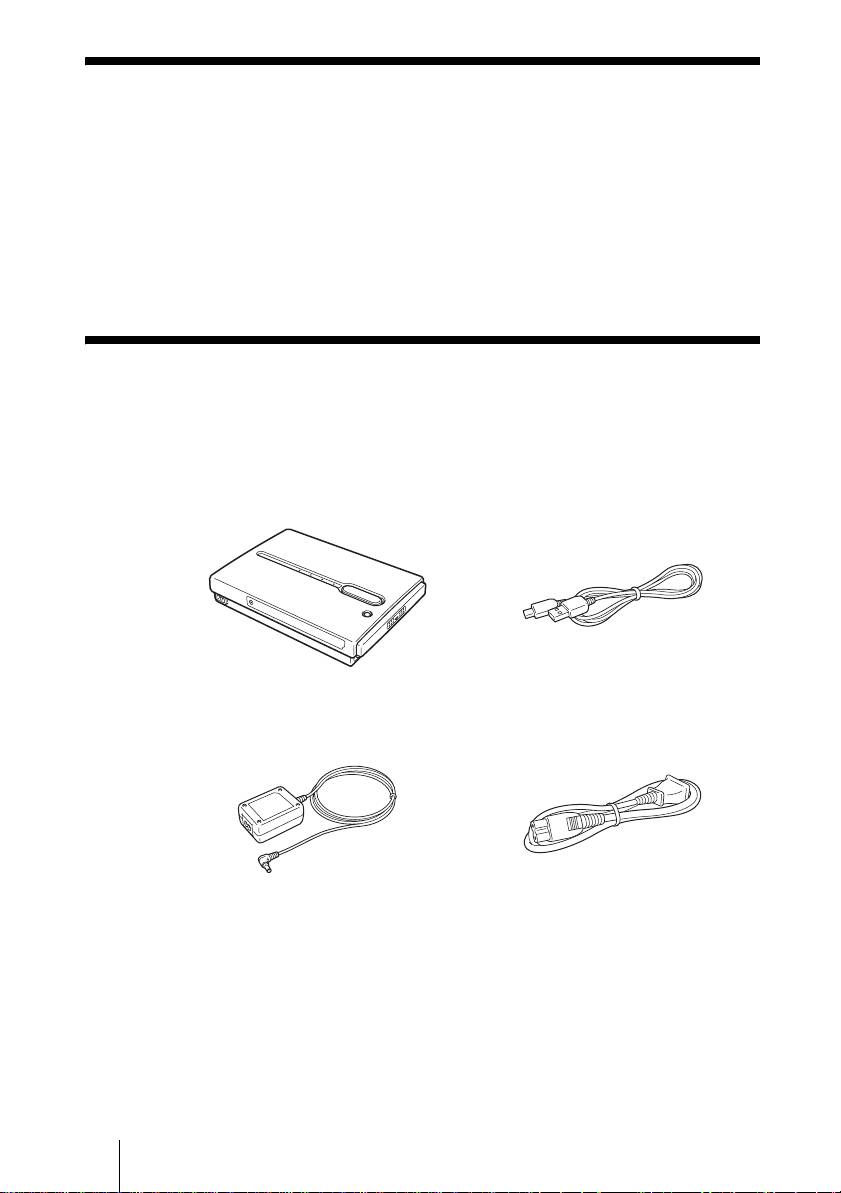
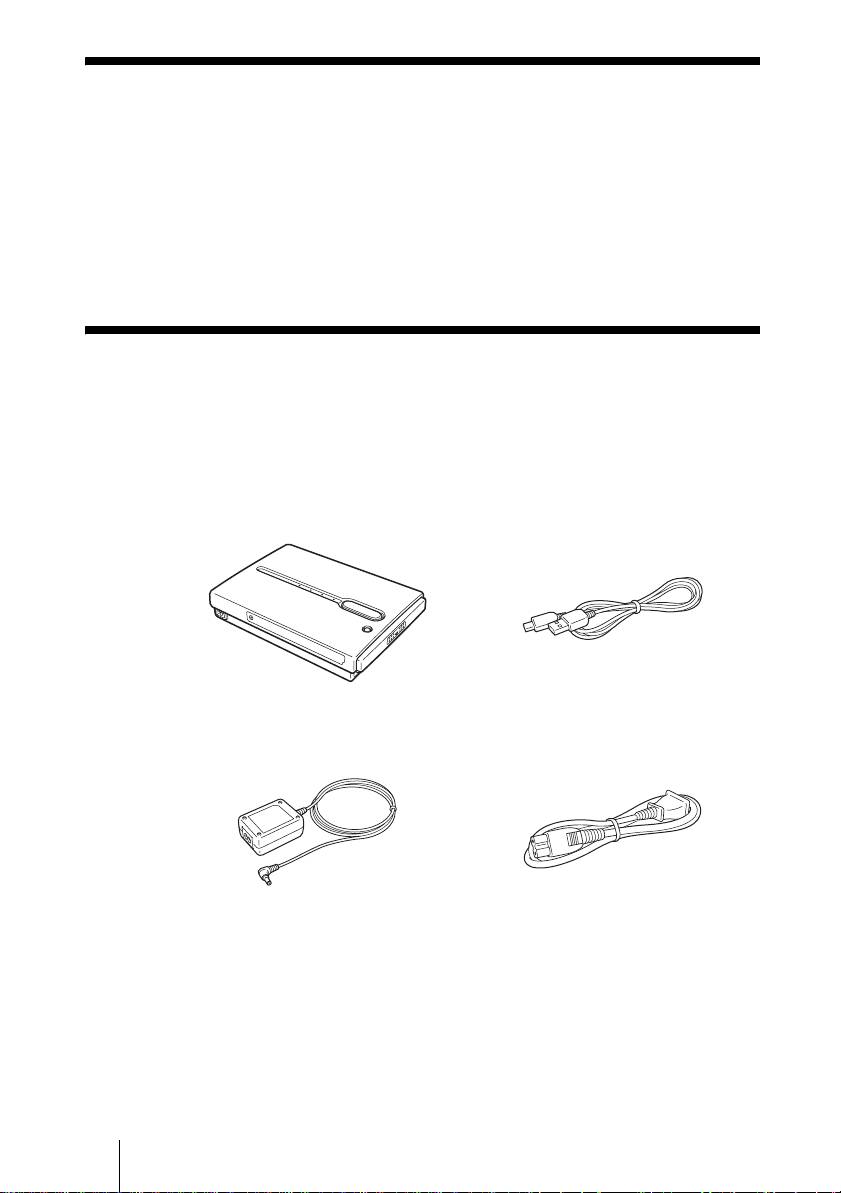
Unpacking
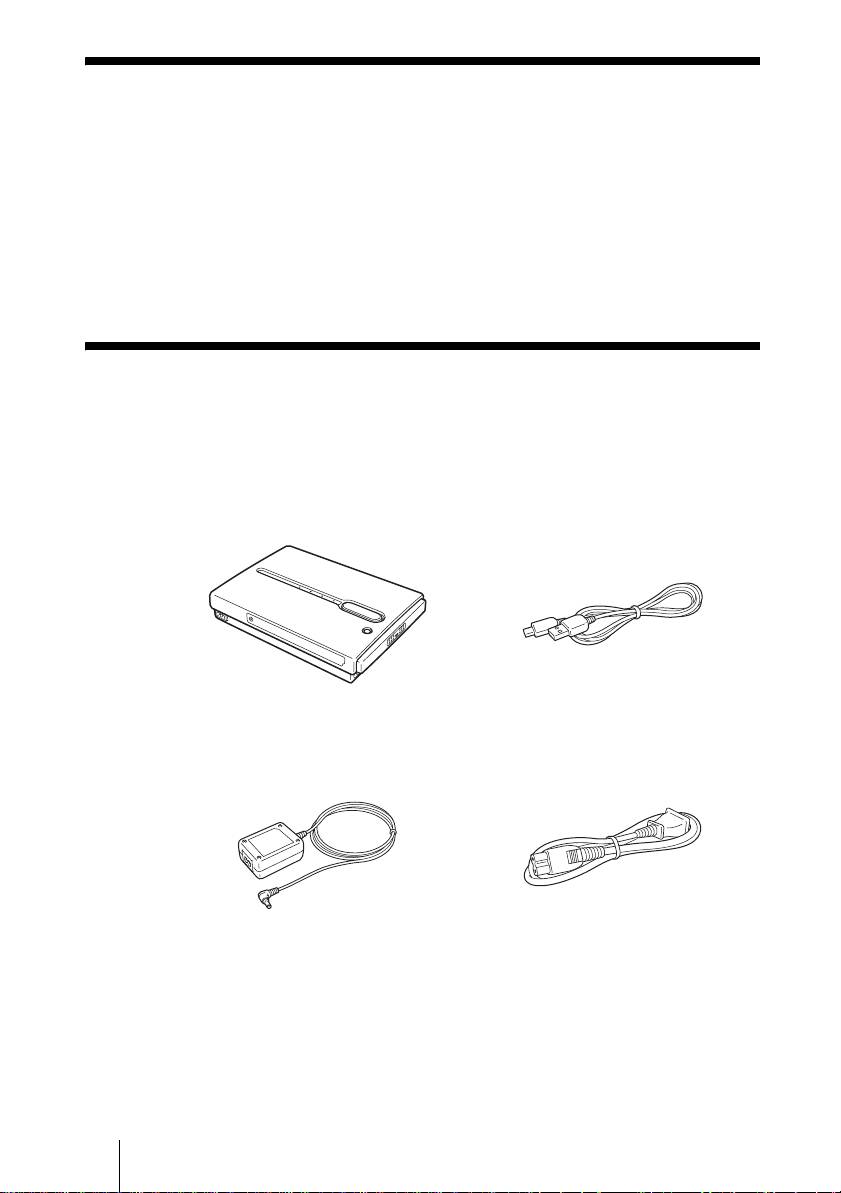
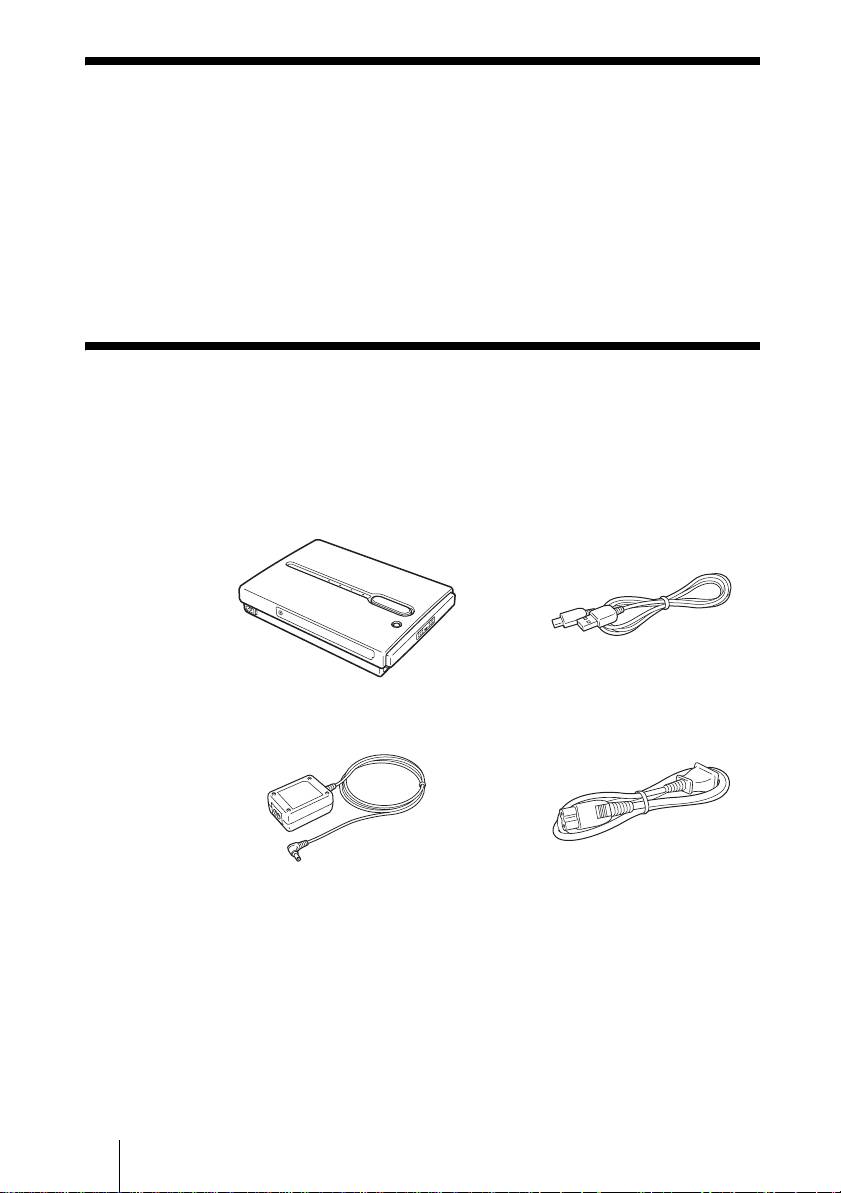
When you unpack the unit, make sure that all the items listed below are
present. If anything is missing, contact your dealer or an authorized service
center in your area.
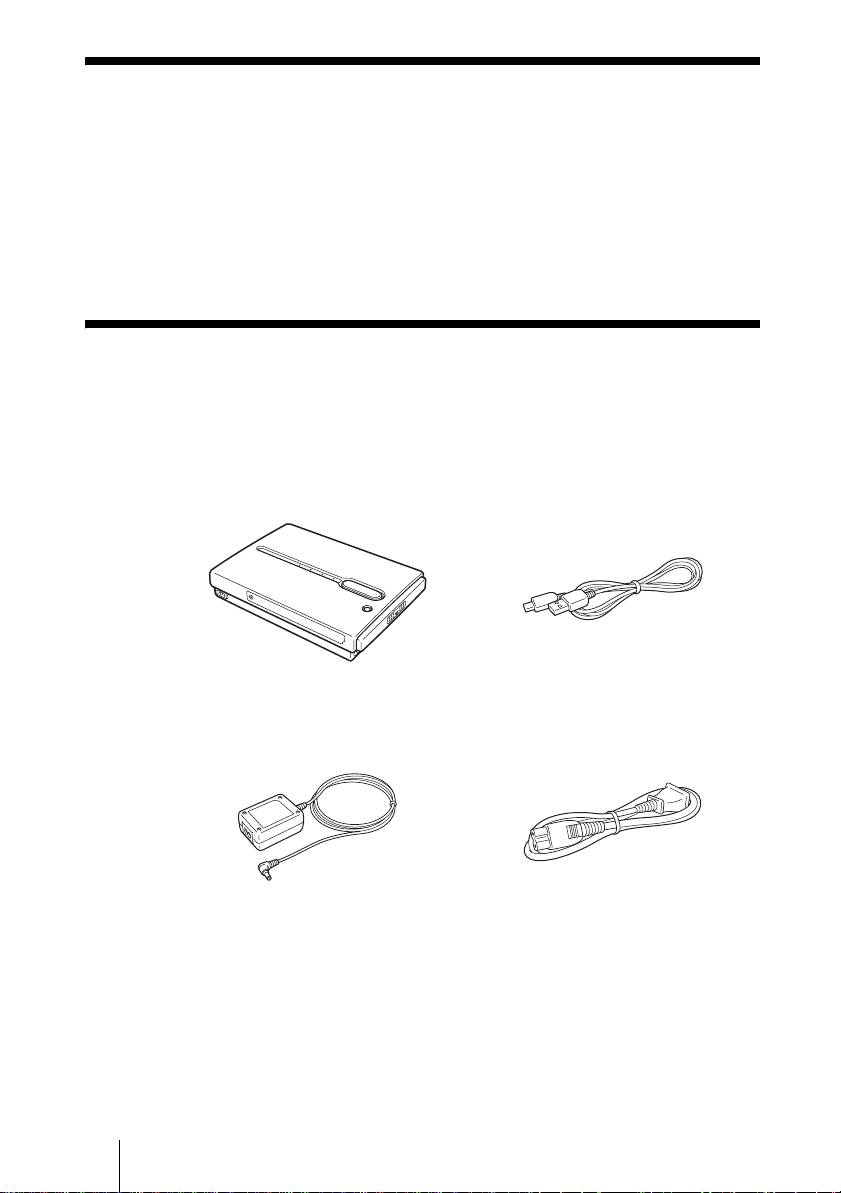
• HDD Photo Storage unit (1) • USB cable (1)
OPEN
• AC power adapter (1)
• Power cord (1)
(SONY, Model HDAC-M1/
MCS-AC1)
• Carrying case (1)
• Hand strap (1)
• Indicator label (1)
• Operating Instructions (on the hard disk)
• PhotoDiary software (on the hard disk)
• Read Me First (this document) (1)
• Warranty card (1)
GB
4
2-109-917-31(1)
HDPS-M1
F:\work\4041445_HDPS-
masterpage:Right
M1_Read\2109917311\2109917311Readme\01GB\01GB05C02-J.fm
Preparing the HDD Photo Storage and
computer
This section describes how to connect the unit to a computer using the USB
cable.
Hint
When the unit is connected to a computer for the first time, the necessary programs are
installed automatically.
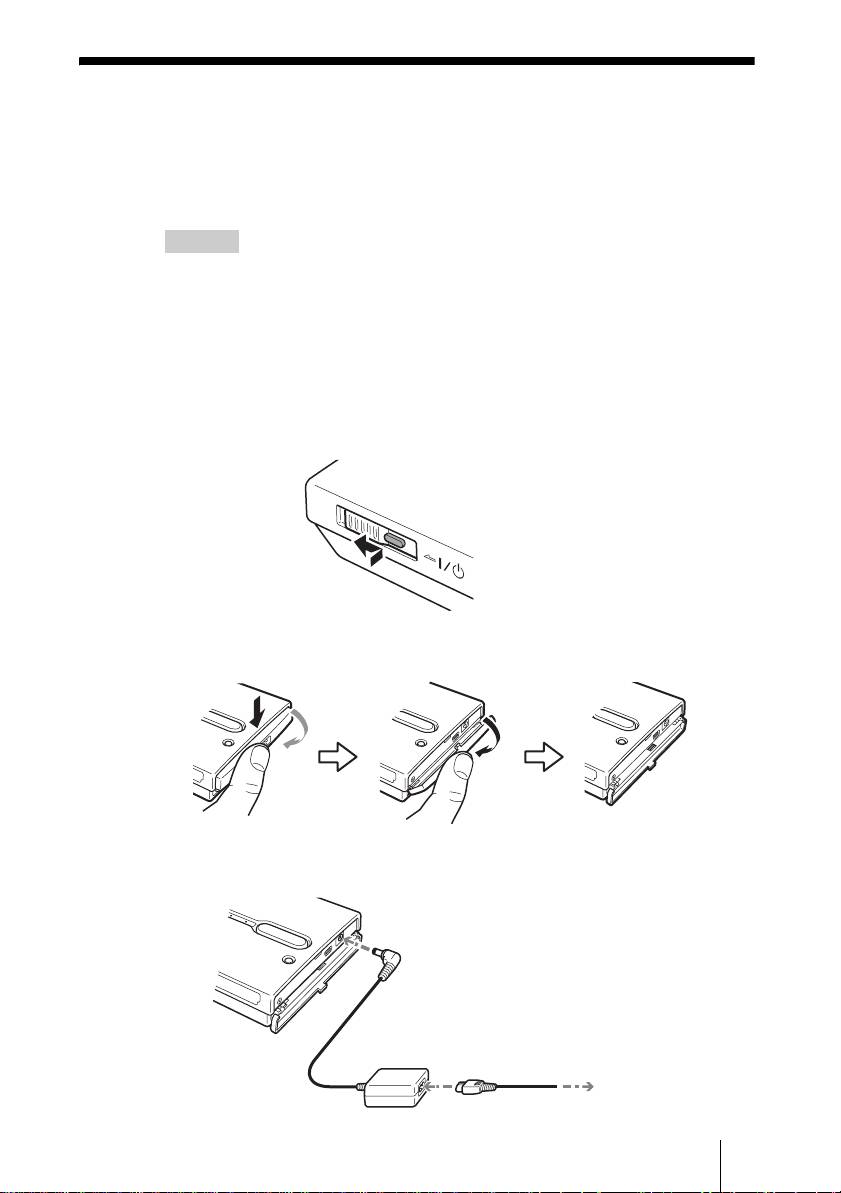
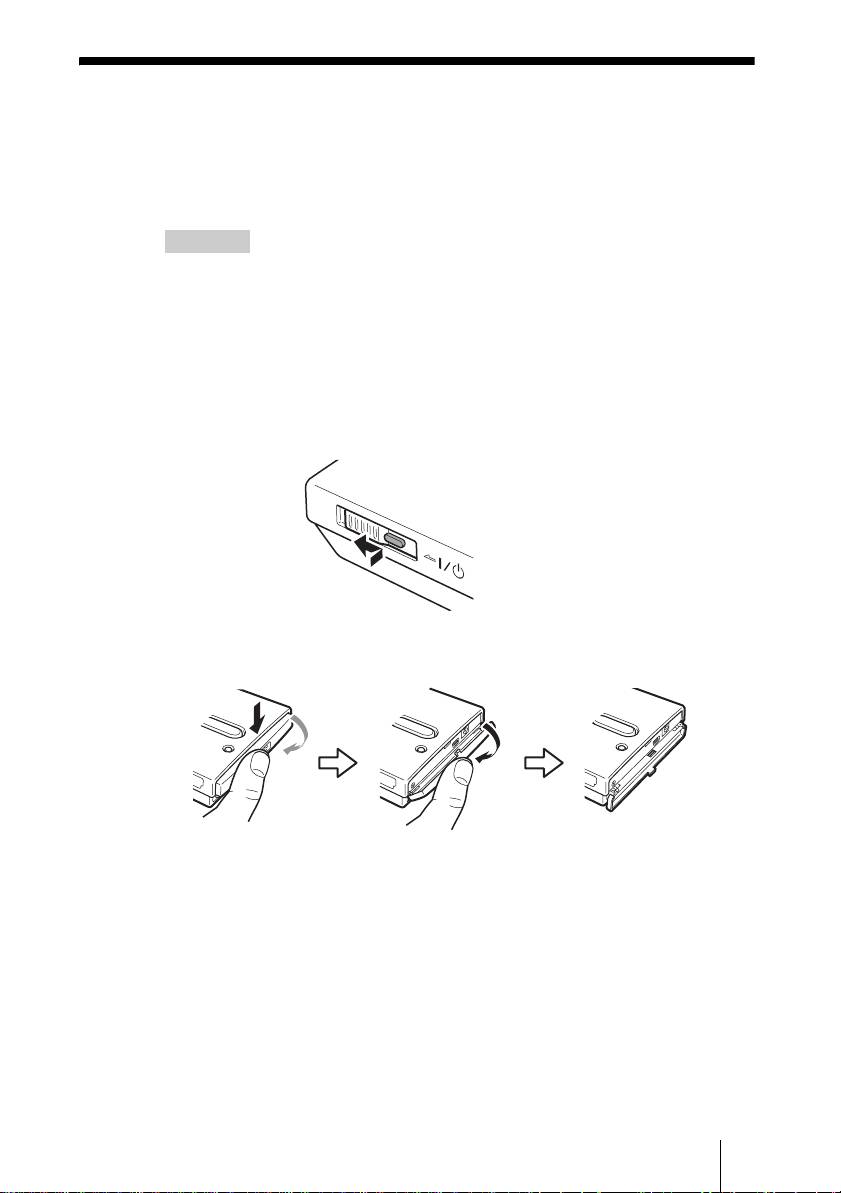
1 Turn on the computer.
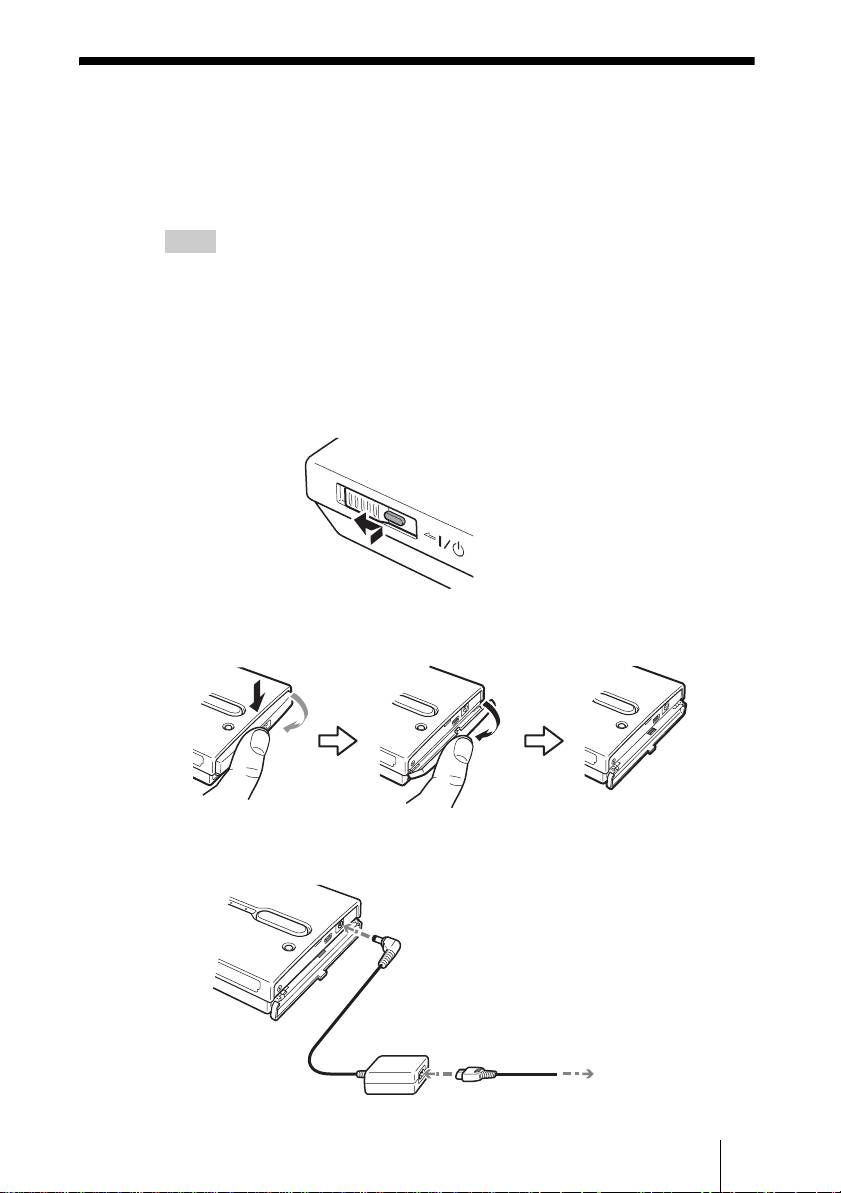
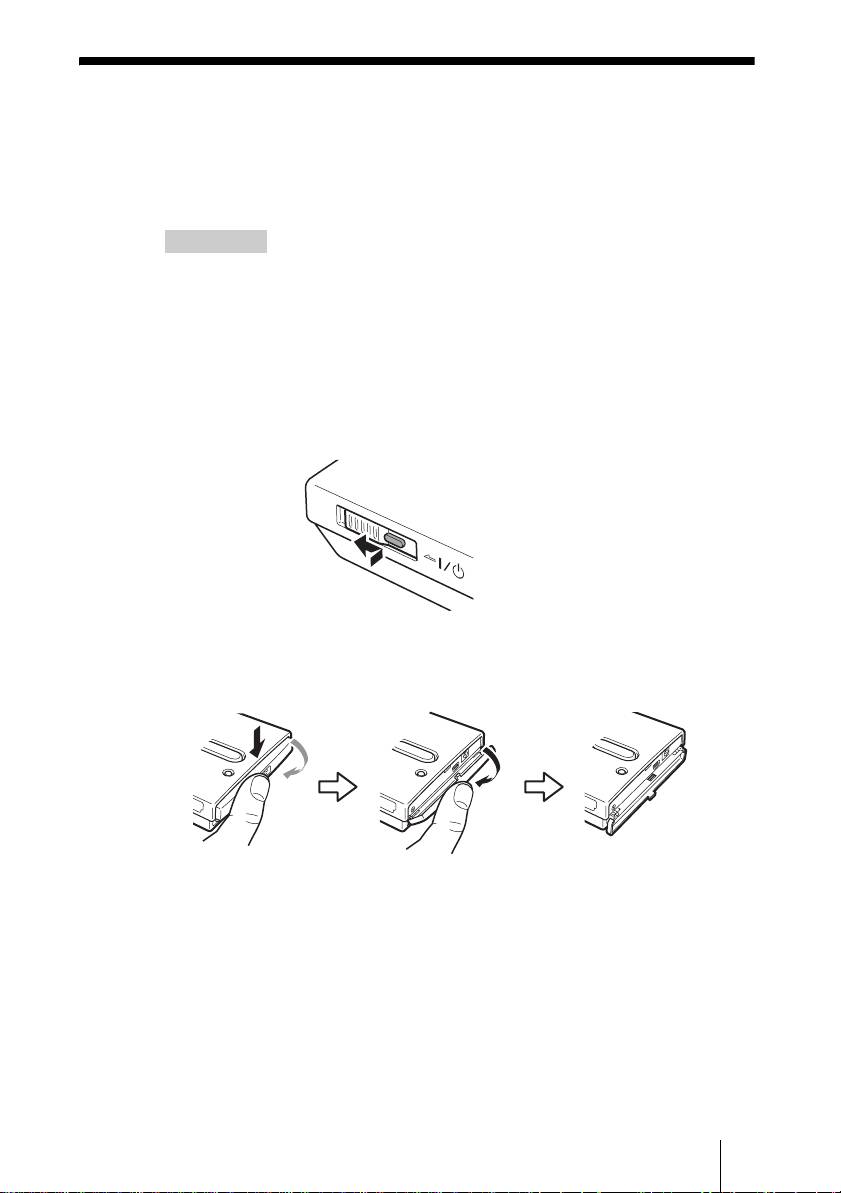
2 Turn on the unit.
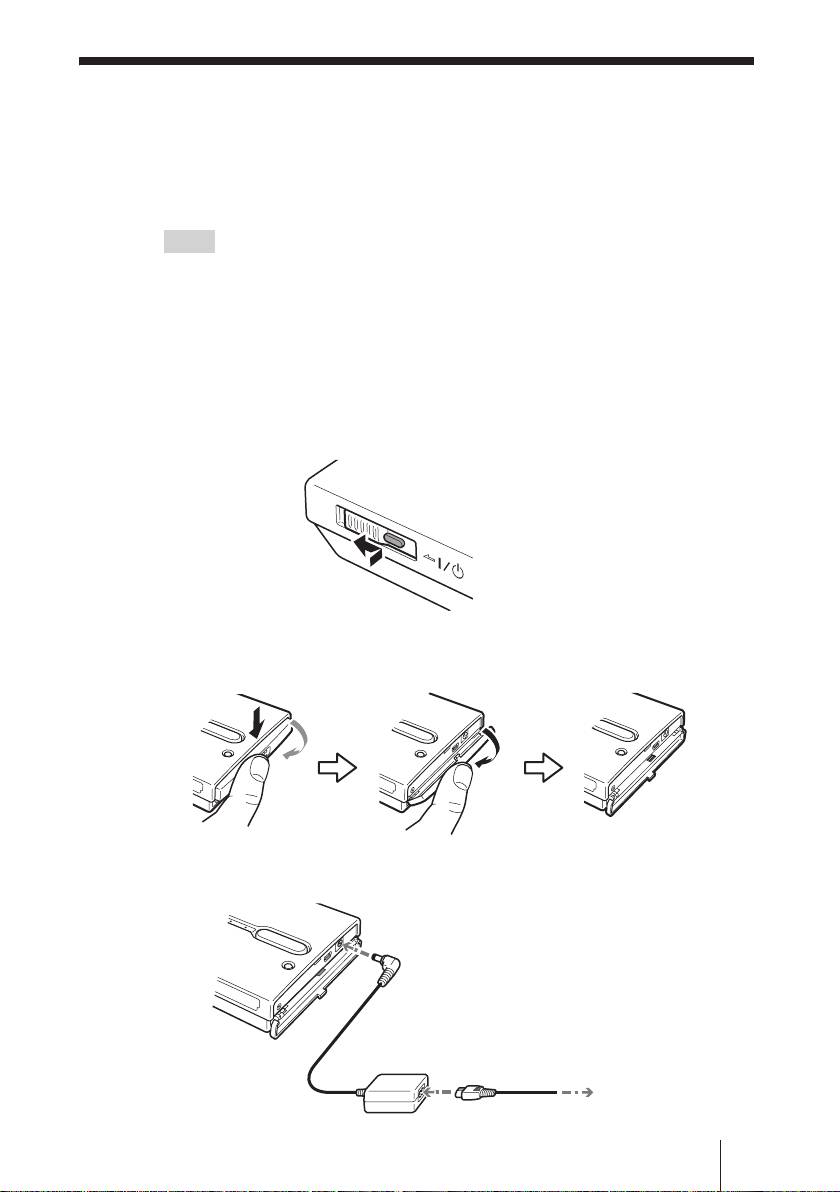
Push and slide the ?/1 (power) switch in the direction of the arrow. Hold
the ?/1 (power) switch until the 1 e (power) indicator lights up.
Hold down and slide in the
direction of the arrow
3 Open the port cover on the right side of the unit.
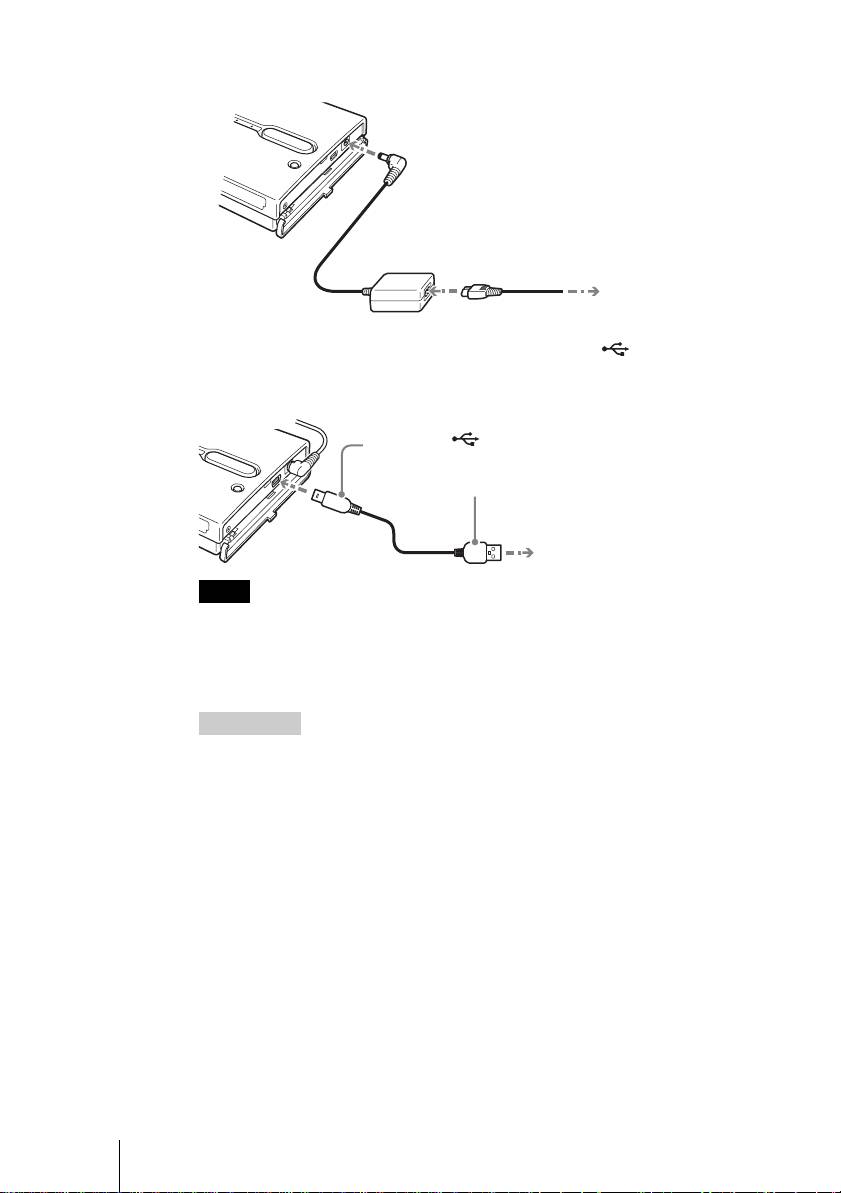
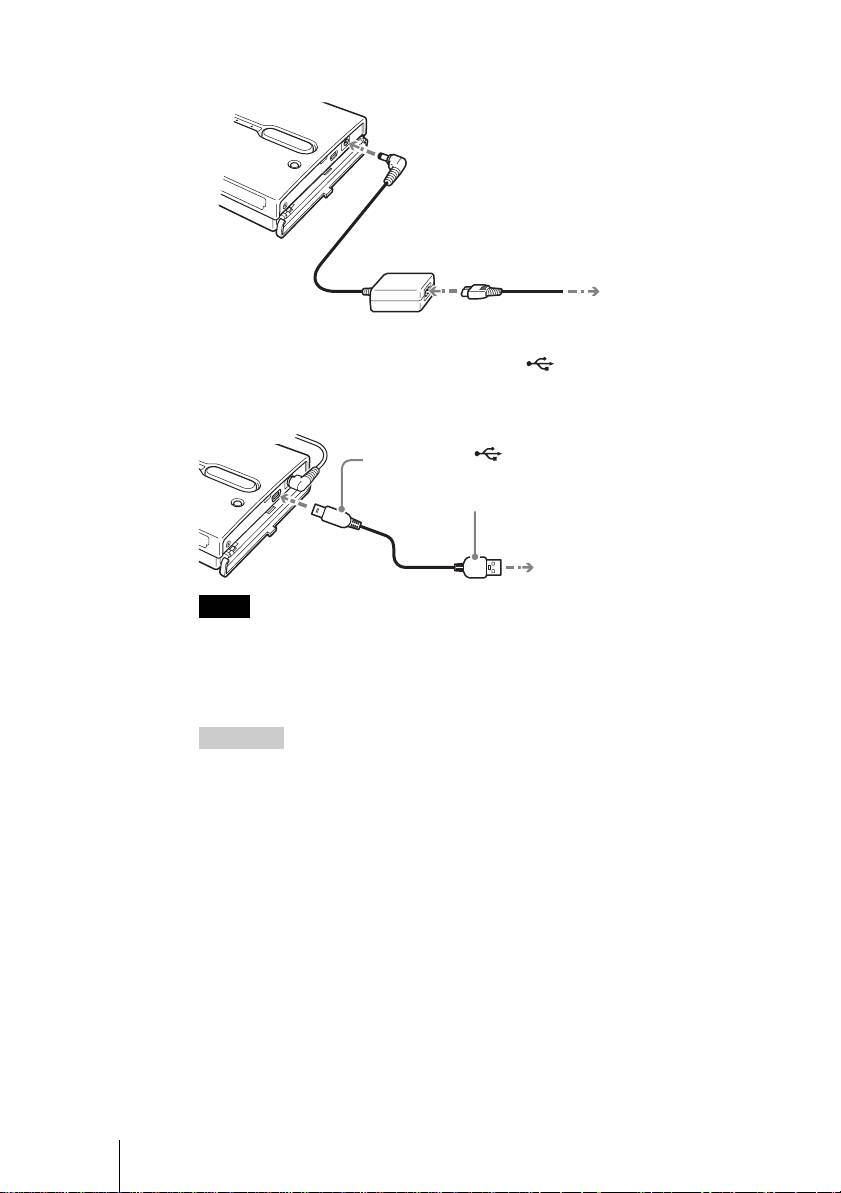
4 Connect the AC power adapter.
GB
5
2-109-917-31(1)
HDPS-M1
H
D
D
H
D
D
H
D
D
OWER
To the
! (DC In) connector
To the AC outlet
F:\work\4041445_HDPS-
masterpage:Left
M1_Read\2109917311\2109917311Readme\01GB\01GB05C02-J.fm
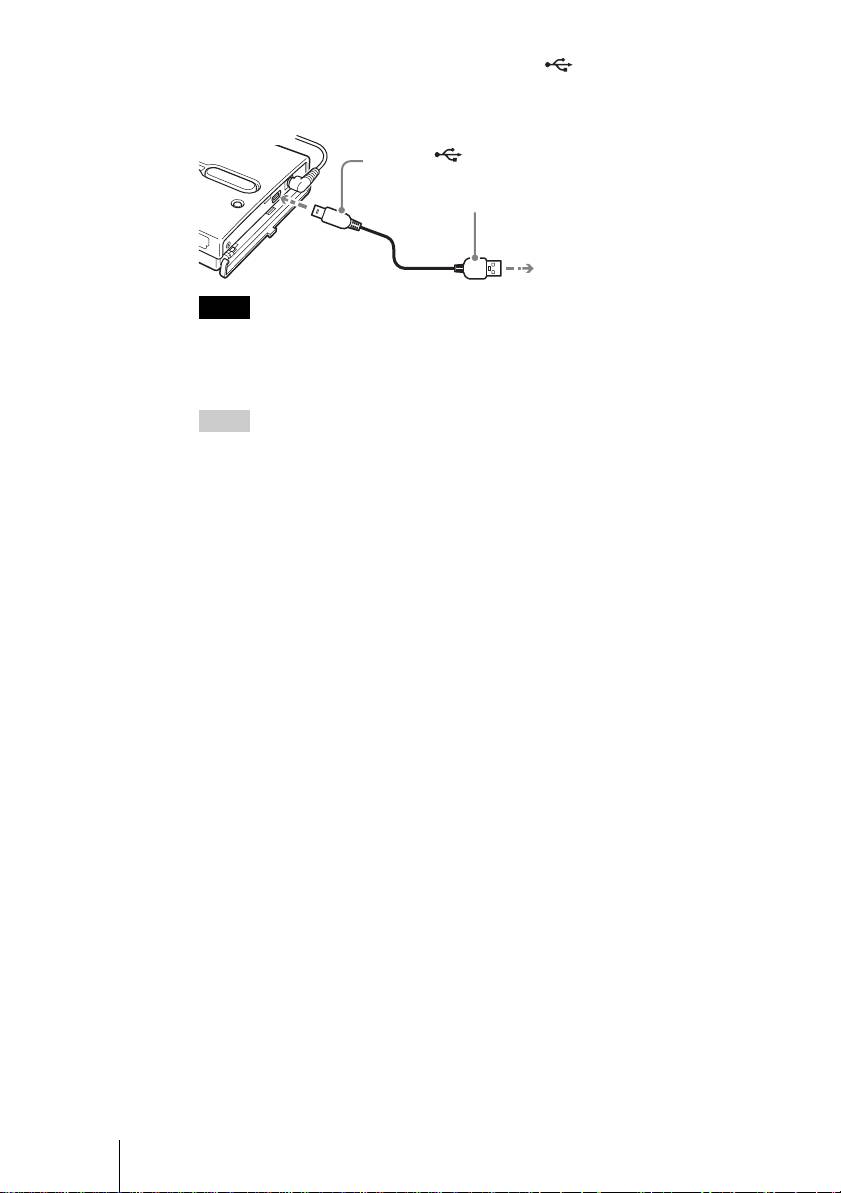
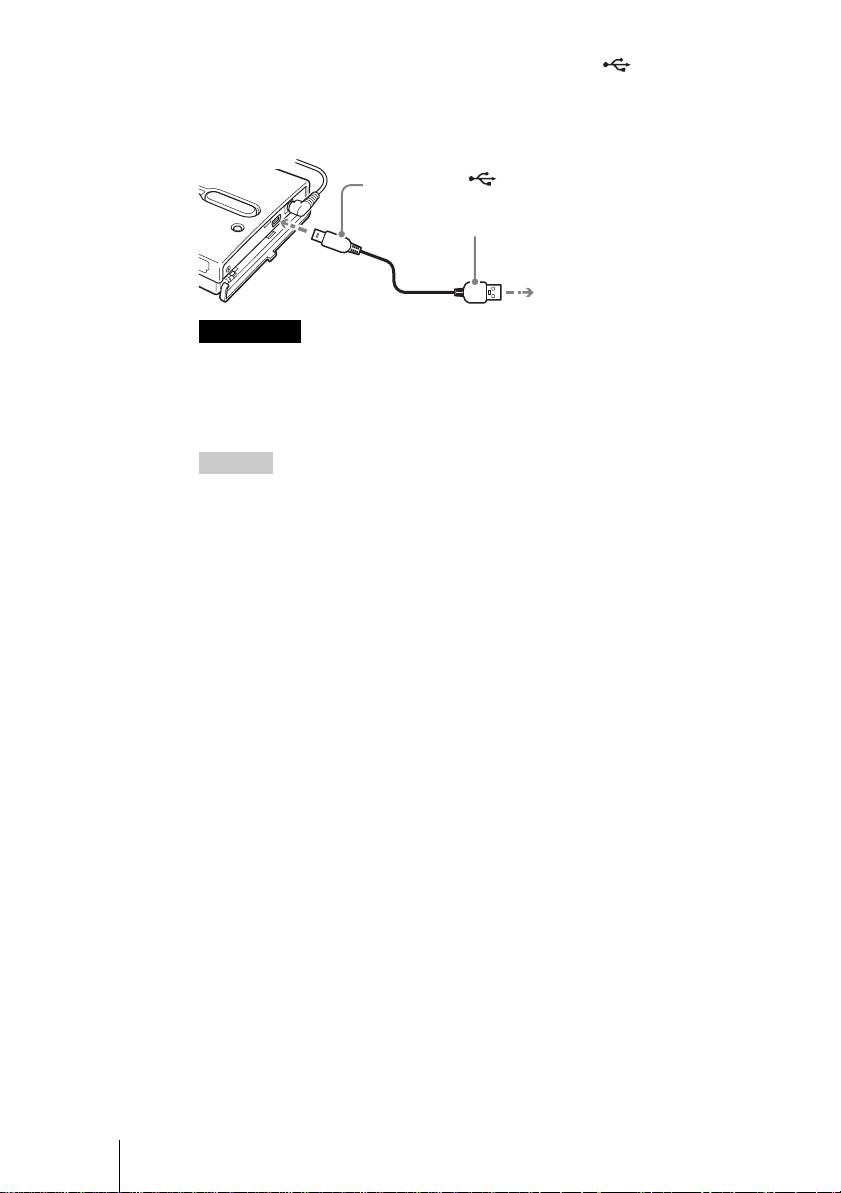
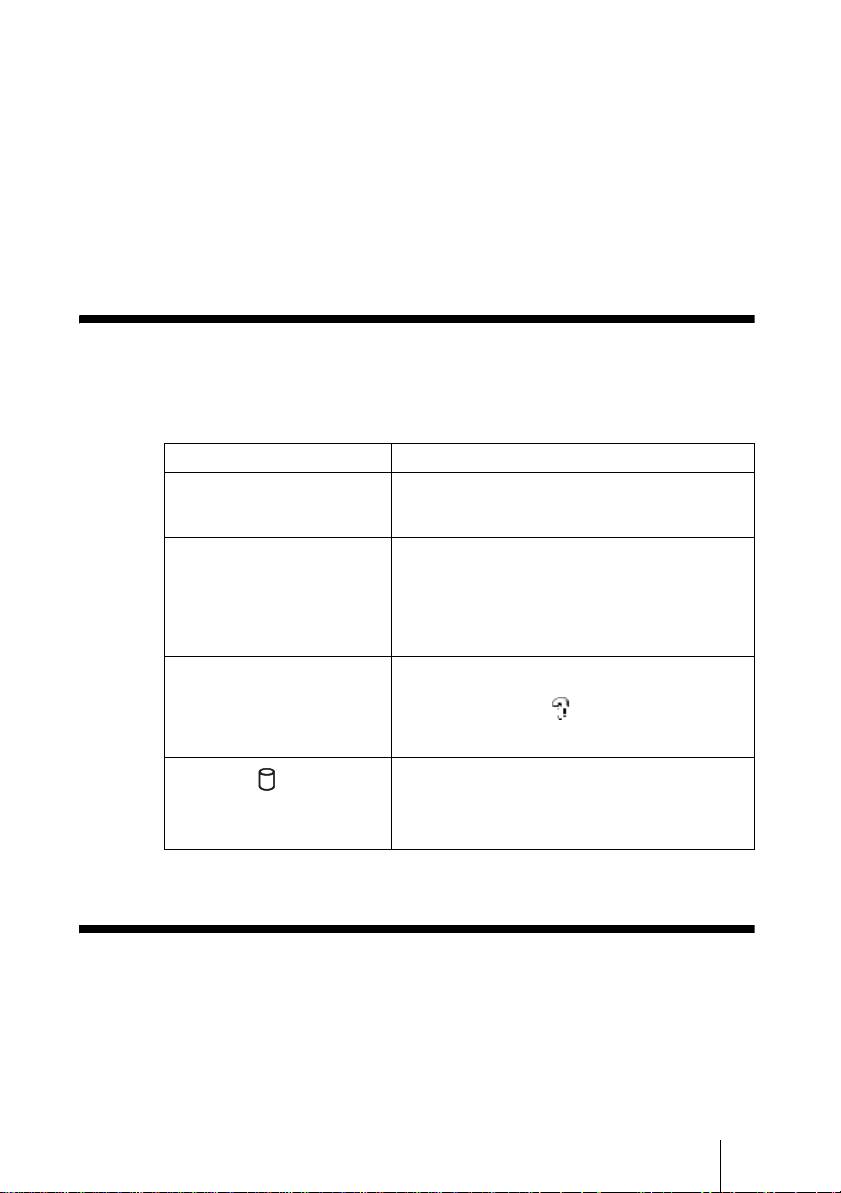
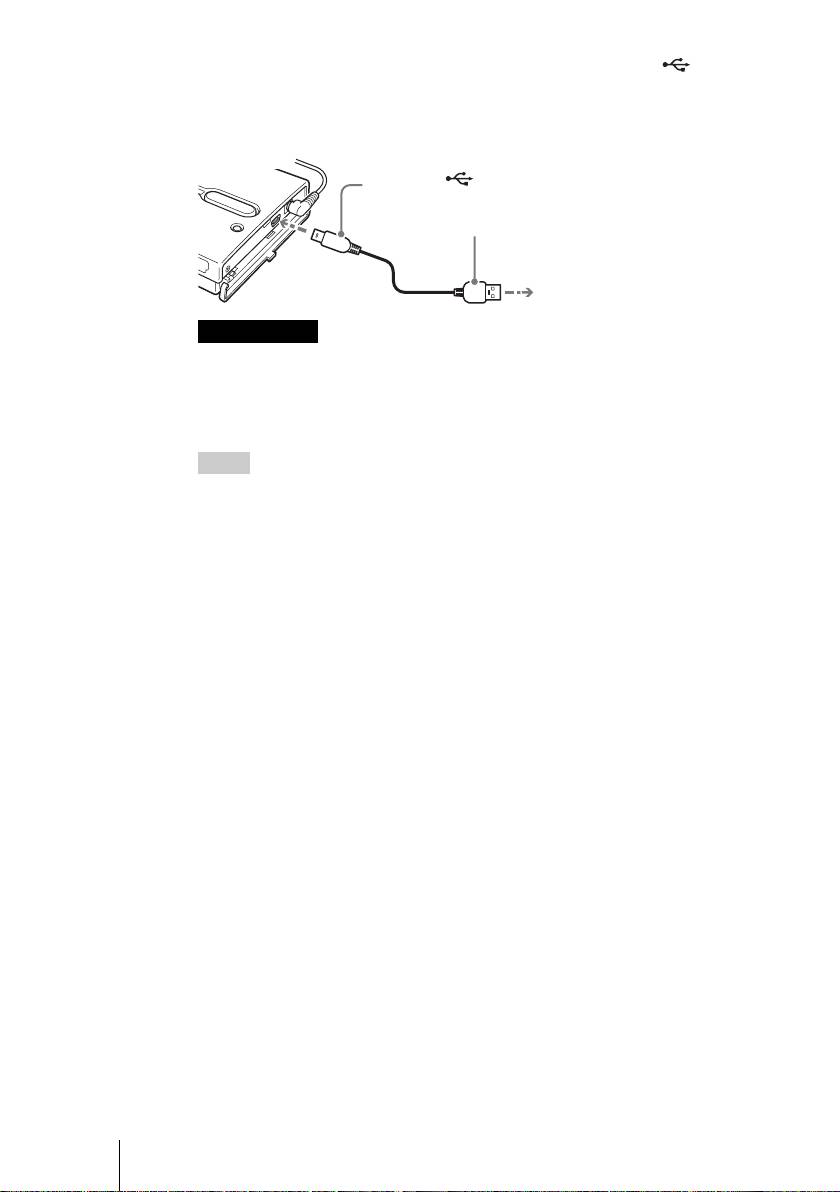
5 Connect the supplied USB cable to the (USB) port. Connect
the other end of the cable to the USB port of your computer.
To the (USB) port
1
To the USB port of your computer
2
Notes
• With Windows XP, when you connect the unit to your computer with the USB cable,
the AutoPlay dialog box will open. Click [Cancel] to close it.
• Correct operation is not guaranteed when the unit is connected to a USB hub. Establish
a direct USB connection.
Hint
When you connect the unit to your computer, the internal battery automatically charges
whether the unit is on or off and the 1 e (power) indicator flashes.
6 Access the internal hard disk of the unit.
• With Windows 2000 or Windows Me
Double-click [My Computer] on your desktop, and then double click the
local disk that corresponds to the internal hard disk of the unit in the “My
Computer” window.
• With Windows XP
On the [Start] menu, click [My Computer], and then click the local disk
that corresponds to the internal hard disk of the unit in the “My
Computer” window.
• With a Macintosh computer
Double-click the icon of the internal hard disk on your desktop.
The “STORE.IPS”, and “HDPS” folders, and the “ReadMe.html” file
appear.
7 Double-click the “ReadMe.html” file and follow the instructions
on the screen to proceed.
GB
6
2-109-917-31(1)
HDPS-M1
F:\work\4041445_HDPS-
masterpage:Right
M1_Read\2109917311\2109917311Readme\01GB\01GB05C02-J.fm
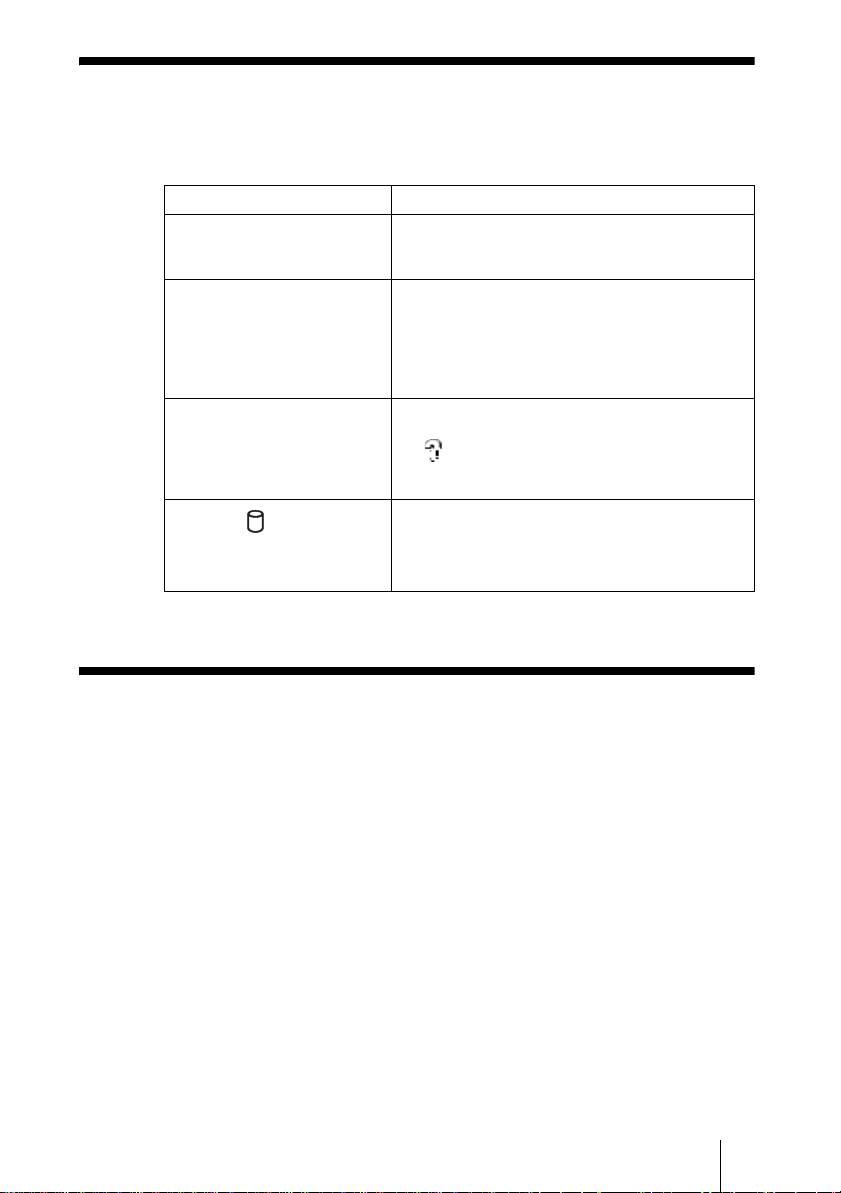
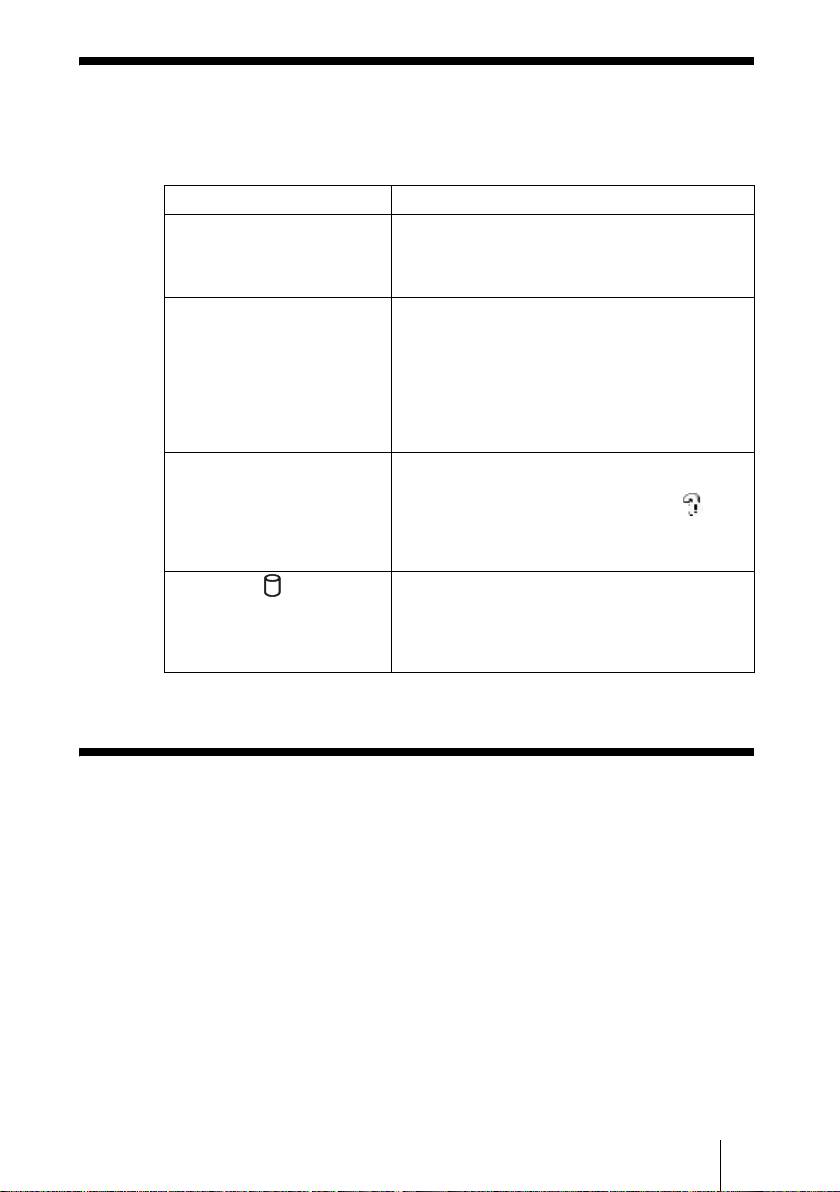
Troubleshooting
In addition to this section, refer to the operating instructions of the unit and the
documentation of your computer.
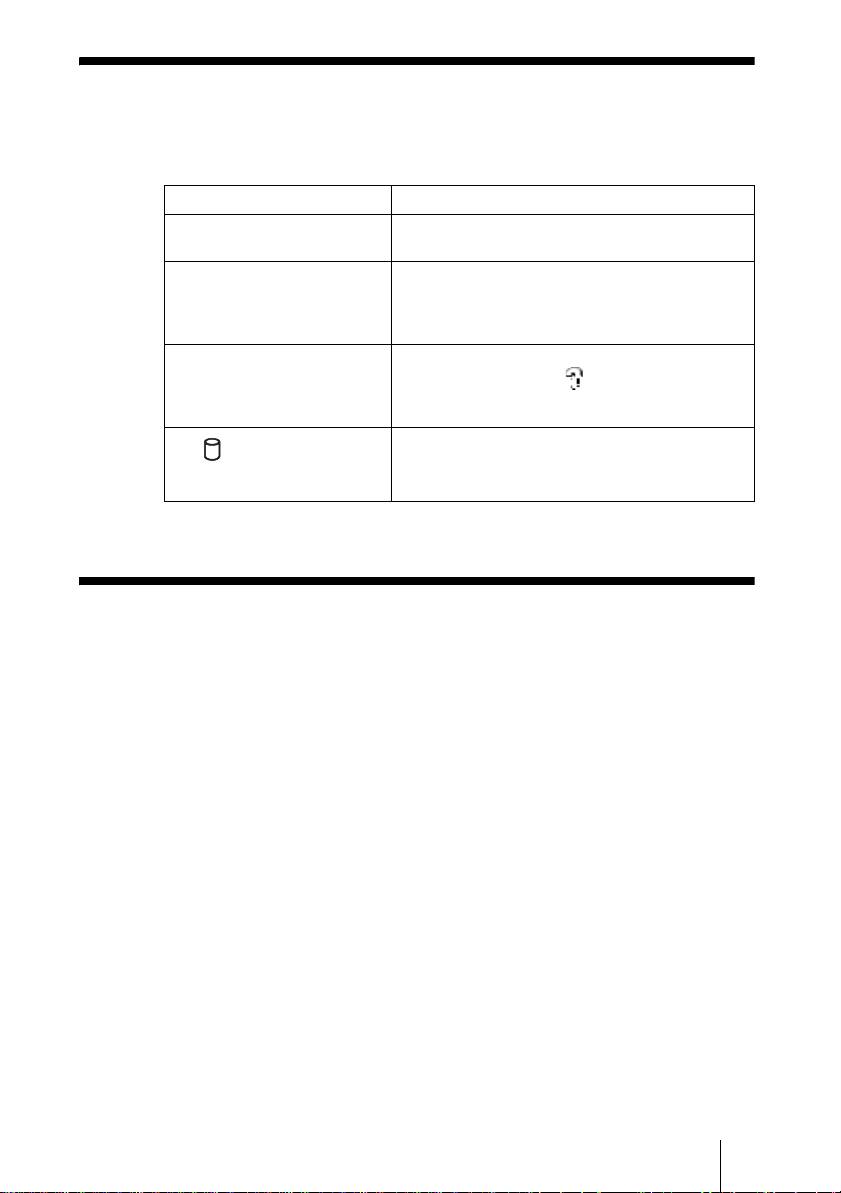
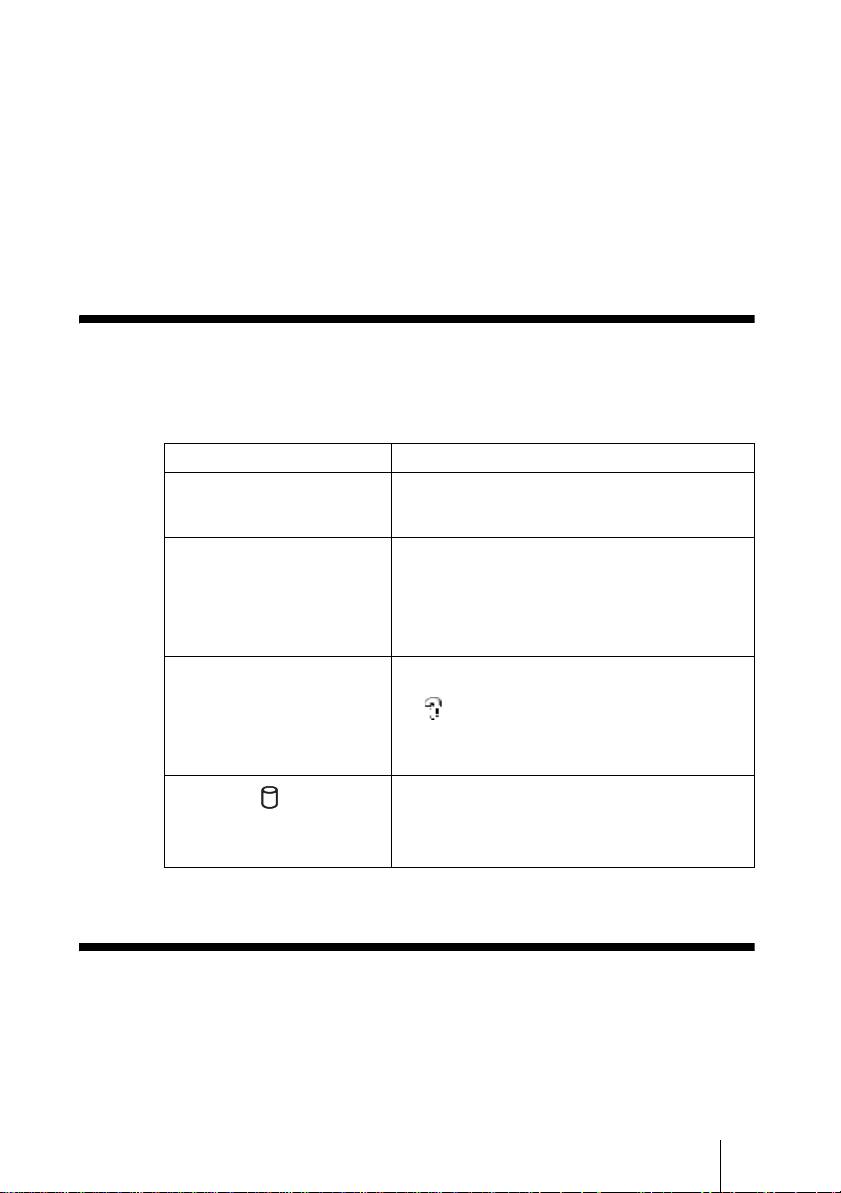
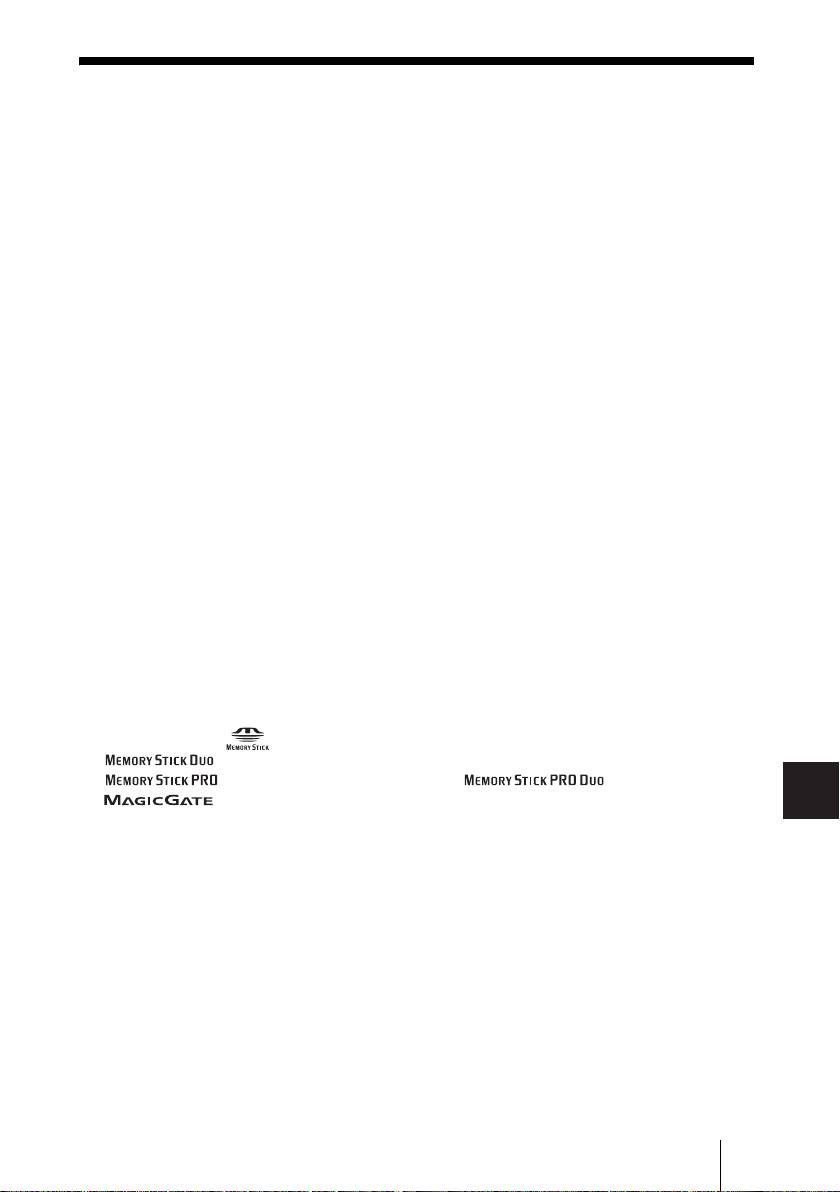
Symptom Cause/remedy
The unit does not start. c The internal battery may be depleted. Connect
the AC power adapter and charge the battery.
The unit turns off
c When the unit is used stand-alone, it turns off
unexpectedly.
automatically after remaining idle for five
minutes, whether operating on internal power or
through the AC power adapter. Restart the unit.
With Windows 2000 or
c Make sure that the “USB Mass Storage Device”
Windows Me, the drive icon of
is not displayed as a in the “Device
the unit does not appear in the
Manager”. If it is, delete it, disconnect the USB
“My Computer” window.
cable from your computer, and then reconnect it.
c Contact your dealer or an authorized service
The (hard disk) indicator is
center.
lit green and the COPY button
is lit yellow or red.
Technical Support
For customers in Europe
Refer to “Customer Support and Service” of the European guarantee
certificate.
GB
7
2-109-917-31(1)
HDPS-M1

masterpage:Left
F:\work\4041445_HDPS-M1_Read\2109917311\2109917311Readme\02FR\02FR01COVTOC.fm
Consignes de sécurité
ATTENTION
Ne laissez pas ce produit à portée de jeunes enfants. En cas d’ingestion de
n’importe quelle pièce de l’appareil, consultez un médecin sans délai.
Pour éviter tout risque d’incendie ou de décharge électrique, n’exposez pas
l’appareil à la pluie ou à l’humidité.
Pour éviter tout risque de décharge électrique, n’ouvrez pas le boîtier du
produit. En cas de besoin, adressez-vous exclusivement à un technicien
qualifié.
Cet appareil doit être utilisé uniquement avec une alimentation SONY, modèle
HDAC-M1/MCS-AC1.
Avertissement
Sony Corporation n’endosse aucune responsabilité en cas de perte de données stockées sur le disque
dur de cet appareil, ou de données copiées sur « Memory Stick » ou carte CompactFlash à l’aide de
votre ordinateur.
FR
2
2-109-917-31(1)
HDPS-M1
masterpage:Right
F:\work\4041445_HDPS-M1_Read\2109917311\2109917311Readme\02FR\02FR01COVTOC.fm
Table des matières
Consignes de sécurité ...........................................................................................2
Introduction ..........................................................................................................4
Déballage ..............................................................................................................4
Préparation de l’Unité de stockage de photos et de l’ordinateur. .........................5
Dépannage ............................................................................................................7
Support technique ................................................................................................. 7
FR
• Les marques commerciales suivantes appartiennent à Sony Corporation :
«Memory Stick», , «MagicGate Memory Stick », « Memory Stick Duo »,
« », « MagicGate Memory Stick Duo», «Memory Stick PRO»,
« », « Memory Stick PRO Duo », « », « MagicGate » et
«».
• Microsoft et Windows sont des marques déposées par Microsoft Corporation aux Etats-Unis et
dans d’autres pays.
• Mac et Macintosh sont des marques commerciales d’Apple Computer Inc., déposées aux Etats-
Unis et dans d’autres pays.
• Microdrive est une marque déposée par Hitachi Global Storage Technologies.
• Les autres noms de systèmes et de produits mentionnés dans ce manuel sont des marques
déposées ou des marques commerciales appartenant à leurs fabricants, bien que les symboles ™
et ® ne figurent pas dans le texte.
®
®
®
®
Dans ce document, Microsoft
Windows
XP Professionnel et Microsoft
Windows
XP Édition
Familiale sont désignés du terme collectif abrégé de Windows XP.
®
®
Dans ce document, Microsoft
Windows
2000 Professionnel est désigné du terme de Windows
2000.
®
®
Dans ce document, Microsoft
Windows
Millenium Edition est désigné du terme de Windows
Me.
FR
3
2-109-917-31(1)
HDPS-M1
F:\work\4041445_HDPS-
masterpage:Left
M1_Read\2109917311\2109917311Readme\02FR\02FR05C02-J.fm
Introduction
Merci d’avoir fait l’acquisition de l’Unité de stockage de photos HDPS-M1.
Ce document vous explique comment préparer l’appareil avant utilisation.
Pour plus de précisions sur l’utilisation de l’appareil, reportez-vous au mode
d’emploi au format PDF qui est fourni sur le disque dur de l’unité. Pour
localiser ce mode d’emploi, consultez le fichier « ReadMe.html » qui se trouve
sur le disque dur de l’unité.
Déballage
En déballant l’appareil, assurez-vous que la boîte contient bien tous les
éléments énumérés ci-dessous. S’il manque quelque chose, contactez votre
revendeur ou le centre de SAV agréé de votre région.
• Unité de stockage de photos (1) • Câble USB (1)
OPEN
• Adaptateur secteur (1)
• Cordon d’alimentation (1)
(SONY, Modèle HDAC-M1/
MCS-AC1)
• Étui de transport (1)
• Dragonne (1)
• Étiquette d’information (1)
• Mode d’emploi (sur le disque dur)
• Logiciel PhotoDiary (sur le disque dur)
• Lisez-moi en premier (ce document) (1)
• Carte de garantie (1)
FR
4
2-109-917-31(1)
HDPS-M1
F:\work\4041445_HDPS-
masterpage:Right
M1_Read\2109917311\2109917311Readme\02FR\02FR05C02-J.fm
Préparation de l’Unité de stockage de
photos et de l’ordinateur.
Cette section explique comment raccorder l’unité à un ordinateur grâce au
câble de liaison USB.
Conseil
Lorsqu’on raccorde l’appareil à l’ordinateur pour la première fois, les programmes
nécessaires s’installent automatiquement.
1 Mettez l’ordinateur sous tension.
2 Mettez l’appareil sous tension.
Appuyez sur le commutateur ?/1 (alimentation) et faites-le glisser dans le
sens de la flèche. Maintenez appuyé le commutateur ?/1 (alimentation)
jusqu’à ce que le témoin 1 e (alimentation) s’allume.
Appuyez et faites glisser
dans la direction de la flèche
3 Ouvrez le capot des connecteurs, sur le côté droit de l’unité.
4 Branchez l’adaptateur secteur.
FR
5
2-109-917-31(1)
HDPS-M1
H
D
D
H
D
D
H
D
D
OWER
Vers la prise
! (DC In/Alimentation)
Vers la prise secteur
F:\work\4041445_HDPS-
masterpage:Left
M1_Read\2109917311\2109917311Readme\02FR\02FR05C02-J.fm
5 Branchez le câble USB fourni au connecteur (USB).
Branchez l’autre extrémité du câble à un port USB de
l’ordinateur.
Vers le port (USB)
1
Vers le port USB de l’ordinateur
2
Remarques
• Avec Windows XP, lorsque vous raccordez l’unité à votre ordinateur à l’aide du câble
USB, la boîte de dialogue de prise en charge automatique s’ouvre. Cliquez sur
[Annuler] pour la refermer.
• Le bon fonctionnement n’est pas garanti lorsqu’on branche l’appareil sur un
concentrateur (hub) USB. Réalisez un branchement USB direct.
Conseil
Lorsque vous raccordez l’appareil à votre ordinateur, la charge de la batterie intégrée
débute automatiquement, que l’appareil soit allumé ou éteint, et le témoin 1 e
(alimentation) clignote.
6 Accédez au disque dur de l’unité.
• Avec Windows 2000 ou Windows Me
Double-cliquez sur l’icône [Poste de travail] de votre Bureau, puis
double-cliquez sur le disque local qui correspond au disque dur interne
de l’unité dans la fenêtre « Poste de travail ».
• Avec Windows XP
Déroulez le menu [Démarrer], cliquez sur [Poste de travail], puis cliquez
sur le disque local qui correspond au disque dur interne de l’unité dans la
fenêtre « Poste de travail ».
• Avec un ordinateur Macintosh
Double-cliquez sur l’icône du disque dur de l’unité qui s’affiche sur le
Bureau.
Les dossiers « STORE.IPS » et « HDPS » apparaissent, ainsi que le fichier
« ReadMe.html ».
7 Double-cliquez sur le fichier « ReadMe.html », puis suivez les
instructions affichées à l’écran.
FR
6
2-109-917-31(1)
HDPS-M1
F:\work\4041445_HDPS-
masterpage:Right
M1_Read\2109917311\2109917311Readme\02FR\02FR05C02-J.fm
Dépannage
Pour compléter les informations ci-dessous, reportez-vous au mode d’emploi
de l’unité de stockage et à la documentation de votre ordinateur.
Symptôme Cause probable/remède
L’appareil ne s’allume pas. c La batterie intégrée est peut-être déchargée.
Raccordez l’adaptateur secteur pour recharger la
batterie .
L’appareil s’éteint de façon
c Lorsque l’appareil est utilisé en mode
inattendue.
autonome, il se met automatiquement hors
tension au bout de cinq minutes en cas de non-
utilisation, qu’il fonctionne sur la batterie
interne ou grâce à l’adaptateur secteur.
Rallumez l’appareil .
Avec Windows 2000 ou
c Vérifiez que l’entrée « Périphérique de stockage
Windows Me, l’icône du disque
de masse USB » n’est pas assortie de l’icône
dur de l’unité ne s’affiche pas
dans la fenêtre du « Gestionnaire de
dans la fenêtre « Poste de
périphériques ». Si c’est le cas, débranchez le
travail »
câble USB, puis rebranchez-le.
c Contactez votre revendeur ou un centre de
Le témoin (disque dur) est
service agréé.
allumé en vert et la touche
COPY est allumée en jaune ou
en rouge.
Support technique
Pour les consommateurs en Europe
Reportez-vous à la section relative au support technique et au service après vente
du certificat de garantie pour l’Europe.
FR
7
2-109-917-31(1)
HDPS-M1

F:\work\4041445_HDPS-
Hauptseite:Links
M1_Read\2109917311\2109917311Readme\03DE\03DE03COVTOC.fm
Sicherheitsbestimmungen
WARNUNG
Von Kindern fernhalten. Falls ein Teil des Geräts verschluckt wird, unverzüglich
einen Arzt aufsuchen.
Zur Verhinderung von Brand und Stromschlägen das Gerät vor Regen und
Feuchtigkeit schützen.
Zur Vermeidung von Stromstößen Gehäuse nicht öffnen. Wartungsarbeiten
sollten nur von qualifiziertem Personal durchgeführt werden.
Nur mit SONY Netzteil Modell HDAC-M1/MCS-AC1 verwenden.
Für Kunden in Deutschland
Entsorgungshinweis: Bitte werfen Sie nur entladene Batterien in die Sammelboxen beim Handel
oder den Kommunen. Entladen sind Batterien in der Regel dann, wenn das Gerät abschaltet und
signalisiert „Batterie leer“ oder nach längerer Gebrauchsdauer der Batterien „nicht mehr
einwandfrei funktioniert“. Um sicherzugehen, kleben Sie die Batteriepole z.B. mit einem
Klebestreifen ab oder geben Sie die Batterien einzeln in einen Plastikbeutel.
Haftungsausschluss
Die Sony Corporation übernimmt keine Verantwortung für den Verlust von Daten, die auf der
Festplatte dieses Geräts gespeichert oder mit Ihrem Computer auf einen „Memory Stick“ und/oder
auf eine CompactFlash Karte übertragen wurden.
Diese Ausrüstung erfüllt die Europäischen EMC-Bestimmungen für die Verwendung in folgender/
folgenden Umgebung(en):
• Wohngegenden
• Gewerbegebiete
• Leichtindustriegebiete
(Diese Ausrüstung erfüllt die Bestimmungen der Norm EN55022, Klasse B.)
DE
2
2-109-917-31(1)
HDPS-M1
F:\work\4041445_HDPS-
Hauptseite:Rechts
M1_Read\2109917311\2109917311Readme\03DE\03DE03COVTOC.fm
Inhalt
Sicherheitsbestimmungen ..................................................................................... 2
Einführung ............................................................................................................4
Auspacken ............................................................................................................4
Vorbereiten des Fotospeicherlaufwerks und des Computers ...............................5
Fehlerbehebung .....................................................................................................7
Technischer Kundendienst .................................................................................... 7
DE
• Folgende Produkte sind Warenzeichen der Sony Corporation.
„Memory Stick”, , „MagicGate Memory Stick“,„Memory Stick Duo“,
„ “, „MagicGate Memory Stick Duo“, „Memory Stick PRO“,
„ “, „Memory Stick PRO Duo“, „ “, „MagicGate“ und
„“.
• Microsoft und Windows sind eingetragene Warenzeichen der Microsoft Corporation in den
Vereinigten Staaten und/oder in anderen Ländern.
• Mac und Macintosh sind in den USA und/oder in anderen Ländern eingetragene Warenzeichen
von Apple Computer Inc.
• Microdrive ist ein eingetragenes Warenzeichen von Hitachi Global Storage Technologies.
• Andere hierin verwendete System- und Produktnamen sind eingetragene Warenzeichen oder
Warenzeichen ihrer jeweiligen Hersteller, wenngleich die Symbole ™ und ® im Text nicht
verwendet werden.
®
®
®
®
In diesem Dokument werden Microsoft
Windows
XP Professional und Microsoft
Windows
XP Home Edition als Windows XP bezeichnet.
®
®
In diesem Dokument wird Microsoft
Windows
2000 Professional als Windows 2000 bezeichnet.
®
®
In diesem Dokument wird Microsoft
Windows
Millennium Edition als Windows Me bezeichnet.
DE
3
2-109-917-31(1)
HDPS-M1
F:\work\4041445_HDPS-
Hauptseite:Links
M1_Read\2109917311\2109917311Readme\03DE\03DE05C02-J.fm
Einführung
Vielen Dank, dass Sie das HDPS-M1 Fotospeicherlaufwerk gekauft haben. In
diesem Dokument wird die Vorbereitung des Geräts für den Betrieb erklärt.
Details über die Verwendung des Geräts entnehmen Sie bitte der
Bedienungsanleitung im .PDF Format, die auf der Festplatte des Geräts
gespeichert ist. Sie finden die Betriebsanleitung unter „ReadMe.html“ auf der
internen Festplatte des Geräts.
Auspacken
Wenn Sie das Gerät auspacken, achten Sie darauf, dass alle unten aufgelisteten
Teile vorhanden sind. Wenn etwas fehlt, wenden Sie sich bitte an Ihren
Händler oder an ein autorisiertes Servicezentrum in Ihrer Nähe.
• Fotospeicherlaufwerk Gerät (1) • USB-Kabel (1)
OPEN
• Wechselstromadapter (1)
• Stromkabel (1)
(SONY, Modell HDAC-M1/
MCS-AC1)
• Transporttasche (1)
• Handriemen (1)
• Anzeige-Label (1)
• Betriebsanleitung (auf der Festplatte)
• PhotoDiary Software (auf der Festplatte)
• Lies mich zuerst (dieses Dokument) (1)
• Garantiekarte (1)
DE
4
2-109-917-31(1)
HDPS-M1
F:\work\4041445_HDPS-
Hauptseite:Rechts
M1_Read\2109917311\2109917311Readme\03DE\03DE05C02-J.fm
Vorbereiten des Fotospeicherlaufwerks
und des Computers
In diesem Abschnitt wird beschrieben, wie das Gerät mit dem USB-Kabel an
einen Computer angeschlossen wird.
Hinweis
Beim ersten Anschließen des Geräts an einen Computer werden die notwendigen Progamme
automatisch installiert.
1 Schalten Sie den Computer ein.
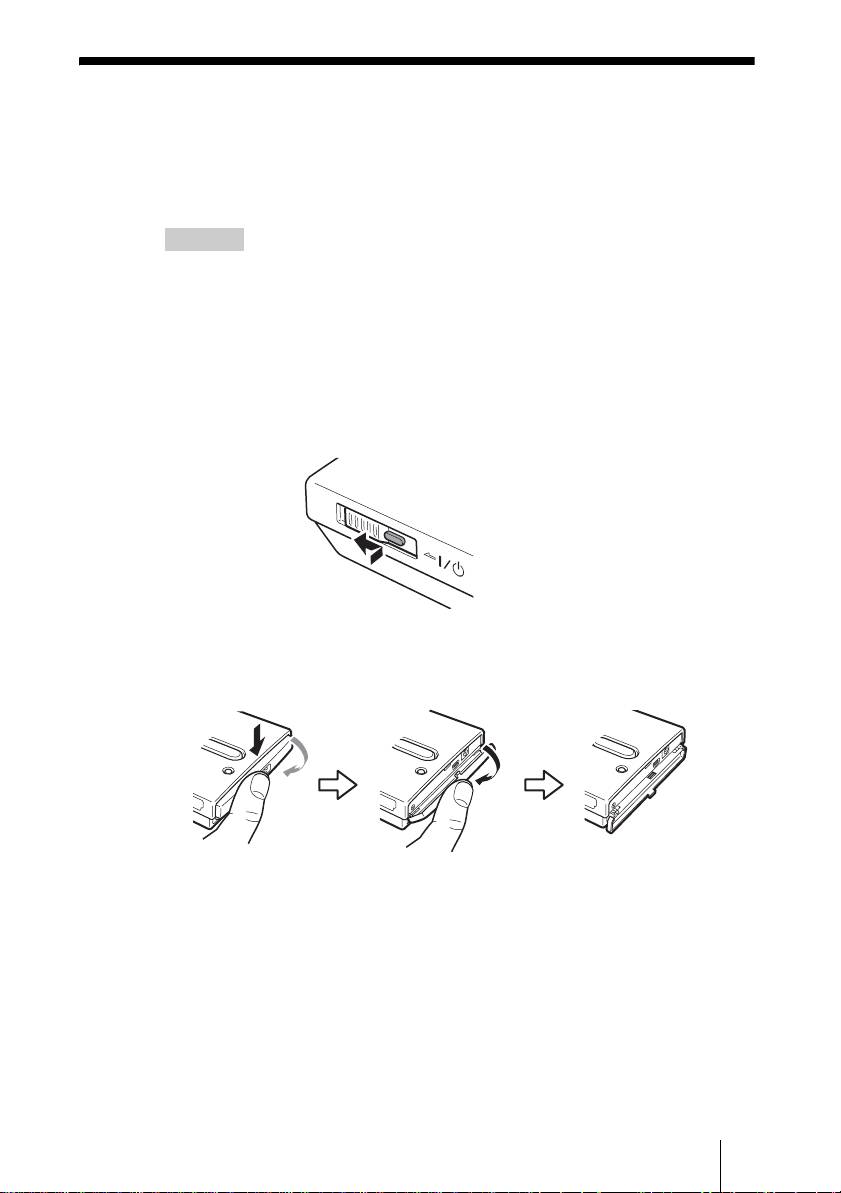
2 Schalten Sie das Gerät ein.
Drücken und schieben Sie den ?/1 (Betrieb) Schalter in Pfeilrichtung.
Halten Sie den ?/1 (Betrieb) Schalter gedrückt, bis die 1 e (Betrieb)
Anzeige aufleuchtet.
Halten und schieben Sie
den Schalter in Pfeilrichtung
3 Öffnen Sie die Anschlussabdeckung auf der rechten Seite des
Geräts.
DE
5
2-109-917-31(1)
HDPS-M1
H
D
D
H
D
D
H
D
D
F:\work\4041445_HDPS-
Hauptseite:Links
M1_Read\2109917311\2109917311Readme\03DE\03DE05C02-J.fm
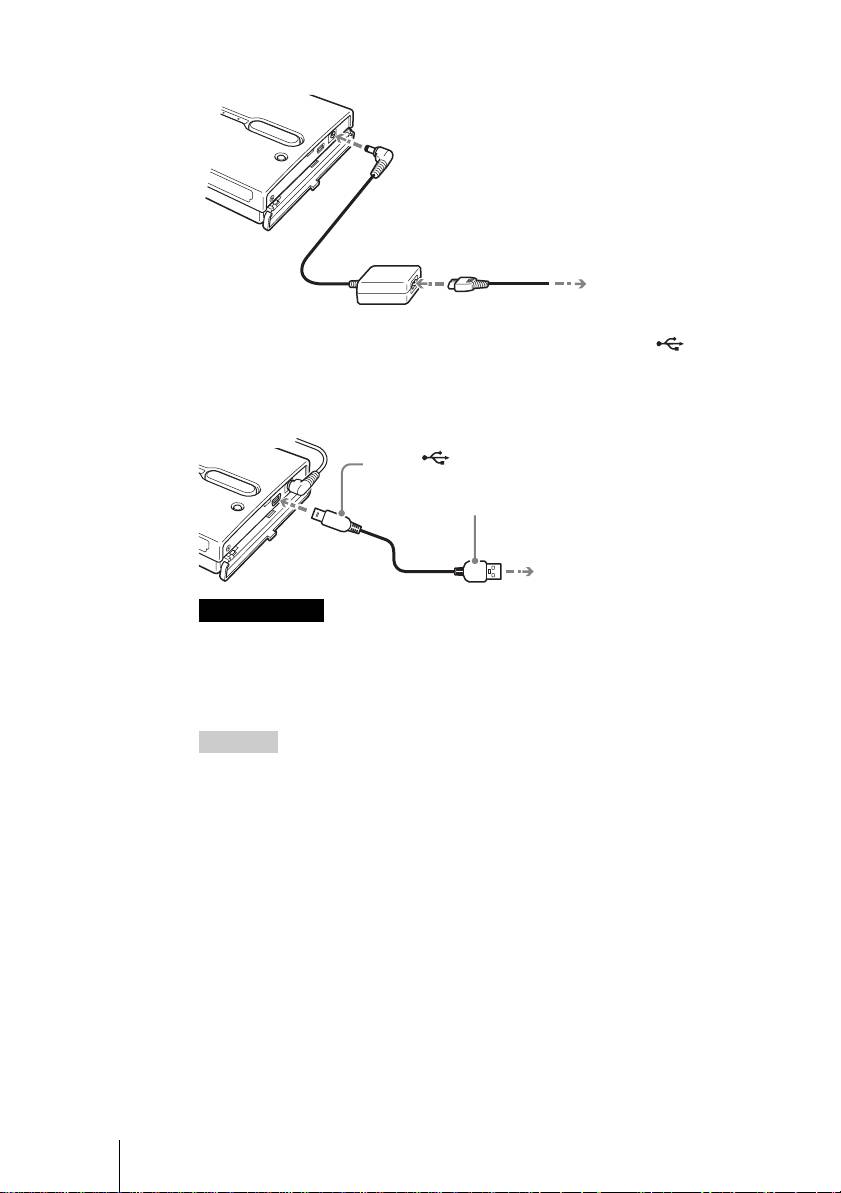
4 Stecken Sie den Wechselstromadapter ein.
5 Schließen Sie das mitgelieferte USB-Kabel an den (USB)
Port an. Schließen Sie das andere Ende des Kabels an den
USB-Port Ihres Computers an.
Anmerkungen
• Wenn Sie das Gerät bei Windows XP mit dem USB-Kabel an Ihren Computer
anschließen, öffnet sich das Dialogfeld AutoPlay. Klicken Sie auf [Cancel]
(Abbrechen), um es zu schließen.
• Der ordnungsgemäße Betrieb kann nicht garantiert werden, wenn das Gerät an einen
USB-Hub angeschlossen ist. Stellen Sie eine direkte USB-Verbindung her.
Hinweis
Wenn Sie das Gerät an Ihren Computer anschließen, wird die interne Batterie
automatisch aufgeladen, gleich ob das Gerät ein- oder ausgeschaltet ist, und die 1 e
(Betrieb) Anzeige blinkt.
6 Zugreifen auf die Interne Festplatte des Geräts.
• Bei Windows 2000 oder Windows Me
Doppelklicken Sie auf [My Computer] (Arbeitsplatz) auf Ihrem Desktop
und doppelklicken Sie dann auf die lokale Festplatte, die der internen
Festplatte des Geräts im Fenster „My Computer“ (Arbeitsplatz)
entspricht.
• Bei Windows XP
Doppelklicken Sie im Menü [Start] (Start) auf [My Computer]
(Arbeitsplatz) und klicken Sie dann auf die lokale Festplatte, die der
internen Festplatte des Geräts im Fenster „My Computer“ (Arbeitsplatz)
entspricht.
DE
6
2-109-917-31(1)
HDPS-M1
OWER
Zur ! (Gleichstrom) Steckdose
Zur
Wechselstromsteckdose
Zum (USB) Port
1
Zum USB-Port Ihres Computers
2
F:\work\4041445_HDPS-
Hauptseite:Rechts
M1_Read\2109917311\2109917311Readme\03DE\03DE05C02-J.fm
• Bei einem Macintosh Computer
Doppelklicken Sie auf das Symbol der internen Festplatte auf Ihrem
Desktop.
Es erscheinen die Ordner „STORE.IPS“ und „HDPS“ und die Datei
„ReadMe.html“.
7 Doppelklicken Sie auf die „ReadMe.html“ Datei und folgen Sie
den Anweisungen auf dem Bildschirm.
Fehlerbehebung
Schlagen Sie zusätzlich zu diesem Abschnitt in der Betriebsanleitung des
Geräts und in der Dokumentation Ihres Computers nach.
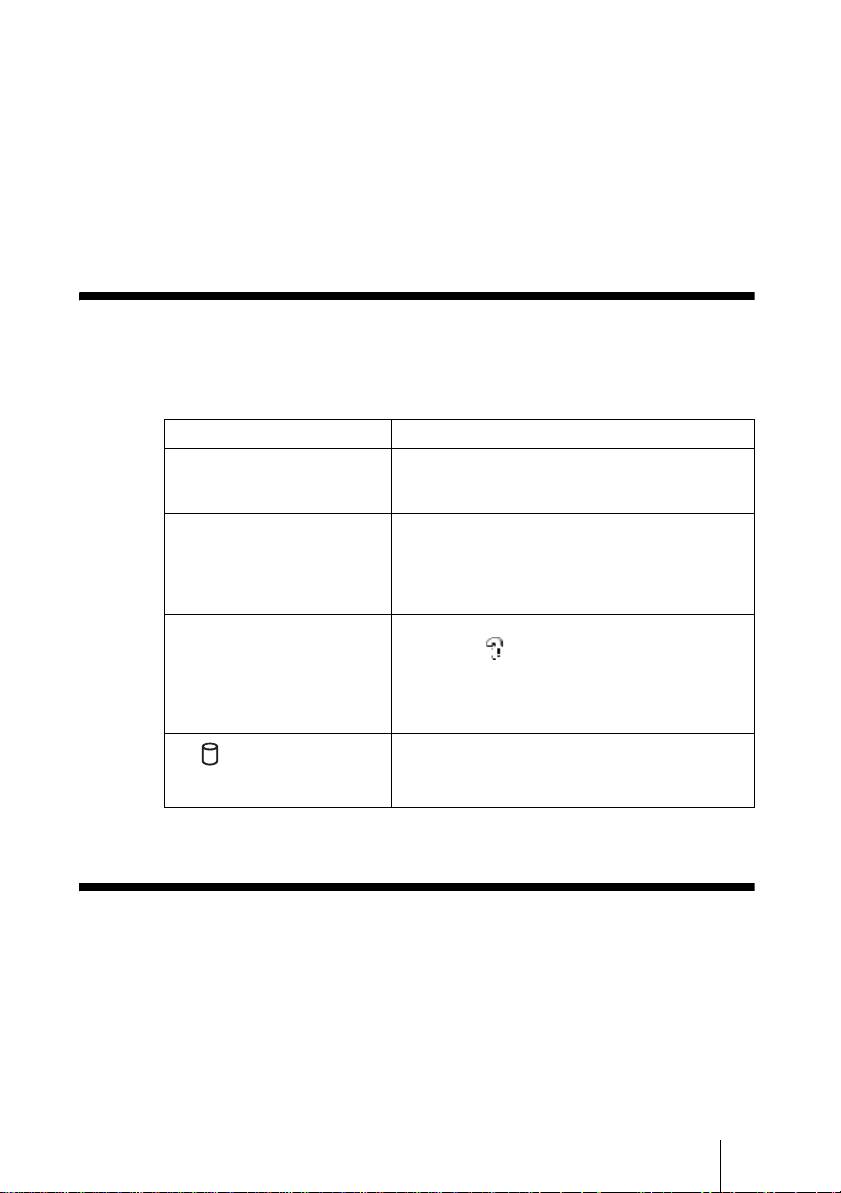
Symptom Ursache/Abhilfe
Das Gerät startet nicht. c Die interne Batterie ist möglicherweise leer.
Schließen Sie den Wechselstromadapter an, um
die Batterie aufzuladen .
Das Gerät schaltet sich
c Wenn das Gerät allein verwendet wird, schaltet
unerwartet aus.
es sich nach fünfminütigem Leerlauf
automatisch ab, unabhängig davon, ob es mit
Batterie oder mit dem Wechselstromadapter
betrieben wird. Starten Sie das Gerät neu .
Unter Windows 2000 oder
c Achten Sie darauf, dass „USB Massenspeicher“
Windows Me erscheint das
nicht als im „Geräte-Manager“ angezeigt
Laufwerksymbol des Geräts im
wird. Wenn dies der Fall ist, löschen Sie es,
Fenster „Arbeitsplatz“ nicht.
stecken Sie das USB-Kabel aus Ihrem
Computer aus und schließen Sie es dann wieder
an.
c Kontaktieren Sie Ihren Händler oder ein
Die (Festplatte) Anzeige
autorisiertes Service Center.
leuchtet grün und die Taste
COPY leuchtet gelb oder rot.
Technischer Kundendienst
Für Kunden in Europa
Lesen Sie unter „Kundenunterstützung und Kundendienst” des
Garantiezertifikats für Europa nach.
DE
7
2-109-917-31(1)
HDPS-M1

F:\work\4041445_HDPS-
masterpage:Left
M1_Read\2109917311\2109917311Readme\04IT\04IT03COVTOC.fm
Avvisi per la sicurezza
AVVERTIMENTO
Tenere fuori dalla portata dei bambini Nel caso dovessero essere inghiottite
parti dell’apparecchio, rivolgersi immediatamente a un medico.
Per evitare il pericolo di incendi o folgorazione, non esporre l’unità alla pioggia
o all’umidità.
Per evitare il rischio di folgorazione, non aprire mai il contenitore dell’unità. In
caso di guasti, rivolgersi unicamente a tecnici di assistenza qualificati.
Utilizzare unicamente alimentatore SONY modello HDAC-M1/MCS-AC1.
Dichiarazione di non responsabilità;
Sony Corporation non si assume alcuna responsabilità per la perdita di informazioni memorizzate
sul disco rigido di questo apparecchio o di informazioni trasferite a un “Memory Stick” e/o scheda
CompactFlash con un computer.
IT
2
2-109-917-31(1)
HDPS-M1
F:\work\4041445_HDPS-
masterpage:Right
M1_Read\2109917311\2109917311Readme\04IT\04IT03COVTOC.fm
Indice
Avvisi per la sicurezza ..........................................................................................2
Introduzione ..........................................................................................................4
Apertura della confezione .....................................................................................4
Preparazione di unità HDD Photo Storage e computer ........................................5
Ricerca e risoluzione dei problemi .......................................................................7
Assistenza tecnica .................................................................................................7
IT
ES
• I seguenti sono marchi di Sony Corporation:
“Memory Stick”, , “MagicGate Memory Stick”, “Memory Stick Duo”,
“ ”, “MagicGate Memory Stick Duo”, “Memory Stick PRO”,
“ ”, “Memory Stick PRO Duo”, “ ”, “MagicGate” e
“”.
• Microsoft e Windows sono marchi registrati di Microsoft Corporation negli Stati Uniti e/o in altri
paesi.
• Mac e Macintosh sono marchi di Apple Computer Inc., registrati negli Stati Uniti e/o in altri paesi.
• Microdrive è un marchio registrato di Hitachi Global Storage Technologies.
• Gli altri nomi di prodotti o sistemi utilizzati in questo documento sono marchi o marchi registrati
dei rispettivi detentori, anche se i simboli ™ e ® non sono utilizzati nel testo.
IT
3
2-109-917-31(1)
HDPS-M1
N
®
®
el presente documento, il termine Windows XP indica Microsoft
Windows
XP Professional e
®
®
Microsoft
Windows
XP Home Edition.
N
®
®
el presente documento, il termine Windows 2000 indica Microsoft
Windows
2000 Professional.
N
®
®
el presente documento, Windows Me indica Microsoft
Windows
Millennium Edition.
F:\work\4041445_HDPS-
masterpage:Left
M1_Read\2109917311\2109917311Readme\04IT\04IT05C02-J.fm
Introduzione
Congratulazioni per l’acquisto dell’unità HDD Photo Storage HDPS-M1.
Questo documento spiega come preparare l’unità per l’uso. Per informazioni
sull’utilizzo dell’unità, fare riferimento alle istruzioni per l’uso in formato
PDF memorizzate sul disco rigido dell’unità stessa. Per individuare le
istruzioni per l’uso, fare riferimento al documento “ReadMe.html” sul disco
rigido interno dell’unità.
Apertura della confezione
Al momento dell’apertura della confezione, assicurarsi che siano presenti tutti
i componenti indicati di seguito. Nel caso dovesse mancare qualche
componente, contattare il rivenditore o un centro di assistenza autorizzato
locale.
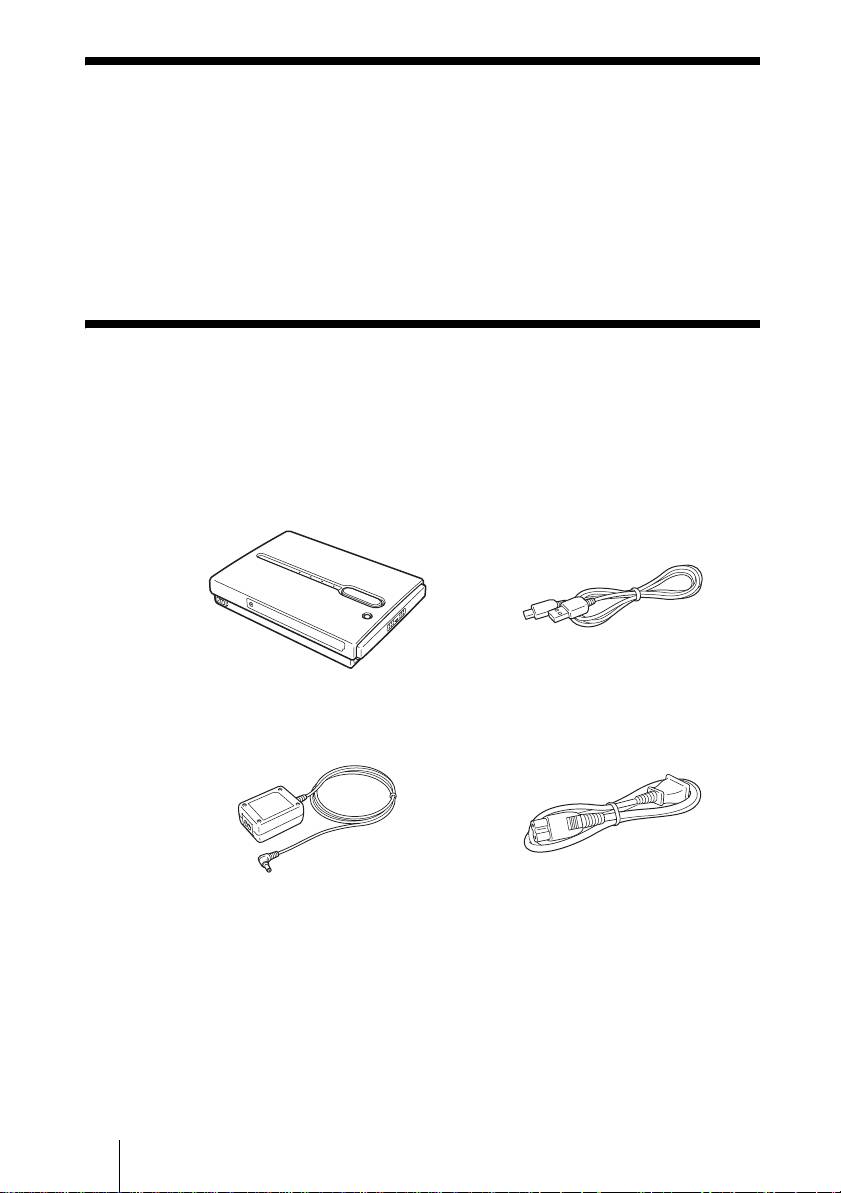
• Unità HDD Photo Storage (1) • Cavo USB (1)
OPEN
• Alimentatore di rete (1)
• Cavo di alimentazione (1)
(SONY, modello HDAC-M1/
MCS-AC1)
• Custodia per il trasporto (1)
• Cinghietta di trasporto (1)
• Etichetta indicatori (1)
• Istruzioni per l’uso (sul disco rigido)
• Software PhotoDiary (sul disco rigido)
• Leggimi (questo documento) (1)
• Scheda di garanzia (1)
IT
4
2-109-917-31(1)
HDPS-M1
F:\work\4041445_HDPS-
masterpage:Right
M1_Read\2109917311\2109917311Readme\04IT\04IT05C02-J.fm
Preparazione di unità HDD Photo
Storage e computer
Questa sezione illustra come collegare l’unità a un computer mediante il cavo
USB.
Suggerimento
Quando l’unità è collegata al computer per la prima volta, tutti i programmi necessari sono
installati automaticamente.
1 Accendere il computer.
2 Accendere l’unità.
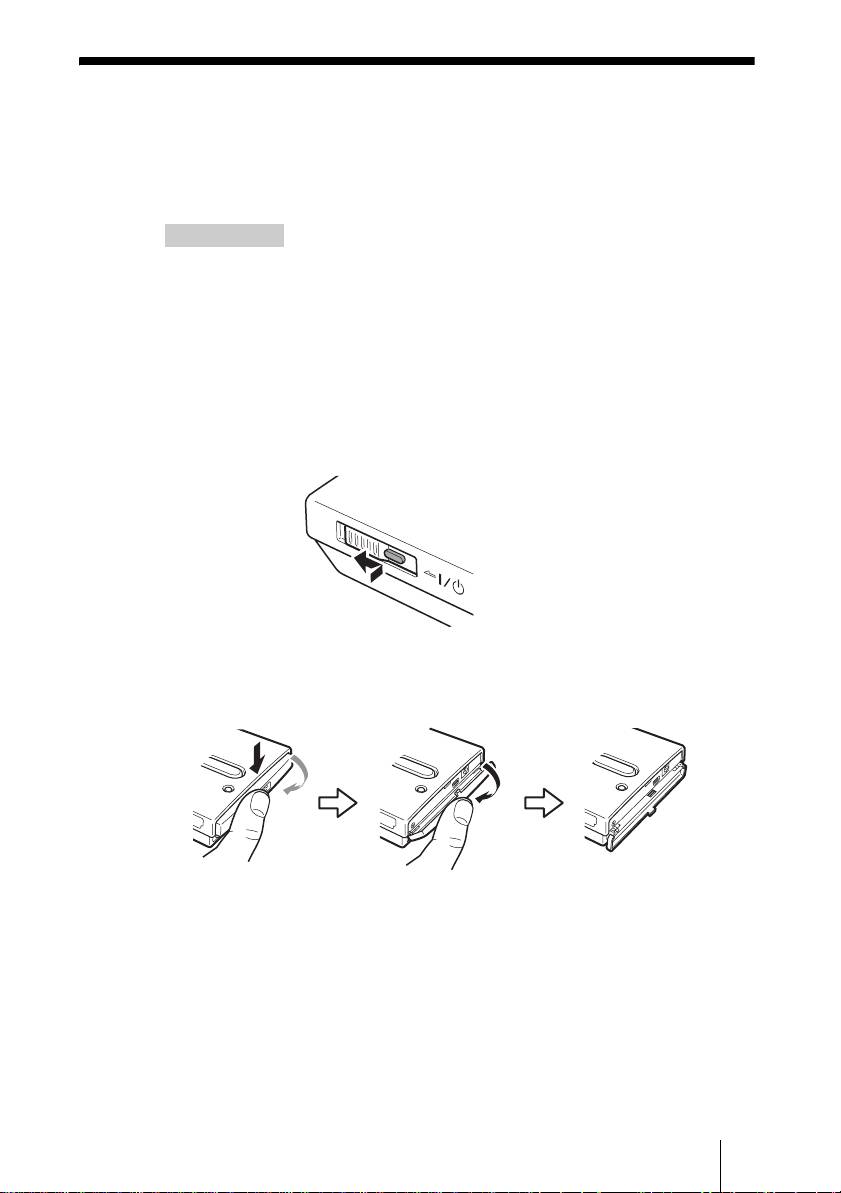
Premere e spostare il pulsante di alimentazione ?/1 (alimentazione) nella
direzione della freccia. Mantenere premuto il pulsante di alimentazione ?/
1 (alimentazione) fino a quando si accende l’indicatore 1 e
(alimentazione) di alimentazione.
Premere e spostare nella
direzione della freccia
3 Aprire lo sportelletto di protezione della porta sul lato destro
dell’unità.
IT
5
2-109-917-31(1)
HDPS-M1
H
D
D
H
D
D
H
D
D
F:\work\4041445_HDPS-
masterpage:Left
M1_Read\2109917311\2109917311Readme\04IT\04IT05C02-J.fm
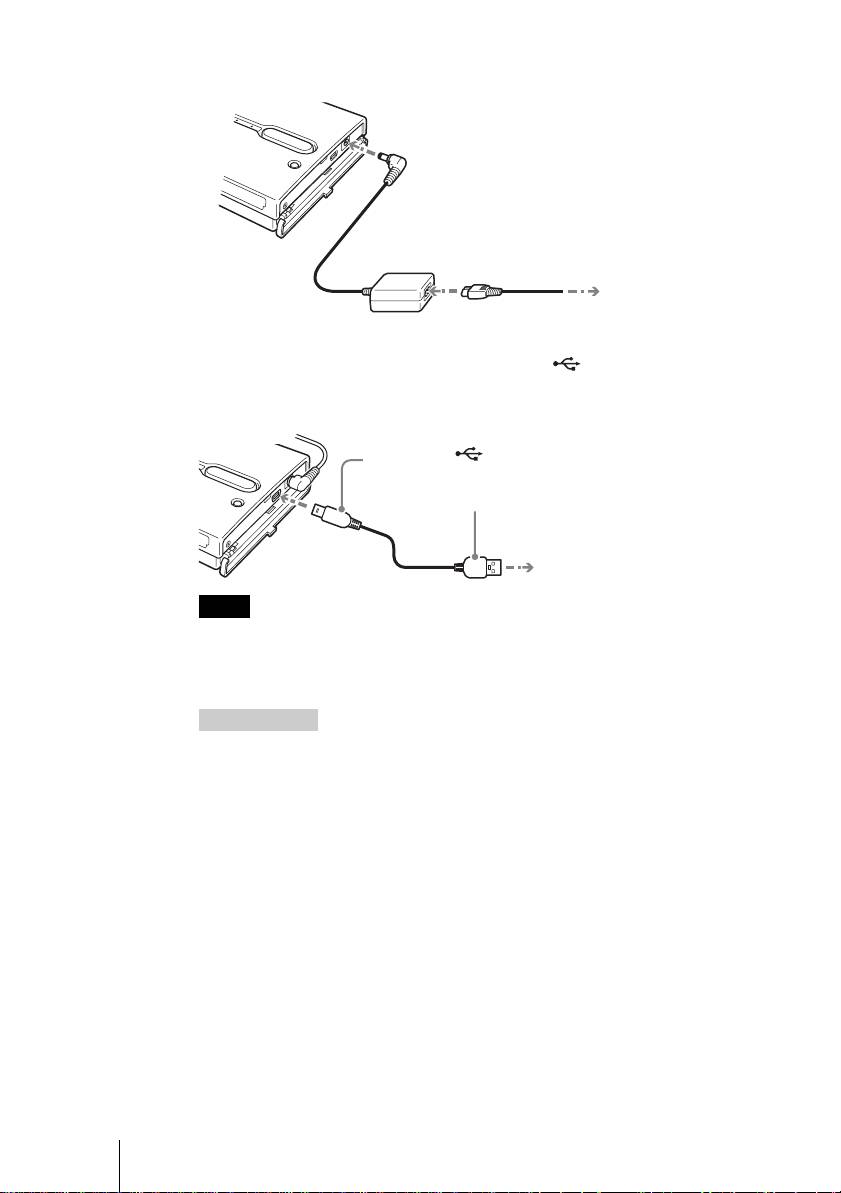
4 Collegare l’alimentatore di rete.
5 Collegare il cavo USB fornito alla porta (USB). Collegare
l’altra estremità del cavo alla porta USB del computer
Note
• Con Windows XP, si aprirà la finestra di dialogo AutoPlay non appena si collega
l’unità al computer con il cavo USB. Fare clic su [Cancel] (Annulla) per chiuderla.
• Non si garantisce il funzionamento corretto quando l’unità è collegata a un hub USB.
Stabilire un collegamento USB diretto.
Suggerimento
Quando si collega l’unità a un computer, la batteria interna si ricarica automaticamente,
anche se l’unità è spenta. L’indicatore di alimentazione 1 e (alimentazione)
lampeggia.
6 Accedere al disco rigido interno dell’unità.
• Con Windows 2000 o Windows Me
Fare doppio clic su [My Computer] (Risorse del computer) e quindi,
nella finestra “My Computer” (Risorse del computer) fare doppio clic sul
disco locale che corrisponde al disco rigido interno dell’unità.
• Con Windows XP
Nel menu [Start] (Start), fare clic su [My Computer] (Risorse del
computer) e quindi, nella finestra “My Computer” (Risorse del
computer) fare clic sul disco locale che corrisponde al disco rigido
interno dell’unità.
IT
6
2-109-917-31(1)
HDPS-M1
OWER
Al connettore di alimentazione !
(Connettore di alimentazione in C.C.)
Alla presa di
corrente
Alla porta (USB)
1
Alla porta USB del computer
2
F:\work\4041445_HDPS-
masterpage:Right
M1_Read\2109917311\2109917311Readme\04IT\04IT05C02-J.fm
• Con un computer Macintosh
Fare doppio clic sull’icona del disco rigido interno sulla Scrivania.
Verranno visualizzate le cartelle “STORE.IPS” e “HDPS” e il file
“ReadMe.html”.
7 Fare doppio clic sul file “ReadMe.html” e seguire le istruzioni
visualizzate a schermo.
Ricerca e risoluzione dei problemi
Oltre a questa sezione, fare anche riferimento alle istruzioni per l’uso
dell’unità e alla documentazione fornita con il computer.
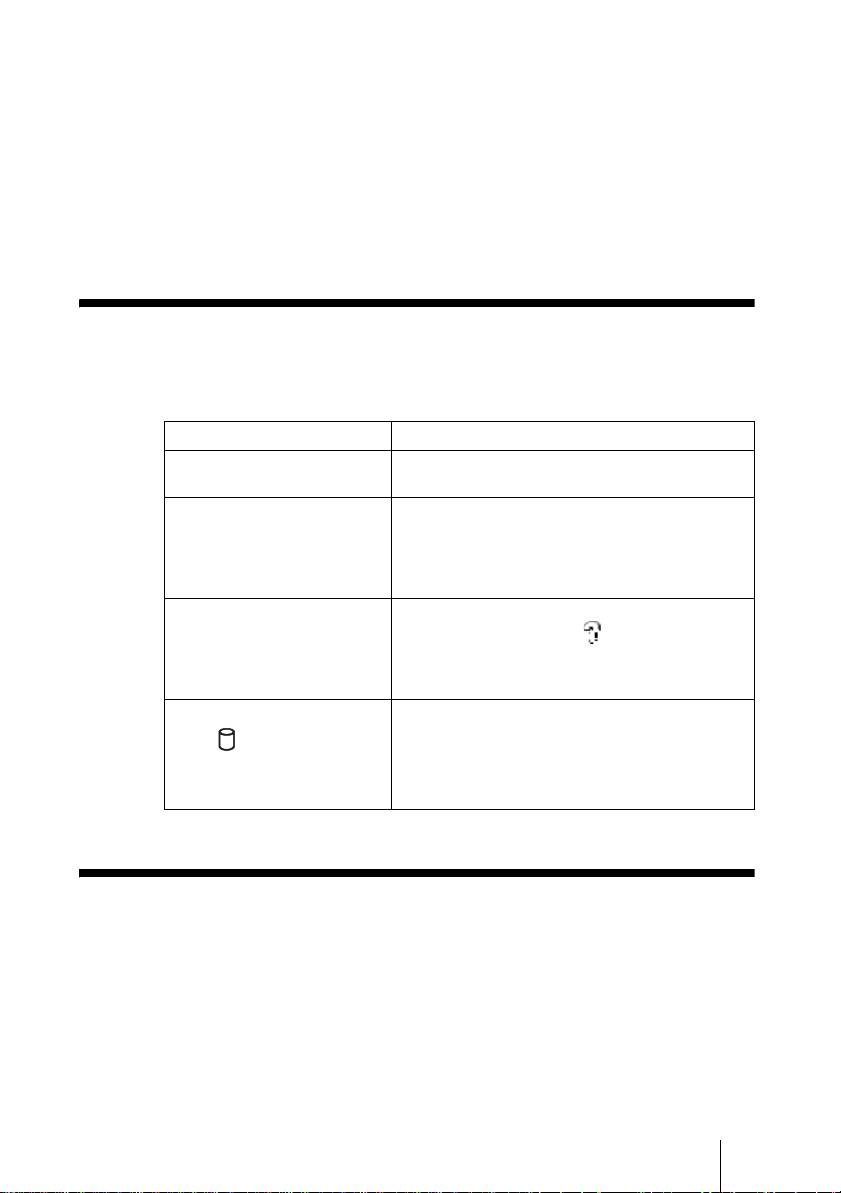
Sintomo Causa / soluzione
L’unità non si avvia. c La batteria interna può essere scarica. Collegare
l’alimentatore di rete per ricaricare la batteria.
L’unità si spegne
c Quando l’unità non è collegata a un computer, si
inaspettatamente.
spegne automaticamente se non viene utilizzata
per oltre cinque minuti, sia che venga alimentata
con la batteria interna che con l’alimentatore di
rete. Riavviare l’unità.
Con Windows 2000 o Windows
c Assicurarsi che in “Gestione periferiche” non
Me, l’icona dell’unità non è
sia visualizzata l’icona in corrispondenza
presente nella finestra “Risorse
di “Periferica archiviazione di massa USB”. Se
del computer”.
lo è, scollegare il cavo USB dal computer, e
connetterlo nuovamente.
L’indicatore di attività del disco
c Rivolgersi al proprio rivenditore o a un centro di
assistenza autorizzato.
rigido (disco rigido) è
illuminato con luce verde e il
pulsante COPY è illuminato
con luce gialla o rossa.
Assistenza tecnica
Per i clienti in Europa
Consultare la sezione “Customer Support and Service” (supporto e assistenza
clienti) del certificato di garanzia europeo.
IT
7
2-109-917-31(1)
HDPS-M1

F:\work\4041445_HDPS-
masterpage:Left
M1_Read\2109917311\2109917311Readme\05ES\05ES03COVTOC.fm
Normas de seguridad
ADVERTENCIA
Manténgase fuera del alcance de los niños. Si se ingiere alguna pieza de la
unidad, consulte inmediatamente a su médico.
Para evitar el riesgo de incendios o electrocución, no exponga la unidad a la
lluvia ni a la humedad.
Para evitar recibir descargas eléctricas, no abra el aparato. Solicite asistencia
técnica únicamente a personal especializado.
Para utilizarse únicamente con una fuente de alimentación SONY, Modelo HDAC-M1/
MCS-AC1.
Limitación de responsabilidad
Sony Corporation no asume responsabilidad alguna por la pérdida de la información almacenada en
el disco duro de esta unidad, ni de la información transferida desde su equipo a una tarjeta “Memory
Stick” y/o CompactFlash.
ES
2
2-109-917-31(1)
HDPS-M1
F:\work\4041445_HDPS-
masterpage:Right
M1_Read\2109917311\2109917311Readme\05ES\05ES03COVTOC.fm
Índice
Normas de seguridad ............................................................................................2
Introducción ..........................................................................................................4
Desembalaje ..........................................................................................................4
Preparación del Almacenamiento para fotos HDD y el ordenador ......................5
Solución de problemas ..........................................................................................7
Asistencia técnica .................................................................................................7
ES
• Sony Corporation es propietaria de las siguientes marcas comerciales:
“Memory Stick”, , “MagicGate Memory Stick”, “Memory Stick Duo”,
“ ”, “MagicGate Memory Stick Duo”, “Memory Stick PRO”,
“ ”, “Memory Stick PRO Duo”, “ ”, “MagicGate” y
“”.
• Microsoft y Windows son marcas comerciales registradas de Microsoft Corporation en los Estados
Unidos y/o en otros países.
• Mac y Macintosh son marcas comerciales de Apple Computer Inc., registradas en los EE.UU. y/o
en otros países.
• Microdrive es una marca comercial registrada de Hitachi Global Storage Technologies.
• Los demás nombres de sistemas y productos utilizados en esta guía son marcas comerciales
registradas o marcas comerciales de sus respectivos fabricantes, aunque las marcas ™ y ® no se
usen en el texto.
®
®
En este documento, el término Windows XP se utiliza para indicar Microsoft
Windows
XP
®
®
Professional y Microsoft
Windows
XP Home Edition.
®
®
En este documento, el término Windows 2000 se utiliza para indicar Microsoft
Windows
2000
Professional.
®
®
En este documento, el término Windows Me se utiliza para indicar Microsoft
Windows
Millennium Edition.
ES
3
2-109-917-31(1)
HDPS-M1
F:\work\4041445_HDPS-
masterpage:Left
M1_Read\2109917311\2109917311Readme\05ES\05ES05C02-J.fm
Introducción
Gracias por adquirir el Almacenamiento para fotos HDD HDPS-M1. En este
documento se explica cómo preparar la unidad para su uso. Para obtener
información acerca de cómo utilizar la unidad, consulte las instrucciones de
funcionamiento en formato PDF que se encuentran en el disco duro de la
unidad. Para localizar las instrucciones de funcionamiento, consulte
“ReadMe.html” en el disco duro interno de la unidad.
Desembalaje
Cuando desembale la unidad, asegúrese de que contenga todos los artículos
que se enumeran a continuación. Si falta alguno, póngase en contacto con su
proveedor o con el centro de servicio autorizado más próximo.
• Unidad Almacenamiento para fotos HDD (1)• Cable USB (1)
OPEN
• Adaptador de alimentación de CA (1)
• Cable de alimentación (1)
(SONY, Modelo HDAC-M1/MCS-AC1)
• Estuche de transporte (1)
• Correa de mano (1)
• Etiqueta indicadora (1)
• Instrucciones de funcionamiento (en el disco duro)
• Software PhotoDiary (en el disco duro)
• Léame primero (este documento) (1)
• Tarjeta de garantía (1)
ES
4
2-109-917-31(1)
HDPS-M1
F:\work\4041445_HDPS-
masterpage:Right
M1_Read\2109917311\2109917311Readme\05ES\05ES05C02-J.fm
Preparación del Almacenamiento para
fotos HDD y el ordenador
Esta sección describe cómo conectar la unidad a un ordenador utilizando el
cable USB.
Sugerencia
Cuando se conecte la unidad a un ordenador por primera vez, se instalarán los programas
necesarios de forma automática.
1 Encienda el ordenador.
2 Encienda la unidad.
Pulse y deslice el interruptor ?/1 (alimentación) en la dirección que indica
la flecha. Mantenga pulsado el interruptor ?/1 (alimentación) hasta que se
encienda el indicador 1 e (alimentación).
Manténgalo pulsado y
deslícelo en la dirección que
3 Abra la cubierta del puerto situado en el lado derecho de la
unidad.
ES
5
2-109-917-31(1)
HDPS-M1
H
D
D
H
D
D
H
D
D
F:\work\4041445_HDPS-
masterpage:Left
M1_Read\2109917311\2109917311Readme\05ES\05ES05C02-J.fm
4 Conecte el adaptador de alimentación de CA.
5 Conecte el cable USB suministrado al puerto (USB).
Conecte el otro extremo del cable al puerto USB del ordenador.
Notas
• En Windows XP, cuando se conecta la unidad al ordenador con el cable USB, se abre
el cuadro de diálogo de reproducción automática. Haga clic en [Cancel] (Cancelar)
para cerrarlo.
• No se garantiza el correcto funcionamiento de la unidad cuando esté conectada a un
concentrador USB. Establezca una conexión USB directa.
Sugerencia
Cuando se conecte la unidad al ordenador, la batería interna se cargará automáticamente,
tanto si está encendida la unidad como si está apagada y el indicador 1 e
(alimentación) parpadea.
6 Acceso al disco duro interno de la unidad.
• En Windows 2000 o Windows Me
Haga doble clic en el icono [My Computer] (Mi PC) del escritorio y, a
continuación, haga doble clic en el disco local que corresponda al disco
duro interno de la unidad en la ventana “My Computer” (Mi PC).
• En Windows XP
En el menú [Start] (Inicio), haga clic en [My Computer] (Mi PC) y, a
continuación, haga clic en el disco local que corresponda con el disco
duro interno de la unidad en la ventana “My Computer” (Mi PC).
ES
6
2-109-917-31(1)
HDPS-M1
OWER
Al conector ! (DC In)
A la toma de CA
Al puerto (USB)
1
Al puerto USB del ordenador
2
F:\work\4041445_HDPS-
masterpage:Right
M1_Read\2109917311\2109917311Readme\05ES\05ES05C02-J.fm
• Con un ordenador Macintosh
Haga doble clic en el icono del disco duro interno del escritorio.
Aparecerán las carpetas “STORE.IPS” y “HDPS” y el archivo
“ReadMe.html”.
7 Haga doble clic en el archivo “ReadMe.html” y siga las
instrucciones que aparecen en pantalla para continuar.
Solución de problemas
Además de esta sección, consulte también las instrucciones de funcionamiento
de la unidad y la documentación del ordenador.
Problema Causa/solución
La unidad no se inicia. c Es posible que la batería interna esté agotada.
Conecte el adaptador de alimentación de CA y
cargue la batería.
La unidad se apaga
c Cuando la unidad se utiliza de forma
inesperadamente.
independiente, se apaga automáticamente
después de permanecer inactiva durante 5
minutos, ya esté funcionando a través de la
batería interna o del adaptador de alimentación
de CA. Reinicie la unidad.
En Windows 2000 o Windows
c Asegúrese de que no se muestra “Dispositivo de
Me, el icono de unidad del
almacenamiento masivo USB” con el símbolo
aparato no aparece en la
en “Administrador de dispositivos”. Si así
ventana “Mi PC”.
fuera, elimínelo, desconecte el cable USB del
ordenador y, a continuación, vuelva a
conectarlo.
c Póngase en contacto con su proveedor o con un
El indicador (disco duro)
servicio técnico autorizado.
está iluminado en verde y el
botón COPY está iluminado en
amarillo o rojo.
Asistencia técnica
Para los clientes en Europa
Consulte “Customer Support and Service” (Servicio y asistencia al cliente) en
el certificado de garantía europeo.
ES
7
2-109-917-31(1)
HDPS-M1

masterpage:Left
F:\work\4041445_HDPS-M1_Read\2109917311\2109917311Readme\06PT\06PT03COVTOC.fm
Regulações de segurança
AVISO
Manter afastado das crianças. Se qualquer parte da unidade for engolida, dirija-
se rapidamente a um médico.
Para evitar incêndios ou choques eléctricos, não exponha a unidade à chuva ou
humidade.
Para evitar choques eléctricos, não abra a caixa. A assistência técnica deve ser
efectuada apenas por pessoal qualificado.
Para utilizar com uma fonte de alimentação SONY, Modelo HDAC-M1/MCS-AC1.
Exclusão de responsabilidades
A Sony Corporation não assume responsabilidade pela perda de informações armazenadas no disco
rígido desta unidade ou informações transferidas para um "Memory Stick" e/ou cartão
CompactFlash utilizando o computador.
PT
2
2-109-917-31(1)
HDPS-M1
masterpage:Direita
F:\work\4041445_HDPS-M1_Read\2109917311\2109917311Readme\06PT\06PT03COVTOC.fm
Índice
Regulações de segurança ......................................................................................2
Introdução .............................................................................................................4
Desembalar ...........................................................................................................4
Preparar o Armazenamento de fotografias em HDD e o computador .................. 5
Resolução de problemas ....................................................................................... 7
Suporte técnico .....................................................................................................7
KR
PT
• As seguintes são marcas comerciais da Sony Corporation:
“Memory Stick”, , “MagicGate Memory Stick”, “Memory Stick Duo”,
“ ”, “MagicGate Memory Stick Duo”, “Memory Stick PRO”,
“ ”, “Memory Stick PRO Duo”, “ ”, “MagicGate”, e
“”.
• Microsoft e Windows são marcas comerciais registadas da Microsoft Corporation nos Estados
Unidos e/ou outros países.
• Mac e Macintosh são marcas comerciais da Apple Computer Inc., registadas nos E.U.A. e/ou
outros países.
• Microdrive é uma marca comercial registada da Hitachi Global Storage Technologies.
• Outros nomes de sistema e de produtos aqui utilizados são marcas comerciais registadas ou marcas
comerciais dos respectivos fabricantes, embora as marcas ™ e ® não sejam utilizadas no texto.
PT
3
2-109-917-31(1)
HDPS-M1
N
®
®
®
®
este manual, o Microsoft
Windows
XP Professional e o Microsoft
Windows
XP Home
Edition são referidos como Windows XP.
N
®
®
este manual, o Microsoft
Windows
2000 Professional é referido como Windows 2000.
N
®
®
este manual, o Microsoft
Windows
Millennium Edition é referido como Windows Me.
F:\work\4041445_HDPS-
masterpage:Left
M1_Read\2109917311\2109917311Readme\06PT\06PT05C02-J.fm
Introdução
Obrigado por ter adquirido o Armazenamento de fotografias em HDD HDPS-
M1. Este manual explica como preparar a unidade para utilização. Para mais
informações sobre como utilizar a unidade, consulte as instruções de
funcionamento em formato PDF no disco rígido da unidade. Para localizar as
instruções de funcionamento, consulte o ficheiro “ReadMe.html” no disco
rígido interno da unidade.
Desembalar
Quando desembalar a unidade, certifique-se de que todos os itens indicados em
baixo estão presentes. Se faltar alguma coisa, contacte o seu revendedor ou
centro de serviço autorizado na sua área.
• Unidade de Armazenamento de
• Cabo USB (1)
fotografias em HDD (1)
OPEN
• Adaptador de alimentação AC (1)
• Fio de alimentação (1)
(SONY, Modelo HDAC-M1/
MCS-AC1)
• Caixa de transporte (1)
• Alça de mão (1)
• Etiqueta do indicador (1)
• Instruções de funcionamento (no disco rígido)
• Software PhotoDiary (no disco rígido)
• Leia-me primeiro (este documento) (1)
• Cartão de garantia (1)
PT
4
2-109-917-31(1)
HDPS-M1
F:\work\4041445_HDPS-
masterpage:Direita
M1_Read\2109917311\2109917311Readme\06PT\06PT05C02-J.fm
Preparar o Armazenamento de
fotografias em HDD e o computador
Esta secção descreve como ligar a unidade a um computador utilizando o cabo
USB.
Sugestão
Quando a unidade for ligada pela primeira vez a um computador, os programas necessários
são automaticamente instalados.
1 Ligue o computador.
2 Ligue a unidade.
Empurre e deslize o interruptor ?/1 (alimentação) na direcção da seta.
Mantenha premido o interruptor ?/1 (alimentação) até que o indicador 1
e (alimentação) se acenda.
Mantenha premido e
deslize na direcção da seta
3 Abra a tampa da porta no lado direito da unidade.
PT
5
2-109-917-31(1)
HDPS-M1
H
D
D
H
D
D
H
D
D
F:\work\4041445_HDPS-
masterpage:Left
M1_Read\2109917311\2109917311Readme\06PT\06PT05C02-J.fm
4 Ligar o adaptador de corrente AC.
5 Ligue o cabo USB fornecido à porta (USB). Ligue a outra
extremidade do cabo à porta USB do computador.
Notas
• No Windows XP, quando liga a unidade ao computador com o cabo USB, é
apresentada a caixa de diálogo de reprodução automática. Clique em [Cancel]
(Cancelar) para fechar.
• O funcionamento correcto não é garantido quando a unidade está ligada a um hub
USB. Estabeleça uma ligação USB directa.
Sugestão
Quando ligar a unidade ao computador, a bateria interna é automaticamente carregada
independentemente se unidade etiver ligada ou desligada e o indicador 1 e
(alimentação) pisca.
6 Acesso ao disco rígido interno da unidade.
• Com Windows 2000 ou Windows Me
Faça duplo clique em [My Computer] (o meu computador) na área de
trabalho e, de seguida, faça duplo clique no disco local que corresponde
ao disco rígido da unidade na janela “My Computer” (O meu
computador).
• No Windows XP
No menu [Start] (iniciar), clique em [My Computer] (o meu computador)
e, de seguida, clique no disco local que corresponde ao disco rígido da
unidade na janela “My Computer” (O meu computador).
PT
6
2-109-917-31(1)
HDPS-M1
OWER
Para o ! Conector (DC In)
Para a tomada AC
Para a porta (USB)
1
Para a porta USB do computador
2
F:\work\4041445_HDPS-
masterpage:Direita
M1_Read\2109917311\2109917311Readme\06PT\06PT05C02-J.fm
• Num computador Macintosh
Faça duplo clique no ícone do disco rígido interno na área de trabalho.
As pastas “STORE.IPS”, “HDPS” e o ficheiro “ReadMe.html” são
apresentados.
7 Faça duplo clique no ficheiro “ReadMe.html” e siga as
instruções no ecrã para continuar.
Resolução de problemas
Além desta secção, consulte as instruções de funcionamento da unidade e a
documentação do computador.
Sintoma Causa/solução
A unidade não arranca. c A bateria interna pode estar descarregada. Ligue
ao adaptador de alimentação AC e carregue a
bateria.
A unidade desliga-se
c Quando a unidade é utilizada de forma
inesperadamente.
autónoma, esta desliga-se automaticamente após
estar parada durante cinco minutos,
independentemente de estar a funcionar com a
bateria interna ou com o adaptador de
alimentação AC. Reinicie a unidade.
No Windows 2000 ou
c Certifique-se de que o “Dispositivo de
Windows Me, o ícone da
armazenamento em massa USB” não é
unidade não é apresentado na
apresentado como no “Gestor de
janela “Os meus computador”.
dispositivos”. Se estiver, elimine-o, desligue o
cabo USB do computador e volte a ligá-lo.
c Contacte o seu revendedor ou um centro de
O indicador (disco rígido)
serviço autorizado.
está aceso a verde e o botão
COPY está aceso a amarelo ou
vermelho.
Suporte técnico
Para os clientes na Europa
Consulte a secção “Assistência ao cliente” do certificado de garantia europeu.
PT
7
2-109-917-31(1)
HDPS-M1

masterpage:Left
E:\LGC\ML\2109917311_HDPS-M1 ReadMe_RU\D\07RU03COVTOC.fm
07RU03COVTOC.fm Page 2 Tuesday, June 15, 2004 2:44 PM
Правила безопасности
ПРЕДУПРЕЖДЕНИЕ
Храните в недоступном для детей месте. При попадании какой-либо
детали устройства в пищеварительный тракт немедленно обращайтесь к
врачу.
Во избежание возгорания или поражения электрическим током не
подвергайте аппарат воздействию дождя или влаги.
Во избежание поражения электрическим током не открывайте корпус
устройства. По вопросам обслуживания обращайтесь только к
квалифицированному специалисту.
Использовать только с источником питания фирмы SONY, модель
HDAC-M1/MCS-AC1.
Отказ от ответственности
Корпорация Sony не несет никакой ответственности за потерю информации,
содержащейся на жестком диске устройства, или информации, перенесенной
на карту “Memory Stick” и/или на карту CompactFlash с помощью
компьютера.
RU
2
2-109-917-31(1)
HDPS-M1
masterpage:Right
F:\yugang\ML\2109917311_HDPS-M1 ReadMe_RU\RU\07RU03COVTOC.fm
07RU03COVTOC.fm Page 3 Monday, August 2, 2004 4:08 PM
Содержание
Правила безопасности ..................................................................................... 2
Введение ............................................................................................................. 4
Распаковка ......................................................................................................... 4
Подготовка устройства HDD Photo Storage и компьютера ................... 5
Устранение неполадок .................................................................................... 7
Техническая поддержка .................................................................................. 7
• Ниже перечислены товарные знаки корпорации Sony:
“Memory Stick”, , “MagicGate Memory Stick”, “Memory Stick Duo”,
“ ”, “MagicGate Memory Stick Duo”, “Memory Stick PRO”,
“ ”, “Memory Stick PRO Duo”, “ ”, “MagicGate” и
RU
“”.
• Microsoft и Windows являются товарными знаками корпорации Microsoft,
зарегистрированными в США и/или других странах.
• Mac и Macintosh являются товарными знаками корпорации Apple Computer Inc.,
зарегистрированными в США и/или других странах.
• Microdrive является зарегистрированной товарным знаком компании Hitachi Global
Storage Technologies.
• Остальные названия систем и товаров, используемые в контексте, являются
зарегистрированными товарными знаками или товарными знаками
®
соответствующих производителей, хотя знаки ™ и
в тексте не используются.
®
®
®
®
Microsoft
Windows
XP Professional и Microsoft
Windows
XP Home Edition
упоминаются в данном документе как Windows XP.
®
®
Microsoft
Windows
2000 Professional упоминается в данном документе как Windows
2000.
®
®
Microsoft
Windows
Millennium Edition упоминается в данном документе как
Windows Me.
RU
3
2-109-917-31(1)
HDPS-M1
F:\LGC\ML\2109917311_HDPS-M1 ReadMe_RU\D\07RU05C02-J.fm masterpage:Right
07RU01COV.book Page 4 Friday, June 11, 2004 2:04 PM
Введение
Благодарим за покупку устройства HDD Photo Storage модели
HDPS-M1. В данном документе объясняются процедуры
подготовки устройства к использованию. Для получения
подробной информации об использовании устройства обратитесь к
инструкциям по эксплуатации, имеющимся на жестком диске
устройства в формате PDF. Чтобы найти инструкции по
эксплуатации, см. файл “ReadMe.html” на встроенном жестком
диске устройства.
Распаковка
При распаковке устройства проверьте наличие всех перечисленных
деталей. Если что-то отсутствует, обратитесь к продавцу или в
авторизованный центр технического обслуживания в вашей
местности.
• Устройство
• Кабель USB (1)
HDD Photo Storage (1)
OPEN
• Адаптер питания
• Кабель питания (1)
переменного тока (1)
(SONY, модель HDAC-M1/
MCS-AC1)
• Футляр для переноски (1)
• Ремешок (1)
• Этикетка индикатора (1)
• Инструкции по эксплуатации (на жестком диске)
• Программное обеспечение PhotoDiary (на жестком диске)
• Прочтите перед началом работы (данный документ) (1)
• Гарантийный талон (1)
RU
4
2-109-917-31(1)
HDPS-M1
F:\LGC\ML\2109917311_HDPS-M1 ReadMe_RU\D\07RU05C02-J.fm masterpage:Right
Подготовка устройства HDD Photo
Storage и компьютера
В данном разделе описывается процедура подсоединения
устройства к компьютеру с помощью кабеля USB.
Cовет
Если устройство подсоединяется к компьютеру впервые, все необходимые
программы устанавливаются автоматически.
1 Включите компьютер.
2 Включите устройство.
Нажмите и сдвиньте выключатель ?/1 (питание) в направлении,
указанном стрелкой. Удерживайте выключатель ?/1 (питание)
нажатым, пока не загорится индикатор 1 e (питание).
Нажмите и сдвиньте в
направлении, указанном стрелкой
3 Откройте крышку портов на правой стороне устройства.
4 Подключите адаптер питания переменного тока.
RU
5
2-109-917-31(1)
HDPS-M1
H
D
D
H
D
D
H
D
D
OWER
07RU01COV.book Page 5 Friday, June 11, 2004 2:04 PM
К разъему ! (вход постоянного тока)
К сети
переменного тока
F:\yugang\ML\2109917311_HDPS-M1 ReadMe_RU\2109917311_HDPS-M1
masterpage:Left
ReadMe_RU\07RU05C02-J.fm
07RU05C02-J.fm Page 6 Wednesday, August 4, 2004 11:38 AM
5 Подсоедините прилагаемый кабель USB к порту (USB).
Подсоедините другой конец кабеля к порту USB
компьютера.
К порту (USB)
1
К порту USB компьютера
2
ПримLечания
• В системе Windows XP, когда устройство подсоединяется к компьютеру с
помощью кабеля USB, открывается диалоговое окно “Автозапуск”. Для
его закрытия нажмите кнопку [Cancel] (Отмена).
• Если устройство подсоединено к концентратору USB, правильность
работы не гарантируется. Установите прямое USB-соединение.
Cовет
При подсоединении устройства к вашему компьютеру встроенная батарейка
автоматически заряжается независимо от того, включено или выключено
устройство; при этом индикатор 1 e (питание) мигает.
6 Выполните доступ к встроенному жесткому диску
устройства.
• В системе Windows 2000 или Windows Me
Дважды нажмите ярлык [My Computer] Мой компьютер на
рабочем столе, затем дважды нажмите локальный диск,
который соответствует встроенному жесткому диску
устройства, в окне “Мой компьютер”.
• В системе Windows XP
В меню кнопки [Start] Пуск выберите [My Computer] Мой
компьютер, затем нажмите локальный диск, который
соответствует встроенному жесткому диску устройства, в окне
“Мой компьютер”.
• На компьютере Macintosh
Дважды нажмите на значок встроенного жесткого диска на
рабочем столе.
Отобразятся папки “STORE.IPS”и “HDPS”, а также файл
“ReadMe.html”.
7 Дважды нажмите файл “ReadMe.html” и для продолжения
следуйте инструкциям, отображаемым на экране.
RU
6
2-109-917-31(1)
HDPS-M1
D:\zhufang\ML\RU\2109917311_HDPS-M1 ReadMe_RU\07RU05C02-J.fm masterpage:Right
07RU05C02-J.fm Page 7 Friday, July 30, 2004 6:16 PM
Устранение неполадок
В дополнение к этому разделу см. инструкции по эксплуатации
устройства и документацию, прилагаемую к компьютеру.
Признак Причина/устранение
Устройство не запускается. c Возможно, разрядилась встроенная
батарейка. Подсоедините адаптер
питания переменного тока и зарядите
батарейку.
Устройство неожиданно
c Когда устройство используется
отключается.
автономно, оно автоматически
выключается, если им не пользуются в
течение пяти минут независимо от того,
работает ли оно от встроенного
источника питания или от адаптера
питания переменного тока.
Перезапустите устройство.
В системе Windows 2000
c Убедитесь, что “Запоминающее
или Windows Me значок
устройство для USB” не отображается в
дисковода устройства не
окне “Диспетчер устройств” как .
отображается в окне “Мой
Если это происходит, удалите его,
компьютер”.
отсоедините кабель USB от компьютера,
а затем снова подсоедините его.
Индикатор (жесткий
c Обратитесь к продавцу или в
диск) горит зеленым, а
авторизованный центр технического
кнопка COPY
обслуживания.
(копирование) горит
желтым или красным.
Техническая поддержка
Для покупателей в Европе
См. раздел “Customer Support and Service” (Поддержка и
обслуживание покупателей) в гарантийном сертификате,
прeдназначенном для стран Европы.
RU
7
2-109-917-31(1)
HDPS-M1

F:\work\4041445_HDPS-M1_Read\2109917311\2109917311Readme\01GB\05GB09BCO.fm
Printed using VOC (Volatile Organic Compound)-free
vegetable oil based ink.
Printed in Malaysia
2-109-917-31(1)
HDPS-M1
