
Nikon AF-S DX 18-55mm f-3.5-5.6GVR ED: instruction
Class: Photo and Video Accessories
Type:
Manual for Nikon AF-S DX 18-55mm f-3.5-5.6GVR ED
Table of contents
- Notes on Safety Operations
- Nomenclature
- Major features Mounting the lens
- Focusing (Fig. A)
- Vibration reduction mode (VR)
- Flash photography using cameras with Lens care a built-in flash
- Standard accessories Optional accessories Incompatible accessories Specifications
- Notes on using wide or super-wide angle AF Nikkor lenses
AF-S DX NIKKOR
18-55mm f/3.5-5.6 VR
使用説明書
P. 2-11
Jp
User’s Manual
PP. 12-19
En
Benutzerhandbuch
S. 20-27
De
Manuel de l’utilisateur
P. 28-35
Fr
Manual del Usuario
PP. 36-43
Es
Anvädarhandbok
S. 44-51
Se
Pykoводство пользoвaтеля
СТР. 52-59
Ru
Gebruikshandleiding
P. 60-67
Nl
Manuale d’uso
PP. 68-75
It
P. 76-85
Ck
P. 86-93
Ch
P. 94-103
Kr
安全上のご注意
ご使用の前に「安全上のご注意」をよくお読みのうえ、正しくお使いください。この「安全上のご注意」は製品を安
全に正しく使用していただき、あなたや他の人々への危害や財産への損害を未然に防止するために、重要な内容を記
載しています。お読みになった後は、お使いになる方がいつでも見られる所に必ず保管してください。
表示について
表示と意味は次のようになっています。
この表示を無視して、誤った取り扱いをすると、人が死亡または重傷を負う可能性が想定される内容を
警告
示しています。
この表示を無視して、誤った取り扱いをすると、人が傷害を負う可能性が想定される内容および物的損
Jp
注意
害の発生が想定される内容を示しています。
En
De
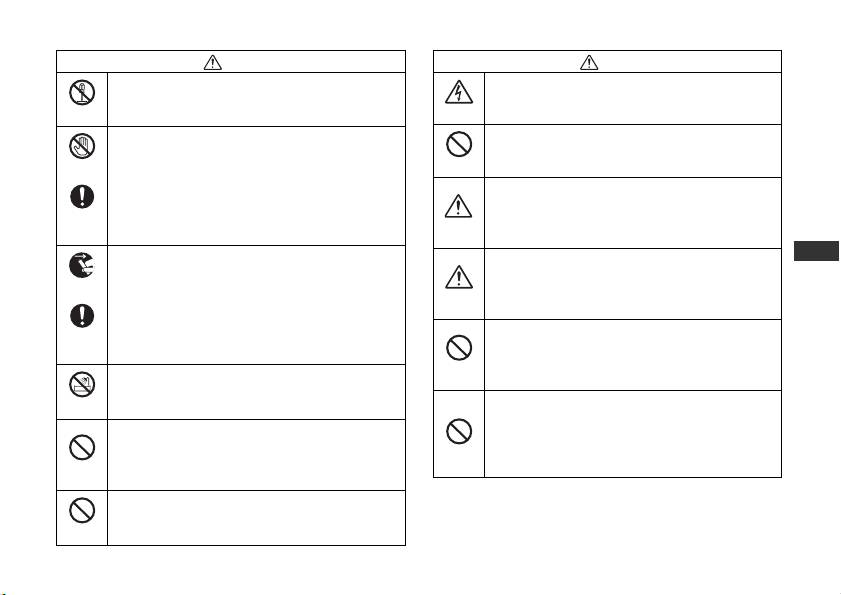
お守りいただく内容の種類を、次の絵表示で区分し、説明しています。
Fr
絵表示の例
Es
記号は、注意(警告を含む)を促す内容を告げるものです。図の中や近くに具体的な注意内容(左図の場合は
Se
感電注意)が描かれています。
Ru
記号は、禁止(してはいけないこと)の行為を告げるものです。図の中や近くに具体的な禁止内容(左図の場
Nl
合は分解禁止)が描かれています。
It
記号は、行為を強制すること(必ずすること)を告げるものです。図の中や近くに具体的な強制内容(左図の
Ck
場合は電池を取り出す)が描かれています。
Ch
Kr
2
Jp_03
警告
注意
分解したり修理・改造をしないこと
ぬれた手でさわらないこと
感電したり、異常動作をしてケガの原因となります。
感電の原因になることがあります。
分解禁止
感電注意
製品は幼児の手の届かないところに置くこと
落下などによって破損し、内部が露出したときは、
ケガの原因になることがあります。
接触禁止
放置禁止
露出部に手を触れないこと
感電したり、破損部でケガをする原因となります。
逆光撮影では、太陽を画角から十分にずらすこと
カメラの電池を抜いて、販売店またはニコンサー
太陽光がカメラ内部で焦点を結び、火災の原因に
すぐに修理
ビス機関に修理を依頼してください。
なることがあります。画角から太陽をわずかに外
使用注意
依頼を
しても火災の原因になることがあります。
Jp
使用しないときは、レンズにキャップをつけるか
熱くなる、煙が出る、こげ臭いなどの異常時は、速
太陽光のあたらない所に保管すること
En
やかにカメラの電池を取り出すこと
電池を取る
太陽光が焦点を結び、火災の原因になることがあ
そのまま使用すると火災、やけどの原因となりま
保管注意
De
ります。
す。電池を取り出す際、やけどに十分注意してくだ
Fr
さい。電池を抜いて、販売店またはニコンサービス
三脚にカメラやレンズを取り付けたまま移動しな
すぐに修理
機関に修理を依頼してください。
Es
いこと
依頼を
転倒したりぶつけたりしてケガの原因になること
移動禁止
Se
水につけたり水をかけたり、雨にぬらしたりしな
があります。
いこと
Ru
水かけ禁止
窓を閉め切った自動車の中や直射日光が当たる場
発火したり感電の原因となります。
Nl
所など、異常に温度が高くなる場所に放置しない
引火・爆発のおそれのある場所では使用しないこと
こと
It
プロパンガス・ガソリンなど引火性ガスや粉塵の
放置禁止
内部の部品に悪い影響を与え、火災の原因となる
Ck
発生する場所で使用すると、爆発や火災の原因と
使用禁止
ことがあります。
なります。
Ch
レンズまたはカメラで直接太陽や強い光を見ない
Kr
こと
見ないこと
失明や視力障害の原因となります。
3
Jp_03
各部の名称
( ):参照頁
※
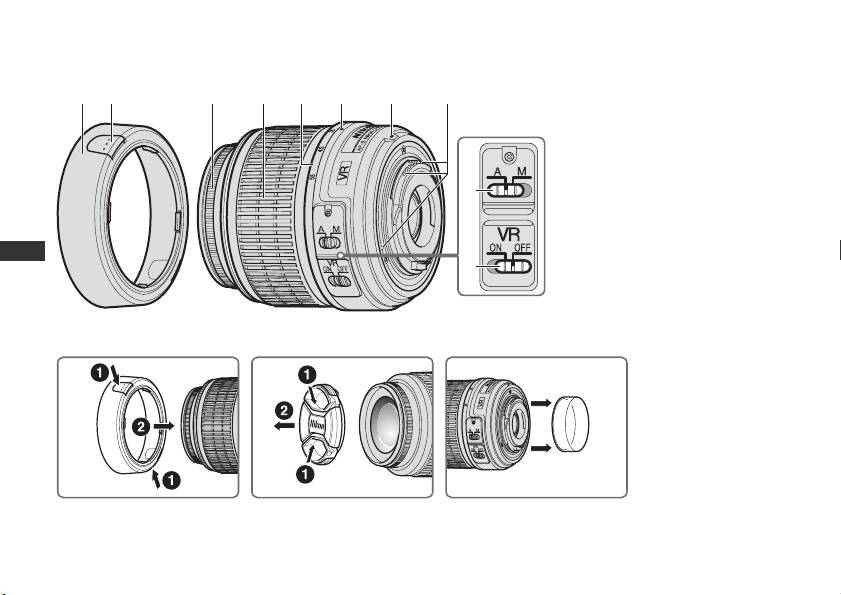
12 3 4 5 6 7 8
1 フード
(P. 5)
2 フード着脱ボタン(
P. 5)
3 フォーカスリング
4 ズームリング(
P. 6)
5 焦点距離目盛
9
6 焦点距離目盛指標
7 レンズ着脱指標(
P. 5)
8
CPU信号接点(P. 8)
Jp
9
A-M切り換えスイッチ(P. 6)
0
En
0 手ブレ補正スイッチ(
P. 7)
De
Fr
A
Es
Se
Ru
Nl
It
Ck
Ch
BCD
Kr
※フードは別売です。
4
Jp_03

このたびはDXニッコールレンズをお買い上げいただきありがとうございます。このレンズは、ニコンDXフォーマッ
トのニコンデジタル一眼レフカメラ(
D2シリーズ、D40シリーズなど)専用です。
ニコン
DX
フォーマットでの撮影画角は、
35mm
判換算で焦点距離の約
1.5
倍の焦点距離に相当する画角になります。
ご使用の前に、この「使用説明書」をよくお読みの上、正しくお使いください。また、カメラの使用説明書もご覧ください。
主な特長
カメラへの取り付け方
・ 手ブレ補正機能(VR)を使用すると、使わないとき
1
カメラの電源スイッチをOFFにします。
※
と比べ約
3段分
(焦点距離55mm時)シャッタース
2
レンズの裏ぶたを取り外します(図D)
ピードを遅くして撮影できるため、シャッタースピー
3
レンズとカメラのレンズ着脱指標7を合わせ、反時
ドの選択範囲が広がり、幅広い領域で手持ち撮影が可
計回りにカチッと音がするまでレンズを回します。
能です。(※当社測定条件によります。また、手ブレ
このとき、レンズの着脱指標7が真上にきます。
補正効果は、撮影者や撮影条件によって異なります。)
4
レンズキャップを取り外します。(図C)
Jp
・ レンズ内超音波モーター(サイレント・ウェーブ・
En
カメラからレンズの取り外し方
モーター)を採用し静かなAF(オートフォーカス)撮
De
影が可能です。また、
A-M切り換えスイッチ9 によ
レンズを取り外すには、カメラの電源スイッチをOFFに
り
AF(オートフォーカス)撮影およびMF(マニュア
し、レンズ取り外しボタンを押しながら時計回りにレン
Fr
ルフォーカス)撮影ができます。
ズを回します。
Es
・ 被写体までの距離情報をカメラボディー側に伝達す
※
Se
フード
HB-45
1
の取り付け、取り外し(図
B
)
る機能を備え、より的確な露出制御を実現します。
・ 非球面レンズや良好なボケ味を再現する円形絞りの
(※フードは別売です。)
Ru
採用により優れた光学性能、描写性能を発揮します。
Nl
取り付け方
It
フード着脱ボタン2を押した状態で取り付け、ボタン2
から指を離します。
Ck
収納時は、フード1を逆向きにして取り付けることがで
Ch
きます。
Kr
取り外し方
フード着脱ボタン2を押した状態で取り外します。
5
Jp_03
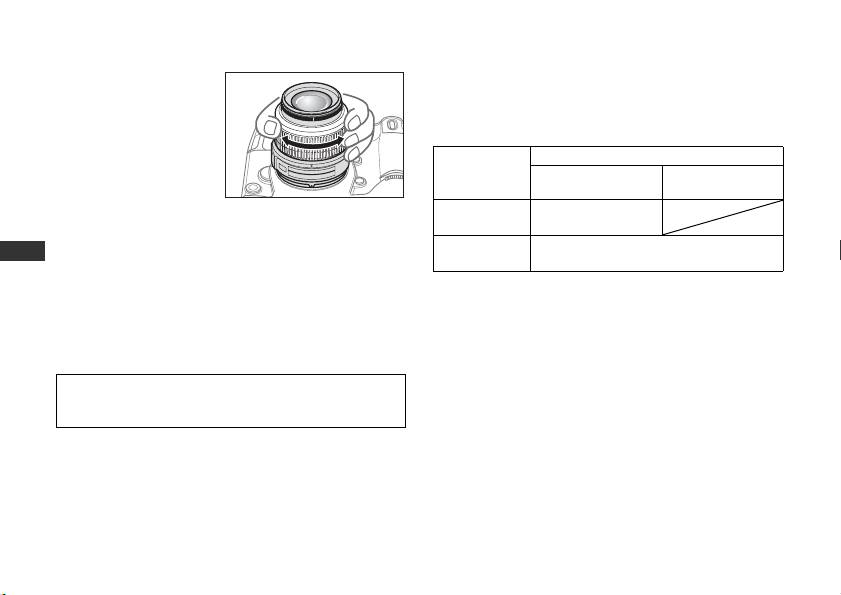
ズーミングと被写界深度
マニュアルフォーカス撮影
撮影を行う場合は、ズー
レンズのA-M切り換えスイッチ9を[ M]にセットしま
ムリング4 を回転させ
す。フォーカスリング3を回転させてピントを合わせ撮
(焦点距離が変化しま
影します。このときカメラ側のフォーカスモードは
AFで
す)構図を決めてから、
も
Mでもマニュアルフォーカス撮影ができます。
ピント合わせを行って
レンズのA-M
カメラのフォーカスモード
ください。プレビュー
切り換え
AF-A/AF-S/AF-C M
(絞り込み)機構を持つ
スイッチ9
カメラでは、撮影前に被
オートフォーカス
A
写界深度を確認できます。
撮影
マニュアルフォーカス撮影
Jp
ピント合わせの方法(図A)
M
(フォーカスエイド可)
En
オートフォーカス撮影
カメラのフォーカスモードについては、カメラの使用説
De
カメラのフォーカスモードをAF-A、AF-SまたはAF-Cに
明書をご覧ください。
Fr
セットし、レンズの
A-M切り換えスイッチ9を[A]に
オートフォーカスが苦手な被写体について
セットしてください。シャッターボタンを半押してピン
Es
「広角・超広角レンズのオートフォーカス撮影について」
トを合わせ撮影します。
Se
(
P. 10)をご覧ください。
オートフォーカス撮影ではフォーカスリング3が回転しま
Ru
すので、フォーカスリング3に触れないように注意してく
Nl
ださい。
It
Ck
Ch
Kr
6
Jp_03

手ブレ補正機能(VR)
・ 手ブレ補正の原理上、シャッターレリーズ後にファイ
※
ンダー像がわずかに動くことがありますが、異常では
シャッタースピードで約3段分
(焦点距離55mm時)
ありません。
の手ブレを補正します。パンニングにも対応し、流し撮
・ 手ブレ補正中にカメラの電源スイッチを
OFF にした
りも行えます。(※当社測定条件によります。また、手
り、レンズを取り外したりしないでください。(その
ブレ補正効果は、撮影者や撮影条件によって異なりま
状態でレンズを振るとカタカタ音がすることがあり
す。)
ますが、故障ではありません。カメラの電源スイッチ
手振れ補正機能の使い方
を再度
ONにすれば、音は消えます。)
1
手ブレ補正スイッチ0を[ON]にセットします。
・ 内蔵フラッシュ搭載のカメラ(
D300、D40 シリーズ
・ スイッチ 0 は、指標が合うようにセットしてく
など)で、内蔵フラッシュ充電中には、手ブレ補正は
ださい。
行いません。
2
シャッターボタンを半押しすると手ブレを補正し
・
三脚を使用するときは、手ブレ補正スイッチ
0
を[
OFF
]
Jp
にしてください。ただし、三脚を使っても雲台を固定し
ます。このときファインダー内の画像のブレも補正
En
ないときや、一脚を使用するときには、スイッチを[
ON
]
するため、ピント合わせが容易で、フレーミングし
De
にすることをおすすめします。
やすくなります。
・ AF 作動ボタンのあるカメラ(D2 シリーズ、D300 な
Fr
3
手ブレ補正スイッチ0を[OFF]にセットすると、
ど)で、
AF作動ボタンを押しても、手ブレ補正は作
Es
手ブレを補正しません。
動しません。
Se
手ブレ補正使用時のご注意
絞り値の設定
Ru
・ シャッターボタンを半押し後、ファインダー像が安定
絞り値を設定する場合は、カメラで設定してください。
Nl
してから撮影することをおすすめします。
・ パンニング(流し撮り)でカメラの向きを大きく変え
It
開放F値の変化
た場合、流した方向の手ブレ補正は機能しません。例
Ck
1
このレンズはズーミングにより、開放 F値が最大1
/3段
えば、流し撮りで横方向にパンニングすると、縦方向
Ch
変化します。ただし、露出を決める際に、
F値の変化量
の手ブレだけが補正され、流し撮りが行えます。
はカメラが自動的に補正しますので考慮する必要はあ
Kr
りません。
7
Jp_03
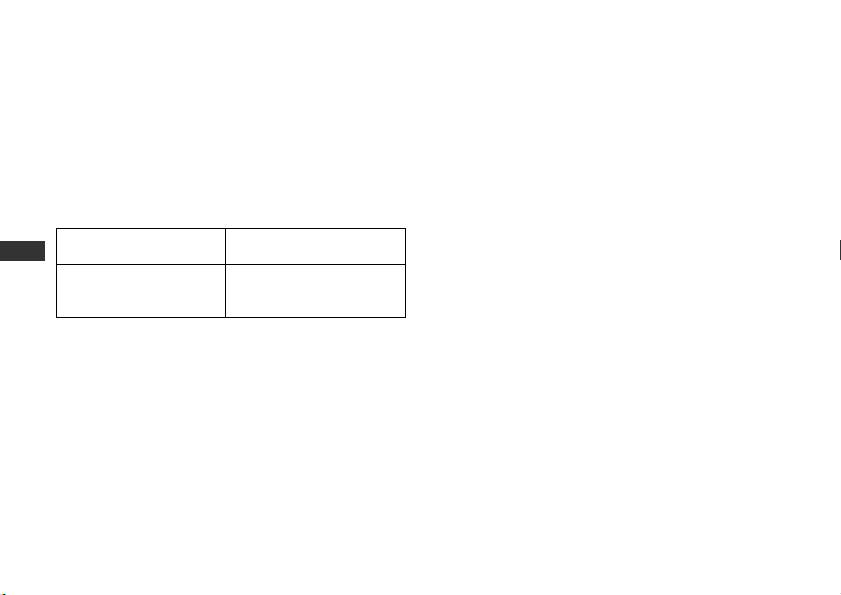
カメラの内蔵フラッシュ使用時のケラレに
レンズのお手入れと取り扱い上のご注意
ついて
・ レンズのCPU 信号接点 8 は汚さないようにご注意く
ださい。
カメラの内蔵フラッシュのケラレとは、フラッシュの光
・ レンズ面の清掃は、ホコリを拭う程度にしてくださ
がレンズのフード1や、焦点距離、撮影距離によっては
い。指紋がついたときは、柔らかい清潔な木綿の布に
レンズの先端でさえぎられて影になり、写真に映り込む
無水アルコール(エタノール)または市販のレンズク
現象です。
リーナーを少量湿らせ、レンズの中心から外周へ渦巻
・ ケラレを防止するために、レンズフード 1 は取り外
状に、拭きムラ、拭き残りのないように注意して拭い
してください。
てください。
・ 撮影距離
0.6m未満では使用できません。
・ シンナーやベンジンなどの有機溶剤は絶対に使用し
ないでください。
ケラレなく撮影できる
デジタル一眼レフカメラ
Jp
・
レンズ表面の汚れや傷を防ぐためには、
NC
フィルター
焦点距離と撮影距離
をお使いいただけます。また、レンズフード
1
も役立
En
D300、D200、D100、D80、
すべての焦点距離で、ケラレ
ちます。
D70シリーズ、D60、D50、
De
は発生しません。
・ レンズをソフトケースに入れるときは、必ず、レンズ
D40シリーズ
キャップと裏ぶたを取り付けてください。なお、フー
Fr
D100/D70の内蔵フラッシュは、20mmレンズの画角を
ド1 を逆さ向きにしてレンズに取り付けた状態でも
Es
カバーする照射角なので、焦点距離
18mmでは周辺が暗
収納可能です。
Se
くなります。
・ フード 1 を持ってカメラを持ち上げたりしないでく
ださい。
Ru
・ レンズを長期間使用しないときは、カビやサビを防ぐ
Nl
ために、高温多湿のところを避けて風通しのよい場所
It
に保管してください。また、直射日光のあたるところ、
ナフタリンや樟脳のあるところも避けてください。
Ck
・ レンズを水に濡らすと、部品がサビつくなどして故障
Ch
の原因となりますのでご注意ください。
Kr
・
ストーブの前など、高温になるところに置かないでく
ださい。極端に温度が高くなると、外観の一部に使用し
ている強化プラスチックが変形することがあります。
8
Jp_03

付属アクセサリー
仕 様
型式 ニコン
FマウントCPU内蔵Gタイプ、
・ 52mmスプリング式レンズキャップ LC-52
AF-S DXニッコールズームレンズ(ニ
別売アクセサリー
コンデジタル一眼レフカメラ[ニコン
DXフォーマット]専用)
・ 52mmネジ込み式フィルター
焦点距離
18mm―55mm
・ 裏ぶた
LF-1
最大口径比 1:3.5―5.6
・ ソフトケース CL-0815
レンズ構成 8群11枚(非球面レンズ1枚)
・ フード HB-45
画角
76°―28°50′
焦点距離目盛
18、24、35、45、55mm
使用できないアクセサリー
撮影距離情報
カメラボディーへの撮影距離情報出力可能
・ テレコンバーター:全種類
ズーミング ズームリングによる回転式
Jp
・ オート接写リング:
PKリング全種類
ピント合わせ 超音波モーターによるオートフォーカ
・
Kリング:全種類
En
ス、マニュアルフォーカス可能
・ オートリング
BR-4
De
手ブレ補正 ボイスコイルモーター(
VCM)による
・ ベローズアタッチメント:全種類
レンズシフト方式
Fr
・ アタッチメントリング
SX-1
最短撮影距離
0.28 m(ズーム全域)
Es
※その他のアクセサリーでも、使用できない場合があり
絞り羽根枚数
7枚(円形絞り)
ます。アクセサリーの使用説明書をご確認ください。
Se
絞り方式 自動絞り
絞りの範囲 焦点距離
18mm時 f 3.5―22、
Ru
55mm時 f 5.6―36
Nl
測光方式 開放測光
It
アタッチメントサイズ
52 mm(P=0.75 mm)
Ck
大きさ
約
73 mm
(最大径)×
79.5 mm
(バヨネッ
トマウント基準面からレンズ先端まで)
Ch
質量 約265 g
Kr
・ 仕様、外観の一部を、改善のため予告なく変更するこ
とがあります。
9
Jp_03
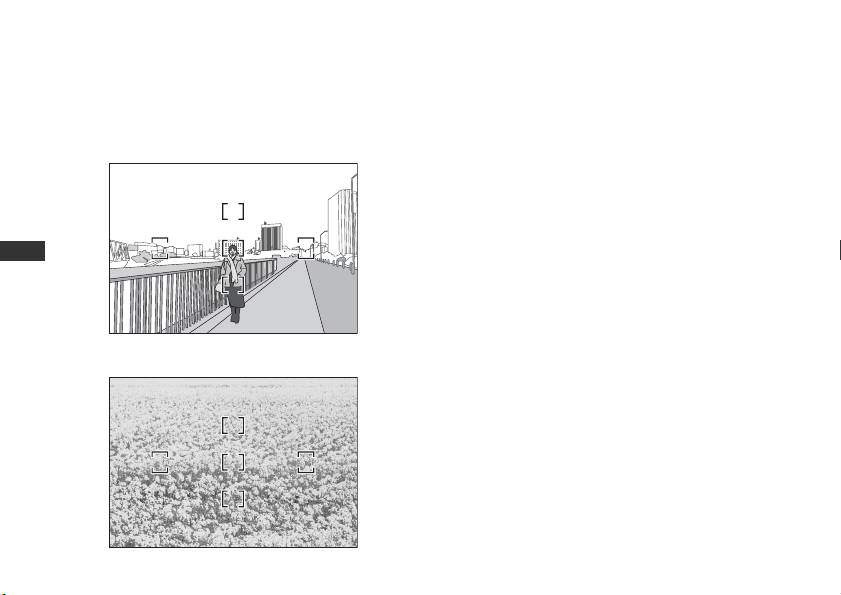
広角・超広角レンズのオートフォーカス撮影について
広角・超広角レンズでは、標準クラスのレンズと比べ、下記のような撮影条件になりやすく、オートフォーカス撮影
時には注意が必要です。
以下をお読みになって、オートフォーカス撮影にお役立てください。
1. フォーカスフレームに対して主要な被写体が
E〈人物〉
小さい場合
図Eのように、フォーカスフレーム内に遠くの建物と
近くの人物が混在するような被写体になると、背景
にピントが合い、人物のピント精度が低下する場合
があります。
Jp
2. 絵柄がこまかな場合
En
図Fのように、被写体が小さいか、明暗差が少ない被
De
写体になると、オートフォーカスにとっては苦手な
Fr
被写体になります。
Es
◆このような時には・・・
F〈花畑〉
Se
1、2のような被写体条件でオートフォーカスが上手く働
Ru
かない場合、主要被写体とほぼ同じ距離にある被写体で
フォーカスロックし、構図を元に戻して撮影する方法が
Nl
有効です。
It
また、マニュアルフォーカスに切り換えて、マニュアル
Ck
でピントを合わせて撮影する方法もあります。
Ch
その他
お手持ちのカメラボディーの使用説明書で「オート
Kr
フォーカスが苦手な被写体について」の説明も参照して
ください。
10
Jp_03

Jp
En
De
Fr
Es
Se
Ru
Nl
It
Ck
Ch
Kr
11
Jp_03
Notes on Safety Operations
CAUTION
Do not disassemble
Keep out of reach of children
Touching the internal parts of the camera or lens could
Particular care should be taken to prevent infants from
result in injury. Repairs should be performed only by
putting the batteries or other small parts into their mouths.
qualified technicians. Should the camera or lens break
Observe the following precautions when handling
open as the result of a fall or other accident, take the
the camera and lens
product to a Nikon-authorized service representative for
• Keep the camera or lens unit dry. Failure to do so could
inspection after unplugging the product and/or removing
result in fire or electric shock.
the battery.
• Do not handle or touch the camera or lens unit with wet
Turn off immediately in the event of malfunction
hands. Failure to do so could result in electric shock.
Jp
Should you notice smoke or an unusual smell coming from
• When shooting with back-lighting, keep the sun well out
En
the camera or lens, remove the battery immediately, taking
of the frame. Sunlight could be focused into the lens
De
care to avoid burns. Continued operation could result in
body and cause a fire. Sunlight not directly in the frame,
Fr
injury.
but even near the frame, can also be the cause of fire.
After removing or disconnecting the power source, take
• When the lens will not be used for an extended period of
Es
the product to a Nikon-authorized service representative
time, attach both front and rear lens caps and store the
Se
for inspection.
lens away from direct sunlight. Failure to do so could
Ru
result in a fire, as the lens may focus sunlight onto a
Do not use the camera or lens in the presence of
Nl
flammable object.
flammable gas
It
Operating electronic equipment in the presence of
flammable gas could result in an explosion or fire.
Ck
Do not look at the sun through the lens or viewfinder
Ch
Viewing the sun or other strong light sources through the
Kr
lens or viewfinder could cause permanent visual
impairment.
12
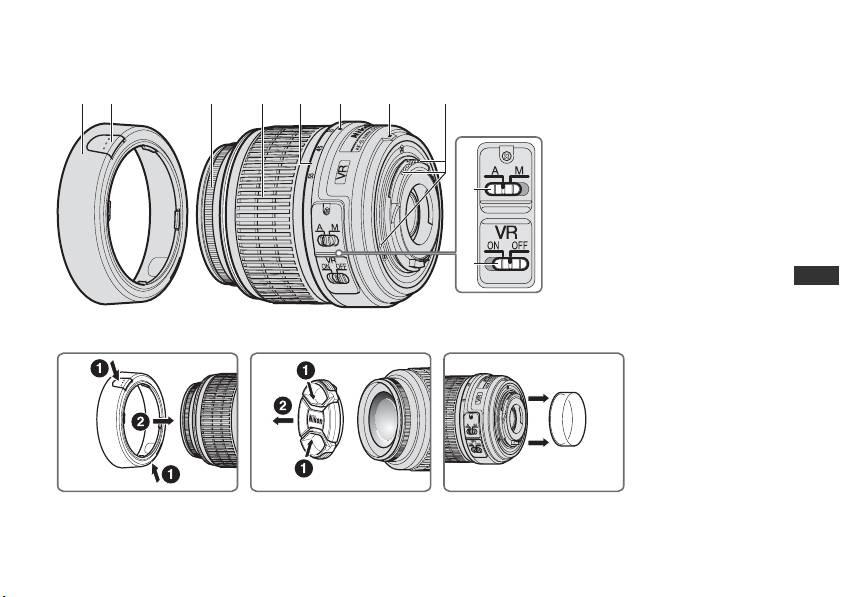
Nomenclature
( ) : reference page
12 3 4 5 6 7 8
1 Lens hood* (P. 14)
2 Lens hood attachment button
(P. 14)
3 Focus ring
4 Zoom ring (P. 15)
9
5 Focal length scale
6 Focal length scale index
7 Mounting index (P. 14)
8 CPU contacts (P. 17)
Jp
0
9 A-M mode switch (P. 15)
En
0 Vibration reduction ON/OFF
De
A
switch (P. 16)
Fr
Es
Se
Ru
Nl
It
Ck
BCD
Ch
*Optional
Kr
13

Thank you for purchasing the AF-S DX NIKKOR 18-55mm f/3.5-5.6G VR. DX Nikkor lenses are specially designed for
use with Nikon digital-SLR (Nikon DX format) cameras, such as the D2-series and D40-series. When mounted on
Nikon DX-format cameras, the lens’ picture angle is equivalent to approximately 1.5× the focal length in 35mm
format. Before using this lens, please read these instructions and refer to your camera’s User’s Manual.
Major features
Mounting the lens
• Enabling vibration reduction (VR) allows for shooting
1
Turn the camera off.
at shutter speeds approximately three stops* slower
2
Remove the rear lens cap (Fig. D).
(at a focal length of 55mm) than when vibration
3
Keeping the mounting index 7 on the lens aligned
reduction is disabled, thus expanding the range of
with the mounting mark on the camera body,
effective shutter speed options, and simplifying
rotate the lens counterclockwise until it clicks into
hand-held shooting at a variety of zoom positions.
place. Be sure that the mounting index 7 is on the
Jp
(*Based on results achieved under Nikon
uppermost side.
En
measurement conditions. The effects of vibration
4
Remove the front lens cap. (Fig. C)
De
reduction may vary by individual and/or shooting
Removing the lens
conditions.)
Fr
Be sure to turn the camera off before removing the lens.
• This lens employs a Silent Wave Motor to drive the
Press and hold the lens-release button while turning
Es
focusing mechanism, making autofocusing smooth,
the lens clockwise to remove.
Se
silent and almost instantaneous. The A-M mode
switch 9 is provided for simple selection of
Using the lens hood HB-45 1* (Fig. B)
Ru
autofocus (A) or manual focus (M) operation.
*Optional.
Nl
• More accurate exposure control is possible because
Attaching the hood
It
subject distance information is transferred from the
Hold down the lens hood attachment buttons 2
lens to the camera body.
Ck
when attaching the lens hood 1. To store the lens
• The use of one aspherical lens elements ensures sharp
hood 1, attach it in the reverse position.
Ch
pictures virtually free of color fringing. Also, by utilizing
Removing the hood
Kr
a seven-blade diaphragm that results in a nearly
circular aperture, out-of-focus objects in front of, or
Hold down the lens hood attachment buttons 2
behind, the subject are rendered as pleasing blurs.
when removing the lens hood 1.
14
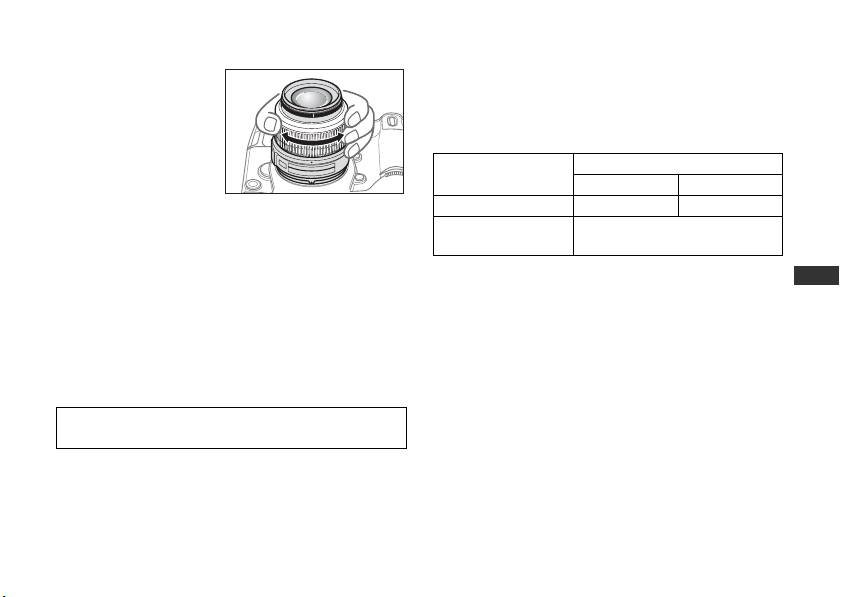
Focusing, zooming, and depth of field
Manual focus mode
Before focusing, rotate
Set the A-M mode switch 9 on the lens to [M]. Rotate
the zoom ring 4 to
the focus ring 3 manually to focus. Shooting is
adjust the focal length
possible when camera focus mode is set to either AF or
until the desired
M.
composition is framed in
Lens’ A-M mode
Camera focus mode
the viewfinder.
switch 9
AF-A/AF-S/AF-C M
If your camera has a
AAutofocus—
depth of field preview (stop-down) button or lever,
Manual focus
depth of field can be previewed through the camera
M
(focus assist is available)
viewfinder.
Jp
For more information on camera focus modes, refer to
En
Focusing (Fig. A)
your camera’s User’s Manual.
De
Autofocus mode
Getting good results with autofocus
Fr
Set the camera focus mode to AF-A, AF-S or AF-C and
Refer to “Notes on using wide or super-wide angle AF
set the A-M mode switch 9 on the lens to [A]. The
Es
Nikkor lenses” (P. 19).
camera focuses automatically (autofocus) while the
Se
shutter-release button is pressed halfway.
Ru
Nl
Be careful not to touch the focus ring 3 when it is turning
during autofocus operation.
It
Ck
Ch
Kr
15

Vibration reduction mode (VR)
• Due to the characteristics of the vibration reduction
mechanism, the image in the viewfinder may be
Enabling vibration reduction (VR) allows for shooting at
blurred after the shutter is released. This is not a
shutter speeds approximately three stops* slower (at a
malfunction.
focal length of 55mm) than when vibration reduction is
• Do not turn the camera off or remove the lens from
disabled. Panning is also supported. (*Based on results
the camera while vibration reduction is operating.
achieved under Nikon measurement conditions. The
Failure to observe this note could result in the lens
effects of vibration reduction may vary depending on
sounding and feeling as if an internal component is
individual and shooting conditions.)
loose or broken when it is shaken. This is not a
Turning the vibration reduction on and off
malfunction. Turn the camera on again to correct this.
1
Set the vibration reduction ON/OFF switch
0
to [ON].
• With cameras such as D300 and D40-series models,
Note: Be sure to set the switch 0 so that the
featuring a built-in flash, vibration reduction does not
indicator is precisely aligned with [ON].
function while the built-in flash is charging.
Jp
2
Camera shake is reduced when the shutter-release
• When the camera is mounted on a tripod, set the
En
button is pressed halfway. Autofocus and manual
vibration reduction ON/OFF switch 0 to [OFF].
However, set the switch to [ON] when using a tripod
De
focusing, as well as precise framing of the subject,
without securing the tripod head, or when using a
are simplified because camera shake visible
Fr
monopod.
through the viewfinder is also reduced.
Es
• With autofocus cameras such as D2-series and D300
3
To disable vibration reduction, set the vibration
models, featuring an AF start (AF-ON) button,
Se
reduction ON/OFF switch 0 to [OFF].
vibration reduction does not function even when the
Ru
Notes on using vibration reduction
AF-ON button is pressed.
Nl
• After pressing the shutter-release button halfway,
Setting the aperture
wait until the image in the viewfinder stabilizes
Use the camera to adjust the aperture setting.
It
before pressing the shutter-release button the rest of
Ck
the way down.
Variable maximum apertures
• If the camera is panned in a wide arc, compensation
Zooming the lens from 18mm to 55mm decreases the
Ch
1
for camera shake in the panning direction is not
maximum aperture by 1
/3 stop.
Kr
performed. For example, with horizontal panning
However, there is no need to adjust the aperture
only vertical camera shake is reduced, making
setting to achieve correct exposures because the
smooth pans much easier.
camera automatically compensates for this variable.
16
Flash photography using cameras with
Lens care
a built-in flash
• Be careful not to soil or damage the CPU contacts 8.
Vignetting is the darkening of the corners around the
• Clean lens surfaces with a blower brush. To remove dirt
and smudges, use a soft, clean cotton cloth or lens tissue
image that occurs when the light emitted by the flash
moistened with ethanol (alcohol) or lens cleaner. Wipe in
is obstructed by the lens hood 1, or lens barrel
a circular motion from the center to the outer edge, taking
depending on the focal length or shooting distance.
care not to leave traces or touch other parts of the lens.
• To prevent vignetting, do not use the lens hood 1 .
• Never use thinner or benzene to clean the lens, as this
• It is not possible to shoot at distances shorter than
could cause damage, result in a fire, or cause health
0.6 m (2.0 ft.) using the camera’s built-in flash.
problems.
• NC filters are available to protect the front lens element.
Supported focal length /
Digital-SLR cameras
The lens hood 1 also helps to protect the front of the
Jp
Shooting distance
lens.
D300, D200, D100, D80, D70-
No vignetting occurs at
En
• When storing the lens in its flexible lens pouch, attach
series, D60, D50, D40-series
any focal length
De
both the front and rear lens caps. The lens can also be
The built-in flash on the D100 and D70 supports focal
stored with the lens hood 1 attached in the reverse
Fr
lengths of 20mm or more.
position.
Es
Vignetting occurs at a focal length of 18mm.
• When the lens is mounted on a camera, do not pick up or
Se
hold the camera and lens by the lens hood 1.
Ru
• When the lens will not be used for an extended period of
time, store it in a cool, dry place to prevent mold. Be sure
Nl
to store the lens away from direct sunlight or chemicals
It
such as camphor or naphthalene.
Ck
• Do not get water on the lens or drop it in water as this will
Ch
cause it to rust and malfunction.
• Reinforced plastic is used for certain parts of the lens. To
Kr
avoid damage, never leave the lens in an excessively hot
place.
17

Standard accessories
Picture angle 76º–28º50’
• 52mm snap-on front lens cap LC-52
Focal length scale
18, 24, 35, 45, 55mm
Optional accessories
Distance
Output to camera body
• 52mm screw-in filters
information
•Rear lens cap LF-1
Zoom control Manually via separate zoom ring
• Flexible lens pouch CL-0815
Focusing
Autofocus using a Silent Wave Motor;
• Lens hood HB-45
manually via separate focus ring
Incompatible accessories
Vibration
Lens-shift method using voice coil
• Teleconverters (all models)
reduction
motors (VCMs)
• Auto Ring BR-4 and all models of Auto Extension Ring
Closest focus
0.28 m (0.9 ft.) at all zoom settings
Jp
PK, K Ring and Bellows focusing attachment.
distance
• Attachment Ring SX-1
En
No. of diaphragm
7 pcs. (rounded)
Other accessories may not be suitable for use with this
blades
De
lens. For details, refer to the User’s Manual provided
Diaphragm Fully automatic
Fr
with accessories.
Aperture range f/3.5 to f/22 (at 18mm), f/5.6 to f/36
Es
Specifications
(at 55mm)
Se
Type of lens G-type AF-S DX Zoom-Nikkor lens
Exposure
Via full-aperture method
Ru
with built-in CPU and Nikon bayonet
measurement
mount (Specially designed for use
Nl
Attachment size 52 mm (P = 0.75 mm)
with Nikon digital-SLR—Nikon DX-
It
format—cameras)
Dimensions Approximately 73 mm (dia.) × 79.5
Ck
mm (extension from the camera’s
Focal length 18mm–55mm
lens-mount flange)
Ch
Maximum
f/3.5–5.6
Weight Approximately 265 g (9.4 oz)
aperture
Kr
Lens
11 elements in 8 groups (1 aspherical
Specifications and designs are subject to change without
construction
lens element)
notice or obligation on the part of the manufacturer.
18
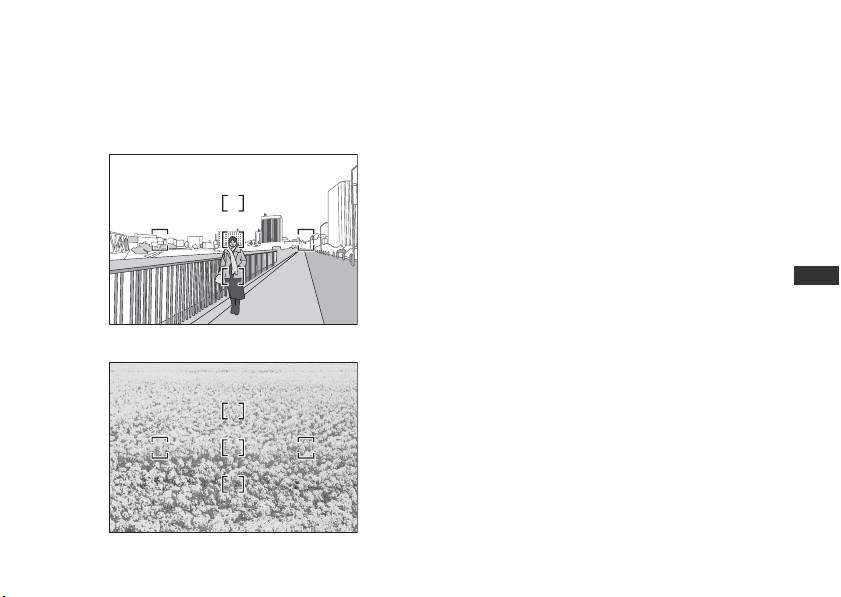
Notes on using wide or super-wide angle AF Nikkor lenses
In the following situations, autofocus may not perform as expected when shooting with wide or super-wide angle
AF Nikkor lenses.
1. When the main subject in the focus
E A person standing in front of a
brackets is relatively small
distant background
When a person standing in front of a distant
background is placed within the focus brackets, as
shown in Fig. E, the background may be in focus,
while the subject is out of focus.
2. When the main subject is a finely
Jp
patterned subject or scene
When the subject is finely patterned or of low
En
contrast, such as a field filled with flowers, as shown
De
in Fig. F, focus may be difficult to acquire using
Fr
autofocus.
F A field filled with flowers
Es
Responses to these types of situations
Se
(1) Focus on a different subject located at the same
Ru
distance from the camera, apply focus lock,
Nl
recompose, and shoot.
It
(2) Set the camera focus mode selector to M (manual)
Ck
and focus manually on the subject.
Ch
Refer to “Getting Good Results with Autofocus” in the
camera’s User’s Manual.
Kr
19
Hinweise für sicheren Betrieb
ACHTUNG
Keinesfalls zerlegen.
Dem Zugriff von Kindern entziehen.
Beim Berühren der Innenteile von Kamera oder Objektiv droht
Es ist unbedingt dafür zu sorgen, dass Kleinkinder keine
Verletzungsgefahr. Überlassen Sie Reparaturen unbedingt
Batterien oder andere kleine Teile in den Mund nehmen
ausschließlich qualifizierten Technikern. Kommt es durch einen
können.
heftigen Stoß (z. B. Fall auf den Boden) zu einem Bruch von
Beim Umgang mit Kamera und Objektiv unbedingt
Kamera oder Objektiv, so trennen Sie zunächst das Produkt vom
Stromnetz bzw. entnehmen die Batterie(n) und geben es dann
die folgenden Vorsichtmaßnahmen beachten:
an eine autorisierte Nikon-Servicestelle zur Überprüfung ab.
• Halten Sie Kamera oder Objektiv stets trocken.
Andernfalls droht Brand- oder Stromschlaggefahr.
Bei einer Störung sofort die Stromversorgung
• Handhaben oder berühren Sie die Kamera bzw. das
Jp
ausschalten.
Objektiv keinesfalls mit nassen Händen. Andernfalls droht
Bei Entwicklung von Rauch oder ungewöhnlichem Geruch
durch Kamera oder Objektiv entnehmen Sie sofort die
Stromschlaggefahr.
De
Batterie(n); dabei vorsichtig vorgehen, denn es besteht
• Achten Sie bei Gegenlichtaufnahmen darauf, dass die
Verbrennungsgefahr. Bei einem Weiterbetrieb unter diesen
Fr
Sonne auf keinen Fall in den Bildausschnitt gerät.
Umständen droht Verletzungsgefahr.
Andernfalls könnte Sonnenlicht durch das Objektiv im
Es
Nach dem Abtrennen von der Stromversorgung geben Sie
Gehäuse fokussiert werden und einen Brand
Se
das Gerät an eine autorisierte Nikon-Servicestelle zur
verursachen. Selbst wenn die Sonne nicht direkt in den
Überprüfung ab.
Ru
Bildausschnitt gerät, sondern nur in dessen Nähe, droht
Kamera oder Objektiv keinesfalls bei Vorhandensein
Nl
Brandgefahr.
von brennbarem Gas einsetzen.
• Vor einem längeren Nichtgebrauch des Objektivs
It
Wird elektronisches Gerät bei brennbarem Gas betrieben,
bringen Sie den vorderen und hinteren Deckel an und
so droht u. U. Explosions- oder Brandgefahr.
Ck
bewahren das Objektiv geschützt vor direkter
Keinesfalls durch Objektiv oder Sucher in die Sonne
Ch
Sonnenlichteinwirkung auf. Andernfalls droht
blicken.
Kr
Beim Betrachten der Sonne oder anderer starker
Brandgefahr wegen möglicher Fokussierung von
Lichtquellen durch Objektiv oder Sucher droht eine
Sonnenlicht durch die Linse auf brennbare Gegenstände.
permanente Schädigung des Sehvermögens.
20
