
Pioneer PD-M426A: BASIC OPERATION TO PLAY A COMPACT DISC
BASIC OPERATION TO PLAY A COMPACT DISC: Pioneer PD-M426A
Table of contents
- WARNING: IMPORTANT NOTICE
- CONTENTS
- CAUTIONS REGARDING HANDLING
- PUT BATTERIES INTO THE REMOTE CONTROL UNIT (PD-M426A only) CONFIRM SUPPLIED ACCESSORIES
- REMOTE CONTROL OPERATIONS (PD-M426A only) BEFORE OPERATING THE PLAYER INSERT DISCS INTO THE 6-DISC MAGAZINE
- AFFIXING LABELS TO THE MAGAZINE
- CONNECTIONS
- CONNECTIONS AC POWER CORD CONNECTION AND FUNCTIONS
- NAMES AND FUNCTIONS OF PARTS FRONT PANEL
- DISPLAY WINDOW NAMES AND FUNCTIONS OF PARTS REMOTE CONTROL UNIT (PD-M426A only)
- BASIC OPERATION TO PLAY A COMPACT DISC
- BASIC OPERATION
- VARIOUS OPERATIONS DISC SEARCH - TO SEARCH FOR A PARTICULAR DISC TRACK SEARCH - TO SEARCH FOR A PARTICULAR TRACK
- MANUAL SEARCH - TO SEARCH FOR A PARTICULAR PASSAGE
- MAGAZINE HI-LITE SCAN RANDOM PLAYBACK - TO PLAY ALL TRACKS IN RANDOM ORDER
- VARIOUS OPERATIONS
- PROGRAM PLAYBACK - TO PROGRAM TRACKS/DISCS IN DESIRED ORDER TO PLAY ONLY DESIRED TRACKS/DISCS
- TO PLAY ONLY DESIRED TRACKS/DISCS
- PROGRAMMING A PAUSE (PD-M426A only)
- TO PLAY ONLY DESIRED TRACKS/DISCS DELETE PROGRAM PLAYBACK - TO DELETE UNDESIRED TRACKS/DISCS (PD-M426A only)
- TO PLAY ONLY DESIRED TRACKS/DISCS
- TROUBLESHOOTING SPECIFICATIONS
13
En/Fr
BASIC OPERATION
2
1
TO PLAY A COMPACT DISC
FONCTIONNEMENT DE BASE
POUR LIRE UN DISQUE COMPACT
STANDBY/ON
1. Appuyer sur l’interrupteur STANDBY/ON pour
mettre le lecteur en service.
2. Insérer un magasin chargeur en le poussant jusqu’
à un déclic.
÷
Insèrer les disques à lire dans le magasin à l’avance. (Se
référer à”
AVANT DE FAlRE FONCTIONNER LE
LECTEUR
” page 7.)
÷
Lorsque le lecteur est en attente, l’insertion d’un magasin
fournit automatiquement l’alimentation.
3. Appuyer sur la touche
6
pour commencer la
lecture.
Pour arrêter momentanément la lecture:
Appuyez sur la
touche
6
pendant la lecture.L’indicateur
8
s’allume et la lecture est arrêtée à ce point. Une nouvelle
pression sur la
touche
6
ou sur la
touche
3
fait reprendre
la lecture à partir du point où le mode de pause a été engagé.
Pour arrêt er la lecture:
Appuyer sur la
touche
7
. Le lecteur revient au début de la
prémière plage musicale où la lecture a été arrêtée. Si on
appuie deux fois sur la
touche
7
, le lecteur revient au début
de la première plage musicale du premier disque, puis passe
en mode d’arrêt.
REMARQUE (uniquement pour le PD-M426A) :
Il est possible d’arrêter le lecteur depuis une télécommande
pour lecteur CD Pioneer ou depuis le bouton marche/arrêt CD
d’un récepteur, mais il est impossible de le mettre en marche
en procédant de la même façon.
REMARQUE (uniquement pour le PD-M406A) :
Un appareil situé du côté SR-OUT et branché par la SR-IN peut
également être arrêté, mais non mis en marche, en procédant
de la même façon.
Pour arrêter la lecture et retirer le magasin chargeur:
Appuyer sur la
touche
EJECT
(
0
), retirer le magasin chargeur,
puis appuyer sur
l’interrupteur STANDBY/ON
pour couper
l’alimentation.
Les fonctionnements indiqués par la marque [
] s’effectuent
par la télécommande.
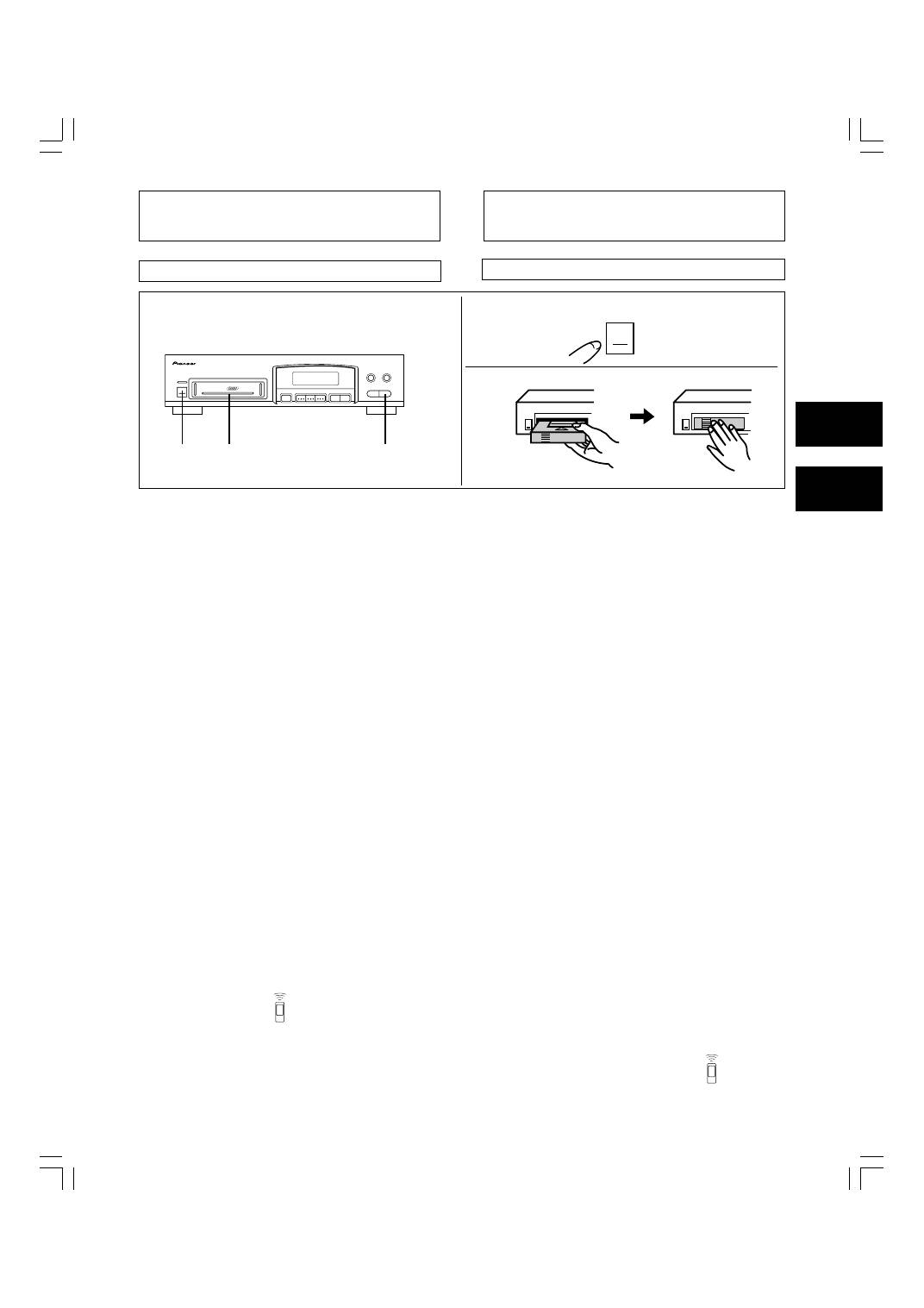
1. Press the STANDBY/ON switch to turn the power
on.
2. Insert a magazine, pushing it in until a click sound
is heard.
÷
Insert the discs to be played into the magazine beforehand.
(Refer to “
BEFORE OPERATING THE PLAYER
” on page 7.)
÷
In standby mode, inserting a magazine automatically turns on
the power.
3. Press the
6
button to start playback.
To pause playback temporarily:
Press the
6
button
during playback. The
8
indicator lights
and playback is paused at that point. Pressing the
6
button
again or
3
button
resumes playback from the position where
pause mode was entered.
To stop playback:
Press the
7
button
. The player returns to the beginning of the
first track on the disc at which playback was stopped. If the
7
button
is pressed twice, the player returns to the beginning
of the first track on the first disc and enters stop mode.
NOTE (Only for PD-M426A):
The player can be turned off using a Pioneer CD player remote
control or a CD power button of an AV receiver, but it cannot
be turned on.
NOTE (Only for PD-M406A):
A device on the SR-OUT side connected via the SR-IN, can
also be turned off if the same operation is conducted, but it
cannot be turned ON.
To stop playback and take out the magazine:
Press the
EJECT button
(
0
), remove the magazine, and then
press the
STANDBY/ON switch
to turn off the power.
Operations indicated the [
] mark are performed with the
remote control unit.
1
2
3
'
0
7
6
Î
4 1
¢
¡
6
