
Pioneer DEH-142UB: Head unit Display indication Basic operations Set up menu
Head unit Display indication Basic operations Set up menu: Pioneer DEH-142UB
Table of contents
- About this unit About this manual Demo mode In case of trouble
- Head unit Display indication Basic operations Set up menu
- Tuner Menu operations identical for set up menu/function settings/audio adjustments/ initial settings/lists
- CD/CD-R/CD-RW and USB storage devices
- Initial settings Audio adjustments
- Connections Sound muting
- Installation DIN front/rear mount
- Troubleshooting Error messages
- Handling guidelines
- Compressed audio compatibility (disc, USB) WMA Sequence of audio files
- Specifications WMA Russian character chart Copyright and trademark
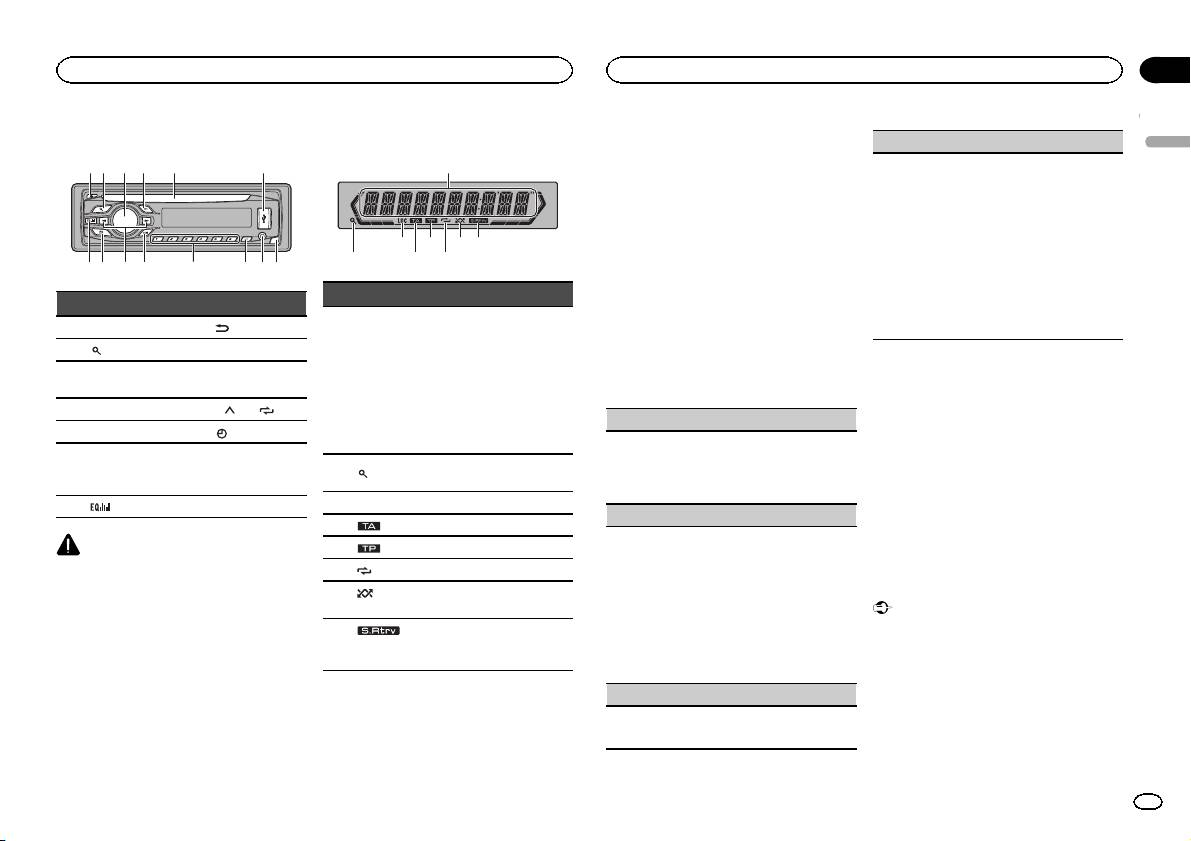
Head unit
b c dea87
12 3 4 5 6
9
Display indication
1
873 5
Part Part
1 h (eject) 8
(back)
2
(list) 9 c/d
MULTI-CONTROL
3
a BAND
(M.C.)
4 SRC/OFF b 1/
to 6/
5 Disc loading slot c (clock)
AUX input jack
6 USB port d
(3.5 mm stereo
jack)
7
(EQ) e Detach button
CAUTION
! Use an optional Pioneer USB cable (CD-
U50E) to connect the USB audio player/USB
memory as any device connected directly to
the unit will protrude out from the unit and
may be dangerous.
! Do not use unauthorized products.
2 4 6
Section
Operating this unit
Operating this unit
02
1 After installation of this unit, turn the
TITLE (multi-language)
ignition switch to ON.
English
SET UP appears.
This unit can display the text information of a com-
pressed audio file even if they are embedded in a
2 Turn M.C. to switch to YES.
Western European or Russian language.
# If you do not operate for 30 seconds, the set up
! If the embedded language and the selected
menu will not be displayed.
language setting are not the same, text infor-
# If you prefer not to set up at this time, turn M.C.
mation may not display properly.
to switch to NO.
! Some characters may not be displayed prop-
If you select NO, you cannot set up in the set up
erly.
menu.
1 Turn M.C. to select the desired setting.
Indicator State
EUR (European)—RUS (Russian)
3 Press M.C. to select.
2 Press M.C. to confirm the selection.
! Tuner: band and fre-
QUIT appears.
quency
4 Perform the following procedures to set
! RDS: program service
the menu.
name, PTY information
5 To finish your settings, turn M.C. to select
Main dis-
To proceed to the next menu option, you need to
1
and other literal informa-
YES.
play section
confirm your selection.
tion
# If you prefer to change your setting again, turn
! Built-in CD player and
M.C. to switch to NO.
CLOCK SET (setting the clock)
USB: elapsed playback
time and text information
6 Press M.C. to select.
1 Turn M.C. to adjust hour.
The list function is being oper-
2 Press M.C. to select minute.
Notes
2
(list)
ated.
3 Turn M.C. to adjust minute.
! You can set up the menu options in the initial
4 Press M.C. to confirm the selection.
settings. For details about the settings, refer
3 LOC Local seek tuning is on.
FM STEP (FM tuning step)
to Initial settings on page 6.
4
(TA) TA function is on.
! You can cancel set up menu by pressing
Normally, the FM tuning step employed by seek
SRC/OFF.
5
(TP) A TP station is tuned in.
tuning is 50 kHz. When AF or TA is on, the tuning
6
(repeat) Track or folder repeat is on.
step automatically changes to 100 kHz. It may be
preferable to set the tuning step to 50 kHz when
Basic operations
(ran-
7
Random play is on.
AF is on.
dom)
Important
! The tuning step remains at 50 kHz during man-
! Handle gently when removing or attaching
ual tuning.
The sound retriever function
the front panel.
8
(sound re-
1 Turn M.C. to select the FM tuning step.
is on.
! Avoid subjecting the front panel to excessive
triever)
50 (50 kHz)—100 (100 kHz)
shock.
2 Press M.C. to confirm the selection.
! Keep the front panel out of direct sunlight
DEMO (demo display setting)
and high temperatures.
Set up menu
! To avoid damaging the device or vehicle inte-
1 Turn M.C. to set the demo display to on or off.
When you turn the ignition switch to ON after in-
rior, remove any cables and devices attached
2 Press M.C. to confirm the selection.
to the front panel before detaching it.
stallation, set up menu appears on the display.
You can set up the menu options below.
En
3
