
Asus A7N8X – страница 6
Инструкция к Компьютерным аксессуарам Asus A7N8X
Оглавление
- User Guide
5.8.1 Starting VideoLive Mail
To start VideoLive Mail, click the Windows Start button, point to Programs,
and then CyberLink VideoLive Mail, and then click VideoLive Mail x.x.
VLM 3’s Setup Wizard will start and guide you through configuring the video
and audio input peripherals and to setup the e-mail environment.
1. Setup Wizard first will prompt a dialog to confirm that you want to configure
the hardware and E-mail setting. Click Yes to continue the system parameter
configuration.
2. The e-mail configuration screen appears. You will need to enter your
name and the e-mail address. Click Next to continue.
3. The Internet e-mail configuration screen appears. You may choose to use
the VLM 3 built-in E-mail functionality (SMTP mail), or use MAPI compliant
e-mail system. Consult your ISP or MIS staff for the E-mail server IP address
if you are not sure. Click Next to continue.
4. Then the Video Configuration screen shows up. You may have to specify
the video driver for VLM 3, if there are several video-input devices installed.
Then configure the number of video frames to be captured per second. Note
that the more frames you choose, the bigger the file size will be. Click Next
to continue.
5. Then the Setup Wizard will then search for the GSM CODECS module for
audio compression, and prompt you with the result. Click Next to continue.
6. Setup Wizard then tests the audio volume during playing and recording.
Click Next when ready.
7. Configuration done. Click Finish to complete the environmental setting
procedure.
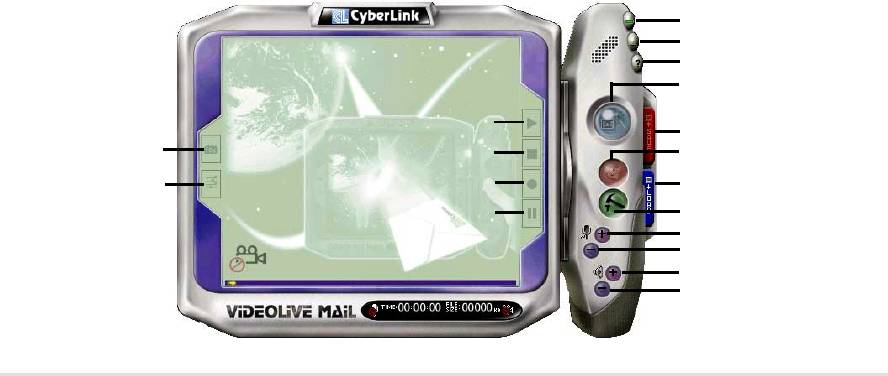
5.8.2 CyberLink VideoLive Mail User Interface
Exit
Minimize
Help
Video Mail Wizard
Start Playback
Save Video File
Snapshot to File
Stop Recording / Playback
Send Mail
Video Configuration
Start Recording
Load Video File
Pause
Send Mail
Increase MIC volume
Decrease MIC volume
Increase speaker volume
Decrease speaker volume
ASUS A7N266-VM motherboard user guide
83

84
Chapter 5: Software reference
Chapter 6
Appendix

ASUS A7N266-VM motherboard
6.1 Glossary
1394
1394 is the IEEE designation for a high performance serial bus tht offers data transfers
at 100/200/400 Mbps. This serial bus defines both a back plane physical layer and a
point-to-point cable-connected virtual bus. The primary application of the cable version
is the integration of I/O connectivity at the back panel of personal computers using a
low-cost, scalable, high-speed serial interface. The 1394 standard also provides new
services such as live connect/disconnect capability for external devices including disk
drives, printers and hand-held peripherals such as scanners and cameras. This is a
new standard to complement the slower USB interface and to compete with the more
expensive SCSI interface.
AC97 (Audio Codec '97)
AC '97 is the next step in enabling PCs with audio quality comparable to consumer
electronics devices. The specification defines new cost-effective options to help
integrate the components necessary to support next-generation auto-intensive PC
applications such as DVD, 3-D multiplayer gaming and interactive music. The
specification also defines new extensions supporting modem and docking to help both
desktop and mobile manufacturers adopt these new technologies more quickly and
cost-effectively. This specification uses software emulation to compete with the PCI
SoundBlaster specification.
ACPI (Advanced Configuration and Power Interface)
The ACPI specification defines a cross-platform interface designed to support many
operating systems. ACPI defines a flexible and abstract hardware interface that
provides a standard way to integrate power management features throughout a PC
system, including hardware, operating system and application software. This enables
the system to automatically turn ON and OFF peripherals such as CD-ROMs, network
cards, hard disk drives, and printers, as well as consumer devices connected to the PC
such as VCRs, TVs, phones, and stereos. With this technology, peripherals will also be
able to activate the PC. For example, inserting a tape into a VCR can turn on the PC,
which could then activate a large-screen TV and high-fidelity sound system.
AGP (Accelerated Graphics Port)
An interface specification that enables high-performance 3D graphics on mainstream
PCs. AGP was designed to offer the necessary bandwidth and latency to perform
texture mapping directly from system memory.
Bus Bus Frequency Bandwidth Data Transfer Rate
PCI 33MHz 33MHz 133MByte/sec
AGP 1X 66MHz 66MHz 266MByte/sec
AGP 2X 66MHz 133MHz 512MByte/sec
AGP 4X 66MHz 266MHz 1024MByte/sec
Backup. A copy of a file, directory, or volume on a separate storage device from the
original. This copy is for the purpose of data retrieval in case the original is accidentally
erased, damaged, or destroyed.
BIOS (Basic Input/Output System)
BIOS is a set of routines that affect how the computer transfers data between computer
components, such as memory, disks, and the display adapter. The BIOS instructions
are built into the computer’s read-only memory. BIOS parameters can be configured by
the user through the BIOS Setup program. The BIOS can be updated using the
provided utility to copy a new BIOS file into the EEPROM.
Bit (Binary Digit)
A bit is he basic unit of digital data used by the computer. A bit equals either: 0 or 1.
Boot
Boot means to start the computer operating system by loading it into system memory.
When the manual instructs you to “boot” your system (or computer), it means to turn ON
your computer. “Reboot” means to restart your computer. When using Windows 95 or
later, selecting “Restart” from “Start | Shut Down...” will reboot your computer.
ASUS A7N266-VM motherboard user guide
85

Bus Master IDE
PIO (Programmable I/O) IDE requires that the CPU be involved in IDE access and
waiting for mechanical events. Bus master IDE transfers data to/from the memory
without interrupting the CPU. Bus master IDE driver and bus master IDE hard disk
drives are required to support bus master IDE mode.
Byte (Binary Term)
One byte is a group of eight contiguous bits. A byte is used to represent a single
alphanumeric character, punctuation mark, or other symbol.
Cache Memory. A type of RAM that allows a faster from the CPU than a regular RAM.
The cache memory eliminates the CPU wait state. When the CPU reads data from the
main memory, a copy of this data is stored in the cache memory. The next time the
same address, the data is transferred from the cache memory instead of from the main
memory.
CODEC (Compressor/Decompressor). A software component that translates video or
audio between its uncompressed form and the compressed form in which it is stored.
COM Port
COM is a logical device name used by to designate the computer serial ports. Pointing
devices, modems, and infrared modules can be connected to COM ports. Each COM
port is configured to use a different IRQ and address assignment.
Concurrent PCI
Concurrent PCI maximizes system performance with simultaneous CPU, PCI and ISA
bus activities. It includes multi-transaction timing, enhanced write performance, a
passive release mechanism and support for PCI 2.1 compliant delayed transactions.
Concurrent PCI provides increased bandwidth, reduced system latencies, improves
video and audio performance, and improves processing of host based applications.
CPU (Central Processing Unit)
The CPU, sometimes called “Processor,” actually functions as the “brain” of the
computer. It interprets and executes program commands and processes data stored in
memory. Currently, there are socket 370 (for Pentium III FC-PGA and Celeron-PPGA),
socket 7 (for Pentium, AMD, Cyrix, IBM), slot 1 (for Pentium II and III), slot 2 (for Xeon),
and slot A (for AMD) processors.
Device Driver
A device driver is a special set of instructions that allows the computer’s operating
system to communicate with devices such as VGA, audio, printer, or modem.
DOS (Disk Operating System)
DOS is the foundation on which all other programs and software applications operate,
including Windows. DOS is responsible for allocating system resources such as
memory, CPU time, disk space, and access to peripheral devices. For this reason, DOS
constitutes the basic interface between you and your computer.
DRAM (Dynamic Random Access Memory)
A type of RAM that requires refresh cycles to prevent the loss of the data stored in it.
There are several different types of DRAM such as, EDO DRAM (Extended Data Output
DRAM), SDRAM (Synchronous DRAM), and RDRAM (Rambus DRAM) and DDR
DRAM, (Double-Data Rate DRAM).
Flash ROM
non-volatile memory device that retains its data even when power is removed. This
device is similar to EPROM, but unlike EPROM which can be erased only using an
ultra-violet light, flash ROM can be electrically erased. Flash ROM is normally used for
system BIOS, which initiates hardware devices and sets up necessary parameters for
the OS. Since the flash ROM contents can be modified, users can easily update the
BIOS..
IDE (Integrated Drive Electronics)
IDE devices integrate the drive control circuitry directly on the drive itself, eliminating the
need for a separate adapter card (in the case for SCSI devices). UltraDMA/33 IDE
devices can achieve up to 33MB/Sec transfer.
86
Chapter 6: Appendix

I/O (Input/Output)
The data transfers from the input devices like a keyboard, mouse, or scanner, to the
output devices like a printer or the monitor screen.
I/O Address
The specific memory location for a particular device. Two devices cannot share the
same I/O address space.
IrDA (Infrared Data Association)
An internaltional organization that creates and promotes inter-operable, low cost,
infrared data interconnection standards that support a walk-up, point-to-point model.
The IrDA protocol is designed to support transmission of data between two devices over
short-range point-to-point infrared at speeds between 9.6Kbps and 4Mbps.
ISP (Internet Service Provider)
A company that provides customer access to the Internet and the World Wide Web for a
fee. The ISP also provides Internet utilities and services like e-mail, newsgroup,
weather reports, and a host of others. The user can connect to the ISP using a modem
installed in the computer and connected to a phone line.
LPT Port (Line Printer Port)
Logical device name reserved by DOS for the computer parallel ports. Each LPT port is
configured to use a different IRQ and address assignment.
MMX
A set of 57 new instructions designed to accelerate multimedia and communications
applications, such as 3D video, 3D sound, video conference.
Modem
A device that allows a computer to talk to another computer through the phone system.
Network
An interconnected computer system linked by telephone wires, or other means.
OnNow
The OnNow design initiative is a comprehensive, system-wide approach to system and
device power control. OnNow is a term for PC that is always ON but appears OFF and
responds immediately to user or other requests. The OnNow design initiative involves
changes that will occur in the Microsoft Windows operating system, device drivers,
hardware, and applications, and also relies on the changes defined in the Advanced
Configuration and Power Interface (ACPI) specification.
PC100/133
This is an industry-standard designation for memory capacity as a measure of the
speed of the memory bus. New platform requirements ensure that memory does not
become a bottleneck to system performance.
PCI Bus (Peripheral Component Interconnect Local Bus)
PCI bus is a standard specification that defines a 32-bit data bus interface.
PCI Bus Master
The PCI Bus Master can perform data transfer without local CPU help and the CPU can
be treated as one of the Bus Masters. PCI 2.1 supports concurrent PCI operation to
allow the local CPU and bus master to work simultaneously.
POST (Power On Self Test)
Powering on the computer initiates the POST, a series of software-controlled diagnostic
tests. The POST checks system memory, the motherboard circuitry, the display, the
keyboard, the diskette drive, and other I/O devices.
PS/2 Port
PS/2 ports are based on IBM Micro Channel Architecture. This type of architecture
transfers data through a 16-bit or 32-bit bus. A PS/2 mouse and/or keyboard may be
used on ATX motherboards.
ASUS A7N266-VM motherboard user guide
87

RDRAM (Rambus DRAM)
Developed by Rambus, Inc., this type of memory can deliver up to 1.6GB of data per
second. RDRAM is the first interface standard that can be directly implemented on high
performance VLSI components such as, CMOS DRAMs, memory controllers, and
graphics/video ICs.
RAM (Random Access Memory). The computer’s primary storage area used to write,
store, and retrieve information and program instructions which are passed to the CPU
for processing. The information in RAM can be repeatedly re-written with new data.
Compared to other storage media like magnetic tape, floppy disk, and hard disk, RAM
has an extraordinarily fast access rate. RAM, however, is volatile, which means that the
data stored in it are lost when the system power is turned off, or if power glitches occur.
See also DRAM and SDRAM.
ROM (Read Only Memory)
ROM is nonvolatile memory used to store permanent programs (called firmware) used
in certain computer components. Flash ROM (or EEPROM) can be reprogrammed with
new programs (or BIOS).
SCSI (Small Computer System Interface)
High speed multi-threaded I/O interface defined by the X3T9.2 committee of the
American National Standards Institute (ANSI) for connecting many peripheral devices.
The standard started from 10MBytes/sec to 160MBytes/sec available today.
SDRAM (Synchronous DRAM)
A type of DRAM with access signals that are synchronized with the CPU clock,
eliminating the delay associated with data transfers between the CPU and memory.
SDRAM takes memory access away from the CPU control; internal registers in the
memory accept the request, and lets the CPU do something else while the data
requested is assembled for the next time the CPU talks to the memory.
SPD for SDRAM module
Serial Presence Detect (SPD) is most like an ID detect for SDRAM module, it using a
EEPROM component on DIMM module for storing module configuration information
inside. The Serial Presence Detect function is implemented using a 2048 bit EEPROM
component. This nonvolatile storage device contains data programmed by the DIMM
manufacturer that identifies the module type and various SDRAM organization and
timing parameters.
System Disk
A system disk contains the core file of an operating system that boots up the operating
system.
TCP/IP (Transmission Control Protocol/Internet Protocol). The communications
protocol used by the UNIX system and the Internet. TCP checks for lost packets, puts
the data from multiple packets into the correct order, and requests that missing or
damaged packets be resent.
USB (Universal Serial Bus)
A 4-pin serial cable bus that allows up to 127 plug and play computer peripherals such
as keyboard, mouse, joystick, scanner, printer, modem, and monitor to share a
bandwidth through a host scheduled token based protocol. This allows attaching or
detaching while the host and other peripherals are in operation. Supports synchronous
and asynchronous transfer types over the same set of wires up to 12Mbit/sec. USB 2.0
provides twice the transfer rate compared to USB 1.0 and competes with the 1394
standard.
Wake-On-LAN
Computer will automatically wake-up upon receiving a wake-up packet through a
Network interface when it is under power soft-off, suspend or sleep mode.
88
Chapter 6: Appendix

6.2 Troubleshooting
™
™
1. Windows 2000
system fails to run the FIFA 2000
video game: the
™
program exits after start up. However, the FIFA 2002
version of the
video game functions flawlessly.
®
™
2. If the NEC
FDA-5101 USB keyboard is used to install Windows XP
,
the keyboard cannot be detected during the installation process.
3. If installing a PCI card with a game port, the PCI game port cannot be
®
used due to a limitation of the nVidia
chipset. However, the game port
on the MB will always function.
®
4. This motherboard does not support PCI VGA cards due to an nVidia
chipset limitation.
ASUS A7N266-VM motherboard user guide
89

90
Chapter 6: Appendix
Index

ASUS A7N266-VM motherboard

Index
C
Central Processing Unit (CPU) 11
Symbols
installation 12
3Deep Color Tuner
Level 1/Level 2 Cache 49
Using 79
Speed 49
Upgrade/Reinstallation 51
A
Chip Configuration 52
Accelerated Graphics Port
Clear RTC RAM jumper 22
AGP Capability 53
Connectors
ASUS PC Probe
Audio 27
Using 73
Chassis Fan 28
ASUS Update
CPU Fan 28
Using 78
Floppy Disk Drive 9, 27, 30
ATAPI CD-ROM 63
Game/MIDI 25
Audio setting 19
HDD LED 23
Audio setting jumper 19
IDE 27
Automatic Power Up 63
infrared module 31
Internal Audio 9, 30
B
Panel 32
Parallel Port 25
BIOS
PS/2 Keyboard 23
Advanced Menu 49
PS/2 Mouse 23
Beep Codes 33
Serial Port 24
Boot Menu 63
SMBus 29
Boot Sequence 63
USB 24
Exit Menu 65
CyberLink
Legend Bar 40
PowerPlayer SE 81
Main Menu 42
VideoLive Mail v, 82
Menu Bar 40
CyberLink PowerPlayer SE
Power Menu 59
Using 81
Setup Defaults, loading 66
CyberLink VideoLive Mail
Setup Program 39
Using v, 82
Sub-menu launching 41
Updating 35
D
BIOS Beep Codes 33
Boot Device
DIMM
Selection 63
installing 14
Boot Up NumLock Status 47
Boot Virus Detection 64
ASUS A7N266-VM motherboard user guide
91

E
L
Expansion card
LAN
installation 15
Jumper Setting 21
Expansion slots 15
Legacy Diskette 42
LiveUpdate 79
F
Using 79
Floppy 3 Mode 42
M
Floppy Disk Drive Connector
9, 27, 30
Motherboard
IRQ Table 17
H
layout 9
Hard Disk Drives (HDDs)
placement 7
CHS Capacity 45
screws 7
Cylinders 45
Mouse
Heads 45
Connector 23
LBA Capacity 45
Multi-Sector Transfers 45
Primary/Secondary Master 43
O
Primary/Secondary Slave 43
Sectors 45
Onboard LED 11
Types 43
Operating system
Hardware Monitor 62
installation 67
I
P
IDE Activity LED 26
Parallel Port 54
IDE Connectors 27
Modes 55
Parallel Port Connector 25
J
Password
Jumpers
Supervisor 48
Audio setting 19
User 48
Cleaer RTC RAM 22
PC Probe
Keyboard Wake Up 20
Using 73
USB device wake-up 21
PCI Configuration 56
PCI Latency Timer 56
K
PCI/VGA Palette Snoop 56
PIO Mode 46
Keyboard
Power On Self Test 64
Auto-Repeat Delay 47
PowerPlayer SE
Auto-Repeat Rate 47
Using 81
Connector 23
PS/2 Keyboard 23
Features 47, 51
PS/2 Keyboard Port 2
Keyboard Wake Up jumper 20
92
Index

PS/2 Mouse 23
V
Function Control 50
Video ROM BIOS Shadow 58
PS/2 Mouse Port 2
VideoLive Mail v, 82
R
Using v, 82
RTC RAM
Clearing 9, 22
S
SDRAM
Configuration 52
Serial Ports 54
Connectors 24, 25
slots
AGP 17
PCI 17
SMART Monitoring 46
SMBus Connector 29
Support CD 67
Welcome screen 67
System Date 42
System memory
configurations 13
System Time 42
U
UART2 54, 56
Ultra DMA Mode 46
Universal Serial Bus (USB) 24
Ports 24
USB device wake up 21
USB Legacy Support 50, 52
Using
3Deep Color Tuner 79
ASUS Update 78
LiveUpdate 79
PC Probe 73
PowerPlayer SE 81
ASUS A7N266-VM motherboard user guide
93

94
Index
