
Dell Latitude E5420 – страница 3
Инструкция к Ноутбуку Dell Latitude E5420
Оглавление
Dell Latitude Ultrabook, E-Family & Mobile Precision Reimage “How-To” Guide
- Control Point Security Manager Features – Table B2
- Dell Data Protection | Access, DDPA – Table B3
Category Feature
Release
Version
Availablity of Feature
when DCP Installed?
Availablity of Feature
when Dell provides
drivers/middleware, but No DCP
App?
Availabilty of Feature
when only Windows OS
installed?
Secure processing and storage of user security
information
v1.0 Yes - USH platforms only No No
Ability to locally backup and restore
credentials in CV
v1.4 Yes - USH platforms only No No
TPM TPM enablement and management v1.0 Yes
Yes - with third party software,
including Windows Vista Bitlocker
No for XP
Yes, with Windows Vista (driver
included) or third party software,
including Windows Vista Bitlocker
Pre-Boot Authentication (PBA) Password and SSO v1.0 Yes Password only, no SSO Password only, no SSO
Embedded Finger Print Reader
Full configuration and management for PBA
and Windows Logon
v1.0 Yes
Yes - with 3rd party software,
does not include PBA
No
Full configuration and management for
Windows Logon
v1.0 yes ( No PBA SUPPORT)
Yes - with 3rd party software,
does not include PBA
No
Full configuration and management for PBA v1.4
yes (E2 with CV only, no M'09,
Foose, Reebok, or Fonseca
support)
No No
Contact Smart Card Reader
Full configuration and management for
Windows Logon
v1.0 Yes
Yes - with 3rd party software,
does not include PBA
No
Full configuration and management for PBA v1.0 Yes No No
Contacless Smart Card Reader
Full configuration and management for
Windows Logon
v1.0 Yes
Yes - with 3rd party software,
does not include PBA
No
Contacless Smart Card Reader Full configuration and management for PBA v1.2 Yes No No
Support for 5400 and 7200 FDE's v1.0 Yes Yes - with 3rd party software Yes - with 3rd party software
Support for SSD FDE's v1.2.01 Yes Yes - with 3rd party software Yes - with 3rd party software
Support for dual FDE's (non-RAID) v1.3 Yes Yes - with 3rd party software Yes - with 3rd party software
RSA SecurID RSA SecurID storage in ControlVault v1.1 Yes - USH platforms only Yes - USH platforms only No
Bitlocker (Vista Only) DCP does not interact with Bitlocker v1.0 Yes N/A Yes
ControlVault
External Dell Branded Finger Print Reader
Full Disked Encrypted Drives (FDE)
Category Feature
Release
Version
Availablity of Feature
when DDPA Installed?
Availablity of Feature
when Dell provides
drivers/middleware, but No
DDPA App?
Availabilty of Feature
when only Windows OS
installed?
Secure processing and storage of user security
information
v2.0 Yes - USH platforms only No No
Ability to locally backup and restore
credentials in CV
v2.0 Yes - USH platforms only No No
TPM TPM enablement and management v2.0 Yes
Yes - with third party software,
including Windows Vista Bitlocker
No for XP
Yes, with Windows Vista (driver
included) or third party software,
including Windows Vista Bitlocker
Pre-Boot Authentication (PBA) Password and SSO v2.0 Yes Password only, no SSO Password only, no SSO
Embedded Finger Print Reader
Full configuration and management for PBA
and Windows Logon
v2.0 Yes
Yes - with 3rd party software,
does not include PBA
No
Full configuration and management for
Windows Logon
v2.0 yes ( No PBA SUPPORT)
Yes - with 3rd party software,
does not include PBA
No
Full configuration and management for PBA v2.0
yes (E2 with CV only, no M'09,
Foose, Reebok, or Fonseca
support)
No No
Contact Smart Card Reader
Full configuration and management for
Windows Logon
v2.0 Yes
Yes - with 3rd party software,
does not include PBA
No
Full configuration and management for PBA v2.0 Yes No No
Contacless Smart Card Reader
Full configuration and management for
Windows Logon
v2.0 Yes
Yes - with 3rd party software,
does not include PBA
No
Contacless Smart Card Reader Full configuration and management for PBA v2.0 Yes No No
Support for 5400 and 7200 FDE's v2.0 Yes Yes - with 3rd party software Yes - with 3rd party software
Support for SSD FDE's v2.0 Yes Yes - with 3rd party software Yes - with 3rd party software
Support for dual FDE's (non-RAID) v2.0 Yes Yes - with 3rd party software Yes - with 3rd party software
RSA SecurID RSA SecurID storage in ControlVault v2.0 Yes - USH platforms only Yes - USH platforms only No
Bitlocker (Vista Only) DCP does not interact with Bitlocker v2.0 Yes N/A Yes
Full Disked Encrypted Drives (FDE)
ControlVault
External Dell Branded Finger Print Reader

Dell Latitude Ultrabook, E-Family & Mobile Precision Reimage “How-To” Guide
- Control Point Connection Manager Features – Table B4
Category Feature
Release
Version
Availablity of Feature
when DCP Installed?
Availablity of Feature
when Dell provides
drivers/middleware, but No DCP
App?
Availabilty of Feature
when only Windows OS installed?
Dell Wireless LAN 1397, 1510
v1.1 Yes
(Broadcom)
Yes, WITH Dell Wireless Client Utility
(DCU)
No for XP
Yes for Vista & Win 7, with WLAN
AutoConfig, but in box driver has not
been Dell validated
Dell Wireless LAN 1520
(Broadcom TGV - no enterprise extension)
v1.3.01 Yes
Yes, with Dell Wireless Client Utility
(DCU)
No for XP
Yes - for Vista & Win 7 ( with in box
drivers) and WLAN AutoConfig
Intel Wireless LAN 5100, 5300 v1.2 Yes Yes, with Intel Proset
No for XP
Yes for Vista & Win 7, with WLAN
AutoConfig, but in box driver has not
been Dell validated
• Intel® Centrino® Ultimate-N 6300 WiFi
card
• Intel® Centrino® Advanced-N 6200 WiFi
card
v1.4 Yes Yes, with Intel Proset
No for XP
Yes for Vista & Win 7, with WLAN
AutoConfig, but in box driver has not
been Dell validated
Disconnect on Ethernet WLAN v1.2 Yes
Yes, with Intel Proset or Dell Wireless
Clinet Utility (DCU)
No
View availabe networks & Site Monitors v1.0 Yes
Yes, with Intel Proset or Dell Wireless
Clinet Utility (DCU)
WZC/WLAN AutoConfig for available
networks
WiFi - Catcher v1.0 Yes Basic Mode Only Basic Mode Only
Hardware Radio Switch v1.0 Yes Yes, in BIOS Yes, in BIOS
Enterprise Extension for WLAN - 802.1x,
WPA-Enterprise/WPA2-Enterprise, CCKM
(CCX5, TTLS not available for Win 7)
v1.2 Yes
Yes, wth Intel PROSet or Dell Wireless
Client Utility (DCU)
Yes, except CCX and TTLS
Dell Wireless Mobile Broadband 5720
Minicard
v1.0 Yes
Yes, with Dell Mobile Broadband Client
Utility (DMBCU) for 5720 EVDO (novatel)
No
Dell Wireless 5600 EV/HSPA (GOBI) v1.2 Yes No No
Dell Wireless 5530 HSPA Minicard
(Helmsley)
v1.0 Yes No No
Dell Wirless 5620 EV/HSPA (GOBI2) v1.4 Yes
Yes, planned alternative connection
manager
No
Dell Wireless 5540 HSPA Minicard (H2) v1.4 Yes
Yes, planned alternative connection
manager
No
GPS Novatel/Ericcson v1.0 Yes
Yes, with Dell Mobile Broadband Client
Utility (DMBCU) for 5720 EVDO (novatel)
No, for 5530 HSPA (Ericson)
No
Disconnect on Ethernet WWAN v1.0 Yes No No
SMS Text Messaging v1.0 Yes
Yes, with Dell Mobile Broadband Client
Utility (DMBCU) for 5720 EVDO (novatel)
No, for 5530 HSPA (Ericson)
No
Broadcom Gigabit LAN v1.0 Yes Yes Yes
Intel 825X Gigabit v1.0 Yes Yes Yes
Conexant HAD D330 MDC V.92 modem v1.0 Yes Yes Yes
Location Profiles v1.0 Yes N/A
Yes, limited attributes through Vista and
Windows 7 (Network and Sharing Center)
Import/Export Profiles v1.0 Yes
Yes, with Intel Proset or Dell Wireless
Clinet Utility (DCU)
Yes, limited to WiFi profiles (netsh)
Profile Management Wizard v1.0 Yes
Yes, with Intel Proset or Dell Wireless
Clinet Utility (DCU)
No
Radio Management Airplane Mode v1.0 Yes No No
Connection Logs v1.0 Yes
Yes, with Intel Proset or Dell Wireless
Clinet Utility (DCU)
No
Connection Status v1.0 Yes
Yes, with Intel Proset or Dell Wireless
Clinet Utility (DCU)
Yes
Device Status v1.0 Yes
Yes, with Intel Proset or Dell Wireless
Clinet Utility (DCU)
Yes
Network Status Details v1.0 Yes
Yes, with Intel Proset or Dell Wireless
Clinet Utility (DCU)
Yes
Status Logs v1.0 Yes
Yes, with Intel Proset or Dell Wireless
Clinet Utility (DCU)
No
Diagnostics Connection base/ Hardware
based
v1.0 Yes
Yes, with Intel Proset or Dell Wireless
Clinet Utility (DCU)
Yes
Troubleshooting FAQ's/Web links v1.0 Yes
Yes, with Intel Proset or Dell Wireless
Clinet Utility (DCU)
Yes
SSO Pre-logon (Windows XP only) v1.0 Yes
Yes, with Intel Proset or Dell Wireless
Clinet Utility (DCU)
Yes, through GPO (Server 2008)
VPN Enforcement v1.0 Yes
Yes, with Dell Mobile Broadband Client
Utility 9DMBCU) for 5720 EVDO (novatel)
No, for 5530 HSPA (Ericson)
No
WLAN
WWAN
LAN/ Modem/other connections
Location Profiles
connection/device/status
Information
Log-on Features

Dell Latitude Ultrabook, E-Family & Mobile Precision Reimage “How-To” Guide
Appendix E
E-Docks
- Dell E-Docks (E-Family Docking Stations)
o Dell E-Family docking stations are architected differently than previous generations of Dell
docking stations.
o To enhance Plug And Play performance E-Family products no longer require a docking profile
Note
: USB devices might be malfunction after docking/undocking. It’s a known issue on
Windows XP. Please refer to http://support.microsoft.com/kb/871233 to get workaround.
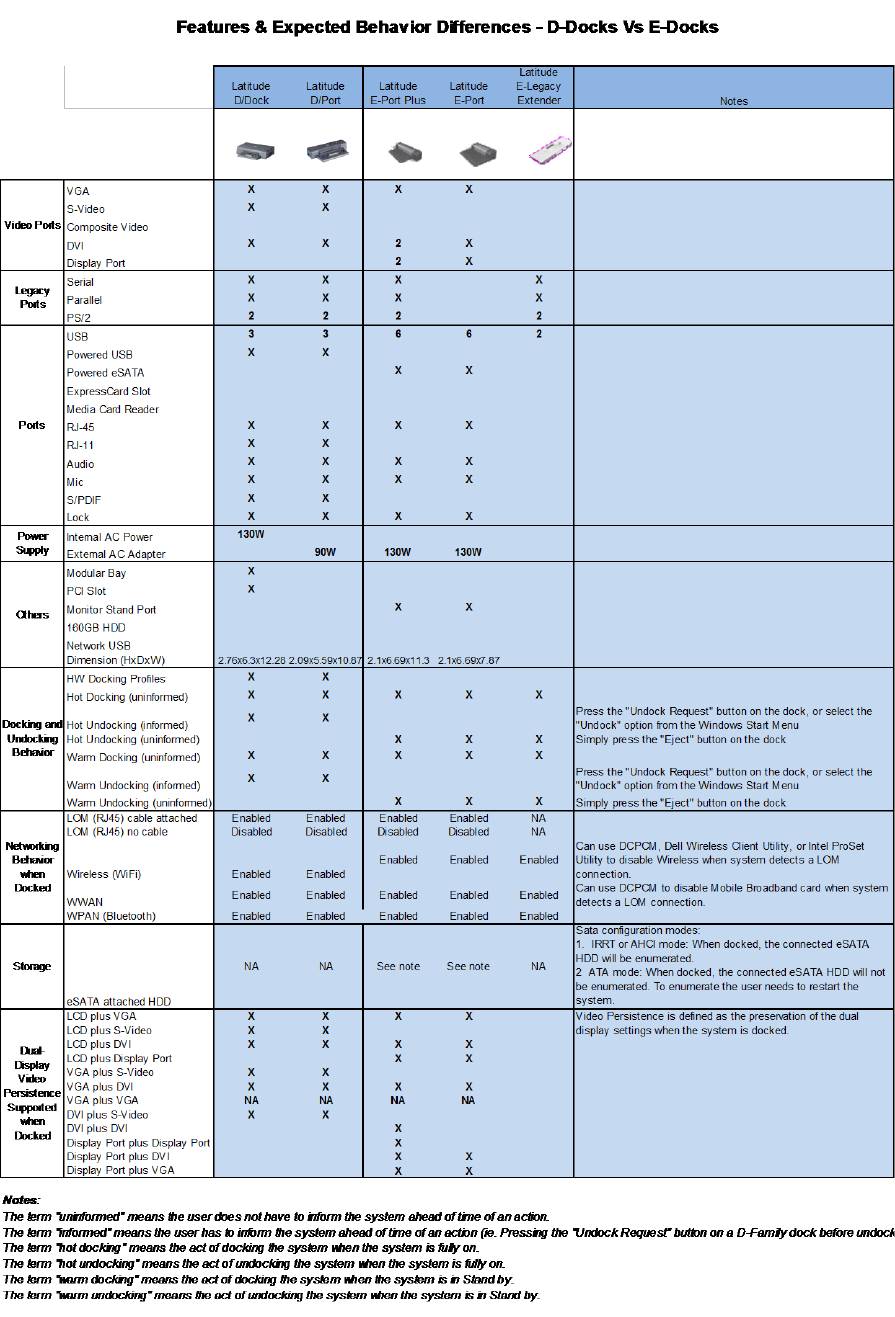
o The following are the list of features and expected behavior differences between D-Docks and
E-Docks:
Dell Latitude Ultrabook, E-Family & Mobile Precision Reimage “How-To” Guide
Dell Latitude Ultrabook, E-Family & Mobile Precision Reimage “How-To” Guide
