
Dell E170S Monitor: 1. Экранное меню Получение информации
1. Экранное меню Получение информации: Dell E170S Monitor
Оглавление
About Your Monitori
A propos de votre moniteur | Acerca de su monitor | Сведения о мониторе | Info zum Monitor | Informacje о monitorze | Sobre seu monitor
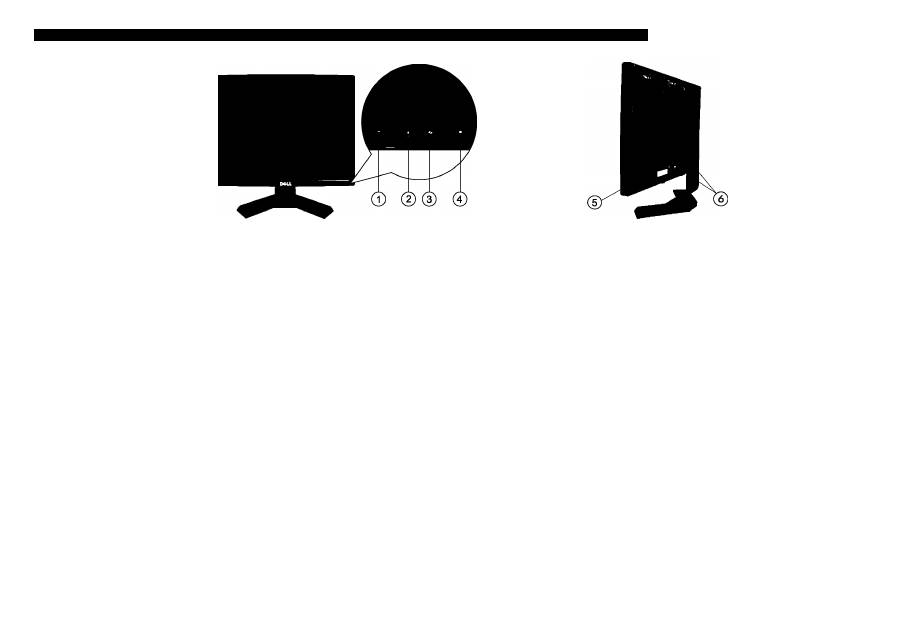
1. OSD menu button
2. Down (-) button/Brightness & Contrast
3. Up (+) button/Auto Adjust
4. Power On/Off button (with LED indicator)
5. Stand removal button
6. Cabie management slot
1. OSD-Menü.
2. Abwärtstaste (-)/Helligkeit und Kontrast
3. Aufwärtstaste(+)/Auto-Einstellung
4. Eln-/Austaste (mit LED-Anzeige)
5. Entrieguiungstaste
6. Kabeihaiter
1. Menu OSD
2. Bouton vers le bas (-)/Luminosité et contraste
3. Bouton vers le haut(+)/Réglage automatique
4. Bouton marche/arrêt (avec voyant DEL)
5. Bouton verrouillage
6. Support de câbles
1. Puisante menu
2. Puisante glù(-)/Lumlnosltà e contrasto
3. Pulsante su (+)/Regolazione automatica
4. Pulsante ON/OFF con Indicazione LED
5. Tasto di sblocco
6. Foro di gestione del cavo
1. Menú OSD.
2. Botón abajo (-)/Brlllo y Contraste
3. Botón arriba (+)/Ajuste automático
4. Botón de encendido/apagado (con Indicador LED)
5. Botón para bloquear
6. Guía de cables
1. Menú OSD
2. Botáo Abalxo(-)/Brílho e contraste
3. Botáo Acima (+)/Ajuste automático
4. Botáo Allmentagáo llgada/desllgada (com Indicador LED)
5. Botáo de bloquelo
6. Suporte de cabos
1. Экранное меню
2. Кнопка «вниз» (-), яркость и контрастность.
3. Кнопка «вверх» (+), автоматическая настройка.
4. Кнопка включения и выключения питания
(со светодиодным индикатором).
5. Кнопка выпуска
6. Отверстие для кабелей
@
Finding Infoimation
For more information see the
User's Guide
on the Drivers and
Documentation
media.
Rechercher des informations Búsqueda de información
Pour plus d'informations, reportez-
vous au Guide de l'utilisateur sur le
CD Pilotes et Documentation.
Para más información, consulte el
manual del usuario en los medios
de controladores y documentación.
Получение информации
Дополнительную информацию
см. в руководстве пользователя
на диске с драйверами и
документацией.
Weitere Informationen
Weitere Informationen finden
Sie in dem Benutzerhandbuch
auf dem Treiber- und
Dokumentationsmedium.
Dove reperire informazioni
Per maggiori irribimazioni, vedere ia
guida utente dei monitor in Driver e
documenti di supporto utente.
Encontrar informagóes
Para obter mais informa^óes
consulte o guía de usuàrio nas
unidades e midia de
documentagào.
О
Printed in China
D0LL
Information In thU document Is subjea to diange without notice.
«2009 Dell Inc All rights reserved.
(DELL P/N:M867N rev AOO)
P/N: 4J.0TN01.002
^
«2009 Dell Inc Tous droits rd
Demand the logo DELL sont des marques déposées de Dell Inc4
Dell dénie tout Intérêt propriétaire dans les marques et les noms
commerciaux autres que les slerts.
La Información de este documento se encuentra sujeta a
«2009 Dell Inc. Все права at
Воспроиавепаниа данных материалов в
OñVy el logotipo de
DELL
son marcas registradas de Dell Inc
Dell descarga todo su interés de propiedad sobre las mareas y
rkombres de otras empresas.
Febrero de 2009
w w w . d e i i . c o m | s u p p o r t . d e i l . c o m
o 2009 Dell Inc Alie Rechte Vorbehalten.
Dell
и логотип
DELL
являются товарными
знаками Dell Ine. Dell отказывается от
частного интереса в марках и наименоааниях
других сторон,
von Dell Ine. lat strikt untersagL
Oe//und das OQL-Logo sind Marken der Dell Inc.
Dell erhebt keinerlei ElgentumsansprOche auf
aridere als Ihre eigenen Marken und Namen.
«2009 Dell IrK. Tu«l IdlritU riservati.
È saweramente vietata la hproduzlorte di questi
materiali In qualsiasi modo senza II et
scritto di Dell Ine.
IO ntarehi registrati di Dell Ine.,
»resse di proprietà escleslva
nel marchi e nelle denominazioni di altri.
О 2009Dell Ine Todos os dlreltos re
Oe//eo logo
DELL
sio marcas registradas da
Dell Ine. Dell néo tem Interesse de propriedade
nas marcas e nomes deterceiros.
