
Dell IN2010NWFP Monitor: Подключите монитор, используя кабель VGA Подключите шнур питания и нажмите кнопку питания ПРИМЕЧАНИЕ: Дополнительные сведения см. 1. Контроль питания 2. Управление функциями
Подключите монитор, используя кабель VGA Подключите шнур питания и нажмите кнопку питания ПРИМЕЧАНИЕ: Дополнительные сведения см. 1. Контроль питания 2. Управление функциями: Dell IN2010NWFP Monitor
Оглавление
- ВНИМАНИЕ: Проверьте содержимое упаковочной коробки Снимите крышку и поместите монитор на нее Поднимите подставку монитора Прикрепите основание к подставке
- Подключите монитор, используя кабель VGA Подключите шнур питания и нажмите кнопку питания ПРИМЕЧАНИЕ: Дополнительные сведения см. 1. Контроль питания 2. Управление функциями
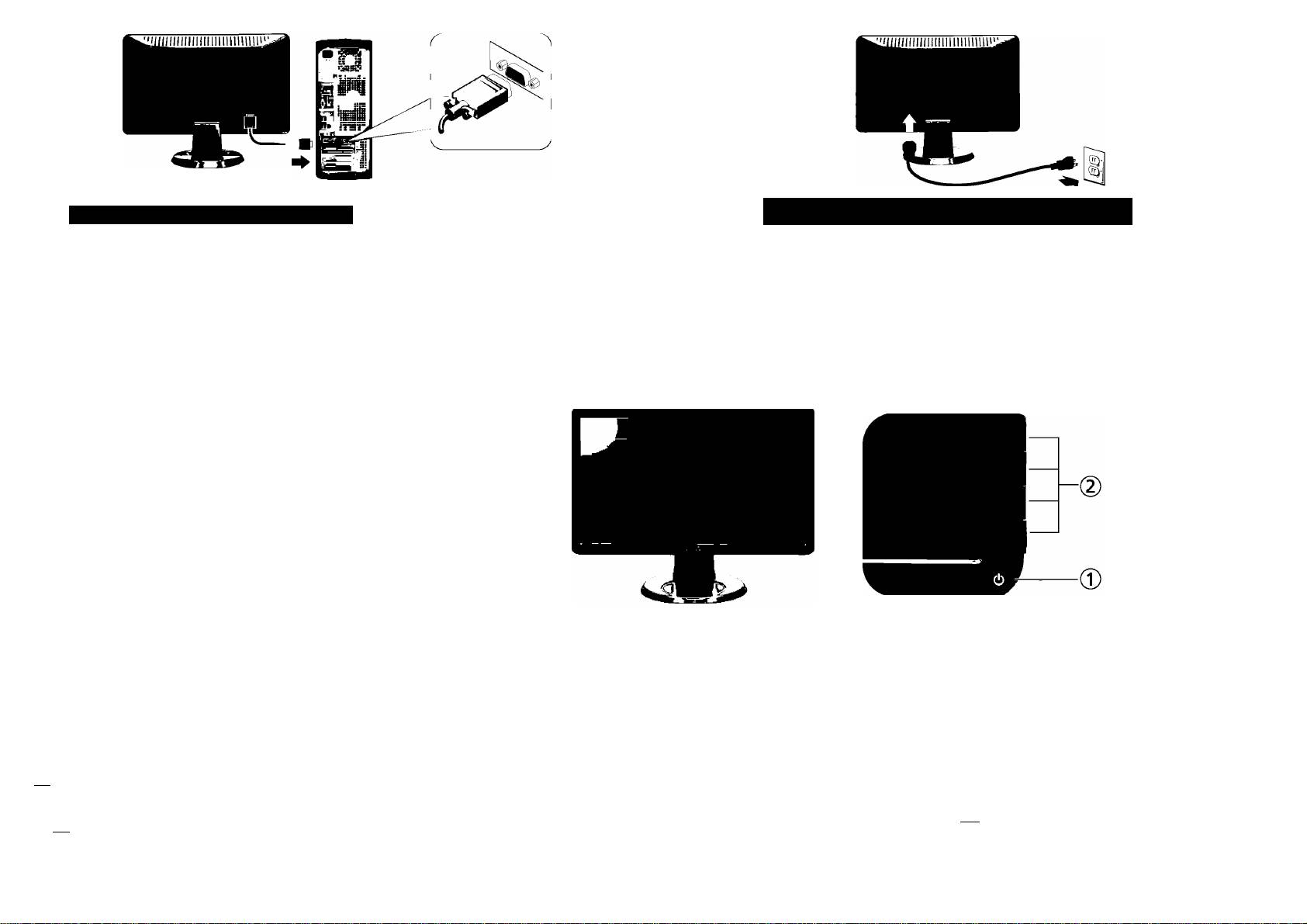
Connect the monitor using the VGA cable
Connect the power cable and press the power button
Connectez le moniteur avec le câble VGA
Connectez le câble d'alimentation. Appuyez le bouton d'alimentation
Conectar el monitor utilizando el cable VGA
Conecte el cable de alimentación. Pulse el botón de encendido
Conecte o monitor usando o cabo VGA
Conecte o cabo de alimentaçâo.Pressione о botâo de liga/desliga
Blaues VGA-Kabel anschIieBen
Schließen Sie das Netzkabel an. Drücken Sie auf die Ein/Aus-Taste
Collegare il monitor utilizzando il cavo VGA
Collegare il cavo di alimentazione.Premere il pulsante di accensione
Подключите монитор, используя кабель VGA
Подключите шнур питания и нажмите кнопку питания
NOTE: See the monitor's User's Guide on the
Drivers and Documentation media, for more information.
REMARQUE : Voir le Guide de l’utilisateur du moniteur
dans le média Pilotes et Documentation, pour plus
d'informations.
NOTA: Consulte la Guía de usuariodel monitor en
Controladores y documentación, para más datos.
OBSERVAÇÂO: Consulte о Guia do Usuáriodo monitor
na mídia de Drivers e DocumentagSo para obter mais
informaçôes.
HINWEIS: Siehe die Bedienungsanleitung des
Monitors unter Treiber und Dokumentation, um weitere
Informationen zu erhalten.
NOTA: Per maggiori informazioni vedere il Manuale
1. Power Control
1. Contrôle de l'alimentation
1. Controi de encendido
1. Controle de Alimentaçâo
utente del monitor in Driver e Documentazione.
2. Function Controls
2. Contrôles de fonction
2. Controies de función
2. Controle de funçâo
ПРИМЕЧАНИЕ: Дополнительные сведения см.
в Руководстве пользователя монитора на диске
1. Ein/Aus-Taste
1. Controllo alimentazione
1. Контроль питания
"Драйверы и документация".
2. Function Controls (Funktionsregler)
2. Controlli Funzione
2. Управление функциями
Informatìoii in this document is subject to
Les informations contenues dans ce document
La información contenida en este documento
As informafOes cuntidas neste documento
Die Informationen in diesem Dokument
Le informazioni contennte in questo documento
Содержащиеся в настоящем документе
change without notice.
peuvent être soumises à des modifications sans
está sqjeta a cambios sin previo aviso.
estáo sujdtas a altera^oes sem aviso prèvio.
unterliegen unangekundigten Änderungen.
sono soggette a variazioni senza preavviso.
сведения могут быть изменены без
предварительного уведомления.
© 2009 Dell Inc. All rights reserved.
préavis. © 2009 Dell Inc. AU rights reserved.
© 2009 Dell Ine. Reservados todos los der echos.
© 2009 Dell Ine.Corporation. Todos os direitos
© 2009 Dell Ine. Alle Rechte Vorbehalten.
© 2009 Dell Ine. Ititti i diritti riservati.
reservados.
® 2009 Dell Inc. Все права защищены.
Reproduction of these materials in any
Toute reproduction de ces documents strictement
Queda terminantemente prohibida cualquier
Reproduktion dieser Materialien auf jegliche Art
£ severamente vietata la riproduzione dei presenti
manner whatsoever without thewritt№
interdite, par quelque moyen que ce soit,
reproducción de estos materiales sin el permiso
A reprodu9äo desses materials por qualquer melo
ohne die sdirifüiche Erlaubnis von Dell Ine. ist
materiali in qualsiasi modalità senza il permesso
Воспроизведение этих материалов любым
permission of Dell Inc. is strictly forbidden.
sans autorisation écrite de Dell™ Inc.
escrito de Dell™ Ine.
possível, sem permissáo por escrito da Dell™ Ine,
Streikverboten..
scritto di Dell Ine.
способом без письменного разрешения
é estritamente proibida.
компании Dell Inc. строго запрещается.
Dell and the DELL logo are trademarks of
Dell et le logo DELL sont la prcrpriété de Dell Inc..
Dell y el logotipo DELL son marcas registradas de
Dell und das D£ZX-Logo sind Warenzeichen der
Dell e il logo DELL sono marchi registrati di
Dell и логотип ОЕНявляются товарными
Dell Inc. DeU disclaims proprietary interest
Tous les autres noms commerciaux ou noms
Dell Ine.. Dell renuncia al derecho de posesión sobre
Dell e o logótipo DELL sSo marcas comerciáis da
Dell Ine.. Warenzeichen und Dell ediebt keinerlei
Dell Ine.. nei marchi e Dell non riccmosce interesse di
знаками компании Dell Inc.Компания Dell не
in Ore marks and names of others.
de marques sont la propriété de leurs détenteurs
las marcas y nombres de terceros.
Dell Ine.. A Dell excluí quaisquer Interesses de
üche auf Namen Dritter.
proprietà esclusiva nelle denominazioni di altri.
имеет никаких прав собственности на
March 2009
req>ectiis.
Marzo 2009
propriedade nas marcas e nomes de outros.
März 2009
Marzo 2009
товарные знаки или названия других
Mars 2009
Mar9o2009
производителей.
Январь 2009
Printed in China.
www.dell.com | support.dell.com
(DELL P/N: F490N rev. АОО)
P/N: 4J.OT701.001
