
JVC KD-SX947R: MAINTENANCE
MAINTENANCE: JVC KD-SX947R
MAINTENANCE
When playing a CD-R or CD-RW
Handling discs
Before playing back CD-Rs or CD-RWs, read
This unit has been designed to reproduce CDs,
their instructions or cautions carefully.
CD-Rs (Recordable), CD-RWs (Rewritable), and
• Use only “finalized” CD-Rs or CD-RWs.
ENGLISH
CD Texts.
• Some CD-Rs or CD-RWs may not play back on
• This unit is also compatible with MP3 discs.
this unit because of their disc characteristics,
and for the following reasons:
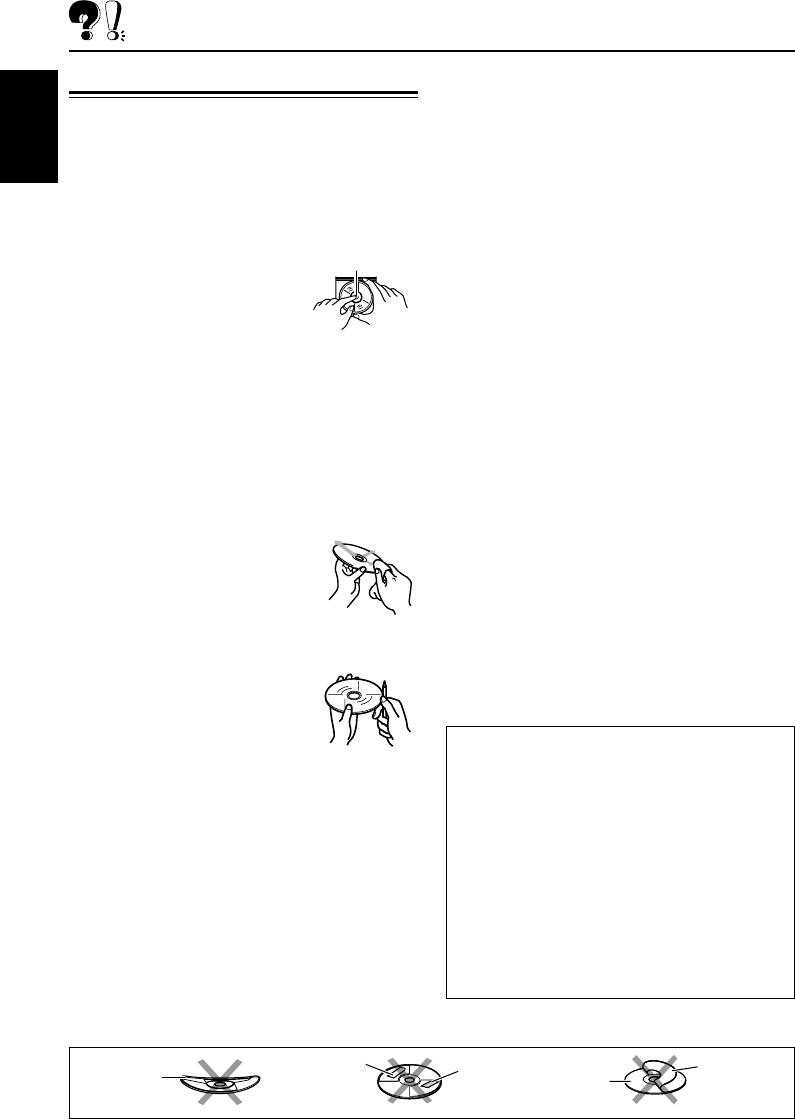
How to handle discs
– Discs are dirty or scratched.
– Moisture condensation on the lens inside the
When removing a disc
Center holder
unit.
from its case, press down
– The pickup lens inside the unit is dirty.
the center holder of the case
• CD-RWs may require a longer readout time
and lift the disc out, holding
since the reflectance of CD-RWs is lower than
it by the edges.
that of regular CDs.
• Always hold the disc by the edges. Do not
• CD-Rs or CD-RWs are susceptible to high
touch its recording surface.
temperatures or high humidity, so do not leave
When storing a disc into its case, gently insert
them inside your car.
the disc around the center holder (with the
• Do not use following CD-Rs or CD-RWs:
printed surface facing up).
– Discs with stickers, labels, or protective seal
• Make sure to store discs into the cases after
stuck to the surface.
use.
– Discs on which labels can be directly printed
by an ink jet printer.
To keep discs clean
Using these discs under high temperatures or
high humidity may cause malfunctions or
A dirty disc may not play correctly.
damage to discs. For example,
If a disc does become dirty, wipe it
– Stickers or labels may shrink and warp a
with a soft cloth in a straight line
disc.
from center to edge.
– Stickers or labels may peel off so discs
cannot be ejected.
To play new discs
– Print on discs may get sticky.
New discs may have some rough
Read instructions or cautions about labels and
spots around the inner and outer
printable discs carefully.
edges. If such a disc is used, this
unit may reject the disc.
CAUTIONS:
To remove these rough spots, rub
• Do not insert 8 cm discs (single CDs) into the
the edges with a pencil or ball-point pen, etc.
loading slot. (Such discs cannot be ejected.)
• Do not insert any disc of unusual shape—like a
Moisture condensation
heart or flower; otherwise, it will cause a
malfunction.
Moisture may condense on the lens inside the
• Do not expose discs to direct sunlight or any
disc player in the following cases:
heat source or place them in a place subject to
• After starting the heater in the car.
high temperature and humidity. Do not leave
• If it becomes very humid inside the car.
them in a car.
Should this occur, the disc player may
• Do not use any solvent (for example,
malfunction. In this case, eject the disc and leave
conventional record cleaner, spray, thinner,
the unit turned on for a few hours until the
benzine, etc.) to clean discs.
moisture evaporates.
Sticker
Warped
Stick-on
Sticker
Disc
disc
label
residue
50
EN47-51_KD-SX947R[EE]f.p65 1/10/03, 9:53 PM50
Оглавление
- CONTENTS
- LOCATION OF THE BUTTONS
- BASIC OPERATIONS
- RADIO OPERATIONS
- RDS OPERATIONS
- CD OPERATIONS
- MP3 INTRODUCTION
- MP3 OPERATIONS
- SOUND ADJUSTMENTS
- OTHER MAIN FUNCTIONS
- CD CHANGER OPERATIONS
- EXTERNAL COMPONENT OPERATIONS
- DAB TUNER OPERATIONS
- TROUBLESHOOTING
- MAINTENANCE
- SPECIFICATIONS
- СОДЕРЖАНИЕ
- РАСПОЛОЖЕНИЕ КНОПОК
- ОСНОВНЫЕ ОПЕРАЦИИ
- ОПЕРАЦИИ С РАДИОПРИЕМНИКОМ
- ОПЕРАЦИИ С RDS
- ОПЕРАЦИИ С КОМПАКТ-ДИСКАМИ
- ПРЕДИСЛОВИЕ К МР3
- ОПЕРАЦИИ МР3
- НАСТРОЙКА ЗВУКА
- ДРУГИЕ ГЛАВНЫЕ ФУНКЦИИ
- ОПЕРАЦИИ С ВНЕШНИМ КОМПОНЕНТОМ
- ОПЕРАЦИИ С ТЮНЕРОМ DAB
- ВЫЯВЛЕНИЕ НЕИСПРАВНОСТЕЙ
- ТЕХНИЧЕСКОЕ ОБСЛУЖИВАНИЕ
- ТЕХНИЧЕСКИЕ ХАРАКТЕРИСТИКИ
- Please reset your unit


