
Sony STR-SE501: Video Component Hookups
Video Component Hookups: Sony STR-SE501
Table of contents
- WARNING Precautions
- About This Manual T ABLE OF CONTENTS Additional Information
- Hooking Up the Components Unpacking
- Antenna Hookups
- Audio Component Hookups
- Video Component Hookups
- Digital Component Hookups
- 5.1CH Input Hookups
- Other Hookups
- CONTROL A1 hookup (STR-DE545 and STR-SE501 only) AUX AUDIO IN hookup Connecting the AC power cord
- Hooking Up and Setting Up the Speaker System
- Speaker System Hookup
- Speaker System Hookup
- Performing Initial Setup Operations
- Multi Channel Surround Setup
- Center speaker size ( Rear speaker size (
- Multi Channel Surround Setup
- Adjusting the speaker volume
- Before turning on the receiver Checking the connections Before You Use Your Receiver Multi Channel Surround Setup
- There is no sound no matter which component is selected. No sound is heard from one of the front speakers.
- Front Panel Parts Descriptions Location of Parts and Basic Operations ? 1 switch Function buttons
- INPUT MODE button
- Front Panel Parts Description
- 25
- Front Panel Parts Description
- Enjoying Surround Sound
- Selecting a Sound Field
- Sound field information
- Use the buttons on the front panel to operate the following modes Selecting a Sound Field
- Understanding the Multi-Channel Surround Displays
- Understanding the Multi-Channel Surround Displays
- Customizing Sound Fields
- Adjusting the level parameters Customizing Sound Fields
- Adjusting the bass/treble Resetting customized sound fields to the factory settings
- Customizing Sound Fields Adjustable parameters for each sound field
- Receiving Broadcasts
- Brief descriptions of buttons used to receive broadcasts
- Storing FM Stations Automatically Direct Tuning
- Preset Tuning Presetting radio stations Automatic Tuning
- Tuning to preset stations Receiving RDS broadcasts Displaying the RDS Information Using the Radio Data System (RDS)
- Using the Radio Data System (RDS) Monitoring traffic, news, or information programmes (EON) Locating a station by programme type
- Description of program types
- Other Operations
- Recording Naming Preset Stations and Program Sources
- Recording on a video tape Using the Sleep Timer Recording
- Adjustment Using the SET UP Button
- Troubleshooting Additional Information
- Reference sections for clearing the receiver’s memory
- Specifications Amplifier section
- FM tuner section AM tuner section Video section General
- Glossary
- Settings Using SUR, LEVEL, BASS/TREBLE, and SET UP buttons
- Remote Button Description (STR-DE445 only)
- Changing the factory setting of a function button
- Remote Button Description (STR-DE445 only)
- Index
7
GB
Hooking Up the Components
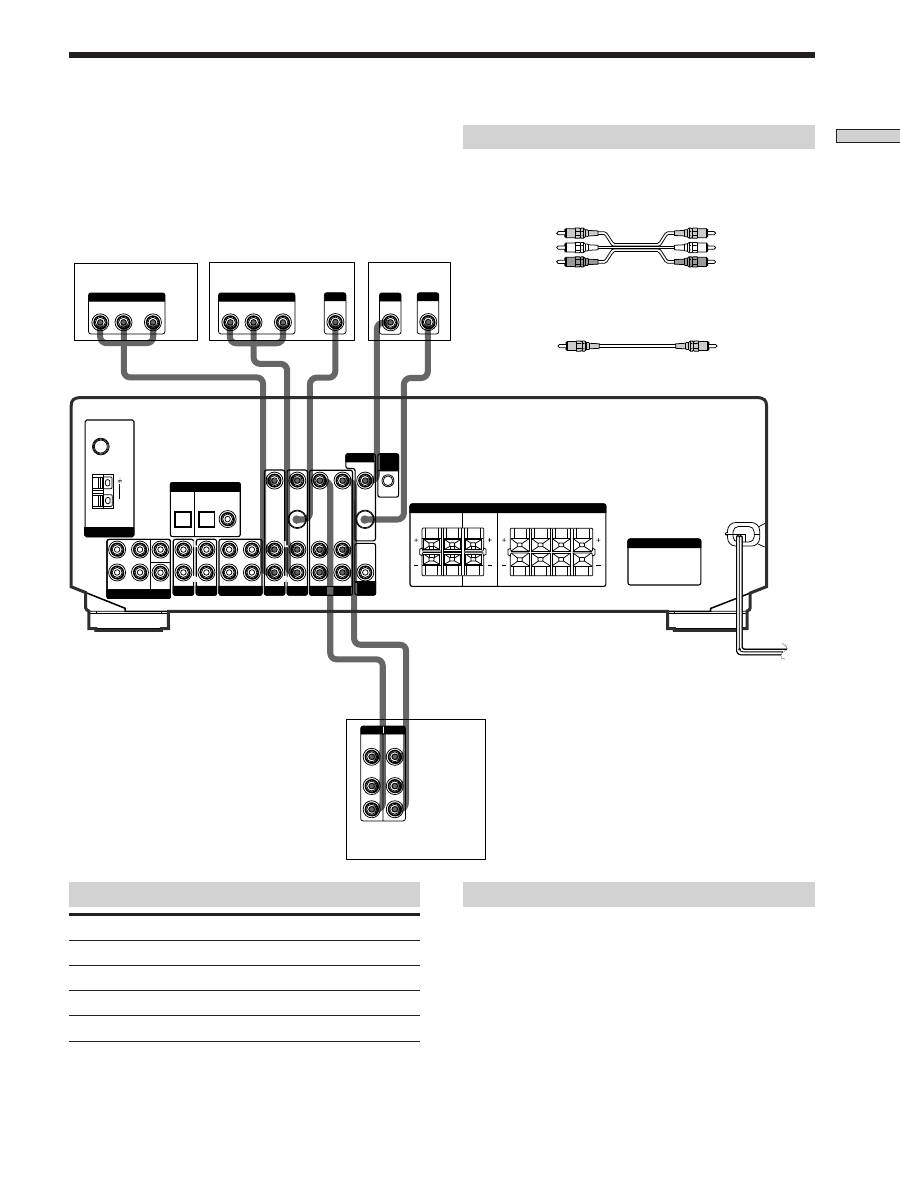
Note on video component hookups
You can connect your TV’s audio output jacks to the TV/
SAT AUDIO IN jacks on the receiver and apply sound
effects to the audio from the TV. In this case, do not
connect the TV’s video output jack to the TV/SAT VIDEO
IN jack on the receiver. If you are connecting a separate
TV tuner (or satellite tuner), connect both the audio and
video output jacks to the receiver as shown above.
z
When using the S-video jacks instead of the video jacks
(STR-DE545 and STR-SE501 only)
Your monitor must also be connected via an S-video jack. S-video
signals are on a separate bus from the video signals and will not
be output through the video jacks.
Jacks for connecting video components
Connect a
To the
TV or Satellite tuner
TV/SAT jacks
VCR
VIDEO jacks
DVD or LD player
DVD/LD jacks
TV monitor
MONITOR VIDEO OUT jack
Required cords
Audio/video cords (not supplied)
When connecting a cord, be sure to match the color-coded pins to
the appropriate jacks on the components.
Video cord for connecting a TV monitor (not supplied)
Video Component Hookups
TV or Satellite tuner
DVD or LD player
Yellow
Yellow
Yellow (video)
Yellow (video)
White (L/audio)
White (L/audio)
Red (R/audio)
Red (R/audio)
VCR
IN
OUT
VIDEO
OUT
R
VIDEO
IN
AUDIO
OUT
AUDIO
IN
INPUT OUTPUT
L
VIDEO
IN
INPUT
OUT
S-VIDEO
IN
S-VIDEO
R
L
AUDIO OUT
VIDEO
OUT
OUTPUT
R
L
AUDIO OUT
VIDEO
OUT
OUTPUT
ç
ç
MD/TAPE
ANTENNA
DIGITAL IN
TV/SAT
5.1 CH INPUT
AUX
CD
DVD/LD
VIDEO
SUB
WOOFER
IMPEDANCE
SELECTOR
SPEAKERS
CTRL
A1
I I
MONITOR
AC OUTLET
FRONT
REAR
SUB
WOOFER
AUDIO IN
AUDIO IN
TV/SAT
OPTICAL
OPTICAL
COAXIAL
DVD/LD
REC OUT
IN
AUDIO IN
VIDEO IN
AUDIO IN
VIDEO IN
AUDIO OUT
AUDIO IN
VIDEO OUT
VIDEO IN
VIDEO OUT
S-VIDEO
OUT
S-VIDEO
IN
AUDIO
OUT
4
Ω
8
Ω
CENTER
L
R
L
R
L
R
L
R
L
R
FRONT
REAR
R
L
R
L
R
L
R
L
R
L
R
L
CENTER
B FRONT A
FM
75
Ω
COAXIAL
AM
TV monitor


