
Sony SPK-HC: Using the Sports Pack (continued)
Using the Sports Pack (continued): Sony SPK-HC
Table of contents
- Table of contents Features and Precautions
- Precautions on Use Water Leakage
- Precautions on Use (continued)
- Maintenance
- Preparing
- Selecting the Camera Mounting Shoe
- Preparing (continued) Installing the Video Camera Recorder 1 Attach the camera mounting shoe. 2 Release the buckles. 3 Coat the front glass with anti-fogging lens solution. 4 Remove foreign materials.
- 5 Connect the plugs to the each jacks of the video camera recorder. When using DCR-HC40/HC30/HC20/HC18/HC16
- Preparing (continued)
- 6 Installing the video camera recorder. 7 Close the rear body.
- Preparing (continued) Preparing the Sports Pack 1 Adjust the grip strap. 2 Attach the shoulder strap.
- Using the Sports Pack Shooting Moving Pictures 1 When recording on a cassette tape or a disc, turn the POWER switch to “CAMERA” (1). When recording on “Memory Stick,” turn the POWER switch to “MEMORY” (2). 2 Press START/STOP button to start recording.
- Using the Sports Pack (continued)
- Recording a Still Picture A. When in MEMORY mode B. When in CAMERA mode
- Using the Sports Pack (continued) Playing Back with the Remote Commander 1 Turn the POWER switch to “VCR.” 2 Press N PLAY on the remote.
- Removing the Video Camera Recorder 1 Turn the POWER switch to “OFF.” 2 Release the buckles, and open the rear body. 3 Pull out the camera mounting shoe.
- Using the Sports Pack (continued) 4 Stop taking out the video camera recorder at the point where the remote plug and the microphone plug come out from the sports pack. Then, disconnect the plugs from the video camera recorder.
- 5 Detach the camera mounting shoe.
- Identifying parts
- Troubleshooting
- Specifications
Using the Sports Pack (continued)
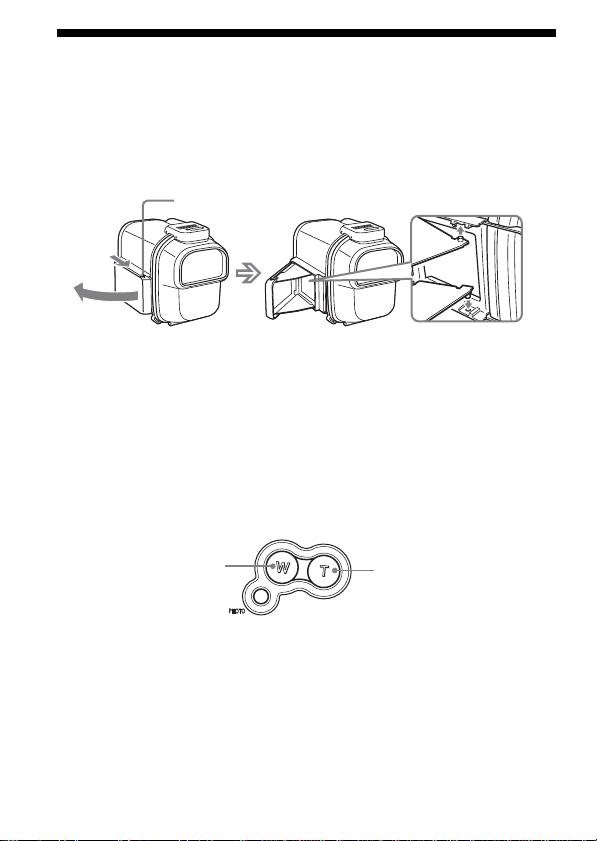
When Shooting with the LCD Screen
You can shoot with the reflection in the mirror.
1 Slide the mirror hood while holding the OPEN mark and open
it.
2 Open the wings and insert the projections into each hole.
OPEN
Slide the mirror hood while holding the OPEN mark and open it.
To close the mirror hood
Undo the projections on the both wings, and close the lower wing first.
Note
When using DCR-HC40/HC30/HC20/HC18/HC16, shoot with the LCD
screen.
Zooming
•Keep the W side pressed for wide-angle.
•Keep the T side pressed for telephoto.
Press it gently for a relatively slow zoom.
Zooming
Wide-angle
Telephoto
Notes on recording
•The POWER switch of the sports pack has priority over the POWER
switch of the video camera recorder.
•If the video camera is left in Standby mode for five minutes or more, it
switches off automatically. This is to preserve the battery and prevent
tape wear. To return to Standby mode, turn the POWER switch to “OFF”
and then back to “CAMERA.” (Except when using DCR-HC40/HC30/
HC20/HC18/HC16/DVD201/DVD101/DVD91 models with the
A.SHUT OFF function set to [Never]. For details, refer to the operating
instructions of your video camera recorder.)
14-GB
