
Sony CPD-G400P: Setup Step 1:Connect your monitor to your computer
Setup Step 1:Connect your monitor to your computer: Sony CPD-G400P
Table of contents
- Owner’s Record
- Table of Contents
- Precautions
- Identifying parts and controls RearFront
- Setup Step 1:Connect your monitor to your computer
- Step 2:Connect the power cord Step 3:Turn on the monitor and computer
- Selecting the on-screen menu Selecting the input signal language (LANG)
- Customizing Your Monitor Navigating the menu
- Adjusting the brightness and contrast
- Automatically sizing and centering Adjusting the size of the picture the picture (AUTO) (SIZE) Enlarging or reducing the picture (ZOOM) Adjusting the centering of the picture (CENTER)
- Adjusting the shape of the picture Adjusting the color of the picture (GEOM) (COLOR)
- Adjusting the convergence (CONV) Additional settings (OPTION)
- Helpful hints and information (HELP)
- Resetting the adjustments
- Technical Features Troubleshooting
- Trouble symptoms and remedies Symptom Check these items
- Symptom Check these items
- Specifications
x
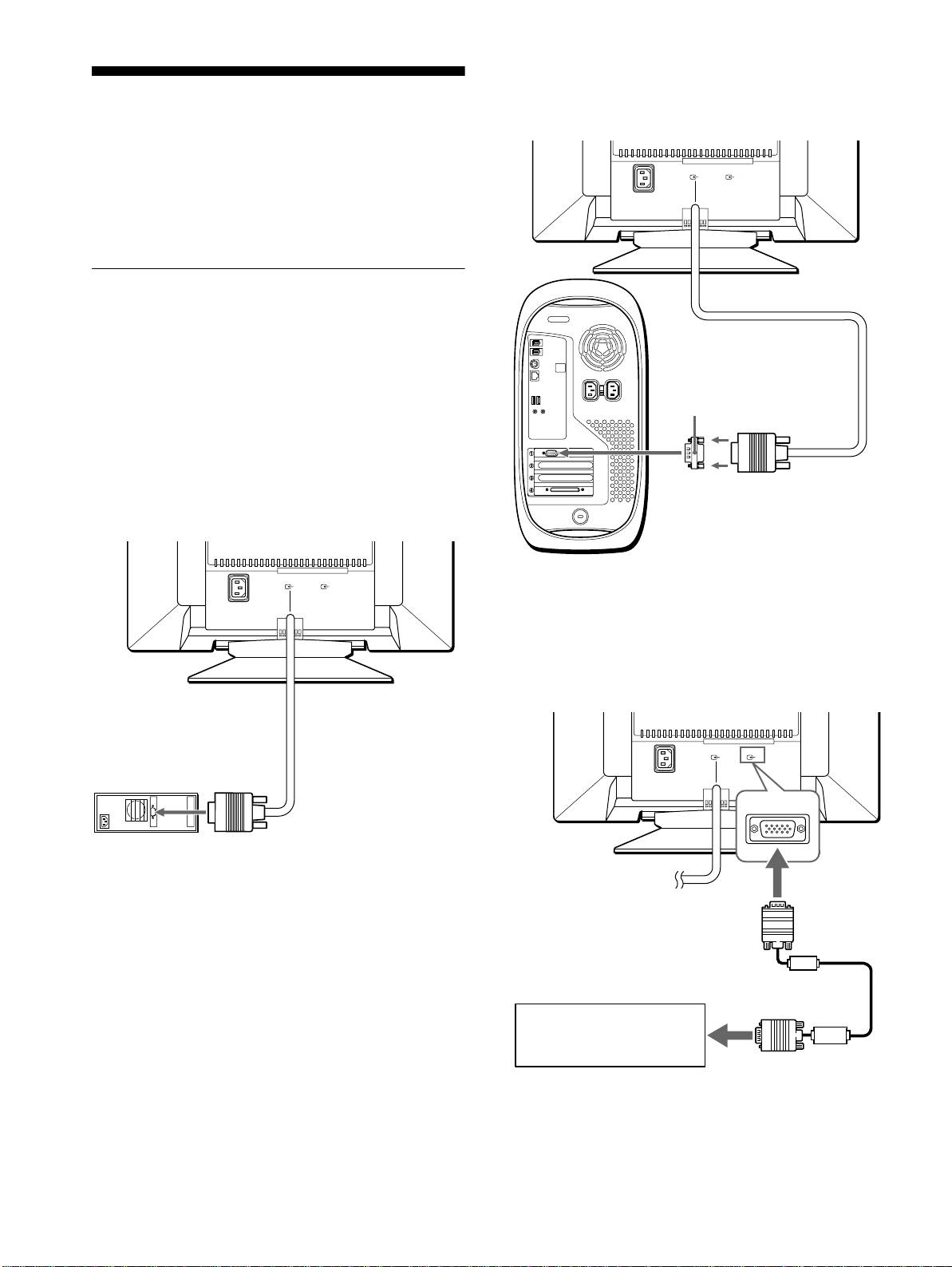
Connecting to a Macintosh or compatible
computer
Setup
Before using your monitor, check that the following accessories
are included in your carton:
•Power cord
• Exclusive Power Mac G3/G4 adapter
• Warranty card
• Notes on cleaning the screen’s surface
• This instruction manual
Step 1:Connect your monitor to
your computer
Turn off the monitor and computer before connecting.
Notes
• Do not touch the pins of the video signal cable connector as this might
bend the pins.
• When connecting the video signal cable, check the alignment of the
HD15 connector. Do not force the connector in the wrong way or the
pins might bend.
x
Connecting to an IBM PC/AT or compatible
computer
(
HD15
)
(
HD15
)
1
2
* Connect the supplied adapter to the computer before connecting the
AC IN
cable. This adapter is compatible only with Power Mac G3/G4
computers that have 3 rows of pins. If you connect to the other version
of Macintosh series computer that has 2 rows of pins, you will need a
different adapter (not supplied).
x
Connecting to a second computer
to video output
IBM PC/AT or
compatible computer
6
(
HD15
)
(
HD15
)
1
2
AC IN
Use the supplied exclusive Power Mac G3/G4 adapter.
exclusive Power Mac G3/G4
adapter (supplied)*
to video output
Power Mac G3/G4
(
HD15
)
(
HD15
)
1
2
AC IN
to video input 2
connector (
y
2)
Refer to the preceding examples
to connect your computer.
HD15 video signal
cable (not supplied)
