
Sony CPD-G400P: Selecting the on-screen menu Selecting the input signal language (LANG)
Selecting the on-screen menu Selecting the input signal language (LANG): Sony CPD-G400P
Table of contents
- Owner’s Record
- Table of Contents
- Precautions
- Identifying parts and controls RearFront
- Setup Step 1:Connect your monitor to your computer
- Step 2:Connect the power cord Step 3:Turn on the monitor and computer
- Selecting the on-screen menu Selecting the input signal language (LANG)
- Customizing Your Monitor Navigating the menu
- Adjusting the brightness and contrast
- Automatically sizing and centering Adjusting the size of the picture the picture (AUTO) (SIZE) Enlarging or reducing the picture (ZOOM) Adjusting the centering of the picture (CENTER)
- Adjusting the shape of the picture Adjusting the color of the picture (GEOM) (COLOR)
- Adjusting the convergence (CONV) Additional settings (OPTION)
- Helpful hints and information (HELP)
- Resetting the adjustments
- Technical Features Troubleshooting
- Trouble symptoms and remedies Symptom Check these items
- Symptom Check these items
- Specifications
Selecting the on-screen menu
Selecting the input signal
language (LANG)
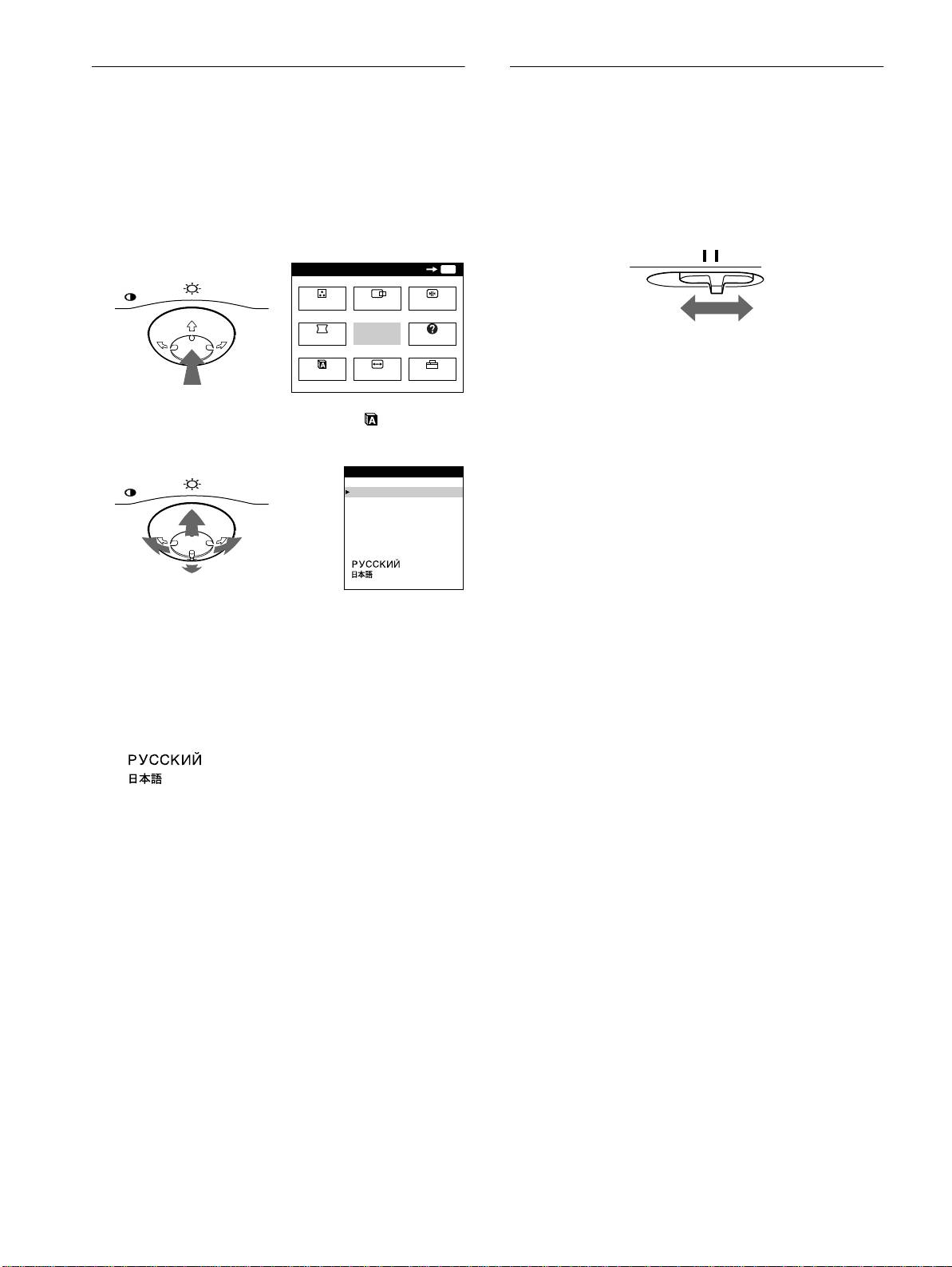
You can connect two computers to this monitor using the video
input 1 (y1) and video input 2 (y2) connectors. To select one
English, French, German, Spanish, Italian, Dutch, Swedish,
of the two computers, use the INPUT switch.
Russian and Japanese versions of the on-screen menus are
available. The default setting is English.
Move the INPUT switch.
The selected connector appears on the screen for 3 seconds.
1
Press the center of the control button.
See page 10 for more information on using the control button.
MENU
OK
MENU
MENU
COLOR
CENTER
CONV
GEOM
EXIT
HELP
“INPUT 1” (video input 1 connector: y1) or “INPUT 2” (video
input 2 connector: y2) appears on the screen.
LANG
SIZE
OPTION
Note
If no signal is input to the selected connector, NO INPUT SIGNAL
2
Move the control button to highlight LANG and
appears on the screen. After a few seconds, the monitor enters the power
press the center of the control button again.
saving mode. If this happens, switch to the other connector.
MENU
LANGUAGE
ENGL I SH
FRANÇA IS
DEUTSCH
ESPAÑOL
ITALIANO
NEDERLANDS
SVENSKA
3
Move the control button
m
/
M
to select a language.
• ENGLISH
• FRANÇAIS: French
• DEUTSCH: German
• ESPAÑOL: Spanish
• ITALIANO: Italian
• NEDERLANDS: Dutch
• SVENSKA: Swedish
• : Russian
• : Japanese
To close the menu
Press the center of the control button once to return to the main MENU,
and twice to return to normal viewing. If no buttons are pressed, the menu
closes automatically after about 30 seconds.
To reset to English
Press the RESET button while the LANGUAGE menu is displayed on the
screen.
8
INPUT 1 2
