
Sony CPD-120AS: Using the tilt-swivel
Using the tilt-swivel: Sony CPD-120AS
Table of contents
- Owner’s Record
- Table of Contents
- Introduction Plug and play
- Precautions Maintenance Transportation
- Warning on Power Connection
- Functions of Controls
- Functions of Controls
- Functions of Controls
- Getting Started Installation p Step 1: Connect the computer
- p CPD-120AS p CPD-220AS
- p Step 2: Connect the power cord p Step 3: Turn on the display and computer. p Step 4: If necessary...
- Using Your Display Preset and user modes
- Using the tilt-swivel
- Damper wire
- Adjustments Adjusting volume
- Adjusting the picture contrast
- Adjusting the picture brightness
- Adjusting the picture centering
- Adjusting the picture size
- Adjusting the picture rotation
- Adjusting the pincushion
- Setting the color temperature
- Resetting
- Available Features Selecting Graphic Picture Enhancement (GPE)
- Selecting Bass Boost
- Power Saving Function
- Specifications
- Troubleshooting
- Troubleshooting
- Troubleshooting
p To enter new timings
When using a video mode that is not one of the 10 factory preset modes,
some fine tuning may be required to optimize the display to your
preferences. Simply adjust the display according to the adjustment
instructions. The adjustments will be stored automatically and recalled
whenever that mode is used.
A total of 10 user-defined modes can be stored in memory. If an 11th
mode is entered, it will replace the first.
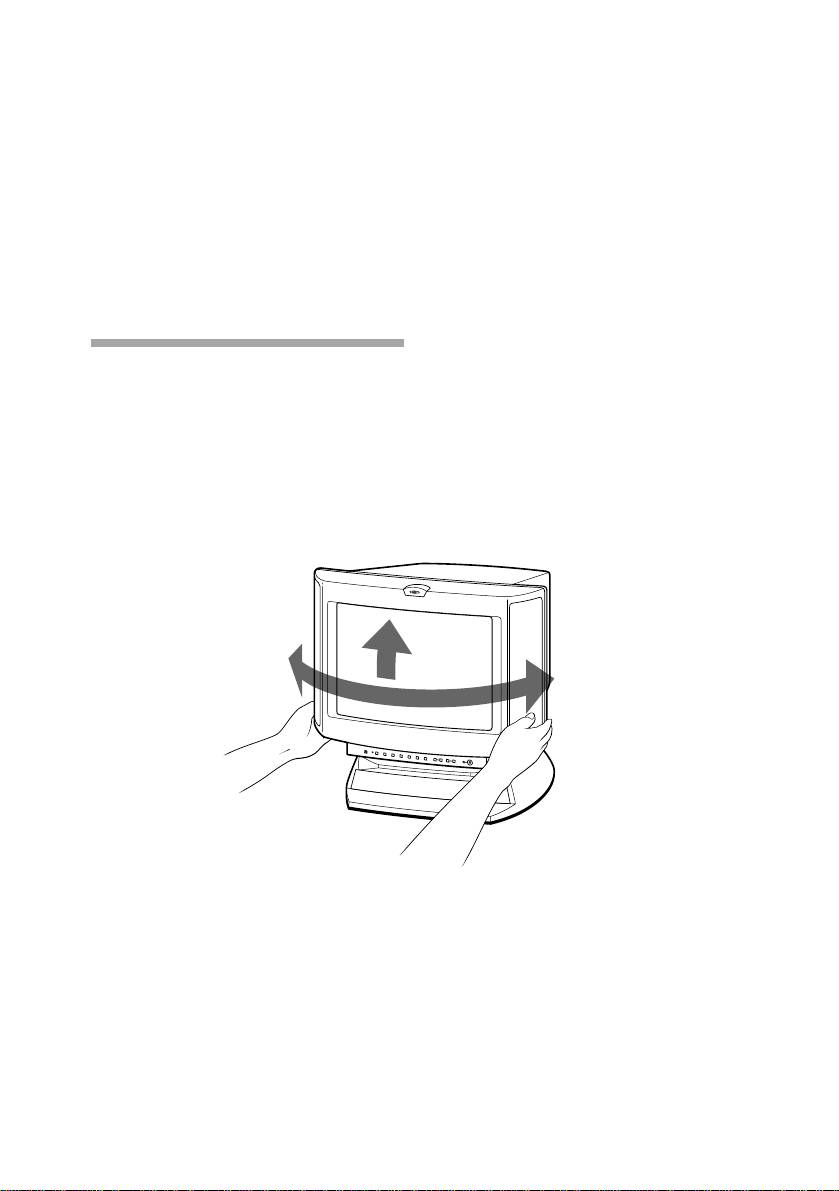
Using the tilt-swivel
With the tilt-swivel, this unit can be adjusted to be viewed at your
desired angle within 90° horizontally and 7° vertically.
To turn the unit vertically and horizontally, hold it at its bottom with
both hands.
Pay attention not to get your hands caught between the display and the
tilt-swivel.
45˚
7˚
45˚
GB
Using Your Display
14
