
Sony CPD-120AS: Selecting Bass Boost
Selecting Bass Boost: Sony CPD-120AS
Table of contents
- Owner’s Record
- Table of Contents
- Introduction Plug and play
- Precautions Maintenance Transportation
- Warning on Power Connection
- Functions of Controls
- Functions of Controls
- Functions of Controls
- Getting Started Installation p Step 1: Connect the computer
- p CPD-120AS p CPD-220AS
- p Step 2: Connect the power cord p Step 3: Turn on the display and computer. p Step 4: If necessary...
- Using Your Display Preset and user modes
- Using the tilt-swivel
- Damper wire
- Adjustments Adjusting volume
- Adjusting the picture contrast
- Adjusting the picture brightness
- Adjusting the picture centering
- Adjusting the picture size
- Adjusting the picture rotation
- Adjusting the pincushion
- Setting the color temperature
- Resetting
- Available Features Selecting Graphic Picture Enhancement (GPE)
- Selecting Bass Boost
- Power Saving Function
- Specifications
- Troubleshooting
- Troubleshooting
- Troubleshooting
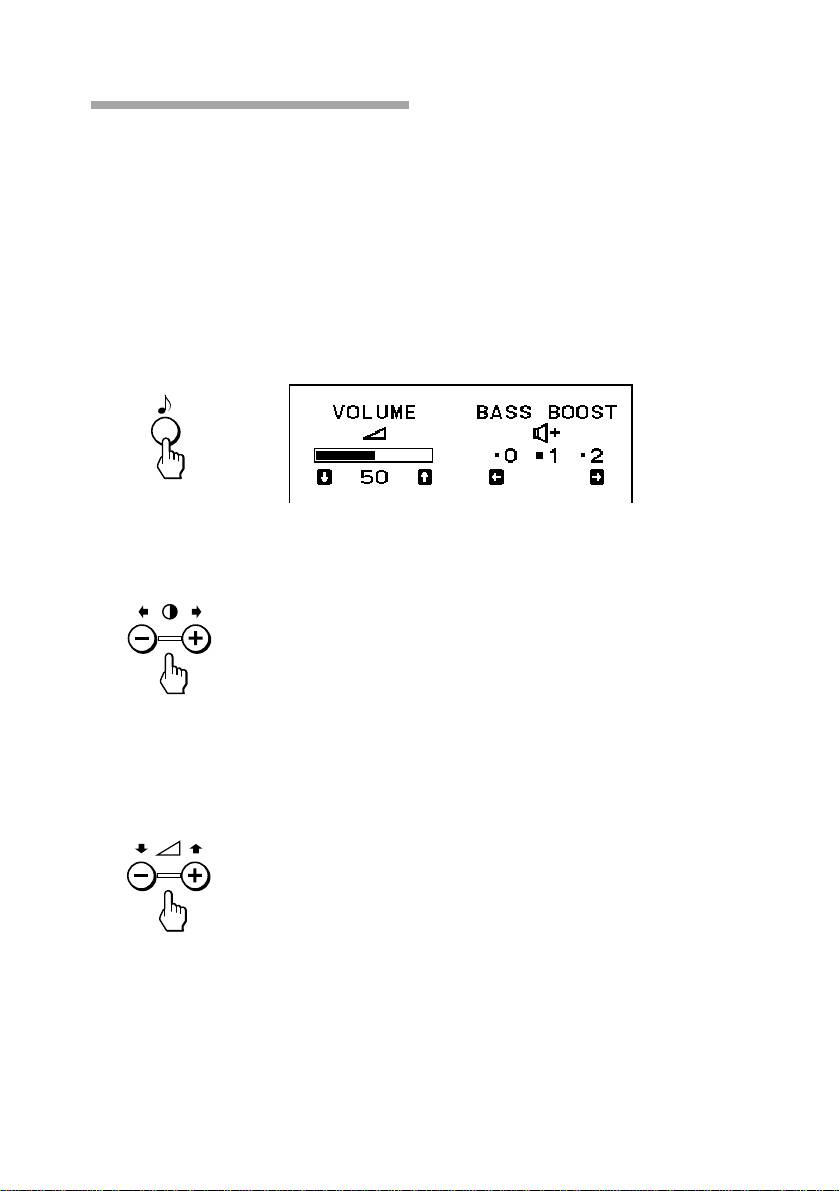
Selecting Bass Boost
There are 3 Bass Boost modes from “0” through “2,” and bass is boosted
more at a higher number. The factory setting is “1” (normal mode).
You can enjoy games and music programs with lively sound by selecting
“2.”
When you use the PC phone, select “0.” You will be able to hear the
caller’s voice more easily as the high-pitched tone is reduced.
1. Press the ≥ button.
The VOLUME/BASS BOOST OSD appears.
2. Press the > +/– buttons to select the BASS BOOST mode.
+ for higher number
– for lower number
After selecting the Bass Boost mode, you can adjust the volume on
the same OSD.
Press the . +/– buttons.
+ to increase volume
– to decrease volume
To exit the OSD
Press the ≥ button again.
✎ Tip
If you don’t touch any buttons, the OSD automatically disappears after 10 seconds.
When you want to adjust another item, press the button of the item. The OSD of the selected
item appears.
GB
Available Features
26
