
Yamaha PJP-25UR: инструкция
Раздел: Сети, связь, телекоммуникации, интернет, безопасность
Тип: Телефон беспроводной DECT + Трубка для беспроводных телефонов
Инструкция к Телефону беспроводной DECT + Трубке для беспроводных телефонов Yamaha PJP-25UR
Оглавление
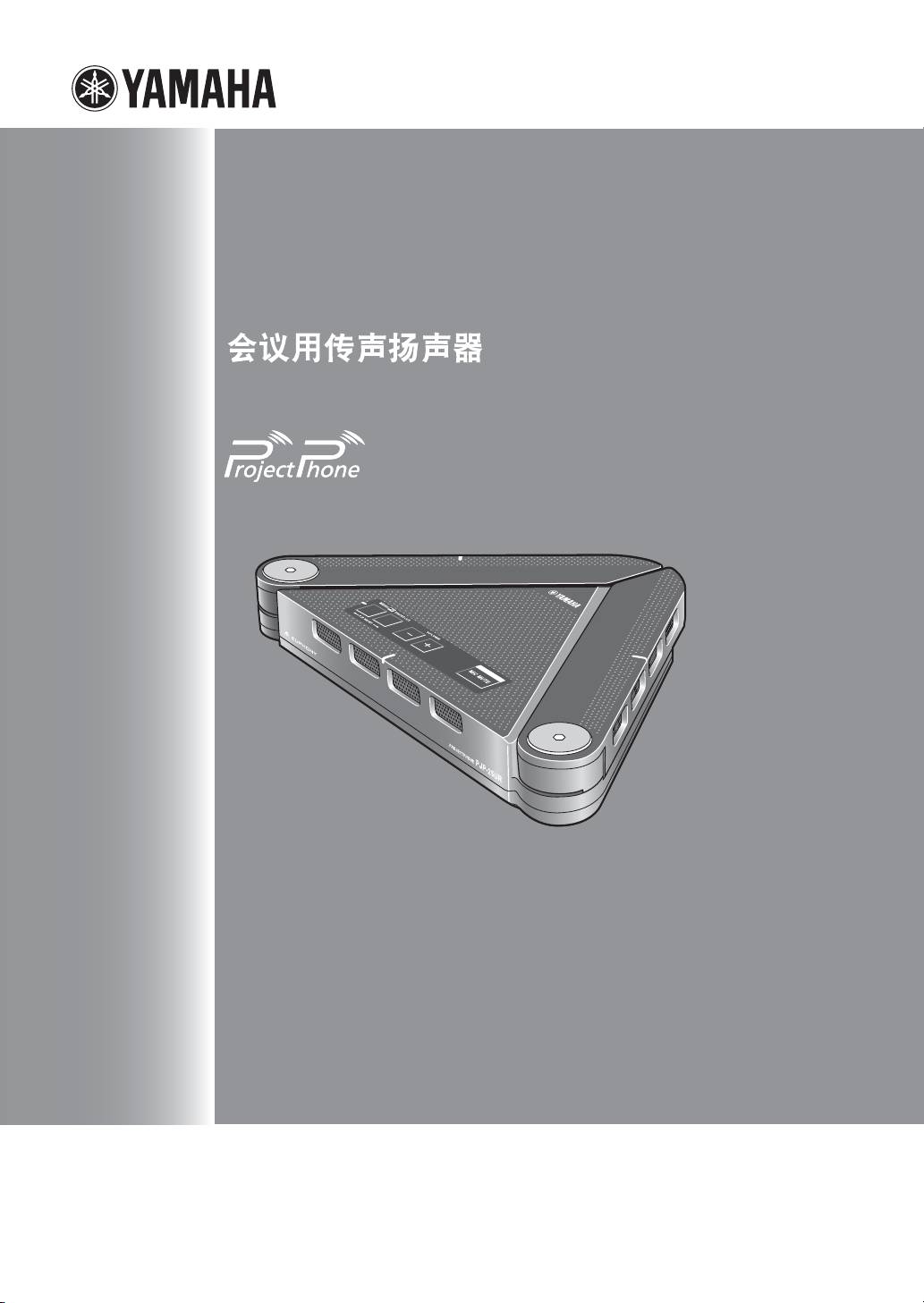
-
PJP
25UR
会議用マイクスピーカー
Conference Microphone Speaker
取扱説明書
Quick Start Guide
Guide de démarrage
Schnellstartanleitung
快捷起动指南
빠른 시작 설명서
Краткое руководство пользователя

Contents
Japanese( 日本語 ) ..................................................................1
English ........................................................................................9
French (Français) ................................................................... 17
German (Deutsch)..................................................................23
Chinese ( 中文 ) ...................................................................... 29
Korean (한국어)......................................................................35
Russian (
Русский)...............................................................41
「EUPHONY™」は、美しい音の響きを楽しむというコンセプトのもと、DiMAGIC(ダイマジック社)独自
の技術を駆使して実現した画期的な音声再生方式です。
“EUPHONY™ is a trademark of DiMAGIC Co., Ltd.”
Euphony is a revolutionary sound field reproduction system implemented with state-of-the-art sound technologies
developed under the basic concept of enjoying beautiful sound.
Euphony (悦耳之音)是划时代声音播放再现系统,她是使用了在满意地欣赏优美音乐的基本理念下而被开发
完成的 DiMAGIC 原始技术。
はじめに
ヤマハ PJP-25URをお買い上げいただきありがとうございます。本機はパソコンと USB ケーブルで接続
することで、音声端末として機能する会議用マイクスピーカーです。
本書中の警告や注意を必ず守り、正しく安全にお使いください。
本書はなくさないように、大切に保管してください。
■ 箱の中身をご確認ください
• PJP-25UR(本機)(1 個)
• 取扱説明書(本書)(1 冊)
• USB ケーブル(1 本)
• 保証書(1 枚)
• CD-ROM(1 枚)
安全上のご注意
本機を安全にお使いいただくために
以下の点を必ず守ってお使いください。
■ 安全のための注意事項を守る
詳しくは、2 〜 3 ページをご覧ください。
■ 故障したら使用を中止する。
お買い上げの販売店またはヤマハのサポート窓口にご連絡ください。
マークの意味
本書では、本機を安全にお使いいただくため、守っていただきたい事項に次のマークを表示していますので、
必ずお読みください。
警告
人体に危険を及ぼしたり、装置に大きな損害を与える可能性があることを示しています。必ず守ってくださ
い。
注意
機能停止を招いたり、各種データを消してしまう可能性があることを示しています。十分注意してください。
• 本書の記載内容を一部または全部を無断で転載することを禁じます。
• 本書の内容および本体の仕様は、改良のため予告なく変更されることがあります。
• 本機を使用した結果発生した情報の消失等の損失については、当社では責任を負いかねます。保証は本
機の物損の範囲に限ります。予めご了承ください。
サポート窓口のご案内
本機に関する技術的なご質問やお問い合わせは、下記へご連絡ください。
■ お客様ご相談窓口
TEL:053-460-2822
ご相談受付時間
9時〜12時、13時〜17時
(土・日・祝日、弊社定休日、年末年始は休業とさせて頂きます)
■ お問い合わせページ
http://www.yamaha.co.jp/projectphone/
Japanese 1

警告 注意
本機を安全にお使いいただくために、下記のご注意
本機を安全にお使いいただくために、下記のご注意
をよくお読みになり、必ず守ってお使いください。
をよくお読みになり、必ず守ってお使いください。
• 本機は一般オフィス向けの製品であり、人の生命
• 本機のコネクタ部分には直接手を触れないでくだ
や高額財産などを扱うような高度な信頼性を要求
さい。本機は静電気に敏感な部品を使用している
される分野に適応するようには設計されていませ
ため、部品が故障するおそれがあります。コネク
ん。
タの接点、部品などを素手で直接触れないでくだ
本機を誤って使用した結果発生したあらゆる損失
さい。
について、当社では一切その責任を負いかねます
• 直射日光や暖房器等の風が当たる場所、温度や湿
ので、あらかじめご了承ください。
度が高い場所には、置かないでください。故障や
• 本機から発煙や異臭がするとき、内部に水分や薬
動作不良の原因となります。
品類が入ったときは、直ちに USB ケーブルや電
• 極端に低温の場所や温度差が大きい場所、結露が
源コードを抜いてください。そのまま使用を続け
発生しやすい場所で使用しないでください。故障
ると、火災や感電のおそれがあります。
や動作不良の原因となります。結露が発生した場
• ケーブルを傷付けたり、無理に曲げたり、引っ
合は、USB ケーブルや電源コードを抜き、乾燥
張ったりしないでください。火災や感電、故障、
させ、充分室温に慣らしてから使用してくださ
ショート、断線の原因となります。
い。
• 本機を落下させたり、強い衝撃を与えたりしない
• ほこりが多い場所や油煙が飛ぶ場所、腐蝕性ガス
でください。内部の部品が破損し、感電や火災、
がかかる場所、磁界が強い場所に置かないでくだ
故障の原因となります。
さい。故障や動作不良の原因となります。
• 本機を分解したり、改造したりしないでくださ
い。火災や感電、故障の原因となります。
• 本機のコネクタ部分に指や異物を入れないでくだ
さい。感電や故障、ショートの原因となります。
• 本機を他の機器と重ねて置かないでください。熱
がこもり、火災や故障の原因となることがありま
す。
• 近くに雷が発生したときは、電源コードやケーブ
ル類を取り外し、使用をお控えください。落雷に
よって火災や故障の原因となることがあります。
• 本機は水平な安定した場所に設置してください。
立てかけたり不安定な場所に設置したりすると、
落下や転倒して破損や故障の原因となります。
• 本機を下記の場所には設置しないでください。水
滴の混入により、火災や感電の原因となります。
− 浴室、加湿器を過度にきかせた部屋など
− 雨や雷、水がかかるところ
• 心臓ペースメーカーをご使用のお客様は、本機が
情報処理装置電波障害自主規制協議会(VCCI)
の基準に基づくクラス B の情報技術装置であり、
本機に近接する範囲で電磁波を受けることをご承
知おきください。
• AC アダプターを使用する場合は、必ず当社指定
の AC アダプターをお使いください。それ以外の
AC アダプターを使用した場合、火災や感電、故
障の原因となることがあります。
2 Japanese

使用上のご注意
• 本機の使用方法や設定を誤って使用した結果発生
• 本機の回転機構部分にコード類、その他の物を挟
したあらゆる損失について、当社では一切その責
まないようご注意ください。故障、ショート、断
任を負いかねますので、あらかじめご了承くださ
線の原因となります。
い。
• 本機を持ち上げる際には、本体部を支えてお持ち
• 誤動作や故障により本機の記録内容が変化・消失
ください。アレイマイク(アーム部)をつかんで
する場合があります。重要なデータはお客様の責
持ち上げると、故障するおそれがあります。
任のもと、定期的に記録されることをお奨めいた
します。
■ 電波障害自主規制について
• 本機のご使用にあたり、周囲の環境によっては電
この装置は、情報処理装置等電波障害自主規制協
話、ラジオ、テレビなどに雑音が入る場合があり
議会 (VCCI) の基準に基づくクラス B 情報技術装
置です。この装置は、家庭環境で使用することを
ます。この場合は本機の設置場所、向きを変えて
目的としていますが、この装置がラジオやテレビ
みてください。
ジョン受信機に近接して使用されると、受信障害
• 本機を譲渡する際は、マニュアル類も同時に譲渡
を引き起こすことがあります。
してください。
取扱説明書に従って正しい取り扱いをしてくださ
• 本機を廃棄する場合には不燃物ゴミとして廃棄し
い。
てください。または、お住まいの自治体の指示に
従ってください。
■ 高調波について
• 本機の回転機構部分が開ききった状態で、さらに
JISC61000-3-2 適合品
開く方向に大きな力を加えないようご注意くださ
JISC61000-3-2 適合品とは、日本工業規格「電
い。故障するおそれがあります。
磁両立性−第 3-2 部:限度値−高調波電流発生限
度値(1 相当たりの入力電流が 20A 以下の機器)」
• 本機の回転機構部分を開閉する際に指の挟み込み
に基づき、商用電力系統の高調波環境目標レベル
にご注意ください。負傷するおそれがあります。
に適合して設計・製造した製品です。
本書の表記について
■ 略称について
■ 詳細な技術情報について
本書ではそれぞれの製品について、以下のように略
本機を使いこなすためには、パソコンの設定やイン
称で記載しています。
ターネット、ネットワークに関する詳しい知識が必
• YAMAHAPJP-25UR:本機
要となる場合があります。付属のマニュアルではこ
れらの情報について解説しておりませんので、詳し
• ヤマハプロジェクトフォン:PJP
くは市販の解説書などを参考にしてください。
®
®
• Microsoft
Windows
:Windows
®
®
■ 商標について
• Microsoft
WindowsVista
:
• イーサネットは富士ゼロックス社の登録商標で
Windows Vista
す。
®
®
• Microsoft
WindowsXP
:WindowsXP
• Microsoft、Windows は米国 Microsoft 社の米
®
®
• Microsoft
Windows2000Professional
:
国およびその他の国における登録商標です。
Windows2000Professional
• EUPHONY はダイマジック社の商標です。
• インテル、Intel、Pentium および Celeron は、
アメリカ合衆国およびその他の国における Intel
Corporation またはその子会社の商標または登録
商標です。
Japanese 3

本製品のお客様サポートについて(サポート規定)
ヤマハ株式会社は本製品を快適に、またその性能・
6 再現性がない、及び特殊な環境でしか起きない等
機能を最大限に活かしたご利用が可能となりますよ
の事象に関しては、解決のための時間がかかった
うに以下の内容・条件にてサポートをご提供いたし
り適切なサポートが行えない場合があります。
ます。
7 オンサイト保守・定期保守等は代理店にて有償に
て行います。詳細な内容は代理店にご確認をお願
1. サポート方法
い致します。
1
FAQ、技術情報、設定例、ソリューション例等の
8 他社サービス、他社製品、及び他社製品との相互
Web 掲載
接続に関してのサポートは弊社 Web 上に掲載し
2 電話でのご質問への回答
ている範囲に限定されます。
3 お問い合わせフォームからのご質問への回答
9 やむを得ない事由により本機の返品・交換が生じ
4 カタログ送付
た場合は、ご購入店経由となります。尚、交換、
5 代理店・販売店からの回答
返品に際しましてはご購入店、ご購入金額を証明
ご質問内容によっては代理店・販売店へご質問内
する証憑が必要となります。
容を案内し、代理店・販売店よりご回答させてい
0 製品の修理は代理店・販売店経由で受付けさせて
ただく場合がありますので予めご了承のほどお
頂きます。弊社への直接持ち込みはできません。
願い致します。
また、着払いでの修理品受付は致しておりませ
ん。発送は弊社指定の通常宅配便(国内発送の
2. サポート項目
み)にて行わせて頂きます。修理完了予定期間は
1
製品仕様について
変更になる場合がありますのでご了承のほどお
2 お客様のご利用環境に適した弊社製品の選定に
願い致します。尚、保証期間中の無償修理(無償
ついて
例外事項)等の詳細規定は保証書に記載しており
ます。
3 簡易なネットワーク構成での利用方法について
A 上記サポート規定は予告なく変更されることが
4 製品の修理について
あります。
5 代理店または販売店のご紹介
3. 免責事項・注意事項
1
回答内容につきましては正確性を欠くことのな
いように万全の配慮をもって行いますが、回答内
容の保証、及び回答結果に起因して生じるあらゆ
る事項について弊社は一切の責任を負うことは
できません。
また、サポートの結果又は製品をご利用頂いたこ
とによって生じたデータの消失や動作不良等に
よって発生した経済的損失、その対応のために費
やされた時間的・経済的損失、直接的か間接的か
を問わず逸失利益等を含む損失及びそれらに付
随的な損失等のあらゆる損失について弊社は一
切の責任を負うことはできません。
尚、これらの責任に関しては弊社が事前にその可
能性を知らされていた場合でも同様です。但し、
契約及び法律でその履行義務を定めた内容は、そ
の定めるところを遵守するものと致します。
2 ファームウェアの修正は弊社が修正を必要と認
めたものについて生産終了後 2 年間行います。
3 実ネットワーク環境での動作保証、性能保証は
行っておりません。
4 期日・時間指定のサポート、及び海外でのご使
用、日本語以外でのサポートは行っていません。
5 お問い合わせの回答を行うにあたって、必要な情
報のご提供をお願いする場合があります。情報の
ご提供がない場合は適切なサポートができない
場合があります。
4 Japanese
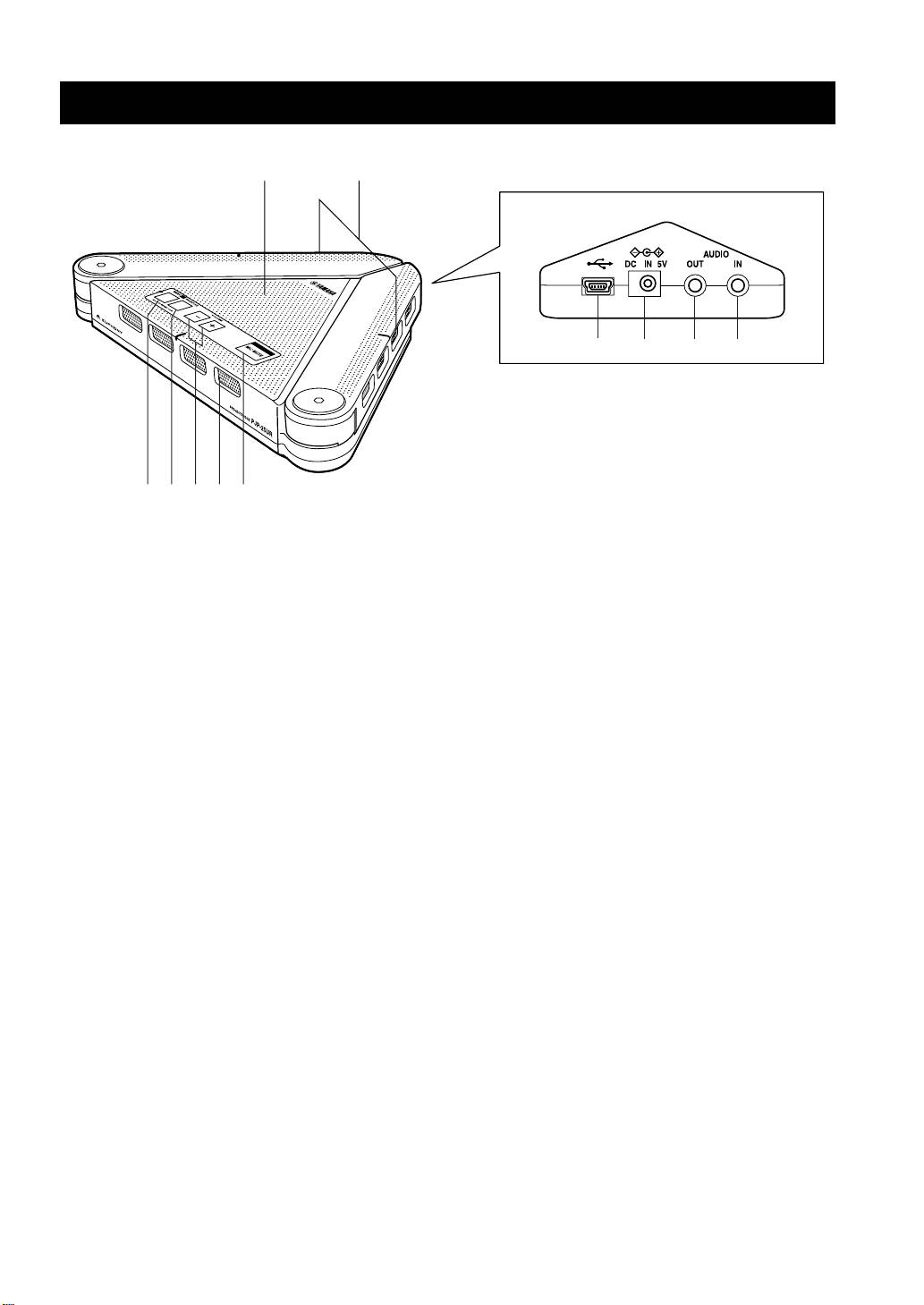
1 アレイマイク
6 MICMUTEキー
発話者の音声を取得します。
本機のマイクを一時的に停止(マイクミュート)す
る際に押します。
2 スピーカー
もう一度 MICMUTEキーを押すとマイクミュート
音声を出力します。
が解除されます。
3 MENU/PCキー
7 USBポート
PJP-25UR コントローラを起動する際に押します。
パソコンと USB ケーブルで接続します。
詳しくは付属の CD-ROM に収録されている「PJP-
25UR の使い方」をご覧ください。
8 DCIN5V端子
オプションの AC アダプターを接続します。
4 SHORTCUTキー
指定した機能を使用する際に押します。機能の指定
9 AUDIOOUT端子
はPJP-25URコントローラで設定できます。詳し
オーディオ機器やパソコンのライン入力端子に接続
くは付属の CD-ROM に収録されている「PJP-
します。
25UR の使い方」をご覧ください。
0 AUDIOIN端子
5 VOLUME+ / −キー
オーディオ機器やパソコンのライン出力端子に接続
スピーカーの音量を調整する際に押します。押し続
します。
けると、連続して音量を上げ下げできます。
Japanese 5
y
各部の名称とはたらき
12
78 90
3451
6
ヒント
MENU/PCキーと VOLUME+キーを同時に押すと、使用環境設定が「会議室専用」に切り替わります。
また、MENU/PCキーと VOLUME−キーを同時に押すと、使用環境設定が「標準」に切り替わります。
MENU/PC キーと SHORTCUT キーを同時に長押しすると、本機の設定がリセットされます。
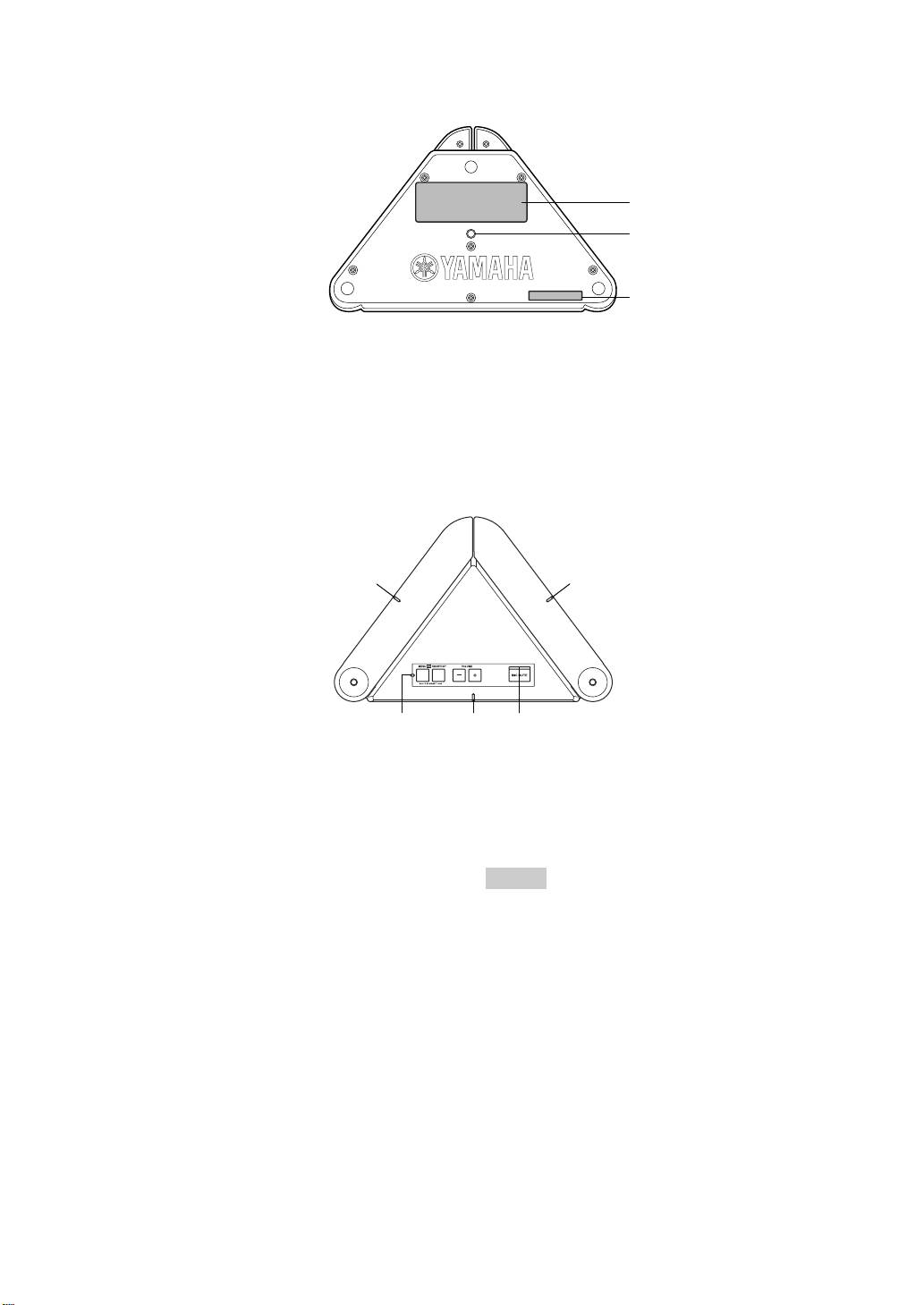
■ その他
1
2
1
1
ラベル
(シリアル番号)です。
以下の情報が記載されています。
2 三脚取付け穴
• MODELNo.:本機の機器名が記載されていま
市販の三脚などを取り付ける場合に使用します。
す。
• SER.:製品を管理/区分するための製造番号
■ LED のはたらき
1
1
1 23
1
マイク LED
3 インフォメーション LED
• マイク&スピーカーモード時:橙色点灯
• SHORTCUT キーに指定した機能使用時:橙色点
• スピーカーモード時:消灯
灯
• 電圧低下時:橙色点滅
• スピーカー音量の最大時:5 回の橙色点滅
• 使用環境の変更操作時(会議室専用):3秒間の
ご注意
橙色点滅
• 使用環境の変更操作時(標準):中央のみ 3秒間
本機は大きな音声出力が継続した場合など、電圧が低下す
ることがあります。その際は、スピーカーの音量を下げる
の橙色点滅
か、オプションの AC アダプターを併用してください。
• リセット操作時:
左→中央→右の順で 2 回の橙色点滅
2 マイクミュート LED
• 通常時:消灯
• マイクミュート時:橙色点灯
6 Japanese
■ 本機を接続するパソコンの仕様
本機を接続するパソコンには、以下のシステム環境
が必要です。
• CPU:750MHz 以上の IntelPentium/Celeron
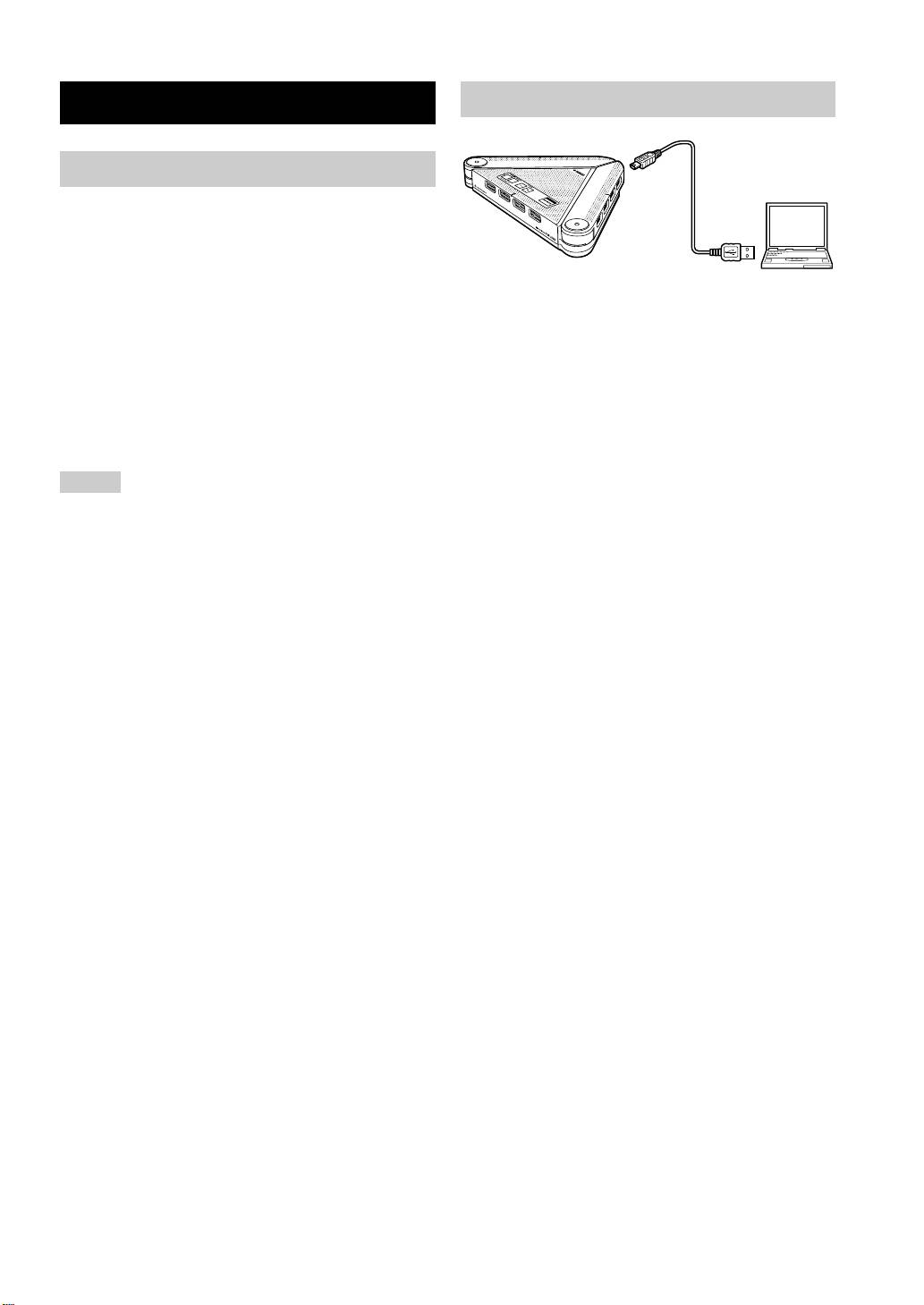
付属の USB ケーブルで本機とパソコンを接続
プロセッサ(および互換プロセッサ)
する。
• OS:Windows Vista、Windows XP
USB ドライバーがパソコンに自動でインストール
Professional または WindowsXPHome
される。
Edition、Windows2000Professional
• メモリ:128MB 以上(256MB 以上推奨)
• USB 端子:USB1.1 以降(USB2.0 対応を推奨)
• 本機とパソコンは、直接接続してください。USB ハブを
経由して接続すると、動作に問題が生じる可能性がありま
す。
• パソコン本体の使用状況(作業負荷やメモリ残の状況)な
どにより、まれに音声再生が途切れることがあります。
• AC アダプタ「PS-AC1」は別売になります。
Japanese 7
y
接続する
接続
接続する前にご確認ください
ヒント
本機はパソコンから標準の USB オーディオデバイ
スとして認識されるため、USBドライバーを別途イ
ンストールする必要はありません。
ご注意
PJP-25UR コントローラをインストールする
と
付属のCD-ROMでPJP-25URコントローラをイン
ストールすれば、本機のキー操作では設定できない
マイク感度などを設定できます。詳しくは付属の
CD-ROM に収録されている「PJP-25UR の使い方」
をご覧ください。

主な仕様
総合 オーディオ
外部インターフェース:
アレイマイク:
USB2.0FullSpeed、アナログ入出力各 1 系統(ス
4個×3列
テレオミニジャック)、AC アダプター接続用コネク
ター(DC5VIN)
スピーカー:
2個、モノラル再生、ステレオ再生(スピーカーの
最大消費電力:
み使用時)
USB バスパワー駆動時 :2.5W 以下、
セルフパワー駆動時 :3.0W 以下
周波数帯域:
300 〜 20,000Hz
電波障害規格:
VCCI クラス B
信号処理:
適応型エコーキャンセラー、マイクアレイ制御、
動作環境:
スピーカーステレオ再生
動作温度 :0 〜 40 ℃、動作湿度 :20 〜 85%
寸法:
229(W)× 34(H)× 152(D)mm
重量:
570g
電源:
USB バスパワー駆動、セルフパワー駆動
付属品:
USB ケーブル、CD-ROM、取扱説明書、保証書
オプション:
AC アダプター(PS-AC1)※別売
PC 動作環境:
®
®
対応 OS:Microsoft
Windows
Vista/XP
Professional/XPHomeEdition/2000
®
®
®
CPU:750MHz 以上の Intel
Pentium
/Celeron
互換プロセッサー
必要メモリー :128MB 以上(256MB 以上推奨)
その他
ファームウェアリビジョンアップ(PC より USB で
転送)
8 Japanese
IMPORTANT SAFETY INSTRUCTIONS
10 Power Sources – This product should be operated only from
CAUTION
the type of power source indicated on the mark.
11 Grounding or Polarization – This product may be equipped
RISK OF ELECTRIC SHOCK
with a polarized alternating current line plug (a plug having
DO NOT OPEN
one blade wider than the other). This plug will fit into the
power outlet only one way. This is a safety feature. If you
CAUTION: TO REDUCE THE RISK OF
are unable to insert the plug fully into the outlet, try
ELECTRIC SHOCK, DO NOT REMOVE
reversing the plug. If the plug should still fail to fit, contact
COVER (OR BACK). NO USER-SERVICEABLE
your electrician to replace your obsolete outlet. Do not
PARTS INSIDE. REFER SERVICING TO
defeat the safety purpose of the polarized plug.
QUALIFIED SERVICE PERSONNEL.
12 USB Cable Protection – USB cable should be routed so that
they are not likely to be walked on or pinched by items
placed upon or against them, paying particular attention to
• Explanation of Graphical Symbols
cords at plugs, convenience receptacles, and the point where
they exit from the product.
This graphic symbol is intended to alert you to the
13 Lightning – For added protection for this product during a
presence of uninsulated “dangerous voltage” within
lightning storm, or when it is left unattended and unused for
the product’s enclosure that may be of sufficient
long periods of time, unplug it from the PC and wall outlet.
magnitude to constitute a risk of electric shock to
This will prevent damage to the product due to lightning and
persons.
power-line surges.
This graphic symbol is intended to alert you to the
14 Overloading – Do not overload wall outlets, extension
presence of important operating and maintenance
cords, bend cords, or integral convenience receptacles as
(servicing) instructions in the literature
this can result in a risk of fire or electric shock.
accompanying the appliance.
15 Object and Liquid Entry – Never push objects of any kind
1 Read Instructions – All the safety and operating instructions
into this product through openings as they may touch
should be read before you operate the product.
dangerous voltage points or short-out parts that could result
in a fire or electric shock. Never spill liquid of any kind on
2 Retain Instructions – The safety and operating instructions
the product.
should be retained for future reference.
16 Servicing – Do not attempt to service this product yourself
3 Heed Warnings – All warnings on the product and in the
as opening or removing covers may expose you to
operating instructions should be adhered to.
dangerous voltage or other hazards. Refer all servicing to
4 Follow Instructions – All operating and use instructions
qualified service personnel.
should be followed.
17 Damage Requiring Service – Unplug this product from the
5 Cleaning – Unplug this product from the PC and wall outlet
PC and wall outlet and refer servicing to qualified service
before cleaning. Do not use liquid cleaners or aerosol
personnel under the following conditions:
cleaners.
a) When the USB cable is damaged,
6 Attachments – Do not use attachments not recommended by
b) If liquid has been spilled, or objects have fallen into the
the product manufacturer as they may cause hazards.
product,
7 Water and Moisture – Do not use this product near water –
c) If the product has been exposed to rain or water,
near a bath tub, wash bowl, kitchen sink, or laundry tub; in a
d) If the product does not operate normally by following
wet basement; or near a swimming pool; and the like.
the operating instructions. Adjust only those controls
8 Accessories – Do not place this product on an unstable cart,
that are covered by the operating instructions as an
stand, tripod, bracket, or table. The product may fall,
improper adjustment of other controls may result in
causing serious injury to a child or adult, and serious
damage and will often require extensive work by a
damage to the product. Use only with a cart, stand, tripod,
qualified technician to restore the product to its normal
bracket, or table recommended by the manufacturer, or sold
operation,
with the product. Any mounting of the product should
e) If the product has been dropped or damaged in any
follow the manufacturer’s instructions, and should use a
way, and
mounting accessory recommended by the manufacturer.
f) When the product exhibits a distinct change in
9 A product and cart combination should be moved with care.
performance - this indicates a need for service.
Quick stops, excessive force, and uneven surfaces may
18 Replacement Parts – When replacement parts are required,
cause the product and cart combination to
be sure the service technician has used replacement parts
overturn.
specified by the manufacturer or have the same
characteristics as the original part. Unauthorized
substitutions may result in fire, electric shock, or other
hazards.
19
Safety Check – Upon completion of any service or repairs to
this product, ask the service technician to perform safety
checks to determine that the product is in proper operating
condition.
20 Heat – The product should be situated away from heat
sources such as radiators, heat registers, stoves, or other
products (including amplifiers) that produce heat.
English 9
COMPLIANCE INFORMATION STATEMENT
This device complies with the requirements listed in FCC
(DECLARATION OF CONFORMITY PROCEDURE)
regulations, Part 15 for Class “B” digital devices. If you
are using a cardiac pacemaker, please note that this device
Responsible Party: Yamaha Electronics Corporation,
can radiate radio frequency energy in the area near the
U.S.A.
product.
Address: 6660 Orangethorpe Avenue Buena Park,
California 90620
Telephone: (714)522-9105
Hours of operation: Monday through Friday
8 a.m. - 4 p.m. PST.
Type of Equipment: Conference Microphone Speaker
Model Name: PJP-25UR
This device complies with Part 15 of the FCC Rules.
Operation is subject to the following two conditions:
1) this device may not cause harmful interference, and
2) this device must accept any interference received
including interfernce that may cause undesired operation.
See user manual instructions if interference to radio
reception is suspected.
FCC INFORMATION (for US customers)
1 IMPORTANT NOTICE: DO NOT MODIFY THIS
Compliance with FCC regulations does not guarantee
UNIT!
that interference will not occur in all installations. If
This product, when installed as indicated in the
this product is found to be the source of interference,
instructions contained in this manual, meets FCC
which can be determined by turning the unit “OFF”
requirements. Modifications not expressly approved by
and “ON”, please try to eliminate the problem by
using one of the following measures;
Yamaha may void your authority, granted by the FCC,
to use the product.
Relocate either the product generating the interference
2IMPORTANT: When connecting this product to
or the device that is being affected by the interference.
accessories and/or another product use only high
Utilize power outlets that are on different branch
quality shielded cables. Cable/s supplied with this
(circuit breaker of fuse) circuits or install AC line
product MUST be used. Follow all installation
filter/s.
instructions. Failure to follow instructions could void
In the case of radio or TV interference, relocate/
your FCC authorization to use this product in the USA.
reorient the antenna. If the antenna lead-in is 300 ohm
3 NOTE: This product has been tested and found to
ribbon lead, change the lead-in to coaxial type cable.
comply with the requirements listed in FCC
If these corrective measures do not produce
Regulations, Part 15 for Class “B” digital devices.
satisfactory results, please contact your local retailer
Compliance with these requirements provides a
authorized to distribute this type of product. If you can
reasonable level of assurance that your use of this
not locate the appropriate retailer, please contact
product in a residential environment will not result in
Yamaha Electronics Corp., U.S.A. 6660 Orangethorpe
harmful interference with other electronic devices.
Ave, Buena Park, CA 90620.
This equipment generates/uses radio frequencies and,
if not installed and used according to the instructions
The above statements apply ONLY to those products
found in the users manual, may cause interference
distributed by Yamaha Corporation of America or its
harmful to the operation of other electronic devices.
subsidiaries.
10 English

CAUTION: READ THIS BEFORE OPERATING YOUR UNIT.
1 To assure the finest performance, please read this manual
21 Do not install this product upside down or in upright position, or
carefully. Keep it in a safe place for future reference.
mount it on a wall. Install the product on a stable, flat surface by
2 Install this unit in a well ventilated, cool, dry, clean place with at
orienting it horizontally.
least 10 cm on the top, 10 cm on the left and right, and 10 cm at
the back of this unit — away from direct sunlight, heat sources,
FOR CANADIAN CUSTOMERS
vibration, dust, moisture, and/or cold.
To prevent electric shock, match wide blade of plug to wide
3 Locate this unit away from other electrical appliances, motors, or
slot and fully insert.
transformers to avoid humming sounds.
This Class B digital apparatus complies with Canadian
4 Do not expose this unit to sudden temperature changes from cold
ICES-003.
to hot, and do not locate this unit in an environment with high
humidity (i.e. a room with a humidifier) to prevent condensation
inside this unit, which may cause an electrical shock, fire,
WARNING
damage to this unit, and/or personal injury.
TO REDUCE THE RISK OF FIRE OR ELECTRIC SHOCK,
5 Avoid installing this unit where foreign object may fall onto this
DO NOT EXPOSE THIS UNIT TO RAIN OR MOISTURE.
unit and/or this unit may be exposed to liquid dripping or
splashing. On the top of this unit, do not place:
WARNING
– Other components, as they may cause damage and/or
This is a class B product. In a domestic environment this
discoloration on the surface of this unit.
product may cause radio interference in which case the user
– Burning objects (i.e. candles), as they may cause fire, damage
may be required to take adequate measures.
to this unit, and/or personal injury.
– Containers with liquid in them, as they may fall and liquid
may cause electrical shock to the user and/or damage to this
unit.
6 Do not cover this unit with a newspaper, tablecloth, curtain, etc.
in order not to obstruct heat radiation. If the temperature inside
this unit rises, it may cause fire, damage to this unit, and/or
personal injury.
7 Do not plug in this unit to a wall outlet until all connections are
complete.
8 When using the unit with an AC adapter, be sure to use the
dedicated AC adapter. Using other AC adapter may cause an
electrical shock, fire, and/or damage to this unit.
9 Do not operate this unit upside-down. It may overheat, possibly
causing damage.
10 Do not use force on switches, knobs, cords, and/or arrayed
microphones.
11 When disconnecting the USB cable from the PC or the power
cable from the wall outlet, grasp the plug: do not pull the cable.
12 Do not use excessive force on the arrayed microphones when
adjusting the angles of the arrayed microphones. It may cause
damage to this unit. Also, be careful not to catch your finger.
13 Be careful not to catch cords and/or foreign object when
adjusting the angles of the arrayed microphones. It may cause
damage to this unit, short circuit, and/or breaking of wire.
14 Do not clean this unit with chemical solvents; this might damage
the finish. Use a clean, dry cloth.
15 Only voltage specified on this unit must be used. Using this unit
with a higher voltage than specified is dangerous and may cause
fire, damage to this unit, and/or personal injury. YAMAHA will
not be held responsible for any damage resulting from use of this
unit with a voltage other than specified.
16 Do not attempt to modify or fix this unit. Contact qualified
YAMAHA service personnel when any service is needed.
17 Condensation will form when the surrounding temperature
changes suddenly. Disconnect the power cable from the outlet
and USB cable from the computer, then leave this unit alone.
18 When using the unit for a long time, the unit may become warm.
Disconnect the cables, then leave the unit alone for cooling.
19 When changing the position of this unit, be sure to hold the main
body. Holding the arrayed microphones (arm part) may cause
damage to this unit.
20 To prevent damage by lightning, keep the cables disconnected
during a lightning storm.
English 11

Introduction
Thank you for purchasing Yamaha PJP-25UR.
This product is a microphone/speaker unit to be connected to a computer with the USB cable for use as its audio terminal.
For your safety, please read all safety instructions and precautions stated in this manual carefully and keep it in a safe
place for future reference.
■ Check the contents
• PJP-25UR (this unit) x 1
• USB cable x 1
•CD-ROM x 1
• Quick Start Guide (this manual)
■ About this Manual
• In this manual, the product names are described as follows.
– Yamaha PJP-25UR: this unit
– Yamaha ProjectPhone: PJP
– Microsoft
®
Windows
®
: Windows
– Microsoft
®
Windows Vista
®
: Windows Vista
– Microsoft
®
Windows XP
®
: Windows XP
– Microsoft
®
Windows 2000 Professional
®
: Windows 2000 Professional
• Detailed knowledge on the computer, Internet, and network may be required to utilize this unit at its full performance.
As the provided manual does not give detailed technical information, please also refer to commercially available
books as required.
• This manual is printed prior to production. Design and specifications are subject to change in part as a result of
improvements, etc.
■ About trademarks
• Microsoft and Windows are registered trademarks of Microsoft Corporation in the United States and other countries.
• Intel and Celeron are trademarks or registered trademarks of Intel Corporation and its subsidiaries in the United States
and other countries.
• EUPHONY is a trademark of DiMAGIC Co., Ltd.
Information for Users on Collection and Disposal of Old Equipment
This symbol on the products, packaging, and/or accompanying documents means that used electrical and electronic
products should not be mixed with general household waste.
For proper treatment, recovery and recycling of old products, please take them to applicable collection points, in
accordance with your national legislation and the Directives 2002/96/EC.
By disposing of these products correctly, you will help to save valuable resources and prevent any potential negative
effects on human health and the environment which could otherwise arise from inappropriate waste handling.
For more information about collection and recycling of old products, please contact your local municipality, your waste
disposal service or the point of sale where you purchased the items.
[For business users in the European Union]
If you wish to discard electrical and electronic equipment, please contact your dealer or supplier for further information.
[Information on Disposal in other Countries outside the European Union]
This symbol is only valid in the European Union. If you wish to discard these items, please contact your local
authorities or dealer and ask for the correct method of disposal.
12 English
Controls and Functions
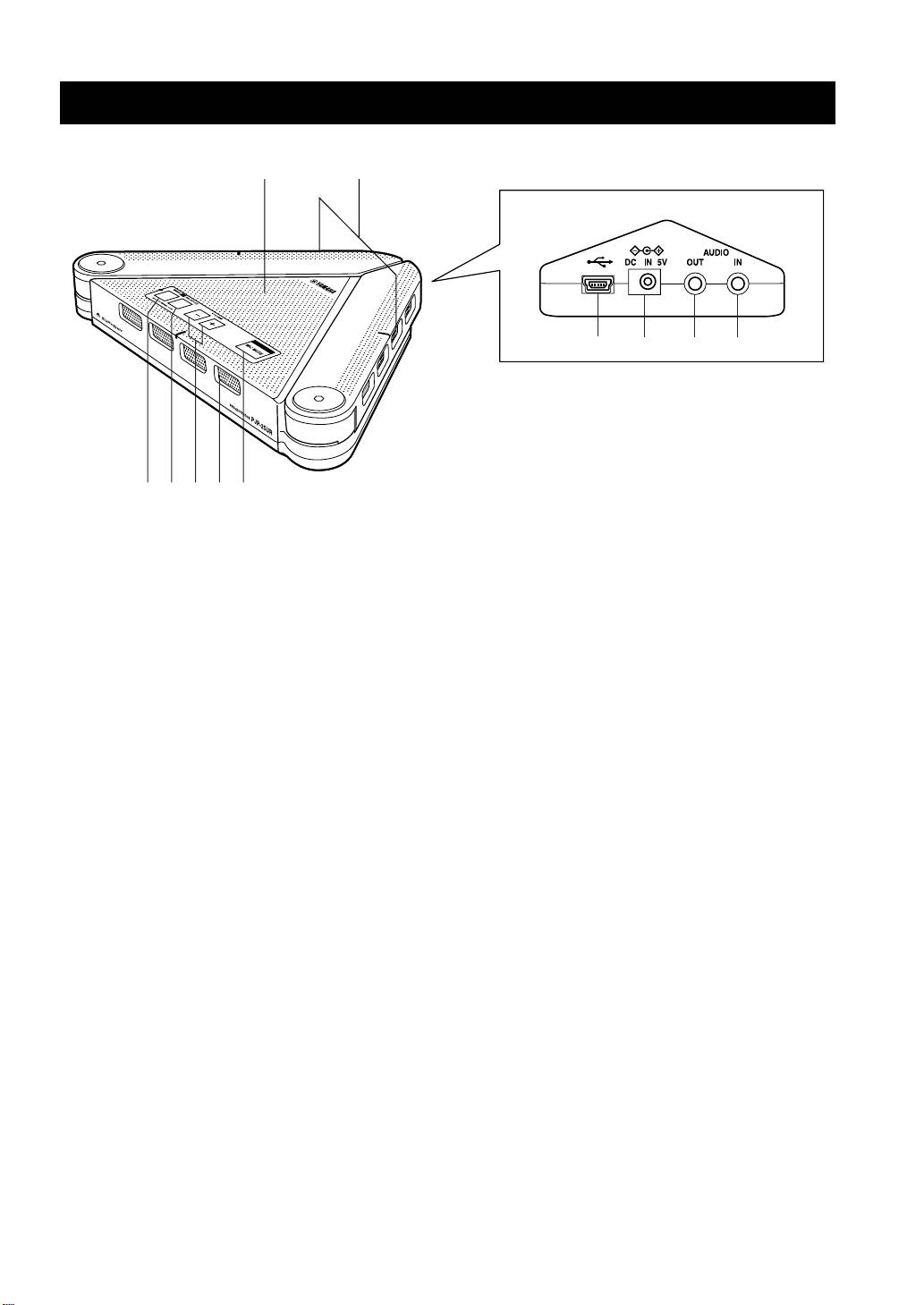
12
78 90
3451
6
1 Arrayed microphones
6 MIC MUTE
Picks up the talker’s voice.
Press to temporarily turn off (mute) the microphones. To
cancel the mute function, press it again.
2 Speaker
Outputs the sounds.
7 USB port
Connect to the computer using the USB cable.
3 MENU/PC
Press to activate the PJP-25UR Controller. For details,
8 DC IN 5V terminal
refer to the “User’s Manual” included in the supplied CD-
Connect the AC adapter (sold separately).
ROM.
9 AUDIO OUT terminal
4 SHORTCUT
Connect to the line-in on the audio device or computer.
Press to activate the function specified in the PJP-25UR
0 AUDIO IN terminal
Controller. For details, refer to the “User’s Manual”
Connect to the line-out on the audio device or computer.
included in the supplied CD-ROM.
5 VOLUME +/–
Press to adjust the speaker volume. Holding either key
increases or decreases the volume continuously.
y
Pressing MENU/PC and VOLUME + at the same time switches the environment setting to “Conference Room”.
Pressing MENU/PC and VOLUME – at the same time switches it to “Normal”.
Holding down MENU/PC and SHORTCUT at the same time resets this unit’s settings.
English 13
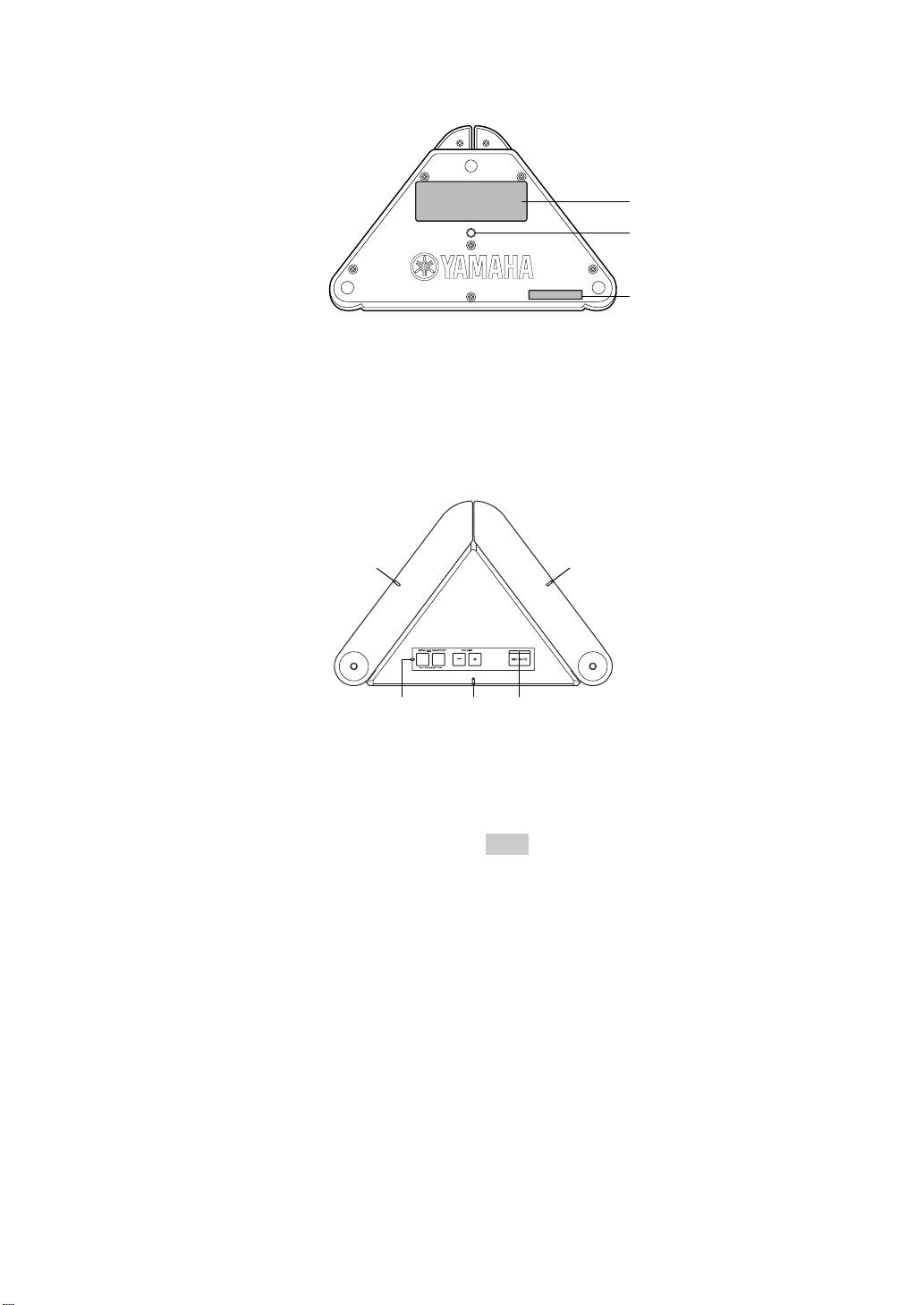
■ Other
1
2
1
1 Label
2 Tripod socket hole
Provides the following information.
Use to connect a commercially available tripod.
• MODEL No.: Model number of this unit
• SER.: Serial number of this unit
■ Functions of the LEDs
1
1
1 23
1 Microphone LEDs
3 Information LED
• Mic&Speaker mode: light in orange
• Function assigned to SHORTCUT is being used:
• Speaker mode: turn off
lights in orange
• Maximum speaker volume: blink in orange five times
• Voltage reduction: blinks in orange
• Changing “Environment” (Conference Room):
blink in orange for three seconds
Note
• Changing “Environment” (Normal): blink in orange
The voltage may decrease if this unit is continuously used at high
for three seconds (middle LED only)
audio levels. In this case, turn down the volume or use the AC
• Reset operation:
blink in orange twice (from left to right)
adapter (sold separately).
2 MIC MUTE LED
• Normal: turns off
• MIC mute: lights in orange
14 English
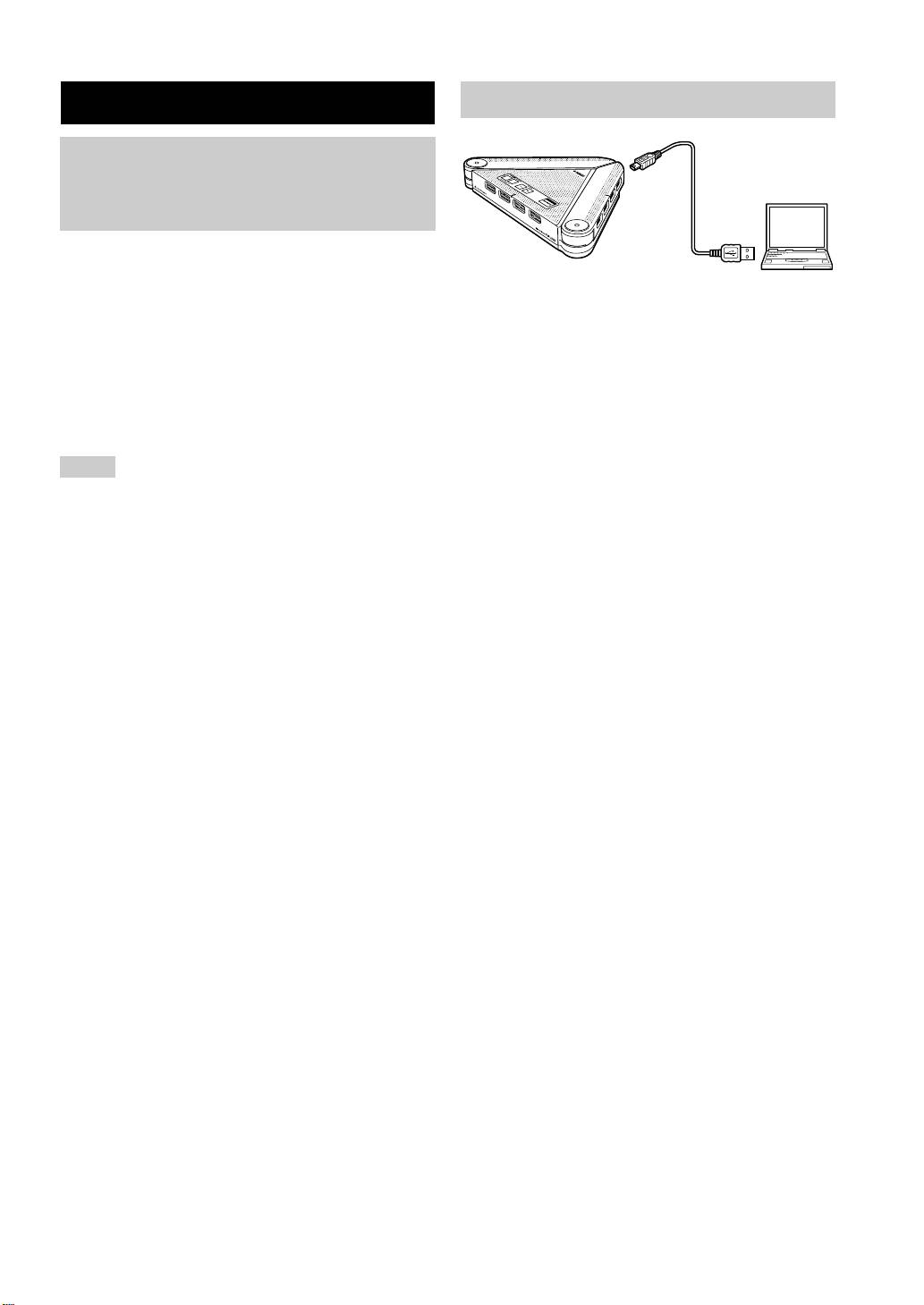
Connecting this unit
Connection
Check the following before
connecting this unit to the
computer
■ System requirement
The computer connected to this unit should meet the
Connect this unit to the computer using the supplied
following system requirement.
USB cable.
• CPU: Intel Pentium/Celeron processor with 750 MHz
The USB driver is automatically installed on the
or higher (or equivalent)
computer.
• OS: Windows Vista, Windows XP Professional/Home,
Windows 2000 Professional
y
• Memory: 128 MB or more (256 MB or more
You do not need to install the USB driver separately because this
recommended)
unit is recognized as a basic audio device by the computer.
• USB port: USB 1.1 or later (USB 2.0 recommended)
Installing the PJP-25UR Controller
By installing and using the PJP-25UR Controller included in the
Notes
supplied CD-ROM, you can adjust this unit’s settings such as the
• Connect this unit and the computer directly. Connecting them
microphone sensitivity, which cannot be controlled with key
through a USB hub may cause problems in operation.
operations. For details, refer to the “User’s Manual” included in
• Audio reproduction may be interrupted depending on the
the supplied CD-ROM.
computer usage situations (workloads or available memory
space).
• The AC adapter (PS-AC1) for this unit is sold separately.
English 15

Specifications
General Audio
Interface:
Arrayed microphones:
USB 2.0 (full), Analog I/O (stereo-mini),
4 units x 3 lines
AC adapter (DC 5V IN)
Speaker:
Power consumption (max):
2 units, monaural output, stereo output (when using the
USB bus power: 2.5 W or less, Self power: 3.0 W or less
speaker only)
Radio interference standard:
Frequency bandwidth:
FCC Part 15 (US)
300 to 20,000 Hz
EN55022 (EU)
Signal processing:
Operating environment:
Adaptive echo canceller, Microphone array control,
Temperature: 0 to 40°C (32 to 104°F),
Stereo output
Humidity: 20 to 85%
Dimensions (W x H x D):
229 x 34 x 152 mm (9-1/32" x 1-11/32" x 6")
Weight:
570 g (1.26 lbs)
Power source:
USB bus power, Self power
Accessories:
USB cable, CD-ROM, Quick Start Guide
Option:
AC adapter (PS-AC1) (sold separately)
Computer environment:
OS: Microsoft
®
Windows
®
Vista/XP Professional/
XP Home Edition/2000
CPU: 750 MHz or higher
(Intel
®
Pentium
®
/Celeron
®
equivalent processor)
Memory: 128 MB or more
(256 MB or more recommended)
Other:
Firmware revision upgrade
(transfer from PC through USB)
16 English

ATTENTION: LISEZ CE QUI SUIT AVANT D’UTILISER L’APPAREIL.
1 Pour utiliser l’appareil au mieux de ses possibilités, lisez
16 Ne tentez pas de modifier ni de réparer l’appareil. Contactez un
attentivement ce mode d’emploi. Conservez-le soigneusement
centre de SAV YAMAHA pour tout travail de réparation.
pour référence.
17 La condensation se forme lorsque la température ambiante
2 Installez cet appareil dans un endroit frais, bien aéré, sec et
change brusquement. Débranchez le cordon d’alimentation de la
propre; ménagez un espace d’au moins 10 cm au dessus, 10 cm à
prise de courant et le câble USB de l’ordinateur et laissez reposer
gauche et à droite et 10 cm à l’arrière de l’appareil – veillez à ce
l’appareil.
qu’il soit à l’abri de la lumière du soleil, des sources de chaleur,
18 La température de l’appareil peut augmenter lors d’une
des vibrations, des poussières, de l’humidité et du froid.
utilisation prolongée. Débranchez les câbles et laissez l’appareil
3 Placez l’appareil loin des équipements, moteurs et
refroidir un moment.
transformateurs électriques, pour éviter les ronflements parasites.
19 Pour changer l’orientation de l’appareil, saisissez-le par son
4 N’exposez pas l’appareil à des variations brutales de température,
boîtier. Ne le saisissez jamais par ses micros dépliables car cela
ne le placez pas dans un environnement très humide (dans une
pourrait endommager l’appareil.
pièce contenant un humidificateur, par exemple). Cela peut
20 En cas d’orage, débranchez tous les câbles afin d’éviter tout
entraîner la formation de condensation à l’intérieur de l’appareil
risque d’endommagement occasionné par la foudre.
et poser un risque d’électrocution, d’incendie,
21 N’installez pas ce produit sens dessus dessous ni en position
d’endommagement de l’appareil ou de blessure.
verticale et ne le fixez pas au mur. Posez-le uniquement à plat sur
5 Installez l’appareil dans un endroit où aucun objet ne risque de
une surface stable et de niveau.
tomber dessus, en veillant à ce l’appareil soit à l’abri de tout
liquide ou source d’éclaboussures. Ne posez jamais sur le dessus
POUR LES CONSOMMATEURS CANADIENS
de l’appareil:
Pour éviter les chocs électriques, introduire la lame la
– D’autres appareils, car cela pourrait endommager la surface de
plus large de la fiche dans la borne correspondante de
l’appareil ou provoquer sa décoloration.
– Des objets se consumant (comme une bougie, par exemple),
la prise et pousser jusqu’au fond.
car cela pourrait provoquer un incendie, un endommagement
Cet appareil numérique de la classe B est conforme à
de l’appareil ou des blessures.
la norme NMB-003 du Canada.
– Des récipients contenant des liquides, car cela pourrait
provoquer une électrocution ou un endommagement de
l’appareil.
AVERTISSEMENT
6 Ne couvrez jamais l’appareil d’un journal, d’une nappe, d’un
POUR Ré DUIRE LES RISQUES D’INCENDIE OU DE
rideau, etc. car cela empêcherait l’évacuation de la chaleur. Une
SECOUSSE é LECTRIQUE, N’EXPOSEZ PAS CET
hausse de la température à l’intérieur de l’appareil pourrait
APPAREIL à LA PLUIE OU à L’HUMIDITé .
provoquer un incendie, un endommagement de l’appareil ou des
blessures.
7 Ne raccordez pas l’appareil à une prise de courant avant que tous
AVERTISSEMENT
les branchements ne soient effectués.
Ce produit fait partie des produits de Classe B. Dans un
8 Alimentez uniquement l’appareil avec l’adaptateur secteur
environnement domestique, ce produit peut causer des
spécialement conçu à cet effet. L’utilisation de tout autre
interférences radio, dans lequel cas l’utilisateur devra prendre
adaptateur secteur pourrait causer une électrocution, un incendie
les mesures nécessaires.
et/ou endommager l’appareil.
9 N’utilisez jamais l’appareil quand il est sens dessus dessous. Il
risquerait de chauffer anormalement et d’être endommagé.
10 N’appliquez jamais de force excessive sur les boutons,
commandes, cordons et/ou microphones de l’appareil.
11 Quand vous débranchez le câble USB du PC ou le cordon
d’alimentation de la prise murale, saisissez toujours la fiche. Ne
tirez jamais sur le câble même.
12 N’appliquez jamais de force excessive sur les micros lorsque
vous réglez leur angle. Cela risquerait d’endommager l’appareil.
Veillez en outre à ne pas vous coincer les doigts.
13 Veillez à ne pas coincer les câbles et/ou tout autre objet quand
vous réglez l’angle des microphones. Cela risquerait
d’endommager l’appareil, de provoquer un court-circuit et/ou
d’abîmer les câbles.
14 N’utilisez jamais de solvant pour nettoyer l’appareil, car cela
risquerait d’endommager sa finition. Utilisez un chiffon sec et
propre.
15 Alimentez toujours l’appareil en respectant la tension prescrite.
Tout branchement à une prise de courant de tension trop élevée
est dangereux et peut provoquer un incendie, un
endommagement de l’appareil ou des blessures. YAMAHA
décline toute responsabilité pour tout dommage résultant de
l’alimentation de l’appareil avec un courant de tension autre que
prescrite.
French 17
Introduction
Nous vous remercions d’avoir choisi le Yamaha PJP-25UR.
Ce produit est un combiné microphones/haut-parleurs servant d’interface de communication sur un ordinateur relié via le
câble USB fourni.
Pour votre sécurité, nous vous conseillons de lire attentivement toutes les précautions d’utilisation figurant dans ce
manuel et de conserver ce dernier en lieu sûr pour toute référence ultérieure.
■ Vérification du contenu de l’emballage
• PJP-25UR (cet appareil) x 1
• Câble USB x 1
•CD-ROM x 1
• Guide de démarrage (ce manuel)
■ A propos de ce manuel
• Les noms de produits figurant dans ce manuel font référence aux produits suivants:
– Yamaha PJP-25UR: cet appareil
– Yamaha ProjectPhone: PJP
– Microsoft
®
Windows
®
: Windows
– Microsoft
®
Windows Vista
®
: Windows Vista
– Microsoft
®
Windows XP
®
: Windows XP
– Microsoft
®
Windows 2000 Professional
®
: Windows 2000 Professional
• L’exploitation optimale de cet appareil pourrait requérir une connaissance approfondie de l’informatique, de l’internet
et des réseaux. Ce manuel ne fournit pas d’explications techniques détaillées. Si nécessaire, procurez-vous la
documentation technique ad hoc disponible dans le commerce.
• Ce manuel a été imprimé avant la production. La conception et les spécifications du produit sont susceptibles d’être
modifiées en vue d’améliorations ou à d’autres fins.
■ A propos des marques commerciales
• Microsoft et Windows sont des marques déposées de Microsoft Corporation aux Etats-Unis et dans d’autres pays.
• Intel et Celeron sont des marques de fabrique ou des marques déposées de Intel Corporation et de ses filiales aux
Etats-Unis et dans d’autres pays.
• EUPHONY est une marque de fabrique de DiMAGIC Co., Ltd.
Information concernant la Collecte et le Traitement des déchets
d’équipements électriques et électroniques.
Le symbole sur les produits, l’emballage et/ou les documents joints signifie que les produits électriques ou
électroniques usagés ne doivent pas être mélangés avec les déchets domestiques habituels.
Pour un traitement, une récupération et un recyclage appropriés des déchets d’équipements électriques et électroniques,
veuillez les déposer aux points de collecte prévus à cet effet, conformément à la réglementation nationale et aux
Directives 2002/96/EC.
En vous débarrassant correctement des déchets d’équipements électriques et électroniques, vous contribuerez à la
sauvegarde de précieuses ressources et à la prévention de potentiels effets négatifs sur la santé humaine qui pourraient
advenir lors d'un traitement inapproprié des déchets.
Pour plus d’informations à propos de la collecte et du recyclage des déchets d’équipements électriques et électroniques,
veuillez contacter votre municipalité, votre service de traitement des déchets ou le point de vente où vous avez acheté
les produits.
[Pour les professionnels dans l’Union Européenne]
Si vous souhaitez vous débarrasser des déchets d’équipements électriques et électroniques veuillez contacter votre
vendeur ou fournisseur pour plus d'informations.
[Information sur le traitement dans d’autres pays en dehors de l’Union Européenne]
Ce symbole est seulement valables dans l’Union Européenne. Si vous souhaitez vous débarrasser de déchets
d’équipements électriques et électroniques, veuillez contacter les autorités locales ou votre fournisseur et demander la
méthode de traitement appropriée.
18 French
