
JVC KD-SC402: Getting started
Getting started: JVC KD-SC402
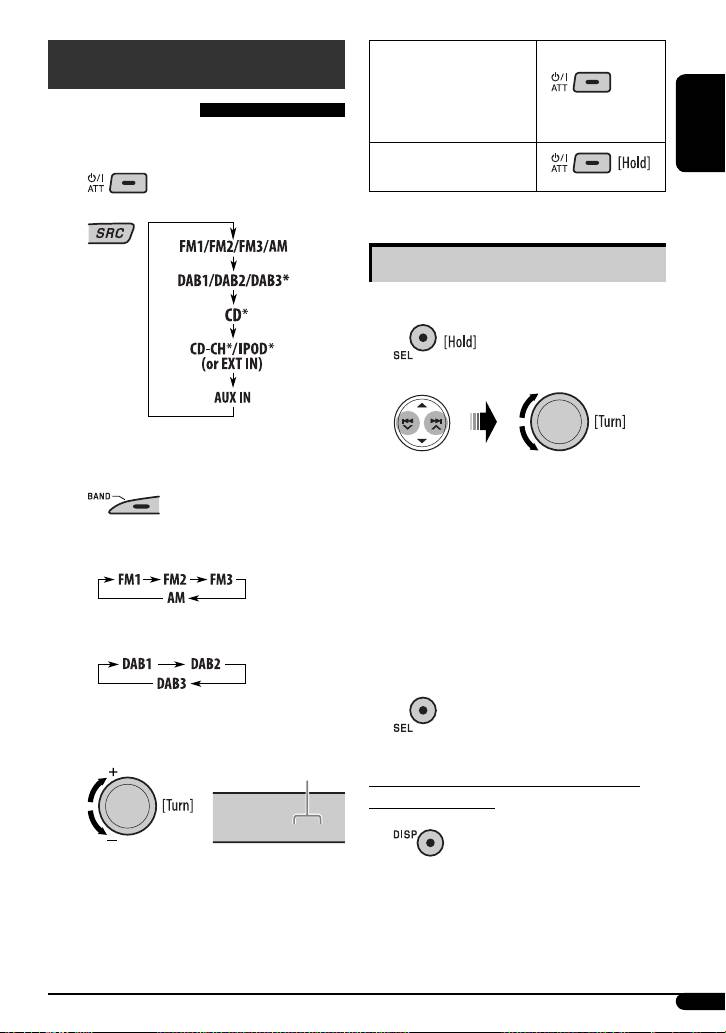
To drop the volume in
Getting started
a moment (ATT)
To restore the sound, press
Basic operations
the button again.
~ Turn on the power.
ENGLISH
To turn off the power
Ÿ
Basic settings
• See also “General settings — PSM” on pages 13 –15.
1
2
* You cannot select these sources if they are not
ready or not connected.
1 Canceling the display demonstrations
Select “DEMO,” then “DEMO OFF.”
!
2 Setting the clock
Select “CLOCK H” (hour), then adjust the hour.
• For FM/AM tuner
Select “CLOCK M” (minute), then adjust the
minute.
Select “24H/12H,” then “24H” (hour) or “12H”
(hour).
• For DAB tuner
3 Finish the procedure.
⁄ Adjust the volume.
Volume level appears.
To check the current clock time while the
power is turned off
VOL 20
Clock time is shown on the
display for about 5 seconds. See
also page 13.
@ Adjust the sound as you want. (See
page 12.)
5
EN02-05_KD-G431_003C_fff.indd 5EN02-05_KD-G431_003C_fff.indd 5 3/13/08 11:50:00 AM3/13/08 11:50:00 AM
Оглавление
- CONTENTS
- Control panel
- Getting started
- Radio operations
- Ÿ Select one of your favorite programme
- ~
- Sound adjustments
- General settings — PSM
- DAB tuner operations
- iPod operations
- ~
- Other external component
- Ÿ Turn on the connected component and
- Maintenance
- More about this unit
- Troubleshooting
- Specifications
- INHALT
- Bedienfeld
- Erste Schritte
- Bedienung des Tuners
- Ÿ Wählen Sie einen ihres gewünschten
- ~
- Klangeinstellungen
- Allgemeine Einstellungen — PSM
- DAB-Tuner-Funktionen
- iPod Bedienverfahren
- ~ Ÿ
- Bedienung von anderen
- Ÿ Schalten Sie die angeschlossene
- Wartung
- Weitere Informationen zu
- Störungssuche
- Technische Daten
- CОДЕРЖАНИЕ
- Панель управления
- Начало работы
- Операции с
- Ÿ Выберите один из типов любимых
- ~
- Настройки звучания
- Общие настройки—PSM
- Операции с тюнером DAB
- Операции
- ~ Ÿ
- Другие операции с
- Ÿ Включите подключенное устройство
- Обслуживание
- Дополнительная
- Устранение проблем
- Технические характеристики
