
Sony CPD-E100E: Customizing Your Monitor Navigating the menu
Customizing Your Monitor Navigating the menu: Sony CPD-E100E
Table of contents
- Owner’s Record
- Table of Contents
- Precautions
- Identifying parts and controls RearFront
- Setup Step 1:Connect your monitor to your computer Step 2:Connect the power cord
- Step 3:Turn on the monitor and Selecting the on-screen menu computer language (LANGUAGE/ INFORMATION)
- Customizing Your Monitor Navigating the menu
- Adjusting the brightness and contrast
- Adjusting the horizontal size or Adjusting the curvature of the centering of the picture (H-SIZE/ picture’s sides (PIN/PIN BALANCE) CENTER) Adjusting the angle of the picture’s sides (KEY/KEY BALANCE) Adjusting the vertical size or centering of the picture (V-SIZE/ CENTER)
- Adjusting the picture’s rotation Adjusting the color of the picture (ROTATION) (COLOR) Enlarging or reducing the picture (ZOOM)
- Additional settings (DEGAUSS/ Resetting the adjustments CANCEL MOIRE)
- Technical Features Troubleshooting
- Trouble symptoms and remedies Symptom Check these items
- Symptom Check these items
- Self-diagnosis function Specifications
C:\WIN95-E\DESKTOP\CPD E100\386765911CPDE100EAEP\01GB03BAS-AEP.fm
masterpage:Left
8
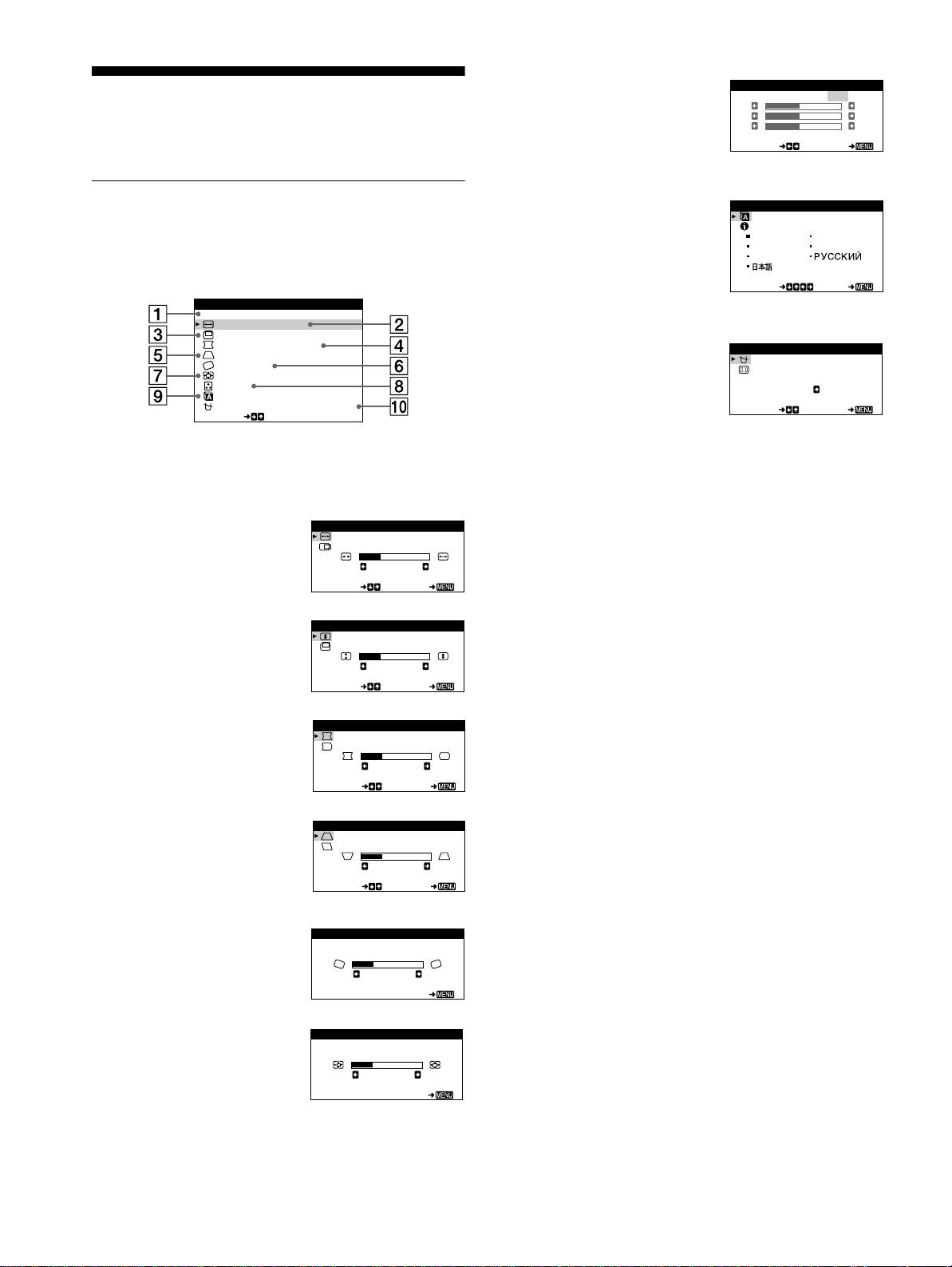
COLOR (page 11)
COLOR
Select the COLOR menu to adjust
USER
5000 6500 9300
KKK
Customizing Your Monitor
R50
the picture’s color temperature.
G50
B50
You can make numerous adjustments to your monitor using the
You can use this to match the
SELECT EXI T
on-screen menu.
monitor’s colors to a printed
picture’s colors.
Navigating the menu
9
LANGUAGE/INFORMATION
LANGUAGE / INFORMAT ION
(page 7, 15)
Press the center of the control button to display the main MENU
Select the LANGUAGE/
ENGL ISH FRANÇAI S
DEUTSCH I TAL IANO
on your screen. See page 9 for more information on using the
INFORMATION menu to choose
ESPAÑOL
control button.
the on-screen menu’s language
SELECT EXI T
and display this monitor’s
MENU
information box.
EXI T
H-SIZE/CENTER
V-SIZE/CENTER
PIN/PIN BALANCE
q;
DEGAUSS/CANCEL MOIRE
DEGAUSS /CANCEL MOI RE
KEY/ KEY BALANCE
ROTATION
(page 12)
DEGAUSS
ZOOM
Select the DEGAUSS/CANCEL
COLOR
ON
LANGUAGE / I NFORMAT NOI
MOIRE menu to degauss the
DEGAUSS /CANCEL MO ERI
SELECT EXI T
SELECT
screen and adjust the moire
cancellation level.
Use the control button to select one of the following menus.
1
EXIT
Select EXIT to close the menu.
2
H-SIZE/CENTER (page 10)
H-SI ZE/CENTER
Select the H-SIZE/CENTER
H-SIZE
menu to adjust the picture’s
26
horizontal size and centering.
SELECT EXI T
3
V-SIZE/CENTER (page 10)
V-SIZE/CENTER
Select the V-SIZE/CENTER
V-SIZE
menu to adjust the picture’s
26
vertical size and centering.
SELECT EXI T
4
PIN/PIN BALANCE (page 10)
PIN/PIN BALANCE
Select the PIN/PIN BALANCE
PIN
menu to adjust the curvature
26
picture’s sides.
SELECT EXI T
5
KEY/KEY BALANCE
KEY/ KEY BALANCE
(page 10)
KEY
Select the KEY/KEY BALANCE
26
menu to adjust the angle of the
SELECT EXI T
picture’s sides.
6
ROTATION (page 11)
ROTAT ION
Select the ROTATION menu to
ROTAT ION
adjust the picture’s rotation.
26
EXI T
7
ZOOM (page 11)
ZOOM
Select the ZOOM menu to enlarge
ZOOM
or reduce the picture.
26
EXI T
8
3-867-659-
CPD-E100E
11
(1)
