
Sony CPD-E100E: Adjusting the horizontal size or Adjusting the curvature of the centering of the picture (H-SIZE/ picture’s sides (PIN/PIN BALANCE) CENTER) Adjusting the angle of the picture’s sides (KEY/KEY BALANCE) Adjusting the vertical size or centering of the picture (V-SIZE/ CENTER)
Adjusting the horizontal size or Adjusting the curvature of the centering of the picture (H-SIZE/ picture’s sides (PIN/PIN BALANCE) CENTER) Adjusting the angle of the picture’s sides (KEY/KEY BALANCE) Adjusting the vertical size or centering of the picture (V-SIZE/ CENTER): Sony CPD-E100E
Table of contents
- Owner’s Record
- Table of Contents
- Precautions
- Identifying parts and controls RearFront
- Setup Step 1:Connect your monitor to your computer Step 2:Connect the power cord
- Step 3:Turn on the monitor and Selecting the on-screen menu computer language (LANGUAGE/ INFORMATION)
- Customizing Your Monitor Navigating the menu
- Adjusting the brightness and contrast
- Adjusting the horizontal size or Adjusting the curvature of the centering of the picture (H-SIZE/ picture’s sides (PIN/PIN BALANCE) CENTER) Adjusting the angle of the picture’s sides (KEY/KEY BALANCE) Adjusting the vertical size or centering of the picture (V-SIZE/ CENTER)
- Adjusting the picture’s rotation Adjusting the color of the picture (ROTATION) (COLOR) Enlarging or reducing the picture (ZOOM)
- Additional settings (DEGAUSS/ Resetting the adjustments CANCEL MOIRE)
- Technical Features Troubleshooting
- Trouble symptoms and remedies Symptom Check these items
- Symptom Check these items
- Self-diagnosis function Specifications
C:\WIN95-E\DESKTOP\CPD E100\386765911CPDE100EAEP\01GB03BAS-AEP.fm
masterpage:Left
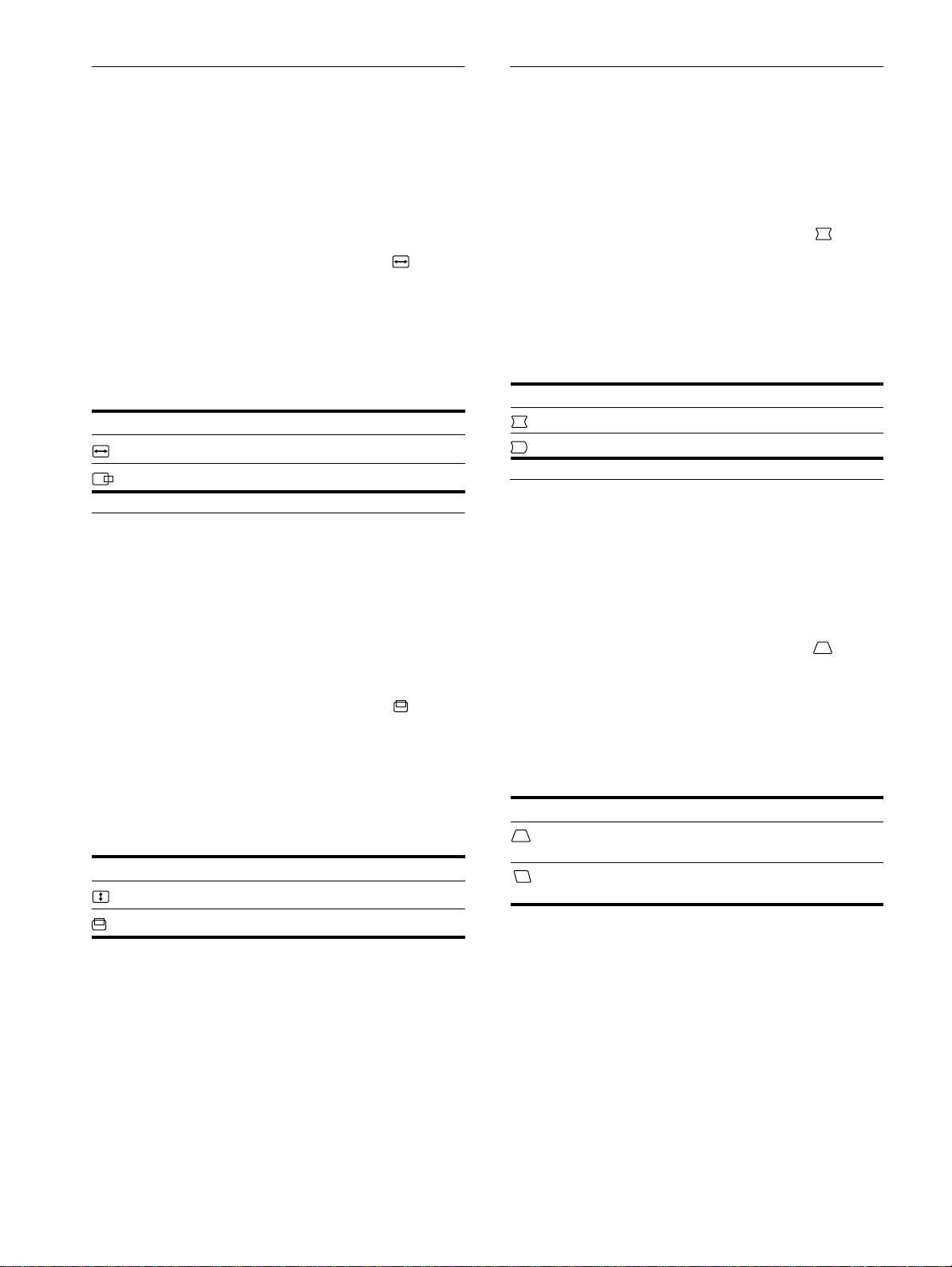
Adjusting the horizontal size or
Adjusting the curvature of the
centering of the picture (H-SIZE/
picture’s sides (PIN/PIN BALANCE)
CENTER)
These settings are stored in memory for the current input signal.
These settings are stored in memory for the current input signal.
1
Press the center of the control button.
The main MENU appears on the screen.
1
Press the center of the control button.
The main MENU appears on the screen.
2
Move the control button
m
/
M
to highlight PIN/
PIN BALANCE and press the center of the control
2
Move the control button
m
/
M
to highlight H-SIZE/
button again.
CENTER and press the center of the control button
The PIN/PIN BALANCE menu appears on the screen.
again.
The H-SIZE/CENTER menu appears on the screen.
3
First move the control button
m
/
M
to select the
desired adjustment item. Then move the control
3
First move the control button
m
/
M
to select the
button
<
/
,
to make the adjustment.
desired adjustment item. Then move the control
button
<
/
,
to make the adjustment.
Select To
Select To
PIN
expand or contract the picture sides
adjust the horizontal size
PIN BALANCE
shift the picture sides to the left or right
H-SIZE
H-CENTER
adjust the horizontal centering
Adjusting the angle of the picture’s
sides (KEY/KEY BALANCE)
Adjusting the vertical size or
centering of the picture (V-SIZE/
These settings are stored in memory for the current input signal.
CENTER)
1
Press the center of the control button.
The main MENU appears on the screen.
These settings are is stored in memory for the current input signal.
2
Move the control button
m
/
M
to highlight KEY/
1
Press the center of the control button.
KEY BALANCE and press the center of the control
The main MENU appears on the screen.
button again.
The KEY/KEY BALANCE menu appears on the screen.
2
Move the control button
m
/
M
to highlight V-SIZE/
CENTER and press the center of the control button
3
First move the control button
m
/
M
to select the
again.
desired adjustment item. Then move the control
The V-SIZE/CENTER menu appears on the screen.
button
<
/
,
to make the adjustment.
3
First move the control button
m
/
M
to select the
desired adjustment item. Then move the control
Select To
button
<
/
,
to make the adjustment.
KEY
adjust the picture width at the top of
the screen
Select To
KEY BALANCE
shift the picture to the left or right at
adjust the vertical size
the top of the screen
V-SIZE
adjust the vertical centering
V-CENTER
10
3-867-659-
CPD-E100E
11
(1)
