
Sony BRAVIA KDL-26S2000: Start-up Guide 1: Checking the 2: Connecting an aerial/ accessories VCR
Start-up Guide 1: Checking the 2: Connecting an aerial/ accessories VCR: Sony BRAVIA KDL-26S2000
Table of contents
- WARNING Introduction Notice for Digital TV function
- Table of Contents
- Start-up Guide 1: Checking the 2: Connecting an aerial/ accessories VCR
- 3: Bundling the cables 5: Selecting the language and country/ region 4: Preventing the TV from toppling over
- 6: Auto-tuning the TV
- Safety information
- GB
- GB
- Precautions
- Overview of the remote
- Overview of the TV buttons and indicators
- Watching TV
- To access Text Picture Freeze To change the screen mode manually to suit the broadcast Using the Tools menu
- Checking the Digital Electronic Programme Guide To Do this
- To Do this
- Using the Favourite list * To Do this
- Viewing pictures from connected equipment
- Navigating through menus Menu Description
- Picture menu
- Noise Reduction Advanced Settings
- Sound menu
- Dual Sound
- Screen menu
- Set-up menu
- All Reset
- PC Settings menu
- Analogue Set-up menu (Analogue mode only)
- Manual Programme Preset
- Digital Set-up menu Digital Tuning
- Digital Set-up
- Connecting optional equipment Connecting to the TV (side)
- Connecting to the TV (rear)
- Using the Tools menu in PC input mode
- Specifications
- PC Input Signal Reference Chart
- Troubleshooting Picture Problem Cause/Remedy
- Sound Channels General
- Index
Start-up Guide
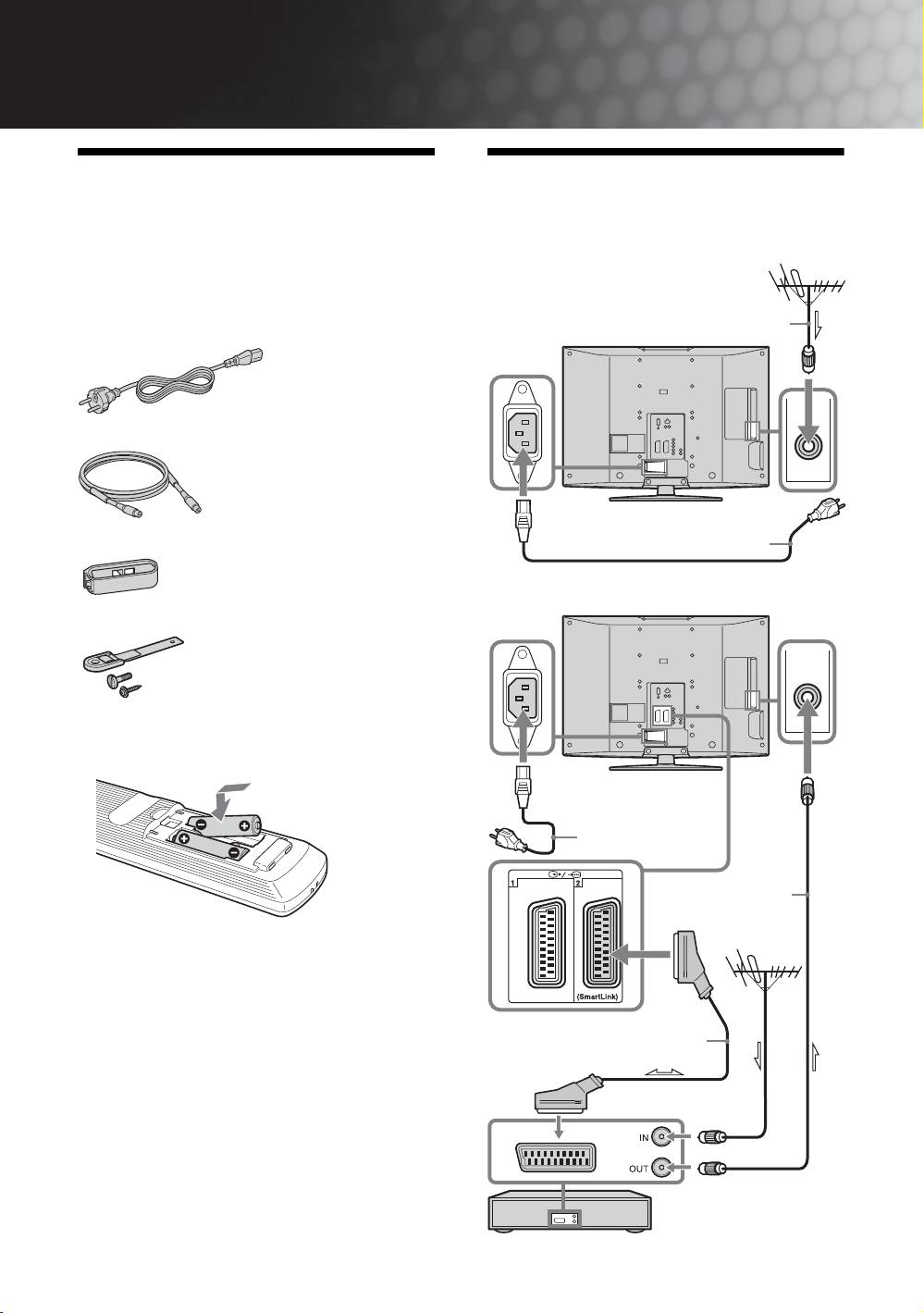
1: Checking the
2: Connecting an aerial/
accessories
VCR
Remote RM-ED005 (1)
Connecting an aerial only
Size AA batteries (R6 type) (2)
Coaxial cable
Mains lead (Type C-6) (1)
(supplied)
Coaxial cable (1)
Cable holder (1)
Mains lead (supplied)
Connecting an aerial and VCR
Support belt (1) and screws (2)
To insert batteries into the remote
Mains lead
(supplied)
RF lead
(not supplied)
Notes
• Observe the correct polarity when inserting batteries.
• Dispose of batteries in an environmentally friendly way.
Certain regions may regulate disposal of the battery.
Please consult your local authority.
• Do not use different types of batteries together or mix old
Scart lead (not supplied)
and new batteries.
• Handle the remote with care. Do not drop or step on it, or
spill liquid of any kind onto it.
• Do not place the remote in a location near a heat source, or
in a place subject to direct sunlight, or in a damp room.
VCR
GB
4
