
Sony BRAVIA KDL-26S2000: GB
GB: Sony BRAVIA KDL-26S2000
Table of contents
- WARNING Introduction Notice for Digital TV function
- Table of Contents
- Start-up Guide 1: Checking the 2: Connecting an aerial/ accessories VCR
- 3: Bundling the cables 5: Selecting the language and country/ region 4: Preventing the TV from toppling over
- 6: Auto-tuning the TV
- Safety information
- GB
- GB
- Precautions
- Overview of the remote
- Overview of the TV buttons and indicators
- Watching TV
- To access Text Picture Freeze To change the screen mode manually to suit the broadcast Using the Tools menu
- Checking the Digital Electronic Programme Guide To Do this
- To Do this
- Using the Favourite list * To Do this
- Viewing pictures from connected equipment
- Navigating through menus Menu Description
- Picture menu
- Noise Reduction Advanced Settings
- Sound menu
- Dual Sound
- Screen menu
- Set-up menu
- All Reset
- PC Settings menu
- Analogue Set-up menu (Analogue mode only)
- Manual Programme Preset
- Digital Set-up menu Digital Tuning
- Digital Set-up
- Connecting optional equipment Connecting to the TV (side)
- Connecting to the TV (rear)
- Using the Tools menu in PC input mode
- Specifications
- PC Input Signal Reference Chart
- Troubleshooting Picture Problem Cause/Remedy
- Sound Channels General
- Index
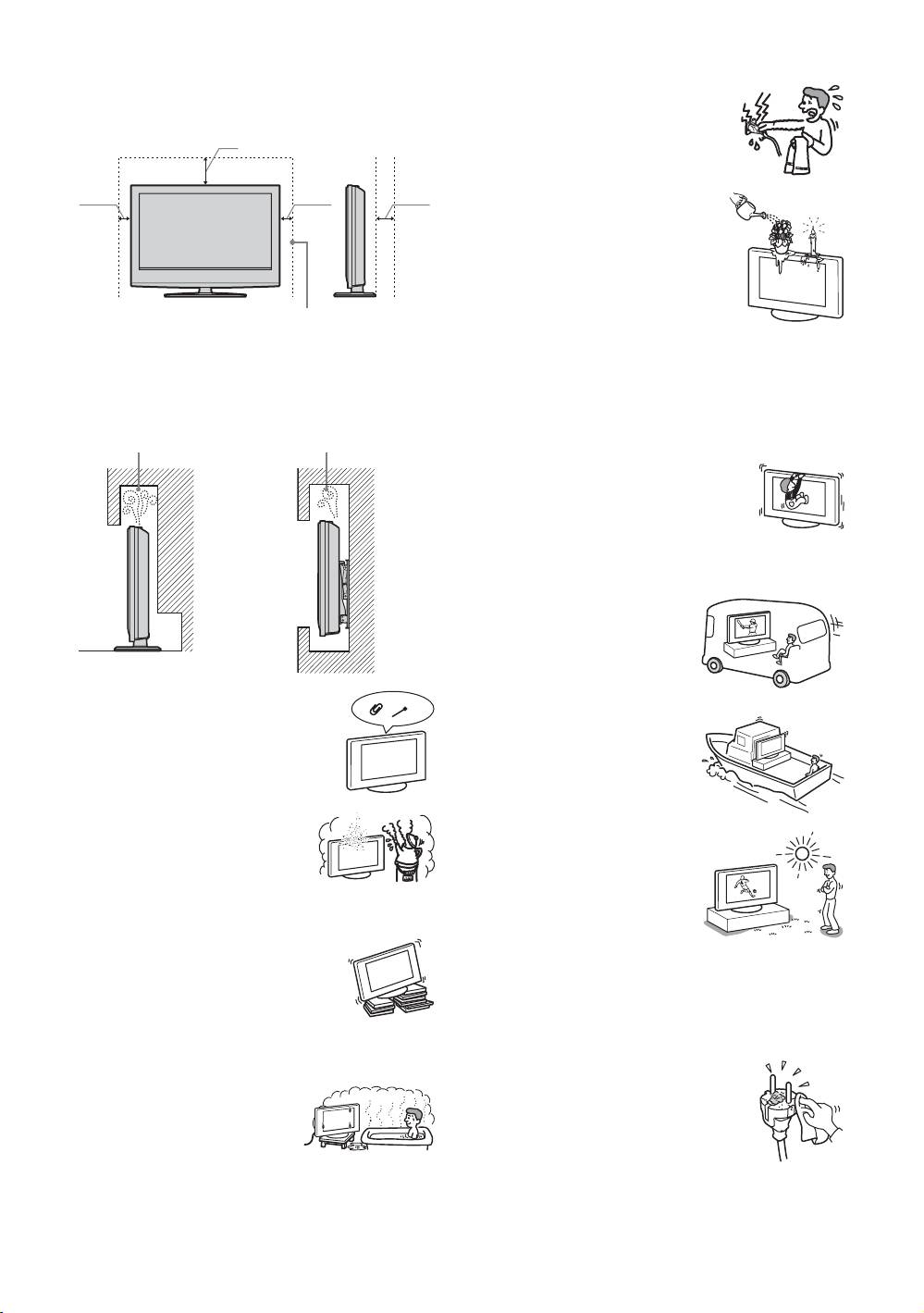
• Leave some space around the TV set. Otherwise, air-
• Do not touch the mains lead and the TV
circulation may be inadequate and cause overheating,
set with wet hands. Doing so may cause
which may cause fire or damage to the TV set.
electric shock or damage to the TV set.
30 cm
10 cm 10 cm 15 cm
Moisture and flammable objects
• Do not let this TV set get wet. Never
spill liquid of any kind on the TV set.
If any liquid or solid object does fall
through openings in the cabinet, do
not operate the TV set. It may result in
electric shock or damage to the TV set.
Leave at least this much space.
Have it checked immediately by
qualified service personnel.
• When installing the TV set on the wall, leave at least
• To prevent fire, keep flammable objects (candles, etc.) and
10 cm space from the bottom, and at least 5.5 cm between
electric bulbs away from the TV set.
the back of the TV set and the wall.
• Never install the TV set as follows:
Oils
Air circulation
Air circulation
Do not install this TV set in restaurants that use oil. Dust
is blocked.
is blocked.
absorbing oil may enter and damage the TV set.
Fall
Place the TV set on a secure, stable stand. Do
not hang anything on the TV set. If you do,
the TV set may fall from the stand or wall-
mount bracket, causing damage or serious
Wall Wall
injury.
Do not allow children to climb on the TV set.
Vehicle or ceiling
Do not install this TV set in a
vehicle. The motion of the vehicle
may cause the TV set to fall down
and cause injury. Do not hang this
Ventilation holes
TV set from the ceiling.
Do not insert anything in the ventilation
Ships and other vessels
holes. If metal or liquid is inserted in these
Do not install this TV set on a ship
holes, it may result in fire or electric shock.
or other vessel. If the TV set is
exposed to seawater, it may cause
fire or damage the TV set.
Placement
• Never place the TV set in hot, humid
Outdoor use
or excessively dusty places.
• Do not expose the TV set to
• Do not install the TV set where
direct sunlight. The TV set may
insects may enter.
heat up and this may result in
• Do not install the TV set where it
damage to the TV set.
may be exposed to mechanical vibration.
• Do not install this TV set
• Place the TV set on a stable, level surface.
outdoors.
Otherwise, the TV set may fall and cause
Wiring
injury.
• Do not install the TV set in a location
• Unplug the mains lead when wiring cables. When hooking
where it may protrude, such as on or
up, be sure to unplug the mains lead for your safety.
behind a pillar, or where you might bump
• Take care not to catch your feet on the cables. It may
your head on it. Otherwise, it may result
damage the TV set.
in injury.
Cleaning
Water and moisture
• Unplug the mains lead when cleaning the
• Do not use this TV set near water
mains plug and this TV set. If you do not,
– for example, near a bathtub or
it may result in electric shock.
shower room. Also do not expose
• Clean the mains plug regularly. If the
to rain, moisture or smoke. This
plug is covered with dust and it picks up
may result in fire or electric shock.
moisture, its insulation may deteriorate
and result in fire.
GB
8
