
Sony BRAVIA KDL-26S2000: Connecting to the TV (rear)
Connecting to the TV (rear): Sony BRAVIA KDL-26S2000
Table of contents
- WARNING Introduction Notice for Digital TV function
- Table of Contents
- Start-up Guide 1: Checking the 2: Connecting an aerial/ accessories VCR
- 3: Bundling the cables 5: Selecting the language and country/ region 4: Preventing the TV from toppling over
- 6: Auto-tuning the TV
- Safety information
- GB
- GB
- Precautions
- Overview of the remote
- Overview of the TV buttons and indicators
- Watching TV
- To access Text Picture Freeze To change the screen mode manually to suit the broadcast Using the Tools menu
- Checking the Digital Electronic Programme Guide To Do this
- To Do this
- Using the Favourite list * To Do this
- Viewing pictures from connected equipment
- Navigating through menus Menu Description
- Picture menu
- Noise Reduction Advanced Settings
- Sound menu
- Dual Sound
- Screen menu
- Set-up menu
- All Reset
- PC Settings menu
- Analogue Set-up menu (Analogue mode only)
- Manual Programme Preset
- Digital Set-up menu Digital Tuning
- Digital Set-up
- Connecting optional equipment Connecting to the TV (side)
- Connecting to the TV (rear)
- Using the Tools menu in PC input mode
- Specifications
- PC Input Signal Reference Chart
- Troubleshooting Picture Problem Cause/Remedy
- Sound Channels General
- Index
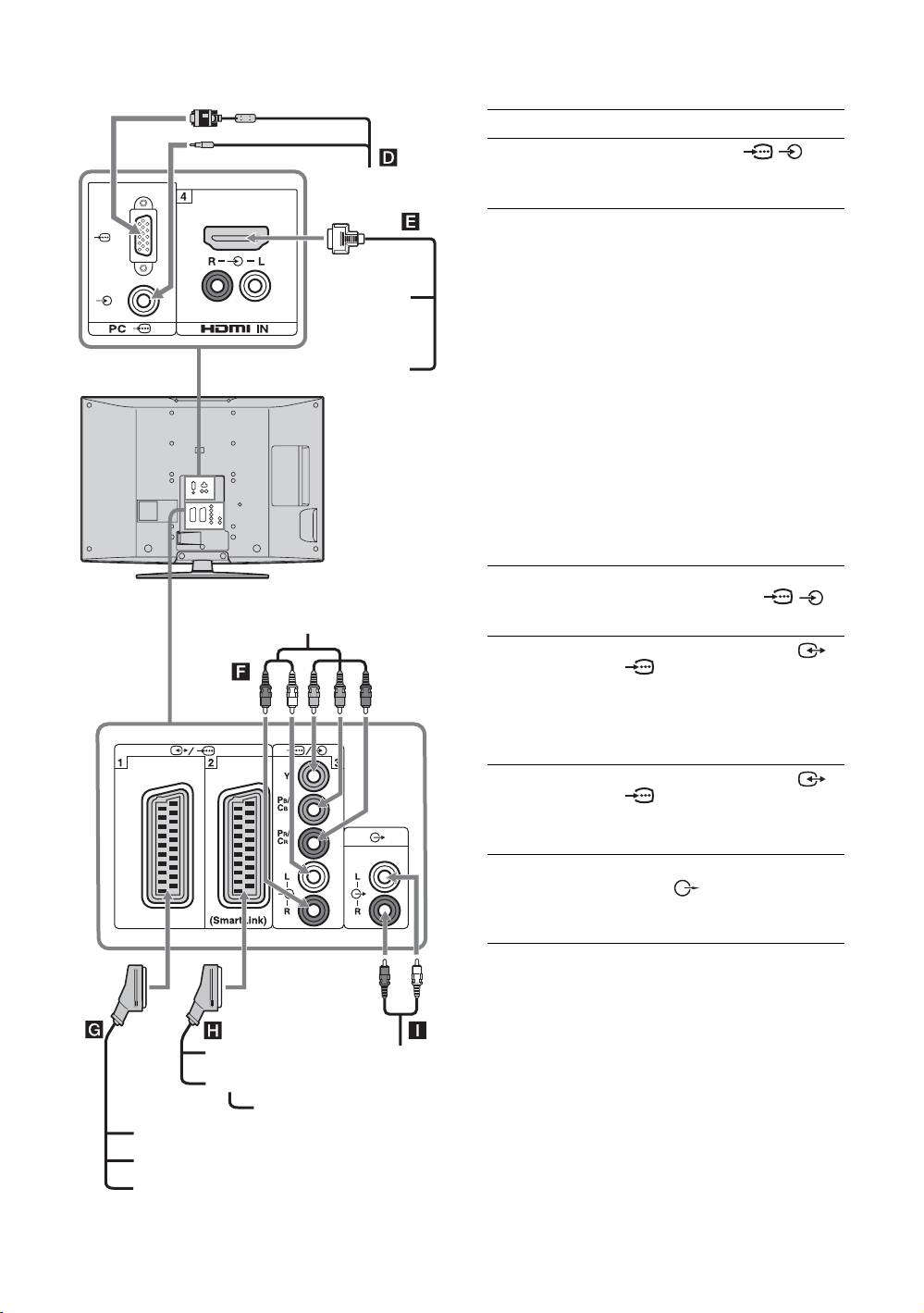
Connecting to the TV (rear)
To connect Do this
PC D Connect to the PC /
sockets. It is recommended to use
PC
a PC cable with ferrites.
Digital satellite
Connect to the HDMI IN 4 socket
receiver or DVD
if the equipment has a HDMI
player E
socket. The digital video and audio
signals are input from the
DVD player
equipment. If the equipment has a
DVI socket, connect the DVI
socket to the HDMI IN 4 socket
through a DVI - HDMI adaptor
Digital satellite receiver
interface (not supplied), and
connect the equipment’s audio out
sockets to the audio in HDMI IN 4
sockets.
Note
The HDMI sockets only support the
following video inputs: 480i, 480p,
576i, 576p, 720p and 1080i. To
connect a PC, please use the PC input
socket.
DVD player with
Connect to the component sockets
component output
and the audio sockets / 3.
DVD player
F
with component output
Video game
Connect to the scart socket /
equipment, DVD
1. When you connect the
player or decoder
decoder, the scrambled signal from
G
the TV tuner is output to the
decoder, then the unscrambled
signal is output from the decoder.
DVD recorder or
Connect to the scart socket /
VCR that supports
2. SmartLink is a direct link
SmartLink H
between the TV and a VCR/DVD
recorder.
Hi-Fi audio
Connect to the audio output
equipment I
sockets to listen to the sound
from the TV on Hi-Fi audio
equipment.
DVD recorder
Hi-Fi
VCR
Decoder
Video game equipment
DVD player
Decoder
GB
34
